Facebook-for-woocommerce: Synced all my products to Facebook shop. But after a while shows out of stock!
I used the plugin to sync all my products. First I had to do the "deactivate" and "activate" all products for being published. This was done in business.facebook.com.
Everything got sorted and showed correctly but now a couple of days later it says everything is "out of stock" even though business.facebook.com showing in stock and my woocommerce also.
How can I change this? Who to talk to?
 Glawing
All 12 comments
WooCommerce version: Version 1.17.1
WordPress version: Version 4.9.8
Plugin version: Version 1.9.7
A screenshot of where you see the problem
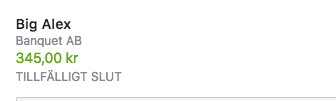
It Swedish meaning "Out of stock"
The URL of your website
https://banquet.se/
The URL of your page
https://www.facebook.com/banquetkonferensab/
The URL(s) of where you took your screenshot(s): https://www.facebook.com/commerce/products/1940397649358717/
(If applicable) Detailed steps you took in order to see the problem
Please include Debug Ready in your reply so our automated system can flag your issue for manual review. Please note that due to a high volume of issues, we may not be able to respond immediately.
Not sure what this means! Debug ready?
Glawing
on 13 Nov 2018
Debug Ready
Glawing
on 13 Nov 2018
Exactly the same issue here - didnt want to open a new thread.
Shop with issue:
https://www.facebook.com/lorientwien/shop/
 the-springer
on 13 Nov 2018
the-springer
on 13 Nov 2018
Hi, I have the same issue.
WooCommerce version: Version 3.5.1
WordPress version: Version 4.9.8
Plugin version: Version 1.9.6
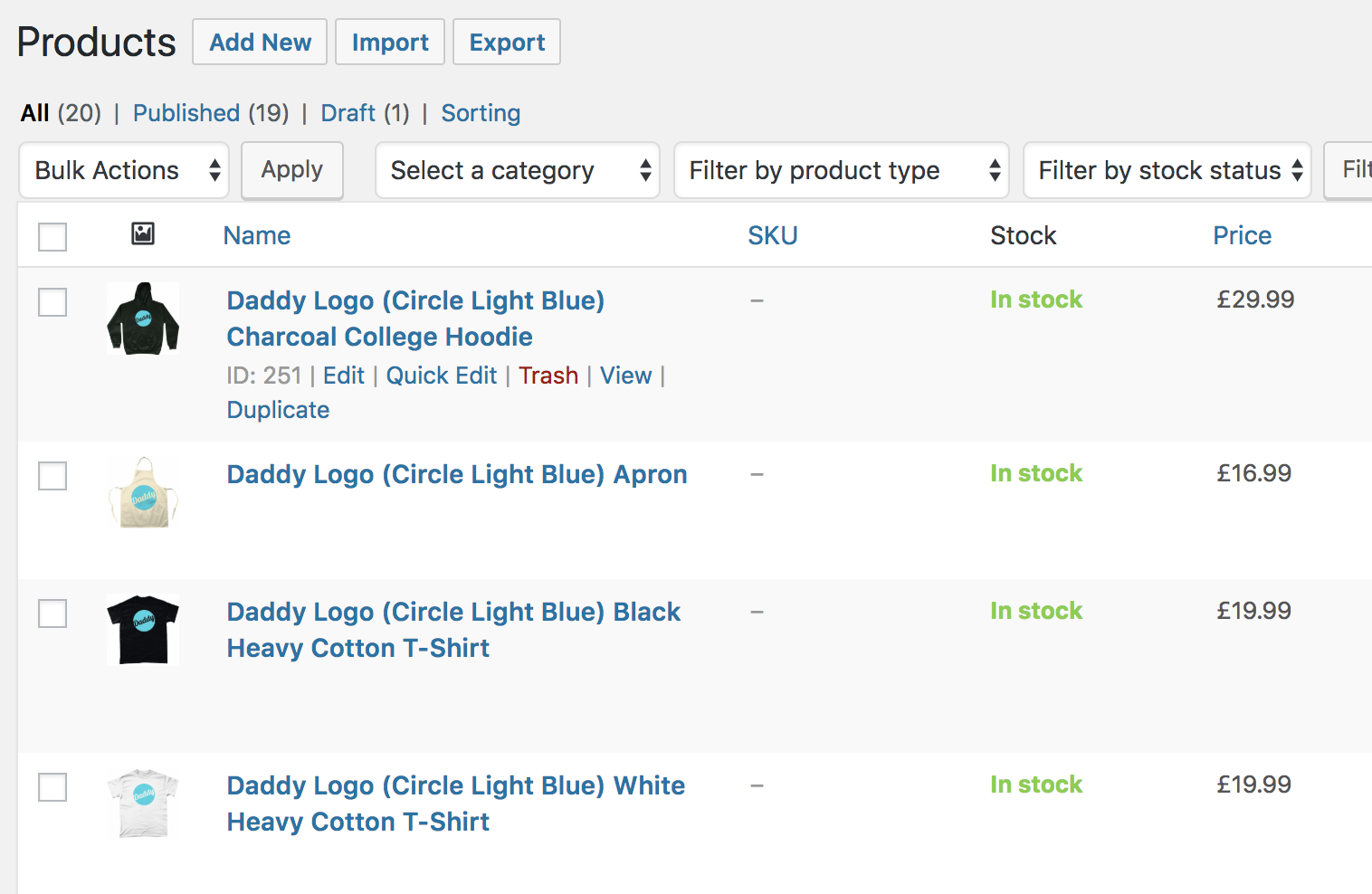
screen shot 2018-11-13 at 14 23 19.png - Shows item in stock in WooCommerce
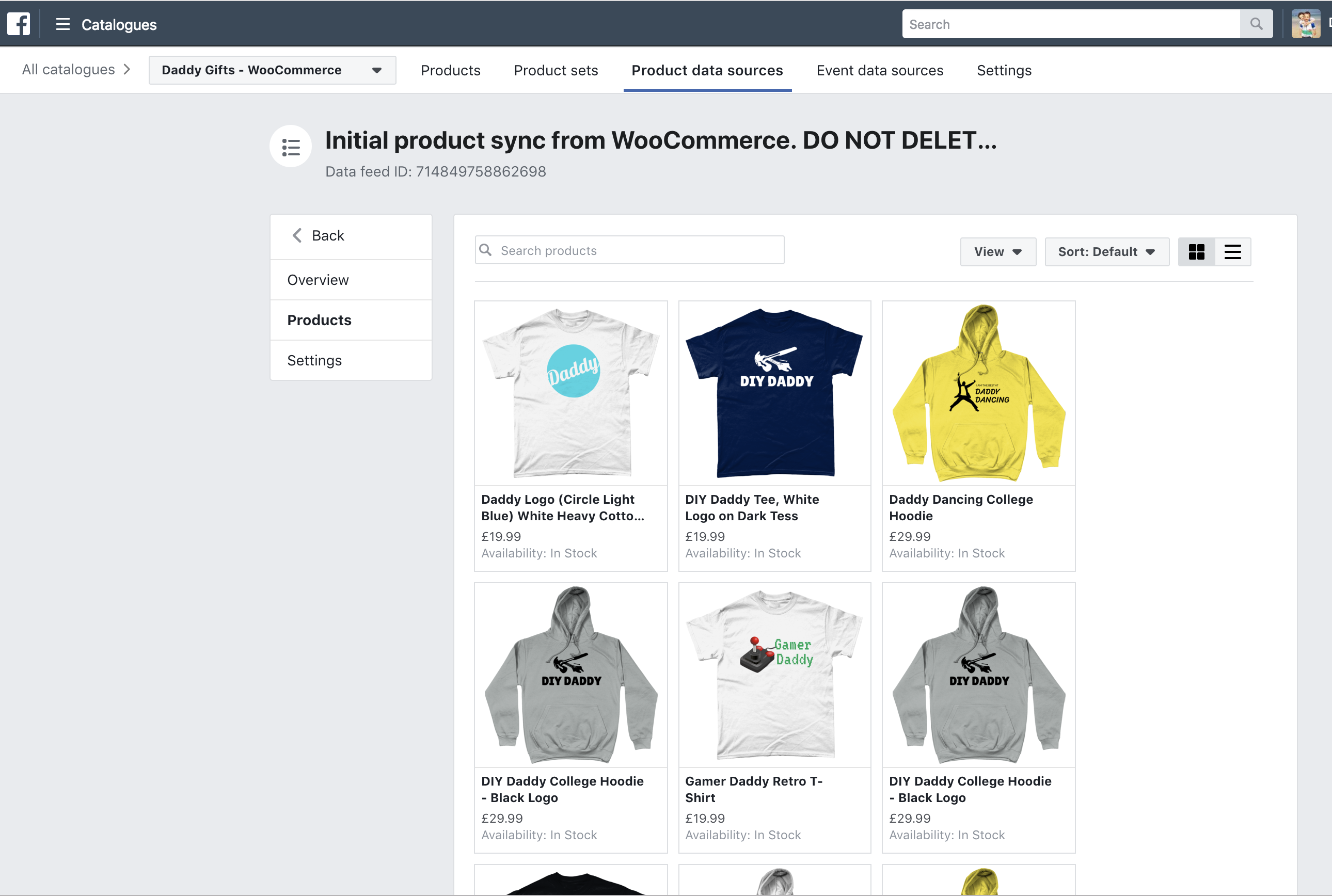
screen shot 2018-11-13 at 14 23 54.png - Shows items in stock via FB Business Catalogue
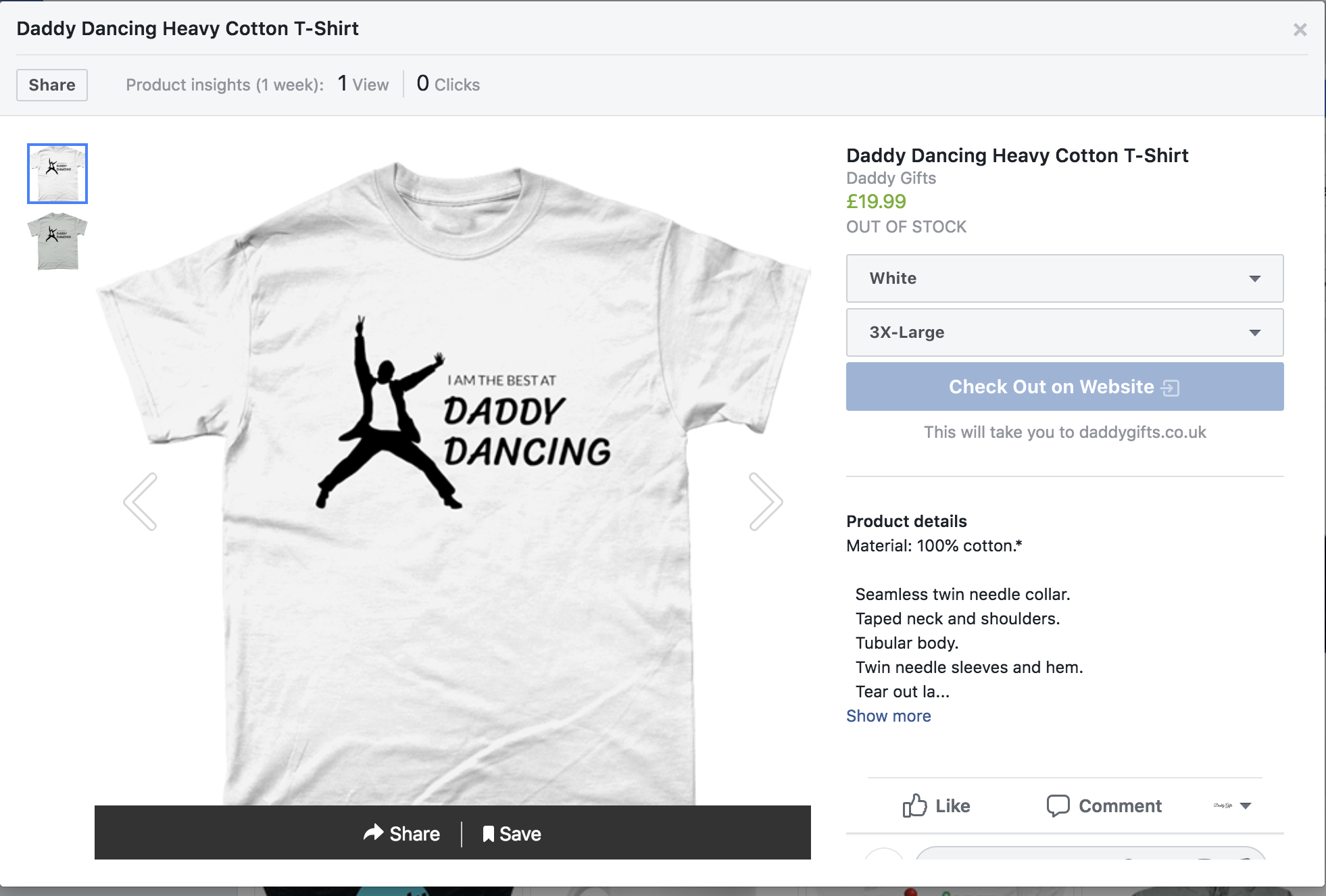
screen shot 2018-11-13 at 14 24 33.png - Show product out of stock in the Facebook shop, which doesn't allow anyone to check out.
Site: https://daddygifts.co.uk
FB: https://facebook.com/daddygifts
Any help would be hugely appreciated.
 Devonpixels
on 13 Nov 2018
Devonpixels
on 13 Nov 2018
Automated Support Message
Hello,
Thanks for your interest in our plugin! Our developer team tries to provide personal support on GitHub whenever possible.
If you have a feature request or feedback for the developers, reply with Feature Request or Feedback.
If you are a developer or have a question for the developers related to code, reply with Developer Question.
If you are running ads with us, reply with Advertiser.
If you have encountered a bug or a problem with the plugin, keep reading for information that can help you resolve the issue yourself or provide us details we need to help you.
Search Existing Issues
First, please search our issues to see if your problem has been reported before.
There may already be a workaround or a solution to your problem. You can use the search bar near the top of our issues page. Be sure to search both _open_ and _closed_ issues.
If you do find a similar issue, leave a comment on that issue instead of creating a new one. Your comment helps us prioritize which existing issues are important and urgent.
Common Resolution Methods
If you are experiencing a problem or bug and have not found any similar issue, please try the following:
- Upgrade to the latest version of the plugin
- Try to
Resyncproducts using the button on the plugin config page - Reset the plugin by selecting
Reconfigure > Advanced Options > Delete, and setting up this plugin again - Try deactivating other plugins that you think may be interfering, then reset and set up again
Necessary Information
If the above steps did not help, please provide the following information in your next comment in order for us to debug your problem:
- WooCommerce version
- WordPress version
- Plugin version (please note: we only support up-to-date versions of the plugin)
- A screenshot of where you see the problem (for example: if it is on Facebook, provide a screenshot of Facebook, if it is on WooCommerce, provide a screenshot of WooCommerce. You can provide multiple screenshots if the problem relates to different screens.)
- The URL of your website
- The URL of your Facebook Page
- The URL(s) of where you took your screenshot(s)
- If applicable, detailed steps you took in order to see the problem
Please include Debug Ready in your reply so our automated system can note your issue for manual review. Please be aware that due to a high volume of issues, we may not be able to respond immediately.
Response Time
We prioritize issues with the tags Advertiser or Multiple Reports.
For issues that have the tags Debug Ready, Feature Request or Developer Question, we aim to respond within 30 days.
If you have not responded to our automated message with one of the above phrases, such as Debug Ready, we may close your issue after 30 days. If a Feature Request is inactive (without new requests, messages or pull requests) for 6 months, we may close it.
Please note that we are not always able to provide support for issues related to interaction from other plugins with this plugin or related to the Facebook advertising interface. To get support related to Facebook ads, try visiting the Facebook Ads Help Center.
For more information on our response times, visit Facebook Support on GitHub.
Thank you,
The Facebook Dev Team
 jieminz22
on 13 Nov 2018
jieminz22
on 13 Nov 2018
Debug Ready
On Tue, 13 Nov 2018, 17:52 jieminz22 Automated Support Message Hello, Thanks for your interest in our plugin! Our developer team tries to If you have a feature request or feedback for the developers, reply with Feature If you have encountered a bug or a problem with the plugin, keep reading First, please search our issues If you are experiencing a problem or bug and have not found any similar Necessary Information If the above steps did not help, please provide the following information Please include Debug Ready in your reply so our automated system can note We prioritize issues with the tags Advertiser or Multiple Reports. If you have not responded to our automated message with one of the above Please note that we are not always able to provide support for issues For more information on our response times, visit Facebook Support on Thank you, —
provide personal support on GitHub whenever possible.
Request or Feedback.
If you are a developer or have a question for the developers related to
code, reply with Developer Question.
If you are running ads with us, reply with Advertiser.
for information that can help you resolve the issue yourself or provide us
details we need to help you.
Search Existing Issues
https://github.com/facebookincubator/facebook-for-woocommerce/issues?q=
to see if your problem has been reported before.
There may already be a workaround or a solution to your problem. You can
use the search bar
https://github.com/facebookincubator/facebook-for-woocommerce/issues?q=
near the top of our issues page. Be sure to search both open and
closed issues.
If you do find a similar issue, leave a comment on that issue instead of
creating a new one. Your comment helps us prioritize which existing issues
are important and urgent.
Common Resolution Methods
issue, please try the following:
and setting up this plugin again
then reset and set up again
in your next comment in order for us to debug your problem:
the plugin)
Facebook, provide a screenshot of Facebook, if it is on WooCommerce,
provide a screenshot of WooCommerce. You can provide multiple screenshots
if the problem relates to different screens.)
your issue for manual review. Please be aware that due to a high volume of
issues, we may not be able to respond immediately.
Response Time
For issues that have the tags Debug Ready, Feature Request or Developer
Question, we aim to respond within 30 days.
phrases, such as Debug Ready, we may close your issue after 30 days. If a Feature
Request is inactive (without new requests, messages or pull requests) for
6 months, we may close it.
related to interaction from other plugins with this plugin or related to
the Facebook advertising interface. To get support related to Facebook ads,
try visiting the Facebook Ads Help Center
https://www.facebook.com/business/help.
GitHub
https://github.com/facebookincubator/facebook-for-woocommerce/wiki/Facebook-Support-on-GitHub
.
The Facebook Dev Team
You are receiving this because you commented.
Reply to this email directly, view it on GitHub
https://github.com/facebookincubator/facebook-for-woocommerce/issues/765#issuecomment-438370867,
or mute the thread
https://github.com/notifications/unsubscribe-auth/Aq6_l8E6O_OBUvEN5qp4ISAIY7NGaJOjks5uuwbrgaJpZM4Ybl9s
.
Devonpixels
on 13 Nov 2018
Thanks all for bringing this up. Please continue to comment here if you have this problem.
We have reported this to the shops team, hopefully there will be resolution within a few days, this is a problem they have had before. See #523
 dmitridr
on 13 Nov 2018
dmitridr
on 13 Nov 2018
All,
Thanks for your reports.
The fix is live. This was a UI issue so the fix was very quick.
Please comment here if you're still seeing the problem (and try refreshing / clearing the cache).
dmitridr
on 13 Nov 2018
Looks good to me now.
 AaronBowie
on 13 Nov 2018
AaronBowie
on 13 Nov 2018
All is working. WooHoo :)
On Tue, 13 Nov 2018, 22:15 Aaron Looks good to me now. —
You are receiving this because you commented.
Reply to this email directly, view it on GitHub
https://github.com/facebookincubator/facebook-for-woocommerce/issues/765#issuecomment-438459064,
or mute the thread
https://github.com/notifications/unsubscribe-auth/Aq6_l1fR2i0lL_1_bvz3M53v4eziEtynks5uu0SLgaJpZM4Ybl9s
.
Devonpixels
on 13 Nov 2018
Closing this. Thanks again for reporting this, thanks to your reports we were able to take action quickly.
dmitridr
on 13 Nov 2018
Thanks for really good support! Everything is OK now!
Glawing
on 14 Nov 2018
Related issues
 binnythap
·
29Comments
binnythap
·
29Comments
 sm7uge
·
37Comments
sm7uge
·
37Comments
 AVTMBijouterieNomade
·
24Comments
AVTMBijouterieNomade
·
24Comments
 MillenniumJim
·
32Comments
MillenniumJim
·
32Comments
 StefsterNYC
·
28Comments
StefsterNYC
·
28Comments
Most helpful comment
Closing this. Thanks again for reporting this, thanks to your reports we were able to take action quickly.