Facebook-for-woocommerce: Mechanism to Automatically Force Resync on Set Schedule
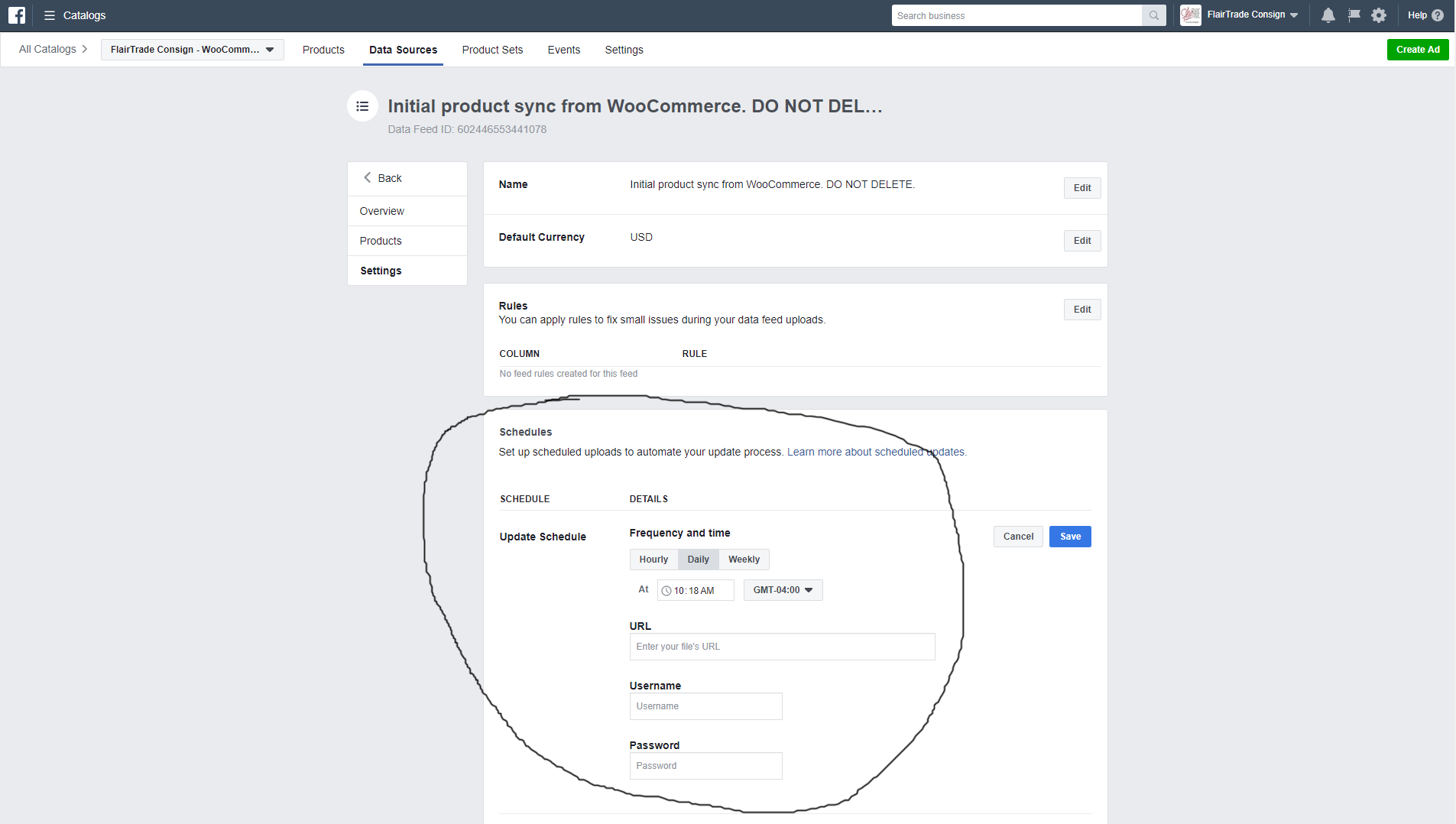
This maybe a feature request but a necessity for my business shop. My clothing consignment store model sells every item as a one of a kind. This means each day we add items to our WooCommerce site and sell items that are currently on it. This results in my catalog item list changing daily. What I have been doing for months is force resync from the plugin settings each morning as a manual process just to keep everything update. I can see in the data sources section of my catalog on Facebook that there is a native way to schedule resync's systemically. Is there a way to get the data source URL to set this up or something that can be added to the plugin to establish a resync schedule during the catalog setup process. This is a real world need for people who have constantly changing inventory.
 FlairTrade
All 7 comments
Automated Support Message
Hello,
Thanks for your interest in our plugin!
If your issue is a feature request or feedback for the developers, reply with Feature Request or Feedback.
Your comment will be categorized accordingly, and we will read it and reply when we can.
If you have encountered a bug or a problem with the plugin, the steps below contain information to help you resolve the issue yourself and provide us information we need to help you with your problem.
Search Existing Issues
First, please search our issues to see if your problem has been reported before.
There may already be a workaround or a solution to your problem. You can search our issues using the search bar near the top of our issues page; be sure to search both _open_ and _closed_ issues.
If you do find a similar issue, leave a comment on that issue and close this one. Your comment helps us prioritize which existing issues are important and urgent.
Common Resolution Methods
If you are experiencing a problem or bug and have not found any similar issue, please try the following:
- Upgrade to the latest version of the plugin.
- Try to
Resyncproducts using the button on the plugin config page - Reset the plugin by selecting
Reconfigure > Advanced Options > Delete, and setting up this plugin again. - Try to deactivate other plugins that you think may be interfering, then reset and set up again.
Necessary Information
If the above steps did not help, please provide the following information in your next comment in order for us to debug your problem:
- WooCommerce version
- WordPress version
- Plugin version (please note: we only support up-to-date versions of the plugin)
- A screenshot of where you see the problem (for example: if it is on Facebook, a screenshot of Facebook, if it is on WooCommerce, a screenshot of WooCommerce. If it is in multiple places, multiple screenshots.)
- The URL of your website
- The URL of your page
- The URL(s) of where you took your screenshot(s)
- (If applicable) Detailed steps you took in order to see the problem
Please include Debug Ready in your reply so our automated system can flag your issue for manual review. Please note that due to a high volume of issues, we may not be able to respond immediately.
Thanks for your patience,
The Facebook Dev Team (@mengyingdu, @dmitridr, @sammul, @jieminz22)
 mengyingdu
on 15 Jun 2018
mengyingdu
on 15 Jun 2018
Feature Request
FlairTrade
on 15 Jun 2018
Hi,
Thanks for the feature request!
Grabbing the products using a fixed URL would be a big change, since we would essentially be switching to a pull model (right now, it's a push model).
I think the easiest thing we can do here to simplify your force-resync-every-day situation is a mechanism which automatically force-resyncs in the backend on a daily basis, using wordpress scheduling functionality. If this sounds like something you'd want, let us know. I think we can build something like this as an advanced feature to be enabled/disabled on the plugin configuration page.
 dmitridr
on 22 Jun 2018
dmitridr
on 22 Jun 2018
I think that would do exactly what I’m requesting. Didnt intend to dictate architecture just the desired outcome.
FlairTrade
on 23 Jun 2018
THANK YOU @dmitridr @mengyingdu I haven't used it yet but just noticed the feature has been added to the options in the latest release of the plugin. Much appreciated and for those with changing inventory, this is a great feature addition.
FlairTrade
on 4 Dec 2018
@FlairTrade Great, glad we could finally build this for you and everyone else who requested it in other issues! (It only took 6 months!) You can already try out the feature, keep in mind you need wp cron functionality enabled for wp scheduling to work correctly. I would also recommend waiting a few days until v1.9.9 to try this out, which should be out early next week, as v1.9.8 has some known instability issues, and the UI looks nicer in 1.9.9.
Cheers, Dmitri.
dmitridr
on 14 Dec 2018
@dmitridr I have been using the feature for 11 days on the v1.9.8 without issue. The only problem I had to deduce was the time setting, apparently my site is using GMT versus local but once I saw what time it was actually executing just made the adjustment on the time setup to get it to the time I actually wanted. Haven't had an issue since. Look forward to the v1.9.9 UI update. Again, thanks for listening...
FlairTrade
on 15 Dec 2018
Related issues
 MillenniumJim
·
32Comments
MillenniumJim
·
32Comments
 AVTMBijouterieNomade
·
24Comments
AVTMBijouterieNomade
·
24Comments
 StefsterNYC
·
28Comments
StefsterNYC
·
28Comments
 sm7uge
·
37Comments
sm7uge
·
37Comments
 boutzamat
·
72Comments
boutzamat
·
72Comments