Facebook-for-woocommerce: Updating to version 1.7.4 stealthily installs an extra plugin without notice to the users
We had a customer contacting us about some strange behavior when updating their Facebook for WooCommerce plugin (internal reference 891319-zen):
Updating Facebook for WooCommerce to version 1.7.4 installs stealthily the extra plugin Pixel for Facebook without notice to the users. This definitely feels sketchy from the user point of view, and making it without notice or warning makes it worst.
Plot twist: After further testing, deleting Pixel for Facebook deleted also the main plugin...
How to replicate:
- Download facebook-for-woocommerce for example from here: https://woocommerce.com/products/facebook/
- Install it in your site
- Check wp-admin and you'll see a prompt to update to 1.7.4
- Click Update.
- Refresh the plugin management page.
Now you have two different plugins:
- Facebook for WooCommerce
- Pixel for Facebook
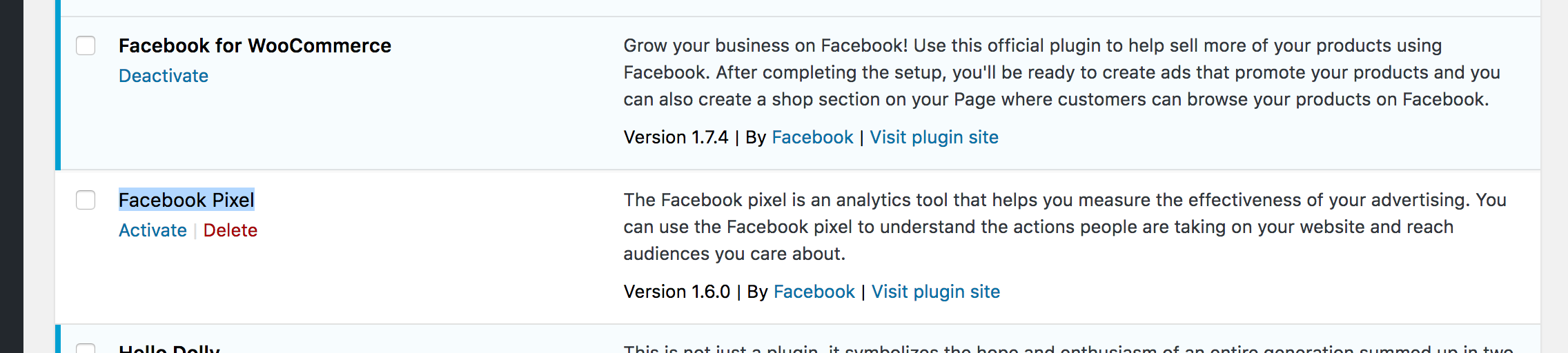
Would be great to have some clarification about the intention of these changes and plugin behavior.
Cheers,
 iamgabrielma
All 4 comments
I have run into the same issue.
It appears to be that the Facebook Pixel plugin in the same directory as the Facebook for WooCommerce plugin. This means when one is installed or deleted they both are installed or deleted.
It looks like with the 1.7.0 update on Nov 29, 2017 they 'Enable auto-upgrading' and added the WC_Facebook_Github_Updater class was added to the WooCommerce repository which started the issue. This is causing update to come directly from this repository, which appears to be a version ahead of the WooCommerce repository at the time of this post.
When this repository updated the past the WooCommerce 1.7.3 to the 1.7.4 version it started distributing the Facebook Pixel plugin into the same directory from this repository.
You might want to just hold at the WooCommerce 1.7.3 version until the plugin author resolves the issue.
 TimBHowe
on 11 Jan 2018
TimBHowe
on 11 Jan 2018
Thanks for flagging. Looks like there could be a problem with our auto updater, we'll fix this ASAP. Facebook Pixel is as you have observed just another plugin that shares this repository, with reduced pixel functionality for non-WooCommerce installations. Should be fine to remove/delete it.
If this removes the Facebook for WooCommerce plugin, this plugin can be re-installed manually using our latest release which does not have the extra plugin.
 dmitridr
on 11 Jan 2018
dmitridr
on 11 Jan 2018
Hi @iamgabrielma and @TimBHowe ,
We fixed this in v1.7.5, can you "deactivate old version -> delete plugin -> reinstall new verion" ? And it won't happen again for next new version. E.g. If you use auto upgrade from 1.7.5 to 1.7.6, only facebook-for-woocommerce will be installed.
Thanks.
 mengyingdu
on 12 Jan 2018
mengyingdu
on 12 Jan 2018
Thanks @mengyingdu , just tested it and installing 1.7.5 indeed only installs Facebook for WooCommerce
iamgabrielma
on 13 Jan 2018
Related issues
 DeeJ
·
32Comments
DeeJ
·
32Comments
 Aprilhead
·
47Comments
Aprilhead
·
47Comments
 dragad
·
47Comments
dragad
·
47Comments
 StefsterNYC
·
28Comments
StefsterNYC
·
28Comments
 JEJSD
·
53Comments
JEJSD
·
53Comments
Most helpful comment
Hi @iamgabrielma and @TimBHowe ,
We fixed this in v1.7.5, can you "deactivate old version -> delete plugin -> reinstall new verion" ? And it won't happen again for next new version. E.g. If you use auto upgrade from 1.7.5 to 1.7.6, only facebook-for-woocommerce will be installed.
Thanks.