Expo: Standalone app doesn't start in offline
Environment
| software | version
| ---------------- | -------
| expo | 27.0.0
| react-native | https://github.com/expo/react-native/archive/sdk-27.0.0.tar.gz
| device | iPhone 6s, iPhone 8
exp diagnostics output
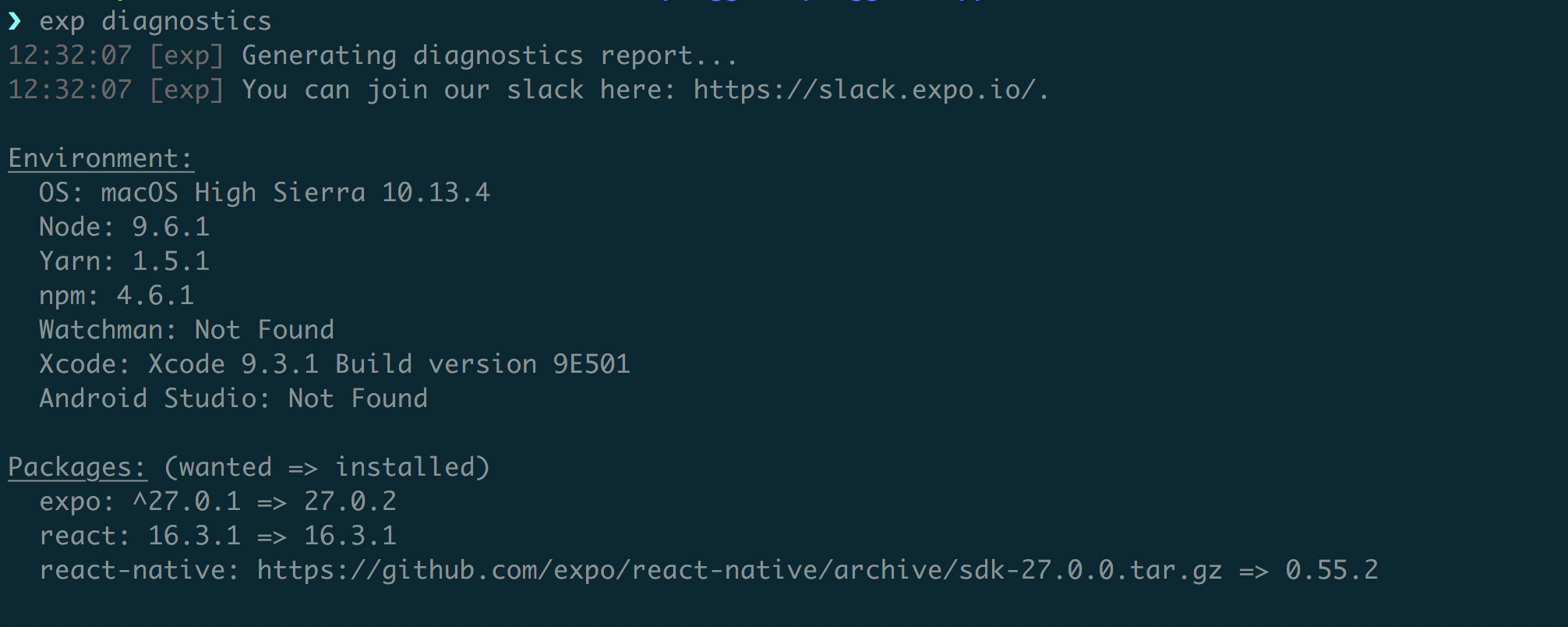
App's target is iOS Standalone
Steps to Reproduce
Create new Expo-project
Add this in
App.js
import React from 'react'
import { View } from 'react-native'

export default class App extends React.Component {
  render() {
    return <View style={{ flex: 1, backgroundColor: 'mediumspringgreen' }} />
  }
}
- Add this in
app.json
{
  "expo": {
    "name": "test",
    "description": "",
    "slug": "test",
    "scheme": "testapp",
    "privacy": "unlisted",
    "sdkVersion": "27.0.0",
    "version": "1.0.0",
    "orientation": "portrait",
    "platforms": ["ios"],
    "primaryColor": "#cccccc",
    "icon": "./assets/icons/app-icon.png",
    "splash": {
      "image": "./assets/img/splash.png",
      "resizeMode": "contain",
      "backgroundColor": "#ffffff"
    },
    "updates": {
      "fallbackToCacheTimeout": 0
    },
    "assetBundlePatterns": ["**/*"],
    "ios": {
      "buildNumber": "1",
      "supportsTablet": true,
      "bundleIdentifier": "<your_indentifier>",
      "config": {
        "usesNonExemptEncryption": false
      }
    },
    "android": {
      "package": "<your_indentifier>"
    }
  }
}
Run
exp build:iosUpload build to iTunes Connect
Install app on your phone with TestFlight
Turn off wifi
Open the app
You will see splash screen and app will stall like this.
Expected Behavior
App should start in offline without any problems.
Actual Behavior
When you start app in offline you see splash screen and that's all.
Reproducible Demo
No demo.
In Simulator all works fine when I disable network on my Mac. I tried with and without "Development mode" in Simulator and everything works fine. The problem is only with standalone app.
@brentvatne, @aalices please fix it.
We have spent much time to implement network independent start for our users. Our app should start and look the same independent from network connection. It was working in Expo 26.
Thanks!
 serhiipalash
All 58 comments
Hi, thanks for the detailed report. I'm flagging @terribleben who should know more.
 schazers
on 5 Jun 2018
schazers
on 5 Jun 2018
Thanks @schazers!
serhiipalash
on 5 Jun 2018
Experiencing the same issue with pretty much the same config as described above. Using a HTTP proxy, one can see that the app makes a call to _exp.host_ when starting. Disabling the proxy makes the app stop working. However, redirecting or terminating that request (such that 400 is returned for example) makes the app work again.
 sebastian-schlecht
on 7 Jun 2018
sebastian-schlecht
on 7 Jun 2018
@sebastian-schlecht if you can reproduce it on your machine can you try to set fallbackToCacheTimeout to 1000 or any non-zero value.
I wanted to try this but it is really annoying to spend 40 minutes on building the app each time I want to test something.
serhiipalash
on 7 Jun 2018
What I already tried was to not use the update property at all. I did not set fallbackToCacheTimeout to a non-zero value though. As to the former - no success. Still didn't work.
sebastian-schlecht
on 7 Jun 2018
Thanks!
{
  "updates": {
    /*
      If set to false, your standalone app will never download any code.
      And will only use code bundled locally on the device.
      In that case, all updates to your app must be submitted through Apple review.
      Defaults to true.

      Note that this will not work out of the box with ExpoKit projects.
    */
    "enabled": BOOLEAN,

    /*
      By default, Expo will check for updates every time the app is loaded.
      Set this to `'ON_ERROR_RECOVERY'` to disable automatic checking unless recovering from an error.

      Must be one of `ON_LOAD` or `ON_ERROR_RECOVERY`.
    */
    "checkAutomatically": STRING,

    /*
      How long (in ms) to allow for fetching OTA updates before falling back to a cached version of the app.

      Defaults to 30000 (30 sec). Must be between 0 and 300000 (5 minutes).
    */
    "fallbackToCacheTimeout": NUMBER
  }
}
Can you try to set
"updates": {
    "enabled": false,
}
or
"updates": {
    "checkAutomatically": "ON_ERROR_RECOVERY",
}
?
serhiipalash
on 7 Jun 2018
I actually didn‘t resort to that because I really wanted to keep OTA updates enabled. It provides a lot of flexibility to us in terms of deployment.
On 7. Jun 2018, at 23:22, Serhii Palash notifications@github.com wrote:
Thanks!
{
"updates": {
/*
If set to false, your standalone app will never download any code.
And will only use code bundled locally on the device.
In that case, all updates to your app must be submitted through Apple review.
Defaults to true.Note that this will not work out of the box with ExpoKit projects. */ "enabled": BOOLEAN, /* By default, Expo will check for updates every time the app is loaded. Set this to `'ON_ERROR_RECOVERY'` to disable automatic checking unless recovering from an error. Must be one of `ON_LOAD` or `ON_ERROR_RECOVERY`. */ "checkAutomatically": STRING, /* How long (in ms) to allow for fetching OTA updates before falling back to a cached version of the app. Defaults to 30000 (30 sec). Must be between 0 and 300000 (5 minutes). */ "fallbackToCacheTimeout": NUMBER}
}
Can you try to set?"updates": {
"enabled": false,
}
or"updates": {
"checkAutomatically": "ON_ERROR_RECOVERY",
}
—
You are receiving this because you were mentioned.
Reply to this email directly, view it on GitHub, or mute the thread.
sebastian-schlecht
on 8 Jun 2018
I really wanted to keep OTA updates enabled
I want the same.
I just want to know where is the bug. This will speed up its fix.
serhiipalash
on 8 Jun 2018
To summarize, it is not possible to load an expo app on iOS while offline. It happens not only the first time the app is started but every time? Is this correct?
 msevestre
on 10 Jun 2018
msevestre
on 10 Jun 2018
@msevestre
it is not possible to load an expo app on iOS while offline.
Yes, it is. If you use Expo AppLoading component your app will not start in offline on iOS.
For example, we detect device locale before we show the app to the user. Until device locale is detected we need to show some loader screen and we use Expo AppLoading component for it.
The problem is that Expo AppLoading component doesn't work in offline. We pass in it promise that detects locale or any other promise, but the result is always the same - promise was resolved but AppLoading is still there, onFinish never fires in offline.
serhiipalash
on 10 Jun 2018
It happens not only the first time the app is started but every time? Is this correct?
Yes, it is correct.
serhiipalash
on 10 Jun 2018
I can reproduce the problem in an app that is not using the AppLoading component.
Basically using the default app that I pushed on testflight. As soon as I go on airplane mode, I can't start the app...
msevestre
on 10 Jun 2018
As soon as I go on airplane mode, I can't start the app...
How does it look? You should see at least something - your app logo or splash screen.
serhiipalash
on 10 Jun 2018
Yeah that's right. Slash screen that loads forever. Very same symptoms as
what you described but without the AppLoading component.
Unless the AppLoading component is used implicitly.
On Sun, Jun 10, 2018, 11:46 AM Serhii Palash notifications@github.com
wrote:
As soon as I go on airplane mode, I can't start the app...
How does it look? You should see at least something - your app logo or
splash screen.—
You are receiving this because you were mentioned.
Reply to this email directly, view it on GitHub
https://github.com/expo/expo/issues/1829#issuecomment-396059242, or mute
the thread
https://github.com/notifications/unsubscribe-auth/AA_jVSgrFVzhE2v4JdIlaYCmqsvkL5TIks5t7T9HgaJpZM4Uagc5
.
msevestre
on 10 Jun 2018
Ok, thanks @msevestre !
I'll try to build today simple app with one View component and test if it starts in offline.
I'll change this issue description if it is not related to AppLoading component.
serhiipalash
on 10 Jun 2018
@msevestre I have tested standalone app with one View component in offline and got the same results like you did. So the problem is not in AppLoading component but with Expo itself.
This is what was in my App.js
import React from 'react'
import { View } from 'react-native'

export default class App extends React.Component {
  render() {
    return <View style={{ flex: 1, backgroundColor: 'mediumspringgreen' }} />
  }
}
and the standalone app just doesn't start while offline, I see splash screen forever.
@brentvatne, @schazers please fix it in next release.
I think this is critical bug for everyone who builds an app with Expo.
serhiipalash
on 10 Jun 2018
@serhiipalash - ios / android? what's in your app.json there?
 brentvatne
on 10 Jun 2018
brentvatne
on 10 Jun 2018
cc @esamelson
brentvatne
on 10 Jun 2018
verified this using a simulator build of a new project with blank template: https://exp-shell-app-assets.s3-us-west-1.amazonaws.com/ios%2F%40notbrent%2Ftest-offline-b820a2ac-1492-486a-83b1-5753ae45a839-simulator.tar.gz
brentvatne
on 10 Jun 2018
what's in your app.json there?
in app.json that what I wrote in first message in this chat
{
  "expo": {
    "name": "test",
    "description": "",
    "slug": "test",
    "scheme": "testapp",
    "privacy": "unlisted",
    "sdkVersion": "27.0.0",
    "version": "1.0.2",
    "orientation": "portrait",
    "platforms": ["ios"],
    "primaryColor": "#cccccc",
    "icon": "./assets/icons/app-icon.png",
    "splash": {
      "image": "./assets/img/splash.png",
      "resizeMode": "contain",
      "backgroundColor": "#ffffff"
    },
    "updates": {
      "fallbackToCacheTimeout": 0
    },
    "assetBundlePatterns": ["**/*"],
    "ios": {
      "buildNumber": "2",
      "supportsTablet": true,
      "bundleIdentifier": "<our_indentifier>",
      "config": {
        "usesNonExemptEncryption": false
      }
    },
    "android": {
      "package": "<our_indentifier>"
    }
  }
}
ios / android?
ios
We don't have Android app and I can't test it.
serhiipalash
on 10 Jun 2018
Works on Android. Issue is only with iOS. No offline capability at all
On Sun, Jun 10, 2018, 2:11 PM Serhii Palash notifications@github.com
wrote:
what's in your app.json there?
in app.json that what I wrote in first message in this chat
{
"expo": {
"name": "test",
"description": "",
"slug": "test",
"scheme": "testapp",
"privacy": "unlisted",
"sdkVersion": "27.0.0",
"version": "1.0.2",
"orientation": "portrait",
"platforms": ["ios"],
"primaryColor": "#cccccc",
"icon": "./assets/icons/app-icon.png",
"splash": {
"image": "./assets/img/splash.png",
"resizeMode": "contain",
"backgroundColor": "#ffffff"
},
"updates": {
"fallbackToCacheTimeout": 0
},
"assetBundlePatterns": ["*/"],
"ios": {
"buildNumber": "2",
"supportsTablet": true,
"bundleIdentifier": "",
"config": {
"usesNonExemptEncryption": false
}
},
"android": {
"package": ""
}
}
}ios / android?
ios
We don't have Android app and I can't test it.
—
You are receiving this because you were mentioned.
Reply to this email directly, view it on GitHub
https://github.com/expo/expo/issues/1829#issuecomment-396069490, or mute
the thread
https://github.com/notifications/unsubscribe-auth/AA_jVaxa77e7gt_G0ZcMZcLhg6e4srSQks5t7WFmgaJpZM4Uagc5
.
msevestre
on 10 Jun 2018
It also works on Android on our end. Issue only occurs for iOS standalone builds.
sebastian-schlecht
on 10 Jun 2018
From #1847
Keeping ON_LOAD and setting fallbackToCacheTimeout to 1 will also allow the app to load with no network, so it seems that the 0 value is not working as intended, which should not wait for any updates per the documentation.
Maybe this could be seen as a workaround in the meantime (#1847 is a detached app but its description sounds very much like what we are discussing here)
msevestre
on 11 Jun 2018
@msevestre setting falbackToCacheTimeout to 1 didn't help
serhiipalash
on 11 Jun 2018
@serhiipalash did you also set "checkAutomatically": "ON_LOAD" (or is that the default anyway)?
sebastian-schlecht
on 11 Jun 2018
@msevestre I didn't set checkAutomatically, but I think its default value is ON_LOAD
serhiipalash
on 11 Jun 2018
@terribleben any thoughts on this?
sebastian-schlecht
on 11 Jun 2018
I had the same problem. I use Expo create a tool for iOS. It can't launch in offline.
 wanxger
on 11 Jun 2018
wanxger
on 11 Jun 2018
Is there any workaround at all? Would disable OTA update solve the issue in the meantime?
msevestre
on 11 Jun 2018
Hi all -- I'm looking into this now. We should have a fix ready soon. Really sorry about this!!
 esamelson
on 11 Jun 2018
esamelson
on 11 Jun 2018
Thanks @esamelson !
serhiipalash
on 11 Jun 2018
Awesome @esamelson. Thanks for being so reactive
msevestre
on 11 Jun 2018
Hi all,
I just tried using the fix proposed in #1847
"checkAutomatically": "ON_LOAD"
"falbackToCacheTimeout":1
and my test app works offline on IOS!!
So at least a workaround until @esamelson fixes the issue!
msevestre
on 11 Jun 2018
@msevestre do you use ExpoKit? Does this also work on default Expo?
sebastian-schlecht
on 11 Jun 2018
@sebastian-schlecht we have default Expo app and I tried to set
"checkAutomatically": "ON_LOAD"
"falbackToCacheTimeout":1
I explicitly set "checkAutomatically" to "ON_LOAD". It didn't help.
serhiipalash
on 11 Jun 2018
Did you also update the version ios app version? You need to create a brand new version on Testflight for the changes to be picked up.
I am using expo out of the box. My test project was created with expo UI. No other customization
msevestre
on 11 Jun 2018
Did you also update the version ios app version?
No, I just updated the build number
serhiipalash
on 11 Jun 2018
@msevestre did it fix the problem for you consistently? I also tried reinstalling the app once (completely new build number, etc.). It worked for the first few restarts and at some point it just stopped.
sebastian-schlecht
on 11 Jun 2018
I think you need to do it because changes in app.json require a full new build. At least it worked for me. -)
msevestre
on 11 Jun 2018
changes in app.json require a full new build
Of course I built (not published) new app each time I changed app.json
serhiipalash
on 11 Jun 2018
it worked for the first few restarts and at some point it just stopped.
Very interesting. I tried again after one hour or so of not using the ipad and indeed, it DOES NOT work anymore.
All right then. I think we need @esamelson to work his magic :)
msevestre
on 11 Jun 2018
Hi everyone -- we landed a fix internally earlier today, but it's looking like it isn't going to make it out by the end of the day. We'll deploy it tomorrow morning instead. Again, really sorry to anyone who's blocked on this 😧 if you're on ExpoKit, you can fix this yourself by applying https://github.com/expo/expo/commit/0c5b721f8f2ae0e40f2ccf84caee45d44fbcbcda manually inside of the pod. Otherwise, just hold tight!!
esamelson
on 12 Jun 2018
@esamelson you are the man! Well done.
What do we need to do to apply the patch? Build a new version of the app? Or is there a new expo release coming out tomorrow?
Cheers
msevestre
on 12 Jun 2018
@msevestre yeah SDK 28 will be going out tomorrow, and once it's out you'll just need to build a new version of your app. (no need to update as the fix will be applied to 27 as well -- it's just that we deploy them all at once.)
esamelson
on 12 Jun 2018
Thanks @esamelson !
serhiipalash
on 12 Jun 2018
Did the fix make it into the new release?
sebastian-schlecht
on 13 Jun 2018
Did the fix make it into the new release?
I am building it right now. I'll let you know in one hour.
serhiipalash
on 13 Jun 2018
Running exp build:ios --release-channel=sanbox on Expo 27 without any changes in code creates ipa file that crashes each time I try to open it either online or offline.
Bug: https://drive.google.com/open?id=1v3OIeKWIscSE6KTW1iMuqd3VdcM2v1KS
Device: iPhone 6s, iPhone 8
Yesterday it was working at least with connected network. I tried to build twice and results are the same.
no need to update as the fix will be applied to 27 as well
@esamelson this seems wrong
This is our last one build logs if it helps you https://expo.io/builds/50197213-2df0-4a2b-a715-e8e6a4cc9d5d
@brentvatne
serhiipalash
on 13 Jun 2018
I just updated to Expo 28. and the same bug is in 28 version.
serhiipalash
on 13 Jun 2018
Hey all, this week's release included the fix for this regression. If you're seeing a problem with your standalone app not starting offline, please rebuild the native binary and try again.
Going to close this thread because it's difficult to tell what's going on at this point. If you think you found a new issue, feel free to open a new thread. Thanks!
 terribleben
on 13 Jun 2018
terribleben
on 13 Jun 2018
@sebastian-schlecht , @msevestre have tried to build? Does offline start work?
serhiipalash
on 14 Jun 2018
@serhiipalash just triggered one but build is stuck in queue...same as yesterday.
msevestre
on 14 Jun 2018
@serhiipalash I can confirm that my demo app (very simple app) now works online and offline consistently with this fix.
msevestre
on 14 Jun 2018
@msevestre I built today and offline start works in our app too. Thanks for your help with this bug!
serhiipalash
on 15 Jun 2018
Hello, everyone. I meet the issue with expo 28.0.0 version on android platform. I build the APK file from expo service and install it to my phone. Shut down network and laucn the App, the app launched and show white screen and keep it forever! When I open network, relaunch the APP, the APP will show something, but some images show slowly. So my question:
- The white screen on first lanch offine.
- Image loading slowly.
 smartsoul
on 10 Sep 2018
smartsoul
on 10 Sep 2018
@smartsoul you should create new blank Expo project from XDE, build Android apk and test it like you described. Then we will know is this the same issue or not. If the new Expo project starts in offline then the issue is in your code and you need to share it so that we can advise you something.
serhiipalash
on 10 Sep 2018
@serhiipalash Thanks. I update version 29 and copy app.json from XDE example. And it works now.
My app.json:
{
"expo": {
"sdkVersion": "29.0.0",
"orientation": "portrait",
"icon": "./src/assets/icon.png",
"splash": {
"image": "./src/assets/splash.png",
"resizeMode": "contain",
"backgroundColor": "#ffffff"
},
"updates": {
"fallbackToCacheTimeout": 0
},
"assetBundlePatterns": ["*/"],
"ios": {
"bundleIdentifier": "com",
"supportsTablet": false
},
"android": {
"package": "com."
}
},
"ios": {
"usesNonExemptEncryption": false
}
}
smartsoul
on 11 Sep 2018
Hi guys ... is there any works on caching a webview in EXPO ?
 mnoandh
on 24 Jan 2019
mnoandh
on 24 Jan 2019
Related issues
 nnasiruddin
·
105Comments
nnasiruddin
·
105Comments
 kaueDM
·
58Comments
kaueDM
·
58Comments
 jbrodriguez-bytelion
·
56Comments
jbrodriguez-bytelion
·
56Comments
 345ml
·
109Comments
345ml
·
109Comments
 trojek
·
68Comments
trojek
·
68Comments
Most helpful comment
Hi all -- I'm looking into this now. We should have a fix ready soon. Really sorry about this!!