Expo: Expo-Facebook login won't redirect back to Expo Client app when using login with Facebook app
🐛 Bug Report
Environment
Expo CLI 3.9.0 environment info:
System:
OS: macOS 10.14.5
Shell: 3.2.57 - /bin/bash
Binaries:
Node: 12.13.1 - ~/.nvm/versions/node/v12.13.1/bin/node
Yarn: 1.19.2 - ~/.yarn/bin/yarn
npm: 6.12.1 - ~/.nvm/versions/node/v12.13.1/bin/npm
IDEs:
Xcode: 11.0/11M337n - /usr/bin/xcodebuild
npmPackages:
expo: ^35.0.0 => 35.0.1
react: 16.8.3 => 16.8.3
react-native: https://github.com/expo/react-native/archive/sdk-35.0.0.tar.gz => 0.59.8
react-navigation: ^4.0.10 => 4.0.10
npmGlobalPackages:
expo-cli: 3.9.0
Expo Client on iOS device
Steps to Reproduce
I recently tried to add login with Facebook to my application. I just copied the logIn function from here
https://docs.expo.io/versions/v35.0.0/sdk/facebook/
When I run my app via Expo Client, and execute the logIn function it
1) Redirects me to a page asking if I want to use the Facebook app for login or use phone or email
2) If I use phone or email login works perfectly fine
3) If I select Use Facebook App it takes me to the Facebook app, it says You have previously logged into [MY_APP] and then I pressContinuea white screen shows up with theCancelbutton on the top left. It never goes back to my app and never resolves this functionlogInWithReadPermissionsAsync`.
Expected Behavior
It should have gone back to the Expo Client app where my app was running and it should have resolved the promise and returned (type === 'success') { so I could use the token and called GraphQL Apis
Actual Behavior
A white screen shows up with the Cancel button on the top left. It never goes back to my app and never resolves this function logInWithReadPermissionsAsync.
Reproducible Demo
``
 async logIn() {
        try {
            const {
                type,
                token,
} = await Facebook.logInWithReadPermissionsAsync(MY_APP_ID, {
permissions: ['public_profile', 'email'],
});
if (type === 'success') {
// Get the user's name using Facebook's Graph API
const response = await fetch(https://graph.facebook.com/me?access_token=${token});
Alert.alert('Logged in!',Hi ${(await response.json()).name}!);
} else {
// type === 'cancel'
alert(Facebook Login Cancel);
}
} catch ({ message }) {
alert(Facebook Login Error: ${message}`);
}
}
render() {
    return (
        <Button onPress={this.logIn}><Text>Login</Text></Button>
    )
}```
 nnasiruddin
All 105 comments
I have the exact same problem, I notice that Expo Facebook tries to open the current Facebook app from the phone and then redirects to a website facebook login, then it returns but its not informing facebook app that the login was done. I tried to add behavior: 'web' as an option but it did not work. It worked when I removed my facebook app. Thanks.
 rodrigoferra
on 9 Dec 2019
rodrigoferra
on 9 Dec 2019
This has been reported before, and should be fixed in SDK 36 (released yesterday), could you try upgrading and lmk if you still see this behavior?
 cruzach
on 11 Dec 2019
cruzach
on 11 Dec 2019
@cruzach I tried now with the updated version 3.6 and unfortunately the same behavior @nnasiruddin explained in the description of the bug, it is still reproducible on my side. The Facebook login does never returns the logInWithReadPermissionsAsync method (after initializeAsync is done). We remain with the white screen shows up with theCancelbutton on the top left. It never goes back to my app and never resolves this.
Is there some redirects needed to be included in the app.json file which maybe we are missing? Or other important setups?
 AdelaPetrut
on 11 Dec 2019
AdelaPetrut
on 11 Dec 2019
SDK 36 didn't solve the problem.
 vasilianeugen
on 11 Dec 2019
vasilianeugen
on 11 Dec 2019
Did they remove the possibility to force "web" behavior? It does not look like my app recognize this after being upgraded to SDK 36, and therefore people now can select themselves, which gives issues.
 CloudFol
on 11 Dec 2019
CloudFol
on 11 Dec 2019
I don't know if it is the same problem but I have a strange problem when i run an expo application : It fail with the expo application downloaded from the store, but not with the application downloaded with the expo-cli (even if the version number in both is 2.14.0)
It result in the error "graphrequest can't be used when facebook sdk isn't fully initialized" (probably due to the change in the sdk that force us to call Facebook.initializeAsync in the v36.0 of expo). The problem is that the application is still in v35.0...
 sulfab
on 11 Dec 2019
sulfab
on 11 Dec 2019
I don't know if it is the same problem but I have a strange problem when i run an expo application : It fail with the expo application downloaded from the store, but not with the application downloaded with the expo-cli (even if the version number in both is 2.14.0)
It result in the error "graphrequest can't be used when facebook sdk isn't fully initialized" (probably due to the change in the sdk that force us to call Facebook.initializeAsync in the v36.0 of expo). The problem is that the application is still in v35.0...
@pbeaume I also had this problem yesterday -> the call which is mandatory in version 36 to be called is "Facebook.initializeAsync". This method is not available in 35 in order to manually call it and after the 36 release it seems that is no longer called by Expo. The only solution I found was to upgrade to 36 and call the Facebook.initializeAsync method...
AdelaPetrut
on 11 Dec 2019
I don't know if it is the same problem but I have a strange problem when i run an expo application : It fail with the expo application downloaded from the store, but not with the application downloaded with the expo-cli (even if the version number in both is 2.14.0)
It result in the error "graphrequest can't be used when facebook sdk isn't fully initialized" (probably due to the change in the sdk that force us to call Facebook.initializeAsync in the v36.0 of expo). The problem is that the application is still in v35.0...@pbeaume I also had this problem yesterday -> the call which is mandatory in version 36 to be called is "Facebook.initializeAsync". This method is not available in 35 in order to manually call it and after the 36 release it seems that is no longer called by Expo. The only solution I found was to upgrade to 36 and call the Facebook.initializeAsync method...
actually it's been fixed :D
make sure to clear npm cache / expo cache and package-lock.json
 islambou
on 11 Dec 2019
islambou
on 11 Dec 2019
@islambou I made a complete reset of the packages (I forgot previously thank you for the hint). But unfortunately, at least on my side the "Expo-Facebook login won't redirect back to Expo Client app when using login with Facebook app" problem it is still not resolved. Did you manage to correctly test this flow?
AdelaPetrut
on 11 Dec 2019
I was having the same issue on expo, updated to expo sdk 36 and still having the same behavior. Just for testing i created an ios build and uploaded it to Test Flight, testing with Test flight I gave permission on the FB app, and the page redirects me to the app and resolve the "Facebook.logInWithReadPermissionsAsync" with type = "success". Don't know if that's the case for everyone, but worth testing.
 merschermat
on 11 Dec 2019
merschermat
on 11 Dec 2019
It's not really clear from this thread if there is a problem, or if there is not.
If you are having this issue, please try testing on a blank expo init project, SDK 36
cruzach
on 13 Dec 2019
@cruzach on my side it is still reproducing.
I created a blank expo init project (SDK 36) -> using minimal (TypeScript) template.
Loading from within EXPO IOS application, is not working.
The same problem mentioned in the issue description is happening for IOS:
I select Use Facebook App it takes me to the Facebook app, it says You have previously logged into [MY_APP] and then I press Continue a white screen shows up with the Cancel button on the top left. It never goes back to my app and never resolves this function 'logInWithReadPermissionsAsync`.
async function onPress() {
try {
await Facebook.initializeAsync(facebook_app_id, facebook_app_name);
const result = await Facebook.logInWithReadPermissionsAsync({
permissions: ["public_profile", 'email'],
});
if (result.type === 'success') {
} else {
// user canceled
}
} catch ({ message }) {
console.log(Facebook Login Error: ${message});
}
AdelaPetrut
on 13 Dec 2019
The issue still actual for me as well. I tried all these approaches ^ to find a solution that will works. All of these didn't work.
My test application for reproduce https://expo.io/@konstantin1/well-travel
dependencies": {
    "expo": "~36.0.0",
    "expo-facebook": "~8.0.0",
    "expo-font": "~8.0.0",
    "react": "~16.9.0",
    "react-dom": "~16.9.0",
    "react-native": "https://github.com/expo/react-native/archive/sdk-36.0.0.tar.gz",
    "react-native-fbsdk": "^1.1.1",
    "react-native-unimodules": "^0.7.0",
    "react-native-web": "~0.11.7",
    "react-redux": "^7.1.3",
    "redux": "^4.0.4",
    "redux-thunk": "^2.3.0"
  },
  "devDependencies": {
    "babel-preset-expo": "~8.0.0",
    "prettier": "^1.19.1"
  },
Could you prioritize this issue?
 kogodabra
on 14 Dec 2019
kogodabra
on 14 Dec 2019
Same here. I created brand new Expo 36 app with facebook integration and its not working. Once redirect to facebook login, it provides option to login with Facebook app but when I chose facebook app then nothing happens.
 sharadrb
on 14 Dec 2019
sharadrb
on 14 Dec 2019
I created a brand new app, it is still the same. After upgrading to v36
nnasiruddin
on 15 Dec 2019
This is my diagnostics,
It does not redirect when using the Expo Client App
Expo CLI 3.11.1 environment info:
System:
OS: macOS 10.14.5
Shell: 3.2.57 - /bin/bash
Binaries:
Node: 12.13.1 - ~/.nvm/versions/node/v12.13.1/bin/node
Yarn: 1.19.2 - ~/.yarn/bin/yarn
npm: 6.12.1 - ~/.nvm/versions/node/v12.13.1/bin/npm
IDEs:
Xcode: /undefined - /usr/bin/xcodebuild
npmPackages:
expo: ~36.0.0 => 36.0.0
react: ~16.9.0 => 16.9.0
react-native: https://github.com/expo/react-native/archive/sdk-36.0.0.tar.gz => 0.61.4
npmGlobalPackages:
expo-cli: 3.11.1
nnasiruddin
on 15 Dec 2019
I uploaded the build to Test Flight and it did redirect back to my app fine.
nnasiruddin
on 15 Dec 2019
Still having the same issue.
Upgraded to Expo SDK 36, expo-facebook package: "~8.0.0" but even after I added the new method to initialise the FBSDK await Facebook.initializeAsync('358071198439996', 'Hawkins'), I still get the white screen after trying to login via the native FB app. Tested on Expo local app. Did not work.
 heyhujiao
on 16 Dec 2019
heyhujiao
on 16 Dec 2019
For those whom Facebook Login worked for them in Expo SDK 36, can you show how your _Facebook Login_ settings in the Facebook Developer Portal look like? I suspect there's some configuration required for the FB Client OAuth setup.
heyhujiao
on 16 Dec 2019
@islambou it might help the people here still having this issue if you share your steps to how you got it working. If there's something else that's necessary besides what we have in our documentation, I can add that in
cruzach
on 16 Dec 2019
Here are my steps:
I added the following fields to my app.json
facebookScheme
facebookAppId
facebookDisplayName
You can check the expo-facebook page on where to get them from
I also followed the steps to release an app to Testflight and ensured that my bundleId matches what apple has
When I did not have the app on Testflight installed on my phone it did not redirect back
When I downloaded my app from Test Flight and tried the FB login from there (Not the expo client) it worked fine.
nnasiruddin
on 16 Dec 2019
Yeah, this issue is only referring to behavior in the Expo Client app, not standalone apps built with expo build:[ios|android]
cruzach
on 16 Dec 2019
My bad, it does not work on Client for me then...
nnasiruddin
on 16 Dec 2019
i can confirm as @nnasiruddin wrote, after setting up proper config its working (i had missing facebookScheme now its working perfectly)
thanks for good job with this plugin
you can close it
 serusko
on 7 Jan 2020
serusko
on 7 Jan 2020
@serusko you're referring to a standalone app built with expo build:ios or expo build:android? This issue is referring to behavior in the Expo Client app
cruzach
on 8 Jan 2020
- dev mode expo client app: OK
- "test mode" - published app its downloaded from expo server via profile: OK
- test-flight: OK
I am using expo 36.0.1
u could try https://expo.io/@serus/prispay-app
serusko
on 8 Jan 2020
Same issue for me, checked facebook developer settings and the few fields needed for the expo client are all correct. Works fine except for clicking "use facebook app"
 travislang
on 24 Jan 2020
travislang
on 24 Jan 2020
This seems to still be an issue :(
 andycorm
on 11 Feb 2020
andycorm
on 11 Feb 2020
Hello !
Ok it Works with IphoneX and Huawei P20.
And don't works with iPhone 6 and iphone5 SE.
I have a token and success response with these two recent phones but blank screen with old phones..
Is it normal ?
What phone are you testing with?
 artshow
on 12 Feb 2020
artshow
on 12 Feb 2020
Same here with iPhone 11 production mode.
 webmasterdragon
on 17 Feb 2020
webmasterdragon
on 17 Feb 2020
Tested on expo "~30.0.2" still same issue.
 artokun
on 20 Feb 2020
artokun
on 20 Feb 2020
I've had trouble redirecting back to my app when the bundle ID of my app at https://developers.facebook.com/ was set to my own bundle ID, rather than the Expo Client bundle id - host.exp.Exponent. Please make sure you are following the docs. If it's not redirecting back to your app, it's probably trying to find the app associated with the bundle ID you've put in that field. You can confirm this by installing the standalone app via testflight, and then it will probably redirect to that app
cruzach
on 24 Feb 2020
That was the first thing I've checked @cruzach :-) I ran into this issue yesterday night, tried everything above but unfortunately with no luck.
I haven't tested the app on Testflight, I'm far from this stage yet. The issue happens on the Expo Client. I grant permissions and after clicking "Continue" in the Facebook app I'm being stuck on the blank screen with cancel button in the top left corner.
Here's a screenshot of my FB App settings:
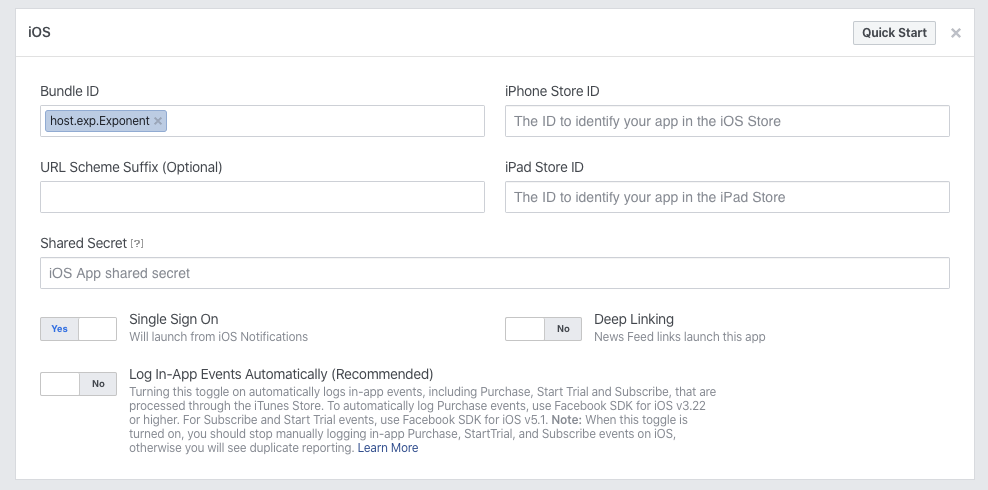
Expo SDK 36, expo-facebook 8.0.0
 msojda
on 24 Feb 2020
msojda
on 24 Feb 2020
Having the same issue on my iPhone expo app. This issue happens on my phone, but not on my Macbook iOS simulator.
I found that it works correctly if I am logged into Facebook on my iPhone's safari browser. As soon as I sign out of the browser (being logged in / logged out to the Facebook app does not affect this), the bug happens again.
"expo": "^36.0.0"
"expo-facebook": "~8.0.0"
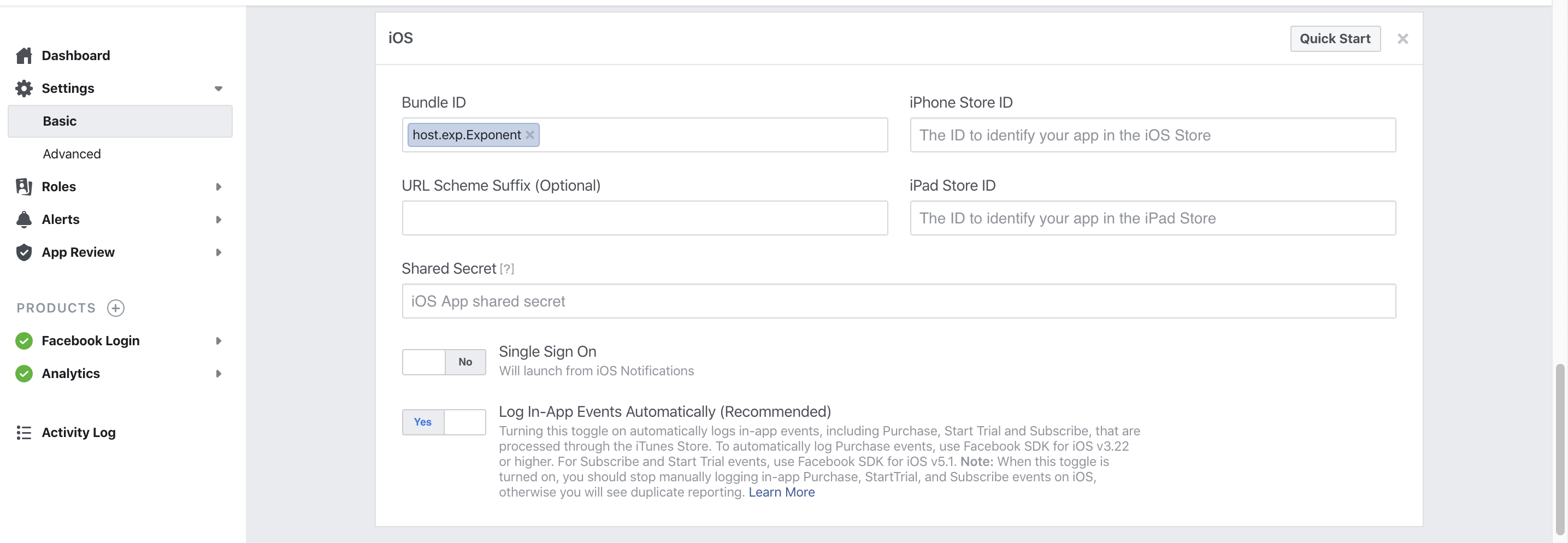
 jnthnch
on 26 Feb 2020
jnthnch
on 26 Feb 2020
I had the same issue, but running "expo start" and "Press p to toggle production mode. (current mode: development), after pressing "p" it shows "Press p to toggle production mode. (current mode: production)", then the Facebook authentication works, but i still don't get the email of the user (if anyone know how to get it, please tell me :))
"expo": "~36.0.0",
"expo-facebook": "~8.0.0",
I'm also using firebase
"firebase": "^7.8.2",
Hope this can help you. Feel free to tell me if it was the case.
Sébastien.
 dioseb
on 27 Feb 2020
dioseb
on 27 Feb 2020
Same issue with my Expo app on prod iOS. The Facebook app doesn't return to the Expo app after authorization. "host.exp.Exponent" is the bundle ID on my app's Facebook settings.
"expo": "^36.0.0"
"expo-facebook": "~8.0.0"
 bonafidehan
on 28 Feb 2020
bonafidehan
on 28 Feb 2020
I have the same issue, running on my Expo app using iPhone 8 Plus. Hope this will get fixed soon.
"expo": "~36.0.0"
"expo-facebook": "^8.0.0"
 maclaine-san
on 28 Feb 2020
maclaine-san
on 28 Feb 2020
I am also experiencing the same issue, but I believe it's because facebook's auth flow forces user to go through the facebook app if installed. So:
My app -> browser login screen -> open facebook app -> user clicks continue
app is setup to go back to expo, but not go back to browser.
Workaround:
Login on your device's default browser, in my case, safari. Then it doesn't redirect user to facebook app for login. Would be great if it was smart enough to do either case though.
 vandervillain
on 3 Mar 2020
vandervillain
on 3 Mar 2020
To solve this issue, I had to upgrade to Expo version 36 and add initializeAsync()
await Facebook.initializeAsync("appid", "appname")
Then call await Facebook.logInWithReadPermissionsAsync()
sharadrb
on 3 Mar 2020
This issue still happens to me. I get the white screen mentioned above: initializeAsync -> logInWithReadPermissionsAsync -> facebook app -> continue (allow access) -> white screen (within facebook app) with Cancel top left. Doesnt redirect back to the app. Switching back to Expo Client have to click Cancel again - only then logInWithReadPermissionsAsync resolved with cancel type.
Even with production mode = true same issue.
expo 36 and expo-facebook v8
 appseugene
on 8 Mar 2020
appseugene
on 8 Mar 2020
I'm having this issue with "expo": "^36.0.0", & "expo-facebook": "~8.0.0".
I'm using Expo client.
Reproducing in both development and production mode.
I made sure I have "host.exp.Exponent" as bundle name since the beginning.
Reproducing on iOS device: iPhone 6S.
The same code works on Android just fine.
I was calling Facebook.initializeAsync(appId) since the beginning. Specifying appName didn't make a difference.
Browser is not logged in to Facebook, since my users don't have to do that.
PS: Tried logging in to Facebook via browser, now it is not reproducible (until I clear browser cache I think).
The point is, it will still fail on users' devices so nothing is fixed.
 nadideozturk
on 8 Mar 2020
nadideozturk
on 8 Mar 2020
Reading @cruzach's comment helped me solve this issue 🎉
For the call to Facebook.initializeAsync I was passing in my live bundle ID, not the expo one (host.exp.exponent). I changed my code like-so and now it's working great both in Expo and Testflight: (expo version 36)
import Constants from 'expo-constants';

const APP_ID = '1234123412341234'; // Facebook App ID here
const BUNDLE_ID = Constants.appOwnership === 'expo' ? 'host.exp.Exponent' : 'com.my_real.app_id';
await Facebook.initializeAsync(APP_ID, BUNDLE_ID);
@andycorm , hmm it still doesnt work for me. By default in Expo Client it should choose 'host.exp.Exponent' as the bundle when the second argument to initializeAsync is not provided. But i did do like you said and still no redirect back to the expo client.
Do yo have both 'host.exp.Exponent' and 'com.my_real.app_id' listed on Facebook's iOS settings in dashboard?
appseugene
on 10 Mar 2020
actually I was having the same problem but in the documentation says you need to initialize the SDK before the logInWithReadPermissionsAsync so I wrote my code like this...
const login = async () => {

        Facebook.initializeAsync(FacebookApi.application_id);

        const { type, token } = await Facebook.logInWithReadPermissionsAsync(

            { permissions: FacebookApi.permissions }

        );

    };
and that way works for me.
I hope is helpful for someone
 ceszgdav
on 17 Mar 2020
ceszgdav
on 17 Mar 2020
ceszgdav pls read the descriptions/title above. what you mentioned is a separate issue with Expo Client update and SDK 36, where you don't even get to the login. This is AFTER you are logged into Facebook, it won't redirect back with success type.
appseugene
on 18 Mar 2020
To fix this issue you just have to modify the bundle ID with the real one in the facebook developers page:
Instead of host.exp.Exponent you put your com.yourapp and it should work.
 harrymelka
on 20 Mar 2020
harrymelka
on 20 Mar 2020
I've tried that and no effect at all. Same issue, once I hit Continue in Facebook App, the screen goes white and only a top left Cancel button remains on screen. Nothing happens afterwards.
appseugene
on 20 Mar 2020
Same issue for me with latest version
 nikolagit123
on 20 Mar 2020
nikolagit123
on 20 Mar 2020
@andycorm @appseugene Can also confirm, tried to explicitly specify 'host.exp.Exponent' when calling initializeAsync. Did not work, same problem.
bonafidehan
on 21 Mar 2020
What are you guys doing to get around this? I have the same issues with latest versions.
 Harrison97
on 21 Mar 2020
Harrison97
on 21 Mar 2020
I can make it happen 100% of the time on my iPhone 6S. replication steps:
- expo init testFacebook (configure as managed workflow)
- expo install expo-facebook
- should have these now in dependencies:
"expo": "~36.0.0",
"expo-facebook": "~8.0.0" - in my developer.facebook app, under IOS, set Bundle ID to host.exp.Exponent
- add this to my App.tsx:
async componentDidMount() {
  await Facebook.initializeAsync([YOUR_APP_ID], [YOUR_APP_NAME])
  const result = await Facebook.logInWithReadPermissionsAsync({ permissions: ['public_profile', 'email'] })
  if (result.type === 'success') {
    console.log('success')
  } else {
    // user canceled
  }
}
- install facebook app if not already installed
- open safari, go to facebook.com, logout, make sure to click the gear next to your profile and "Remove account from device". This will make it seem like you have yet to login to fb
- start/open your app, "Expo Wants to Use facebook.com..." -> continue
- "Open this page in "Facebook"? -> Open
- for me, "You previously logged in to APP_NAME with Facebook" (I have logged in successfully previously when safari was logged in) -> Continue
you'll end up on an empty white screen with "cancel" button in top left.
If you feel like it, open safari, facebook.com, login, and then try again. You'll be able to get into your app just fine. Obviously won't be sufficient for an actual production application.
vandervillain
on 22 Mar 2020
@cruzach is there a way we can provide more help / data to narrow down the bug so that it can be fixed? cc @appseugene & @vandervillain
bonafidehan
on 23 Mar 2020
@vandervillain following your exact steps worked for me in the expo Client. After installing the Facebook app, did you log in to the app? (i did not)
Sorry everyone, it's obvious that there is some issue here but without a reliable way to reproduce it it's very hard to debug on our end 🙁 If you want to investigate in your own further, I think the best next step is to take a look at the device logs and see if there's anything interesting there, and then I'd also recommend testing expo-facebook in a bare workflow project
cruzach
on 23 Mar 2020
@cruzach I encounter the issue whether I am logged in to the app or not--I will continue to investigate on my end. Thanks!
vandervillain
on 25 Mar 2020
@cruzach , it works fine for you on sdk 36 with expo-facebook 8.0.0 ? while logged into facebook app (and not in safari), does it redirect back to the Expo Client?
if so, pls share your configations in Facebook Developer Console also
appseugene
on 26 Mar 2020
I Can confirm every non working examples.
Working example: While logged in to Facebook via Safari Browser, initiate FB Login from expo client App. The login process will happen in the browser and redirect back to expo client app.
For me the redirection does not happen when Login happens in the Facebook app and not in the browser.
Expo SDK 36.0.0
expo-facebook 8.0.0
 gitteraz
on 26 Mar 2020
gitteraz
on 26 Mar 2020
@appseugene
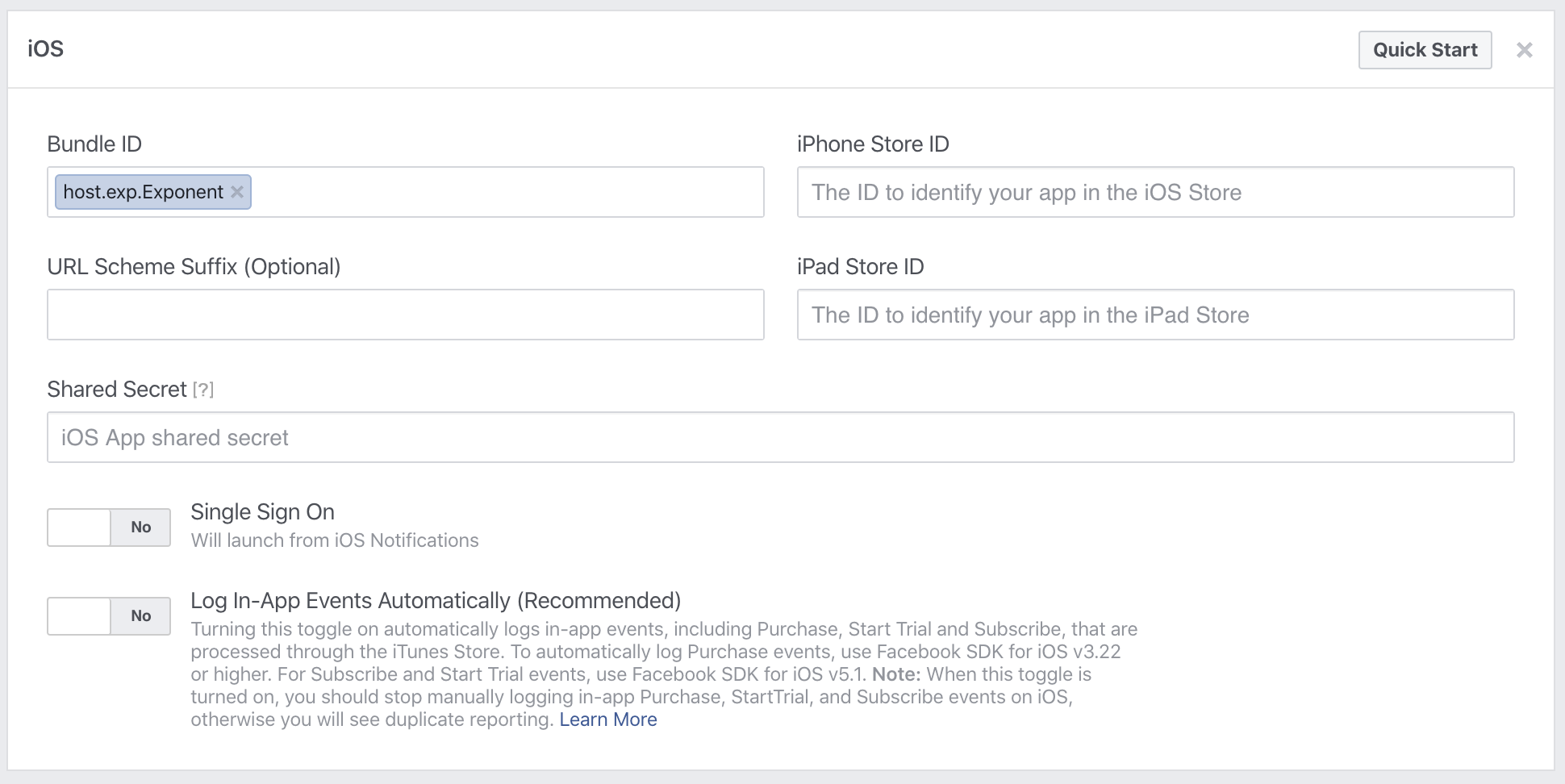
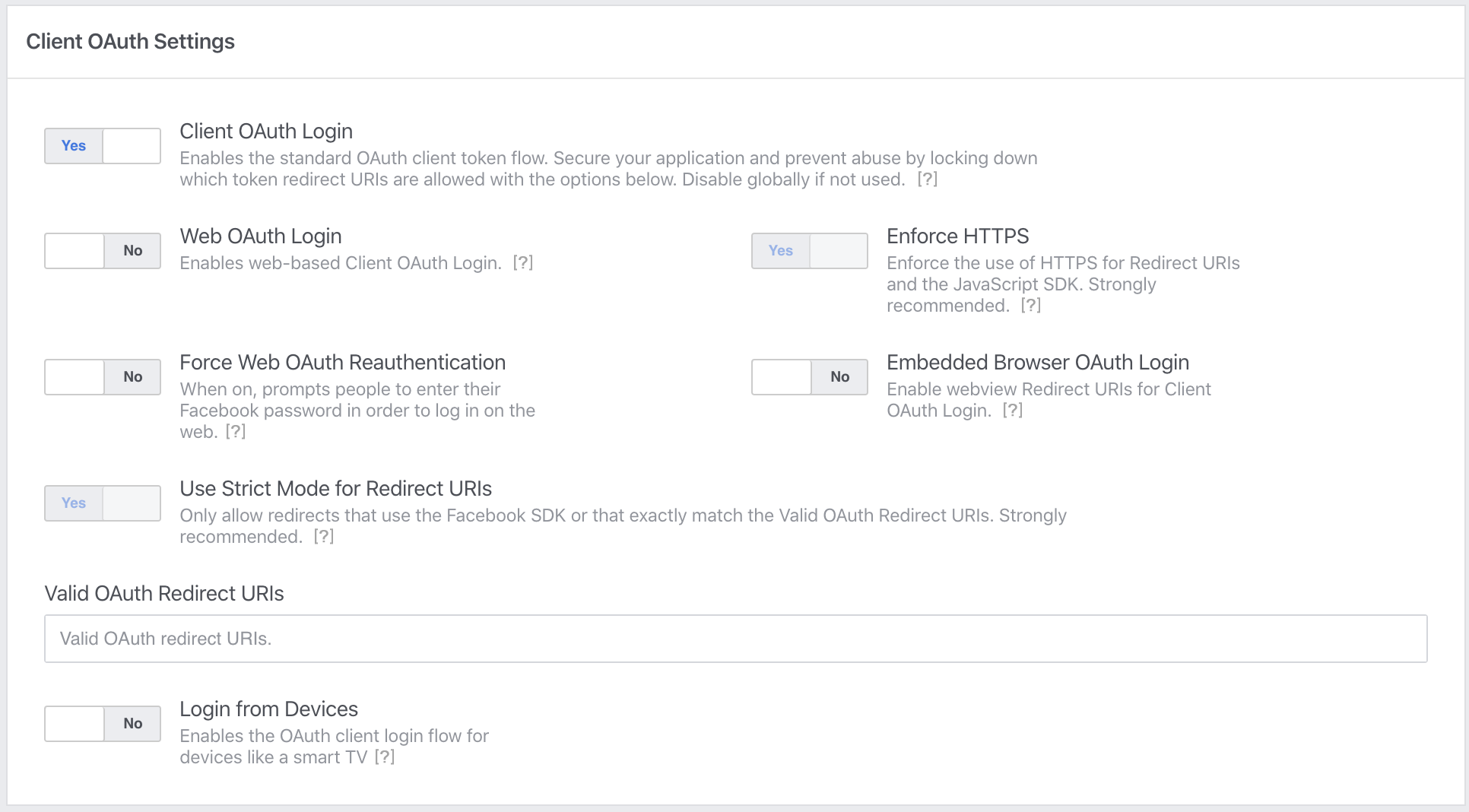
cruzach
on 26 Mar 2020
The only deltas I could detect from your FB settings and mine were:
- "Valid OAuth Redirect URIs": I have a Firebase URL there
- And likely a delta, my FB app is "In development"
@cruzach can you check what version of Facebook iOS app you have? Mine's 262.0.0.47.113.
cc @appseugene
bonafidehan
on 27 Mar 2020
The only deltas I could detect from your FB settings and mine were:
- "Valid OAuth Redirect URIs": I have a Firebase URL there
- And likely a delta, my FB app is "In development"
@cruzach can you check what version of Facebook iOS app you have? Mine's 262.0.0.47.113.
cc @appseugene
We experienced the same trouble with iOS build in TestFlight.
One person was all the time redirected to the FB app to authorise and then thrown back in our app but with no login status.
I've asked to remove both our app and FB app. Then install FB app and our app back.
Authorization through Facebook App worked, and our app got login status.
Could it be a problem with outdated FB app? May be, but person has auto install updates from AppStore enabled.
Looks really weird and hard to trace. And what is even worse we now need to ask people to re-install FB app in order to start using our app. That definitely a very bad experience.
 asabadyr
on 30 Mar 2020
asabadyr
on 30 Mar 2020
@cruzach any chance I could just jump on a video call with you and figure this out? The alternative is to disable FB login for iOS and that would really suck for a lot of apps. Would love to spend any time needed to unblock you on this. By myself, it's hard to figure out what other info to provide. The call would be super helpful.
bonafidehan
on 31 Mar 2020
@cruzach Please correct me if I’m wrong. The expo-facebook 8.0.0 uses facebook-sdk 5.8 under the hood. The “behavior” option was deprecated from 4.43.0. That’s why the browser behavior is the only option. We use expo for a long time and previously used browser behavior only (native app was always buggy) and users didn’t have an option to launch the application from the in-app browser. Now they can.. Might it be the core of the issue?
 AndreiChe
on 31 Mar 2020
AndreiChe
on 31 Mar 2020
Meanwhile is it possible to force browser identification instead of opening the app as the current behavior (white screen) is bad for the user experience and can be misleading.
Thank you
 flo-butterfly
on 31 Mar 2020
flo-butterfly
on 31 Mar 2020
Anyone tried expo SDK 37 for this issue?
maclaine-san
on 1 Apr 2020
By the way, we did following and issue was resolve
- Upgraded to Expo version 36
We just didn't upgrade. We had to recreate new project and copied all project files. We had to create new app because we upgraded all our components including react navigation.
- await Facebook.initializeAsync("appid", "appname")
- call await Facebook.logInWithReadPermissionsAsync()
Try creating brand new expo app and try to call initializeAsync() followed by logInWithReadPermissionsAsync()
Hope this helps
sharadrb
on 1 Apr 2020
Hi all,
Please try to use yarn instead of npm
Hope it will help.
 FatBuTa
on 2 Apr 2020
FatBuTa
on 2 Apr 2020
@maclaine-san verified exact same problem exists with Expo SDK 37:
- "expo": "^37.0.0"
- "expo-facebook": "~8.1.0"
@sharadrb Yup that's exactly what we're all doing and still encountering problems.
  await Facebook.initializeAsync(APP_ID, 'host.exp.Exponent')
  const {
    type,
    token,
    expires,
    permissions,
    declinedPermissions,
  } = await Facebook.logInWithReadPermissionsAsync({
    permissions: ['public_profile', 'email'],
  })
@AndreiChe your hypothesis in https://github.com/expo/expo/issues/6459#issuecomment-606544783 seems possible. But would you be able to reason why it impacts (apparently) only some use cases? For example, cruzach is not able to reproduce the bug.
bonafidehan
on 2 Apr 2020
As I investigate some use cases:
Create a new expo project with Facebook login only.
- try to create a new facebook project.
==> after login it display the blank screen with Cancel button - try to use existing facebook project that worked for a long time.
only change the Facebook ID in expo project, don't modify anything in the Facebook project
==> after login it open the app that registered in the facebook project. - try to modify the existing facebook project above to point the Bundle ID to host.exp.Exponent
==> after login it open the app that registered in the facebook project.(exactly same with 2)
So I think the problem is facebook developer page have a problem with update Bundle ID
FatBuTa
on 2 Apr 2020
@bonafidehan To be honest, I don't know exactly what is the issue. We tried many suggested fixes including creating a new app but nothing worked stably for us. This is just one more idea. I guess that if Facebook says that they support the browser behavior only, the authentication using the app will not work properly. @cruzach please contact me if you need help with reproducing the issue.
AndreiChe
on 2 Apr 2020
@AndreiChe I was able to reproduce this in the Expo client app, can you confirm for me that this works as expected in a standalone app built with expo build:ios?
cruzach
on 3 Apr 2020
@cruzach No, it doesn't. Of course, we didn’t do a release in stores but tried all these fixes on the ios test flight. It wasn’t stable nor in the Expo client neither in the standalone builds
AndreiChe
on 3 Apr 2020
Same case that reproduces it in the Expo Client is working fine for me in testflight on SDK 37
cruzach
on 3 Apr 2020
@cruzach Please clarify a bit for my understanding. As I mentioned above, when users are on the Facebook page in in-app browser they see a popup that allows them to authenticate via the app. You mean they don't have such an option on SDK 37 anymore. Or was it another issue?
AndreiChe
on 3 Apr 2020
@AndreiChe in a standalone SDK 37 app, I was not given the option to authenticate via the Facebook app. This is the login function I used:
async function logIn() {
  try {
    await Facebook.initializeAsync("MY-FB-APP-ID");
    const {
      type,
      token
    } = await Facebook.logInWithReadPermissionsAsync({
      permissions: ["public_profile"]
    });
    if (type === "success") {
      // Get the user's name using Facebook's Graph API
      const response = await fetch(
        `https://graph.facebook.com/me?access_token=${token}`
      );
      Alert.alert("Logged in!", `Hi ${(await response.json()).name}!`);
    } else {
      // type === 'cancel'
    }
  } catch ({ message }) {
    alert(`Facebook Login Error: ${message}`);
  }
}
In the facebok developer console, in the app's advanced settings, I have
Native or desktop app? -Yes- SDK version: iOSv5.8.0
And for Facebook Login settings, I have:
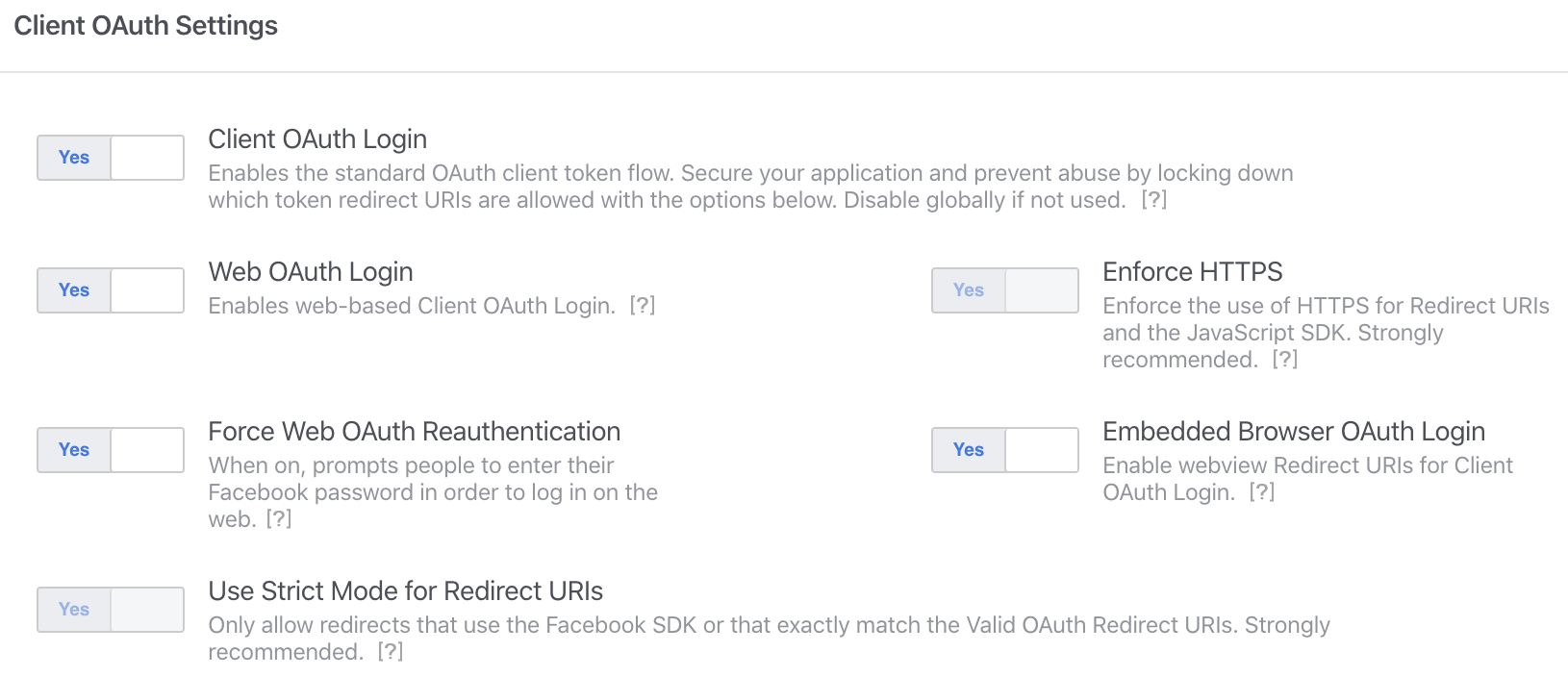
(with the most recent Facebook app downloaded)
cruzach
on 3 Apr 2020
Hi everyone, has there been any progress on this issue? I'm hitting this on a brand new empty Expo Client app on SDK 37.
 gvillenave
on 3 Apr 2020
gvillenave
on 3 Apr 2020
@bonafidehan did you find any work around for Expo sdk 37 and expo-faceboo 8.1.0 ?
 YahiaBadr
on 5 Apr 2020
YahiaBadr
on 5 Apr 2020
@YahiaBadr I didn't find a workaround. Current status that I'm aware of: cruzach was able to reproduce for Expo client app but not for standalone.
bonafidehan
on 5 Apr 2020
@bonafidehan It still doesn't work for me in the Expo client app, if i use safari for auth it redirects. However, if i use the Facebook app it sticks in the blank page with the cancel button. Did it work for you in the Expo client app with the Facebook app?
YahiaBadr
on 5 Apr 2020
@YahiaBadr please read my and other comments more carefully. As I already mentioned, cruzach has reproduced the bug in Expo client https://github.com/expo/expo/issues/6459#issuecomment-608441099 and is likely working on a fix.
bonafidehan
on 6 Apr 2020
SOLUTION(IOS): Remove Facebook app from your phone and try doing it with Safari browser (worked fine for me)
 alikhaledahmed
on 6 Apr 2020
alikhaledahmed
on 6 Apr 2020
SOLUTION(IOS): Remove Facebook app from your phone and try doing it with Safari browser (worked fine for me)
This solution is only for you as a developer, but we cannot publish our apps like this. I had to remove the Facebook login from my app when i publish it as it will be very inconvenient for the user.
YahiaBadr
on 6 Apr 2020
Hi,
I've also the same problem only on my device, with the simulator it's ok, but on real device, white screen like said before...
I'm under the 37.0.0 SDK,
Don't want to use this solution because as @YahiaBadr said, we cannot publish our apps like that...
SOLUTION(IOS): Remove Facebook app from your phone and try doing it with Safari browser (worked fine for me)
 ArthurDelbeke
on 6 Apr 2020
ArthurDelbeke
on 6 Apr 2020
Hi @cruzach. Thank you for the detailed instructions. We have upgraded the expo version and updated the configuration on the Facebook developer's page. Now we have exactly the same setup as you have except "Native or desktop app?" which is turned off as we use this app for the web auth as well (is this correct?)
This is how we login:
await Facebook.initializeAsync(secrets.facebook.appId);
const result = await Facebook.logInWithReadPermissionsAsync(Config.FACEBOOK.OPTIONS);
Issues:
- Users still have an option to launch the Facebook app
- This issue is still here. It is not reproduced consistently. Sometimes happens on terminating the app and first login attempt; sometimes after several attempts to log in / log out.
AndreiChe
on 7 Apr 2020
Hi @cruzach. We have ejected the app to manage the Facebook SDK directly. It worked exactly the same way as with the Expo, so that users had an option to launch the Fecabook app. Then, after doing this fix https://github.com/expo/expo/issues/6112#issuecomment-610546525 we got browser behavior only! So the issue has been resolved now. Unfortunately, we didn’t find a way to make Facebook app work but it seems to be impossible for now, which is sad from the UX perspective..
This could be also related: https://github.com/facebook/facebook-ios-sdk/issues/1067#issuecomment-578875814
AndreiChe
on 8 Apr 2020
The Facebook app login workflow is no longer supported, as far as I can tell. Peak at the changes to FBSDKLoginBehavior between 4.39 and v5
cruzach
on 8 Apr 2020
@cruzach any ideas what should we all do? If we stay in managed flow. It's a real pain for us
asabadyr
on 9 Apr 2020
any updates?
YahiaBadr
on 10 Apr 2020
I've created a workaround for this situation.
I put a timeout for the authentication promise and use a fallback flow via AuthSession
asabadyr
on 11 Apr 2020
@asabadyr could you share the code with us?
YahiaBadr
on 12 Apr 2020
Hi,
i have same problem, @asabadyr could you share the code with us?
 dpmika
on 12 Apr 2020
dpmika
on 12 Apr 2020
Hi guys,
I confirm that the problem only appears when the application is run on the device via the expo client.
Today I did a test by doing a build and sending it with TestFlight.
The login works !
dpmika
on 13 Apr 2020
Any update which can be resolved this issue?
webmasterdragon
on 14 Apr 2020
@webmasterdragon No, but the problem is only there if you run the app on Expo client. On native apps, there's no problem
dpmika
on 14 Apr 2020
@webmasterdragon No, but the problem is only there if you run the app on Expo client. On native apps, there's no problem
incorrect. we still face this from time to time without any logic
asabadyr
on 16 Apr 2020
Hi,
i have same problem, @asabadyr could you share the code with us?
promiseTimeout(30000, promise).then(({
                                               type,
                                               token,
                                               expires,
                                               permissions,
                                               declinedPermissions,
                                           }) => {
            if (type === 'success') {
                const credential = firebase.auth.FacebookAuthProvider.credential(token);
                firebase.auth().signInWithCredential(credential)
                    .then(v => {
                        ...
                    })
                    .catch((error) => {
                        alert(lstr('facebookLoginError', {error: error}));
                    })
            } else {
                alert(lstr('facebookLoginError', {error: type}));
            }
        }).catch(err => {
            setUseAltFlow(true);
        });
const login2 = async () => {
        setButtonDisabled(true);
        let redirectUrl = AuthSession.getRedirectUrl();
        console.log(redirectUrl);
        let result = await AuthSession.startAsync(
            {
                authUrl:
https://www.facebook.com/v2.8/dialog/oauth?response_type=token+
&client_id=${Config.loginSetup.facebookID}+
&redirect_uri=${
encodeURIComponent(
redirectUrl
) },
}
);
}
asabadyr
on 16 Apr 2020
I am facing the same issue.
After Login once from my account. whenever i try to re-authenticate the user. It doesn't ask for username and password screen again.
 vineetvk01
on 16 Apr 2020
vineetvk01
on 16 Apr 2020
We'll be releasing an update to the App Store Expo Client with this fix included soon, most likely next week
cruzach
on 30 Apr 2020
hello, is there any update of this issue? thanks!
 LucasMilotich
on 7 May 2020
LucasMilotich
on 7 May 2020
Fix has landed, you must update to the most recent version (2.15.5) of the Expo Client app to use it
cruzach
on 7 May 2020
Is the fix specific to the simulator or does it fix issues regarding actual device experience?
 Amirjab21
on 10 May 2020
Amirjab21
on 10 May 2020
@cruzach is the fix available also for expo bare application? using EXPO 37 version?
AdelaPetrut
on 16 Jun 2020
@Amirjab21 the fix is for both sims and devices
@AdelaPetrut this issue didn't affect bare apps afaik
cruzach
on 16 Jun 2020
@cruzach unfortunately we have a bare app which was reproducing the:
_[iOS][Facebook] Not redirecting back to app after Facebook.logInWithReadPermissionsAsync through facebook_
Related I think also to the following GIT (isn't the correction also the same for the below GIT issue)?:
https://github.com/expo/expo/issues/6112
AdelaPetrut
on 16 Jun 2020
This issue is for the App Store Expo Client app, not standalone or bare apps. If you're seeing this issue in a bare app please create a new issue with a reproducible demo included.
Most likely you have not included the relevant facebookScheme and facebookAppId in info.plist if you're seeing this in the bare workflow
cruzach
on 16 Jun 2020
I solved it by adding key hashes on Facebook Developer -> Settings -> Basic -> Android.
Notes:
- It was working using Expo client without Facebook App installed (I don't use facebook app).
- After I released for production, my users (with Facebook app installed) were complaining that they cannot login using facebook auth option.
- So I figured it out, then I tried installing facebook app (no choice) :|
- When I tried to authenticate, the native app opened and I got "invalid key hash" error. So I tried to copy the hash included in the error message, and added it into the fb developer settings (see above).
- During production, I encountered the same "invalid key hash" error, and this time it generated a new key hash. So I just added it again.
Facebook auth will try to connect to the native app, if none installed, it will use the browser based authentication (web).
 mastahed
on 25 Jun 2020
mastahed
on 25 Jun 2020
Related issues
 terribleben
·
54Comments
terribleben
·
54Comments
 leighquince
·
80Comments
leighquince
·
80Comments
 jyoo
·
64Comments
jyoo
·
64Comments
 joshwils82
·
60Comments
joshwils82
·
60Comments
 jbrodriguez-bytelion
·
56Comments
jbrodriguez-bytelion
·
56Comments
Most helpful comment
This solution is only for you as a developer, but we cannot publish our apps like this. I had to remove the Facebook login from my app when i publish it as it will be very inconvenient for the user.