I am seeing a blank (all white) AppLoading screen after upgrading to 18.0.0. I have AppLoading as the root component. This appears to be an Android only issue as it is still working on iOS.
 joshwils82
All 60 comments
Can you upload your code or reproduce on snack?
 jesseruder
on 25 Jul 2017
jesseruder
on 25 Jul 2017
Sure, here is some code you can put into snack that will show the issue. Notice how after the "Waiting for code.." message, the screen is blank for 5 seconds while it is showing the AppLoading component.
import React, { Component } from 'react';
import { Text, View, StyleSheet } from 'react-native';
import { Constants, AppLoading } from 'expo';
export default class App extends Component {
constructor() {
super();
this.state = { pending: true};
}
componentWillMount() {
setTimeout(() => {
this.setState({pending: false});
}, 5000);
}
render() {
if (this.state.pending) {
return (<AppLoading/>);
}
return (
<View style={styles.container}>
<Text style={styles.paragraph}>
Change code in the editor and watch it change on your phone!
Save to get a shareable url. You get a new url each time you save.
</Text>
</View>
);
}
}
const styles = StyleSheet.create({
container: {
flex: 1,
alignItems: 'center',
justifyContent: 'center',
paddingTop: Constants.statusBarHeight,
backgroundColor: '#ecf0f1',
},
paragraph: {
margin: 24,
fontSize: 18,
fontWeight: 'bold',
textAlign: 'center',
color: '#34495e',
},
});
I'm having the same issue on SDK 19
 benhannel
on 21 Aug 2017
benhannel
on 21 Aug 2017
+1 SDK 19
 innerexception
on 11 Sep 2017
innerexception
on 11 Sep 2017
+1 SDK 20
 wenbolovesnz
on 15 Sep 2017
wenbolovesnz
on 15 Sep 2017
Had the same problem with 20.0.0. Just updated to 21.0.0 and it's fixed! 🎉🎈
Thank you! 👍🙏
 mamal72
on 28 Sep 2017
mamal72
on 28 Sep 2017
Hi! I think without specifying a loading/splash config in app.json I think it's supposed to default to a blank screen. If we've specified differently elsewhere, please post back and I'll reopen. Thanks!
Side note: I observed the same behavior on iOS and Android in the latest release.
 anp
on 11 Oct 2017
anp
on 11 Oct 2017
@dikaiosune Same here, in iOS works as expected and in android white screen ...
I leave a comparison side by side:
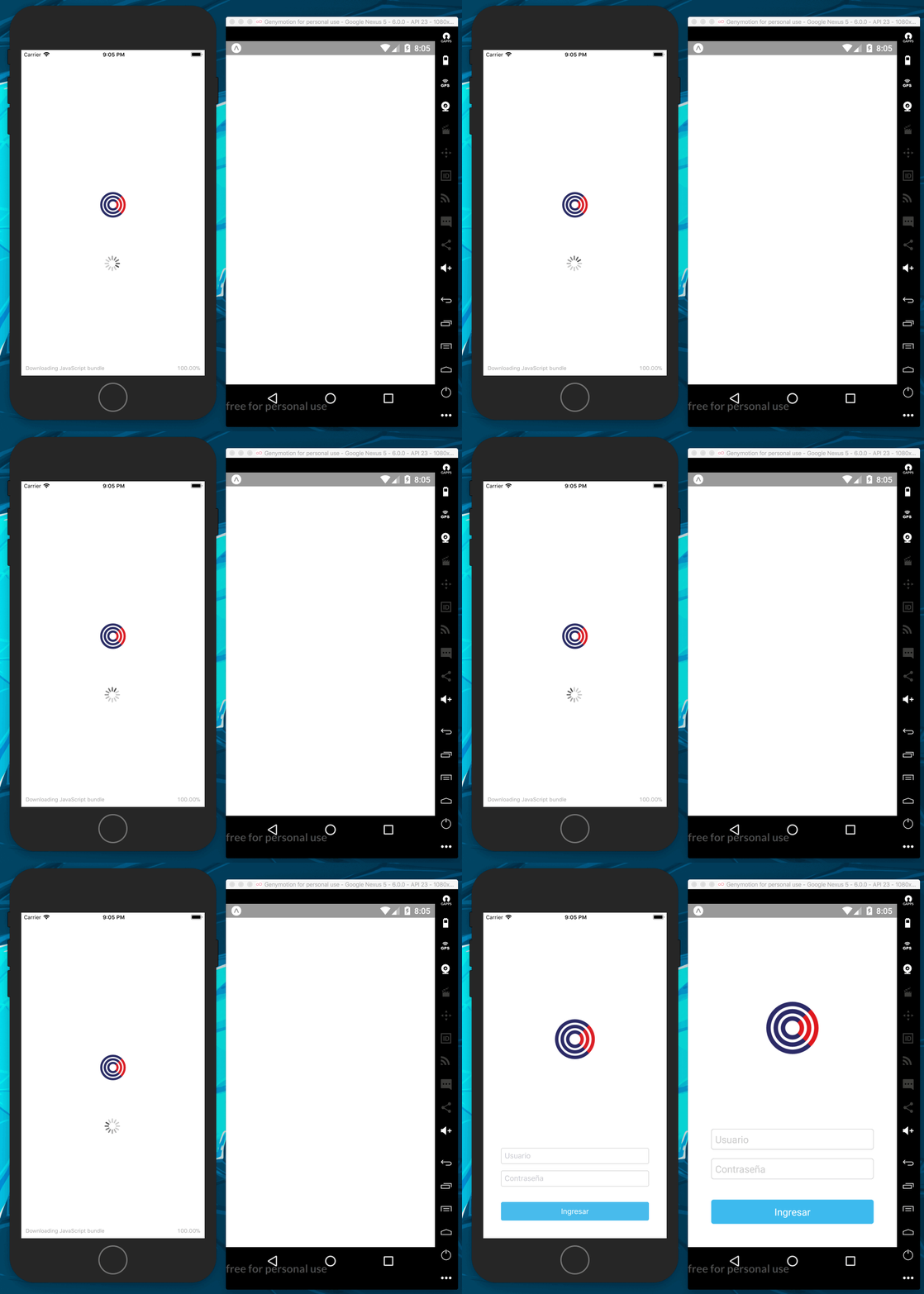
Im running 21 SDK with last cli on both devices also here I leave the app.json and the source:
{
"expo": {
"name": "foo",
"description": "An empty new project",
"slug": "foo",
"privacy": "unlisted",
"sdkVersion": "21.0.0",
"version": "1.0.0",
"orientation": "portrait",
"primaryColor": "#cccccc",
"icon": "./assets/icons/app-icon.png",
"loading": {
"icon": "./assets/icons/loading-icon.png"
},
"packagerOpts": {
"assetExts": ["ttf", "mp4"]
}
}
}
One option in the new SDK way:
export default class App extends React.Component {
state = {
rehydrated: false,
};
async _persistStore() {
return new Promise(function(resolve, reject) {
// https://github.com/rt2zz/redux-persist/blob/master/docs/recipes.md
persistStore(store, { storage: AsyncStorage, whitelist: ['auth'] }, () => {
setTimeout(() => {
resolve();
}, 10 * 1000); // 10 secs
});
});
}
render() {
if (!this.state.rehydrated) {
return (
<AppLoading
startAsync={this._persistStore}
onFinish={() => this.setState({ rehydrated: true })} />
);
}
return (
<Provider store={store}>
<Router />
</Provider>
);
}
}
The old one:
export default class App extends React.Component {
state = {
rehydrated: false,
};
componentWillMount() {
// https://github.com/rt2zz/redux-persist/blob/master/docs/recipes.md
persistStore(store, { storage: AsyncStorage, whitelist: ['auth'] }, () => {
setTimeout(() => {
this.setState({
rehydrated: true
});
}, 10 * 1000); // 2 secs
});
}
render() {
if (!this.state.rehydrated) {
return (
<AppLoading />
);
}
return (
<Provider store={store}>
<Router />
</Provider>
);
}
}
NOTE: same behavior in both codes
thanks !!!
 outaTiME
on 13 Oct 2017
outaTiME
on 13 Oct 2017
Looking at the source code of AppLoading.android.js in 19.0.0:
'use strict';

export default () => null;
That could explain the blank screen....
 kadoshms
on 21 Oct 2017
kadoshms
on 21 Oct 2017
+1 SDK 23
 3axap4eHko
on 27 Nov 2017
3axap4eHko
on 27 Nov 2017
+1 with SDK 23
 sermagnus
on 1 Dec 2017
sermagnus
on 1 Dec 2017
I found solution with following config. It will show splash on standalone application (not in development)
"expo": {
  ...
  "splash": {
     "backgroundColor": "#424242",
     "image": "./images/icon_512.png"
  }
  ...
}
@outaTiME's issue is this other one https://github.com/expo/expo/issues/1068 -- that issue tracks the similar issue for development mode live reloading, please discuss it there.
The issue on this page should be addressed in the minor update https://blog.expo.io/expo-for-android-sdk23-minor-update-daf5847ae0a7 and has worked for at least one user https://forums.expo.io/t/sdk-23-only-white-screen-on-android/4944/9 -- let us know if you still face it.
 nikki93
on 5 Dec 2017
nikki93
on 5 Dec 2017
@nikki93 I'm having this issue with a detached app (just updated from expo22 to 23). How can I fix or debug it?
 arrygoo
on 13 Dec 2017
arrygoo
on 13 Dec 2017
Having this issue with the latest expo on Ubuntu 16.04 and Android. Worked well for most of yesterday and then started with this problem out of the blue.
 gfleetwood
on 25 Dec 2017
gfleetwood
on 25 Dec 2017
I am not sure weather this issue is fixed or not.
Anyway, doesnt seem like it does in both sdk 23 and 24
kadoshms
on 31 Dec 2017
Same issue on sdk 24
 MaybeRex
on 1 Jan 2018
MaybeRex
on 1 Jan 2018
Now I can confirm that this is not fixed in 23 nor 24.
Could someone please reopen?
kadoshms
on 1 Jan 2018
Same issue on Android.
 mauroporras
on 1 Jan 2018
mauroporras
on 1 Jan 2018
Same issue on Android.
 MedinaGitHub
on 4 Jan 2018
MedinaGitHub
on 4 Jan 2018
@kadoshms @MaybeRex @mauroporrasp @MedinaGitHub
Try adding a png to the following:
mobile/android/app/src/main/res/drawable-hdpi/shell_launch_background_image.png
mobile/android/app/src/main/res/drawable-ldpi/shell_launch_background_image.png
mobile/android/app/src/main/res/drawable-mdpi/shell_launch_background_image.png
mobile/android/app/src/main/res/drawable-xhdpi/shell_launch_background_image.png
mobile/android/app/src/main/res/drawable-xxhdpi/shell_launch_background_image.png
mobile/android/app/src/main/res/drawable-xxxhdpi/shell_launch_background_image.png
for people who have this issue -- are you using create-react-native-app? does this happen in development only or also when you publish?
 brentvatne
on 4 Jan 2018
brentvatne
on 4 Jan 2018
@brentvatne
1) Yes. For me, it started after I detached with Expo.
2) It happens in both.
Thanks.
mauroporras
on 5 Jan 2018
@brenvatne 1.yes 2. only in standaolne
kadoshms
on 5 Jan 2018
when I exported an APK it still happens to me
MedinaGitHub
on 9 Jan 2018
@arrygoo I tried and it still not work
@brentvatne
- Yes and detached Expo
- Both
 YKSing
on 16 Jan 2018
YKSing
on 16 Jan 2018
I was having this issue when configuring splash options under the Android key. Moving it out seems to fix the issue
 wrsx
on 28 Jan 2018
wrsx
on 28 Jan 2018
I created a new application today with create-react-native-app and detached to expo kit. I then copied my assets/source folders over and made sure the app.json was configured properly.
White screen on development and production builds. (Android)
"expo": "^25.0.0",
 ChristianTucker
on 2 Feb 2018
ChristianTucker
on 2 Feb 2018
I think I've solved the problem for my standalone App.
This is my experience:
- Expo =< v23: in app.json the "loading" settings has never worked
- Expo >= 24: the problem is related to wrong settings "app.json" (or missing use of "splash" section)
In addition, usingand the preloading of assets, i have encountered issues with too many images of heavy assets that cause a delay of app startup.
This is my app.json
``javascript{
"expo": {
"version": "1.0.8",
"sdkVersion": "25.0.0",
"name": "***",
"slug": "***",
"privacy": "unlisted",
"orientation": "portrait",
"primaryColor": "#3E7535",
"icon": "./assets/icons/app-icon.png",
"notification": {
"icon": "./assets/icons/android-notification-grayscale.png",
"color": "#08005D"
},
"loading": {
"icon": "./assets/icons/app-loading.png",
"backgroundColor": "#ffffff",
"hideExponentText": false
},
"splash": {
"image": "./assets/images/startup-splash.png",
"backgroundColor": "#ffffff",
"resizeMode": "cover"
},
"packagerOpts": {
"assetExts": ["ttf"]
},
"android": {
"versionCode": 5,
"package": "***",
"config": {
"googleMaps": {
"apiKey": "***"
}
}
},
"ios": {
"buildNumber": "5",
"loadJSInBackgroundExperimental": true,
"bundleIdentifier": "***",
"icon": "./assets/icons/app-icon_ios.png",
"supportsTablet": false,
"config": {
"usesNonExemptEncryption": false,
"googleMapsApiKey": "***"
},
"infoPlist": {
"CFBundleLocalizations": [
"en",
"it"
]
}
},
"assetBundlePatterns": [
"./assets/images/**",
"./assets/fonts/**",
"node_modules/react-navigation/src/**/*.png",
"node_modules/@expo/vector-icons/fonts/*.ttf"
]
}
}
sermagnus
on 2 Feb 2018
Expo == 23
Used CRNA and detached with expokit.
Works fine on IOS but on android white screen. White screen on android occurs on development and published version both.
 falloutcoder
on 3 Feb 2018
falloutcoder
on 3 Feb 2018
Hi all - we've created an internal issue to investigate this issue. We don't have an ETA and are currently focused on other issues for SDK 26 but do have this tracked internally.
 ide
on 5 Feb 2018
ide
on 5 Feb 2018
+1
my app is not detached. It is just a standalone app and the android version also has only a white screen
for the splash
{
  "expo":{
    "name": "xxxx",
    "description": "Messenger",
    "slug": "xxxx",
    "privacy": "public",
    "sdkVersion": "23.0.0",
    "version": "1.5.3",
    "orientation": "portrait",
    "primaryColor": "#cccccc",
    "icon": "./assets/icons/icon_android.png",
    "notification":{
      "icon": "./assets/icons/notification.png"
    },
    "splash": {
      "backgroundColor": "#4988dd",
      "resizeMode": "cover",
      "image": "./assets/images/lynxBackground.png",
    },
    "packagerOpts": {
      "assetExts": ["ttf", "mp4"]
    },
    "ios": {
      "supportsTablet": true,
      "bundleIdentifier": "xxxxx",
      "buildNumber": "xxx",
      "icon": "./assets/icons/icon_lynx.png",
      "loadJSInBackgroundExperimental": true,
      "usesIcloudStorage": true
    },
    "android": {
      "package": "xxxxx",
      "config": {
        "googleMaps": {
          "apiKey": "xxxxxxxxxxxxxxxxxxx"
        },
      },
      "splash": {
        "ldpi": "./assets/images/lynxBackground.png",
        "mdpi": "./assets/images/lynxBackground.png",
        "hdpi": "./assets/images/lynxBackground.png",
        "xhdpi": "./assets/images/lynxBackground.png",
        "xxhdpi": "./assets/images/lynxBackground.png",
        "xxxhdpi": "./assets/images/lynxBackground.png",
        "resizeMode": "cover",
        "backgroundColor": "#4988dd",
      },
      "versionCode": 7
    }
  }
}
 lucidtheory
on 18 Feb 2018
lucidtheory
on 18 Feb 2018
the problem is that the image file does not exist, what you can do is use the icon of the app, editing the file splash_background.xml replacing the line
<item><bitmap android:gravity="center" android:src="@drawable/shell_launch_background_image"/> </item>
for
<item><bitmap android:gravity="center" android:src="@drawable/ic_launcher" /></item>
verify that the ic_launcher image exists in the directories drawable-hdpi drawable-mdpi drawable-xhdpi drawable-xxhdpi drawable-xxxhdpi if it does not exist you can obtain the mipmap folders. FOR ONLY DETACHED PROJECTS
 machester4
on 22 Feb 2018
machester4
on 22 Feb 2018
Same issue, using expo 25 and detached app.
 alanlanglois
on 4 Mar 2018
alanlanglois
on 4 Mar 2018
Got it working,
Added a png file named "shell_launch_background_image.png" all the drawable-xxxx folders.
I had an error when building saying "duplicate files in dev19", I removed the file and build again.
It did the trick.
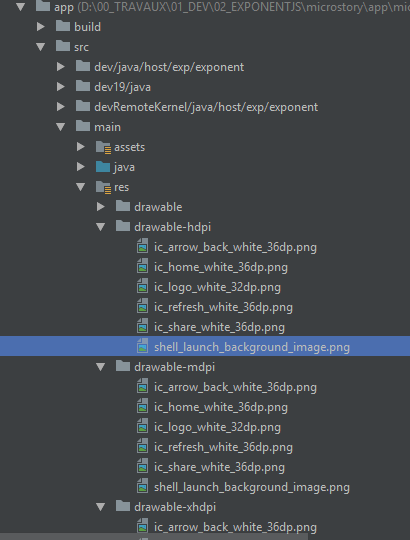
Also make sure you have a splash_background.xml file in your res/drawable folder.
<?xml version="1.0" encoding="utf-8"?>
<layer-list xmlns:android="http://schemas.android.com/apk/res/android">

    <item android:drawable="@color/splashBackground"/>

    <item><bitmap android:gravity="center" android:src="@drawable/shell_launch_background_image" /></item>

</layer-list>
@alanlanglois @machester4 it shouldn't be a problem if you specify all the dpis in your app.json did you do that?
@EsdrasEtrenne there might have been an issue with android's splash not working to well in some cases... can you try upgrading to SDK 24 ?
 aalices
on 21 Mar 2018
aalices
on 21 Mar 2018
Hello @aalices, I've faced the same issue with the non-detached app. Splash screen works fine for me, but AppLoading doesn't. It shows the blank screen.
And the actual problem – just a single line export default () => null; in AppLoadingNativeWrapper.android.js file. So it shows a navigator card background and blinks because it doesn't show a NativeAppLoading like iOS does.
So, the fix will be at least an ability to render just something instead of just a null. Or implementing a real NativeAppLoading for Android which will be much better.
 terrysahaidak
on 22 Mar 2018
terrysahaidak
on 22 Mar 2018
I have the same problem I added entity framework into a shared libary and created a context but when I launch the master detail app I get a blank white screen I am on api level 27
 davidbuckleyni
on 23 Mar 2018
davidbuckleyni
on 23 Mar 2018
I confirm, the problem persists, what are the solutions?
"expo": "^25.0.0"
"sdkVersion": "25.0.0"
 eeeman1
on 23 Apr 2018
eeeman1
on 23 Apr 2018
last .4 release appears to be working fine
Sent from my iPhone
On 23 Apr 2018, at 11:48, eeeman1 notifications@github.com wrote:
I confirm, the problem persists, what are the solutions?
"expo": "^25.0.0"
"sdkVersion": "25.0.0"—
You are receiving this because you commented.
Reply to this email directly, view it on GitHub, or mute the thread.
davidbuckleyni
on 23 Apr 2018
version of what?
eeeman1
on 23 Apr 2018
Anyone still having the issue on a detached or standalone app? I can confirm there's a white flash inside Expo client that is going to be fixed and want to know if someone's still having issues.
There might be a specific reason for it to happen as I still didn't manage to reproduce
aalices
on 10 May 2018
the problem is relevant, because of this I refused to use AppLoading and made my logic
eeeman1
on 10 May 2018
"sdkVersion": "26.0.0",
working perfectly for ios
but for android:
after the splash screen in android
using apploading to check for permissions in construtor
the interval between it starts to check for permissions and the time the isReady(to render apploading or not) is set to true ,
i'm getting the white screen
 ghost
on 11 May 2018
ghost
on 11 May 2018
"sdkVersion": "27.0.0",
I still get blank screen on android.
 nntai
on 15 Jun 2018
nntai
on 15 Jun 2018
sdk 28, same issue on Android
 mnemotiv
on 15 Jun 2018
mnemotiv
on 15 Jun 2018
Anyone reporting the issue, please include your app.json configuration, point out where the issue occurs (Expo client / standalone / detached). This would help us a lot!
aalices
on 18 Jun 2018
We attached the xamrian logs if their not sufficent why not it should be !!!
Sent from my iPhone
On 18 Jun 2018, at 08:08, Alicja Warchał notifications@github.com wrote:
Anyone reporting the issue, please include your app.json configuration, point out where the issue occurs (Expo client / standalone / detached). This would help us a lot!
—
You are receiving this because you commented.
Reply to this email directly, view it on GitHub, or mute the thread.
davidbuckleyni
on 18 Jun 2018
@davidbuckleyni I'm not seeing any Xamarin logs attached to your messages. Also, I'm not sure how Xamarin logs would help as Expo is built on top of React Native, not Xamarin.
anp
on 18 Jun 2018
Anyone reporting the issue, I've just tried to reproduce. Everything works as expected with SDK 28 (and even 27 in my production app). The issue doesn't reproduce using builded app, but does reproduce in Expo.
Here is the video: https://photos.app.goo.gl/3CABxs5mmj7fFTC16
And here is the code:
import React from 'react';
import { Image, Text, View, StyleSheet } from 'react-native';
import { Asset, AppLoading } from 'expo';

const delay = (shouldReject, timeout = 2000) =>
  new Promise((res, rej) =>
    setTimeout(shouldReject ? rej : res, timeout));

export default class App extends React.Component {
  state = {
    isReady: false,
  };

  render() {
    if (!this.state.isReady) {
      return (
        <AppLoading
          startAsync={this.asyncJob}
          onFinish={() => this.setState({ isReady: true })}
          onError={console.warn}
        />
      );
    }

    return (
      <View style={styles.container}>
        <Text>Hello world</Text>
      </View>
    );
  }

  asyncJob() {
    return Promise.all([
      delay(),
      delay(true, 1000), // even with rejecting
      // everything else
    ]);
  }
}

const styles = StyleSheet.create({
  container: {
    flex: 1,
    backgroundColor: '#fff',
    alignItems: 'center',
    justifyContent: 'center',
  },
});
@terrysahaidak Could you attach your app.json, please?
 Pavel-Mishin
on 25 Jun 2018
Pavel-Mishin
on 25 Jun 2018
Same issue on sdk version 28
app.json
{
      "expo": {
        "name": "App name",
        "description": "Some descrption",
        "slug": "App slug",
        "privacy": "public",
        "sdkVersion": "28.0.0",
        "version": "1.0.4",
        "orientation": "portrait",
        "primaryColor": "#5a227e",
        "icon": "./assets/icons/app-icon.png",
        "notification": {
          "icon": "./assets/icons/notification-icon.png",
          "color": "#000000"
        },
        "splash": {
          "image": "./assets/splash-screen.png",
          "backgroundColor": "#5a227e",
          "resizeMode": "cover"
        },
        "packagerOpts": {
          "assetExts": ["ttf"]
        },
        "ios": {
          "bundleIdentifier": "com.package.app",
          "supportsTablet": true
        },
        "android": {
          "versionCode": 7,
          "package": "com.package.app",
          "icon": "./assets/icons/app-icon-android.png",
          "config": {
            "fabric": {
              "apiKey": "[API KEY HERE]",
              "buildSecret": "[BUILD SECRET]"
            }
          }
        },
        "androidStatusBar": {
          "backgroundColor": "#34323"
        },
        "hooks": {
          "postPublish": [
            {
              "file": "sentry-expo/upload-sourcemaps",
              "config": {
                "organization": "orginizatino",
                "project": "App",
                "authToken": "[AUTH TOKEN]"
              }
            }
          ]
        }
      },
    }
works fine with ios.
In android -> standalone app when i lunch the app, i see a blank white screen with spinner for some seconds then the splash screen appear and the rest goes fine.
 FakhruddinAbdi
on 29 Jun 2018
FakhruddinAbdi
on 29 Jun 2018
I'm not sure but it seems like the problem is caused by "./" in splash image path. If you'll see to the expo console, there will be paths like "xxhdpiUrl":"http://localhost:19001/assets/./assets/icons/icon.png" if in app.json
"xxhdpi":"./assets/icons/icon.png", so try to replace it with "xxhdpi":"assets/icons/icon.png". Also it may required to write splash config in android section, for each resolution.
It seems worked for me, but unfortunately i can't check it right now.
Pavel-Mishin
on 29 Jun 2018
I have change my app.json icon path to yours, But it didn't works . same as before @Pavel-Mishin
FakhruddinAbdi
on 7 Jul 2018
I got same problem
 mochfauz
on 13 Jul 2018
mochfauz
on 13 Jul 2018
I'm experiencing the same issue:
{
 "expo": {
  "name": "App Name",
  "version": "0.1.0",
  "slug": "App Slug",
  "sdkVersion": "28.0.0",
  "privacy": "unlisted",
  "ios": {
    "bundleIdentifier": "xxx"
  },
  "android": {
    "package": "xxx"
  }}
}
 rmushtaq21
on 17 Jul 2018
rmushtaq21
on 17 Jul 2018
Same issue, "sdkVersion": "27.0.0", looking for a workaround or fix
 Hypothesis-github
on 18 Jul 2018
Hypothesis-github
on 18 Jul 2018
Same issue sdkVersion": "28.0.0"
I just decided to detach and go ahead with native codes :(
Despite the simplicities expo brought to react native development, But it has some deal breakers which forced me to detach.
The next step after detach would be removing expo sdk completely to reduce app size.
FakhruddinAbdi
on 18 Jul 2018
Hi all -- really sorry this has been a pain point. Unfortunately it's very hard for us to provide any sort of help on an issue like this that has been open for almost a year. Lots of things have changed since this issue was opened, and it's nearly impossible to pinpoint anyone's problem without more context.
For all those who are still having an issue resembling this one, please first make sure you have followed @aalices 's suggestion from earlier in the thread, setting the android.splash images for every DPI in app.json (see https://docs.expo.io/versions/latest/guides/configuration.html#android at the very bottom of the page).
If that still doesn't help, please open a new issue and fill out the template there as completely as you can -- the more information you give, the more likely we'll be able to help.
Thanks!
 esamelson
on 18 Jul 2018
esamelson
on 18 Jul 2018
Looks like Expo AppLoading on Android is looking for the file with a specific name: "shell_launch_background_image.png" in Android drawable folders, even if you specify another one in app.json and use JS project folder (I had "./assets/splash.png" in my app.json).
So by placing "shell_launch_background_image.png" in xxxhdpi folder should be enough, file name is what matters here. Moving a file named splash.png from 'assets' to 'xxxhdpi' will not work.
You can obviously do that for all the other density folders as well if you like to provide a better quality. Also this is only for the AppLoading splash screen. For the the native splash screen you have to make the xml file.
My project: sdkVersion: 32 / detached (ExpoKit)
 Symyon
on 17 Apr 2019
Symyon
on 17 Apr 2019
Related issues
 terribleben
·
54Comments
terribleben
·
54Comments
 serhiipalash
·
58Comments
serhiipalash
·
58Comments
 hesyifei
·
60Comments
hesyifei
·
60Comments
 serhanozcan
·
98Comments
serhanozcan
·
98Comments
 AlessyoAndrei
·
70Comments
AlessyoAndrei
·
70Comments
Most helpful comment
Looking at the source code of
AppLoading.android.jsin19.0.0:That could explain the blank screen....