Hello.
I'm using the Camera module from Expo in my React Native App (generated by CRNA).
I noticed a 3 second delay when i trigger the method takePictureAsync(). There is a way to reduce the response time? Its really annoying wait 3 seconds to take one picture.
My code is the same from Expo docs, i just changed to console.log instead creating a folder and saving the image in the device.
takePicture = () => {
        if (this.camera) {
            this.camera.takePictureAsync()
                .then(data => console.log(data))
        }
    }
package.json:
{
  "name": "manager-app",
  "version": "0.1.0",
  "private": true,
  "devDependencies": {
    "react-native-scripts": "1.3.1",
    "jest-expo": "~20.0.0",
    "react-test-renderer": "16.0.0-alpha.12"
  },
  "main": "./node_modules/react-native-scripts/build/bin/crna-entry.js",
  "scripts": {
    "start": "react-native-scripts start",
    "eject": "react-native-scripts eject",
    "android": "react-native-scripts android",
    "ios": "react-native-scripts ios",
    "test": "node node_modules/jest/bin/jest.js --watch"
  },
  "jest": {
    "preset": "jest-expo"
  },
  "dependencies": {
    "@expo/vector-icons": "^5.2.0",
    "babel-plugin-transform-remove-console": "^6.8.5",
    "expo": "^21.0.0",
    "firebase": "^4.3.1",
    "lodash": "^4.17.4",
    "moment": "^2.18.1",
    "native-base": "^2.3.2",
    "react": "16.0.0-alpha.12",
    "react-native": "https://github.com/expo/react-native/archive/sdk-21.0.2.tar.gz",
    "react-native-progress": "^3.4.0",
    "react-navigation": "^1.0.0-beta.11",
    "redux-persist": "^4.9.1",
    "redux-thunk": "^2.2.0"
  }
}
 kaueDM
All 58 comments
Hi, there!
- Is this on iOS or Android?
- Are you timing how long it takes for
console.log(data)to show up on a device? That likely takes significantly longer than actually taking the picture did.
 terribleben
on 2 Oct 2017
terribleben
on 2 Oct 2017
Hi @terribleben , whats up?
Is this on iOS or Android?
Both.
IOS: Running in a simulator. Iphone SE - IOS 11
Android: Real device. Moto G4 Plus - Android 7.0
Are you timing how long it takes for console.log(data) to show up on a device? That likely takes significantly longer than actually taking the picture did.
About 3 seconds in both platforms.
I created an APK and installed it in my phone and get the same issue. Code:
takePicture = () => {
        if (this.camera) {
            this.camera.takePictureAsync()
                .then(data => this.props.navigation.goBack())
        }
    }
I changed the callback for testing purposes. After touching/clicking in the button that trigger the function, it takes ~3 seconds to redirect me.
kaueDM
on 3 Oct 2017
Hey I am also experiencing the same issue
However for me it is only on android. The takepictureasync function would take around 3 seconds to resolve.
I am using Expo sdk 22, and I am not logging the data to the console, i'm only setting the state to display using an image component.
I have most of the props on the Camera component, The one component that seem to have the biggest effect was autoFocus.
When autoFocus is off, it takes roughly 1.5 to 2 seconds for the function to resolve.
On ios devices, it takes about half a second to resolve.
Also it feels like once you have called the takepictureasync function, you are still able to move while it is taking a picture, (on Android at least, on ios it was too fast to notice it) thus resulting in a blurry picture.
I will take a look at the native code and see if I can identify the problem.
Hopefully this comment will give you a bit more information to start your investigation.
Thanks in advance and hope you all have a great Christmas!
 verzil
on 26 Dec 2017
verzil
on 26 Dec 2017
This is an issue for me as well.
I notice the delay only on an android device, ios works perfect.
I'm using a Samsung Galaxy S5.
I tried it on a S7 and I think it went faster, but can't be sure because I only had it for about 30 seconds to test with.
Maybe this hasn't anything to do with Expo. Might be a slow device/camera issue because even taking photos with the system app it takes a while.
Haven't had enough android devices to figure it out.
 vojdan
on 30 Dec 2017
vojdan
on 30 Dec 2017
yup i did some testing and investigation. It appears that when you have auto focus on. The android camera module will call a method to stop focusing and then take still picture.
I suspect it is because of that the camera seem slow. I did not look into the ios side of the code.
I donno if that is 100% the cause, and that its something we cannot control(since it is using the CameraV2 api.)
.
I am not that good with android programming. If anyone is able to replicate this issue using pure android, then we can conclude that it is a library issue.
A possible workaround solution is to introduce a manuel focus, where you expose an api that toggles focus when on touch. then we can manuel focus before taking the picture thus reaping the benefit of both focus and still picture(Fast speed, and has focus)
Currently you have to set state to accomplish this feature, It just doesn't feel as responsive as releasing a api call
Anyways thanks again and have a great new year!
verzil
on 31 Dec 2017
@verzil thanks for digging into it. I did some research too and it showed that taking the image does not take much time but processing it and saving do. I'll think of any way to improve this process cause I agree - it takes much too long!
 aalices
on 4 Jan 2018
aalices
on 4 Jan 2018
@verzil Is there a way to disable the auto focus from JavaScript? I'm also experiencing this issue as well.
 wcandillon
on 9 Jan 2018
wcandillon
on 9 Jan 2018
@wcandillon just set autoFocus prop to false :)
aalices
on 9 Jan 2018
@aalices thanks, sorry I missed that. Setting autoFocus={false} doesn't fixes the issue for me. taking a snapshop on android take a lot of time (works seamlessly on iOS).
wcandillon
on 9 Jan 2018
Hey guys...
I have the same problem. I used the expo-camera and also the react-native-camera. Both take 3-4 seconds in the response of the takePictureAsync() method. Tested both emulator and an device.
Also ejected for an apk, installed it and it continues with the delay.
(All tests performed with inactive development mode)
I opened a issue in https://github.com/react-native-community/react-native-camera/issues/1162
 adhenrique
on 28 Jan 2018
adhenrique
on 28 Jan 2018
@aalices Hey just wondering is there any progress on this issue?
verzil
on 6 Feb 2018
I wanted to give you some context on this:
Here is the result of my testing:
WITH Default RGB COLOR SPACE and 100% quality

Timing: Starting picture saving 1522320060696
Decoding Done -548
Rotation & Manipulation Done -12
Saving Done -1436


WITH Default RGB 565 and 80% quality

Starting picture saving 1522320335952
Decoding Done -479
Rotation & Manipulation Done -13
Saving Done -1044

Starting picture saving 1522320347745
Decoding Done -475
Rotation & Manipulation Done -8
Saving Done -1067

Starting picture saving 1522320351839
Decoding Done -484
Rotation & Manipulation Done -10
Saving Done -1049

RGB 565 and 100% quality

Starting picture saving 1522320713532
Decoding Done -458
Rotation & Manipulation Done -14
Saving Done -1953

Starting picture saving 1522320718464
Decoding Done -459
Rotation & Manipulation Done -8
Saving Done -1984

Starting picture saving 1522320723406
Decoding Done -493
Rotation & Manipulation Done -11
Saving Done -2048

default RGB and 80% quality
Starting picture saving 1522321728761
Decoding Done -494
Rotation & Manipulation Done -13
Saving Done -957

Starting picture saving 1522321732670
Decoding Done -527
Rotation & Manipulation Done -8
Saving Done -987

Starting picture saving 1522321737130
Decoding Done -523
Rotation & Manipulation Done -8
Saving Done -1010
As you can see manipulation (with nothing set) does not take that long, however decoding and saving is taking a lot of time... even when reducing quality to 80% and using a different RGB color space (which is supposed to be faster) does not help the issue.
I tried different approachs to make this faster but it is not really possible, it seems the problem is both decoding/enconding from a byte array to a bitmap and then saving to disk.
I'm not an android expert but there is no way to make this more efficient, when using the default camera API it actually already returns a jpeg image (link) so this seems the way to go for me.
 ospfranco
on 29 Mar 2018
ospfranco
on 29 Mar 2018
I'm experiencing 3-4 sec lag on android devices as well.
It seems @ospfranco temporarily solved the problem by adding skipProcessing=true option in react-native-camera. Any chance this option could also be added in expo camera?
 scientist1642
on 6 Apr 2018
scientist1642
on 6 Apr 2018
I have this issue too. 3 second delay on Android. Any progress @aalices ?
 watadarkstar
on 10 Apr 2018
watadarkstar
on 10 Apr 2018
Hi, we're working on this and as some of you noticed the issue is not that obvious to solve. skipProcessing would indeed make the process significantly faster but it has problems with the image orientation. We're trying to find a way to get both.
aalices
on 11 Apr 2018
Thanks for the response @aalices you the best! 👍
watadarkstar
on 11 Apr 2018
Hope this is not a silly question, but why isn't there a method for the Camera component that takes a picture without saving it?
 ejvelasco
on 16 Apr 2018
ejvelasco
on 16 Apr 2018
@ejvelasco I am not sure what the use case for this method would be, because the user won't be able to see the photo
aalices
on 18 Apr 2018
@aalices You may use base64 only.
Actually, we have that exact use case in our app, since we need to keep taken pictures offline for undetermined time, and don't want to rely on app cache.
 minedeljkovic
on 18 Apr 2018
minedeljkovic
on 18 Apr 2018
Good point! I'll keep this is in my mind while modifying this method.
aalices
on 18 Apr 2018
@aalices I am working on an app that detects products based on OCR from an image. I definitely don't need to save the image client side before sending the image data to the server for processing. It looks like expo's camera depends on react-native camera, and they do not offer a method that does not save the picture either. I am really not sure of how to approach this. Currently, I have to wait 3-4 seconds on Android before the data is sent to the server.
ejvelasco
on 20 Apr 2018
@ejvelasco What you might want to do for now is have a loading state and show a loading spinner that is set to true and then false once takePictureAsync finishes. That is what I have been considering. Although its not the best solution.
watadarkstar
on 20 Apr 2018
@watadarkstar Thanks. I am doing that, but the problem is that the user ends up waiting much longer than necessary. My flow goes as follows:
1) takePictureAsync (3-4s on Android, 1-2s on iOS).
2) Send image data to server (from step 1) (< 1s).
3) Server detects words and responds. (1-2 s).
Because takePictureAsync saves/processes the image, I have to wait a while before I can send the image data to the server. This makes it look like the OCR takes 6-7s on Android, when in reality it takes about 1-2s. It would be great if there was a method that took a picture and returned image data without saving it first. At least, it would be nice to have an option to turn image processing off.
ejvelasco
on 21 Apr 2018
@aalices I would be happy to help implement something like this, if you don't mind pointing me in the right direction.
ejvelasco
on 21 Apr 2018
@ejvelasco For our computer vision app, its similar:
- takePictureAsync (3-4s on Android, 1-2s on iOS).
- Send image or video data to server (from step 1) (7s).
- Server detects objects and responds. (1-2 s).
I'm curious how you got your image uploading to be so fast (<1s)? What are your takePictureAsync options? My images are uploading in 7s with these options:
const options = {
        quality: 0
      };
      const { uri } = await this.camera.takePictureAsync(options);
I use "react-native-background-upload" for the uploading. What are you using?
watadarkstar
on 21 Apr 2018
I am not sending video. What I am doing is getting the base64 encoded image string from takePictureAsync, and sending it in the body of a post request. Are you waiting for media to be saved in the server?
const { base64 } = await this.camera.takePictureAsync({
  base64: true,
  quality: 0
})
const res = await axios.post(url.detectImageText, {
  imageData: base64
})
@ejvelasco I see. I use this library called react-native-background-upload - its killer feature is the background uploading it has (so if someone switches to another app its still uploading etc.). I also use blobs and I'm not sure how RN-background-upload works under the hood. Anyway here is the code if you are curious. But seems like we are using the same options in terms of quality.
import Upload from "react-native-background-upload";
...
const getUrl: string = (uuid: string) =>
  `https://${env.AZURE_STORAGE_ACCOUNT}.blob.core.windows.net/${
    env.AZURE_STORAGE_CONTAINER
  }/${uuid}`;
const url: string = getUrl(uuid);
const options = {
        quality: 0
      };
const { uri } = await this.camera.takePictureAsync(options);
...
const headers: BlobHeaders = {
    "x-ms-blob-type": BLOB_TYPE,
    "x-ms-date": date,
    "Content-Type": contentType,
    "Content-Disposition": `attachment; filename="${uuid}"`,
    Authorization
  };
  const options = {
    url,
    path: dest,
    method: "PUT",
    type: "raw",
    headers,
    // Below are options only supported on Android
    notification: {
      enabled: isIos === false && Platform.Version < 27
    }
  };
uploadId = await Upload.startUpload(options);
...
Upload.addListener("progress", uploadId, data => {
...
  });
  Upload.addListener("error", uploadId, () => {
    ...
  });
  Upload.addListener("cancelled", uploadId, () => {
   ...
  });
  Upload.addListener("completed", uploadId, data => {
    ...
  });
@watadarkstar Nice, I think your solution is probably better for a production environment, but I am only working on an MVP.
ejvelasco
on 22 Apr 2018
base64 unfortunately also has performance issues - a huge string is overloading the RN bridge. You can see what I mean here - choosing the very same picture with and without base64 encoding:
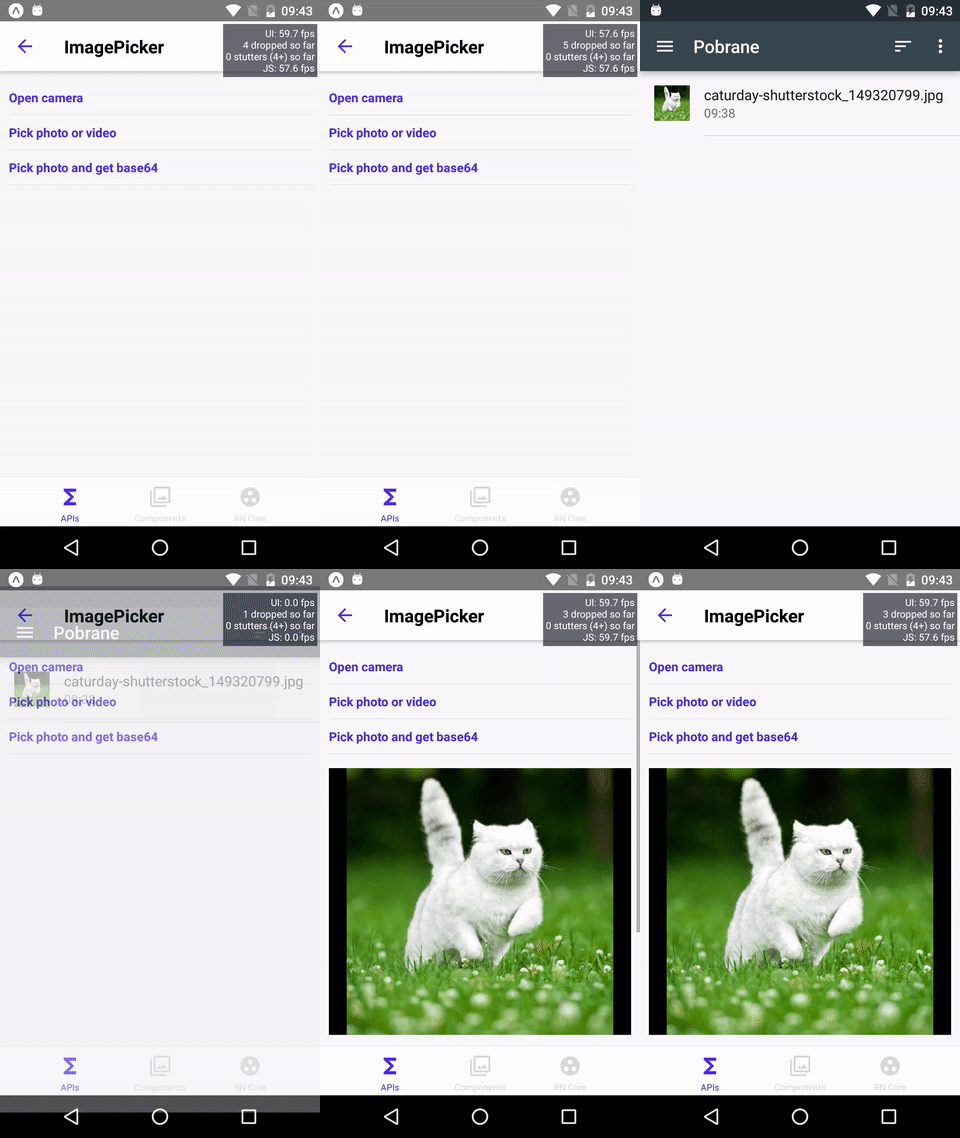
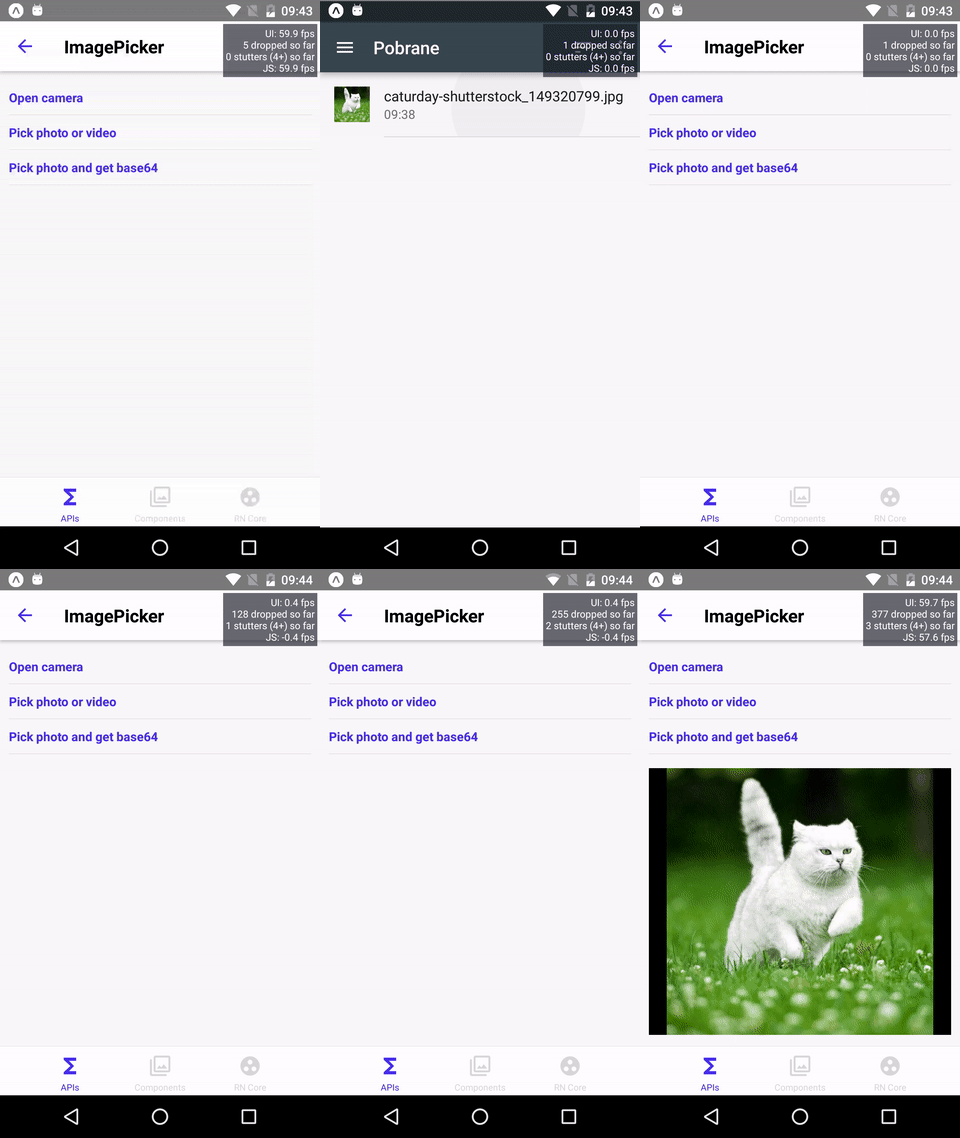
JS thread going baad
What I'm planning to do is:
- adding a
pictureSizeprop - so if you don't need a hi-res photo, choose a smaller size and the photo process will take less time - maybe adding a
manualResumeoption totakePictureAsyncso the preview will be locked until it is released manually withresumePreviewmethod ( so yes, new methods:resume/pausePreview) - I'm still not sure about
skipProcessingbecause of its problems with images' orientation but if some image-processing backend is used this can be solved on its side using the exif info and rotating the image properly
Any ideas/PRs are welcome :)
aalices
on 25 Apr 2018
pictureSize would be exactly what I need. I need picture with about 1MPx size and currently use ImageEditor to shrink result of takePictureAsync before send to server. With pictureSize set to something smaller then default it would be much faster for my use case.
Some other people would appreciate that too (https://expo.canny.io/feature-requests/p/capturequality-prop-for-camera-component).
 pm4r
on 26 Apr 2018
pm4r
on 26 Apr 2018
@aalices Some performance metrics I have collected on this issue. Using console.time.
```
camera.takePictureAsync: 2278.471ms <------------------ takes aprox. 2.2 seconds
this.navigateToChat: 204.853ms
this.props.uploadAndComputerVision: 7.280ms
takePictureAsync: 2501.953ms<------------------- whole function takes 2.5 seconds (aprox. the sum of the above)
```
BeforetakePicture`:

After takePicture:

watadarkstar
on 30 Apr 2018
+1, does anyone have code to add a spinner?
 yehudahkay
on 8 May 2018
yehudahkay
on 8 May 2018
I added managed to add a spinner by setting camera opacity to 0. Perhaps you can add skipProcessing option in the meantime? Especially as we already need to do image manipulation since iOS camera returns rotated pictures.
yehudahkay
on 8 May 2018
Hello i am still experiencing low performances.. I am trying to preview the taken picture as in facebook or snapchat but i have a 3 second delay (at least for androïd) all options were set to minimal i don’t understand since facebook or instagram have been made with react native didnt they use the react native camera module?
 Mnjaro
on 18 May 2018
Mnjaro
on 18 May 2018
@AriaGrt @yehudahkay What I had to do is use react-native-camera due to these performance issues.
watadarkstar
on 18 May 2018
I have the same issue in real device. My phone is samsung s9. Is there any way to solve this problem?
 tamdao
on 28 May 2018
tamdao
on 28 May 2018
@watadarkstar i am using the react-native-camera as well. I am trying to display a preview directly after the image is taken. Problem is, there is this delay so the direct effect on my app is: Instead of seeing a preview instantly after the picture is taken, there is this 3 secs delay where i can still see the camera moving, then, the preview is correctly displayed. I have tried setting all camera options to the lowest but there is nothing i can do. How do Facebook related app get to create this preview instantly? Aren't they using react-native? I am feeling like we are missing something quite important for this module...
Mnjaro
on 1 Jun 2018
@AriaGrt which version of rn-camera are you using?
watadarkstar
on 1 Jun 2018
Using master version accordingly to set up documentation
Mnjaro
on 1 Jun 2018
sdk28 includes onPictureSaved callback you can pass in to takePictureAsync to get rid of this delay. see info here https://github.com/expo/expo-docs/blob/9d5f0e478d1f13a67546e71928b5ebbc61a86799/versions/unversioned/sdk/camera.md#takepictureasync
 brentvatne
on 1 Jun 2018
brentvatne
on 1 Jun 2018
(it'll be released next week most likely)
brentvatne
on 1 Jun 2018
Will it be updated in the react-native-caméra module also?
Mnjaro
on 2 Jun 2018
react-native-camera is based on expo's camera source code (copied and pasted from this repository to another), with some modifications on top. i don't know when the developers that work on it plan on porting this functionality over
brentvatne
on 2 Jun 2018
onPictureSaved has landed https://blog.expo.io/expo-sdk-v28-0-0-is-now-available-f30e8253b530
 tylerbuchea
on 13 Jun 2018
tylerbuchea
on 13 Jun 2018
The SDK 28 solution doesn't really works so well when you need to show the image which is often the case
 amahrt
on 14 Jun 2018
amahrt
on 14 Jun 2018
@amahrt that had also been my thought when reading the docs, there is no way to display the thumbnail immediately? What happened to the idea of adding skipProcessing?
yehudahkay
on 14 Jun 2018
I see that in the blogpost Expo made for version 28, there is a entry for a size param under Camera improvements, but I cant find this param in the documentation?
Add picture size param to let people opt in to low-quality, faster photos. (Helps with this issue.)
 andrzey
on 15 Jun 2018
andrzey
on 15 Jun 2018
@andrzey possibly this? @aalices is this documented somewhere? 🦄
 EvanBacon
on 15 Jun 2018
EvanBacon
on 15 Jun 2018
@amahrt I just tested SDK 28 and if you use pausePreview & resumePreview with the new onPictureSaved callback the user experience will be a bit better because you can now freeze the image as soon as it's taken and the user understands what is going on. See this sample:
let image = await new Promise(async resolve => {
await this.camera.takePictureAsync({onPictureSaved : resolve});
this.camera.pausePreview();
})
this.camera.resumePreview();
//image is available here
 Lidanha
on 16 Jun 2018
Lidanha
on 16 Jun 2018
skipProcessing would sometimes result in a picture with wrong orientation, so we decided not to include it. Whoops, pictureSize doc has vanished 🙈 until we update it, you just have to set pictureSize prop with one of the values returned by getAvailablePictureSizesAsync ( see here: https://docs.expo.io/versions/latest/sdk/camera.html#getavailablepicturesizesasync )
EDIT: here it is: https://docs.expo.io/versions/latest/sdk/camera.html#picturesize-string
aalices
on 18 Jun 2018
@aalices would this code possibly help to get the proper orientation? (i use this code so that the image uploaded to my server will display in the browser with the correct orientation):
if (image.exif && image.exif.Orientation) {
Expo.ImageManipulator.manipulate(image.uri, [{rotate: -image.exif.Orientation}])
}
skipProcessing would probably any processing so Exif won't be available. Even if it would, using ImageManipulator will do exactly the same as takePictureAsync does right now under the hood, so this is not really saving any time :(
aalices
on 18 Jun 2018
Ok hope you can find a solution and thank you!
yehudahkay
on 18 Jun 2018
@aalices thanks for your explenation regarding pictureSize.
However I was not able to utilize this properly properly.
It seems that Camera needs to receive this property when it's created (in the JSX). If you change is after, lets say a second after it does not affect the actual picture size.
The issue is that the function getAvailablePictureSizesAsync is async (meaning, I don't have the value for the pictureSize property when creating the Camera)
Do you have any suggestions?
Thanks! Lidan
Lidanha
on 21 Jun 2018
@Lidanha it should work if you set it in runtime. Can you create a snack reproducing this?
aalices
on 21 Jun 2018
Hey @aalices
Sorry for the delay. Here is the snack I made:
https://snack.expo.io/@lidanh/camera-picturesize-setter-bug
I tested on my Android and here are the results:
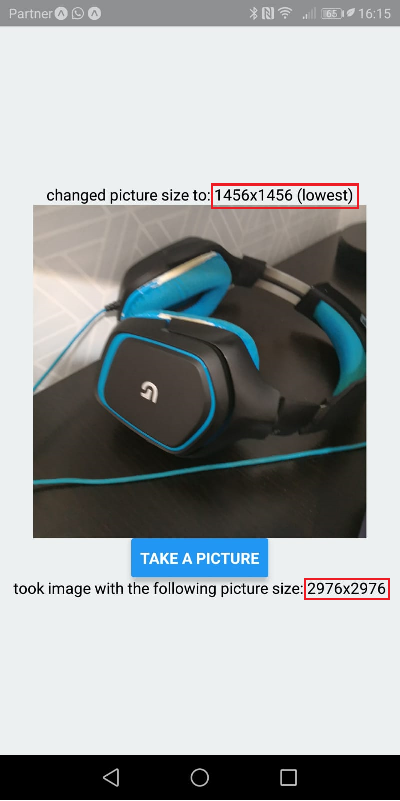
As you can see, I changed the value of pictureSize after the onCameraReady event and it didn't change anything :-(. If I change the JSX directly (hard-coded) it works.
I can also use something like <Camera pictureSize={this.state.pictureSize} /> but this will cause the entire camera to reload when the picture size is initialized and it's something you really notice (~1 second lag)
Thanks,
Lidan
Lidanha
on 24 Jun 2018
@Lidanha you cannot set a prop using (in your case) this.camera.propName = value syntax. pictureSize can only be set like this: <Camera pictureSize={value} /> and it needs some time to reconfigure. You can however post a gif that shows the lag you mentioned
aalices
on 25 Jun 2018
Hey all, I'm going to close this thread for the sake of recordkeeping, as the original issue (delay when taking a picture) has been solved in SDK 28. I've also opened a followup issue about skipProcessing here. Feel free to add any other details that I missed. If you think there are any other unresolved problems (besides skipProcessing) then feel free to open another issue. Thanks!
terribleben
on 2 Jul 2018
Related issues
 joshwils82
·
60Comments
joshwils82
·
60Comments
 galiminus
·
61Comments
galiminus
·
61Comments
 Renji3
·
55Comments
Renji3
·
55Comments
 nnasiruddin
·
105Comments
nnasiruddin
·
105Comments
 jyoo
·
64Comments
jyoo
·
64Comments
Most helpful comment
(it'll be released next week most likely)