Expo: Not valid sdk version after upgrading Android Expo app (
I have Android Expo app (v. 2.10.0) downloaded from the Play Store.
I try to run a new Expo project:
expo init my-new-project
cd my-new-project
expo start
Then I open the app on my device and get a blue screen with: "Something went wrong. 31.0.0. is not a valid SDK version. Options are 32.0.0, UNVERSIONED."
How can I use Expo app on my device with expo project which uses < 32.0.0 expo version?
 trojek
All 68 comments
I am having the same issue
 Hunter315
on 4 Jan 2019
Hunter315
on 4 Jan 2019
Hey, its a bug indeed. Devs are already aware of this: https://github.com/expo/expo/issues/3030
 vractal
on 4 Jan 2019
vractal
on 4 Jan 2019
same issue
 bj-budhathoki
on 5 Jan 2019
bj-budhathoki
on 5 Jan 2019
Same issue.
 ochui
on 5 Jan 2019
ochui
on 5 Jan 2019
Sorry guys for the trouble 😞 We've fixed this issue in v2.10.1 that was released just a few hours later so you should already have an update.
 tsapeta
on 5 Jan 2019
tsapeta
on 5 Jan 2019
Hi guys! I have the same issue here... Update my expo-cli to 2.6.14 version and create a new project. When I run this project, I get this error "32.0.0. is not a valid SDK"
 paegle
on 8 Jan 2019
paegle
on 8 Jan 2019
I have same issue with paegle too after upgrade to SDK32 and change the sdkVersion to "32.0.0" in app.json
 JHMAa
on 8 Jan 2019
JHMAa
on 8 Jan 2019
me too
 davolu
on 11 Jan 2019
davolu
on 11 Jan 2019
Guys, this problem just happen on windows. I migrated to linux and don't have this problem.
paegle
on 11 Jan 2019
same here, please advise on how to fix this...
 Pesche007
on 11 Jan 2019
Pesche007
on 11 Jan 2019
This might be obvious, but I was running an emulator and I had to update Expo on the emulator to get this to work. As a side note, my original emulator was based on an S5 and I also found the new Expo app doesn't seem to work on it, so I made a new emulator based on a Pixel.
 nbayles05
on 12 Jan 2019
nbayles05
on 12 Jan 2019
I am trying to learn React Native and am too running into the "32.0.0 is not a valid SDK version" error when I try to scan the code. Is it no longer possible to use React Native on an Android until this bug is fixed?
 cweibel73
on 4 Mar 2019
cweibel73
on 4 Mar 2019
@cweibel73 You should try to uninstall your Expo app from your simulator or your physical Android device and install it again. Mine fixed by uninstalling the app from the simulator.
 MelYasuda
on 7 Mar 2019
MelYasuda
on 7 Mar 2019
in my case, only have this problem in a release mode :(
 thanh90
on 30 Jul 2019
thanh90
on 30 Jul 2019
on my emulator its showing "34.0.0 is not a valid SDK version". I'm currently using Pixel 2.
 vishesh3006
on 31 Jul 2019
vishesh3006
on 31 Jul 2019
maybe expo publish solves the problem
thanh90
on 31 Jul 2019
I just updated the expo app on my emulator and now it's working fine.
vishesh3006
on 31 Jul 2019
Does the Expo app on Android from the Play Store update automatically? I am experiencing the same issue but I have auto-updates turned on. I am on 2.12.0 and experiencing this.
 anavathe
on 15 Aug 2019
anavathe
on 15 Aug 2019
same issue.
 spathak510
on 23 Sep 2019
spathak510
on 23 Sep 2019
This just started happening while I was developing. I think it was an expo updated that caused this.
 ras-marques
on 23 Sep 2019
ras-marques
on 23 Sep 2019
I think it is because of an update on expo that made the react native SDK version deprecated. There is a set of instructions here that may help.
https://docs.expo.io/versions/latest/workflow/upgrading-expo-sdk-walkthrough/
ras-marques
on 23 Sep 2019
I got this issue re-installing the expo app as well.
 0608jennylee
on 24 Sep 2019
0608jennylee
on 24 Sep 2019
Also experience it after my expo updates.. :(
 arvenjadeaguilar
on 24 Sep 2019
arvenjadeaguilar
on 24 Sep 2019
I have managed to fix this, by performing the following:
Using the latest version of React Native and expo, I had to manually change the SDK version to 35.0.0 in app.json, as for some reason this will still 30.0.0 which caused the error:
"sdkVersion": "35.0.0"
It is also worth checking you package.json for:
"react-native": "https://github.com/expo/react-native/archive/sdk-35.0.0.tar.gz",
Make sure the version number matches, and you should be all good.
 geminicoder
on 4 Oct 2019
geminicoder
on 4 Oct 2019
I've got the same issue, I checked everything you said @geminicoder before for a blank project with Expo SDK 35 and the latest version of Expo client android application and expo-cli, still get stuck in SDK 32 is not valid... =(
 behniaes
on 7 Oct 2019
behniaes
on 7 Oct 2019
Just dowloaded expo and get in the expo app a "35.0.0 is not a valid SDK version. Options are 34.0.0, 31.0.0, 32.0.0, 33.0.0, UNVERSIONED".
I checked app.json and package.json and they match with the expo SDK walkthrough.
Any idea why ?
 theaupoulat
on 9 Oct 2019
theaupoulat
on 9 Oct 2019
Downgraded to 34.0.0 and worked.
theaupoulat
on 9 Oct 2019
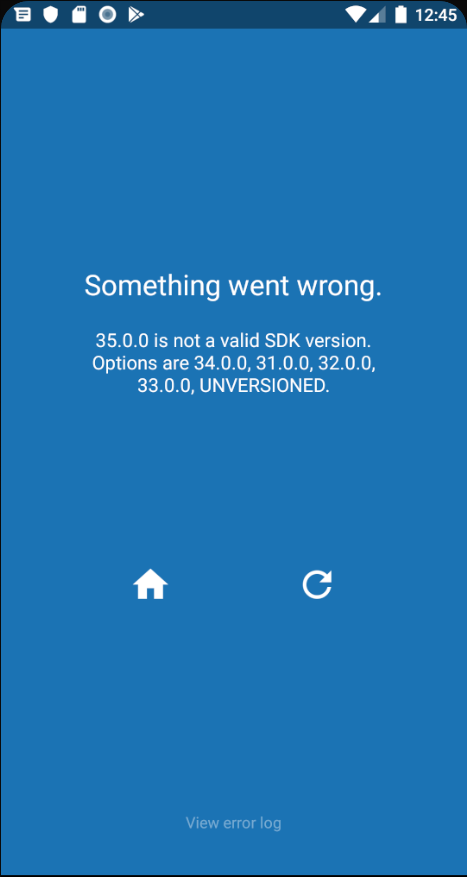
Any solution on this one?
 VanLaerAshley
on 12 Oct 2019
VanLaerAshley
on 12 Oct 2019
@behniaes what command are you using to create your app. I was using create-react-app-native (I think) since using the newer command npx react-native init I haven't had these problems and my app.json has about 2 lines in it now.
geminicoder
on 12 Oct 2019
expo init with expo-cli 3.2.3, but at first, I had a project based on SDK 33, I kept my own created files and folders and then moved them to new blank project based on SDK 35 and magically (!) problem solved, expo upgrade wasn't the answer at all as documentation said to change your project SDK to 35 or at least for me it didn't work
behniaes
on 12 Oct 2019
Any solution on this one?
 ni3galave
on 23 Oct 2019
ni3galave
on 23 Oct 2019
@ni3galave create a blank project with latest expo-cli and then move all your project files and folders related to application source code which you modified or created to the newly created blank project, it'll work like a charm again (Don't move package.json, package-lock.json, app.json or node-modules folder from the old project to new one at all)
behniaes
on 24 Oct 2019
In my case, the problem was caused by an old version of the Expo client in the emulator, because I used emulator for another project before. I simply deleted the client from emulator and ran the project again. The current client version has been installed in the emulator. I assume that on a physical device it should help to update the Expo client as well.
 safmar84
on 9 Nov 2019
safmar84
on 9 Nov 2019
Guys, this problem just happen on windows. I migrated to linux and don't have this problem.
I'm using Linux and I'm still facing this issue
 suraj93p
on 16 Jan 2020
suraj93p
on 16 Jan 2020
Any solution ?
 ricardozv
on 18 Feb 2020
ricardozv
on 18 Feb 2020
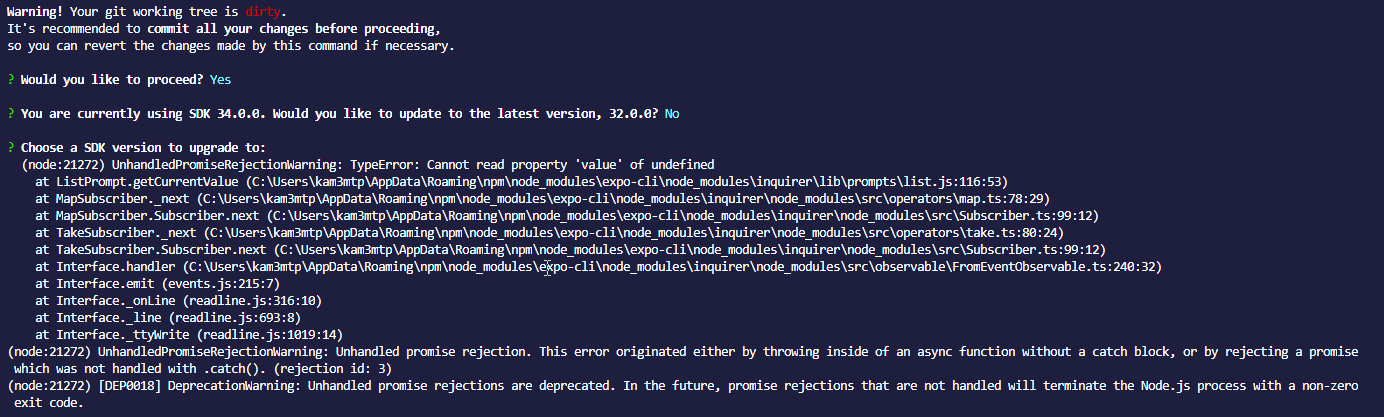
"You are currently using SDK 36.0.0. Would you like to update to the latest version, 32.0.0?" lol....
$ expo --version
3.13.5
Did anyone figure out a solution?
We can't deploy our app because of this issue.
 GrillAndChill
on 11 Mar 2020
GrillAndChill
on 11 Mar 2020
@GrillAndChill - this may have been caused by expo-cli falling back to using a cache of schemas, perhaps due to internet connectivity issues. this has been resolved in https://github.com/expo/expo-cli/pull/1675
install [email protected] and let me know if the issue persists
 brentvatne
on 11 Mar 2020
brentvatne
on 11 Mar 2020
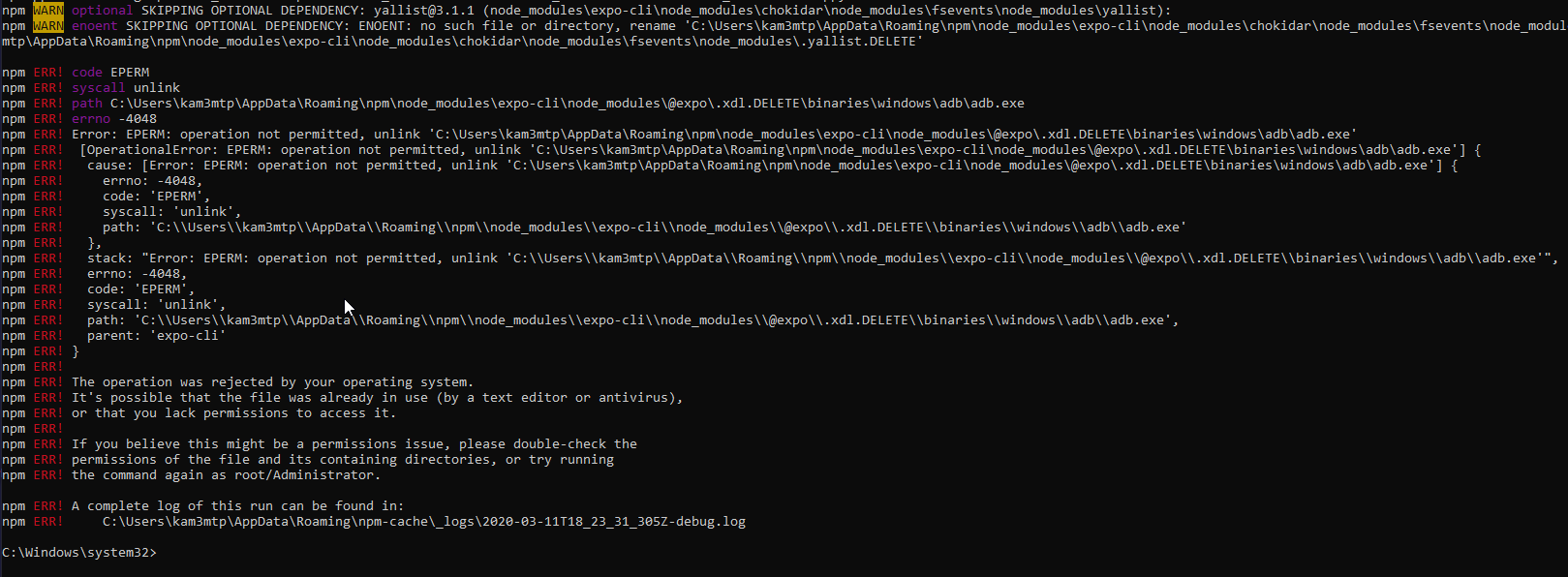
Hi @brentvatne - I have tried npm i -g [email protected] but I get this error (I'm also running the CMD as an admin):
npm ERR! code EPERM
npm ERR! syscall unlink
npm ERR! path C:\Users\kam3mtp\AppData\Roaming\npm\node_modules\expo-cli\node_modules\@expo\.xdl.DELETE\binaries\windows\adb\adb.exe
npm ERR! errno -4048
npm ERR! Error: EPERM: operation not permitted, unlink 'C:\Users\kam3mtp\AppData\Roaming\npm\node_modules\expo-cli\node_modules\@expo\.xdl.DELETE\binaries\windows\adb\adb.exe'
npm ERR!  [OperationalError: EPERM: operation not permitted, unlink 'C:\Users\kam3mtp\AppData\Roaming\npm\node_modules\expo-cli\node_modules\@expo\.xdl.DELETE\binaries\windows\adb\adb.exe'] {
npm ERR!   cause: [Error: EPERM: operation not permitted, unlink 'C:\Users\kam3mtp\AppData\Roaming\npm\node_modules\expo-cli\node_modules\@expo\.xdl.DELETE\binaries\windows\adb\adb.exe'] {
npm ERR!     errno: -4048,
npm ERR!     code: 'EPERM',
npm ERR!     syscall: 'unlink',
npm ERR!     path: 'C:\\Users\\kam3mtp\\AppData\\Roaming\\npm\\node_modules\\expo-cli\\node_modules\\@expo\\.xdl.DELETE\\binaries\\windows\\adb\\adb.exe'
npm ERR!   },
npm ERR!   stack: "Error: EPERM: operation not permitted, unlink 'C:\\Users\\kam3mtp\\AppData\\Roaming\\npm\\node_modules\\expo-cli\\node_modules\\@expo\\.xdl.DELETE\\binaries\\windows\\adb\\adb.exe'",
npm ERR!   errno: -4048,
npm ERR!   code: 'EPERM',
npm ERR!   syscall: 'unlink',
npm ERR!   path: 'C:\\Users\\kam3mtp\\AppData\\Roaming\\npm\\node_modules\\expo-cli\\node_modules\\@expo\\.xdl.DELETE\\binaries\\windows\\adb\\adb.exe',
npm ERR!   parent: 'expo-cli'
npm ERR! }
npm ERR!
npm ERR! The operation was rejected by your operating system.
npm ERR! It's possible that the file was already in use (by a text editor or antivirus),
npm ERR! or that you lack permissions to access it.
npm ERR!
npm ERR! If you believe this might be a permissions issue, please double-check the
npm ERR! permissions of the file and its containing directories, or try running
npm ERR! the command again as root/Administrator.

npm ERR! A complete log of this run can be found in:
npm ERR!     C:\Users\kam3mtp\AppData\Roaming\npm-cache\_logs\2020-03-11T18_23_31_305Z-debug.log
GrillAndChill
on 11 Mar 2020
you might want to try rebooting your machine and running it again, seems related to https://github.com/expo/expo-cli/issues/283
brentvatne
on 11 Mar 2020
@brentvatne I was able to update expo to 3.13.6, but I still have the same issue
GrillAndChill
on 11 Mar 2020
can you try deleting the ~/.expo/cache/ directory?
brentvatne
on 12 Mar 2020
@brentvatne looks like I don't have a cache directory.

GrillAndChill
on 12 Mar 2020
🤔 that does look like it could be a problem. can you send me the output of expo diagnostics @GrillAndChill?
brentvatne
on 12 Mar 2020
@brentvatne Sure thing!
Expo CLI 3.13.6 environment info:
    System:
      OS: Windows 10 10.0.17763
    Binaries:
      Node: 12.13.1 - C:\Program Files\nodejs\node.EXE
      Yarn: 1.16.0 - C:\Program Files (x86)\Yarn\bin\yarn.CMD
      npm: 6.14.1 - C:\Program Files\nodejs\npm.CMD
    npmPackages:
      expo: ^34.0.0 => 36.0.2
      react: 16.8.3 => 16.8.3
      react-native: https://github.com/expo/react-native/archive/sdk-34.0.2.tar.gz => 0.61.4
      react-navigation: ^3.0.9 => 3.13.0
@GrillAndChill - can you access this url from your machine? https://expo.io/--/xdl-schema/36.0.0
brentvatne
on 12 Mar 2020
@brentvatne yes I can, and I see this big json object
{
  "schema": {
    "type": "object",
    "properties": {
      "name": {
        "description":
          "The name of your app as it appears both within Expo and on your home screen as a standalone app.",
        "type": "string"
      },
      "description": {
        "description": "A short description of what your app is and why it is great.",
        "type": "string"
      },
      "slug": {
        "description": "The friendly url name for publishing. eg: `expo.io/@your-username/slug`.",
        "type": "string",
        "pattern": "^[a-zA-Z0-9_\\-]+$"
      },
      "owner": {
        "description": "The username of the account under which this app is published. If not specified, the app is published as the currently signed-in user.",
        "type": "string"
      },
      "privacy": {
        "description":
          "Either `public` or `unlisted`. If not provided, defaults to `unlisted`. In the future `private` will be supported. `unlisted` hides the experience from search results.",
        "enum": ["public", "unlisted"],
        "type": ["array", "boolean", "number", "object", "string", "null"]
      },
      "sdkVersion": {
        "description":
          "The Expo sdkVersion to run the project on. This should line up with the version specified in your package.json.",
        "type": "string",
        "pattern": "^(\\d+\\.\\d+\\.\\d+)|(UNVERSIONED)$"
      },
      "version": {
        "description": "Your app version, use whatever versioning scheme that you like.",
        "type": "string"
      },
......
it looks like the cache might actually be elsewhere on windows:
what is the contents of your AppData/Local/Expo directory?
also, which shell are you using?
brentvatne
on 12 Mar 2020
@brentvatne This is what I have in AppData/Local/Expo
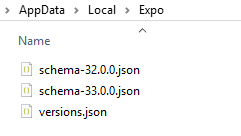
I use Bash and CMD
GrillAndChill
on 12 Mar 2020
@GrillAndChill - can you share the contents of versions.json?
is there any chance that the directory is not writable by your user?
brentvatne
on 12 Mar 2020
@brentvatne
I can write to the directory with no issues.
This is the content of versions.json
{"androidUrl":"https://d1ahtucjixef4r.cloudfront.net/Exponent-2.11.2.apk","androidVersion":"2.11.2","iosUrl":"https://dpq5q02fu5f55.cloudfront.net/Exponent-2.11.1.tar.gz","iosVersion":"2.11.1","sdkVersions":{"10.0.0":{"expoReactNativeTag":"sdk-10.0.0","exponentReactNativeTag":"sdk-10.0.0","facebookReactNativeVersion":"0.33.0","isDeprecated":true},"11.0.0":{"expoReactNativeTag":"sdk-11.0.0","exponentReactNativeTag":"sdk-11.0.0","facebookReactNativeVersion":"0.36.0","isDeprecated":true},"12.0.0":{"expoReactNativeTag":"sdk-12.0.0","exponentReactNativeTag":"sdk-12.0.0","facebookReactNativeVersion":"0.37.0","isDeprecated":true},"13.0.0":{"androidExpoViewUrl":"https://s3.amazonaws.com/exp-exponent-view-code/android-v1.12.1-sdk13.0.0-f2251910-2ae0-4cc9-9cd0-4c28771fef12.tar.gz","androidExponentViewUrl":"https://s3.amazonaws.com/exp-exponent-view-code/android-v1.12.1-sdk13.0.0-f2251910-2ae0-4cc9-9cd0-4c28771fef12.tar.gz","expoReactNativeTag":"sdk-13.0.0","exponentReactNativeTag":"sdk-13.0.0","facebookReactNativeVersion":"0.40.0","iosExpoViewUrl":"https://s3.amazonaws.com/exp-exponent-view-code/ios-v1.12.2-sdk13.0.0-15988a32-c353-4625-a704-a430f509f621.tar.gz","iosExponentViewUrl":"https://s3.amazonaws.com/exp-exponent-view-code/ios-v1.12.2-sdk13.0.0-15988a32-c353-4625-a704-a430f509f621.tar.gz","isDeprecated":true},"14.0.0":{"androidExpoViewUrl":"https://s3.amazonaws.com/exp-exponent-view-code/android-v1.13.2-sdk14.0.0-5d431a7c-7837-4793-96f3-a1a131b6eadf.tar.gz","androidExponentViewUrl":"https://s3.amazonaws.com/exp-exponent-view-code/android-v1.13.2-sdk14.0.0-5d431a7c-7837-4793-96f3-a1a131b6eadf.tar.gz","expoReactNativeTag":"sdk-14.0.0","exponentReactNativeTag":"sdk-14.0.0","facebookReactNativeVersion":"0.41.0","facebookReactVersion":"~15.4.0","iosExpoViewUrl":"https://s3.amazonaws.com/exp-exponent-view-code/ios-v1.13.1-sdk14.0.0-06dab271-a23b-436f-a19e-1c86c16067b9.tar.gz","iosExponentViewUrl":"https://s3.amazonaws.com/exp-exponent-view-code/ios-v1.13.1-sdk14.0.0-06dab271-a23b-436f-a19e-1c86c16067b9.tar.gz","isDeprecated":true},"15.0.0":{"androidExpoViewUrl":"https://s3.amazonaws.com/exp-exponent-view-code/android-v1.14.0-sdk15.0.0-c07a9392-71db-4330-8452-98080b6b52f1.tar.gz","expoReactNativeTag":"sdk-15.0.0","facebookReactNativeVersion":"0.42.0","facebookReactVersion":"~15.4.0","iosExpoViewUrl":"https://s3.amazonaws.com/exp-exponent-view-code/ios-v1.14.3-sdk15.0.0-9cc802d5-6c7b-4b26-8495-bd86d1450edf.tar.gz","isDeprecated":true},"16.0.0":{"androidExpoViewUrl":"https://s3.amazonaws.com/exp-exponent-view-code/android-v1.15.1-sdk16.0.0-2448b7f4-9b6a-4fd0-906d-8bd7da336bd7.tar.gz","expoReactNativeTag":"sdk-16.0.0","facebookReactNativeVersion":"0.43.0","facebookReactVersion":"16.0.0-alpha.6","iosExpoViewUrl":"https://s3.amazonaws.com/exp-exponent-view-code/ios-v1.15.2-sdk16.0.0-df18e714-3618-4db8-81db-48efa205fba6.tar.gz","iosVersion":"1.15.2","isDeprecated":true},"17.0.0":{"androidExpoViewUrl":"https://s3.amazonaws.com/exp-exponent-view-code/android-v1.16.1-sdk17.0.0-87570a36-13ff-4017-9b89-6c9930b78572.tar.gz","expoReactNativeTag":"sdk-17.0.0","facebookReactNativeVersion":"0.44.0","facebookReactVersion":"16.0.0-alpha.6","iosExpoViewUrl":"https://s3.amazonaws.com/exp-exponent-view-code/ios-v1.16.2-sdk17.0.0-b5bce87c-1a42-4b6d-888f-877f855c9680.tar.gz","iosVersion":"1.16.2","isDeprecated":true},"18.0.0":{"androidExpoViewUrl":"https://s3.amazonaws.com/exp-exponent-view-code/android-v1.17.0-sdk18.0.0-4680412d-04c4-47ed-9161-88e01d76be96.tar.gz","expoReactNativeTag":"sdk-18.0.0","facebookReactNativeVersion":"0.45.0","facebookReactVersion":"16.0.0-alpha.12","iosExpoViewUrl":"https://s3.amazonaws.com/exp-exponent-view-code/ios-v1.17.0-sdk18.0.0-b4aff885-a9a8-4733-9fa9-ec28bef01e15.tar.gz","iosVersion":"1.17.0","isDeprecated":true},"19.0.0":{"androidExpoViewUrl":"https://s3.amazonaws.com/exp-exponent-view-code/android-v1.18.4-sdk19.0.0-3fb414c9-8696-4966-a0ac-9ca424242424.tar.gz","expoReactNativeTag":"sdk-19.0.0","facebookReactNativeVersion":"0.46.1","facebookReactVersion":"16.0.0-alpha.12","iosExpoViewUrl":"https://s3.amazonaws.com/exp-exponent-view-code/ios-v1.18.2-sdk19.0.0-3fabbbb7-61b3-4a1e-9932-12d0aa6af276.tar.gz","iosVersion":"1.18.2","isDeprecated":true},"20.0.0":{"androidExpoViewUrl":"https://s3.amazonaws.com/exp-exponent-view-code/android-v1.19.1-sdk20.0.0-5b613054-1239-439f-9c3a-0aad67cbe39a.tar.gz","expoReactNativeTag":"sdk-20.0.0","facebookReactNativeVersion":"0.47.1","facebookReactVersion":"16.0.0-alpha.12","iosExpoViewUrl":"https://s3.amazonaws.com/exp-exponent-view-code/ios-v1.19.2-sdk20.0.0-71c3afdd-3b31-4722-9657-bbf07ea645d8.tar.gz","iosVersion":"1.19.2","isDeprecated":true,"releaseNoteUrl":"https://blog.expo.io/expo-sdk-v20-0-0-is-now-available-79f84232a9d1"},"21.0.0":{"androidExpoViewUrl":"https://s3.amazonaws.com/exp-exponent-view-code/android-v1.20.0-sdk21.0.0-38791499-fe99-4600-950d-cf7e2e85cea9.tar.gz","expoReactNativeTag":"sdk-21.0.0","facebookReactNativeVersion":"0.48.4","facebookReactVersion":"16.0.0-alpha.12","iosExpoViewUrl":"https://s3.amazonaws.com/exp-exponent-view-code/ios-v1.20.5-sdk21.0.0-11e2eb3f-807e-48d4-8685-b0694f874637.tar.gz","iosVersion":"1.20.5","isDeprecated":true,"releaseNoteUrl":"https://blog.expo.io/expo-sdk-21-0-0-is-now-available-be33b79921b7"},"22.0.0":{"androidExpoViewUrl":"https://s3.amazonaws.com/exp-exponent-view-code/android-v2.0.0-sdk22.0.0-7432f75c-05a1-4826-a456-02875e338222.tar.gz","expoReactNativeTag":"sdk-22.0.0","facebookReactNativeVersion":"0.49.3","facebookReactVersion":"16.0.0-beta.5","iosExpoViewUrl":"https://s3.amazonaws.com/exp-exponent-view-code/ios-v2.0.4-sdk22.0.0-10110e7c-e9b1-43e6-b7e0-8a0e971480e8.tar.gz","iosVersion":"2.0.4","isDeprecated":true,"releaseNoteUrl":"https://blog.expo.io/expo-sdk-v22-0-0-is-now-available-7745bfe97fc6"},"23.0.0":{"androidExpoViewUrl":"https://s3.amazonaws.com/exp-exponent-view-code/android-v2.1.2-sdk23.0.0-d47f172b-1ed3-4c8f-9e48-239052c678b6.tar.gz","expoReactNativeTag":"sdk-23.0.0","facebookReactNativeVersion":"0.50.3","facebookReactVersion":"16.0.0","iosExpoViewUrl":"https://s3.amazonaws.com/exp-exponent-view-code/ios-v2.1.4-sdk23.0.0-f67c5bc3-4a27-40f6-8686-91e8f868a145.tar.gz","iosVersion":"2.1.4","isDeprecated":true,"releaseNoteUrl":"https://blog.expo.io/expo-sdk-v23-0-0-is-now-available-be0a8c655414"},"24.0.0":{"androidExpoViewUrl":"https://s3.amazonaws.com/exp-exponent-view-code/android-v2.2.0-sdk24.0.0-16620828-4df4-4e2d-b0af-5dc1352b82cb.tar.gz","expoReactNativeTag":"sdk-24.0.0","facebookReactNativeVersion":"0.51.0","facebookReactVersion":"16.0.0","iosExpoViewUrl":"https://s3.amazonaws.com/exp-exponent-view-code/ios-v2.2.1-sdk24.0.0-36ff2264-629d-44df-a819-8c982454e5e8.tar.gz","iosVersion":"2.2.1","isDeprecated":true,"releaseNoteUrl":"https://blog.expo.io/expo-sdk-v24-0-0-is-now-available-bfcac3b50d51"},"25.0.0":{"androidExpoViewUrl":"https://s3.amazonaws.com/exp-exponent-view-code/android-v2.3.0-sdk25.0.0-0c32461b-a7c6-4ddc-b85b-32a80c4f18d9.tar.gz","expoReactNativeTag":"sdk-25.0.0","facebookReactNativeVersion":"0.52.0","facebookReactVersion":"16.2.0","iosExpoViewUrl":"https://s3.amazonaws.com/exp-exponent-view-code/ios-v2.3.3-sdk25.0.0-e7a4361a-631d-4caf-9692-1880d71c394a.tar.gz","iosVersion":"2.3.3","isDeprecated":true,"releaseNoteUrl":"https://blog.expo.io/expo-sdk-v25-0-0-is-now-available-714d10a8c3f7"},"26.0.0":{"androidExpoViewUrl":"https://s3.amazonaws.com/exp-exponent-view-code/android-v2.4.0-sdk26.0.0-e63d9209-070c-4118-b06b-c60e82da0b66.tar.gz","expoReactNativeTag":"sdk-26.0.0","facebookReactNativeVersion":"0.54.2","facebookReactVersion":"16.3.0-alpha.1","iosExpoViewUrl":"https://s3.amazonaws.com/exp-exponent-view-code/ios-v2.4.4-sdk26.0.0-3bd935c7-cdd3-4002-8e44-4df857a675f2.tar.gz","iosVersion":"2.4.4","releaseNoteUrl":"https://blog.expo.io/expo-sdk-v26-0-0-is-now-available-2be6d9805b31"},"27.0.0":{"androidExpoViewUrl":"https://s3.amazonaws.com/exp-exponent-view-code/android-v2.5.3-sdk27.0.0-408c8d77-8d1f-4784-b7b4-93826250663a.tar.gz","expoReactNativeTag":"sdk-27.0.0","facebookReactNativeVersion":"0.55.2","facebookReactVersion":"16.3.1","iosExpoViewUrl":"https://s3.amazonaws.com/exp-exponent-view-code/ios-v2.5.10-sdk27.0.0-7e6dd135-e649-48e2-ab7c-e76521ce6259.tar.gz","iosVersion":"2.5.10","releaseNoteUrl":"https://blog.expo.io/expo-sdk-v27-0-0-is-now-available-898bf1e5b0e4"},"28.0.0":{"androidExpoViewUrl":"https://s3.amazonaws.com/exp-exponent-view-code/android-v2.6.4-sdk28.0.0-9ba3198a-7d95-4769-9e16-178a37a70cae.tar.gz","expoReactNativeTag":"sdk-28.0.0","facebookReactNativeVersion":"0.55.4","facebookReactVersion":"16.3.1","iosExpoViewUrl":"https://s3.amazonaws.com/exp-exponent-view-code/ios-v2.6.8-sdk28.0.0-d3178d29-6e12-458b-bfeb-8b7538943b48.tar.gz","iosVersion":"2.6.8","releaseNoteUrl":"https://blog.expo.io/expo-sdk-v28-0-0-is-now-available-f30e8253b530"},"29.0.0":{"androidExpoViewUrl":"https://s3.amazonaws.com/exp-exponent-view-code/android-v2.7.2-sdk29.0.0-54e8f46d-36a6-460f-b0f9-e1043f28b215.tar.gz","expoReactNativeTag":"sdk-29.0.0","expokitNpmPackage":"[email protected]","facebookReactNativeVersion":"0.55.4","facebookReactVersion":"16.3.1","iosExpoViewUrl":"https://s3.amazonaws.com/exp-exponent-view-code/ios-v2.7.8-sdk29.0.0-02bd60c8-f134-4f5e-b5c0-1898ffb57231.tar.gz","iosVersion":"2.7.8","releaseNoteUrl":"https://blog.expo.io/expo-sdk-v29-0-0-is-now-available-f001d77fadf"},"30.0.0":{"androidExpoViewUrl":"https://s3.amazonaws.com/exp-exponent-view-code/android-v2.8.1-sdk30.0.0-0fde103b-be3d-43f9-bc48-3035aa136971.tar.gz","expoReactNativeTag":"sdk-30.0.0","expokitNpmPackage":"[email protected]","facebookReactNativeVersion":"0.55.4","facebookReactVersion":"16.3.1","iosExpoViewUrl":"https://s3.amazonaws.com/exp-exponent-view-code/ios-v2.8.4-sdk30.0.0-3de13133-1adc-4ba1-8569-a84011e570b4.tar.gz","iosVersion":"2.8.4","releaseNoteUrl":"https://blog.expo.io/expo-sdk-30-0-0-is-now-available-e64d8b1db2a7"},"31.0.0":{"androidExpoViewUrl":"https://s3.amazonaws.com/exp-exponent-view-code/android-v2.9.2-sdk31.0.0-f0c63b44-0556-45f2-b4b9-ff5082f9ef72.tar.gz","expoReactNativeTag":"sdk-31.0.0","expokitNpmPackage":"[email protected]","facebookReactNativeVersion":"0.57.1","facebookReactVersion":"16.5.0","iosExpoViewUrl":"https://s3.amazonaws.com/exp-exponent-view-code/ios-v2.9.0-sdk31.0.0-250a3991-b623-4f9c-b07f-0b9ed7e8c4c9.tar.gz","iosVersion":"2.9.0","releaseNoteUrl":"https://blog.expo.io/expo-sdk-v31-0-0-is-now-available-cad6d0463f49"},"32.0.0":{"androidExpoViewUrl":"https://s3.amazonaws.com/exp-exponent-view-code/android-v2.10.8-sdk32.0.0-bca0f957-de78-44c8-91ed-f3151372d79d.tar.gz","expoReactNativeTag":"sdk-32.0.0","expokitNpmPackage":"[email protected]","facebookReactNativeVersion":"0.57.1","facebookReactVersion":"16.5.0","iosExpoViewUrl":"https://s3.amazonaws.com/exp-exponent-view-code/ios-v2.10.6-sdk32.0.0-e50ee83a-41bd-4965-b067-4c815a3b3fcc.tar.gz","iosVersion":"2.10.6","releaseNoteUrl":"https://blog.expo.io/expo-sdk-v32-0-0-is-now-available-6b78f92a6c52"},"33.0.0":{"androidExpoViewUrl":"https://s3.amazonaws.com/exp-exponent-view-code/android-v2.11.2-sdk33.0.0-14eac386-52d3-401f-9daa-8f93307457f9.tar.gz","expoReactNativeTag":"sdk-33.0.0","expokitNpmPackage":"[email protected]","facebookReactNativeVersion":"0.59.8","facebookReactVersion":"16.8.3","iosExpoViewUrl":"https://s3.amazonaws.com/exp-exponent-view-code/ios-v2.11.0-sdk33.0.0-4b05019b-b5d6-454b-8350-09c2187b9f91.tar.gz","iosVersion":"2.11.0","packagesToInstallWhenEjecting":{"react-native-unimodules":"^0.4.0"}},"7.0.0":{"expoReactNativeTag":"sdk-7.0.0","exponentReactNativeTag":"sdk-7.0.0","facebookReactNativeVersion":"0.27.0","isDeprecated":true},"8.0.0":{"expoReactNativeTag":"sdk-8.0.0","exponentReactNativeTag":"sdk-8.0.0","facebookReactNativeVersion":"0.31.0","isDeprecated":true},"9.0.0":{"expoReactNativeTag":"sdk-9.0.0","exponentReactNativeTag":"sdk-9.0.0","facebookReactNativeVersion":"0.31.0","isDeprecated":true}},"starterApps":{"default":{"description":"Basic app with tab navigation.","version":"1.5.1"}},"templates":[{"description":"The Blank project template includes the minimum dependencies to run and an empty root component.","iconUrl":"https://d306o6r76fnu7o.cloudfront.net/template_icon_blank.png","id":"blank","name":"Blank","url":"https://d306o6r76fnu7o.cloudfront.net/blank-17.0.1.tar.gz","version":"17.0.1"},{"description":"The Tab Navigation project template includes several example screens.","iconUrl":"https://d306o6r76fnu7o.cloudfront.net/template_icon_tabs.png","id":"tabs","name":"Tab Navigation","url":"https://d306o6r76fnu7o.cloudfront.net/tabs-17.0.1.tar.gz","version":"17.0.1"}],"templatesv2":[{"description":"The Blank project template includes the minimum dependencies to run and an empty root component.","iconUrl":"https://d306o6r76fnu7o.cloudfront.net/template_icon_blank.png","id":"blank","name":"Blank","url":"https://d306o6r76fnu7o.cloudfront.net/blank-31.0.1.tar.gz","version":"31.0.1"},{"description":"The Tab Navigation project template includes several example screens.","iconUrl":"https://d306o6r76fnu7o.cloudfront.net/template_icon_tabs.png","id":"tabs","name":"Tab Navigation","url":"https://d306o6r76fnu7o.cloudfront.net/tabs-31.0.1.tar.gz","version":"31.0.1"}],"turtleSdkVersions":{"android":"33.0.0","ios":"33.0.0"}}
GrillAndChill
on 12 Mar 2020
that cache is very much out of date. can you try deleting that file and running the command again?
brentvatne
on 12 Mar 2020
@brentvatne woohoo! it worked!! 🤝🤝
I guess we will have to delete the file before running expo upgrade or would be easier if expo automatically deletes versions.json before upgrading. Thanks for the help!!

GrillAndChill
on 12 Mar 2020
strange... i'm not sure why that wasn't updating. it should not have stayed cached with that value. i'll look into it
brentvatne
on 12 Mar 2020
weird question - if you still have those files in your bin can you check the file creation / modification dates?
brentvatne
on 12 Mar 2020
@brentvatne sure thing!
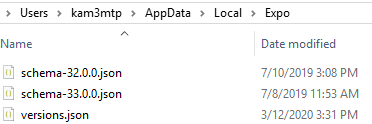
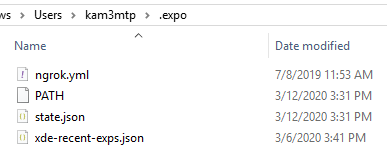
GrillAndChill
on 12 Mar 2020
if anyone else encounters this issue, please:
1) update to the latest version of expo-cli.
2) if updating doesn't resolve the issue, try running expo-cli with the SKIP_CACHE environment variable, eg: SKIP_CACHE=true expo start. if that fixes it, then delete the cached schema/versions in ~/.expo/cache (mac) or Users/{yourusername}/AppDate/Local/Expo (windows) or ~/.cache/expo (other)
brentvatne
on 12 Mar 2020
Downgraded to 34.0.0 and worked.
I had the same idea, but how?
 KZTN
on 1 Apr 2020
KZTN
on 1 Apr 2020
Ok, I solved this problem manually reinstalling the app(using android device as emulator). Prettier easier than downgrade the expo-cli tho.
KZTN
on 1 Apr 2020
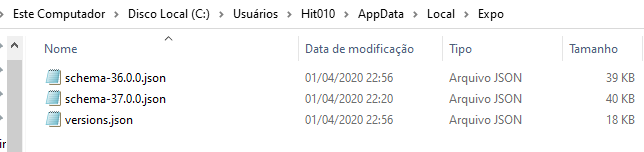
I got the same issue a the 37 version. I tried delete the file versions.json but the error remains. I'm using the latest version of expo-cli and it works on emulator but pop this error on device.
 devfabiorm
on 2 Apr 2020
devfabiorm
on 2 Apr 2020
update the expo client on your device to the latest version
brentvatne
on 2 Apr 2020
I did more than one time to be sure that it wasn't the issue (I've deleted all cache from this app and then delete it, after I downloaded again from Play Store). I've noticed that my older project which uses expo 36 works normally.
versions.zip
devfabiorm
on 2 Apr 2020
@yagamikisuke - can you send me a screenshot of the projects tab in expo client on your phone? i think it probably doesn't have the latest version of the client. i saw a similar issue earlier where someone deleted and reinstalled but they didn't update, maybe that's a thing that's easy to do on android
brentvatne
on 2 Apr 2020


devfabiorm
on 2 Apr 2020
ok your app does support sdk 37. what is the exact error message that you're seeing? can you post a screenshot of that too?
brentvatne
on 2 Apr 2020

This screenshot is from when I sent the first message, now I try again because I've uninstalled everything and re-installed. Gime some minutes.
devfabiorm
on 2 Apr 2020
Well, now we're good hehe
I believe that what you said it's true because I remember that in the projects tab was written that it supported up to 36 version, but after some times doing the same process now it shows that supports 37 version.
Anyway, thanks for the help.
devfabiorm
on 2 Apr 2020
Can you leave the instructions / commends to fix the issue, please?
 tabbyson
on 2 Apr 2020
tabbyson
on 2 Apr 2020
@tabbyson - the solution was to update expo client.
brentvatne
on 2 Apr 2020
Related issues
 sweebee
·
61Comments
sweebee
·
61Comments
 Codigo-Fuentes
·
53Comments
Codigo-Fuentes
·
53Comments
 Renji3
·
55Comments
Renji3
·
55Comments
 hesyifei
·
60Comments
hesyifei
·
60Comments
 cruzach
·
88Comments
cruzach
·
88Comments
Most helpful comment
In my case, the problem was caused by an old version of the Expo client in the emulator, because I used emulator for another project before. I simply deleted the client from emulator and ran the project again. The current client version has been installed in the emulator. I assume that on a physical device it should help to update the Expo client as well.