Expo: Apps sometimes crash (call stack at BaseExperienceActivity$2.run)
after the battery bug i released a new android app. But I still see some crashes:
SDK: 35
java.lang.RuntimeException:
  at host.exp.exponent.experience.BaseExperienceActivity$2.run (BaseExperienceActivity.java:196)
  at android.os.Handler.handleCallback (Handler.java:873)
  at android.os.Handler.dispatchMessage (Handler.java:99)
  at android.os.Looper.loop (Looper.java:214)
  at android.app.ActivityThread.main (ActivityThread.java:7076)
  at java.lang.reflect.Method.invoke (Method.java)
  at com.android.internal.os.RuntimeInit$MethodAndArgsCaller.run (RuntimeInit.java:493)
  at com.android.internal.os.ZygoteInit.main (ZygoteInit.java:965)
Devices:
Galaxy A50 (a50) android 9
Galaxy A40 (a40) android 9
 sweebee
All 61 comments
You might want to check out this forum post which points to GCM as the cause of this crash
 cruzach
on 2 Oct 2019
cruzach
on 2 Oct 2019
I'm not using GCM. I'm using FCM. Also this only happens on SDK35. on 34 it doesnt happen.
sweebee
on 5 Oct 2019
Okay, can you provide more information regarding this? We provide an issue template that asks for everything we need. Most helpful would be a repro
cruzach
on 7 Oct 2019
We see this as well. See below:
🐛 Bug Report
Environment
Expo CLI 3.1.2 environment info:
System:
OS: macOS 10.15
Shell: 3.2.57 - /bin/bash
Binaries:
Node: 10.16.3 - /var/folders/tk/1c86q3t945j098jmhrnbzh7m0000gn/T/yarn--1570607473880-0.8337767224368917/node
Yarn: 1.17.3 - /var/folders/tk/1c86q3t945j098jmhrnbzh7m0000gn/T/yarn--1570607473880-0.8337767224368917/yarn
npm: 6.9.0 - ~/.nvm/versions/node/v10.16.3/bin/npm
IDEs:
Xcode: 11.0/11A419c - /usr/bin/xcodebuild
npmPackages:
expo: ^35.0.0 => 35.0.0
react: 16.8.3 => 16.8.3
react-native: https://github.com/expo/react-native/archive/sdk-35.0.0.tar.gz => 0.59.8
react-navigation: ^3.11.1 => 3.12.1
We target Android and iOS. Bug appears on Android.
Steps to Reproduce
Some users report crashes on app start. We see this in Google Play Console:
java.lang.RuntimeException:
  at host.exp.exponent.experience.BaseExperienceActivity$2.run (BaseExperienceActivity.java:196)
  at android.os.Handler.handleCallback (Handler.java:873)
  at android.os.Handler.dispatchMessage (Handler.java:99)
  at android.os.Looper.loop (Looper.java:214)
  at android.app.ActivityThread.main (ActivityThread.java:6990)
  at java.lang.reflect.Method.invoke (Method.java)
  at com.android.internal.os.RuntimeInit$MethodAndArgsCaller.run (RuntimeInit.java:493)
  at com.android.internal.os.ZygoteInit.main (ZygoteInit.java:1445)
Expected Behavior
The app starts without crashing.
Actual Behavior
The app crashes.
Reproducible Demo
I cannot reproduce it on a device of my own, so it's going to be tricky I suppose?
 linus
on 9 Oct 2019
linus
on 9 Oct 2019
@linus are you seeing this on certain devices only? Does it happen with all SDK 35 builds, or is it after publishing a new bundle that causes the error?
cruzach
on 9 Oct 2019
@cruzach tricky to say -- we see it in Google Play Console, for a bunch of Android versions and device makes. It started on upgrade to Expo SDK 35, but right now I can't say if it's tied to publishing new bundles. It's a minority of users that are affected.
linus
on 9 Oct 2019
I have the same crashes. Any solution? I'm using expo 35.0.1

 RodolfoGS
on 14 Nov 2019
RodolfoGS
on 14 Nov 2019
any updates ?
 bulby97
on 26 Nov 2019
bulby97
on 26 Nov 2019
at SDK 36 same
 rxhivzero
on 20 Dec 2019
rxhivzero
on 20 Dec 2019
No updates yet, what would really help us debug this is a method to reproduce the issue on a blank expo project
cruzach
on 20 Dec 2019
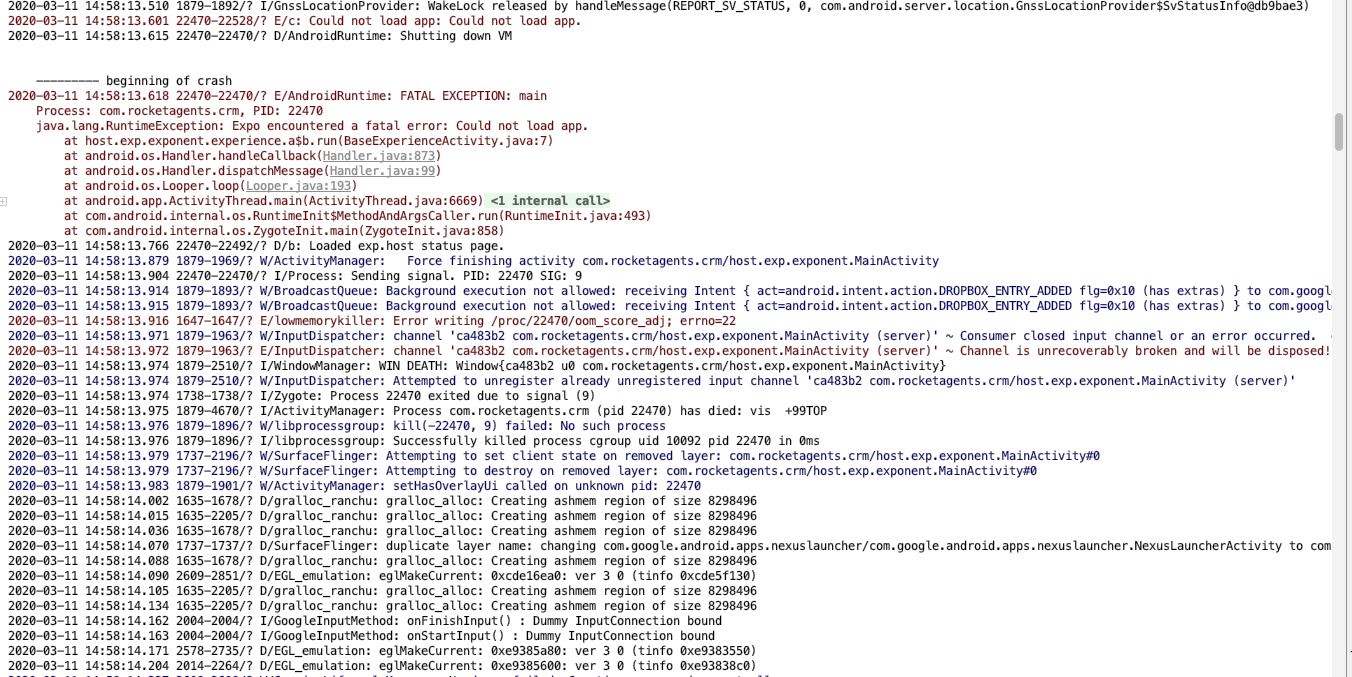
Can this be the same issue or it is sth different? (SDK 36)
I realy don't know what to do..it doesn't work only in standalone APK. It works correctly in debug.
2019-12-20 16:56:22.269 3073-3118/? E/BufferQueueProducer: [xxxxx.xxx.xxx/host.exp.exponent.MainActivity[25602]#0] disconnect: not connected (req=1)
2019-12-20 16:56:25.347 25602-25602/? E/AndroidRuntime: FATAL EXCEPTION: main
    Process: xxxxx.xxx.xxx, PID: 25602
    java.lang.RuntimeException: Expo encountered a fatal error: Error while updating property 'onLayout' in shadow node of type: RCTView
        at host.exp.exponent.experience.a$b.run(BaseExperienceActivity.java:7)
        at android.os.Handler.handleCallback(Handler.java:873)
        at android.os.Handler.dispatchMessage(Handler.java:99)
        at android.os.Looper.loop(Looper.java:214)
        at android.app.ActivityThread.main(ActivityThread.java:7078)
        at java.lang.reflect.Method.invoke(Native Method)
        at com.android.internal.os.RuntimeInit$MethodAndArgsCaller.run(RuntimeInit.java:494)
        at com.android.internal.os.ZygoteInit.main(ZygoteInit.java:964)
 Xrew
on 20 Dec 2019
Xrew
on 20 Dec 2019
@Xrew I suggest running your app locally in production mode with expo start --no-dev --minify, that may help you find out what is causing your app to crash
cruzach
on 20 Dec 2019
@cruzach I tried it, but it works correcty :( so, there has to be some different in build standalone APKs..
EDIT: Better and better :D if I run app multiple time, it works sometimes...
EDIT2: OK, I think, that this is my problem..https://github.com/expo/expo/issues/6523
Xrew
on 20 Dec 2019
same issue, SDK 36, any solution?
RodolfoGS
on 21 Dec 2019
@RodolfoGS check the above linked issue 6523, it looks like it points to react-native-calendars as the source
cruzach
on 23 Dec 2019
@cruzach I'm not using react-native-calendars nor any of my dependeces use it. I can't reproduce the crash, in my devices all works great, but I can see a lot of crashes in the Play Store Console. Any idea that what I can make to fix this? I have hundreds of crashes.
RodolfoGS
on 27 Dec 2019
I'm not sure, hard to say how to fix without knowing what's causing the crashes
Is it after a certain OTA update? Or is the binary you're shipping causing crashes without ever downloading a new javascript bundle?
cruzach
on 27 Dec 2019
Seems related to https://github.com/expo/expo/issues/6523
Same issue here --
- upgraded 35 - > 36
- standalone android app continuously crashes with similar error as above.
- i'm not using
react-native-calendarseither. - initial load works and subsequent loads crash with the above errors.
- iOS works fine.
- crash started with new binaries after sdk36 update, not OTA
Ended up having to downgrade to 35 for our android builds in the meantime unfortunately.
 wen-kai
on 27 Dec 2019
wen-kai
on 27 Dec 2019
I'm not sure, hard to say how to fix without knowing what's causing the crashes
Is it after a certain OTA update? Or is the binary you're shipping causing crashes without ever downloading a new javascript bundle?
I'm not sure, I pushed OTA updates, so I don't know if it happen specifically for OTA updates. I'm using expo ejected (with expokit). I have the issue since SDK 35, currently I'm in SDK 36 and the issue persist.
RodolfoGS
on 27 Dec 2019
Same problem here on SDK 35 and SDK 36
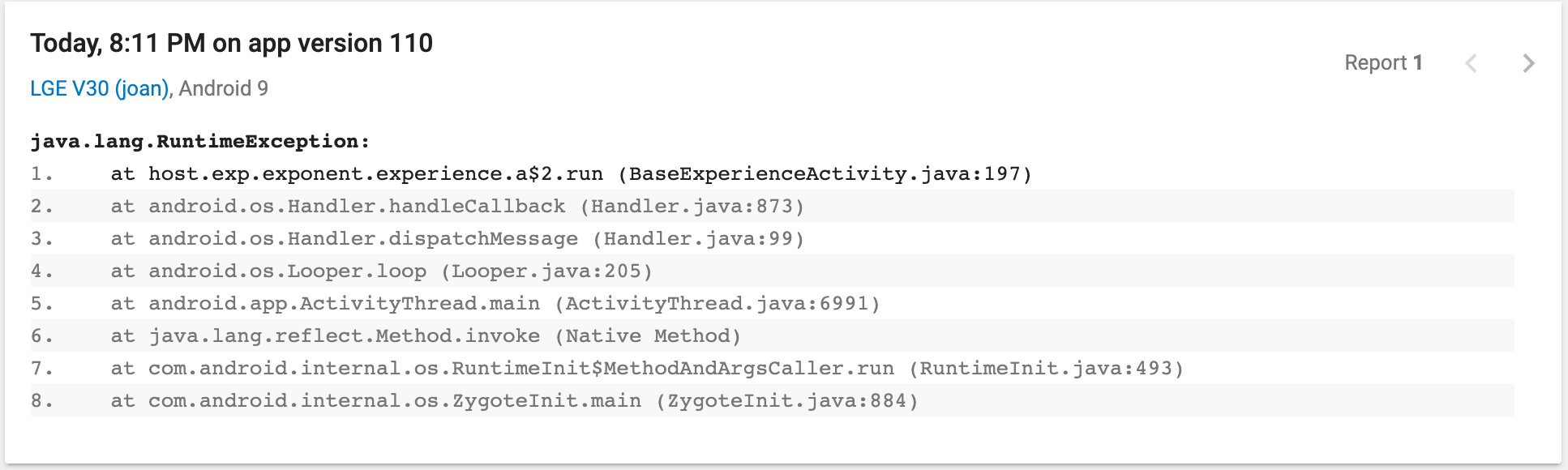
_(From google play crash screen)_
I don't know what I can do.
 felipefdl
on 31 Dec 2019
felipefdl
on 31 Dec 2019
Same problem here on SDK 35 and SDK 36
_(From google play crash screen)_I don't know what I can do.
Same problem on a Samsung Galaxy S9 (starlte), Android 9
 LaszloDev
on 5 Jan 2020
LaszloDev
on 5 Jan 2020
Same issue here on two different standalone expo apps.
- started happening last month
- happening for both expo 35 & 36
- using latest expo-cli 3.11.3
- getting no error reports on sentry for both apps
I created an issue on the Expo forum about this last month but the issue was unresolved and closed. My app crash rate has gone from below 1% to 10% and I've been getting terrible review on the play store. I know it's hard to debug without being able to reproduce, but please look into this if you have the time. Thanks.
https://forums.expo.io/t/expo-sdk-35-android-standalone-app-crashing-on-start-up/30303
 robertcreaner
on 6 Jan 2020
robertcreaner
on 6 Jan 2020
I'm not sure yet if this is definitely the case, but comments on another very similar issue seem to indicate that disabling dark mode prevents the crashes https://github.com/expo/expo/issues/6523#issuecomment-571185329 might be worth a shot
cruzach
on 6 Jan 2020
Unfortunately disabling dark mode does not fix the issue. I tried setting "userInterfaceStyle": "light" in the app.json and installing the react-native-appearance module but the app is still crashing.
The crash rate on both of my apps has spiked dramatically within the last month. Both have been tested extensively in the expo client and work fine in production mode, which indicates that it's not an issue with my JS.
Also can't reproduce the issue on a blank expo project because it only occurs on standalone builds
robertcreaner
on 7 Jan 2020
Unfortunately disabling dark mode does not fix the issue. I tried setting "userInterfaceStyle": "light" in the app.json and installing the react-native-appearance module but the app is still crashing.
Also can't reproduce the issue on a blank expo project because it only occurs on standalone builds
I think he meant that you should disable dark mode on the android phone you trying to open the app with.
This solved the crashing issue for me.
LaszloDev
on 7 Jan 2020
I cannot reproduce the crash on any of my android devices. It seems to only occur on certain devices.
Also requesting my app users to disable dark mode on their android devices is not a viable option.
robertcreaner
on 7 Jan 2020
I was able to get my hands on a Huawei device that was crashing as soon as I opened my app. I don't think it has anything to do with dark mode (that could be a separate issue altogether). As soon as I reset the app cache/storage the app started working fine.
Is it possible that this crash might be related to over the air updates and/or release channels?
robertcreaner
on 8 Jan 2020
Is it possible that this crash might be related to over the air updates and/or release channels?
@robertcreaner Yes, that is a definite possibility. I experienced that myself and was able to reproduce it. It happened when I was on a Wifi network with poor signal although that might not be required. Running adb logcat showed things like this (summarised):
12-26 21:58:33.473 10444 10444 E AndroidRuntime: FATAL EXCEPTION: main
12-26 21:58:33.473 10444 10444 E AndroidRuntime: java.lang.RuntimeException: Expo encountered a fatal error: Attempting to call JS function on a bad application bundle: RCTDeviceEventEmitter.emit()
12-26 21:58:35.786 10651 10651 E AndroidRuntime: FATAL EXCEPTION: main
12-26 21:58:35.786 10651 10651 E AndroidRuntime: java.lang.RuntimeException: Unable to resume activity {com.example.myapp/host.exp.exponent.MainActivity}: java.lang.RuntimeException: Expo encountered a fatal error: Attempting to call JS function on a bad application bundle: AppRegistry.runApplication()
12-26 21:58:35.786 10651 10651 E AndroidRuntime: Caused by: java.lang.RuntimeException: Expo encountered a fatal error: Attempting to call JS function on a bad application bundle: AppRegistry.runApplication()
12-26 21:58:40.029 10781 10781 E AndroidRuntime: FATAL EXCEPTION: main
12-26 21:58:40.029 10781 10781 E AndroidRuntime: java.lang.RuntimeException: Unable to resume activity {com.example.myapp/host.exp.exponent.MainActivity}: java.lang.RuntimeException: Expo encountered a fatal error: Attempting to call JS function on a bad application bundle: AppRegistry.runApplication()
12-26 21:58:40.029 10781 10781 E AndroidRuntime: Caused by: java.lang.RuntimeException: Expo encountered a fatal error: Attempting to call JS function on a bad application bundle: AppRegistry.runApplication()
12-26 21:58:44.934 10907 10907 E AndroidRuntime: FATAL EXCEPTION: main
12-26 21:58:44.934 10907 10907 E AndroidRuntime: java.lang.RuntimeException: Unable to resume activity {com.example.myapp/host.exp.exponent.MainActivity}: java.lang.RuntimeException: Expo encountered a fatal error: com.facebook.react.devsupport.JSException: Unexpected end of script
12-26 21:58:44.934 10907 10907 E AndroidRuntime: Caused by: java.lang.RuntimeException: Expo encountered a fatal error: com.facebook.react.devsupport.JSException: Unexpected end of script
12-26 21:59:08.619 11153 11153 E AndroidRuntime: FATAL EXCEPTION: main
12-26 21:59:08.619 11153 11153 E AndroidRuntime: java.lang.RuntimeException: Unable to resume activity {com.example.myapp/host.exp.exponent.MainActivity}: java.lang.RuntimeException: Expo encountered a fatal error: Attempting to call JS function on a bad application bundle: RCTDeviceEventEmitter.emit()
12-26 21:59:08.619 11153 11153 E AndroidRuntime: Caused by: java.lang.RuntimeException: Expo encountered a fatal error: Attempting to call JS function on a bad application bundle: RCTDeviceEventEmitter.emit()
The only thing that fixed it was clearing the app's data.
In order to reproduce it I did this:
Clear the data, then open and close the app quickly (1 to 3 seconds after app has loaded) until it either showed the latest bundle or crashed. If it showed the latest bundle I cleared the data again and continued trying. Did not take too many attempts.
@cruzach advised as follows, but have not tried it yet:
if you set
fallbackToCacheTimeoutto 0, you can useUpdates.addListenerto listen for when the update has fully finished downloading https://docs.expo.io/versions/latest/sdk/updates/#updatesaddlistenereventlisteneryou can implement some logic around requiring the
DOWNLOAD_FINISHEDevent typeyou can add a listener using
Updates.addListener, which will then return this event type https://docs.expo.io/versions/latest/sdk/updates/#eventIf you get a
DOWNLOAD_FINISHEDevent, then you know the bundle has successfully downloaded, and is in your cache. Then, just callUpdates.reloadFromCache
you should turn off automatic updates before implementing that, thoughAfaik, since you turned off automatic updates, it won't reload from a new bundle until you explicitly say to
 wodin
on 8 Jan 2020
wodin
on 8 Jan 2020
@wodin I disabled OTA updates and published a new build to the Play Store hoping it would fix the issue but the app is still crashing. Prior to that I added implemented the proposed solution by @cruzach but no luck either :/
robertcreaner
on 9 Jan 2020
Are you also getting errors like the following?
12-26 21:58:40.029 10781 10781 E AndroidRuntime: FATAL EXCEPTION: main
12-26 21:58:40.029 10781 10781 E AndroidRuntime: java.lang.RuntimeException: Unable to resume activity {com.example.myapp/host.exp.exponent.MainActivity}: java.lang.RuntimeException: Expo encountered a fatal error: Attempting to call JS function on a bad application bundle: AppRegistry.runApplication()
12-26 21:58:40.029 10781 10781 E AndroidRuntime: Caused by: java.lang.RuntimeException: Expo encountered a fatal error: Attempting to call JS function on a bad application bundle: AppRegistry.runApplication()
or:
11-30 09:26:45.507 18414 18414 E AndroidRuntime: FATAL EXCEPTION: main
11-30 09:26:45.507 18414 18414 E AndroidRuntime: Process: blah.my_app, PID: 18414
11-30 09:26:45.507 18414 18414 E AndroidRuntime: java.lang.RuntimeException: Expo encountered a fatal error: Unexpected end of script
I got that sort of thing before the following:
11-30 09:26:45.507 18414 18414 E AndroidRuntime: no stack
11-30 09:26:45.507 18414 18414 E AndroidRuntime:    at host.exp.exponent.experience.a$2.run(BaseExperienceActivity.java:197)
11-30 09:26:45.507 18414 18414 E AndroidRuntime:    at android.os.Handler.handleCallback(Handler.java:873)
[...]
This BaseExperienceActivity$2.run or a$2.run stuff is just where the exception gets thrown from, so it doesn't tell you much by itself:
        // we don't ever want to show any Expo UI in a production standalone app
        // so hard crash in this case
        if (Constants.isStandaloneApp() && !isDebugModeEnabled()) {
          throw new RuntimeException("Expo encountered a fatal error: " + errorMessage.developerErrorMessage());
        }
Also, if the app has downloaded a bad bundle (I think this can only happen if the bundle download doesn't complete, e.g. because the user closed the app while it was being downloaded) then in theory it will fall back to the previous one or the one bundled in the APK, but when this happened to me it did not appear to do so and required the app's data to be cleared in order to get back to a working state. So in order for @cruzach's suggestion to help the app data might need to be cleared and then the new bundle successfully downloaded (or of course a new APK installed). When you say "but no luck", how did you verify that? I still haven't had a chance to test the suggested changes. If and when I do I'll let you know whether it seemed to fix the bad bundle issue for me.
It could be there's another issue causing a crash with the same stack trace, but a different error message. So I think we need to see what you're getting in adb logcat just before the stack trace. i.e. the "Expo encountered a fatal error:" error message. Then figure out where to go from there.
wodin
on 10 Jan 2020
@wodin here's the thing, I'm unable to reproduce the crash myself. I ended up having to downgrade my app from expo 36 -> 35 and the crashes have stopped so maybe that fixed it, or else expo fixed the issue and was pushed when I rebuilt the app.
robertcreaner
on 10 Jan 2020
@robertcreaner Are you able to get the "Expo encountered a fatal error:" error messages from these crashes? I suspect they are not all caused by the same thing.
SDK 36 introduced dark mode on Android, so if downgrading to SDK 35 fixed the crashes then I think there's a good chance they are as a result of the dark mode issue. Unfortunately it does not look like there's a workaround or fix for this issue yet.
I have now had a chance to try @cruzach's suggestions for the crash caused by a truncated bundle after an OTA update and I am no longer able to reproduce that crash, unless I host the files on my own server and manually truncate the bundle. So it seems that it is a good workaround for the truncated bundle crash.
wodin
on 11 Jan 2020
I have 489 crashes in the last 7 days!

This maybe can help, some errors have the follow error message:
java.lang.RuntimeException: Expo encountered a fatal error: Unexpected end of script no stack
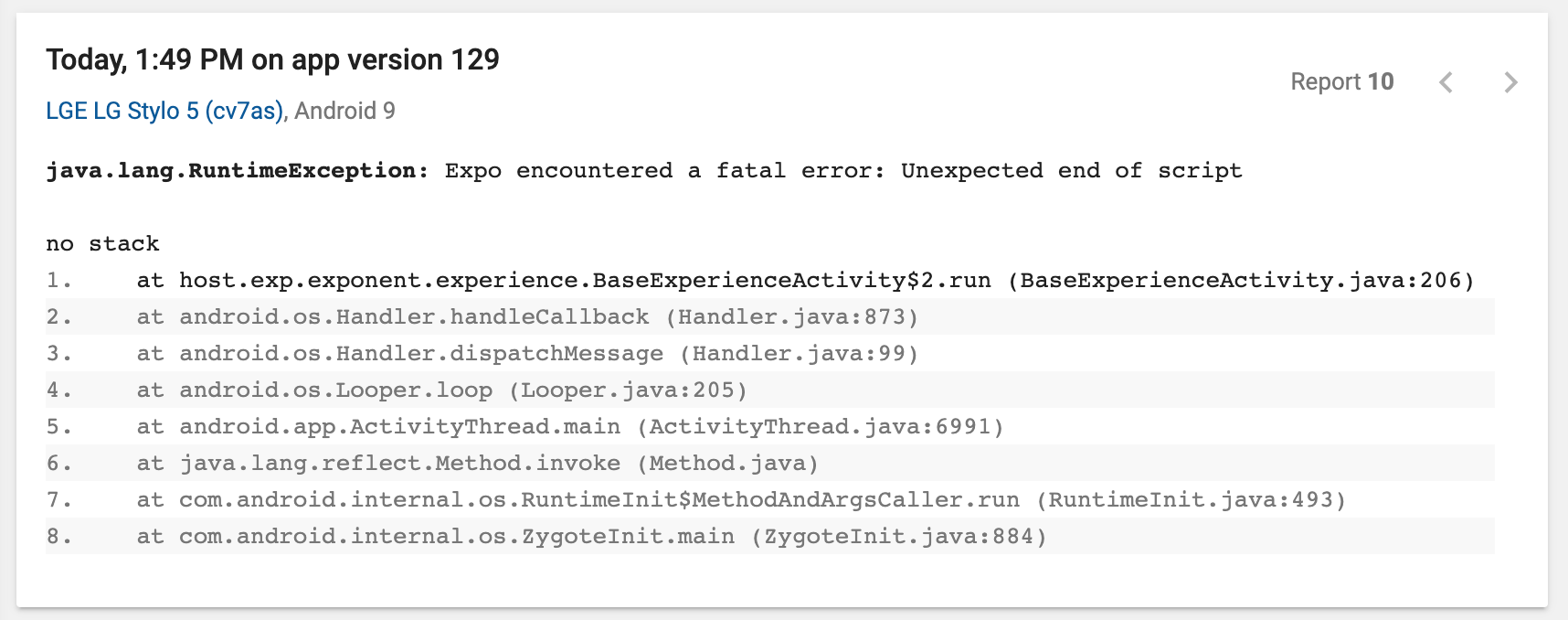
Not always says that message, in the most cases I haven't a message. Ex:
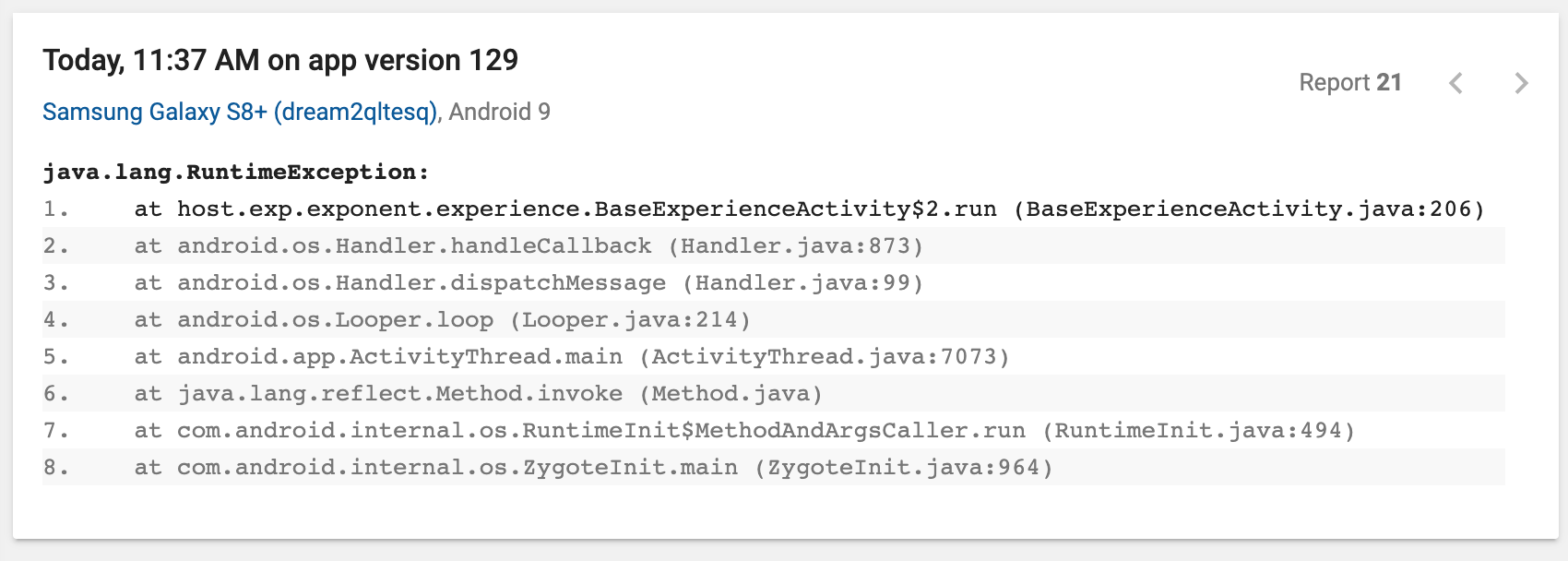
Any suggestion?
RodolfoGS
on 13 Jan 2020
Unexpected end of script
This looks like an incomplete OTA update. I experienced that too and was also able to reproduce the problem by opening and closing the app several times while it was auto-downloading an update until I was able to catch it in the middle of a download.
I tried @cruzach's suggestions here:
https://github.com/expo/expo/issues/5839#issuecomment-572296759
After that I have not been able to reproduce the bug.
wodin
on 13 Jan 2020
@wodin I'll try that, thanks!
RodolfoGS
on 13 Jan 2020
I hope it helps. In my case it's just a single instance of the app. I do not yet have an app on the Play store. So I can't guarantee it will fix the problem, but it seems like it at least makes the problem less likely.
wodin
on 13 Jan 2020
Crash ratios of the app:
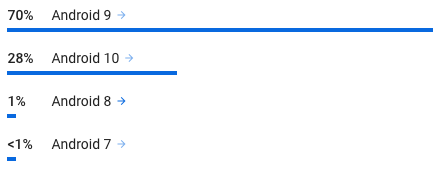
I'm facing the same issue here with around 1k crash in the last 24 hours. I'm forced to downgrade on sdk 35 😢 Looks like a main thread issue on android devices ?
Hope you'll find a solution soon 🤞
👇 The first line of this log is totally random. I tried to reproduce it on my own but it didn't worked.
Fatal Exception: java.lang.RuntimeException: Expo encountered a fatal error: Error while updating property 'fontSize' in shadow node of type: RCTText
       at host.exp.exponent.experience.BaseExperienceActivity$2.run(BaseExperienceActivity.java:206)
       at android.os.Handler.handleCallback(Handler.java:873)
       at android.os.Handler.dispatchMessage(Handler.java:99)
       at android.os.Looper.loop(Looper.java:214)
       at android.app.ActivityThread.main(ActivityThread.java:7094)
       at java.lang.reflect.Method.invoke(Method.java)
       at com.android.internal.os.RuntimeInit$MethodAndArgsCaller.run(RuntimeInit.java:494)
       at com.android.internal.os.ZygoteInit.main(ZygoteInit.java:975)
 liogate
on 14 Jan 2020
liogate
on 14 Jan 2020
The first line of the log is the relevant part. The line that contains host.exp.exponent.experience.BaseExperienceActivity$2.run(BaseExperienceActivity.java:206) doesn't provide much information about the error since it's generic error-handling code:
I suspect that the root causes of several of the issues in this thread are unrelated. The stack trace is currently a red herring.
 ide
on 14 Jan 2020
ide
on 14 Jan 2020
Totally agree. I've found this interesting article about this kind of situation.
https://blog.bam.tech/developer-news/debugging-a-non-reproducible-crash
I'm using a fully managed expo app (and I don't want to eject to keep it easy), I changed nothing from the sdk 35 and sdk 36 except dependencies versions, accordingly to the new expo requirements.
Now I'm trying this code, hope it work :
👉 https://github.com/expo/expo/issues/6523#issuecomment-573855517
liogate
on 14 Jan 2020
Error while updating property 'fontSize' in shadow node of type: RCTText
@liogate I think you might be running into the dark mode issue
EDIT: Sorry, I see you already linked to that issue in your comment :)
wodin
on 14 Jan 2020
I have just encountered a similar type of crash on a freshly updated app running on SDK 36.
java.lang.RuntimeException:
  at host.exp.exponent.experience.BaseExperienceActivity$2.run (BaseExperienceActivity.java:206)
  at android.os.Handler.handleCallback (Handler.java:874)
  at android.os.Handler.dispatchMessage (Handler.java:100)
  at android.os.Looper.loop (Looper.java:198)
  at android.app.ActivityThread.main (ActivityThread.java:6729)
  at java.lang.reflect.Method.invoke (Method.java)
  at com.android.internal.os.RuntimeInit$MethodAndArgsCaller.run (RuntimeInit.java:493)
  at com.android.internal.os.ZygoteInit.main (ZygoteInit.java:858)
 dkulagin
on 9 Feb 2020
dkulagin
on 9 Feb 2020
Hi @dkulagin
Unfortunately that stacktrace doesn't really tell you anything. You will need to get the error message just above the stacktrace in the adb logcat crash log. e.g.:
12-26 21:58:35.786 10651 10651 E AndroidRuntime: Caused by: java.lang.RuntimeException: Expo encountered a fatal error: Attempting to call JS function on a bad application bundle: AppRegistry.runApplication()
or
12-26 21:58:44.934 10907 10907 E AndroidRuntime: java.lang.RuntimeException: Unable to resume activity {com.example.myapp/host.exp.exponent.MainActivity}: java.lang.RuntimeException: Expo encountered a fatal error: com.facebook.react.devsupport.JSException: Unexpected end of script
If you're getting errors like the above then try the workaround mentioned here:
https://github.com/expo/expo/issues/5839#issuecomment-572296759
If you're getting other error messages what are they?
wodin
on 9 Feb 2020
I also have this issue:
java.lang.RuntimeException:
  at host.exp.exponent.experience.a$b.run (BaseExperienceActivity.java:7)
  at android.os.Handler.handleCallback (Handler.java:873)
  at android.os.Handler.dispatchMessage (Handler.java:99)
  at android.os.Looper.loop (Looper.java:214)
  at android.app.ActivityThread.main (ActivityThread.java:6986)
  at java.lang.reflect.Method.invoke (Native Method)
  at com.android.internal.os.RuntimeInit$MethodAndArgsCaller.run (RuntimeInit.java:494)
  at com.android.internal.os.ZygoteInit.main (ZygoteInit.java:1445)
Only android device : Samsung Galaxy S9 (starlte), Android 9, Huawei P20 (HWEML), Android 9
My package.json
"dependencies": {
    "expo": "36.0.2",
    "expo-constants": "8.0.0",
    "expo-file-system": "8.0.0",
    "expo-image-picker": "8.0.1",
    "expo-keep-awake": "8.0.0",
    "expo-linear-gradient": "8.0.0",
    "expo-mail-composer": "8.0.0",
    "expo-media-library": "8.0.0",
    "expo-permissions": "8.0.0",
    "expo-sensors": "8.0.0",
    "humps": "2.0.1",
    "prop-types": "15.7.2",
    "react": "16.9.0",
    "react-dom": "16.9.0",
    "react-native": "https://github.com/expo/react-native/archive/sdk-36.0.1.tar.gz",
...
app.json not use userInterfaceStyle
{
  "expo": {
    "name": "...",
    "slug": "...",
    "privacy": "public",
    "sdkVersion": "36.0.0",
    "platforms": [
      "ios",
      "android",
      "web"
    ],
Does anyone have same issue?
 dean9703111
on 19 Feb 2020
dean9703111
on 19 Feb 2020
@dean9703111 you will need to get the error message from just before the stack trace. The stack trace itself unfortunately doesn't tell you what the problem is.
e.g.:
Expo encountered a fatal error: <the error message is here>
<stack trace here>
If you post the error message we are more likely to be able to help.
wodin
on 19 Feb 2020
This looks like an incomplete OTA update. I experienced that too and was also able to reproduce the problem by opening and closing the app several times while it was auto-downloading an update until I was able to catch it in the middle of a download.
I tried @cruzach's suggestions here:
After that I have not been able to reproduce the bug.
@wodin, would you mind posting your complete fix? I assume that you implemented it in App.js? Thanks
 bogrees
on 26 Feb 2020
bogrees
on 26 Feb 2020
I've put the code here
Please let me know if you have improvements :)
I wanted to check for updates periodically. I originally tried using setInterval() but found out that's not a good idea when you're trying to do something every 6 hours.
The tick, setTick() stuff in my code is a workaround for that. So every time the user clicks on a button to navigate to another screen the app checks if enough time has passed since the last update check. If so, it updates tick which causes the useEffect() body to run again, which causes it to check for updates.
So this is all a bit convoluted and I'm sure there's a better way.
wodin
on 27 Feb 2020
@cruzach and @ide, is there a plan to include fixing this in an upcoming release of ExpoKit? It seems to have been narrowed down to a problem with OTA updates being incomplete on Android and then getting into an unrecoverable state. Thanks for looking into this.
bogrees
on 6 Mar 2020
Bear in mind that the title of this issue is very non-specific, so a truncated/corrupted bundle would be just one cause of this BaseExperienceActivity$2.run error.
That said, the Updates module is being extracted so that it can be used in the Bare workflow. I think it's supposed to be released with SDK 37 at the end of March.
I can't find the issue or the pull request now, though :sweat_smile:
Ah, here's the "umbrella" issue for these updates. There are a few different issues/PRs for the Updates module extraction and the Android one is still in progress by the looks of things.
https://github.com/expo/expo/issues/6513
https://github.com/expo/expo/pull/6625
Perhaps you can try it out and test how it behaves if you deliberately truncate the bundle. I was able to reproduce the crashes in a managed app like this:
$ expo export --public-url https://example.com/blah/
$ rsync -avxz --progress --delete --stats dist/ example.com:/blah/
$ rm -r dist
$ expo ba --public-url https://example.com/blah/android-index.json
$ expo export --public-url https://example.com/blah/
[Manually truncate dist/bundles/android-*.js]
$ rsync -avxz --progress --delete --stats dist/ example.com:/blah/
Just an update from my side, I decided to finally throw in the towel on ExpoKit --- this error was the last straw, unfortunately.
I spent the last two days removing ExpoKit from the app, and I now have everything successfully working on both iOS and Android. The Android project was a nightmare to get working, but overall, it simplified a _TON_ of code --- and I can still use most of the Expo libraries that I was previously using (sweet!).
I'll be moving to CodePush for the OTA update functionality. ¯\ _(ツ)_ /¯
bogrees
on 10 Mar 2020
I also have this issue:
"react": "~16.9.0",
    "react-dom": "~16.9.0",
    "react-native": "https://github.com/expo/react-native/archive/sdk-36.0.1.tar.gz",
app.json
{
  "expo": {
    "name": "...",
    "slug": "...",
    "privacy": "public",
    "sdkVersion": "36.0.0",
    "platforms": [
      "ios",
      "android",
      "web"
    ],
 ektasahu027
on 12 Mar 2020
ektasahu027
on 12 Mar 2020
I've had this issue for a while now and cases really spiked after upgrading to SDK 36 (sometimes up to 200+ a day). Two days ago, I uploaded a version, where I increased "fallbackToCacheTimeout" from 1000 to 5000 and since then I've had only one instance of this error. I'm not really sure if that's the reason, but I didn't change anything else that could be related to this.
 tindery
on 12 Mar 2020
tindery
on 12 Mar 2020
@tindery according to https://docs.expo.io/versions/latest/workflow/configuration/#updates the default is 30000 (30s) which is still 6x larger than you config. Or do you mean 50s instead of 5s?
 gasolin
on 16 Mar 2020
gasolin
on 16 Mar 2020
Maybe the timeout of fallbackToCacheTimeout is breaking the bundle 🤔
I have that in 30000
RodolfoGS
on 16 Mar 2020
I only had it set to 1 second for a long time, and there wasn't a single problem with it until SDK 34/35 I think. I'm not sure why that was, but It might have been done before we were handling cases without internet connection and it took too long to load the app. I'm not saying increasing to 5 seconds fixed the issue, but those errors almost stopped, and I don't have any other explanation for it 😄
Maybe just something to try or look into?
tindery
on 16 Mar 2020
@ManigandanRaamanathan it would probably be a good idea to figure out what is causing your crashes, but if you are sure you want to downgrade, make sure everything is committed to Git so you don't lose any changes. Then with a recent version of expo-cli installed, run:
expo upgrade 35.0.0
There might be dependencies you need to downgrade manually after that, to versions that are compatible with SDK 35.
wodin
on 28 Mar 2020
We're also having this issue unfortunately.
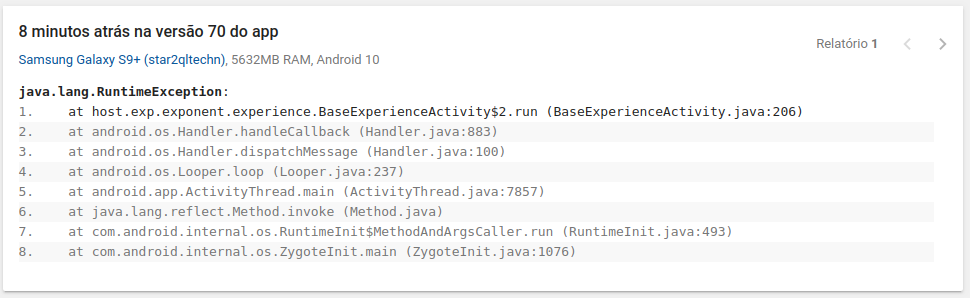
The last update on this issue was on March 28, and it's still open. Does the Expo team know what is causing this already?
 feliperaul
on 25 Jun 2020
feliperaul
on 25 Jun 2020
This stack trace is coming from a generic handler. Many different errors could be causing this; there is not necessarily one cause.
The best way to help out is to figure out how to attribute the error to the actual place it was caused so that the stack trace is accurate instead of pointing to this error handler.
ide
on 26 Jun 2020
@ide Unfortunately that's all we have. Customers are sending printscreens of the app crashing on open. The only thing we have available is the "send feedback" button on Android, which sends it to our Google Apps Console, and that's all we get there, nothing more :(
Plese tell me if there's anything else I can do to help you guys debug this.
feliperaul
on 26 Jun 2020
Same problem here on some devices (same stack https://github.com/expo/expo/issues/5839#issuecomment-649716057)
Trying to disable OTA. We'll see ¯\ (ツ) /¯
 rphlmr
on 15 Jul 2020
rphlmr
on 15 Jul 2020
Facing same issue. Having worked on 4-5 cross platforms I recommend not to use Expo. Umpteen endless issues.
 sheshashayan
on 13 Aug 2020
sheshashayan
on 13 Aug 2020
My app has come to a last stage.... keeping it haulted because of this issue...
sheshashayan
on 13 Aug 2020
Related issues
 SKempin
·
60Comments
SKempin
·
60Comments
 joshwils82
·
60Comments
joshwils82
·
60Comments
 jbrodriguez-bytelion
·
56Comments
jbrodriguez-bytelion
·
56Comments
 TristanGodal
·
59Comments
TristanGodal
·
59Comments
 serhanozcan
·
98Comments
serhanozcan
·
98Comments
Most helpful comment
at SDK 36 same