Expo: [standalone] Landscape Orientation Hides Footer
Hi. First, sorry for my english.
I got a big problem, when I’m using expo start for develop my application, my differents screens are responsive (Especially footer bar, content and header…) but when I build the App using expo build:android or expo build:ios, it’s keeping responsive but I think the App is setting fixed values. For example, if I rotate the screen from Portrait to Landscape, the footer is going to disappear and I can’t scroll the content like in the “debug” mode.
Changing orientation in debug mode :
Changing orientation after build :
Code of a screen :
`
import React from "react";
import { Text, View, StyleSheet, ScrollView, FlatList, Alert, TouchableHighlight, Image } from "react-native";
import { Container, Header, Title, Left, Icon, Right, Button, Body, Content, Card, CardItem, Footer, FooterTab, Badge } from "native-base";
import LoginScreen from "../LoginScreen/LoginScreen.js";
import {BackHandler} from 'react-native';

var ls = require('react-native-local-storage');

export default class FileScreen extends React.Component {
  constructor(props) {
    super(props);

    this.state = {
      userGroupId: null,
      loaded: false,
      badgeCommande: 0
    };
  }


  componentWillMount = async() => {

    await ls.get('userGroupID').then((grpid) => {this.setState({userGroupId: grpid})}).then(async() => {
                                                                 const response = await fetch('https://koustapp.com/apex/rest/mobile/notif_commande?groupid='.concat(this.state.userGroupId));
                                                                 const json = await response.json().then((data) => {
                                                                   ls.save('badgeCommande', data.items[0].value);
                                                                   console.log(data.items[0].value);
                                                                 });
                                                               }).then(async() => {
                                                                  await ls.get('badgeCommande').then((data) => {
                                                                                                      this.setState({loaded: true,
                                                                                                                     badgeCommande: data});
                                                                                                    });
                                                               })

   }

   handleBackPress = () => {
    this.props.navigation.goBack();
    return true;
  }


   componentDidMount() {
     this.backHandler = BackHandler.addEventListener('hardwareBackPress', this.handleBackPress);
   }

   componentWillUnmount() {
    this.backHandler.remove();
  }


  render() {
    if (this.state.loaded === 'false') {
      return (
        <View style={{flex: 1, flexDirection: 'row',alignItems: 'center', justifyContent: 'center'}}>
          <Image
            source={require("./../../assets/logo_login.png")}
            style={[
              {
                resizeMode: "contain",
                width: 350,
                height: 162
              }
            ]}
          />
      </View>
      );
    }  else {

      let footerBadgeCommande;

      if(this.state.badgeCommande != 0){

        footerBadgeCommande = <Button badge vertical onPress={() => this.props.navigation.navigate('Commandes')}>
          <Badge style={{ backgroundColor: '#ff9500' }}><Text style={{ color: 'white', fontSize: 10 }}>{this.state.badgeCommande}</Text></Badge>
          <Icon name="cart" style={styles.footerIcon}/>
          <Text style={styles.footerText}>Commandes</Text>
        </Button>;
      } else {
        footerBadgeCommande = <Button vertical onPress={() => this.props.navigation.navigate('Commandes')}>
          <Icon name="cart" style={styles.footerIcon}/>
          <Text style={styles.footerText}>Commandes</Text>
        </Button>;
      }

        return (
          <Container>
          <React.Fragment>
            <Header style={styles.header}>
              <Left>
                <Button
                  transparent
                  onPress={() => this.props.navigation.openDrawer()}>
                  <Icon name="menu" style={{color:'white'}}/>
                </Button>
              </Left>
              <Body>
                <View>
                  <Button
                    transparent onPress={() => this.props.navigation.navigate('Accueil')}>
                    <Image
                      style={{resizeMode: 'contain', height: 35, width: 74, alignSelf: 'center' }}
                      source={require('../../assets/logo_sidebar.png')}
                    />
                  </Button>
                </View>
              </Body>
              <Right>
                <Button
                  transparent onPress={() => this.props.navigation.navigate('Settings')}>
                  <Icon name="settings" style={{color:'white'}}/>
                </Button>
              </Right>
            </Header>
            <ScrollView>
            <View style={styles.scrollContainer}>
                  <View style={styles.orderView}>
                    <Icon name="paper" style={styles.titleIcon}/>
                    <Text style={{fontSize:20, marginTop:15, marginLeft:13}}>Mes Recettes</Text>
                  </View>
            </View>
              </ScrollView>
              <Footer>
                <FooterTab style={styles.footerContainer}>
                  <Button vertical onPress={() => this.props.navigation.navigate('Recettes')}>
                    <Icon name="paper" style={styles.footerIcon}/>
                    <Text style={styles.footerText}>Fiches Techniques</Text>
                  </Button>
                  {footerBadgeCommande}
                  <Button vertical>
                    <Icon name="apps" style={styles.footerIcon}/>
                    <Text style={styles.footerText}>Plus..</Text>
                  </Button>
                </FooterTab>
              </Footer>
            </React.Fragment>
          </Container>
        );
      }
  }
}

const styles = StyleSheet.create({
  container: {
    backgroundColor: '#f8f8f8',
    flex:1
  },
  orderView: {
   flex:1,
   height: 60,
   marginRight:30,
   marginLeft:30,
   margin: 5,
   marginTop:10,
   flexDirection: 'row',
   backgroundColor: 'white',
   borderBottomColor: 'black',
   borderBottomWidth: 1
 },
  header:{
    backgroundColor: '#2578cf',
  },
 footerText: {
   fontSize: 10,
   textAlign: 'center',
   color: 'white'
 },
 footerContainer:{
   backgroundColor: '#2578cf',
 },
 footerIcon: {
   color: 'white',
 },
 titleIcon: {
   color: '#ff9500',
   fontSize:30,
   marginTop:12
 }
});
`
Someone got an idea from where it could come from ? Thanks!
 TristanGodal
All 59 comments
Hey @TristanGodal - could you create a snack or share a repo that reproduces the issue? I know you shared the code of one of your screens, but it's much more effective to share an minimal example, so using as little code as possible to replicate the issue. Also, make sure to include your SDK version
 cruzach
on 22 Jul 2019
cruzach
on 22 Jul 2019
Hi. Thanks for answering. I tried but I can't reproduce it, because it's only after building the app that the problem occur, when i'm in developping mode, if I change the screen orientation, the footer is keeping fixed at bottom and the ScrollView is working fine. But when I build, if I change orientation, the footer disappear and I'm not able to scroll anymore..
TristanGodal
on 23 Jul 2019
That's not a problem, a repro that I can test via testflight is good enough!
cruzach
on 23 Jul 2019
Thanks. There is GitHub repo : https://github.com/TristanGodal/ExpoKoust/
You can connect in the app using false values, I make an if(1 === 1) to allow you connection.
TristanGodal
on 26 Jul 2019
Up. Somebody got an idea ? Thanks.
TristanGodal
on 31 Jul 2019
I have the same problem.
Any updates?
 powerpovar
on 1 Aug 2019
powerpovar
on 1 Aug 2019
Always trying to find a solution.. Will update if I found one..
TristanGodal
on 1 Aug 2019
[UPDATE] After building to iOS and run it with TestFlight, this error seems not happening. So, the error only occur with Android Device. (Test it on a Note 9 and Galaxy Tab 4).
EDIT : Like I can see, all is affected, not only the footer. If you rotate, then only visible content could be interacted with. Very strange.
TristanGodal
on 8 Aug 2019
I just raised an issue that may be related to this one. https://github.com/expo/expo/issues/5285 If it is the same thing, feel free to merge these two together. There's super simple code to reproduce the problem.
 martin-ecatch
on 10 Aug 2019
martin-ecatch
on 10 Aug 2019
Hi. That's clearly the same problem. I'm going to test today, give some news before 17pm.
TristanGodal
on 10 Aug 2019
So, I make change and I tried to downgrade my project to SDK32. But, when I try to gradle assembleRelease my ejected app (ExpoKIt), it's not upgrading version, looks like gradle is building anterior version. I use gradle clean, expo publish before but it's not changing result. You think it come from the downgrade ?
I moved to 32.0.0 in app.json and there is my package.json :
{

  "main": "node_modules/expo/AppEntry.js",
  "scripts": {
    "start": "expo start",
    "android": "expo start --android",
    "ios": "expo start --ios",
    "web": "expo start --web",
    "eject": "expo eject"
  },
  "dependencies": {
    "@expo/vector-icons": "^10.0.3",
    "check-node-version": "^4.0.1",
    "expo": "^32.0.0",
    "expokit": "^33.0.4",
    "intl": "^1.2.5",
    "md5": "^2.2.1",
    "native-base": "^2.12.1",
    "react": "16.5.0",
    "react-dom": "^16.8.6",
    "react-native": "https://github.com/expo/react-native/archive/sdk-32.0.0.tar.gz",
    "react-native-elements": "^1.1.0",
    "react-native-local-storage": "^1.5.2",
    "react-native-modalbox": "^1.7.1",
    "react-native-picker-select": "^6.3.0",
    "react-native-unimodules": "^0.4.2",
    "react-native-vector-icons": "^6.6.0",
    "react-native-web": "^0.11.4",
    "react-native-woodpicker": "0.0.16",
    "react-navigation": "^3.0.9",
    "request": "^2.88.0"
  },
  "devDependencies": {
    "babel-preset-expo": "^5.1.1"
  },
  "private": true
}
And idea maybe ? Thanks.
expo diagnostics :
`  Expo CLI 3.0.9 environment info:
    System:
      OS: macOS 10.14.6
      Shell: 3.2.57 - /bin/bash
    Binaries:
      Node: 12.7.0 - /usr/local/bin/node
      npm: 6.10.3 - /usr/local/bin/npm
    IDEs:
      Android Studio: 3.4 AI-183.6156.11.34.5692245
      Xcode: 10.3/10G8 - /usr/bin/xcodebuild
    npmPackages:
      expo: ^32.0.0 => 32.0.6
      react: 16.5.0 => 16.5.0
      react-native: https://github.com/expo/react-native/archive/sdk-32.0.0.tar.gz => 0.57.1
      react-navigation: ^3.0.9 => 3.11.1
    npmGlobalPackages:
      expo-cli: 3.0.9`
Is there a workaround for this? I tried a few things but no luck. This is a real issue, it is not possible to make an android app for both orientations. SDK32 is not an option, because that doesn't support 64bit.
martin-ecatch
on 12 Aug 2019
Ah ok, you answer my question cause my smartphone use 64bits. Yes so that's a big problem, maybe expo could patch it ? Waiting for some news, thanks.
TristanGodal
on 12 Aug 2019
Hi @cruzach , I see that you have put this issue in SDK 35. Do you have any info on when SDK35 could be available? (weeks? months?) Would it be possible to fix it on SDK34 as a patch update? Is there anything I can do to help? I suspect it might be just a matter of tweaking the "shell app"... or am completely off course? Sorry for so many questions, this is a blocking issue for us and I'm desperate to work out a solution.
martin-ecatch
on 13 Aug 2019
SDK 35 will be released in September, so we're looking at a couple weeks out
Would it be possible to fix it on SDK34 as a patch update?
Afaik, this is possible, and in regards to what you can do -> finding the root cause of the issue is a huge help in getting issues resolved. (No worries about asking questions, that's what this thread is for! So sorry this is a blocking issue for you 🙁 )
cruzach
on 13 Aug 2019
That's a really weird problem. Looks like when you build the app, there's something that cares about layout is different from the development server, incompatible with native code of an Android Device, don't think that it could come from a sort of Authorization to re-layout the screen of an Android Device but maybe there is a deprecated function that it used ?
TristanGodal
on 13 Aug 2019
I've been trying to figure out where the main layout comes from... I thought it would be in host.exp.exponent.MainActivity, but it must be buried somewhere in expo itself. Or even inside RN. But it works fine in Expo app, so I suspect the problem is in the "shell app", not RN.
I'm attaching a screenshot of Layout Inspector. The app was started in landscape and then rotated to portrait (see it's using only half of the screen now).
The view that has incorrect dimensions is the one highlighted (the second FrameLayout, height 720 instead of 1280). The first FrameLayout is correct.
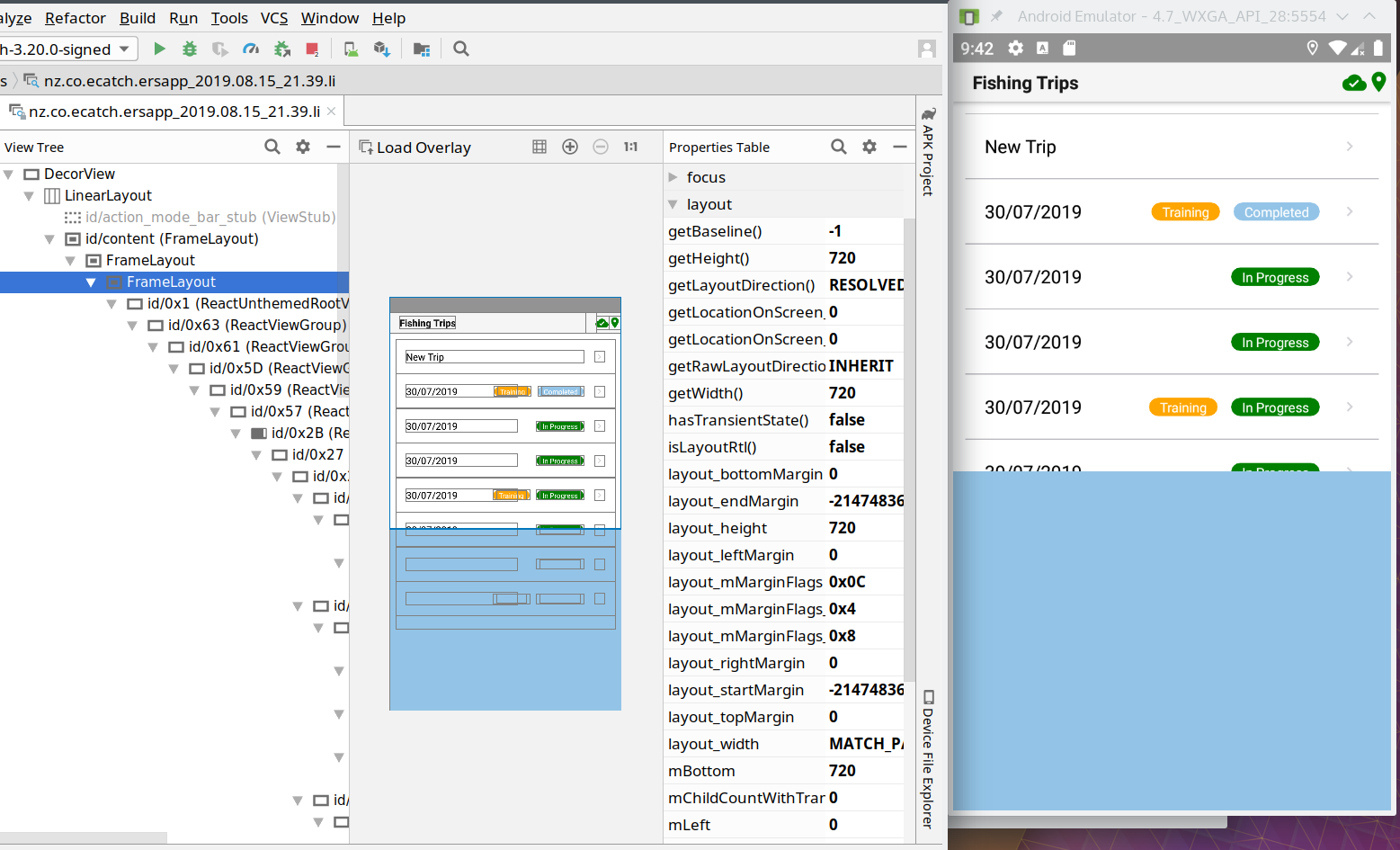
Can anybody point me to the code that is responsible for the offending FrameLayout? I'm hoping once that's located, it could be an easy fix (fingers crossed).
martin-ecatch
on 15 Aug 2019
Don't know if I'm going to tell something that is relevant but, when I use a full android project, to define a responsive height, i'm using RelativeLayout and by this way, I use something like this inside :
android:layout_width="fill_parent"
android:layout_height="wrap_content"
On yout screen, layout_width seems to be MATCH_PARENT, that's sounds like okay but, height is defined by an integer, maybe the problem could come from there ? Maybe no responsive function is used to define the height of the layout.
Really not sure.
TristanGodal
on 15 Aug 2019
Ok I might have a lead... ReactNativeActivity.java on line 252: layoutParams.height = mLayout.getHeight();
It sets the height of the container view when the splash screen is done. I suspect that the height then stays the same forever.
Could that be the problem? Also it seems like the container view doesn't have any layout attributes defined (Can't see anything relevant in Layouts.
I would like to confirm that, but I'm struggling to get a working setup to debug expo-based native app. Can anybody with more experience in Android native development help with this? I feel like I'm getting close, but not quite able to fix it by myself.
martin-ecatch
on 16 Aug 2019
@cruzach I believe I have found and confirmed the root cause of the problem! It is in fact the line 252 in ReactNativeActivity.java (see my previous comment).
The whole block is only executed if SHOW_LOADING_VIEW_IN_SHELL_APP == true, so I changed that in my AppConstants to false (after ejecting to ExpoKit). Splash screen doesn't display (as expected), and the app is perfectly responsive to orientation changes. This would be a good workaround, but I'd like to avoid ejecting if the fix is not too far away. Is there a way to change this constant in Expo-built app? I'm happy to sacrifice splash screen over responsiveness, but I don't see a way to change this constant.
Should I attempt to fix it myself and provide a PR or is it better for somebody who knows the code to fix it? I'm worried that I'd cause unintended side effects if I hack it myself... also I can't find any instructions on how to setup environment for developing expo itself.
martin-ecatch
on 16 Aug 2019
Hey @martin-ecatch, there's no way to change that value in a managed Expo project (no access to native files in that workflow)
However, you should be able to provide a PR. We have a guide for getting your station up and running in the readme. Once you get the Android client running and make your changes to the native files, you can build a standalone app (directions also in the readme).
What makes you say you're happy to sacrifice splash screen over responsiveness? I don't think I'm clear on what the sacrifice is here, sorry 😅
cruzach
on 16 Aug 2019
Thanks, I'll have a crack at it.
What I don't see in the readme is how do I use my modified version of expo (not the expo client) and then use it to build my app. It just uses a specific version of expo that is downloaded by gradle/maven.
The "splash screen over responsiveness" - I was referring to a possible temporary workaround: if you disable splash screen, you get orientation change working. One or the other.
martin-ecatch
on 17 Aug 2019
Yeah so I'm stuck. I installed all the required stuff and can build the Expo Client. But what I need is change expo code (in the expoview module) and build a separate standalone app using that code. How do I do that?
martin-ecatch
on 17 Aug 2019
I don't think I'll be able to provide a PR without being able to run the code. I know how to fix it, but no luck building the modules and including them in my project. Is anybody able to help? Or pass this to somebody who can easily fix that? @cruzach ?
So how to fix it? Use setAlpha instead of changing height of the mContainer view to hide/show it for the splash screen.
It's just two changes in ReactNativeActivity.java:
Lines 167-169 change
      ViewGroup.LayoutParams layoutParams = mContainer.getLayoutParams();
      layoutParams.height = 0;
      mContainer.setLayoutParams(layoutParams);
to
mContainer.setAlpha(0.0f);
And lines 251-253:
      ViewGroup.LayoutParams layoutParams = mContainer.getLayoutParams();
      layoutParams.height = mLayout.getHeight();
      mContainer.setLayoutParams(layoutParams);
to
mContainer.setAlpha(1.0f);
This should do it. But as mentioned before, I'm not able to run it :-(.
martin-ecatch
on 20 Aug 2019
There isn't really a good way to test this right now outside of the Expo client. We'll need to extract ScreenOrientation from the expo package, which is on our 2019 roadmap.
Additionally we are planning some changes around how "safe areas" are handled, which includes the notch and also status bar. We'll have to see how all these interact with each other and with different OS versions.
 ide
on 21 Aug 2019
ide
on 21 Aug 2019
Thanks for getting back to me @ide . Yeah I was worried that it might be quite tricky to test this :-(.
I understand that you want to fix this while dealing with ScreenOrientation module, that makes sense. However, this doesn't actually seem to be a problem with the ScreenOrientation module, rather with the way the splash screen is handled. Not sure if that's of any help.
For everybody who has this issue - the current workaround is eject to ExpoKit and set SHOW_LOADING_VIEW_IN_SHELL_APP = false in the constants. It means splash screen is off, but at least the app itself can function properly.
I'm surprised that nobody else is reporting this issue, maybe nobody noticed yet? I guess this bug was introduced just recently in SDK33. I find it quite serious to not have the ability to handle screen orientation on any android phone/tablet.
Anyway, thanks for trying, hopefully it'll be fixed at some stage soon.
I still like Expo! It makes my life so much easier :-).
martin-ecatch
on 21 Aug 2019
Ah, I see. @sjchmiela - looking at the Git history, you might be the most familiar with this code (although perhaps not that familiar). Do you think you could look into this or assign it to someone who'd be good at fixing this?
ide
on 21 Aug 2019
I have the same problem, I think I'll wait for it to be fixed in the next updates
 JoynerPerez1987
on 27 Aug 2019
JoynerPerez1987
on 27 Aug 2019
I have the same problem too.
 acsel1985
on 17 Sep 2019
acsel1985
on 17 Sep 2019
@ide Any update about this issue
 SaravanakumarSubramanian
on 19 Sep 2019
SaravanakumarSubramanian
on 19 Sep 2019
@SaravanakumarSubramanian no updates, if there is one we will post it here.
ide
on 19 Sep 2019
I just noticed that SDK35 has been released... presumably this is not going to be fixed in SDK35 then? Is the plan to do it in SDK36?
@WoLewicki were any of my findings in previous comments useful?
martin-ecatch
on 23 Sep 2019
This is not on our roadmap but we are open to a PR if it identifies and addresses the root cause. We can't take PRs that cover up over issues, but fundamentally correct fixes are welcomed.
ide
on 23 Sep 2019
!!! OMG A SOLUTION !!!
How: in app.json change android->splash->resizeMode to "native" (instead of the default "contain).
What... why?: this option appeared in SDK34 and uses different way of displaying the splash screen, thus avoiding this whole issue.
Conclusion/suggestion: I suggest removing the default value of "contain" for resizeMode, because it doesn't do anything useful/different compared to "native". Also "contain" introduces this bug.
Yeah, expo apps are responsive again! :-)
martin-ecatch
on 24 Sep 2019
you are a genius, 2 months I had that problem, I congratulate you and I thank you for finding the solution
JoynerPerez1987
on 24 Sep 2019
@martin-ecatch Thanks for the workarround! This saves my app which was useless on Android.
 anniekvandijk
on 26 Sep 2019
anniekvandijk
on 26 Sep 2019
@martin-ecatch Thank you for posting this solution!!!
 danhixon
on 28 Sep 2019
danhixon
on 28 Sep 2019
@martin-ecatch I tried the workaround you provided I am not able to build my project now,expo throws error
Error: Problem validating fields in app.json. See https://docs.expo.io/versions/v34.0.0/workflow/configuration/
• Field: splash.resizeMode - should be equal to one of the allowed values.
Couldn't publish because errors were found. (See logs above.) Please fix the errors and try again
app.json
 "platforms": [
      "ios",
      "android"
    ],
    "version": "1.1.6",
    "orientation": "portrait",
    "icon": "./assets/images/app_logo.png",
    "notification": {
      "icon": "./assets/images/logo.png",
      "androidMode": "default",
      "color": "#FFF"
    },
    "splash": {
      "image": "./assets/images/splash.png",
      "resizeMode": "native",
      "backgroundColor": "#ffffff"
    },
Does this require to perform eject to expokit ???
SaravanakumarSubramanian
on 8 Oct 2019
@SaravanakumarSubramanian
You still need to have a base config for splash.resizeMode.
Example:
{
  "expo": {
    ...
    "splash": {
      "image": "./assets/example.png",
      "backgroundColor": "#ffffff",
      "resizeMode": "cover"
    },
    "android": {
      ...
      "splash": {
        "mdpi": "./assets/example.png",
        "backgroundColor": "#ffffff",
        "resizeMode": "native"
      }
    },
}
 aav7fl
on 8 Oct 2019
aav7fl
on 8 Oct 2019
@aav7fl thank you, this worked for me
SaravanakumarSubramanian
on 9 Oct 2019
@martin-ecatch Thanks, it worked for me as well
For ExpoKit users:
1) Change SHOW_LOADING_VIEW_IN_SHELL_APP to false in AppConstants.java
2) Add <bitmap /> item to app/src/main/res/drawable/splash_background.xml:
<?xml version="1.0" encoding="utf-8"?>
<layer-list xmlns:android="http://schemas.android.com/apk/res/android">

    <item android:drawable="@color/splashBackground"/>

    <item><bitmap android:gravity="center" android:src="@drawable/shell_launch_background_image" /></item>

</layer-list>
3) In case where the splash screen is cropped (or looks weird otherwise): make sure you have correct shell_launch_background_image.png generated in the right res folder (in my case in app/src/main/res/drawable-xxxhdpi)
 pwlmaciejewski
on 6 Nov 2019
pwlmaciejewski
on 6 Nov 2019
Thanks so much for the solution!
 cyrieu
on 29 Nov 2019
cyrieu
on 29 Nov 2019
Thanks to all!!!
 javigodoy
on 11 Jan 2020
javigodoy
on 11 Jan 2020
thanks very much for the solution... saved me a lot of time to figure it out :+1:
 Mirkesx
on 28 Apr 2020
Mirkesx
on 28 Apr 2020
@TristanGodal Is this still an issue for you, or can we close this?
 IjzerenHein
on 17 Jul 2020
IjzerenHein
on 17 Jul 2020
Sorry,
I forgot to answer after this, that's resolve !
Thanks to all.
TristanGodal
on 17 Jul 2020
@TristanGodal , did you solved your problem with the landscape orientation? Did not find any solution yet in this issue.
 lucianoacsilva
on 12 Aug 2020
lucianoacsilva
on 12 Aug 2020
@TristanGodal , did you solved your problem with the landscape orientation? Did not find any solution yet in this issue.
@martin-ecatch Thanks, it worked for me as well
For ExpoKit users:
- Change
SHOW_LOADING_VIEW_IN_SHELL_APPtofalseinAppConstants.java- Add
<bitmap />item toapp/src/main/res/drawable/splash_background.xml:<?xml version="1.0" encoding="utf-8"?> <layer-list xmlns:android="http://schemas.android.com/apk/res/android"> <item android:drawable="@color/splashBackground"/> <item><bitmap android:gravity="center" android:src="@drawable/shell_launch_background_image" /></item> </layer-list>
- In case where the splash screen is cropped (or looks weird otherwise): make sure you have correct
shell_launch_background_image.pnggenerated in the rightresfolder (in my case inapp/src/main/res/drawable-xxxhdpi)
This one actually works for me.
TristanGodal
on 12 Aug 2020
Understood, @TristanGodal . Where in the expo project can I find the file AppConstants.java?
lucianoacsilva
on 12 Aug 2020
Understood, @TristanGodal . Where in the expo project can I find the file
AppConstants.java?
You can find it there :
android/app/src/main/java/host/exp/exponent/generated
TristanGodal
on 12 Aug 2020
I cannot find the android folder, @TristanGodal . Do I have to eject the project with expo eject first?
lucianoacsilva
on 12 Aug 2020
My project was ejected yes.
This solution seems to be the good one for non ejected projects :
!!! OMG A SOLUTION !!!
How: inapp.jsonchange android->splash->resizeMode to "native" (instead of the default "contain).
What... why?: this option appeared in SDK34 and uses different way of displaying the splash screen, thus avoiding this whole issue.
Conclusion/suggestion: I suggest removing the default value of "contain" for resizeMode, because it doesn't do anything useful/different compared to "native". Also "contain" introduces this bug.Yeah, expo apps are responsive again! :-)
TristanGodal
on 12 Aug 2020
I see. But is this solution only for the splash screen? Or for any screen of the app? @martin-ecatch @TristanGodal
lucianoacsilva
on 12 Aug 2020
Did you tried it ?
TristanGodal
on 12 Aug 2020
Yes, it only changes the splash screen. I was trying to rotate not the splash screen, but another one (one which I use expo-camera to take photos).
lucianoacsilva
on 12 Aug 2020
It only interfeers on the splash screen.
lucianoacsilva
on 12 Aug 2020
@lucianoacsilva The splash screen (the hiding of it) is what is causing the issue for the rest of the app. It is solved using the workarounds mentioned above. If you're just trying to set orientation for the whole app, that's a different setting and probably a different problem.
martin-ecatch
on 12 Aug 2020
Hi, I am presenting the same problems, I have made the configurations in the app.json placing the splash: "native", in the same way it continues to have the same problem
 JoseTeque
on 4 Nov 2020
JoseTeque
on 4 Nov 2020
please post a new issue and fill out the template if you believe you are encountering this, thanks!
 brentvatne
on 4 Nov 2020
brentvatne
on 4 Nov 2020
Related issues
 jyoo
·
64Comments
jyoo
·
64Comments
 trojek
·
68Comments
trojek
·
68Comments
 Renji3
·
55Comments
Renji3
·
55Comments
 joshwils82
·
60Comments
joshwils82
·
60Comments
 serhanozcan
·
98Comments
serhanozcan
·
98Comments
Most helpful comment
!!! OMG A SOLUTION !!!
How: in
app.jsonchange android->splash->resizeMode to "native" (instead of the default "contain).What... why?: this option appeared in SDK34 and uses different way of displaying the splash screen, thus avoiding this whole issue.
Conclusion/suggestion: I suggest removing the default value of "contain" for resizeMode, because it doesn't do anything useful/different compared to "native". Also "contain" introduces this bug.
Yeah, expo apps are responsive again! :-)