Running exp build:android errors fails. I am experiencing this on both Windows and OS X.
This solution is working as a temporary work around. Expo version is 56.0.0.
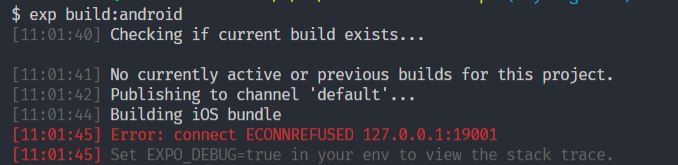
$ exp build:android
[11:01:40] Checking if current build exists...

[11:01:41] No currently active or previous builds for this project.
[11:01:42] Publishing to channel 'default'...
[11:01:44] Building iOS bundle
[11:01:45] Error: connect ECONNREFUSED 127.0.0.1:19001
[11:01:45] Set EXPO_DEBUG=true in your env to view the stack trace.
Environment
Environment:
  OS: Windows 10
  Node: 8.11.1
  Yarn: 1.9.4
  npm: 5.6.0
  Watchman: Not Found
  Xcode: N/A
  Android Studio: Not Found

Packages: (wanted => installed)
  expo: ^29.0.0 => 29.0.0
  react: 16.3.1 => 16.3.1
  react-native: https://github.com/expo/react-native/archive/sdk-29.0.0.tar.gz => 0.55.4

Diagnostics report:
  https://exp-xde-diagnostics.s3.amazonaws.com/skempin-e8172ba2-6e87-419c-b5dd-7eb273b98cbf.tar.gz
Steps to Reproduce
- Run
exp build:androidfrom a fresh terminal.
Expected Behavior
The APK should be built.
Actual Behavior
The build fails.
A temporary solution is to run exp start first and then run exp:build:android.
 SKempin
All 60 comments
I am also experiencing this issue.
 jacinto123
on 17 Aug 2018
jacinto123
on 17 Aug 2018
Another solution is open in a different tab the expo server running yarn start (or npm start) if the project was created under create-react-native-app
 cesarodriguez4
on 20 Aug 2018
cesarodriguez4
on 20 Aug 2018
This works.
exp start- Cancel
ctrl c - then do
exp build:android.
 kevupton
on 26 Aug 2018
kevupton
on 26 Aug 2018
This works.
exp start- Cancel
ctrl c- then do
exp build:android.
I don't know why but I do the same way with expo-cli and it's working!
 fannyhasbi
on 15 Sep 2018
fannyhasbi
on 15 Sep 2018
the commands recently got changed with the new update exp build:android to expo build:android
Reference: Expo Building Standalone Apps
 Nisharunnisaa
on 25 Sep 2018
Nisharunnisaa
on 25 Sep 2018
Probably the bundler didn't close correctly. So you cannot run another one on the same port. Maybe expo start kills the old process?
 julianrod94
on 8 Oct 2018
julianrod94
on 8 Oct 2018
Closing since it sounds like this has been resolved in expo-cli
 tcdavis
on 8 Oct 2018
tcdavis
on 8 Oct 2018
im using expo-cli and im having the same issue. but the solution above worked anyway...
 proof-of-reality
on 27 Oct 2018
proof-of-reality
on 27 Oct 2018
I'm still experiencing the same issue with expo-cli 2.3.5
Upgrading to expo sdk 31 broke our pipeline because the packager is not started automatically anymore.
 tonnenpinguin
on 8 Nov 2018
tonnenpinguin
on 8 Nov 2018
Experiencing same issue with [email protected], solution above helped.
 Niades
on 6 Dec 2018
Niades
on 6 Dec 2018
@Niades might be worth opening a new ticket to let them know.
SKempin
on 6 Dec 2018
try run command
expo build:android
 hendra1
on 20 Dec 2018
hendra1
on 20 Dec 2018
Issue still occurs
 Vieshanis
on 5 Feb 2019
Vieshanis
on 5 Feb 2019
This works.
* `exp start`

* Cancel `ctrl c`

* then do `exp build:android`.
Savior
 joaowiciuk
on 14 Feb 2019
joaowiciuk
on 14 Feb 2019
This is work for me.
- expo start
- Open another tab
- expo build:android
 shivnath17
on 29 Apr 2019
shivnath17
on 29 Apr 2019
My build pipeline started throwing this error after I accidentally commited .expo/packager-info.json and settings.json. Removing them from the repository fixed the issue.
 jannikbuschke
on 3 May 2019
jannikbuschke
on 3 May 2019
Had the same issue on OSX . Was resolved by:
- expo start
- once app is running, ctrl c to close the packager.
- expo build:android
 jimwilde
on 3 Jun 2019
jimwilde
on 3 Jun 2019
Some info:
expo start now uses 19002 port but the expo publish and expo build still look for the bundler in 19001.
is this related to the latest v33 release?
 john20xdoe
on 10 Jun 2019
john20xdoe
on 10 Jun 2019
Thanks 'expo start' worked
and then with metro bundler opened I tried 'expo build:android'
 jhonatanyachi
on 27 Aug 2019
jhonatanyachi
on 27 Aug 2019
No need to hassle. Just delete .expo folder and expo build:android or expo build:ios, works like a charm.
 abduraufsherkulov
on 30 Aug 2019
abduraufsherkulov
on 30 Aug 2019
no a big deal just open ur text editor and make a new changes , in my own case i write a comment and i save .then re run expo build:android .thank me later
 Remig9
on 8 Sep 2019
Remig9
on 8 Sep 2019
 ZamanGoraya
on 19 Sep 2019
ZamanGoraya
on 19 Sep 2019
For me, on Windows,
expo start
ctrl+c
expo build:android
worked once. But couldn't make it work again by the same way.
Tried running expo start, opening a new tab and running expo build:android at the same time, without cancelling expo start, and worked 100%!
Thank you so much!
 kalliub
on 23 Sep 2019
kalliub
on 23 Sep 2019
Mostly every time I had this issue since the update in the expo-cli is to "expo start -c" which will clear the cache for you and will fix the issue you have. Other solutions are not fixing the issue any more.
 ognjenciric
on 5 Oct 2019
ognjenciric
on 5 Oct 2019
For me on Windows this worked:
- expo start
- open a new command tab - expo publish
 EdvinasRuo
on 11 Oct 2019
EdvinasRuo
on 11 Oct 2019
Solved the issue the following way:
1-expo start
2-opening a new terminal window (same project dir) => expo build
 Decoder3-14
on 19 Nov 2019
Decoder3-14
on 19 Nov 2019
Solved the issue the following way:
1-expo start
2-opening a new terminal window (same project dir) => expo build
exactly, the expo must be running, this will work. (run terminal as admin).
 moaazmf90
on 19 Nov 2019
moaazmf90
on 19 Nov 2019
Why is this still an issue?
The workaround with CTRL + C doesn't help in my case. Luckily, deleting the .expo folder works.
Why is it doing an iOS bundle while I want to build Android?
$ expo build:android
Checking if there is a build in progress...


? Would you like to upload a keystore or have us generate one for you?
If you don't know what this means, let us handle it! :)
 false
Publishing to channel 'default'...
Building iOS bundle
connect ECONNREFUSED 127.0.0.1:19001
Set EXPO_DEBUG=true in your env to view the stack trace
 rolandoldengarm
on 21 Nov 2019
rolandoldengarm
on 21 Nov 2019
This is work for me.
- expo start
- Open another tab
- expo build:android
Thanks bro, It's also working for me thank you so much.
 ashokharijan97
on 24 Nov 2019
ashokharijan97
on 24 Nov 2019
use this command expo build:android -c or expo build:ios -c and happy build!
 chathunpc
on 25 Nov 2019
chathunpc
on 25 Nov 2019
Another solution is open in a different tab the expo server running
yarn start(ornpm start) if the project was created undercreate-react-native-app
thanks man! that worked for me! Finally, thank god!!!
 TanvirHasanHridoy
on 27 Nov 2019
TanvirHasanHridoy
on 27 Nov 2019
see this forum comment.
https://forums.expo.io/t/error-when-trying-to-run-exp-publish/223/12?u=jorgews.dev
 egos-ti
on 10 Dec 2019
egos-ti
on 10 Dec 2019
I still have this with SDK36, how do you CTRL+C and Open a new tab within a CI ? (Gitlab-CI)
Related to https://github.com/expo/expo/issues/6639
 kopax
on 30 Dec 2019
kopax
on 30 Dec 2019
run npm i -g exp
 mohamedlahouassa
on 3 Jan 2020
mohamedlahouassa
on 3 Jan 2020
@mohamedlahouassa - exp is no longer updated, please use expo-cli instead - npm i -g expo-cli - more info at https://docs.expo.io/versions/v36.0.0/workflow/expo-cli/
 brentvatne
on 3 Jan 2020
brentvatne
on 3 Jan 2020
I am building an android app with expo and encountered this issue as well. Thanks for the solution guys.
I just want to share what caused the error.
The build requires a Metro Bundler running in port 19001 where this is not running by default as we type in expo build:android and this caused this error
connect ECONNREFUSED 127.0.0.1:19001
so starting the Metro Builder first by typing expo start then start building using a different cmd or tab by typing expo build:android or I haven't try this yet but share us the result when you does thanks! Add -c to expo build:<platform> example: expo build:android -c
Cheers!
 Arjorie
on 9 Jan 2020
Arjorie
on 9 Jan 2020
After downgrade to [email protected] and deleting .expo folder fixed for me
npm uninstall -g expo-cli
npm install -g [email protected]
 hassan-dev
on 11 Jan 2020
hassan-dev
on 11 Jan 2020
Fixed the same problem by deleting the .expo folder.
 xerus2000
on 15 Jan 2020
xerus2000
on 15 Jan 2020
@abduraufsherkulov
No need to hassle. Just delete .expo folder and
expo build:androidorexpo build:ios, works like a charm.
This -> expo publish did the trick for me.
 TomWrd
on 10 Feb 2020
TomWrd
on 10 Feb 2020
Open 2 terminals
terminal1: npm start
//let start the app
terminal2: expo build: android
tada your app will start building apk/ipk
 sagarmakhija1994
on 23 Feb 2020
sagarmakhija1994
on 23 Feb 2020
@sagarmakhija1994 that is exactly the hassle I want to avoid...
xerus2000
on 25 Feb 2020
Remove .expo directory from project and try again.
rm -rf .expo
 badbod99
on 28 Feb 2020
badbod99
on 28 Feb 2020
@badbod99 yes that usually works, but is also a hassle I'd like to avoid - it doesn't fix the actual problem. And it changes the tunnel url...
xerus2000
on 5 Mar 2020
None of the above suggestions actually fix this issue, they are just workarounds.
badbod99
on 6 Mar 2020
Generally, this happen randomly, waiting a bit and trying again also solve the issue. I believe expo can also have internals problems.
kopax
on 6 Mar 2020
This is work for me.
1. expo start

2. Open another tab

3. expo build:android
Yes it is the standard method and works for me!
 Codeskiin
on 9 Mar 2020
Codeskiin
on 9 Mar 2020
Generally, this happen randomly, waiting a bit and trying again also solve the issue. I believe expo can also have internals problems.
This is an Expo project issue report, it's been closed by the Expo team, but clearly, as you mention, it's an Expo bug (or Expo internal issue).
badbod99
on 11 Mar 2020
try run command
expo build:android
only this solution worked for me. the exp command always throwed errors
 stevenYouhana
on 20 Mar 2020
stevenYouhana
on 20 Mar 2020
open a new terminal
write ipconfig
you'll get ip4 address like: 192.168.........
copy this address and run this
set REACT_NATIVE_PACKAGER_HOSTNAME=(paste you ip4 address here)
now run expo start
open split terminal and run expo build:android
Happy coding :)
 Rafay3198
on 21 Mar 2020
Rafay3198
on 21 Mar 2020
This Work 100%
1)npm start
2)expo build:android
3)do not close npm start using ctral +c
Happy coding :)
 KavinduDissanayake
on 24 Mar 2020
KavinduDissanayake
on 24 Mar 2020
Por que isso ainda é um problema?
A solução alternativa com CTRL + C não ajuda no meu caso. Felizmente, excluir a pasta .expo funciona.
Por que ele está executando um pacote iOS enquanto eu quero criar o Android?$ expo build:android Checking if there is a build in progress... ? Would you like to upload a keystore or have us generate one for you? If you don't know what this means, let us handle it! :) false Publishing to channel 'default'... Building iOS bundle connect ECONNREFUSED 127.0.0.1:19001 Set EXPO_DEBUG=true in your env to view the stack trace
funcionou perfeitamente
 Katacha1537
on 28 Mar 2020
Katacha1537
on 28 Mar 2020
@Katacha1537 - every time you run expo build:* it will publish first, and every time you publish (expo publish) it currently publishes to ios and android. if you want to use a previously published version, then do expo build:android --no-publish
brentvatne
on 28 Mar 2020
To whom it may concern, I solved all the issues like this:
ECONNREFUSED 127.0.0.1:19001 in CI (gitlab-ci)
```jsx
android-staging:
stage: native
artifacts:
name: "myapp-android-${CI_BUILD_TAG}-staging"
paths:
- myapp-android-${CI_BUILD_TAG}-staging.apk
expire_in: 1 week
script:
- npm i
- npx expo start &
- EXPO_PID=$(echo $!)
- npm run build:android:staging
- npm run publish:staging -- --max-workers 1
- curl -o myapp-android-${CI_BUILD_TAG}-staging.apk "$(npx expo url:apk --non-interactive)"
- kill -9 $EXPO_PID
only:
- tags
tags:
- docker
````
And for the timeout while waiting for a branch:
kopax
on 28 Mar 2020
It worked like this for me:
• I started the project using "yarn start", which in this case would be "expo start"
• To run the build, I ran "expo build: android" and it worked.
 CauueSanttos
on 2 Apr 2020
CauueSanttos
on 2 Apr 2020
This is work for me.
- expo start
- Open another tab
- expo build:android
It works for me
 inkxe-saismita
on 3 Apr 2020
inkxe-saismita
on 3 Apr 2020
This is for due to the React App not running at the time of building Android and ios app.
for more about "connect econnrefused 127.0.0.1:19001 expo build"
 dipankar937
on 24 Apr 2020
dipankar937
on 24 Apr 2020
Can this be reopened? This happens to me on a regular basis, and its frankly just annoying. The workarounds seem to work, but it would be cool to address the underlying issue.
jannikbuschke
on 19 May 2020
the commands recently got changed with the new update
exp build:androidtoexpo build:androidReference: Expo Building Standalone Apps
the commands recently got changed with the new update
exp build:androidtoexpo build:androidReference: Expo Building Standalone Apps
Thankyou so much. It worked for me
 sukhveersingh0779
on 19 May 2020
sukhveersingh0779
on 19 May 2020
If none of above methods works for you.
Then try closing your emulator in windows / mac
run expo start
split terminal in (vs code) and run expo publish
 EhsanWebDev
on 24 Sep 2020
EhsanWebDev
on 24 Sep 2020
You just have to put your connection on "LOCAL" 😁😁, and open a new fresh "Commande Line" and run expo build: android
 YanDevDz
on 10 Oct 2020
YanDevDz
on 10 Oct 2020
Related issues
 345ml
·
109Comments
345ml
·
109Comments
 leighquince
·
80Comments
leighquince
·
80Comments
 Renji3
·
55Comments
Renji3
·
55Comments
 trojek
·
68Comments
trojek
·
68Comments
 terribleben
·
54Comments
terribleben
·
54Comments
Most helpful comment
This works.
exp startctrl cexp build:android.