Expo: [iOS][Facebook] Not redirecting back to app after Facebook.logInWithReadPermissionsAsync through facebook app
🐛 Bug Report
Environment
Expo CLI 3.2.3 environment info:
    System:
      OS: macOS 10.14.5
      Shell: 3.2.57 - /bin/bash
    Binaries:
      Node: 8.16.0 - ~/.nodebrew/current/bin/node
      Yarn: 1.16.0 - ~/.nodebrew/current/bin/yarn
      npm: 6.4.1 - ~/.nodebrew/current/bin/npm
      Watchman: 4.9.0 - /usr/local/bin/watchman
    IDEs:
      Android Studio: 3.4 AI-183.6156.11.34.5522156
      Xcode: 11.0/11A420a - /usr/bin/xcodebuild
    npmPackages:
      expo: ^35.0.0 => 35.0.0
      react: 16.8.3 => 16.8.3
      react-native: https://github.com/expo/react-native/archive/sdk-35.0.0.tar.gz => 0.59.8
      react-navigation: ^3.11.0 => 3.11.0
    npmGlobalPackages:
      expo-cli: 3.2.3
iOS Standalone AND iOS Expo Client
Steps to Reproduce
Must be logged out of Facebook in the browser, but logged in in the Facebook app
Facebook.logInWithReadPermissionsAsync, doesn’t come back to our app after flying to Facebook app.
This may or may not occur.
For now it only occurs on iOS standalone.
It’s pretty strange because it’s quite strange behavior and it hurts user acquisition opportunities.
This is fatal for our app.
Expected Behavior
After logging in with Facebook, you are redirected to our app and the login process is executed
Actual Behavior
Even after logging in on the Facebook app, it behaves like staying in the Facebook app.
The only way to get back to our app is to cancel, and of course the login process will fail.
Sample code
import * as firebase from 'firebase';
import * as Facebook from 'expo-facebook';

const signinFacebook = async () => {
  try {
    const {
      type,
      token,
    } = await Facebook.logInWithReadPermissionsAsync(
      ENV.FACEBOOK_APP_ID,
      {
        permissions: ['public_profile', 'email'],
      },
    );

    if (type === 'success') {
      const credential = firebase.auth.FacebookAuthProvider.credential(token);
      return firebase.auth().signInWithCredential(credential).catch((error) => {
        throw error;
      });
    }
  } catch (error) {
    // ERROR
  }
};
 345ml
345ml
All 109 comments
Any update?
 ronal2s
on 29 Oct 2019
ronal2s
on 29 Oct 2019
Waiting on a build to finish in TestFlight to see if I see the same issue
Workaround for now is to use the web browser to login, rather than the Facebook app. I've tested that in a standalone and it works without a hitch
 cruzach
on 29 Oct 2019
cruzach
on 29 Oct 2019
How exactly are you logging in with the Facebook app? In https://github.com/expo/expo/pull/5499, we removed all behaviors besides browser
cruzach
on 29 Oct 2019
@cruzach in mi app when i execute "Facebook.logInWithReadPermissionsAsync(id, opts)" it opens a web "modal" that's asking me to open the page in Facebook app (you must be logged out of Facebook in the browser and logged in the app) then when you hit open it redirects back to the start.
 nachofassini
on 29 Oct 2019
nachofassini
on 29 Oct 2019
Yeah I see it now, I edited your original post to include those prerequisite steps
cruzach
on 29 Oct 2019
@sjchmiela Any updates on this? Thanks
 iwantooxxoox
on 4 Nov 2019
iwantooxxoox
on 4 Nov 2019
We will upgrade the underlying Facebook SDK, recent versions of which may have this bug fixed, in SDK 36.
 sjchmiela
on 4 Nov 2019
sjchmiela
on 4 Nov 2019
@sjchmiela thank you for the prompt reply, just wondering if there is anything we can do like a workaround before SDK 36 released? Thanks
iwantooxxoox
on 4 Nov 2019
I don't think so, sorry.
Actually you could try ejecting, upgrading the SDK yourselves, rebuilding the native app and resubmitting to the App Store, but… 😕
sjchmiela
on 4 Nov 2019
Can someone please explain how one would make use of this recent change (upgrade fb sdk to 5.8.0) in an ejected expokit project? Thanks!
 emildancescu
on 10 Nov 2019
emildancescu
on 10 Nov 2019
@emildancescu if you are ejected you are on your own. Update the fb sdk on your own. read this commit for ideas https://github.com/expo/expo/commit/5c9913eca88eef7beefa7d1a43cb5a38b37327b9 probably update the pod file and reinstall the deps
 morenoh149
on 12 Nov 2019
morenoh149
on 12 Nov 2019
@emildancescu if you are ejected you are on your own. Update the fb sdk on your own. read this commit for ideas 5c9913e probably update the pod file and reinstall the deps
Thank you!
What about normal expo projects? I've tried a few things but there seemed to be no changes whatsoever.
emildancescu
on 12 Nov 2019
@emildancescu the update will affect SDK 36, so you have to wait until we release that 🙂
cruzach
on 12 Nov 2019
@cruzach
I have upgraded FBSDK to 5.8 manually in my ExpoKit project.
This issue still happen randomly.
Please reconfirm upgrading FBSDK to 5.8 can fix on SDK 36
 azurechen
on 13 Nov 2019
azurechen
on 13 Nov 2019
Hi @azurechen
some people fixed the bug with FBSDK version 5.6.0 as mentioned on this link !! Could you try to downgrade your FBSDK version to version 5.6.0.
 applizem
on 13 Nov 2019
applizem
on 13 Nov 2019
upgraded to SDK 36 but the issue is still happening. Can you re-open it?
 alaminopu
on 19 Dec 2019
alaminopu
on 19 Dec 2019
@alaminopu was it on iOS or on Android?
sjchmiela
on 19 Dec 2019
@sjchmiela On iOS.
alaminopu
on 19 Dec 2019
still happening, please reopen it.
azurechen
on 21 Dec 2019
I'm also seeing this problem: specifically, when I use the expo-facebook SDK with Expo SDK version 36, the modal that launches has the native capability enabled, where I'm expecting that only browser-based facebook oauth would be available.
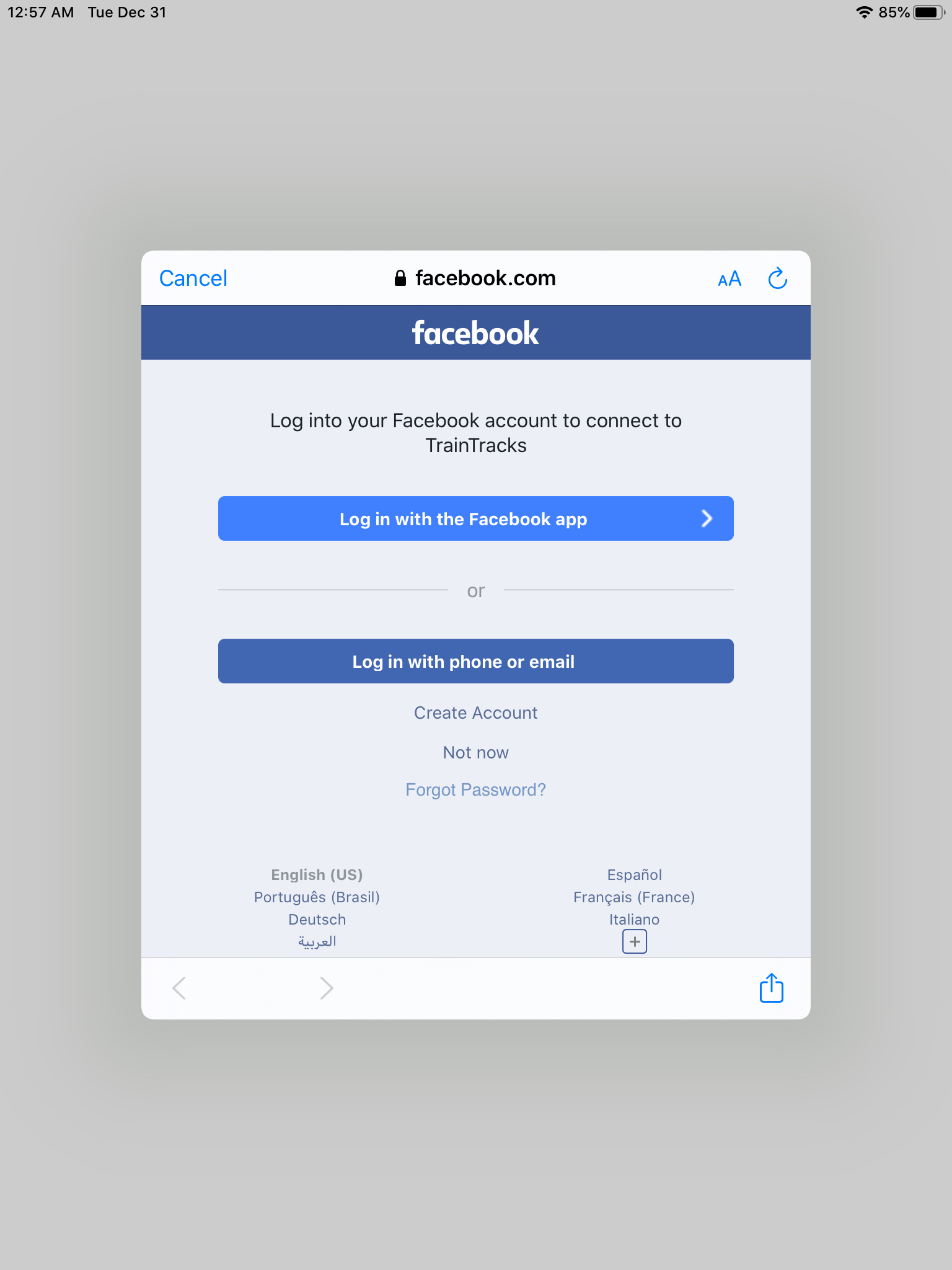
When I run the same code on my iphone I only see the browser based login as expected
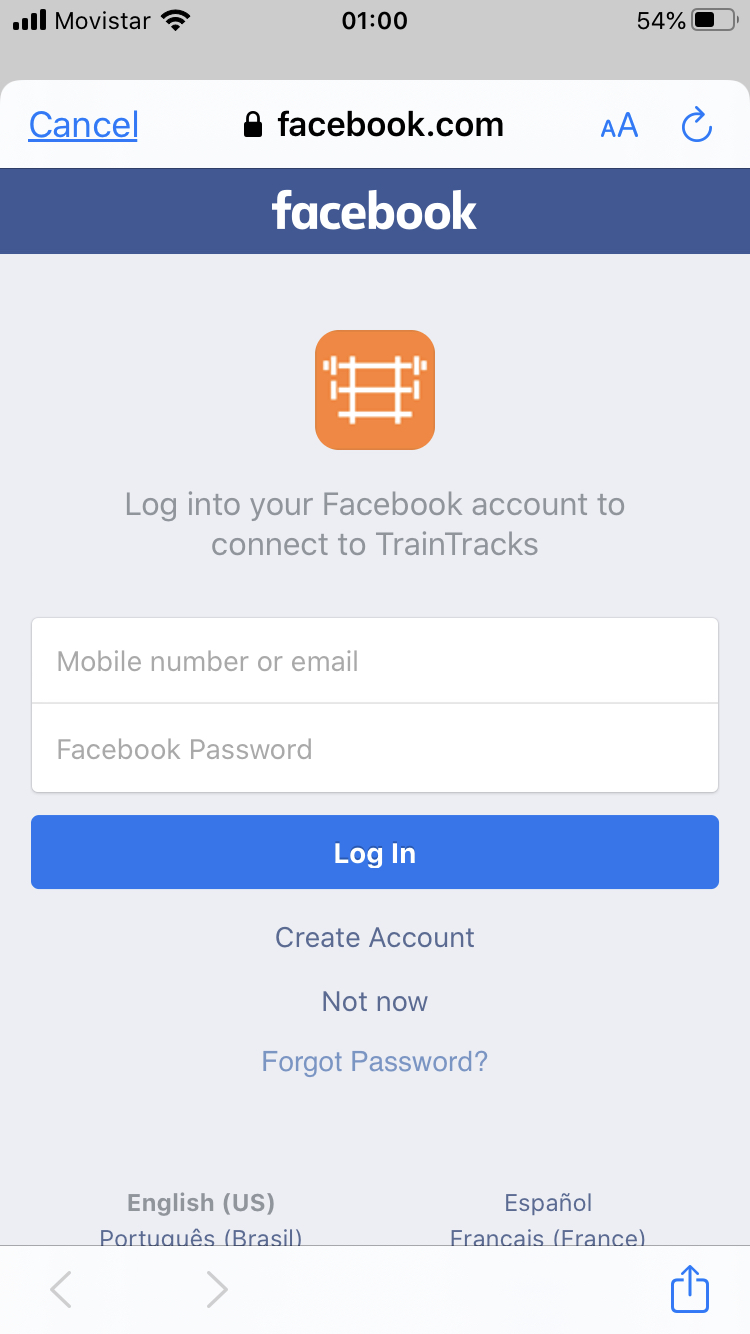
I created a minimal repro case with expo init--I reused the facebook app id from my own app for simplicity, please feel free to sub in your own to try it out.
I actually just had my app rejected from the Apple App Store for this issue, so I'm stuck until there's a fix. Let me know if I can provide anything else
 dnlsngr
on 31 Dec 2019
dnlsngr
on 31 Dec 2019
We also have exactly the same problem on iOS, also with the Expo SDK 36.
The error (no redirect to app after login) as described only occurs after login with the Facebook App (not with the web login).
We have many error events in Sentry which probably relate to this issue.
https://sentry.io/share/issue/39fc058d6bd9428ebe107262d5274cb1/
But this exception is thrown probably by the user clicking "Cancel/Abort" on the web view overlay, so it only proofs that this occurs often (every time?).
Our app (running on Expo SDK 36):
https://apps.apple.com/de/app/id1420554336
@sjchmiela please can you reopen the Ticket?
 musemind
on 9 Jan 2020
musemind
on 9 Jan 2020
The error (no redirect to app after login) only occurs after login with the Facebook App (not with the web login).
musemind
on 9 Jan 2020
@dnlsngr I just tested your repro in the Expo Client, and everything seems to be working correctly. I don't see the option for logging in with the native app. What device/platform are you testing on?
or @musemind let me know how you were able to login through the FB app
cruzach
on 9 Jan 2020
@cruzach I assume it may be necessary to have the Facebook app (!= Messenger) installed on the iPhone?
musemind
on 9 Jan 2020
Yeah I do have the app installed, and I'm signed out of FB in the browser. We have the screenshot from above already, what would help is a full repro and steps to reproduce, and device OS and version
cruzach
on 9 Jan 2020
@cruzach
- The problem is locally not reproducible because the Facebook App redirects to the production version of the app after the login, not to the expo app.
- @dnlsngr provided a repo. it shows both buttons (Facebook app and web) on my phone. https://github.com/dnlsngr/repro-6112
- The problem occurs for example on iOS 13.3
Does anybody know the exact conditions when the Facebook login web view shows the "Log in with the Facebook app"-Button?
I hope it helps.
musemind
on 9 Jan 2020
Tested in standalone, as well as with the Expo Client app. Still, only getting web browser login, and redirecting back to the standalone app successfully
tried it while logged out of FB in the browser & the app, logged into just the app and not the browser, and logged into the browser and not the app
cruzach
on 9 Jan 2020
@cruzach It may be necessary to have the production app which is related to the facebookAppId installed to see the app login button.
You may try it with our app, but it's only available in the german app store:
facebookAppId 507044299633917
https://apps.apple.com/de/app/foodly-kochzutaten-bestellen/id1420554336
I can provide the app to you via Testflight.
musemind
on 9 Jan 2020
That's how I tested it, through Testflight on a standalone iOS app with the facebook appID configured, as well as the facebookScheme in app.json (as per the documentation
Make sure you've followed the Standalone iOS Build section of those docs, and are using the most recent version of the packages.
"expo": "^36.0.0",
"expo-facebook": "~8.0.0"
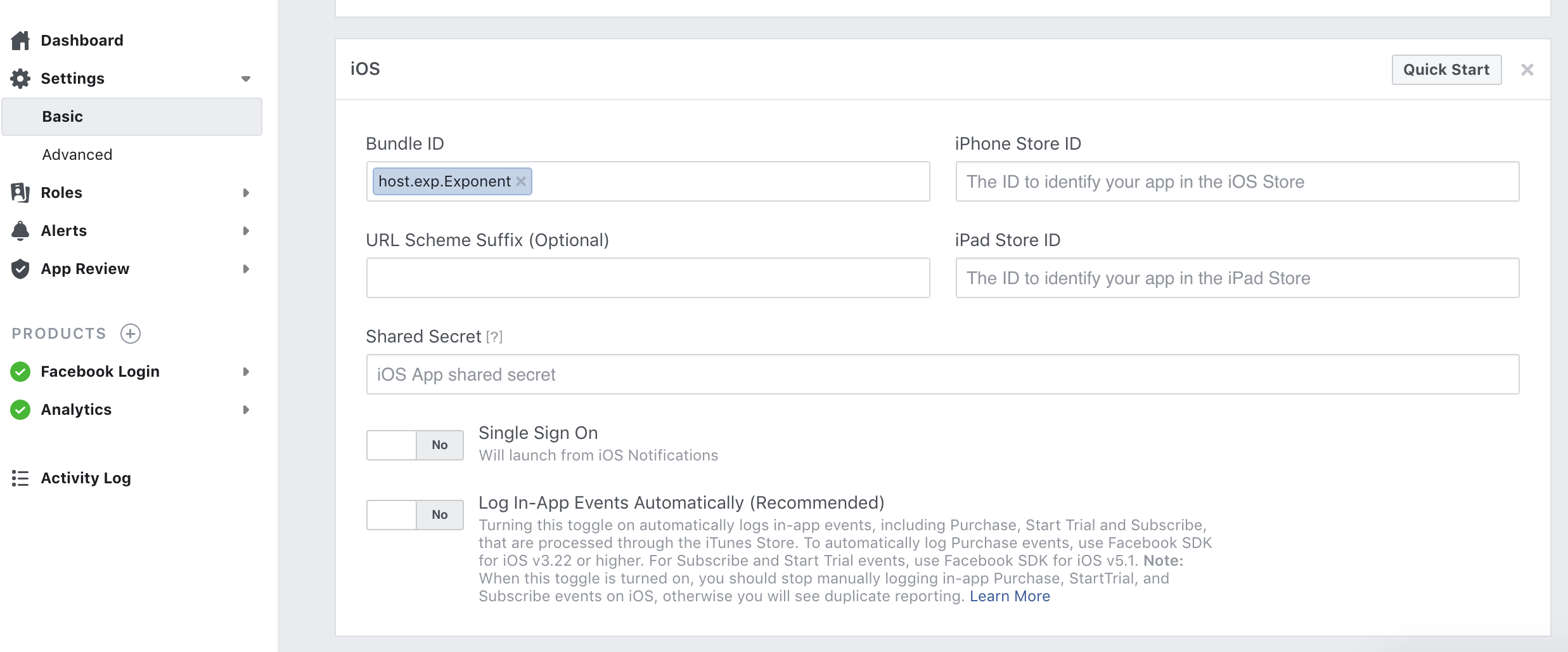
It seems we have found the cause of our problem. In the Facebook settings, we had our iOS Bundle ID in addition to host.exp.Exponent:

After removing our Bundle ID, clearing the mobile safari browser cache and restarting the production app, the Facebook login via Facebook App works (is no longer stuck in the loop).
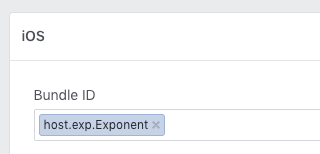
This might be added in the expo docs as a warning? Some apps might depend on their Bundle ID in the Facebook settings for some reason.
@cruzach thanks for your efforts! I still have no idea why the "Log In with App" Button does not show up at all on your phone. This was only reproducible by deleting the Facebook app for me.
musemind
on 10 Jan 2020
Thanks for investigating on your end, and sharing the issue! It's in the docs right now to set the the bundle ID too your own bundle ID for a standalone, but I'll add a note to remove the host.exp.exponenet id when you do that.
Closing this since it seems we've debugged
cruzach
on 10 Jan 2020
I think there was a miscommunication up above between @musemind and @cruzach.
@musemind reported that removing _their app's_ Bundle ID and _keeping_ the Expo bundle ID solved the issue. The docs have been updated to say exactly the opposite.
We were experiencing a similar issue reported by others in this thread (although we were also seeing the failed redirect in FB web login and not just FB app login). By following @musemind 's guidance to use a bundle ID of host.exp.Exponent (as opposed to our own bundle ID) were we able to get past this issue in our standalone iOS app.
All that said, the solution seems pretty unintuitive. @cruzach is this the expected behavior?
 nsdub
on 11 Jan 2020
nsdub
on 11 Jan 2020
Yeah, seems like I definitely misread musemind's comment. Although, I tested this with a standalone app, with my own bundle ID (not exp.host.exponent) and that worked correctly. expo.host.Exponent should only be used when testing inside the Expo client app.
Maybe try not having two separate bundle IDs in that field?
cruzach
on 11 Jan 2020
It also works with only our bundle ID.
musemind
on 16 Jan 2020
Unfortunately, the problem still exists (on some, not all devices). We have 2 more user feedbacks about it, one of them in the App Store. On one device we were able to reproduce the problem again. We switched the bundle id back to (only!) ours, but that didn't help. Here is a screen video:
https://res.cloudinary.com/spiderless/video/upload/v1579262535/screen_videos/facebook_app_login_loop.mp4
iOS 12.4 / iPhone 6
The device/iOS Version of the other users with the problem is unknown.
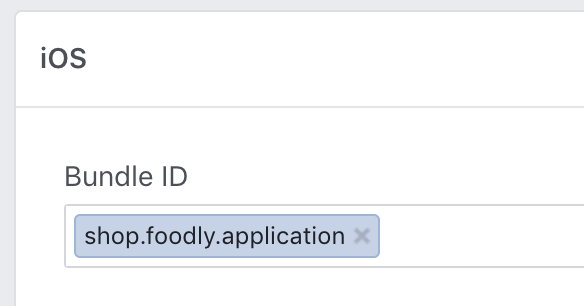
Any ideas?
musemind
on 17 Jan 2020
Please reopen this issue. It still exists.
Just like @musemind 's video. easily reproduce.
I can reproduce it 100% on any iOS 12 device.
azurechen
on 20 Jan 2020
For whatever reason, this issue doesn't seem to be consistently reproducible 🙁
One thing that might help is to follow this suggestion here and set a custom FacebookUrlSchemeSuffix in your app.json ios.infoPlist, and add the same suffix to facebookScheme property (also in app.json) before building an iOS binary
cruzach
on 23 Jan 2020
@cruzach I am having this issue as well. While troubleshooting I noticed that if I sign into facebook with the web browser option and then sign out in the browser, strangely using the native fb app sign in works after that. But I tested it on a different phone and it still loops.
 travislang
on 4 Feb 2020
travislang
on 4 Feb 2020
@cruzach Okay I did more troubleshooting on this and I can now consistently get it reproducible.
If you choose the option to log in on the browser everything works fine, and then the next time you try to log in with facebook it doesn't even give you the option to use the facebook app. Everything works fine.
Now, open a browser and log out of facebook. It will look like this:
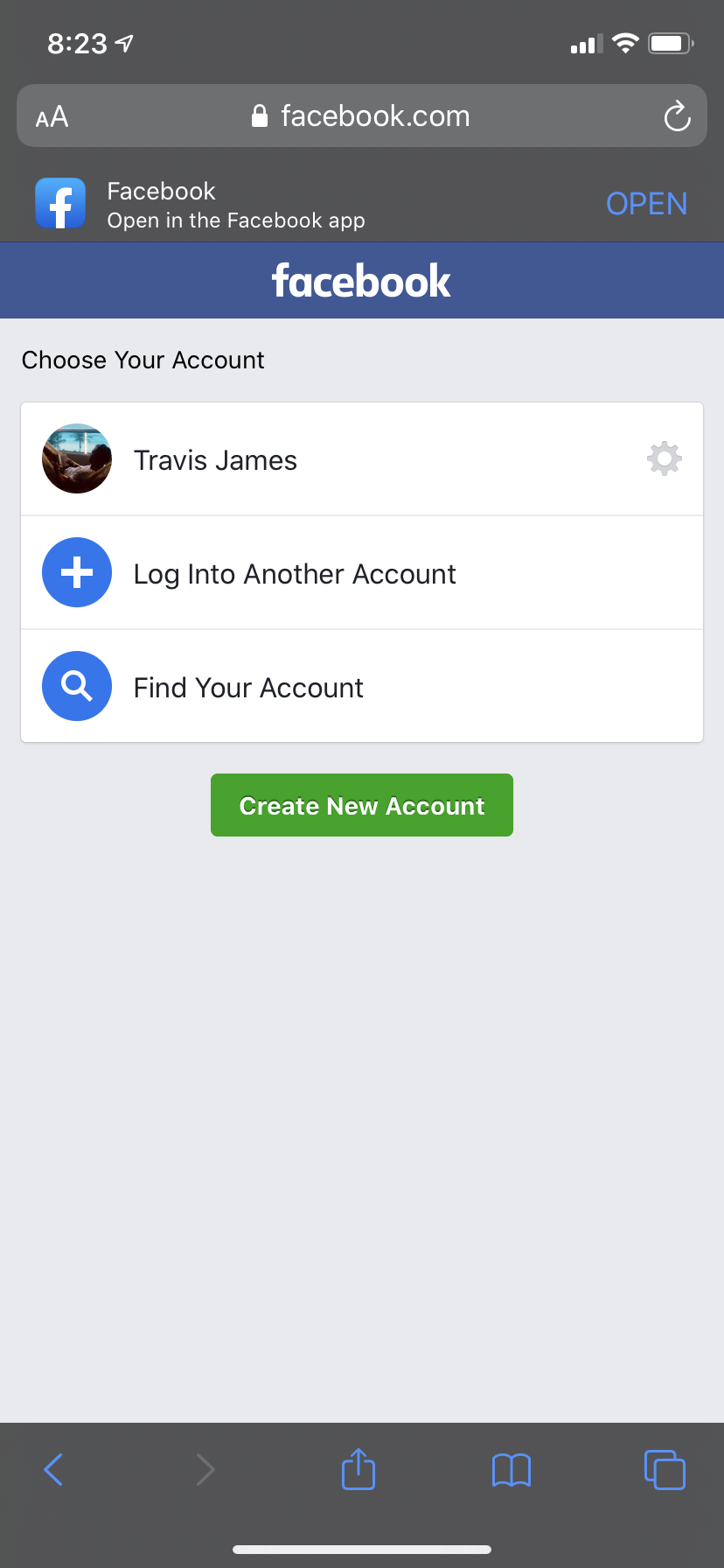
This doesn't actually completely log you out though, it saves your login info so the next time you want to log in you don't have to enter it. Click the settings icon next to your name and it will show this:

Now, if you don't click anything and leave the browser in that state and go back to your app and try to log in with facebook it DOES give you the option to use the fb app:
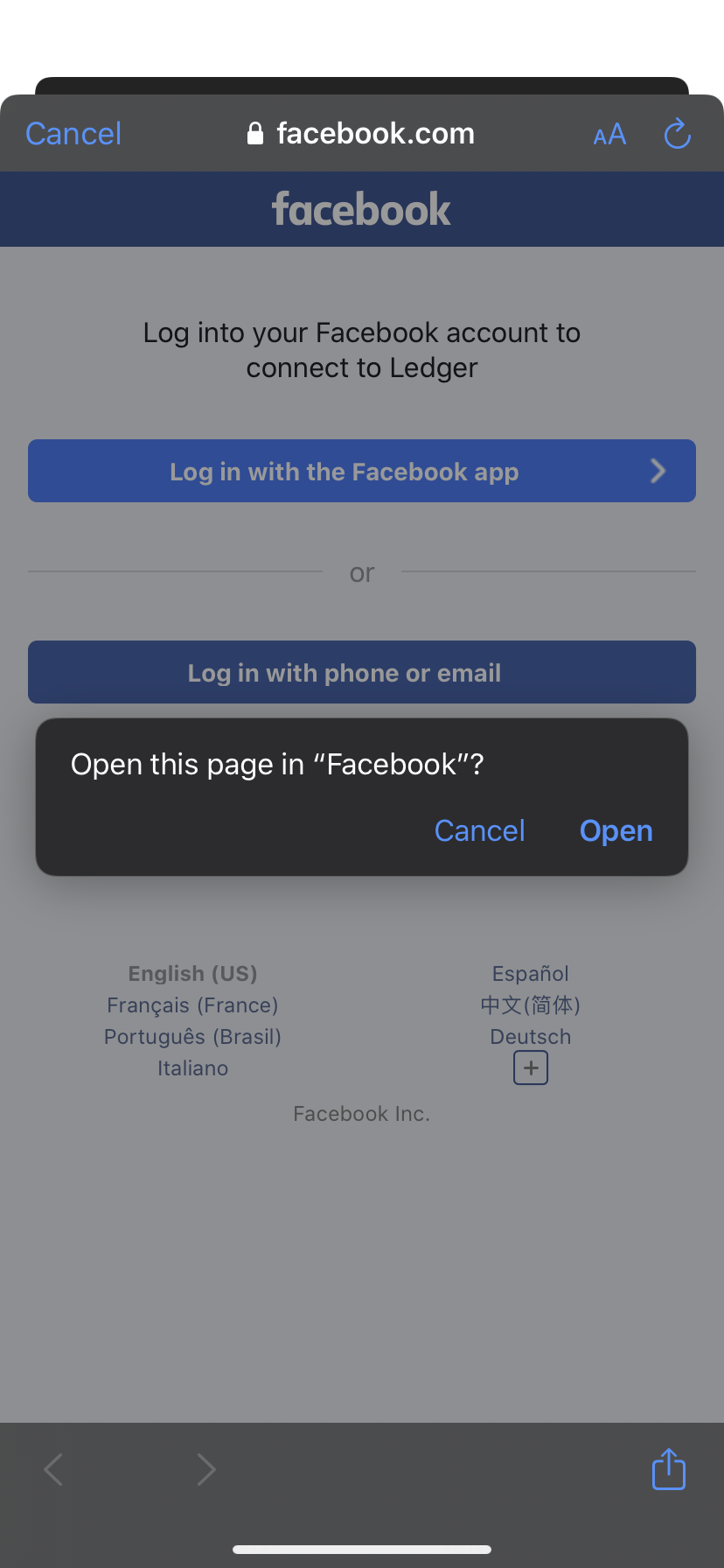
And now, after opening the fb app and approving the app, it CORRECTLY redirects back to the app and everything works fine.
Now, if you go back to the browser and click the option to "remove saved login info" facebook completely logs you out and must remove some cached data, because now if you go back to your app and try facebook login and click the "open in fb app" option, it doesn't redirect back to your app and just redirects back to the facebook modal.
So, with all that said I think what is happening is somehow the native facebook app is always only redirecting back to the modal and then depending on the state of fb in the browser it is either closing the modal correctly or it isn't.
Hopefully that helps troubleshoot because it is definitely a reproducible issue right now.
travislang
on 4 Feb 2020
Any news about it? Was anyone able to fix it?
I need to fix this error as soon as possible and I wasn't able to find any solution.
 fabiosarcansky
on 21 Feb 2020
fabiosarcansky
on 21 Feb 2020
@travislang is that happening in a standalone app, or in the expo client? I am not able to see the option to login via the facebook app.
cruzach
on 24 Feb 2020
@travislang is that happening in a standalone app, or in the expo client? I am not able to see the option to login via the facebook app.
logout your facebook account on safari first. you should see the option.
azurechen
on 25 Feb 2020
I was logged out 🤔 Also tried it logged in, logged out of facebook app, logged in to facebook app
cruzach
on 25 Feb 2020
I have this problem too, pretty easy to reproduce: Log in to facebook through safari, install facebook app, log out of safari, log in into facebook app then check your app. You should see the prompt to log in through facebook app rather than facebook on safari.
 AndreiStoica32
on 26 Feb 2020
AndreiStoica32
on 26 Feb 2020
@cruzach it for sure happens in the standalone build, and I can't remember but possibly in the expo client as well.
Obviously you need to have the facebook app installed though, and like @azurechen says you need to be logged out of facebook in your mobile browser.
Maybe try removing the app from your approved apps in facebook settings so it starts from scratch and facebook asks you to approve the app?
Possibly clearing cache might help too.
If you need anything more specific to help you reproduce, code snippets or anything, just let me know!
travislang
on 26 Feb 2020
Thanks @educonz although it's working for me without that configured...
Would be good to know if that has resolved it for others
cruzach
on 5 Mar 2020
"Embedded Browser OAuth Login" did not work for me. Still getting the white screen in facebook app without redirecting back to Expo Client..
 appseugene
on 8 Mar 2020
appseugene
on 8 Mar 2020
"expo": "~36.0.0",
"expo-facebook": "~8.0.0",
"react-native": "https://github.com/expo/react-native/archive/sdk-
36.0.0.tar.gz"
on Android works, but on Ios not redirecting to app (only white screen with cancel button)
Why expo added this feature? It doesnt work on Ios
 seruybrat
on 8 Mar 2020
seruybrat
on 8 Mar 2020
"Embedded Browser OAuth Login" also didn't work here for myself.
 AndrewBarber
on 9 Mar 2020
AndrewBarber
on 9 Mar 2020
Have the same problem, but
- for me it sometimes works and sometimes not;
- strange is that if I fall in the loop (as in the video) I can't get out of it easily; usually closing my app and fb native app, waiting couple of secs., opening everything again... helps! then I test it again, and at some point I'm falling in loop again
- I think I did about 200-300 tests today with different scenarios (web fb, native fb, logged in/out, etc. etc., close/reopen both my and fb native apps) and can't find any pattern, for me it looks random
(
tested with different bundle ids - doesn;t matter for me
tested on iPhone 8, 10 - both random
sdk: 36, expo-fb: 8,
)
 rjanas
on 19 Mar 2020
rjanas
on 19 Mar 2020
+1
 rodriguezmanu
on 26 Mar 2020
rodriguezmanu
on 26 Mar 2020
@seruybrat same issue here:
"expo": "~36.0.0",
"expo-facebook": "~8.0.0",
"react-native": "https://github.com/expo/react-native/archive/sdk-36.0.0.tar.gz"
and expo app in managed mode. Expo app -> FB Webview -> FB App -> White screen with cancel button (but no redirection to the expo app).
I'm confused, does anyone manage to make it work with a Managed Expo app ?
 ziiw
on 31 Mar 2020
ziiw
on 31 Mar 2020
I've been having the same issue and it's driving me crazy. Can only log in if I'm logged in with the browser, otherwise it tries opening the app and goes into a loop. Bundle ID doesn't make a difference. Is there a chance this be related to SceneDelegate somehow?
UPDATE: I was able to fix it with this solution. Scene Delegate was the problem. I actually had the code but in the wrong place (it was in my WillConnectTo function but should be outside of it as its own function). Hope this helps someone.
 asweitzman
on 4 Apr 2020
asweitzman
on 4 Apr 2020
I have only been able to reproduce this issue when using the Expo client app. A standalone IPA built with expo build:ios does not replicate the same behavior for me, so see below to check your configuration/code against mine. If you are seeing this behavior in the Expo client app, then please refer to this issue. Only continue providing information here if you are seeing this behavior in a standalone iOS app.
In a standalone SDK 37 app, I was not given the option to authenticate via the Facebook app. This is the login function I used:
async function logIn() {
  try {
    await Facebook.initializeAsync("MY-FB-APP-ID");
    const {
      type,
      token
    } = await Facebook.logInWithReadPermissionsAsync({
      permissions: ["public_profile"]
    });
    if (type === "success") {
      // Get the user's name using Facebook's Graph API
      const response = await fetch(
        `https://graph.facebook.com/me?access_token=${token}`
      );
      Alert.alert("Logged in!", `Hi ${(await response.json()).name}!`);
    } else {
      // type === 'cancel'
    }
  } catch ({ message }) {
    alert(`Facebook Login Error: ${message}`);
  }
}
In the facebok developer console, in the app's advanced settings, I have
Native or desktop app? -Yes- SDK version: iOSv5.8.0
And for Facebook Login settings, I have:
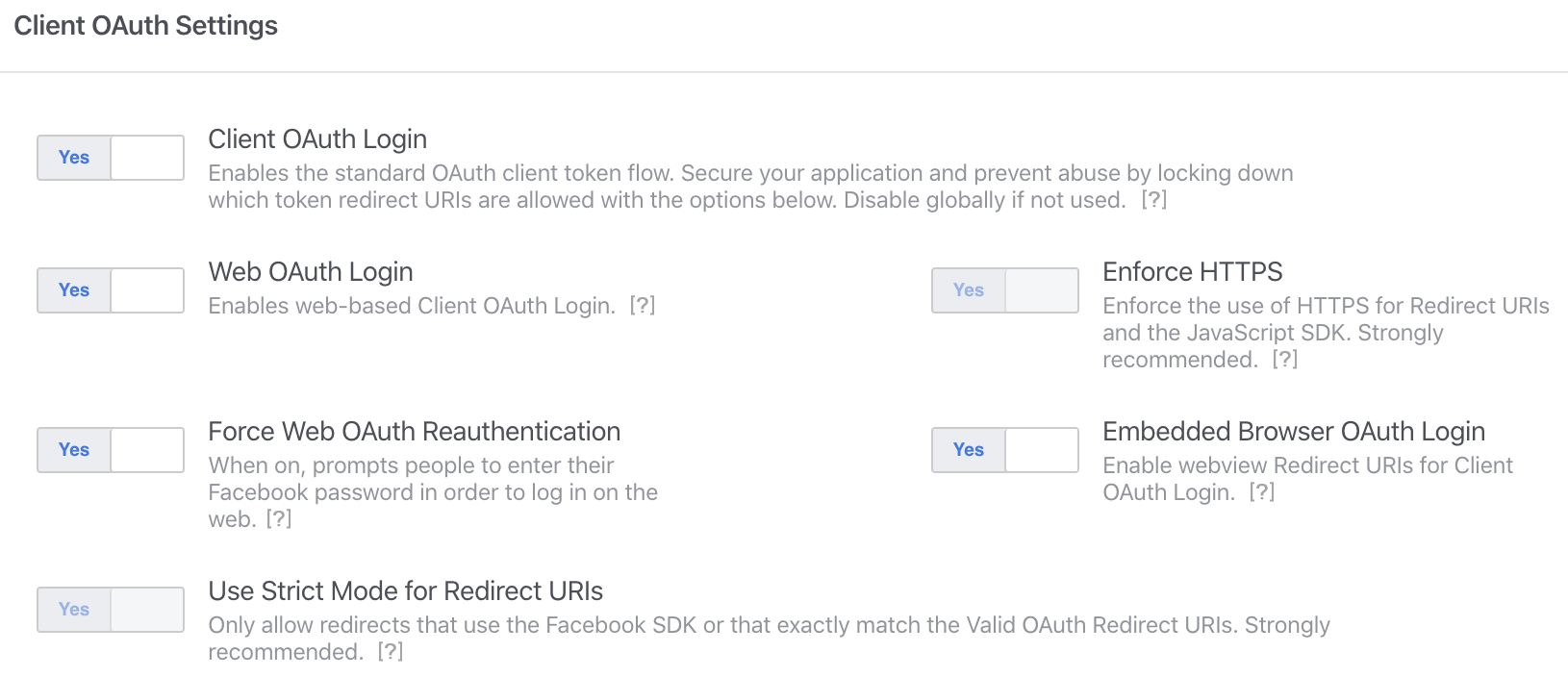
(with the most recent Facebook app downloaded)
cruzach
on 6 Apr 2020
I'm running into the same issue with a Bare app, SDK 37 on iOS
I've set up my CFBundleURLSchemes, FacebookAppID and FacebookDisplayName on my Info.plist
- I click my button to log in with Facebook (calls
logInWithReadPermissionsAsync) - It opens a browser and I get prompted to "Open In Facebook" app
- I'm already signed in with the facebook app, so I just hit "Continue"
- I'm sent back to the browser login page (step 2)
- If I hit "Login with the facebook app" I get stuck in this loop
- If I cancel my call to
logInWithReadPermissionsAsyncreturns{type: 'cancel'}
 luizjr92
on 6 Apr 2020
luizjr92
on 6 Apr 2020
is there a workaround?
 ningacoding
on 6 Apr 2020
ningacoding
on 6 Apr 2020
Same issue here, any workarounds would be appreciated
 mariusbld
on 7 Apr 2020
mariusbld
on 7 Apr 2020
Solution please :)
 angelorampersad
on 7 Apr 2020
angelorampersad
on 7 Apr 2020
Asking for a workaround isn't very helpful, as this is still not reproducible on our end in a standalone (expo build:ios) app. If you can provide that, then please do. Otherwise, I've shared my setup above. One thing to note @luizjr92 since you're in a bare project, do you have fbauth2 as part of your LSApplicationQueriesSchemes in Info.plist?
cruzach
on 7 Apr 2020
@cruzach I do! I have fbapi, fb-messenger-api, fbauth2 and fbshareextension.
It works fine when the sign in happens inside the browser UI.
luizjr92
on 7 Apr 2020
Logging in through the browser is the only supported method from the Facebook SDK now. It seems to me that providing fbauth2 allows the browser to open the link as a deep link (thus opening the Facebook native app)
cruzach
on 7 Apr 2020
@cruzach I removed fbauth2 from my LSApplicationQueriesSchemes and now log in happens exclusively inside the browser. I'll call it a win! 👍
(Even though my app with Expo 36 Managed Workflow in production still manages to login with deep linking and return to the app. And ejecting added fbauth2 to my info.plist by default)
luizjr92
on 7 Apr 2020
@cruzach I removed
fbauth2from myLSApplicationQueriesSchemesand now log in happens exclusively inside the browser. I'll call it a win! 👍(Even though my app with Expo 36 Managed Workflow in production still manages to login with deep linking and return to the app. And ejecting added
fbauth2to myinfo.plistby default)
I didn't understand what exactly do you mean, but if you found a workaround just explain it.
 YahiaBadr
on 7 Apr 2020
YahiaBadr
on 7 Apr 2020
It would only apply to Bare apps. It's a way of disabling the "Open in Facebook" question (deep link).
You need to edit you /ios/yourApp/Info.plist but it won't work if you're in the managed workflow (if you use expo build:* or expo start)
luizjr92
on 7 Apr 2020
I'm only doing Managed Expo.
The repro is 100% and it is exactly as described by @travislang on is post on Feb 4 (the post with the screenshots).
@cruzach is this not expected to work on Managed Expo? Otherwise, how can I help with a repro?
mariusbld
on 8 Apr 2020
@mariusbld as I said above, unfortunately I tried to follow Travis's steps and was not able to reproduce the behavior in a standalone application. I can in the Expo Client app, but that is a separate issue (which has now been linked multiple times, and I'm afraid both threads are getting too deep & noisy for efficient conversation to happen).
If you can reproduce this in a blank expo init project after building with expo build:ios, then please share that with me
cruzach
on 8 Apr 2020
Also have the same issue with a standalone iOS app, using the Expo Managed Workflow on SDK 37.
The behavior seems very inconsistent, sometimes Facebook login works just fine, and sometimes it gets into this endless loop of redirecting back to your app, from the Facebook app, but nothing happening and the login promise never resolves. See attached GIF for what that looks like (recorded on iPhone 7 running 13.4, app was built with expo build:ios and downloaded to device via testflight).
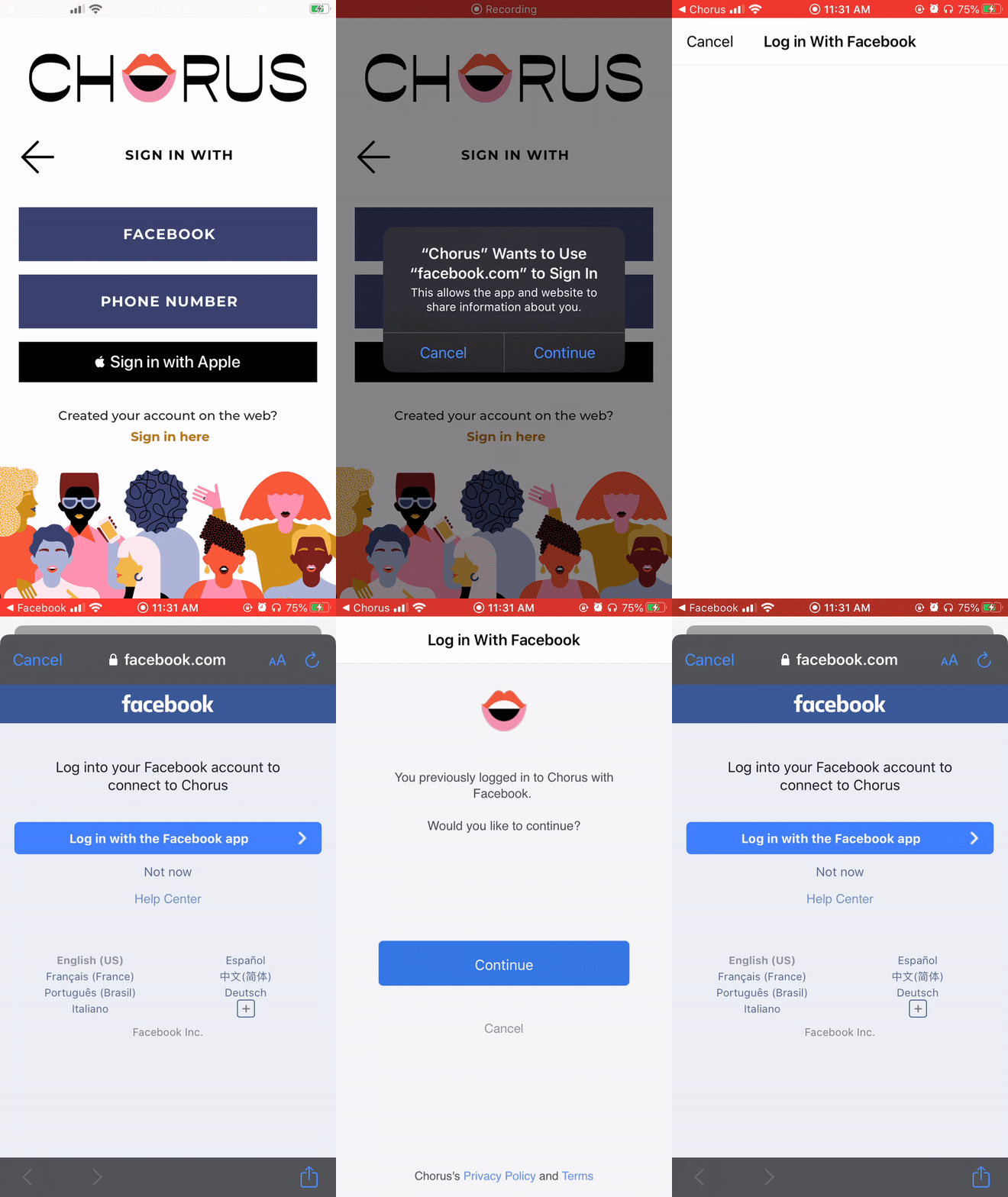
As part of debugging, I tried ejecting and did some digging last night through the native code of EXFacebook, FBSDKLoginKit and FBSDKCoreKit. When it doesn't work the promise in line 95 of EXFaceboook.m loginMgr logInWithPermissions doesn't resolve. Additionally, the FBSDKURLOpening method from FBSDKLoginManager.m doesn't get called after the redirect back to your own happens, so it doesn't even check if isFacebookURL is true or false. I tried to trace this to FBSDKBridgeAPI.m in the BridgeAPI folder of FBSDKCoreKit, but couldn't figure out what's going on in there as it relates to the redirect back from Facebook to my app. The error message that is output in the Xcode console when this happens happens though looks like this:
Error Domain=NSPOSIXErrorDomain Code=53 "Software caused connection abort" UserInfo={_kCFStreamErrorCodeKey=53, _kCFStreamErrorDomainKey=1}.
When I searched for that error message, I can upon this link: https://morioh.com/p/E9zTI5QbWhwk, which suggest the following when trying to dispatch on the main queue dispatch_after(dispatch_time(DISPATCH_TIME_NOW, 0.1 * NSEC_PER_SEC), dispatch_get_main_queue(), ^{ .
Hopefully this can be of some help?
EDIT: just to confirm, the version I am testing on (and is the version in the GIF above) is the version created using expo build:ios. Debugging via ejecting was something I did in addition to try to look into it further.
EDIT 2: Has anyone considered that we're perhaps being rate-limited or something in that vein when we are trying to login with Facebook a bunch of times in a row?
 ilyausorov
on 8 Apr 2020
ilyausorov
on 8 Apr 2020
@cruzach it makes sense, I was only trying it in the Expo Client App.
I agree this is a very long conversation and hard to follow, so I appreciate your fast response!
mariusbld
on 9 Apr 2020
Have the same problem in a new expo app expo init, it does not redirect to the expo client app.
signInWithFacebookAsync=async()=>{
  try {
    await Facebook.initializeAsync('xxxxxxxxxxx');
    const {
      type,
      token,
      expires,
      permissions,
      declinedPermissions,
    } = await Facebook.logInWithReadPermissionsAsync('xxxxxxxxxx',{
      permissions: ['email'],
    });
    if (type === 'success') {
      // Get the user's name using Facebook's Graph API
      const response = await fetch(`https://graph.facebook.com/me?access_token=${token}&fields=id,name,email,birthday,picture.type(large)`);
      const user = await response.json()
      console.log(user)
    } else {
      console.log('cancel')
      // type === 'cancel'
    }
  } catch ({ message }) {
    alert(`Facebook Login Error: ${message}`);
  }
}

YahiaBadr
on 10 Apr 2020
@ilyausorov could you share a repo of a managed or ejected project that reproduces this in a standalone app? I still haven't been able to see this behavior anywhere (tried managed, bare, and expokit) except in the expo client app
cruzach
on 13 Apr 2020
Hi guys, I confirm that the problem only appears when the application is run on the device via the expo client. Today I did a test by doing a build and sending it with TestFlight. The app works properly.
 dpmika
on 13 Apr 2020
dpmika
on 13 Apr 2020
@ilyausorov could you share a repo of a managed or ejected project that reproduces this in a standalone app? I still haven't been able to see this behavior anywhere (tried managed, bare, and expokit) except in the expo client app
hey @cruzach, please find a managed project repo here: https://github.com/ilyausorov/expo-login-testing-app. I just created this app using expo init this evening. It only contains one thing in it, which is the expo-facebook package.
I created a new iOS standalone app using expo build:ios, uploaded to Testflight and then ran it on my iPhone 7, running 13.4.1.
I tested the Facebook Login behavior as follows:
1) Logged out of facebook.com in Safari browser
2) Ensured I'm logged in to the Facebook native app
3) Choose the "Login With The Facebook App" option when presented with the Facebook oAuth screen
4) Press Continue in the Facebook App and return to my app
5) See result, force close my app, restart and try again.
I tested 9 times as you can see in this video, in which 3 times the login promised failed to resolve and I was stuck on the Facebook oAuth screen after returning from the Facebook app, and in the other 6 times it worked. Once you are stuck on the Faceboook oAuth screen after returning from the Facebook app, it's stuck for that whole app session. You can close the facebook login modal, open it again and it still won't work. Only way I was able to make it work again was by force closing the app, and re-opening it, which I'm assuming initializes something on the native side again.
My Facebook Login Settings look as follows:
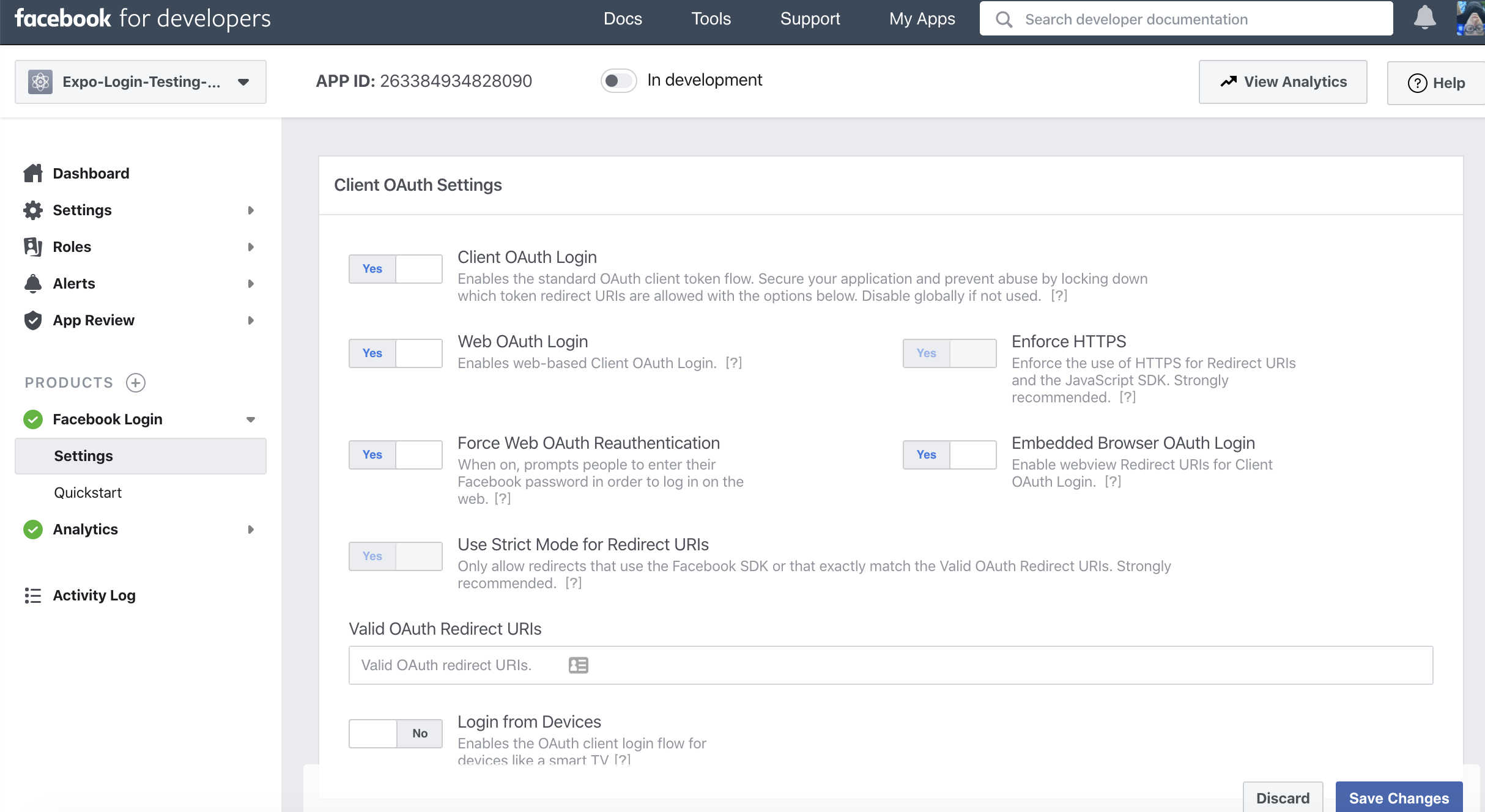
And I ran expo diagnostics for more info:
Expo CLI 3.17.24 environment info:
    System:
      OS: macOS 10.15.4
      Shell: 5.7.1 - /bin/zsh
    Binaries:
      Node: 12.16.1 - /usr/local/bin/node
      Yarn: 1.22.4 - ~/.yarn/bin/yarn
      npm: 6.14.4 - /usr/local/bin/npm
      Watchman: 4.9.0 - /usr/local/bin/watchman
    IDEs:
      Android Studio: 3.5 AI-191.8026.42.35.6010548
      Xcode: 11.4/11E146 - /usr/bin/xcodebuild
    npmPackages:
      expo: ~37.0.3 => 37.0.7
      react: ~16.9.0 => 16.9.0
      react-native: https://github.com/expo/react-native/archive/sdk-37.0.1.tar.gz => 0.61.4
    npmGlobalPackages:
      expo-cli: 3.17.24
ilyausorov
on 14 Apr 2020
@ilyausorov have you tried debugging with bugsnag? I noticed in the above screenshot your "Valid OAuth Redirect URIs" was empty. I have my firebaseapp auth handler URL in that input field "https://yourappname-12345.firebaseapp.com/__/auth/handler" aka "OAuth redirect URI" which can be found in your authentication panel's Facebook settings within Firebase Console.
As an aside, I'm able to get the FB auth to redirect back into the app every time BUT bugsnag caught this error:
undefined is not an object (evaluating 'c.default.auth.FacebookAuthProvider.credential')
Which has blocked my ability to login.
I have a separate file that handles the loading of Firebase and I read that this may have something to do with it? ie: import firebaseApp from "./firebase";
// ./firebase.js
import firebase from "firebase/app";
import "firebase/auth";
import "firebase/storage";

const config = Expo.Constants.manifest.web.config.firebase;

export default !firebase.apps.length
    ? firebase.initializeApp(config)
    : firebase.app();
 adriaanbalt
on 14 Apr 2020
adriaanbalt
on 14 Apr 2020
@ilyausorov have you tried debugging with bugsnag? I noticed in the above screenshot your "Valid OAuth Redirect URIs" was empty. I have my firebaseapp auth handler URL in that input field "https://yourappname-12345.firebaseapp.com/__/auth/handler"
As an aside, I'm able to get the FB auth to redirect back into the app every time BUT bugsnag caught this error:
undefined is not an object (evaluating 'c.default.auth.FacebookAuthProvider.credential')
Which has blocked my ability to login.
I have a separate file that handles the loading of Firebase and I read that this may have something to do with it? ie:import firebaseApp from "./firebase";// ./firebase.js import firebase from "firebase/app"; import "firebase/auth"; import "firebase/storage"; const config = Expo.Constants.manifest.web.config.firebase; export default !firebase.apps.length ? firebase.initializeApp(config) : firebase.app();
Hey @adriaanbalt, in the production app I'm maintaining we do have bugsnag and it is not catching anything when this happens, because it looks like nothing is happening on the JS side. It's just a promise that is not resolving.
We're not using firebase either, but that's besides the point as I made the separate test repo that literally only has the expo-facebook module in there and that's it. The fact that it works some of the time means that it's not an obvious config issue, but rather feels like either an initialization issue on the native side, or perhaps thread blocking or something else of that nature which gets things stuck.
ilyausorov
on 14 Apr 2020
I solved my previous bug by adding import * as firebase from "firebase"; to where I am invoking firebase.auth.FacebookAuthProvider.credential(token). Not sure why Expo cannot distinguish between my Firebase apps.
@ilyausorov I am also using expo-facebook but with my firebase integration. I am also not able to redirect back into the app as expected. I checked my OAuth redirect path within Facebook app and it is correct wired up to be the same as my Firebase's redirect details within firebase console authentication. I've also confirmed that my app name and app secret are the same as my Facebook app. I end up on a white screen every time; it never redirects.
adriaanbalt
on 15 Apr 2020
exact same issue for me as explained by @ilyausorov in detail. im in testFlight with standalone app on iPhone 11 Pro with iOS 13.3.
@cruzach are you able to see exactly what @ilyausorov provided with a basic app with just expo-facebook?
appseugene
on 17 Apr 2020
@ilyausorov thank you for providing that repo, it illuminates quite a few things that I believe are worth mentioning:
- Using your exact code, except removing the appName argument from the call to
Facebook.initializeAsync(meaning, only providing the appId) resulted in the correct behavior for me. If you can try that, and let me know the results, please do (should be easily doable in your testflight app via anexpo publish) - Providing the
facebookSchemein app.json is what enables the behavior for the app to use the Facebook app. without this, your app will not be given the option to "Sign in using the 'Facebook' app" (not sure if that's what anyone here is looking for, but thought it worth mentioning) - Using SDK 37,
expo-facebook@~8.1.0, in a standalone app (built withexpo build:ios) I am not able to reproduce the behavior of the "White screen with cancel button". Note that I am able to reproduce this in the Expo Client app, and that is a separate issue tracked in 6459
cruzach
on 17 Apr 2020
@cruzach I tested the things you suggested:
- As you can see from this commit in the repro repo that I shared earlier, I removed the appName argument from the
Facebook.initializeAsyncmethod. After that, I tested the same process as above several more times. Unfortunately, I still had several login attempts fail to return the promise and get stuck on the login modal, after getting redirected back from the Facebook App. Another video here. As previously mentioned, it only fails to work in about 30% of the tries. So I don't think removing appName did anything to change this issue.
Then I tried to remove the facebookScheme property from app.json in this commit, and then create a new standalone app using
expo build:ios. When trying to do Facebook login using the same method, the option to "Login with the Facebook App" is still show, but when I try it, it doesn't redirect back to my app and just stays on the white screen Facebook app. See this video for what that looks like. It seems removing facebookScheme only stops Facebook from redirecting back to my app, but not from trying to offer the "Login with the Facebook App" method.However, I tried one more thing which was to eject the same repro repo, and removed "fbauth2" from the
LSApplicationQueriesSchemeskey in Info.plist. When I did this, Facebook started only offering the ability to login through the web modal using email and password, and not offering the option to "Login with the Facebook App" anymore. What do you think about, for the managed workflow, allowing a developer to choose to not have this item (fbauth2) be included in theLSApplicationQueriesSchemeskey in Info.plist? Right now I think I'm able to add more items intoLSApplicationQueriesSchemesthrough app.json, but not remove the ones that Expo includes automatically for Facebook. I'd be open to doing the PR for this if it would be acceptable.
ilyausorov
on 18 Apr 2020
For point 3- I'm aware of this, but am hesitant to make that change since the FB docs explicitly state to include fbauth2 in the app's LSApplicationQueriesSchemes
I'm not sure why we are having different behavior when our setup for the first two points is identical...the only difference I can imagine is the Facebook app version, but doubt that would make any difference. I'll have to continue investigating
cruzach
on 18 Apr 2020
I've also tested with initializing facebook only with app id, like so:
await Facebook.initializeAsync(Constants.manifest.facebookAppId);
published that to expo and not much change in my standalone app.
My success rate is the other way around, only like a third of the time it works ok.
When i close both apps (facebook and my app) I only get it to login about half the time. The rest is just stuck at navigating back to my app and having the facebook login stay open (like in Ilya's video). I'm also on the latest Facebook app (downloaded like a day ago).
appseugene
on 18 Apr 2020
For point 3- I'm aware of this, but am hesitant to make that change since the FB docs explicitly state to include
fbauth2in the app'sLSApplicationQueriesSchemesI'm not sure why we are having different behavior when our setup for the first two points is identical...the only difference I can imagine is the Facebook app version, but doubt that would make any difference. I'll have to continue investigating
Yeah, I agree that I'd be more in favor of finding out the root cause of this issue, rather than enacting an "unrecommended" workaround.
Although... further flexibility of the Info.plist file through app.json would maybe not be the worst thing. We already let users add anything they want to the ios.infoPlist key in app.json - why not let us remove defaults as well?
Regarding what could be different between our testing setups, I can think of the following:
1) Facebook App Version (I'm on the latest from the App Store, but we know they are always doing a million different experiments so who knows)
2) Physical Device Hardware (I'm on iPhone 7, perhaps older / slower hardware is slowing down some native initialization code? Although @appseugene is on an iPhone 11 Pro and is also experiencing this issue)
3) iOS Version (I'm on 13.4.1)
4) Internet Connectivity Speed (My wifi at home is ok, but not amazing)
As I hypothesized a few posts back, I think the issue is somewhere in FBSDKBridgeAPI.m in the BridgeAPI folder of FBSDKCoreKit, but I can't confirm it. I'll keep trying to fiddle with it too. Let me know if you can think of anything else and I'd be happy to try it out.
ilyausorov
on 18 Apr 2020
@ilyausorov I was using an iPhone 7, although on iOS 13.3, so I'm testing on 13.4 now (could also add you as a Testflight tester to confirm if it you see the same behavior on your wifi)
Could you double-check that the bundle Id in your facebook app settings is only your bundle Id, and does not include host.exp.exponent?
edit: Updated to ios 13.4.1 and still can't reproduce 🙁
cruzach
on 20 Apr 2020
Guys, I think I just got rejected on Apple due to this :(
`We discovered one or more bugs in your app when reviewed on iPad running iOS 13.4.1 on Wi-Fi.
Specifically, we were not able to login with Facebook ...`
I guess i got lucky on iPhone but the iPad failed..
@cruzach, to answer your question (ahead of Ilya), my Facebook app settings only have my bundle id (nothing expo related) and I still have this issue.
appseugene
on 20 Apr 2020
@ilyausorov I was using an iPhone 7, although on iOS 13.3, so I'm testing on 13.4 now (could also add you as a Testflight tester to confirm if it you see the same behavior on your wifi)
Could you double-check that the bundle Id in your facebook app settings is only your bundle Id, and does not include
host.exp.exponent?edit: Updated to ios 13.4.1 and still can't reproduce 🙁
Hey @cruzach, previously I did have host.exp.exponent as one of the bundle ids in Facebook app settings. I removed host.exp.exponent and only left my app's bundle id and ran another 10 tests, as above. I still got a 30% rate of the infinite stuck loop with my repro app.
Should we swap testflights? I'm at [first name] @ [last name] dot com
ilyausorov
on 21 Apr 2020
@appseugene could you provide more information (if Apple gave you any)? Or ask Apple for clarification. I submitted a test expo app and wasn't rejected
@ilyausorov just sent you an email
cruzach
on 21 Apr 2020
@cruzach, yea i asked Apple for more info. But all they said is what I have above :( that Facebook login failed. And mentioned the iPad running iOS 13.4.1 on Wi-Fi..
appseugene
on 21 Apr 2020
@appseugene Charlie and I were finally able to replicate the issue on his device, after sharing my Testflight app with him.
Let's wait to see what he says after he has a chance to investigate a bit more and maybe run it by the Expo team.
Given the inconsistency of the failure state, and the fact that it resets after force closing and re-opening the app, gives me the feeling that this will be a hard thing to debug / fix. I'll also dig in further on the native side, but for now it's a bit of a roll of the dice whether your reviewer inits your app with Facebook Login working or not working.
ilyausorov
on 21 Apr 2020
thank you guys for looking into this. i'm glad at least we're able to replicate now and move the needle. I'll keep an eye here for any updates and hopefully i keep submitting to apple until the dice rolls in my favor :)
appseugene
on 21 Apr 2020
Quick update for all the followers of this thread: heard from Charlie earlier today and it looks like we've been able to isolate the problem & he came up with a proposed long term fix.
High level, it has to do with how Expo treats all of its submodules and how they are initialized on the native side. Sometimes the Expo default Linking module would be initialized first, and other times Expo-Facebook is initialized first. If the default Expo Linking module would be initialized first, then it would try to handle the Facebook deeplink back from Facebook to our app and do nothing with it. Charlie's solution is to (quoting from him) "add a notion of unimodule "priority", where certain unimodules will be instantiated before others. This way, Expokit functions as a "catch-all" and won't be checked till the end."
No promises on how fast it can be delivered, but Charlie is working on the PR. Looking forward to seeing this fix land!
ilyausorov
on 23 Apr 2020
@ilyausorov when should we start using it or how to update it in our code?
YahiaBadr
on 27 Apr 2020
same - wanted to ask what next steps should be, now that this is Closed
appseugene
on 27 Apr 2020
Indeed that's a good question for @cruzach. I imagine there will be a new binary release of the iOS Expo Client on the App Store in the coming days (for when working with the Expo client), which will include this fix, as well as an update to the iOS builders in the Expo cloud to use this new version of the code.
@cruzach any ETA that we can look forward to yet?
ilyausorov
on 27 Apr 2020
@cruzach , pls let us know what you think will be next for us to get this fix. For me, this is the only thing preventing to 'go live' as we aim for Facebook to be the primary login method and don't want to loose users when they get into the infinite loop..
Appreciate any feedback.
appseugene
on 29 Apr 2020
We'll be releasing an update soon, hopefully early next week
cruzach
on 30 Apr 2020
If you are using bare work flow, you may try this method, select your project -> targets -> info tab -> scroll down to URL Types, need to fill your fb scheme like this.

while I am using react-native-fbsdk I encountered the same issue as well. After I modified the fb scheme in URL Types everything works fine. It may works for expo-facebook as well.
 miracle0930
on 1 May 2020
miracle0930
on 1 May 2020
This fix has been deployed to our builders- to get it, just rebuild with expo build:ios on an SDK 37 app
If you use turtle-cli you'll need to update to [email protected]
cruzach
on 4 May 2020
thanks @cruzach , so all we need to do is just rebuild?
no sdk changes/re-installs?
im on:
- sdk-37.0.1.tar.gz
- expo": "~37.0.3"
- expo-facebook": "~8.1.0"
not using turtle-cli
appseugene
on 5 May 2020
@appseugene that's correct!
cruzach
on 6 May 2020
Seems to work now (with multiple attempts that I tried).
Thanks again everyone for the work on this one!
appseugene
on 7 May 2020
Hello,
I was watching this thread and I can confirm that the error was visible in my case too. After the update I encountered another problem which I am not very sure how to resolve. Basically after this update on iOS all my builds crashed when Facebook.logInWithReadPermissionsAsync is called.
I am calling the function like below dispatching actions with redux on then and error cases.
Facebook.logInWithReadPermissionsAsync('APP_ID', {
    permissions: ['email', 'public_profile'],
    behavior: Platform.OS === 'android' ? 'web' : 'native',
  })
I also tried for iOS system instead of native, but with native was working prior to this update. The app works ok on Android even if Facebook app is installed or not, but on iOS simply the app crashes when the button is pressed and this line is called. There is no Facebook loader or that popup that appear asking you to login with facebook.
Here is a part my app.json
"expo": {
"name": "appName",
"scheme": "appscheme",
"facebookScheme": "fbxxx",
"facebookAppId": "APPID",
"facebookDisplayName": "appname",
....
"ios": {
"bundleIdentifier": "appbundle",
"infoPlist": {
"CFBundleURLTypes": {
"CFBundleURLSchemes": [
"fbxxxx",
"appscheme"
]
},
"FacebookAppId": "APPID",
"FacebookDisplayName": "appname",
"LSApplicationQueriesSchemes": [
"fbapi",
"fb-messenger-share-api",
"fbauth2",
"fbshareextension"
]
},
....
}`
I tried with and without infoPlist, as above, while following other threads but the first rebuild after your message about fixing this crashed.
Expo packages that I use :
`
    "exp-cli": "^5.0.0",
    "expo": "^37.0.9",
    "expo-app-auth": "~9.0.0",
    "expo-apple-authentication": "~2.1.0",
    "expo-asset": "~8.1.4",
    "expo-blur": "~8.1.0",
    "expo-cli": "^3.20.3",
    "expo-constants": "~9.0.0",
    "expo-facebook": "~8.1.0",
    "expo-font": "~8.1.0",
    "expo-google-app-auth": "^8.1.0",
    "expo-google-sign-in": "~8.1.0",
    "expo-image-picker": "~8.1.0",
    "expo-intent-launcher": "~8.1.0",
    "expo-linear-gradient": "~8.1.0",
    "expo-permissions": "~8.1.0",
    "expo-random": "~8.1.0",
    "expo-web-browser": "^8.2.1",
"react-native": "^0.61.4",
`
Is anyone encountering this issue? Any suggestion on how to investigate this is appreciated!
 manusharian
on 15 May 2020
manusharian
on 15 May 2020
Hello,
I was watching this thread and I can confirm that the error was visible in my case too. After the update I encountered another problem which I am not very sure how to resolve. Basically after this update on iOS all my builds crashed when Facebook.logInWithReadPermissionsAsync is called.
I am calling the function like below dispatching actions with redux on then and error cases.
Facebook.logInWithReadPermissionsAsync('APP_ID', { permissions: ['email', 'public_profile'], behavior: Platform.OS === 'android' ? 'web' : 'native', })
I also tried for iOS system instead of native, but with native was working prior to this update. The app works ok on Android even if Facebook app is installed or not, but on iOS simply the app crashes when the button is pressed and this line is called. There is no Facebook loader or that popup that appear asking you to login with facebook.
Here is a part my app.json
"expo": {
"name": "appName",
"scheme": "appscheme",
"facebookScheme": "fbxxx",
"facebookAppId": "APPID",
"facebookDisplayName": "appname",
....
"ios": {
"bundleIdentifier": "appbundle",
"infoPlist": {
"CFBundleURLTypes": {
"CFBundleURLSchemes": [
"fbxxxx",
"appscheme"
]
},
"FacebookAppId": "APPID",
"FacebookDisplayName": "appname",
"LSApplicationQueriesSchemes": [
"fbapi",
"fb-messenger-share-api",
"fbauth2",
"fbshareextension"
]
},
....
}`I tried with and without infoPlist, as above, while following other threads but the first rebuild after your message about fixing this crashed.
Expo packages that I use :
`"exp-cli": "^5.0.0", "expo": "^37.0.9", "expo-app-auth": "~9.0.0", "expo-apple-authentication": "~2.1.0", "expo-asset": "~8.1.4", "expo-blur": "~8.1.0", "expo-cli": "^3.20.3", "expo-constants": "~9.0.0", "expo-facebook": "~8.1.0", "expo-font": "~8.1.0", "expo-google-app-auth": "^8.1.0", "expo-google-sign-in": "~8.1.0", "expo-image-picker": "~8.1.0", "expo-intent-launcher": "~8.1.0", "expo-linear-gradient": "~8.1.0", "expo-permissions": "~8.1.0", "expo-random": "~8.1.0", "expo-web-browser": "^8.2.1", "react-native": "^0.61.4",`
Is anyone encountering this issue? Any suggestion on how to investigate this is appreciated!
I had also the same issue after updating. However, i solved it by adding these fields in my app.json.
"facebookScheme":"fbAppId",
"facebookAppId":"AppId",
"facebookDisplayName":"myAppName",
But i also see them in your file, so double check if the values are written right and you appId follows the one in your facebook developer page.
YahiaBadr
on 15 May 2020
I had also the same issue after updating. However, i solved it by adding these fields in my
app.json."facebookScheme":"fbAppId", "facebookAppId":"AppId", "facebookDisplayName":"myAppName",But i also see them in your file, so double check if the values are written right and you appId follows the one in your facebook developer page.
Thank you very much! That was the case, I just had fbscheme from another app and because until now the there was no problem I did not checked them carefully! On simulator it is working, hopefully when on Testflight it will be the same.
Update: Works perfectly! Thank you again!
manusharian
on 15 May 2020
Hello everyone, I'm trying to fix this issue with my app but whenever I upgrade from SDK 36 to SDK 37, the token I'm receiving back from Facebook.logInWithReadPermissionsAsync is not matching to what it was before.
Is this something that anyone else has ran into? How should I fix this? I wouldn't want to deploy and have all the users not being recognized when they login and losing their data.
Here's an example of my code:
try {
    await Facebook.initializeAsync(fb_id);
    const {
        type,
        token,
        expires,
        permissions,
        declinedPermissions,
    } = await Facebook.logInWithReadPermissionsAsync({
        permissions: ['public_profile'],
    });
    if (type === 'success') {
        // Get the user's name using Facebook's Graph API
        const response = await fetch(`https://graph.facebook.com/me?access_token=${token}&fields=id,name,first_name,last_name,email,picture`);
        const fbUser = await response.json();
        dispatch(logInUser('facebook', fbUser.id, { first_name: fbUser.first_name, last_name: fbUser.last_name, email: fbUser.email, profile_pic: fbUser.picture.data.url }));
    } else {
        // type === 'cancel'
    }
} catch ({ message }) {
    alert(`Facebook Login Error: ${message}`);
}
 Brune04
on 27 May 2020
Brune04
on 27 May 2020
Hello everyone, I'm trying to fix this issue with my app but whenever I upgrade from SDK 36 to SDK 37, the token I'm receiving back from Facebook.logInWithReadPermissionsAsync is not matching to what it was before.
Is this something that anyone else has ran into? How should I fix this? I wouldn't want to deploy and have all the users not being recognized when they login and losing their data.
Here's an example of my code:
try {
  await Facebook.initializeAsync(fb_id);
  const {
      type,
      token,
      expires,
      permissions,
      declinedPermissions,
  } = await Facebook.logInWithReadPermissionsAsync({
      permissions: ['public_profile'],
  });
  if (type === 'success') {
      // Get the user's name using Facebook's Graph API
      const response = await fetch(`https://graph.facebook.com/me?access_token=${token}&fields=id,name,first_name,last_name,email,picture`);
      const fbUser = await response.json();
      dispatch(logInUser('facebook', fbUser.id, { first_name: fbUser.first_name, last_name: fbUser.last_name, email: fbUser.email, profile_pic: fbUser.picture.data.url }));
  } else {
      // type === 'cancel'
  }
} catch ({ message }) {
  alert(`Facebook Login Error: ${message}`);
}
I think you missed adding your fb_id here.
await Facebook.logInWithReadPermissionsAsync(fb_id,{permissions: ['public_profile']});
@YahiaBadr Looks like that wasn't the issue. I added the fb_id to that method and it's still logging in with the wrong token.
Just to clarify, the only difference between it not working and it working is me running expo upgrade to get from 36 to 37 and running npm i react-native-screens to fix an issue with not finding that package.
Brune04
on 27 May 2020
@cruzach In an ExpoKit project I tried to upgrade to EXPO 37 (successful) but when using the ExpoKit tag with version 2.15.4 (from April which contains @cruzach corrections):
pod 'ExpoKit',
:git => "http://github.com/expo/expo.git",
:tag => "ios/2.15.4",
:subspecs => [
"Core"
],
I receive the following error:
EXDevMenuDelegateProtocol.h not found in EXKernel.h.
The file is not found in node_modules folder.
How do I resolve it?
EXViewController.m:4:9: In file included from ...mobile/ios/Pods/ExpoKit/ios/Exponent/ExpoKit/EXViewController.m:4
If I use the :tag => "ios/2.15.1" in the ExpoKit project (it is building correctly) - but the Facebook redirect problem is still reproducible
 AdelaPetrut
on 17 Jun 2020
AdelaPetrut
on 17 Jun 2020
Any particular reason you're using Expokit rather than the bare workflow? you may want to check out this blogpost
cruzach
on 17 Jun 2020
@cruzach because it was included in our project like this before the Bare workflow was launched.
And we used the fact that is mentioned that "To ease the transition, we’ve outlined our recommended approach to migration, and will still release ExpoKit for SDK37 and SDK38."
-> so we would like to let it in until the EXPO 38, when we plan to make the migration.
We have a live on store scheduled this week - this is why we would need to find (is possible) a solution for the ExpoKit.
Are there some steps we can do to make it build it in ExpoKit?
AdelaPetrut
on 17 Jun 2020
@cruzach thank you very much for your help and support. You saved the day.
As you answered to me here: https://forums.expo.io/t/expokit-exdevmenudelegateprotocol-h-not-found/39157/4:
it seems that Expokit 2.15.4 is missing the fix that was applied by this commit.
To get that fix, you can change:
pod ‘ExpoKit’,
:git => “http://github.com/expo/expo.git”,
:tag => “ios/2.15.4”,

to

pod 'ExpoKit',
:git => "http://github.com/expo/expo.git",
:commit => "30eb0558ff6a77acf56bb045e98b84f6a5e1478a",
This solution worked great for my ExpoKit application problem.
AdelaPetrut
on 17 Jun 2020
Related issues
 rollymaduk
·
3Comments
rollymaduk
·
3Comments
 peacemind
·
3Comments
peacemind
·
3Comments
 brentvatne
·
3Comments
brentvatne
·
3Comments
 fredjens
·
3Comments
fredjens
·
3Comments
 mikadze
·
3Comments
mikadze
·
3Comments
Most helpful comment
@cruzach Okay I did more troubleshooting on this and I can now consistently get it reproducible.
If you choose the option to log in on the browser everything works fine, and then the next time you try to log in with facebook it doesn't even give you the option to use the facebook app. Everything works fine.
Now, open a browser and log out of facebook. It will look like this:
This doesn't actually completely log you out though, it saves your login info so the next time you want to log in you don't have to enter it. Click the settings icon next to your name and it will show this:
Now, if you don't click anything and leave the browser in that state and go back to your app and try to log in with facebook it DOES give you the option to use the fb app:
And now, after opening the fb app and approving the app, it CORRECTLY redirects back to the app and everything works fine.
Now, if you go back to the browser and click the option to "remove saved login info" facebook completely logs you out and must remove some cached data, because now if you go back to your app and try facebook login and click the "open in fb app" option, it doesn't redirect back to your app and just redirects back to the facebook modal.
So, with all that said I think what is happening is somehow the native facebook app is always only redirecting back to the modal and then depending on the state of fb in the browser it is either closing the modal correctly or it isn't.
Hopefully that helps troubleshoot because it is definitely a reproducible issue right now.