Devilutionx: Compiling MSVC x64-Release build fails with C1001 internal compiler error
Describe
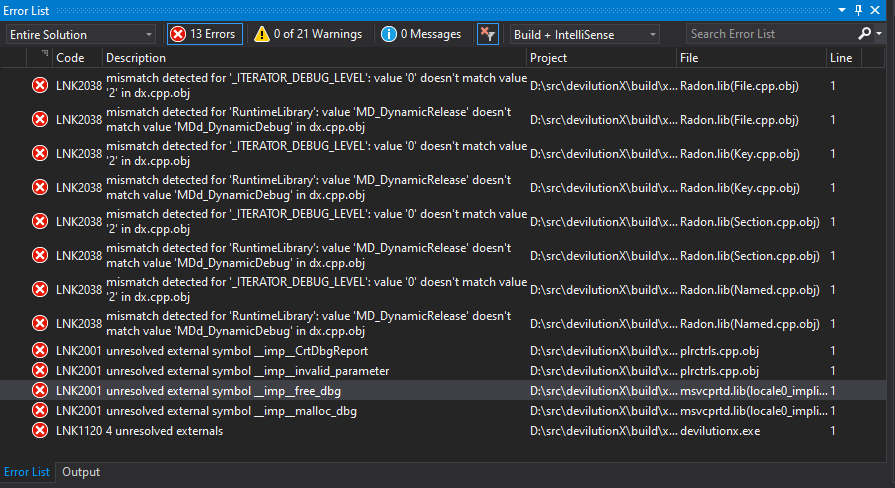
Attempting to compile x64-Release build on Visual Studio 2019 results in linking errors. x64-Debug build compiles fine and shows only warnings.
To Reproduce
Steps to reproduce the behavior:
- Install needed 64 bit dependencies via vcpkg
- Open Visual Studio
- Open devilutionX project via "File - Open- CMake"
- Choose "x64-Release" configuration
- Click "Build - Build All"
- See linking errors
Expected behavior
Compilation is successful and results in working devilutionX.exe
Screenshots
Additional context
- OS: Windows 10
- Compiler: Visual Studio 2019 16.5.4
- sdl2 2.0.10-3
- sdl2-mixer 2.0.4-9
- sdl2-ttf 2.0.15-3
- libsodium 1.0.18-2
 tsunamistate
All 14 comments
Does it work under MSVC 2017? We do not have a Windows maintainer so it's limited how much we can test and fix MSVC specific issues.
Most of the errors show appear to be related to https://github.com/szewczukk/Radon and debug function. Can you check if it is indeed building the relevant parts in release mode, and maybe check the other issues with the Radon project.
 AJenbo
on 15 Apr 2020
AJenbo
on 15 Apr 2020
x64-Release does compile fine in VS2017, seems it's VS2019 specific.
Also, just to check I have made another build generating the VS solution in CMake-GUI, and it has a different error
7>D:\src\devilutionX\Source\drlg_l3.cpp(1351): fatal error C1001: Internal compiler error.
7>(compiler file 'd:\agent\_work\1\s\src\vctools\Compiler\Utc\src\p2\main.c', line 182)
7> To work around this problem, try simplifying or changing the program near the locations listed above.
7>If possible please provide a repro here: https://developercommunity.visualstudio.com
7>Please choose the Technical Support command on the Visual C++
7> Help menu, or open the Technical Support help file for more information
7>  link!InvokeCompilerPassW()+0x2c6e4
7>  link!InvokeCompilerPassW()+0x2c6e4
tsunamistate
on 16 Apr 2020
That looks like a bug in msvc, maybe you can get them to help with solving it
AJenbo
on 16 Apr 2020
Is this really MSVC bug? Around 2 months ago Release build was building fine without any errors.
tsunamistate
on 16 Apr 2020
I se no other way of interpreting this message:
Internal compiler error ... If possible please provide a repro here: https://developercommunity.visualstudio.com, Please choose the Technical Support command on the Visual C++ 7> Help menu
Microsoft is basically asking you to help them solve the issue.
And after all it still works in MSVC 2017, and all other compilers that we are testing. The mentioned code also hasn't changed for 6 months.
AJenbo
on 16 Apr 2020
@tsunamistate in the first screenshot it looks like the Release build is being linked against Debug libraries, or perhaps the other way around
 glebm
on 16 Apr 2020
glebm
on 16 Apr 2020
is your cmake at least v3.14? From what I can tell, VS2019 is not supported in versions below v3.14.
glebm
on 16 Apr 2020
I think MSVC 2017 came with CMake 3.10 build in.
AJenbo
on 16 Apr 2020
It works for me with VS2019. Interestingly, it uses the Ninja generator.
glebm
on 16 Apr 2020
Alright, I have deleted the repo, cloned it again and rebuilt the project - Radon.lib errors are gone, and I'm only left with C1001 compiler error in drlg_l3.cpp, line 1351
@glebm looks like you are right that build was linked against wrong libraries.
I will try to report the C1001 to MSVC, but think this should be left open
tsunamistate
on 16 Apr 2020
I've updated my VS2019 and I now see the same compiler error.
Looks like this bug has been introduced in one of the recent VS2019 updates.
It's not a DevilutionX bug though, so I think we should close this with a link to the VS2019 issue.
glebm
on 16 Apr 2020
The x64-Debug and both x86 builds work
glebm
on 16 Apr 2020
Thank you for helping me in identifying the problem, I have reported this bug to MSVC team:
https://developercommunity.visualstudio.com/content/problem/995884/internal-compiler-error-c1001-in-x64-release-build.html
Hope it'll be identified and fixed quickly.
I really appreciate this project, even though I have no nostalgia with Diablo, you've gotta respect the classics!
tsunamistate
on 17 Apr 2020
Thanks for taking it all the way :)
AJenbo
on 17 Apr 2020
Related issues
 Chance4us
·
15Comments
Chance4us
·
15Comments
 mgpat-gm
·
21Comments
mgpat-gm
·
21Comments
 mbreskovec
·
49Comments
AJenbo
·
19Comments
mbreskovec
·
49Comments
AJenbo
·
19Comments
 predator8bit
·
21Comments
predator8bit
·
21Comments
Most helpful comment
Thank you for helping me in identifying the problem, I have reported this bug to MSVC team:
https://developercommunity.visualstudio.com/content/problem/995884/internal-compiler-error-c1001-in-x64-release-build.html
Hope it'll be identified and fixed quickly.
I really appreciate this project, even though I have no nostalgia with Diablo, you've gotta respect the classics!