Devilutionx: Game controller improvments
The current game controller code has some minor quirks that should be death with.
auto-aim
- [x] Targeting enemies should take reachability/walk-path (if not ranged weapon) and player direction into consideration. See https://stackoverflow.com/questions/30368632/calculate-distance-on-a-grid-between-2-points this might already be implemented via path_get_h_cost.
- [x] Monsters that can talk should always be last target
- [x] We do not aim at other players, this should happen if we cast a friendly spell or friendly mode is off
- [x]
FindPathis expensive on slow devices, especially when path is blocked - [x] Melee aim isn't correctly finding the rothery closest target, or down prioritizing talkingmonsters.
- [x] Target triggers (stairs) if nothing else is around
misc
- [x] Automap moves in the opposite direction compared to arrow keys and moves to fast.
- [x] Town portal should be cast in front of the player instead of where the mouse happens to be (same for the firewall with no target monster etc)
- [x] Consider a way to hold position (shift attack, spell aim)
- [x] Prevent opening char/inv sheet, and change stats after death or in menu
- [x] When dialog text is being shown, B will close the char sheet
- [x] Inconsistent behavior for "previous", when in the main menu it's B, when a store its Y
- [x] Player can walk across lava and other edges
[x] Navigate spell book. Left right to flip page, and maybe updown to change spell
[x] Consider the feasibility of using L1/R1 as modifier buttons to change X/Y/A/B to F5-F8 (favorite spells) the 4 panels instead of the current implementation that only allows for 2 of the 4 panels and no quick spell switching.
[x] Current button layout differs from the original PSX (and Xbox conventions also), possibly this would be a better default layout:
B: Primary, accept in menus
Y: Secondary, back in menus
X: Cast spell, Use inventory item, delete hero in menu
A: QuickBook
L1: Heal
R1: Mana
L2: Panel mod
R2: Favorit spell mod
Note X/Y A/B is given as laid out on the Nintendo Switch
cursor
- [x] Casting targeted spells like resurrection can hinder auto-aim from working, show the cursor and cancel the spell on move or primary action.
 AJenbo
All 19 comments
Attacking on B instead of A felt cramped on RG300, this is why I swapped them. The current mappings match the Nintendo convention: A to confirm, B to cancel. I guess this is different from the PS/XBox convention.
 glebm
on 6 Nov 2019
glebm
on 6 Nov 2019
Should there be a different issue (or it could be discussed here for now) for in-game controller buttons remapping? Different standard controller schemes could be supplied that switch depending on the controller model, or maybe a player could switch schemes in-game. The easiest stop-gap solution would be to just specify the mapping in the config file.
 MaxDesiatov
on 6 Nov 2019
MaxDesiatov
on 6 Nov 2019
@MaxDesiatov for now this issue is a catch all for what is missing from the controller code plus some ideas on how to improve it. As things get more concreat it may be split up.
AJenbo
on 6 Nov 2019
Really great work +1
I've just rebuilt after pulling master (ef20d1a) and have tried to use my generic logitech controller on my macbook pro. Controller input not detected. Is there any setup (i.e. compile settings) required to get controller support working?

system_profiler SPUSBDataType
USB:
USB 3.0 Bus:

  Host Controller Driver: AppleUSBXHCILPTH
  PCI Device ID: 0x8c31
  PCI Revision ID: 0x0005
  PCI Vendor ID: 0x8086

        Bluetooth USB Host Controller:

          Product ID: 0x8289
          Vendor ID: 0x05ac (Apple Inc.)
          Version: 1.46
          Speed: Up to 12 Mb/sec
          Manufacturer: Apple Inc.
          Location ID: 0x14330000 / 5
          Current Available (mA): 500
          Current Required (mA): 0
          Extra Operating Current (mA): 0
          Built-In: Yes

    Gamepad F310:

      Product ID: 0xc21d
      Vendor ID: 0x046d  (Logitech Inc.)
      Version: 40.14
      Serial Number: DA724757
      Speed: Up to 12 Mb/sec
      Manufacturer: Logitech
      Location ID: 0x14200000 / 6
      Current Available (mA): 500
      Extra Operating Current (mA): 0
Added debug info in case it helps...
 dcworldwide
on 7 Nov 2019
dcworldwide
on 7 Nov 2019
Controller mappings come from the SDL2 game controller database. If your controller is not in the database it won't be mapped but you can easily add it to the community-maintained database: https://github.com/gabomdq/SDL_GameControllerDB/blob/master/README.md
glebm
on 7 Nov 2019
@dcworldwide please run the game from a terminal and copy the output here so that we can see if it detects the controller.
AJenbo
on 7 Nov 2019
From the build directory, I've run open devilutionx.app however there is no terminal outputting. I must be missing something simple?
I can see F310 is listed in https://github.com/gabomdq/SDL_GameControllerDB/blob/master/data/SDL_gamecontrollerdb2.0.10.h
dcworldwide
on 7 Nov 2019
@dcworldwide you should run it as ./devilutionx.app/Contents/MacOS/devilutionx instead to get the output
MaxDesiatov
on 7 Nov 2019
Thanks
Here is the output
./devilutionx.app/Contents/MacOS/devilutionx
./devilutionx.app/Contents/MacOS/devilutionx
DUMMY: SFileSetBasePath @ SourceX/storm/storm.cpp:807
DUMMY: DispatchMessageA @ SourceX/miniwin/misc_msg.cpp:680
/Users/me/projects/diablo/devilutionX/SourceX/miniwin/misc_msg.cpp:271:35: runtime error: left shift of negative value -22
SUMMARY: UndefinedBehaviorSanitizer: undefined-behavior /Users/me/projects/diablo/devilutionX/SourceX/miniwin/misc_msg.cpp:271:35 in
DUMMY: UiProfileGetString @ SourceX/DiabloUI/diabloui.cpp:363
DUMMY: CreateFileA : file: /Users/me/Library/Application Support/diasurgical/devilution/single_0.sv (/Users/me/Library/Application Support/diasurgical/devilution/single_0.sv)
Booted game, could not navigate menu with controller, loaded existing game using mouse, could not navigate world with controller
dcworldwide
on 7 Nov 2019
Another issue: Short d-pad presses do nothing in the inventory screen.
glebm
on 9 Nov 2019
Here is the output
It doesn't detect your controller, but I also do not have any idea on how to debug it furhter :/
AJenbo
on 18 Nov 2019
Here is the output
It doesn't detect your controller, but I also do not have any idea on how to debug it further :/
Update: My mistake. New to mac gaming. Switched controller from XInput to DirectInput and the controller is detected by SDL. There is a game crash for me when opening the single player game menu with controller, which I will debug. There is also an odd mapping configuration, where A and Y seem configured in reverse... but I assume I can just play with my mappings.
dcworldwide
on 18 Nov 2019
@dcworldwide grate, this page has a useful code snippet to test with:
https://wiki.libsdl.org/SDL_GameControllerOpen
AJenbo
on 18 Nov 2019
Controllers can go where a mouse cannot. In short, the issue is that the controller doesn't check if the move is valid via path_solid_pieces. This allows the player to cut corners when a doorway is only blocked by someone directly in front off you, or even cross lave rivers when they bend:
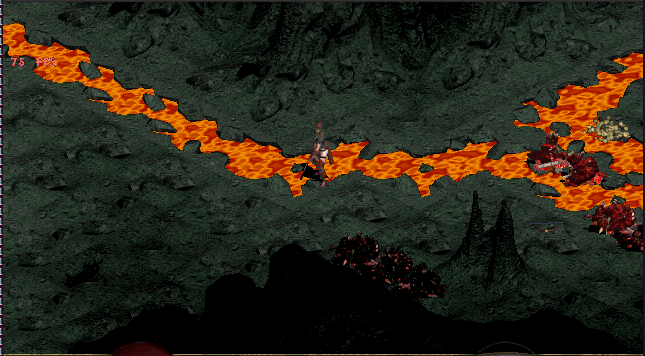
edit: fixed in #504
AJenbo
on 26 Nov 2019
@dcworldwide the controller code should now detect when a game controller has been made avalible, please test if this helps your situatin.
AJenbo
on 5 Dec 2019
@AJenbo works. in-game detected controller insert. Plays very nicely... auto-aim feels fluid
dcworldwide
on 6 Dec 2019
Split the issue up in to a few sub issues:
https://github.com/diasurgical/devilutionX/issues/512
https://github.com/diasurgical/devilutionX/issues/511
https://github.com/diasurgical/devilutionX/issues/510
Most of the remaining items in this issue still need some consideration or is simple to deal with
AJenbo
on 14 Dec 2019
Having completed the game a few times with the current controller scheme I don't think hold position is needed, or very feasable on a regular controller.
Hot spells have been implemented via https://github.com/diasurgical/devilutionX/pull/513
AJenbo
on 17 Dec 2019
Map scrolling has now been flipped to match arrow keys and also move at variable speed and diagonally: https://github.com/diasurgical/devilutionX/commit/cc42e9abb1d29cbf9894a0c3b2a4d31658b2377f
AJenbo
on 24 Dec 2019
Related issues
 cain05
·
18Comments
cain05
·
18Comments
 tsunamistate
·
14Comments
tsunamistate
·
14Comments
 Tmkrth
·
25Comments
Tmkrth
·
25Comments
 predator8bit
·
21Comments
predator8bit
·
21Comments
 Chance4us
·
27Comments
Chance4us
·
27Comments
Most helpful comment
@AJenbo works. in-game detected controller insert. Plays very nicely... auto-aim feels fluid