Desktop: Improve workflows with uncommitted changes
We've heard a lot that users want to be able to stash changes in the working directory and that they have to leave GitHub Desktop and do this on the command line. We wanted to take the opportunity to clarify the problem statements as we explore potential paths forward in solving the problems.
More about the history of these problems and how people are experiencing them can be found in #1633 and #2304.
I realized after I started doing work that I actually wanted to be doing that work on a different branch. I want to be able to switch branches and retain the uncommitted changes I've made without having to leave GitHub Desktop.
I'm doing work on a branch, and something comes up where I need to temporarily go to a different branch to do something entirely different. I'm forced to either WIP commit my work and undo it when I come back or leave Desktop to stash it temporarily. I want to just be able to switch branches, do whatever I needed to do, and come back with my changes right where I left them.
When I pull from the remote and there are uncommitted changes, if the uncommitted changes conflict with the commits I'm attempting to pull, I'm not able to pull unless I either commit or stash my changes and deal with the conflicts later. This is true for both regular
git pullandgit pull --rebase. We've decided that this is not in scope for our initial work.
Of note, we had a feature on an earlier version of GitHub for Mac that attempted to solve problem 2 with "magic stashing," which auto-stashed your uncommitted changes on a current branch when you switched branches, and auto-popped them when you returned to the original branch.
@shiftkey noted some pitfalls with this approach (capturing here so we consider them in any proposed solutions):
- "Magic stashing didn't restore uncommitted changes after syncing"
- "Magic stashing can fail to restore changes with no indication that they still exist"
- "Magic stashing may delete ignored files"
- "Magic stashing fails if untracked files conflict"
- "Magic stashing information will be lost if a repository moves on disk"
The first two problems are almost certainly related and should not be considered in isolation.
 billygriffin
All 65 comments
@billygriffin One of the observations I made using Magic stashing, is that it doesn't work all the times. Sometimes it may work, other times not at all. When it doesn't work can't understand why and that's kind of a bummer. Not sure if unreliable is the correct word here (kind of harsh) to describe the situation but it's definitely not a pleasant one.
Using the terminal for stashing isn't that bad but it adds one more step to my workflow and I kinda "hate" that. Because of situations like the one above I now remember every shortcut in Github Desktop without looking at them so that's cool. 😛
 agisilaos
on 6 Nov 2018
agisilaos
on 6 Nov 2018
95% of the time I need to stash because I did
- make a PR1
- forget to checkout a new branch (so stay on PR1 branch)
- work on task2, make changes that would result in conflict if PR1 is merged
- merge PR1
- finish task2
- damnit, I need a branch for PR2 based on master
- stash, checkout master, pull changes, checkout new branch, unstash
 Janpot
on 6 Nov 2018
Janpot
on 6 Nov 2018
@Janpot Thanks, that’s so helpful! A couple questions:
- Did you commit task2 anywhere in that flow, or do those changes remain uncommitted the whole time until after step 7?
- How frequently does stash pop/apply result in conflicts in step 7? When it does, how painful are they to resolve?
billygriffin
on 6 Nov 2018
- No, usually changes aren't committed until after 7. And if they are, they can be undone easily with the desktop client, or I use the CLI again to rebase on top of master. usually this situation happens because my PR1 is waiting for code review. Sometimes I'm deliberately in this situation if task2 depends on PR1
- Seldom in my workflow. Our team is small enough and is working on diverse enough code that we don't often run into each other. It's usually just conflicting with my own previous changes. If github desktop (or even git on the cli) could just pull master in the background that would be a perfect solution for me. In that case there wouldn't be conflicts anymore.
stashing or rebasing my branch on top of master are maybe 80% of the cases that I switch to the CLI for
Janpot
on 6 Nov 2018
Updated the original issue body with problem statement #3 after talking through it in #5953. If anyone has particular experiences in that area they'd like us to take into consideration, we'd love to hear about them.
billygriffin
on 7 Nov 2018
FYI, I added this alias to my bash profile to make my life easier for the 2. case.
# stash - pull master - unstash
alias spmu='git stash && git checkout master && git pull origin master && git stash apply stash@{0}'
@Janpot Thanks! You mean problem 3, not 2, right? Also, how often do your uncommitted changes conflict with the commits you pulled and require you to resolve those? And when that does happen, how do you typically handle it?
billygriffin
on 8 Nov 2018
it solves my problem when
- I created PR1 on brnach1
- kept working on branch1
- PR1 got "squashed + rebased on master" on github
- locally I'm still working on branch1. it now contains conflict with local master but not with remote master.
We have more repos than team members so I almost never run in the conflict you describe. I'd probably create a branch on branch1, commit my work to it and rebase on top of master and resolve conflicts manually.
Also, this is not my regular workflow. I just sometimes get in this situation because of lazyness, taking shortcuts or forgetting to reset my branch
Janpot
on 8 Nov 2018
In lieu of "magic" stashing, even just having Stash and Pop commands available in the UI would have probably avoided this whole discussion from the get-go.
And if magic stashing doesn't always work, then asking "do you want to stash your changes? yes/no/cancel" when switching branches would get around that as well. If issues arise with stashing/popping, the stash/pop would not happen and we would have to deal with them at the command line like we do with any other conflict. I don't think resolving such issues should be considered as part of this request.
FWIW, the only time I like the fact that my changes are not magically stashed (I'm still using the old UI) is when I make changes, realize I'm on the wrong branch, and then immediately create a new branch, in which case the changes become part of the new branch.
If, on the other hand, I make changes in branch A and then realize they should have been made in branch B, it's my responsibility to open the changed files in my editor, discard the branch A changes, open branch B, and then re-save my files. Nothing about that workflow has to change IMHO.
 barbara-sfx
on 15 Nov 2018
barbara-sfx
on 15 Nov 2018
TLDR: I use stashing as more of a intentional whiteboard / testing area to avoid creating branching that may fall behind master.
I sometimes have the workflow where I might have a bug to deal with, and I don't wanna commit to opening a branch which may fall behind master as I am just exploring (_I know its silly_). So I just work on a spike off of master and if its good I then create a branch and go through the normal processes there.
The first stash scenario I have is when during this spike (so uncommitted changes on master) I get interrupted with another quick thing to work on this is when I would usually use the terminal or sourcetree to stash, I prefer sourcetree since its a bit more visual on what exactly has been stashed.
The second is that during my spike I want to maybe try out a different method I would stash the initial work (again uncommitted on master), work on the second implementation and use sourcetree and desktop side by side to compare the diffs and see which way I prefer.
I also sometimes even store something I might need later in a stash and pop (sometimes without deleting the stash which sourcetree allows) at a later date.
 abdulajet
on 15 Nov 2018
abdulajet
on 15 Nov 2018
My thoughts are there should be two layers of options for this:
- A manual stash option. This can be hidden up in the menus (with a keyboard shortcut) for more of a power option if you desire.
- A magic stash option when switching branches (probably can be disabled in options or changed to a prompt).
I work with a number of programmers that are brand new to version control. Ideally, you'd have magic stashing, as my experience with brand new users is this is one of the biggest if not the very biggest thing that they stumble on (bringing changes over to other branches by accident). We had a huge mistake made here on our very first day of using Github Desktop by a new user. At the very least, there needs to be a serious warning if they start to do this, as it should be a very purposeful thing to ever bring uncommitted changes from one branch to another.
However, magic stashing does need to be implemented in a reliable manner. The issues in the first post need to be addressed and resolved in some way that a new user doesn't accidentally lose his work or mess things up.
I think it would be fine as well, if necessary, to instead have a warning that changes have not been stashed and ask if you'd like to stash them. Importantly though, it should then prompt them when they return that changes were stashed before switching and ask if they'd like to pop them. At least in this manner, we could train new users in a reliable manner, where they won't forget to stash or check if something needs to be stashed and end up committing bad changes to the wrong branch. As mentioned earlier, you could have an option that makes this automatic or prompt the user.
 dillydadally
on 26 Nov 2018
dillydadally
on 26 Nov 2018
Why did you remove magic stashing in the first place instead of making it an opt-in option in the preferences? I miss this A LOT.
 Swarzkopf314
on 18 Dec 2018
Swarzkopf314
on 18 Dec 2018
Designs
Hey all! Here's a general idea for the current design direction for uncommitted changes and stashing. This is where we've landed after a few rounds and internal discussion, but this is very much still open for feedback.
Problems to solve
To reiterate from above...
I have uncommitted changes. I want to:
- Move this stuff to another branch
- Go to another branch, keep these uncommitted changes here until I come back
- ~Pull while I have uncommitted changes~ out of scope
Where does this fall on a spectrum from:
Literally stashing <--------------------X-------------------> Magic
Through exploring this, we felt that _too_ magic hid too much of what was going on, and wouldn't teach users about important concepts. But, leaning too much into stashing felt too advanced and unintuitive.
Constraints
We've talked about starting with these constraints to simplify what we're grappling with:
- We will only show stashes initiated through this flow in Desktop
- We will only show a most recent, single stash per branch
Main flow
Here's the main, happy path flow. In this scenario, imagine this is someone working on a feature branch who wants to move to master, and wants their changes to stay on the feature branch.
- Users will only (at least at first) create stashes when switching branches.
- We'll prompt them with a modal asking what they want to do with their uncommitted changes.
- If they want their changes to stay, we'll create a stash for them.
- When they return to that branch, they'll be able to click into and see their stash, clear and apply/pop it.
- This also encourages the current default behavior of taking uncommitted changes with you to a new branch

Overwriting a stash
Considering we're only going to show a single stash, if a user initiates a new stash, we'll need to warn them.

Running into conflicts
It's possible when applying stashes that users will run into conflicts. We can warn them about these like so:

Applying a stash with uncommitted changes
Git actually will throw an error if you try to apply a stash when you have other uncommitted changes. So in this case, we can disable the Apply button and show a note why.

Here's an overview of all the screens I showed here if you want to poke around in detail:

Clarifications
What happens if you change the name of one of the stashes on the CLI?
Desktop will lose knowledge of that stash, but this feels like such an edge case that we don't intend to solve for it unless it becomes a broader problem.
What happens if conflicts occur when switching branches and bringing changes over?
For now, we'll use the current default behavior of Git and how Desktop handles it today. If it becomes a problem people are having issues with, we'll address it after shipping v1.
What happens if you delete a branch and there's a stash associated with it in Desktop?
The stash remains in the list and available via the CLI, but it's no longer visible in Desktop.
Feedback
- Does this overall flow feel right for the problems we originally outlined?
- Do these constraints make sense?
- What language makes sense in terms of
Apply,Pop? Maybe we can abstract these to icons to avoid confusion. - Anything else I haven't considered or mentioned here?
Open to any and all comments! ✨
 ampinsk
on 25 Feb 2019
ampinsk
on 25 Feb 2019
Hey @ampinsk, thanks a bunch for sharing, everything looks great! I would have to try out how having stashes pinned to branches might work in practice but it does seem not to be an issue.
I think apply is good.
abdulajet
on 25 Feb 2019
Thanks for the feedback @abdulajet!
I would have to try out how having stashes pinned to branches might work in practice but it does seem not to be an issue.
That's definitely an assumption we're interested in validating as we see how people use it, and certainly something we're going to be trying to understand a bit better and iterate on. Thanks for calling it out specifically. 😄
billygriffin
on 25 Feb 2019
This looks really good. Thanks for deciding to start working on it and giving it so much thought.
The word "Apply" threw me. Maybe "Restore"?
In my usage, a stash is always relative to a branch, so I guess I don't understand the concern of having stashes pinned to branches. The whole point of a stash (for me) is to be able to restore it when I go back to that branch.
Also, if I return to a branch with a stash, I would like to be actively informed/reminded that I have a stash, so I don't just start working and then wind up with a conflict. This could be a preference like "Prompt to restore stash when switching branches?" or something. After a while it would become a habit to look and I would probably disable it.
Also, and this is tangential, it would have helped me in general as I was learning git to know what the CLI term is for stuff I do in the UI. So something like "Restore (pop) stash?" would be even better. At least in modal text if not in the button itself. Ditto for tems like Sync etc. But I guess that's a separate request.
barbara-sfx
on 26 Feb 2019
I really _really_ like this work flow for three reasons:
- it provides an _almost_ magic stash for new users to help ease them into Git
- it teaches them about stashing and good practices at the same time
- it allows more experienced users to bring changes to other branches (I sometimes make a change on the wrong branch and have to switch to the right one before committing, which magic stashing screwed up)
I have just two suggestions to make it better.
First and most importantly, instead of just having a little line there indicating there was a stash, can you have an actual prompt when you switch back to the branch that says "You have stashed changes on this branch. Would you like to apply them now?" If they say no, keep the line there you already have and they can be applied later.
The reason this is important is, again, it teaches good habits and workflow and makes sure new users don't forget things. I work with a lot of brand new Git users, and from experience I can tell you they forget things and get confused rather easily for the first 6 months. I can see a situation where new users switch back to the branch and forget about their stash and don't process what the stash line means there and make some changes. Then they say, oh! I forgot and need to get my stash changes! Then they're trying to wrestle with conflicts and requirements to commit first and such and it becomes much more complicated for them. A simple prompt would really help them get into the natural workflow of Git and remember to apply their stashes when they come back.
Second, ideally, if you already have a stash and try to switch to a different branch, the options should change from the default to look something like this:
- Bring changes to new branch
- Overwrite old stash with new stash
- Combine old stash and new stash
That would be more intuitive, especially for new users. You should still have the second popup warning making sure people are OK with overwriting their old stash if they choose the "Overwrite old stash with new stash" option.
Amazing work! I'm excited for these changes!
dillydadally
on 26 Feb 2019
What should happen when you create a new branch and have unstashed changes? I like the current behavior where the changes are carried over, but it’s conceivable someone would want it the other way around.
 j-f1
on 26 Feb 2019
j-f1
on 26 Feb 2019
I also like that changes are carried over to new branches, but for consistency, I think the same question should be asked.
barbara-sfx
on 26 Feb 2019
👋
I really like the idea of only one stash, however I do have a weird development pattern that this would bump up against.
Sometimes I stash things just to get rid of them. Like, I don't want them back - ever. Sure, I could reset but I always have to google the syntax for that (and I've definitely done it wrong before), or I could checkout to a new branch, commit those unnecessary files and go back to my working branch and then go back later to delete the stash branch. OR I could just type git stash and move on with my day 😎
... which is a very round about way of saying: for this particular workflow, it would be very useful to be able to view and then destroy my stash! I just wanna nuke it from orbit completely 🔥 🔥
But thinking of my other workflows! Looking at the workflow for overriding stash changes when creating a new stash, it's not ideal that it's two confirmation dialogs. It was kind of hard to follow in the gif because it moves a little quicker than I would the first time I interacted with the dialog, but I know I would be confused by having to confirm twice. I think I would prefer one dialog there if at all possible.
What language makes sense in terms of Apply, Pop? Maybe we can abstract these to icons to avoid confusion.
I have never heard of the apply concept for stashing before. I exclusively use stash pop. As a result, when I see "apply" here, I don't realize it's apply (a git command), I think it's "apply" (a thing you're doing to do). My fear is that y'all are going to commit these changes to my branch when I hit that "apply" button. I would be worried that some unknown operation was about to happen with that "apply" button - kind of like my initial fear of the "undo" button, which isn't actually a command in git, and I only started using it after someone explained to me what it would do.
I stash for three primary reasons:
- Most often: I have a local change that I can't commit and would never commit, but it makes my workflow faster (ex: commenting out lines of code that make local dev speedier). I will stash these changes and
popthem every time I change branches so they are always with me. Like a security blanket. - Sometimes: I need to switch branches quickly to look at something or answer someone's question and my work is too in-flight to commit (I don't do WIP commits because I am a chronic micro-committer). I'm planning on coming back to that stash in <20 mins and want to bring it back into my working tree to keep working on those files.
- Rarely: I really fucked up and want to get rid of everything in my working tree but can't be bothered to search for the correct way to do it in git. I will never look at these changes again, I just want them to die.
I don't believe I have ever removed something from my stash and then immediately committed it 🤔
So my stash is either:
- Added to and removed from nearly immediately
- Added to and removed from as soon as I can come back, but never ever ever the next day (it's working memory, which expires after like 30 mins 😂 )
- A garbage can never to be opened again
And one minor point of feedback: I personally struggle with the very small amount of space in the file tree - losing vertical space here for "Stashed changes" is a downgrade for me. I've spent the last few weeks in a PR with 35 files and not being able to get more vertical space in the file list view without resizing the app window has made it hard to make sure I am committing the right group of files.
Would it be possible to create a new tab next to "Changes" and "History"? Something that just said "Stash"? And maybe only show it when there are changes in the stash?
 feministy
on 12 Mar 2019
feministy
on 12 Mar 2019
Thanks @feministy for the detailed feedback and description of your workflows!
I think the first problem you describe (which corresponds to your number 3 later on), just getting rid of changes forever, can be reasonably achieved in Desktop with discarding changes, and that's not something we've heard from many users, so I'm going to focus primarily on the other things.
I have never heard of the apply concept for stashing before. I exclusively use stash pop. As a result, when I see "apply" here, I don't realize it's apply (a git command), I think it's "apply" (a thing you're doing to do). My fear is that y'all are going to commit these changes to my branch when I hit that "apply" button. I would be worried that some unknown operation was about to happen with that "apply" button - kind of like my initial fear of the "undo" button, which isn't actually a command in git, and I only started using it after someone explained to me what it would do.
This is something we've been trying to think a lot about, and we're pretty sure there's almost no way to get it right for everyone. For users who don't know what apply or pop mean, apply seems to be a more intuitive word for what you're doing, although to your point it could also be confused for "is this going to just directly commit these things?" Whereas pop is more widely understood by beginner to intermediate level devs from my experience, but the word itself is super confusing if you're not familiar with Git ("is this going to just get rid of these changes if I click Pop?"). We're not positive which direction we'll go when we ship this, but your feedback is super helpful and appreciated.
I have a local change that I can't commit and would never commit, but it makes my workflow faster (ex: commenting out lines of code that make local dev speedier). I will stash these changes and pop them every time I change branches so they are always with me. Like a security blanket.
This seems to be solved by the "No, bring my changes with me" option in the dialog, where it effectively allows you to carry the same set of changes with you to whatever branch you go. Does that seem right to you?
I need to switch branches quickly to look at something or answer someone's question and my work is too in-flight to commit (I don't do WIP commits because I am a chronic micro-committer). I'm planning on coming back to that stash in <20 mins and want to bring it back into my working tree to keep working on those files.
This seems to be solved by the "Yes, stash my changes from [branch name]" option in the dialog when you're switching branches, which just enables you to leave your changes there and then have them available when you come back to that branch. Does that sound right?
And one minor point of feedback: I personally struggle with the very small amount of space in the file tree - losing vertical space here for "Stashed changes" is a downgrade for me.
Thanks! That's really interesting and not something I hear super often, so we'll definitely take it into consideration. Do you keep your Desktop window relatively small?
Would it be possible to create a new tab next to "Changes" and "History"? Something that just said "Stash"? And maybe only show it when there are changes in the stash?
Because this isn't something we think should have a super high level of prominence, this suggestion feels like it would place "stashing" higher than we'd like in the information hierarchy. But we'll definitely think about the vertical space available in the changes list. Thanks for the suggestion regardless. 😄
billygriffin
on 12 Mar 2019
Thanks for the feedback @dillydadally!
First and most importantly, instead of just having a little line there indicating there was a stash, can you have an actual prompt when you switch back to the branch that says "You have stashed changes on this branch. Would you like to apply them now?" If they say no, keep the line there you already have and they can be applied later.
This is something we initially considered but thought it might be too prominent based on what we've heard from users, and could potentially get in people's way. We're still considering whether our current approach is obvious enough where people will definitely know it's there, so this is definitely useful feedback.
Combine old stash and new stash
This is also something we discussed and we're still considering and discussing more internally, so thanks for the feedback!
billygriffin
on 12 Mar 2019
What should happen when you create a new branch and have unstashed changes? I like the current behavior where the changes are carried over, but it’s conceivable someone would want it the other way around.
@j-f1 I think our current assumption is to be agnostic about whether they're switching to a new branch or existing branch in terms of how this is treated. In other words, you're asked in the same way whether you'd like to stash or bring your changes over.
billygriffin
on 12 Mar 2019
@billygriffin 👋
This is something we've been trying to think a lot about, and we're pretty sure there's almost no way to get it right for everyone. For users who don't know what apply or pop mean, apply seems to be a more intuitive word for what you're doing, although to your point it could also be confused for "is this going to just directly commit these things?" Whereas pop is more widely understood by beginner to intermediate level devs from my experience, but the word itself is super confusing if you're not familiar with Git ("is this going to just get rid of these changes if I click Pop?"). We're not positive which direction we'll go when we ship this, but your feedback is super helpful and appreciated.
I think the wording of "apply" is probably fine - but since there is enough space in the view, perhaps a short sentence that says what is exactly happening would serve the purpose here?
This seems to be solved by the "No, bring my changes with me" option in the dialog, where it effectively allows you to carry the same set of changes with you to whatever branch you go. Does that seem right to you?
YES
This seems to be solved by the "Yes, stash my changes from [branch name]" option in the dialog when you're switching branches, which just enables you to leave your changes there and then have them available when you come back to that branch. Does that sound right?
ALSO YES
Thanks! That's really interesting and not something I hear super often, so we'll definitely take it into consideration. Do you keep your Desktop window relatively small?
It takes up almost the full window (1680 × 945), but I do have it zoomed in to 125% because I am old and I cannot read that size 10px font without getting some significant eye strain (I also have dotcom zoomed in to 125%).
Because this isn't something we think should have a super high level of prominence, this suggestion feels like it would place "stashing" higher than we'd like in the information hierarchy. But we'll definitely think about the vertical space available in the changes list. Thanks for the suggestion regardless. 😄
This is totally fair, I am a terrible designer and am ok with it 😂
feministy
on 12 Mar 2019
I still prefer Restore to Apply or Pop. It seems the most accurate - you are restoring files you previously stashed. You aren't applying anything to anything IMHO. If we want to help train users, then "Restore (Pop)" would be nice as well.
Or maybe "Restore stashed files"?
barbara-sfx
on 12 Mar 2019
Thanks @barbara-sfx, sorry I somehow missed your earlier feedback, that's really helpful context. I don't think we had considered using "Restore" until your comment, so I'll bring that up as a possibility in our discussion. It still creates a tension between Git things vs. Human things, which could be mitigated by your suggestion of "Restore (Pop)" or something similar.
Also, if I return to a branch with a stash, I would like to be actively informed/reminded that I have a stash, so I don't just start working and then wind up with a conflict. This could be a preference like "Prompt to restore stash when switching branches?" or something. After a while it would become a habit to look and I would probably disable it.
This is similar feedback to what @dillydadally brought up, and it's something we'll consider and discuss.
billygriffin
on 12 Mar 2019
Since we’ve decided to not overwrite stash entries and to instead modify previous stash entry messages, I’ve learned that git does not support updating stash commits. This means that it’s not practical to try to modify a stash entry once it’s been created.
I think we have two approaches going forward:
- Delete stash entries thereby enforcing the one stash per branch rule (destructive approach)
- Abandon the one stash per branch rule and continue to show the last stash created on a branch
I prefer the second approach because we avoid destructive actions like dropping a stash and it changes the semantics around stashing from something you do in a repository to something you do in a branch, effectively giving us _branch stashing_.
I think this can work because if a user were to create 3 stash entries for their branch, they'd only be presented with the top entry of the stack. Once they clear or restore the entry, it will be destructively removed and the app will show the next entry on the stack (they can always recreate the deleted branch by creating a new stash). This process would continue until there are no more stash entries associated with the branch. I like this approach because Desktop will only remove an entry at the users request (restoring and clearing).
Whether we choose to go with one of the two approaches above or some other approach, I think the current designs (see the 3rd image under the heading Creating a stash when you already have one in the stashing png) will have to be updated since git doesn't provide the ability to modify a stash entry's message and I'm 👎 on doing direct file manipulation to achieve our original design.
 iAmWillShepherd
on 5 Apr 2019
iAmWillShepherd
on 5 Apr 2019
After discussing @iAmWillShepherd's comment above, we're going to maintain the existing design around overwriting a previous stash with a new one because 1. this feels like an edge case that people shouldn't encounter often, 2. the word "overwrite" conveys that the previous stash will be deleted, and 3. you can get it back in a different way, so it's not a huge deal. Obviously if we see that this is happening more frequently than we thought, we'll revisit this decision and likely the overall design and discoverability.
billygriffin
on 10 Apr 2019
Hi folks! Update: we shipped a beta with the first iteration of this work today! We've got more coming before the production release, but we'd love to hear feedback on how it's working currently and how you're feeling about it. The beta version is available to download here if you're not currently using it: https://github.com/desktop/desktop#beta-channel
billygriffin
on 17 Apr 2019
I updated to beta4, but I don't see any UI changes to allow me to stash.
 IdanAdar
on 17 Apr 2019
IdanAdar
on 17 Apr 2019
@IdanAdar please have a read of the designs that help outline the workflow and the motivation behind it https://github.com/desktop/desktop/issues/6107#issuecomment-467197085
 shiftkey
on 17 Apr 2019
shiftkey
on 17 Apr 2019
So far so good! I really enjoy the feature!
The flow is pretty smooth and it works prefectly :)
Great job!
@IdanAdar switch branch while having local modications
 spimort
on 17 Apr 2019
spimort
on 17 Apr 2019
Thanks @spimort. Works great.
IdanAdar
on 17 Apr 2019
Neither the Windows nor the macOS link works for me...? I am getting the following message:
Error 503 first byte timeout
first byte timeout

Guru Mediation:
Details: cache-akl1425-AKL 1555533088 3306542902

Varnish cache server
 agarny
on 17 Apr 2019
agarny
on 17 Apr 2019
Ok, all working fine now. Go figure!
agarny
on 17 Apr 2019
So far, so good. Thanks for listening to your users and working on bringing this feature back even better than before!
barbara-sfx
on 17 Apr 2019
@billygriffin Oh boo, I spoke too soon. It looks like it is hanging on creating a branch. But it isn't - the modal just stays open with the progress icon continuing to twirl. I can X out to get to my new branch.
Would I create a new issue here to report that? Or if not, how do you want beta feedback?
barbara-sfx
on 17 Apr 2019
@barbara-sfx If you click "About GitHub Desktop" and update to the latest latest beta 😅, that should be fixed. We had an issue where we didn't dismiss the dialog properly when creating a new branch when there weren't any changes present (like in your case above), but that should be fixed now on the latest beta. Let us know if not, and thank you for the report!
billygriffin
on 17 Apr 2019
Hello, I have tried this feature and it's been working great. I suggest a message box confirmation when discarding the stash in case of a misclick.
 gojanpaolo
on 18 Apr 2019
gojanpaolo
on 18 Apr 2019
Thanks @gojanpaolo! A confirmation on discarding a stash is something we discussed internally today as well, and we’re hoping to get that in prior to the production release. Glad we’re on the same page, and thank you so much for trying it out and offering feedback!
billygriffin
on 18 Apr 2019
Is it planned to also stash files in an existing branch and not only when moving between branches?
IdanAdar
on 18 Apr 2019
@IdanAdar We didn't see that as a common use case in talking with users who were asking for that feature were always doing it in the context of going to a different branch. Would you mind sharing in what circumstances you think stashing changes while staying on the same branch would be useful to you? We're definitely open to iterating on this after the production release, but don't currently have any plans around that unless we see a compelling and widespread use case for it. Thanks!
billygriffin
on 18 Apr 2019
Sometimes there are neeed pieces of code that shouldn't be commited, but also cannot be .gitignored. Stashing allows me to "hide" some content prior to pushing and later unstash it. It's a convenience.
IdanAdar
on 18 Apr 2019
Been working a bit for a while with this feature and it seems to work well. The main feedback I have is that, before this feature, the behavior would be to bring your changes to the new branch. Now, the default, preselected option seems to be to stash. This happens to be the least used path for me so far.
Janpot
on 19 Apr 2019
Thank you so much for adding this feature! I've been missing stash options ever since I moved away from the old Github client, and this looks really great so far.
One thing I wanted to mention about this warning dialog:
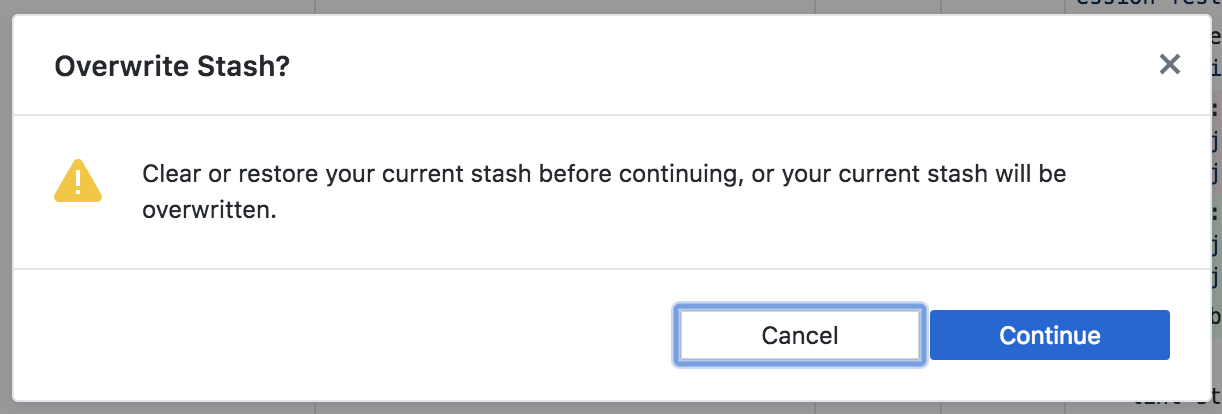
The wording on that might be a little confusing. When I skim it, I see "Clear or restore...", along with a continue button, which can look like it's guiding me somewhere to fix things, rather than deleting the old stash. It makes sense as a whole, but the main things I looked at weren't clearly destructive.
I think it'd especially be helpful if there was a button here that you could click to open the current stash. The Stashed Changes button in the lower left seems generally fine to me, but it's also something I could definitely see myself not noticing.
I just went to the Help menu and typed in "stash", because that's what I'd normally do if I couldn't find something, and it looks like this isn't in any menus.
 eschafer
on 19 Apr 2019
eschafer
on 19 Apr 2019
Yeaah
On Tue, Nov 6, 2018, 4:45 AM Jan Potoms notifications@github.com wrote:
95% of the time I need to shash because I did
- make a PR1
- forget to checkout a new branch (so stay on PR1 branch)
- work on task2, make changes that would result in conflict if PR1 is
merged- merge PR1
- finish task2
- damnit, I need a branch for PR2 based on master
- stash, checkout master, pull changes, checkout new branch, unstash
—
You are receiving this because you are subscribed to this thread.
Reply to this email directly, view it on GitHub
https://github.com/desktop/desktop/issues/6107#issuecomment-436225236,
or mute the thread
https://github.com/notifications/unsubscribe-auth/ARs1x1_Fp4WQExmTW0jEqY-XzWcjA4y1ks5usXZMgaJpZM4YPh4v
.
 JannaLorette
on 19 Apr 2019
JannaLorette
on 19 Apr 2019
Y
On Tue, Nov 6, 2018, 4:45 AM Jan Potoms notifications@github.com wrote:
95% of the time I need to shash because I did
- make a PR1
- forget to checkout a new branch (so stay on PR1 branch)
- work on task2, make changes that would result in conflict if PR1 is
merged- merge PR1
- finish task2
- damnit, I need a branch for PR2 based on master
- stash, checkout master, pull changes, checkout new branch, unstash
—
You are receiving this because you are subscribed to this thread.
Reply to this email directly, view it on GitHub
https://github.com/desktop/desktop/issues/6107#issuecomment-436225236,
or mute the thread
https://github.com/notifications/unsubscribe-auth/ARs1x1_Fp4WQExmTW0jEqY-XzWcjA4y1ks5usXZMgaJpZM4YPh4v
.
JannaLorette
on 19 Apr 2019
Agree! I don't actually remember seeing this dialog myself - when does it show up? But if it stays as is, the buttons should be something like Cancel and Overwrite.
barbara-sfx
on 19 Apr 2019
@eschafer Many thanks for the feedback and we are glad you are enjoying the new stashing feature! 😄I have opened an issue here to address your feedback.
@barbara-sfx The dialog can be seen when you attempt to stash on a branch that already has a stash. Also, thanks for the input. It is aways helpful 👍
Repro steps:
- add some changes to to branch A
- navigate to branch B and stash your changes on branch A when prompted
- repeat step 1
- when attempting step 2 the popup will happen
 tierninho
on 19 Apr 2019
tierninho
on 19 Apr 2019
@eschafer Echoing @tierninho, thanks for your detailed feedback and the things that were confusing! In addition to what @tierninho said, we've also got #7353 coming shortly to assist with making the fact that there's a stash on a branch more discoverable without blocking people if they don't want to view the stash right away.
billygriffin
on 19 Apr 2019
Been working a bit for a while with this feature and it seems to work well. The main feedback I have is that, before this feature, the behavior would be to bring your changes to the new branch. Now, the default, preselected option seems to be to stash. This happens to be the least used path for me so far.
@Janpot Thanks for the feedback! We should have metrics pretty soon on this to determine which option is selected more (if one clearly outweighs the other, we'll likely default to that one), and we'll definitely revisit the flow to make sure it's intuitive to people.
billygriffin
on 19 Apr 2019
If there is no clear winner, please make the default selectable in Settings. (Or maybe do that no matter what you choose for a default.) Because I almost never want to bring my changes to a new branch. The fact that that was the default/only behavior is what led to this whole feature request in the first place! And that's also what prompted people like me to stick with the old version or move to a different product altogether.
barbara-sfx
on 19 Apr 2019
@barbara-sfx Thanks! I'm not ready to commit to any specific direction yet before seeing data to help inform our decision, but we understand that people have varying use cases and we'll definitely account for the feedback we get and work to ensure it makes sense for varying use cases.
billygriffin
on 19 Apr 2019
How about doing the same thing as the default clone directory — remember what was selected last time and preserve that choice?
j-f1
on 20 Apr 2019
Thanks so much for adding support in for magic stashing! I know there were multiple issues posted pertaining to this over the years, glad to see Github listened to the users and added it in! Great job!
 kaster14
on 5 Jun 2019
kaster14
on 5 Jun 2019
Sorry to rain on your parade but I think this is not helpful in the current state as it's forcing everyone to stash staged changes when traversing branches, if you travel a lot this means at least 4 extra clicks every time you do this, specially if you do it with staged changes...
Imagine the following very common picture
Branches:
master
release
feature_1 (my working branch)
File 1 (working)
File 2 (working)
File 3 (Change ready for launch, HOTFIX)
File 3 is commited.
You travel to release and merge feature_1 (stash dialog)
You travel to master and merge release (stash dialog if you didn't stash)
You travel back to feature_1 (time to unstash)
Now picture doing this 10 times a day or more, that's what, 40+ extra clicks?
I really appreciate you guys bringing back magic stashing, but it should be something optional that we can de/activate from the options menu
 jmonrove
on 10 Jun 2019
jmonrove
on 10 Jun 2019
@jmonrove Thanks for the feedback - would you mind helping me understand this a bit better? Your repro steps start with "File 3 is committed." Once things are committed, the stashing dialog should not appear. It's only when changes are in progress (or uncommitted) that it should give you those choices. I'd love a bit more detail about how this happens for you so we can evaluate things from there. It is that you're carrying around files 1 and 2 with you to the different branches intentionally? If so, can you help us understand why that is? Thanks!
billygriffin
on 10 Jun 2019
@billygriffin, glad to add more details, let me know if this makes sense to you or need further clarification, thanks for the effort!
I don't commit all the files that I have in a feature branch, in fact I might be working on multiple features on the same branch if they're not big.
Only when a certain feature is going to take longer than a week to develop or it'll be more than 10 files, or it's a whole new process, then I'll put it on its own branch.
For the sake of this previous example, File 1 and 2 are still uncommitted, staged, with local changes, and I will not be committing them anytime soon
The reason I don't commit these is because this helps locate where I was when I come back to it, if I were to commit these changes then I would have to look through the previous commit history to see what changed. By not committing these I can see them marked on my IDE.
If I publish 4 things today this way, I'll have to stash and un-stash 4 times, previously I would just checkout the branch and merge from my feature, without having to stash local "staged" changes.
jmonrove
on 11 Jun 2019
@jmonrove Thank you, that's super helpful to understand it better. Is your preference essentially to always bring your changes with you, or are there instances where you'd prefer to stash things on your current working branch?
billygriffin
on 11 Jun 2019
@billygriffin
The only times when I stash code is when there's a conflict and I cannot checkout a certain branch carrying my staged changes, I will manually stash from the terminal and when I'm done with merges and pulls I'll pop it back out of the stash.
In previous GitHub Desktop client versions changes would be kept on the specific branch you made them on, the Desktop client would automatically stash them (branch A) on checkout to a different branch (branch B) and then when coming back into that previous branch (branch A) they would be automatically restored without you having to click on anything.
in Versions 1.6 before 2.0 local staged changes would always come with you, unless there was a conflict, at that point you couldn't checkout branch B unless you either stashed your changes on A or did a commit to save them.
I wouldn't mind either one, ideally you could have both options without the nuance of having to select every time you checkout by selecting the desired behavior from the options menu, but I know having both is a lot of work to maintain for everyone involved in the development of Desktop.
jmonrove
on 11 Jun 2019
Thanks @jmonrove, really appreciate your thoughts. And yep, we tried to hit a middle ground here and the vast majority of feedback has been really positive. But I also totally understand how it feels like a regression based on the workflow you explained. We're going to let this release breathe for a bit, continue to collect feedback to find out how/whether others are experiencing similar pain, and iterate from there. This is really helpful and I appreciate your thoughtful responses and constructive criticism. ❤️
billygriffin
on 11 Jun 2019
I think I might have mentioned this way back in time somewhere, but having a preference like Always stash, Never stash, Always ask would (I think) make everybody happy. And then the Ask dialog would have something like a Do Not Ask Again option that would save whatever answer I give into the preference, which I could go and change at any time like any other preference.
barbara-sfx
on 11 Jun 2019
Just set up Github on a new machine, got greeted by this (I still have to set up gitignore for .DS_Store files)
Here's a very possible scenario, someone stashes a file like this that will appear again automatically by the system and then try to restore the stash, whoops, you won't be able to apply your stash.
It is a very petty scenario but it could happen and it helped me realize the bigger picture (After pictures)


The stash/change problem is exacerbated if you accidentally make changes on a separate branch and want to bring your changes into the branch you left (Stashing your changes first in the branch you intended to do the work on)
You wont be able to restore your stashed changes since you already have local changes, even though they're not to the same file, this is not a problem if it's one or two files, but if you've been working for a while we could be talking about multiple files and hundreds of lines of code, that you would have to manually reapply or play the commit game around.
This would have not been a problem before, since the changes would've been brought with you.
The only solution at this point would be to commit either one and then merge, in my opinion this is unnecessary and a nuance.
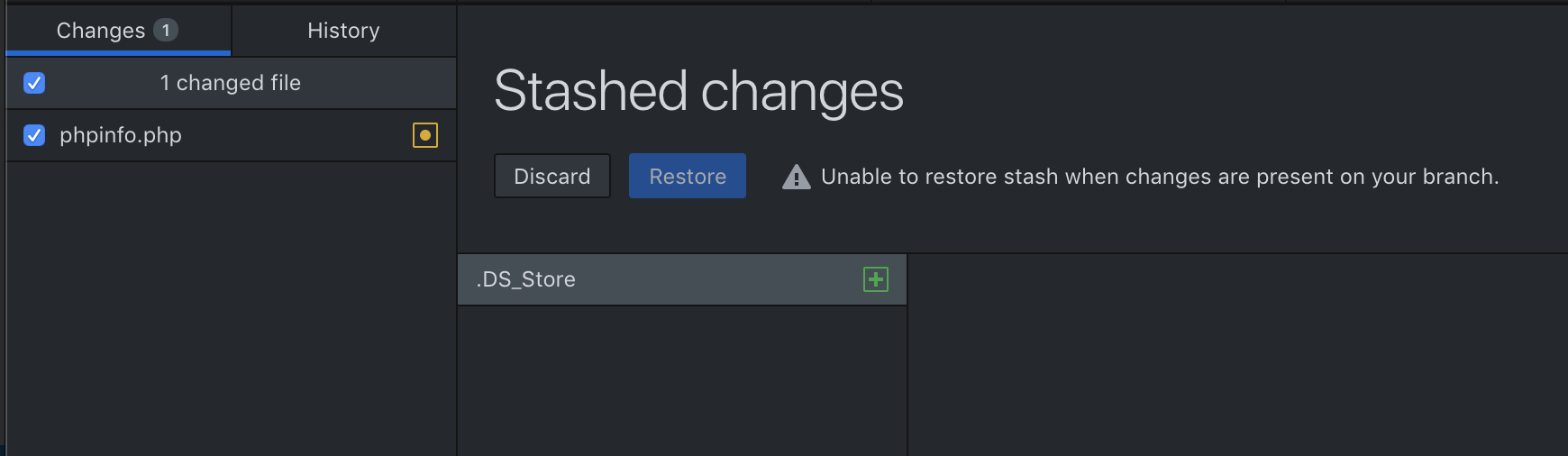
I can't be the only one having these issues :/
jmonrove
on 13 Jun 2019
Hi @jmonrove, thanks for continuing to weigh in and provide examples. We honestly expected that a similar pain might surface from more users than it has thus far. As I mentioned previously, we're going to give this release some time to breathe and evaluate some of the metrics we're seeing, and then iterate from there. We try to be really intentional about providing toggles because they can spiral quickly into just having checkboxes for everything and it becoming impossible to figure out, so that's not an immediate step but we're not at all opposed to iteration based on continued feedback from more users.
billygriffin
on 13 Jun 2019
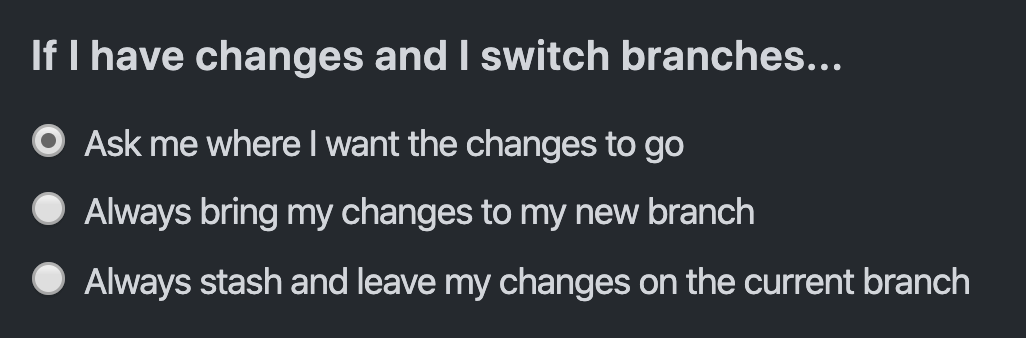
Ah, apologies that I forgot to update this issue with where we landed with stashing. In case anyone didn't realize it, you can now choose to always either stash or bring changes in Preferences.
billygriffin
on 17 Apr 2020
Related issues
 renegadedata
·
68Comments
shiftkey
·
60Comments
renegadedata
·
68Comments
shiftkey
·
60Comments
 decabeza
·
63Comments
decabeza
·
63Comments
 Be1con
·
74Comments
Be1con
·
74Comments
 Raul6469
·
57Comments
Raul6469
·
57Comments
Most helpful comment
Designs
Hey all! Here's a general idea for the current design direction for uncommitted changes and stashing. This is where we've landed after a few rounds and internal discussion, but this is very much still open for feedback.
Problems to solve
To reiterate from above...
I have uncommitted changes. I want to:
Where does this fall on a spectrum from:
Literally stashing <--------------------X-------------------> Magic
Through exploring this, we felt that _too_ magic hid too much of what was going on, and wouldn't teach users about important concepts. But, leaning too much into stashing felt too advanced and unintuitive.
Constraints
We've talked about starting with these constraints to simplify what we're grappling with:
Main flow
Here's the main, happy path flow. In this scenario, imagine this is someone working on a feature branch who wants to move to master, and wants their changes to stay on the feature branch.
Overwriting a stash
Considering we're only going to show a single stash, if a user initiates a new stash, we'll need to warn them.
Running into conflicts
It's possible when applying stashes that users will run into conflicts. We can warn them about these like so:
Applying a stash with uncommitted changes
Git actually will throw an error if you try to apply a stash when you have other uncommitted changes. So in this case, we can disable the
Applybutton and show a note why.Here's an overview of all the screens I showed here if you want to poke around in detail:
Clarifications
Desktop will lose knowledge of that stash, but this feels like such an edge case that we don't intend to solve for it unless it becomes a broader problem.
For now, we'll use the current default behavior of Git and how Desktop handles it today. If it becomes a problem people are having issues with, we'll address it after shipping v1.
The stash remains in the list and available via the CLI, but it's no longer visible in Desktop.
Feedback
Apply,Pop? Maybe we can abstract these to icons to avoid confusion.Open to any and all comments! ✨