Desktop: handle the lack of LFS locking API on the remote repository
2747 highlighted some Git scenarios that we don't handle properly, and one interesting one was a push to an LFS-enabled repository that doesn't support locking:
2017-09-21T01:19:40.407Z - error: [ui] `git -c credential.helper= push origin master:master --progress` exited with an unexpected code: 1.
Remote "origin" does not support the LFS locking API. Consider disabling it with:
  $ git config lfs.https://github.com/AndyBPA/brutes.git/info/lfs.locksverify false
This experience could be better:
- as part of initializing LFS for the repository, we might be able to probe for it and set it
- when the push fails, we could warn the user, set it for them and retry
Probably need to do both, but it'd be nice to get some feedback from @technoweenie or someone on the LFS team about what we should be doing here to lay the groundwork for locking support
 shiftkey
All 60 comments
Are you sure locking is the problem? Locking errors should warn by default. I think they only block pushes if locksverify is true. At least, that was certainly the intention.
Also, how in the world does a GitHub repo not support locking? That's weird...
 technoweenie
on 21 Sep 2017
technoweenie
on 21 Sep 2017
To explain fully, the intent was to _attempt_ locks verifications, but only warn if it's not supported. You can either set the lfs.<url>.locksverify config to false to disable checks altogether, or true to make them required.
Here's the code where that error message is spit out:
} else if state == verifyStateUnknown || state == verifyStateEnabled {
        if errors.IsAuthError(err) {
            if state == verifyStateUnknown {
                Error("WARNING: Authentication error: %s", err)
            } else if state == verifyStateEnabled {
                Exit("ERROR: Authentication error: %s", err)
            }
        } else {
            Print("Remote %q does not support the LFS locking API. Consider disabling it with:", remote)
            Print("  $ git config lfs.%s.locksverify false", endpoint.Url)
            if state == verifyStateEnabled {
                ExitWithError(err)
            }
        }
Based on the error message in your report, it looks like the user set it to true. Now, this could also be LFS's fault, as it does suggest setting it to true:
if err != nil {
  // snip (see above)
} else if state == verifyStateUnknown {
    Print("Locking support detected on remote %q. Consider enabling it with:", remote)
    Print("  $ git config lfs.%s.locksverify true", endpoint.Url)
}
At the least, it should be reporting the error somewhere so I have a clue why the user was experiencing problems. GH supports the locking API everywhere, so in theory we should be able to set lfs.https://github.com.locksverify to true and have it work for everyone.
technoweenie
on 21 Sep 2017
@technoweenie thanks for the extra info, before I go into the details I'll clarify some stuff from our side.
This error looks like it's part of the pre-push commit hook, and because it's returning a non-zero exit code it's aborting the push. I tested a fresh git lfs clone yesterday and couldn't spot any default configuration entries for lfs.[url].locksverify, so I'm happy to keep working from the assumption that verifyStateUnknown is the default.
So that means this setup at least is working with a verifyStateEnabled repository. Maybe this user had this set somewhere else - they were working with an LFS-enabled repository, so it could be possible. Relevant discussion starts about here: https://github.com/desktop/desktop/issues/2747#issuecomment-331050567 cc @AndyBPA for any other insight.
Putting all that aside, I'm puzzled about why our remote is returning this error about the locking API - the error that's landing us here isn't an auth error, and I'm not quite sure how to surface that within the app without a fresh build. Do you care at all what that might be? Maybe there's something in the server logs to trace what's happening here...
shiftkey
on 21 Sep 2017
I would be curious about what exactly changed in v0.9.1 which is when the issue first arose. There were hints that there was a previous bug or something, that was then fixed in v0.9.1, and that created the new issues we're facing - but the solutions for 'cleaning up' a repository after that fix, failed. I assume we've been using verifystateenabled this whole time on our repo, so something changed in v0.9.1 that triggered the new error, and forced us to set it to false?
My understanding of how it all works is very limited.. but from my point of view, this is what happened in the timeline;
- I was using the version of the desktop client 'prior' to v0.9.1 (whatever that was) successfully pushing and pulling.
- Desktop client wanted to upgrade, so I did the upgrade to v0.9.1 - from that point on I started getting the credentials error.
- It was suggested to try 'del /f .githookspre-push' and 'del .githooks*' to effectively 'clean the repository - which worked in the first instance, but upon switching branches back and forth, the credential error would return again.
- It was suggested to run 'git config lfs.https://github.com/AndyBPA/brutes.git/info/lfs.locksverify false' - which fixed the issue for me.
Based on that, I assume something changed with how the client checks the verifystateenabled, and the error handling of that may be borked.
Hope that helps.
 AndyBPA
on 22 Sep 2017
AndyBPA
on 22 Sep 2017
I would be curious about what exactly changed in v0.9.1 which is when the issue first arose.
@AndyBPA the back story on our recent LFS changes:
- #2619 added support for registering global filters in your
~/.gitconfig, and asking the user to add hooks when they added an LFS-enabled repository. This made it into version0.8.2. - #2734 we updated
git-lfsto get a fix as the earlier version was adding the hooks behind our back when we only wanted to probe for whether it was LFS-enabled. This made it into0.9.1. - #2702 switched us over to use
git lfs clone- this would download assets in parallel after a clone. This also made it into0.9.1.
- I was using the version of the desktop client 'prior' to v0.9.1 (whatever that was) successfully pushing and pulling.
- Desktop client wanted to upgrade, so I did the upgrade to v0.9.1 - from that point on I started getting the credentials error.
Did you have another version of Git LFS on your machine? Did we prompt you to install LFS on that repository as part of the update? My best theory at this point was that we've "updated" you by overwriting the hooks to the version of Git LFS that we ship inside Desktop, rather than the previous one already installed.
Based on that, I assume something changed with how the client checks the verifystateenabled, and the error handling of that may be borked.
Yeah, it's probably something in the update to 0.9.1. It'd be nice to find out which version you were using alongside the one in Desktop.
shiftkey
on 22 Sep 2017
Putting all that aside, I'm puzzled about why our remote is returning this error about the locking API - the error that's landing us here isn't an auth error, and I'm not quite sure how to surface that within the app without a fresh build. Do you care at all what that might be? Maybe there's something in the server logs to trace what's happening here...
Yeah, I'd need a request id or a way to replicate this. I can add a change to spew more error details if it exits here.
technoweenie
on 22 Sep 2017
I think I fixed this issue. Turned out to be a silly issue with the way we were processing the GIT_ASKPASS output. https://github.com/git-lfs/git-lfs/pull/2607.
I'll ship v2.3.1 next week, if that works.
technoweenie
on 22 Sep 2017
Yay! Well done - Team Effort ;)
AndyBPA
on 22 Sep 2017
@technoweenie that should work fine. I'll close this out once we've update our Git tooling to consume this Git LFS update.
shiftkey
on 23 Sep 2017
Yeah... so... still getting that error... thought it was fixed... but its come back. I'll just keep using command line till the update.
AndyBPA
on 26 Sep 2017
@AndyBPA You can turn off the locks checks by running git config lfs.locksverify false. The lfs.<url>.locksverify config keys let you set this on a per-remote or per host basis.
technoweenie
on 26 Sep 2017
Yeah it broke again after upgrading to 1.0.1. Seems to occur when I have to store a commit, and pull changes by someone else before pushing.
This is our config file;
[core]
repositoryformatversion = 0
filemode = false
bare = false
logallrefupdates = true
symlinks = false
ignorecase = true
[submodule]
active = .
[remote "origin"]
url = https://github.com/AndyBPA/brutes.git
fetch = +refs/heads/:refs/remotes/origin/
[branch "master"]
remote = origin
merge = refs/heads/master
[lfs "https://github.com/AndyBPA/brutes.git/info/lfs"]
access = basic
locksverify = false
[branch "release-0.98"]
remote = origin
merge = refs/heads/release-0.98
On a side note, after upgrading to 1.0.1 my other colleague now can't switch branches. v0.9.1 was the last 'working' version for us all.
BTW: I tried 'git config lfs.locksverify false' again, and it doesnt actually fix it (since its already set to false I assume). I guess I have to delete the hooks again. Somethings pretty borked with these recent updates - Its like russian roulette ;)
AndyBPA
on 26 Sep 2017
As discussed in #2907, this hasn't been completely resolved.
@AndyBPA Could you attach a fresh log so we can see the commands that you were running leading up to the error? I think our next step here is to recreate it on the command line (Git LFS 2.3.0 is in the latest version of Git for Windows) and crank up the diagnostics so we can understand what's happening.
shiftkey
on 1 Oct 2017
https://github.com/git-lfs/git-lfs/issues/2634 was opened, discussing a different preference order for LFS. Just tossing this in here, in case making this change will affect Desktop. I don't _think_ so, since it's using GIT_ASKPASS exclusively, and intentionally disabling the credential helper.
I guess I have to delete the hooks again.
If you delete the pre-push hook for LFS, LFS files will not be uploaded. You can run git lfs push --all to make sure the server has all the necessary objects.
technoweenie
on 2 Oct 2017
At this point I've given up using the desktop client to push or pull. I'm just using the command line instead....
AndyBPA
on 2 Oct 2017
@technoweenie I don't think that affects us, because we disable the credential helper for network commands with a -c credential.helper=to ensure we _only_ use GIT_ASKPASS.
@AndyBPA totally understandable. I'm going to try and refine our diagnostics in the app so we're generating more insightful logs for clone/fetch/push/pull errors, and then come back to recreating your setup and issue - there's a few intertwined issues here, and a chance to streamline things.
shiftkey
on 3 Oct 2017
No problem. I really do appreciate all the help and support. Just kinda have to keep the momentum going on our project, so needed a quick workaround and can't really spend too much time trying to 'figure it out'.
AndyBPA
on 3 Oct 2017
Question: What do I do when one of my guys cannot Switch Branches at all? just gets stuck with no error reports or anything. Attempting via client and cmd. Is there some sort of commands we can run to fix it? Its happened twice now for two different guys - we get stuck trying to switch branches.
AndyBPA
on 5 Oct 2017
What happens when they run GIT_TRACE=1 git checkout {branch}?
technoweenie
on 5 Oct 2017
It worked for him this time, not sure if it was due to running that command, or having done a computer reset earlier. We had tried Git Reset numerous times and that didn't work. If it was the computer reset that fixed it, then it suggests some temporary hooks or hangups getting borked? I assume that command just traces what its trying to do during checkout and probably didn't fix it right? If it gets stuck again, we will try running that command right away to compare - and I'll try it with the other guy having problems.
p.s. I do wonder if every time you update the client, whether branch switching breaks... ?
Cheers techo!
AndyBPA
on 5 Oct 2017
Apparently thats a linux command? Which one of the guys did have setup - but the other guy doesnt - so is there something I can run for him?
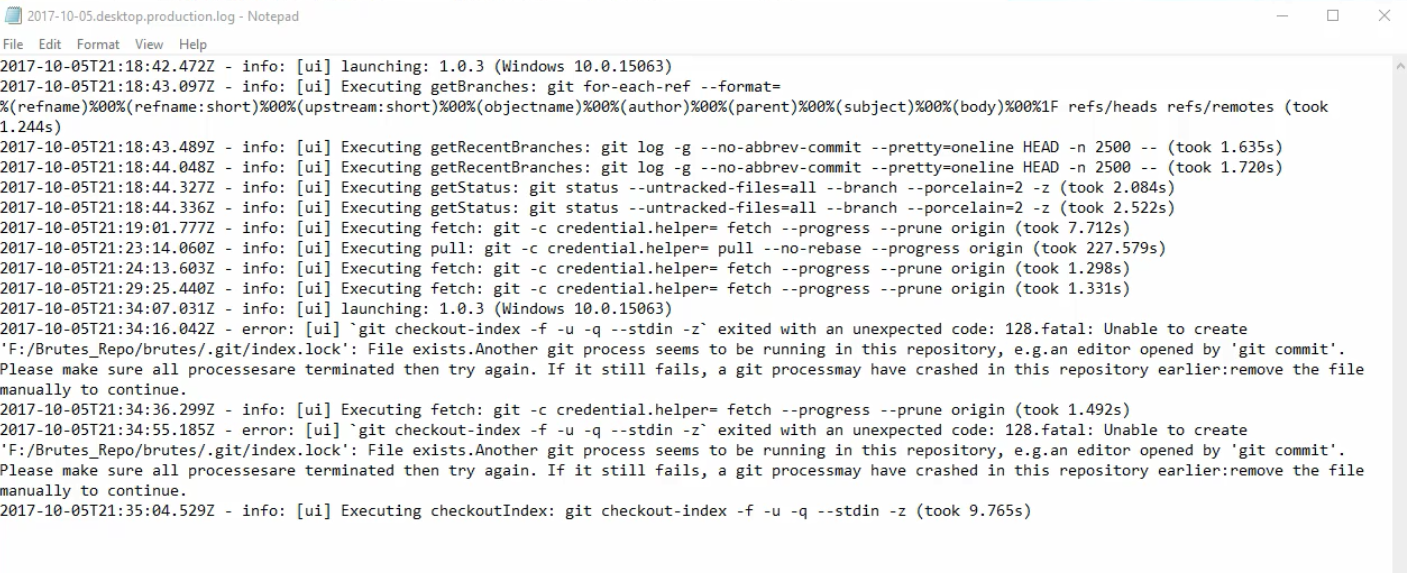
We basically run the desktop client, try to select a different branch, but it just does nothing, stuck saying 'switching to' - we wait for more than 5 minutes and it never switches (takes me less than 5 minutes to switch myself) - and the client log doesn't say anything about attempting to switch, its at 9:29 we attempted it - just notes the last fetch, then nothing for that amount of time.
This guy has rebooted several times, deleted the repo and checked it out again fresh, but no matter what he cant switch branches.
AndyBPA
on 5 Oct 2017
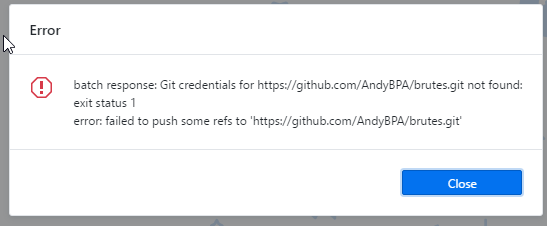
And I still randomly get this error...
AndyBPA
on 6 Oct 2017
@AndyBPA to test this in cmd you should do this:
SET GIT_TRACE=1
git checkout {branch}
Or PowerShell:
$env:GIT_TRACE=1
git checkout {branch}
Yeah so running that command does make it switch branches (attached) and its now freely switching back and forth. Will check again tomorrow after a reboot and see if it dies again. (I wonder if each client update just screws it up each time?). Weird tho, isnt that command just to trace what happens? Why would that make it work all of a sudden? (hes now switching branches in the client in less than a minute)
Update: Although after further testing all the image files were corrupted after switching, so going to try a fresh repo pull... its neverending problems...
Update 2: After a fresh repo pull, its all completely borked, all the image files are corrupted. And its back to not switching branches again..
Update 3: My other dev who doesnt use this client at all, hasnt had any problems. This desktop client, post v0.9.1 is completely borked - and for one guy completely corrupted it for him. I think we'll try the sourcetree app instead - and see how that goes.
AndyBPA
on 6 Oct 2017
Report a similar problem with Mac command line client pusing to GitHub repository.
git-lfs/2.3.2 (GitHub; darwin amd64; go 1.9)
Remote "origin" does not support the LFS locking API. Consider disabling it with:
     $ git config lfs.https://github.com/.../info/lfs.locksverify false
ERROR: missing repository: exit status 1
error: failed to push some refs to ...
I am using this GitHub repository with LFS on a branch. Merged to a different branch and tried to push it have gotten this LFS locking problem.
Following the warning instruction helped to push to the repository.
 lseongjoo
on 20 Oct 2017
lseongjoo
on 20 Oct 2017
Report a similar problem with Mac command line client pusing to GitHub repository.
@lseongjoo can you reproduce this with Git LFS 2.3.4 that was just published? I think there was a fix for this issue https://github.com/git-lfs/git-lfs/issues/2634 that might be related to your setup.
We're not using the credential manager in Desktop, and your setup might, so it'd be nice to confirm that's not related to this issue (and already resolved).
shiftkey
on 20 Oct 2017
@shiftkey Thank you!
If git lfs install after version upgrade initializes git config locksverify false that were previously set, then it resolves the problem.
lseongjoo
on 20 Oct 2017
If
git lfs installafter version upgrade initializesgit config locksverify falsethat were previously set, then it resolves the problem.
git lfs install does not modify your lfs.locksverify config.
technoweenie
on 24 Oct 2017
GitHub Desktop 1.0.6 included an update to Git LFS. Is anyone able to reproduce this problem after updating?
 joshaber
on 27 Oct 2017
joshaber
on 27 Oct 2017
This issue has been automatically marked as stale because it has not had recent activity. It will be closed if no further activity occurs.
![stale[bot] picture](https://avatars3.githubusercontent.com/in/1724?v=4&s=40) stale[bot]
on 10 Nov 2017
stale[bot]
on 10 Nov 2017
Hello,
I have the same error @AndyBPA posted in his screenshot (using version 1.0.8).
The error only pops up whenever I am using GIT LFS while pushing or pulling.
When I clear the .git/hooks folder completely before pushing I can use LFS again.
 sebastian-schiegl
on 13 Nov 2017
sebastian-schiegl
on 13 Nov 2017
Thanks for letting us know @s-schiegl!
Could you give us a bit more information about the repository? Is it on GitHub? Is it public? Is it a fork?
joshaber
on 13 Nov 2017
It is a clone from a private repository in our organization account. Cloning the same repository works fine on my other machine with the same version of GitHub Desktop. I have installed GitHub Desktop and Sourcetree on both machines. I already uninstalled everything Git-related on my current machine and only reinstalled GitHub Desktop but this didn't solve the issue.
Edit: I now tried it with a public repo in my own account and it doesn't work either.
sebastian-schiegl
on 13 Nov 2017
@s-schiegl There may be some relevant information in log files generated by GitHub Desktop:
- If you are on macOS, attach the most recent log file from:
~/Library/Application Support/GitHub Desktop/logs/*.desktop.production.log - If you are on Windows, attach the most recent log file from:
%APPDATA%\GitHub Desktop\logs\*.desktop.production.log
joshaber
on 13 Nov 2017
@joshaber
Here is the output for a clone operation that failed:
2017-11-13T21:25:54.965Z - info: [ui] [AppStore] loading 1 repositories from store
2017-11-13T21:25:54.967Z - info: [ui] [AppStore] found account: irs-sesc1 (Sebastian Schiegl)
2017-11-13T21:25:55.623Z - info: [ui] launching: 1.0.8 (Windows 10.0.16299)
2017-11-13T21:26:10.757Z - info: [ui] [AppStore.getAccountForRemoteURL] account found for remote: https://github.com/irs-systems/Beispielprojekt.git - irs-sesc1 (has token)
2017-11-13T21:26:14.855Z - info: [ui] Executing clone: git -c credential.helper= lfs clone --recursive --skip-repo --progress -- https://github.com/irs-systems/Beispielprojekt.git D:GitHubBeispielprojekt (took 4.092s)
2017-11-13T21:26:14.857Z - error: [ui] git -c credential.helper= lfs clone --recursive --skip-repo --progress -- https://github.com/irs-systems/Beispielprojekt.git D:\GitHub\Beispielprojekt exited with an unexpected code: 2.
Git LFS: (0 of 2 files) 0 B / 4.29 MB
Git LFS: (0 of 2 files) 0 B / 4.29 MB
Cloning into 'D:GitHubBeispielprojekt'...
remote: Counting objects: 37, done.
remote: Compressing objects: 3% (1/29)
.
.
.
remote: Compressing objects: 100% (29/29), done.
remote: Total 37 (delta 9), reused 25 (delta 4), pack-reused 0
batch response: Git credentials for https://github.com/irs-systems/Beispielprojekt.git not found:
exit status 1
error: failed to fetch some objects from 'https://github.com/irs-systems/Beispielprojekt.git/info/lfs'
sebastian-schiegl
on 13 Nov 2017
I now tried it with a public repo in my own account and it doesn't work either.
Could you link to that repository so I can try?
The error message above suggests some sort of problem authenticating:
batch response: Git credentials for https://github.com/irs-systems/Beispielprojekt.git not found:
Could you try logging out and back in?
joshaber
on 14 Nov 2017
@joshaber
I just tried it with a random new public repo in my own account and had the same error as soon as I started to use LFS. But I think it is not related to specific repositories or repository configuations because all the operations on the same repos work fine when they are done with GitHub Desktop on my other machine. So it should be due to some misconfiguration on my local machine. I logged out and back in and even uninstalled/reinstalled GitHub Desktop and Git.
sebastian-schiegl
on 14 Nov 2017
@s-schiegl That's really interesting... and to be clear, does it work fine for repositories that don't use LFS?
joshaber
on 14 Nov 2017
@joshaber Yes I can push to a repo in general but as soon as I add for example "git lfs track '*.bin'" via the command prompt the error comes up when pushing (even when I only want to push the .gitattributes file). The error also pops up when I want to clone a repo that already has LFS files, although cloning that repo on my other machine works just fine with GitHub Desktop.
sebastian-schiegl
on 14 Nov 2017
Thank you for your issue!
We haven’t gotten a response to our questions above. With only the information that is currently in the issue, we don’t have enough information to take action. We’re going to close this but don’t hesitate to reach out if you have or find the answers we need. If you answer our questions above, a maintainer will reopen this issue.
![no-response[bot] picture](https://avatars2.githubusercontent.com/u/26350515?v=4&s=40) no-response[bot]
on 14 Nov 2017
no-response[bot]
on 14 Nov 2017
Whoops, looks like our bot got a little too aggressive. Re-opening.
joshaber
on 14 Nov 2017
@s-schiegl Is your other machine on which it's working also running Windows?
joshaber
on 14 Nov 2017
Yes they are both Windows 10
sebastian-schiegl
on 14 Nov 2017
Well huh. Would you mind running git config -l from the repository on both machines? Maybe there's some configuration we're missing.
joshaber
on 14 Nov 2017
@joshaber The output is identical:
core.symlinks=false
core.autocrlf=true
core.fscache=true
color.diff=auto
color.status=auto
color.branch=auto
color.interactive=true
help.format=html
rebase.autosquash=true
http.sslcainfo=C:/Program Files/Git/mingw64/ssl/certs/ca-bundle.crt
http.sslbackend=openssl
diff.astextplain.textconv=astextplain
filter.lfs.clean=git-lfs clean -- %f
filter.lfs.smudge=git-lfs smudge -- %f
filter.lfs.process=git-lfs filter-process
filter.lfs.required=true
credential.helper=manager
filter.lfs.clean=git-lfs clean -- %f
filter.lfs.smudge=git-lfs smudge -- %f
filter.lfs.process=git-lfs filter-process
filter.lfs.required=true
user.email=_hidden_
user.name=_hidden_
core.repositoryformatversion=0
core.filemode=false
core.bare=false
core.logallrefupdates=true
core.symlinks=false
core.ignorecase=true
submodule.active=.
remote.origin.url=https://github.com/irs-systems/Beispielprojekt.git
remote.origin.fetch=+refs/heads/:refs/remotes/origin/
branch.master.remote=origin
branch.master.merge=refs/heads/master
lfs.https://github.com/irs-systems/Beispielprojekt.git/info/lfs.access=basic
sebastian-schiegl
on 14 Nov 2017
I also found out that "git clone" works fine with Git Bash on the affected pc, for the same repo that can't be cloned with GitHub desktop.
Besides, in a cloned repo where the LFS push fails by using the button within the GUI, the push works fine by opening a command prompt and pushing there.
sebastian-schiegl
on 14 Nov 2017
Summarizing all we've learned so far:
- Pushing from the command line works.
- Pushing a non-LFS repository works.
- Pushing from Desktop works from on one computer but not the other.
- The git configs are identical on both computers.
joshaber
on 15 Nov 2017
When you push or clone from Git Bash, how does it authenticate? Does it prompt you for a username and password?
joshaber
on 15 Nov 2017
No the operation from the command line does not request username and password.
One could add that cloning fails too when a repo already contains LFS files. However cloning the same repo on the same computer from the command line works again.
sebastian-schiegl
on 15 Nov 2017
No the operation from the command line does not request username and password.
Huh, well that's kind of interesting. The credential helper must be providing them and working 🤔
joshaber
on 15 Nov 2017
@technoweenie Can you think of any reason that our GIT_ASKPASS would fail but the credential helper would work?
joshaber
on 15 Nov 2017
All known askpass bugs are fixed as of LFS v2.3.2 (and v2.3.1 fixed a nasty askpass bug).
Would it be possible to run it from the command line exactly like Desktop does, but with GIT_TRACE=1? That would give me some details on what LFS is doing. Here's an example (replace cowsay with whatever Desktop uses):
$ GIT_TRACE=1 GIT_ASKPASS=cowsay git -c "credential.helper=" lfs fetch --all
11:58:14.608185 git.c:576               trace: exec: 'git-lfs' 'fetch' '--all'
11:58:14.608800 run-command.c:626       trace: run_command: 'git-lfs' 'fetch' '--all'
11:58:14.623860 trace git-lfs: exec: git 'version'
11:58:14.636340 trace git-lfs: exec: git 'config' '-l'
Scanning for all objects ever referenced...
11:58:14.642778 trace git-lfs: run_command: git rev-list --objects --all --
11:58:14.648185 trace git-lfs: run_command: git cat-file --batch
✔ 8 objects found
Fetching objects...
11:58:14.668155 trace git-lfs: exec: git '-c' 'filter.lfs.smudge=' '-c' 'filter.lfs.clean=' '-c' 'filter.lfs.process=' '-c' 'filter.lfs.required=false' 'rev-parse' 'HEAD' '--symbolic-full-name' 'HEAD'
11:58:14.675473 trace git-lfs: tq: running as batched queue, batch size of 100
11:58:14.675492 trace git-lfs: fetch render.png [124733b36d098353ad16bb11646643709e87c4746e0d97913a9826829e0477a3]
11:58:14.675552 trace git-lfs: tq: sending batch of size 1
11:58:14.675806 trace git-lfs: api: batch 1 files
11:58:14.675960 trace git-lfs: creds: filling with GIT_ASKPASS: cowsay Username for "https://github.com"
11:58:14.707117 trace git-lfs: creds: filling with GIT_ASKPASS: cowsay Password for "https://___________________________________%20%0A%3C%20Username%20for%20%22https%3A%2F%2Fgithub.com%22%20%3E%0A%20-----------------------------------%20%0A%20%20%20%20%20%20%20%20%5C%20%20%20%5E__%5E%0A%20%20%20%20%20%20%20%20%20%5C%20%20%28oo%29%5C_______%0A%20%20%20%20%20%20%20%20%20%20%20%20%28__%29%5C%20%20%20%20%20%20%20%29%5C%2F%5C%0A%20%20%20%20%20%20%20%20%20%20%20%20%20%20%20%20%7C%7C----w%20%7C%0A%20%20%20%20%20%20%20%20%20%20%20%20%20%20%20%20%7C%7C%20%20%20%20%20%7C%[email protected]"
11:58:14.739742 trace git-lfs: Filled credentials for https://github.com/github/git-lfs-test
11:58:14.790513 trace git-lfs: HTTP: POST https://github.com/github/git-lfs-test.git/info/lfs/objects/batch
11:58:15.275497 trace git-lfs: HTTP: 403
11:58:15.275849 trace git-lfs: HTTP: {"message":"Bad credentials","documentation_url":"https://github.com/contact"}
11:58:15.275978 trace git-lfs: api error: Bad credentials
Git LFS: (0 of 1 files) 0 B / 60.16 KB
batch response: Bad credentials
error: failed to fetch some objects from 'https://github.com/github/git-lfs-test.git/info/lfs'
In this example, my given askpass value is clearly being used, but returning bogus results leading to a 403.
TIL cowsay is a terrible askpass implementation :)
$ cowsay Username for "https://github.com"
 _________________________________
< Username for https://github.com >
 ---------------------------------
        \   ^__^
         \  (oo)\_______
            (__)\       )\/\
                ||----w |
                ||     ||
@technoweenie
This is my output for your mentioned command:
22:48:49.244144 git.c:576 trace: exec: 'git-lfs' 'fetch' '--all'
22:48:49.245146 run-command.c:626 trace: run_command: 'git-lfs' 'fetch' '--all'
22:48:49.274212 trace git-lfs: run_command: 'git' version
22:48:49.355340 trace git-lfs: run_command: 'git' config -l
Scanning for all objects ever referenced...
22:48:49.375389 trace git-lfs: run_command: git rev-list --objects --all --
22:48:49.379397 trace git-lfs: run_command: git cat-file --batch
5 objects found
Fetching objects...
22:48:49.587763 trace git-lfs: run_command: 'git' -c filter.lfs.smudge= -c filter.lfs.clean= -c filter.lfs.process= -c filter.lfs.required=false rev-parse HEAD --symbolic-full-name HEAD
22:48:49.608795 trace git-lfs: run_command: 'git' config branch.master.remote
22:48:49.627815 trace git-lfs: tq: running as batched queue, batch size of 100
22:48:49.627815 trace git-lfs: fetch _filename_ [f4987cd35bcb532f62d9cc887ff630511d609c907b4ad130109ef965135fe333]
22:48:49.627815 trace git-lfs: fetch _filename_ [b32934631c7dbd101ce3bb9cce2ba526ec776209c23aaf1a68798de2871ecdb0]
22:48:49.627815 trace git-lfs: fetch _filename_ [948bdd36d20ae7041b29a4c100a084b8ce075a8945da35dba897efbdc9eb3d6f]
22:48:49.627815 trace git-lfs: fetch _filename_ [9d6716fe24d352b91fe682044668fac90c92ecabbe56821631069f88024f48cd]
22:48:49.627815 trace git-lfs: tq: sending batch of size 4
22:48:49.629818 trace git-lfs: api: batch 4 files
22:48:49.634839 trace git-lfs: creds: filling with GIT_ASKPASS: cowsay Username for "https://github.com/irs-systems/Beispielprojekt.git"
22:48:49.634839 trace git-lfs: api error: Git credentials for https://github.com/irs-systems/Beispielprojekt.git not found:
exec: "cowsay": executable file not found in %PATH%
Git LFS: (0 of 4 files) 0 B / 113.13 MB
batch response: Git credentials for https://github.com/irs-systems/Beispielprojekt.git not found:
exec: "cowsay": executable file not found in %PATH%
error: failed to fetch some objects from 'https://github.com/irs-systems/Beispielprojekt.git/info/lfs'
sebastian-schiegl
on 16 Nov 2017
Ah, cowsay was a joke ;) @joshaber what's the askpass value that GH Desktop uses, so that @s-schiegl can attempt this with extra tracing?
technoweenie
on 16 Nov 2017
It takes a bit of work to assemble all the values GitHub Desktop needs. Here's an example with my computer:
GIT_TRACE=1 DESKTOP_ASKPASS_SCRIPT="/Users/joshaber/Documents/Development/GitHub/desktop/dist/GitHub Desktop-dev-darwin-x64/GitHub Desktop-dev.app/Contents/Resources/app/ask-pass.js" DESKTOP_ENDPOINT="https://api.github.com" DESKTOP_PATH="/Users/joshaber/Documents/Development/GitHub/desktop/dist/GitHub Desktop-dev-darwin-x64/GitHub Desktop-dev.app/Contents/Frameworks/GitHub Desktop-dev Helper.app/Contents/MacOS/GitHub Desktop-dev Helper" DESKTOP_USERNAME="joshaber" GIT_ASKPASS="/Users/joshaber/Documents/Development/GitHub/desktop/dist/GitHub Desktop-dev-darwin-x64/GitHub Desktop-dev.app/Contents/Resources/app/static/ask-pass-trampoline.sh" git -c "credential.helper=" lfs fetch —all
There are a lot of paths there that will need to be changed to be relative to where the app is on a particular machine.
I'm gonna open a PR that adds the ability to have Desktop use GIT_TRACE.
joshaber
on 17 Nov 2017
The latest update of this has Git LFS 2.3.4 as well as GIT_TRACE enabled - @s-schiegl are you still able to see the problem?
shiftkey
on 6 Dec 2017
Dropping this from 1.0.x - we can re-prioritize once we get some more information about reproducing the problem
shiftkey
on 7 Dec 2017
@shiftkey
Still doesn't work.
Production log now provides the following information:
2017-12-11T21:13:09.848Z - info: [ui] [AppStore] loading 4 repositories from store
2017-12-11T21:13:09.852Z - info: [ui] [AppStore] found account: @s-schiegl (Sebastian Schiegl)
2017-12-11T21:13:10.763Z - info: [ui] launching: 1.0.9 (Windows 10.0.16299)
2017-12-11T21:13:11.461Z - info: [ui] Stats reported.
2017-12-11T21:13:24.704Z - info: [ui] Executing fetch: git -c credential.helper= fetch --progress --prune origin (took 1.429s)
2017-12-11T21:18:39.220Z - info: [ui] Executing fetch: git -c credential.helper= fetch --progress --prune origin (took 1.277s)
2017-12-11T21:23:53.736Z - info: [ui] Executing fetch: git -c credential.helper= fetch --progress --prune origin (took 1.278s)
2017-12-11T21:25:10.894Z - info: [ui] [AppStore] loading 4 repositories from store
2017-12-11T21:25:10.896Z - info: [ui] [AppStore] found account: irs-sesc1 (Sebastian Schiegl)
2017-12-11T21:25:11.371Z - info: [ui] launching: 1.0.10 (Windows 10.0.16299)
2017-12-11T21:25:39.017Z - info: [ui] [AppStore.getAccountForRemoteURL] account found for remote: https://github.com/irs-systems/Beispielprojekt.git - @s-schiegl (has token)
2017-12-11T21:26:10.657Z - info: [ui] Executing clone: git -c credential.helper= lfs clone --recursive --skip-repo --progress -- https://github.com/irs-systems/Beispielprojekt.git D:GitHubBeispielprojekt (took 31.633s)
2017-12-11T21:26:10.660Z - error: [ui] git -c credential.helper= lfs clone --recursive --skip-repo --progress -- https://github.com/irs-systems/Beispielprojekt.git D:\GitHub\Beispielprojekt exited with an unexpected code: 2.
Git LFS: (0 of 5 files) 0 B / 194.68 MB
Git LFS: (0 of 5 files) 0 B / 194.68 MB
WARNING: 'git lfs clone' is deprecated and will not be updated
with new flags from 'git clone'
'git clone' has been updated in upstream Git to have comparable
speeds to 'git lfs clone'.
Cloning into 'D:GitHubBeispielprojekt'...
remote: Counting objects: 351, done.
remote: Compressing objects: 0% (1/240)
...
Resolving deltas: 100% (107/107), done.
batch response: Git credentials for https://github.com/irs-systems/Beispielprojekt.git not found:
exit status 1
error: failed to fetch some objects from 'https://github.com/irs-systems/Beispielprojekt.git/info/lfs'
sebastian-schiegl
on 11 Dec 2017
@sebastian-schiegl apologies for the delay in replying. We added some extra tracing into the GUI in #3360 that you can enable like this if you're running 1.0.11:
- View | Toggle developer tools to open the dev tools
- Select the Application tab
- In the sidebar, expand Local Storage and select file://
- Add a new key name
git-tracewith a value of1

If you can still get the clone to error, we should see more information in the logs about what git-lfs is doing.
shiftkey
on 8 Jan 2018
Rather than let this issue continue to meander, I'm going to close this in favour of #3752 which is a concrete issue with a known resolution. I've not been able to confirm with @sebastian-schiegl that it's the same root cause, but I'm reasonably confident that this error:
batch response: Git credentials for https://github.com/irs-systems/Beispielprojekt.git not found:
exit status 1
Has the same underlying root cause.
An issue was also opened against Git LFS itself which has similar reproduction steps https://github.com/git-lfs/git-lfs/issues/2841#issuecomment-362129050 so I'm going to centralize all that into #3752 and move us away from relying on this batch file.
shiftkey
on 1 Feb 2018
Related issues
 michellepurcell
·
50Comments
michellepurcell
·
50Comments
 billygriffin
·
65Comments
billygriffin
·
65Comments
 cheshire137
·
52Comments
cheshire137
·
52Comments
 justinjdickow
·
56Comments
justinjdickow
·
56Comments
 kiuru
·
58Comments
kiuru
·
58Comments