Desktop: Option to disable auto-fetching (background fetching) in Desktop
I would love the option to be able to turn off the app fetching the latest changes for me, or really any automatic git command done on my behalf. My main use case for the app is to have a pretty diff of the changes I'm about to commit. I do much of my other work, like resolving conflicts and updating a branch with the latest master, via the terminal. I often hit errors when I do a flow like git pull; git checkout master; git pull; git checkout -; git merge master that I think are caused by the app trying to run git commands at the same time I am:
Already up-to-date.
Switched to branch 'master'
Your branch is up-to-date with 'origin/master'.
error: cannot lock ref 'refs/remotes/origin/acceptance-saml': is at 00617906cd4ddf0ffdf2391f4c77187406a9b38a but expected 181445860d11aaeb13b0a281d42e59610e6499e2
From https://github.com/github/github
 ! 181445860d1..00617906cd4  acceptance-saml    -> origin/acceptance-saml  (unable to update local ref)
error: cannot lock ref 'refs/remotes/origin/lw-manage-listings': is at bde39ce0be0b9b4049a575892d705e440744068e but expected 38318bd501856d9f15119d7f6ef77f9a54427e89
 ! 38318bd5018..bde39ce0be0  lw-manage-listings -> origin/lw-manage-listings  (unable to update local ref)
I can get around these errors by rerunning my command, but it's frustrating when they occur because it feels like I'm wrestling with the GitHub app being open. I'd like to be able to leave the app open since I commit frequently and love the diff view, but I'd also like to be in control of when it runs git commands.
 cheshire137
All 52 comments
@cheshire137 I think it's a different sort of error that occurs when Git operations collide - I opened https://github.com/desktop/desktop/issues/908 a while ago when I was seeing VSCode (which does Git operations in the background) interfering with my CLI usage (as well as Desktop:TNG).
Is this cannot lock ref error something you see daily? I've only been able to trigger this a couple of times from git fetch in the past few months, so I'm not sure how to consistently reproduce it (aside from maybe doing github/github work, lol).
At this point we don't have plans to do any background Git operations, but we don't enforce this currently. I _think_ we do some refreshing (invoking git status) when you focus the app again, but my memory is a bit hazy.
 shiftkey
on 5 Apr 2017
shiftkey
on 5 Apr 2017
Is this cannot lock ref error something you see daily?
I'd say daily, yeah. A few times a day sometimes.
I think we do some refreshing (invoking git status) when you focus the app again
That might help, actually, if the automatic refreshing were only done when the app has focus, since I'd be staying in my term and not using the app while doing git commands myself. If you think that's the problem I'm experiencing. 🤔
cheshire137
on 5 Apr 2017
I bet it's background fetching screwing you up here. I think it's pretty reasonable for us to throttle that when the app isn't focused.
@cheshire137 to be clear, does the background fetching _itself_ bother you, or is it the ref locked error?
 joshaber
on 5 Apr 2017
joshaber
on 5 Apr 2017
It's the side effects of the background fetching that bother me, so the ref locked error. The app can do what it likes so long as it doesn't interfere with the git commands I run myself. 😺
cheshire137
on 5 Apr 2017
Cool, thanks @cheshire137!
@desktop/core I'm curious what you all think. In Classic we didn't throttle background fetching while the app was in the background, but it _is_ pretty weak if we interfere with command line usage (or other apps) while the app isn't active.
joshaber
on 5 Apr 2017
Allow disabling auto-fetching
Please! This is a show-stopper for me, I have a lot of remotes and GD tries to fetch them all at startup which cripples my internet connection. If there is an option, it should also consider auto-fetch only the current branch. And when I do choose to update all remotes it'd be nice if it run in parallel -- git remote update --prune does it sequentially.
 alrz
on 17 May 2017
alrz
on 17 May 2017
I have a lot of remotes and GD tries to fetch them all at startup which cripples my internet connection.
We'll push out https://github.com/desktop/desktop/pull/1435 soon which will stop this from occurring.
And when I do choose to update all remotes it'd be nice if it run in parallel --
git remote update --prunedoes it sequentially.
We're tracking #750 to do something similar to this - please comment there about that request.
shiftkey
on 18 May 2017
I think an option to separate fetching and pulling would be great actually.
Fetch - show the changes that can be pulled from the branch. A preview of sorts
Pull - pull the changes from the remote branch to have them merged locally
Right now I can only pull without knowing what I am pulling. I have to go to the website to see what are those changes...
 IdanAdar
on 13 Jun 2017
IdanAdar
on 13 Jun 2017
In https://github.com/desktop/desktop/issues/3306 @jm3 brought up the case where someone uses an external authenticator. They'll be pinged every time we do an auto-fetch :hurtrealbad:
joshaber
on 13 Nov 2017
Any update on this? I am on the latest version of the Desktop app for Mac and see no way to disable the auto fetch.
 daveb-sentinelda
on 30 Jan 2018
daveb-sentinelda
on 30 Jan 2018
@cheshire137 thinking about this again, this really feels like it aligns with the offline mode that's been suggested in #3854, except your use case is that you want to block any network activity that the app might run.
If you're 👍with that, I'll roll this feedback into that.
shiftkey
on 28 Feb 2018
@shiftkey I understand what you're saying, and I disagree :)
What we're asking for is a prefs toggle, e.g. "Auto-fetch every N seconds", which defaults to On, and if toggled off, then Fetch (or Pull, insert appropriate git verb here) would only run when the Sync button is clicked. Basically a managed entry point to throttle DefaultFetchInterval and friends.
Implementing a complete offline mode sounds like a bit of a scope expansion from "I would prefer this app to NOT run git fetch every N seconds", although I defer to the maintainers' familiarity with the codebase.
I feel remiss if I don't anchor this discussion in my understanding of Git, viz. Git is designed to work with decentralized, intermittently connected teams. So the assumption by the app that a constant low-interval fetch is OK seems a teeny bit fishy.
My $0.02, feel free to destroy my argument.
 jm3
on 1 Mar 2018
jm3
on 1 Mar 2018
Auto-fetching also prohibits using --force-with-lease: https://developer.atlassian.com/blog/2015/04/force-with-lease/
I would love to see the ability to disable auto-fetch entirely.
 ToddRopog
on 5 Mar 2018
ToddRopog
on 5 Mar 2018
@ToddRopog thanks for clueing me into git push --force-with-lease!
jm3
on 5 Mar 2018
I would also like to have the option to disable auto-fetch entirely. I was confused for a while as to how I was getting the latest commits of a branch even before doing git pull, and it took me a while to realize it was because I had GitHub Desktop open, and it was fetching on its own.
 ebelinski
on 25 May 2018
ebelinski
on 25 May 2018
Seriously why isn't there an option to disable this?
 m4heshd
on 6 Jun 2018
m4heshd
on 6 Jun 2018
Making my voice heard as well. I'd prefer to have more control for when GD syncs rather than it deciding to do it for me. A toggle with a time would do nicely in preferences that is auto on is fine but as long as I can turn it off.
 Subliminalman
on 14 Jun 2018
Subliminalman
on 14 Jun 2018
@Subliminalman note that we don’t actually push or pull any changes — the only thing that happens when we fetch is that the remote branches (the ones starting with origin/) get updated, which updates the ⬆️ and ⬇️ indicators on the push/pull button.
 j-f1
on 14 Jun 2018
j-f1
on 14 Jun 2018
This auto refresh is the most annoying thing ever when trying to look through history.
 damonearl
on 20 Jul 2018
damonearl
on 20 Jul 2018
Why not add an option to disable auto-refresh? What is the objection?
These refreshes occur much more frequently than 60 minutes, and they take forever (as does essentially every single operation in GD for Windows, whether it's pushing a commit or rendering a dropdown menu).
 109digital
on 23 Jul 2018
109digital
on 23 Jul 2018
@j-f1 Fetching alone still alters the state of a repository without a developer's knowledge. It's disruptive when you're used to git working a certain way, and you suddenly notice mysterious fetches happening at unknown times with no clear origin.
ebelinski
on 23 Jul 2018
I just cloned a new repo. Within 5 minutes of pulling it, a "refresh" began, and lasted roughly 5 minutes.
Windows Task Manager took about 15 seconds to open as my system continued to struggle under whatever load GD was placing on it. When it finally did open, GD had 64 running processes. I have no idea what was going on, but it blows my mind the resources that this application uses.
I have already resigned myself to the abysmal performance of GD, that is never going to change. But disabling these insanely annoying auto-refreshes would at least mean that GD only brings my system to its knees when I'm ready, rather than at random intervals.
It's a sad state of affairs indeed when you are hoping that Microsoft acquiring a company will actually lead to an improvement in its software.
109digital
on 23 Jul 2018
@109digital please keep in mind my offer to investigate your performance issues is still open: https://github.com/desktop/desktop/issues/4290#issuecomment-403122823
shiftkey
on 23 Jul 2018
Assigning this to myself to look into next week after I've helped shepherd 1.3.0 on Monday. Until I have more information to report back on, I'm going to lock this issue to prevent things going sideways further.
shiftkey
on 23 Jul 2018
Un-assigning myself from this issue while I'm on holidays, but I think #6141 is the missing piece here about the current background fetching behaviour, without needing to identify whether we make this a setting.
shiftkey
on 21 Nov 2018
Oh, and #6142 will also be a great help about reducing the network traffic cost of fetching - I recommend enabling that locally if you're working with GitHub repositories.
shiftkey
on 21 Nov 2018
I too would like a setting to disable background fetch, preferably on a per-repository basis. I have a repository in github desktop which has its origin on a local network server that requires a password to access, and desktop's constant attempts to fetch from it in the background is resulting in literally thousands of fail login attempts on the server. (Even if I wanted to give it the password, I don't think there's a way to do so.)
 tustin2121
on 27 Nov 2018
tustin2121
on 27 Nov 2018
My company uses Krypton for 2FA authentication. With other git clients, the 2FA requests only occur when I'm actively working on a repo. However, with Desktop's auto-fetch, it's constantly pinging the repo in the background, thus triggering Krypton notifications to my phone—even when I'm away from my computer, or over the weekend.
 mrgan
on 10 May 2019
mrgan
on 10 May 2019
From #7986:
While on a metered connection, background fetches should be disabled to prevent unnecessary data usage. The currently active repository should remain unaffected.

 steveward
on 19 Jul 2019
steveward
on 19 Jul 2019
Hi folks! Since the original reason for this issue was fixed in #6141, I renamed this issue again to just be that some folks would like to disable background fetching (or update the interval) for reasons unrelated to Git collisions. It looks like the primary reason is related to data usage, especially on metered connections, but there are a couple others as well (like 2FA auth notifications via Krypton on every fetch).
 billygriffin
on 31 Jul 2019
billygriffin
on 31 Jul 2019
Wanted to add my own 2¢ here, given background fetch is a regular annoyance, and enough of one to prevent me from actually using the app for long durations. (@billygriffin It's an "open it only when needed" situation right now because of this.)
I utilize a USB-C Yubikey token for hardware cryptographic key management and offloading of cryptographic operations (OpenPGP/GnuPG + SSL PIV), as well as for a number of its OTP functions (FIDO2, U2F, Yubico OTP, OATH, …). It is utilized by Git for signing operations of commits, merges, and tags, as well as by OpenSSH as the source for my SSH key. This means every SSH action (fetch/pull/push) and every Git operation generating new leaves (commits, rebases, merges, tags, …) require physical activation of the token, and possibly PIN entry.
If I have 64 repos currently tracked in-app, just imagine how long I'm sitting there repeatedly stabbing my token with a finger after it blinks once, then chugs away doing the crypto. Then blinks again. Then chugs away at crypto. Then… just to figure out there's nothing new in any of them.
:rips hair out:
Edited to add: if it could be disabled entirely, that'd resolve my issue. If it could be configured to only repeatedly poll the active / selected repository while viewing it, even better, that'd be acceptable—if it gave visible indication as to the operation underway anywhere; in-ui or by notification. If I'm working on something, I probably want to be informed if I'm about to step on toes. Possibly an option, as well, to only perform polled checking when run in the foreground, or at least… visible? Thanks? ;)
One of the issues with physical token 2FA is that it blinks at you. Imagine coding away for 10 minutes then noticing … it's blinking at me. Why is it blinking at me? What the heck did I do that needed my keys? Is it safe to trust that and just let it go through, whatever it was? (Spoiler: It's not.) For example, at my command prompt, I know to expect it any time my working directory changes to a subpath of a git repository, as it automatically displays prettiness to me upon doing so, including a fetch to identify upstream changes I might need to pull, and what they are).
 amcgregor
on 9 Sep 2019
amcgregor
on 9 Sep 2019
Similar to the comment above, but I use ssh keys protected by TouchID. The dialog pops up every few minutes. What's worse is that instead of issuing a single command, it apparently attempts it 5 times in a row, so it's constantly popping up.
 jtg-convoy
on 18 Dec 2019
jtg-convoy
on 18 Dec 2019
Similar to the comment above, but I use ssh keys protected by TouchID.
First off, that's neat, and I need to do some searching to see how that works. I've been wanting to use the Secure Enclave dedicated coprocessor (fun fact: an _Apple Watch_ processor is embedded to implement the Touch Bar and TouchID!) as a TPM like that, since getting one.
The dialog pops up every few minutes.
Precisely my problem, as it does not appear to take into account the active repository (it polls all), nor foreground state (that I'm actually likely to be looking at the app as I'm elbow deep in it at the moment), nor window visibility, i.e. that there is any chance, whatsoever, of my seeing the result of the update operation.
What's worse is that instead of issuing a single command, it apparently attempts it 5 times in a row, so it's constantly popping up.
All repositories, one fetch (SSH operation) per. In my situation, it's even worse, beyond having… 50+ repositories checked out. If I pull and a merge is needed (even an automatic one, e.g. no conflicts), it generates a new Git leaf. Which means a new signing operation. Merging a PR can _sometimes_ require a new signing operation per commit being merged. 30 commits? Stabbing the token 31 times over the next 10 minutes of my life. That particular issue isn't GH Desktop's fault, not _really_, but seemingly trying to do so every few minutes, for every single known repository is.
amcgregor
on 18 Dec 2019
@jtg-convoy and @amcgregor Do you have any gif video or screenshots of these events happening that you could share?
 tierninho
on 18 Dec 2019
tierninho
on 18 Dec 2019
@jtg-convoy and @amcgregor Do you have any gif video or screenshots of these events happening that you could share?
Yes, +1 to @tierninho 's request. I think we should also move this problem into a new issue since this one is more focused on data limited connections, thank you! @jtg-convoy @amcgregor
 outofambit
on 18 Dec 2019
outofambit
on 18 Dec 2019
@tierninho … Do you have any gif video or screenshots of these events happening that you could share?
Alas, a third of the interaction happens in meat-space (physical contact with a capacitive sensor on the token itself), a third happens inside a secure context (PIN entry dialog), and the rest is just GitHub Desktop sitting there, apparently doing nothing. (Thus my emphatic request, earlier: «if it gave visible indication as to the operation underway anywhere; in-ui or by notification.» … but it doesn't, so a GIF capture would be a single frame better off as a PNG, and not very useful. ;)
Edited to add:
we should also move this problem into a new issue
But it's still fundamentally the same problem: over-polling, lack of control over polling behaviours, and lack of clear indication as to the active operation. On one hand bandwidth, on the other hand app-request/token-blinking spamming, on the gripping hand: polling.
amcgregor
on 18 Dec 2019
As @amcgregor says, the behavior tends to manifest outside the app itself. Here’s an example from a pretty typical day when using Krypton for SSH authentication and leaving GitHub Desktop open and running https://twitter.com/ashur/status/1103889537384689667
 ashur
on 20 Dec 2019
ashur
on 20 Dec 2019
Finally did it. Locked my PIN/PUK after repeated bleary-eyed late-night (almost better called early morning…) polling during an extended hacking session. Luckily it's new-years, so time to mint a new key anyway. 😬
amcgregor
on 29 Dec 2019
Automatic unconditional background fetching is a very bad UX. Please consider making it an option.
 ZhilkinSerg
on 3 Mar 2020
ZhilkinSerg
on 3 Mar 2020
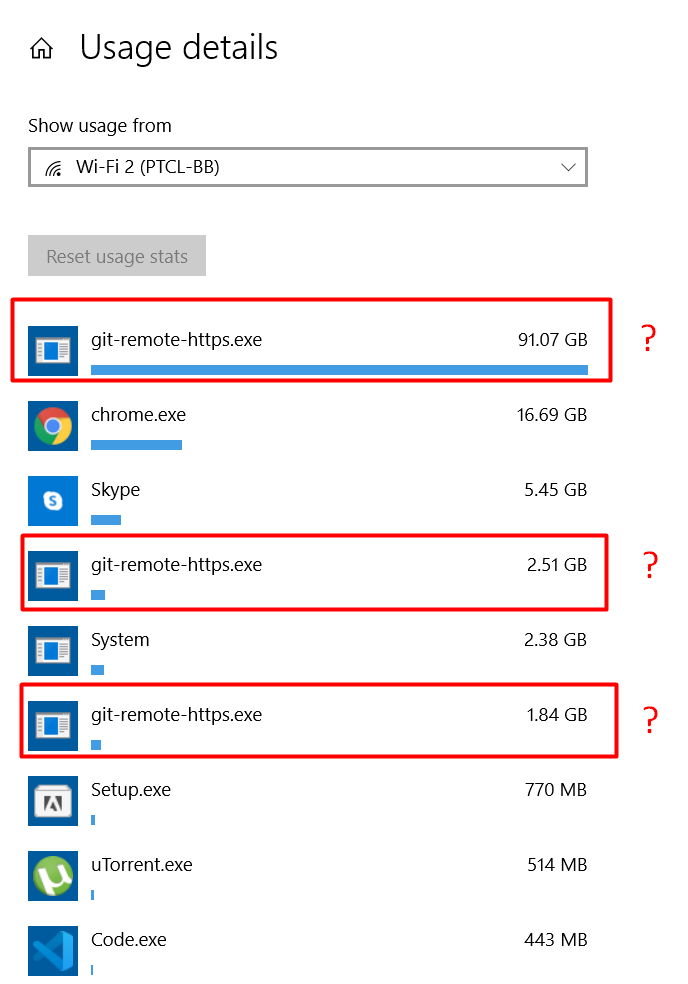
It use my all cell data usage. i was wandering what happend? it was not doing this before. what i should do now to stop automatially fetching data( it is more concern that which data is that ?)
 MuhammamdArslanKhan
on 28 Mar 2020
MuhammamdArslanKhan
on 28 Mar 2020
As of GitHub Desktop 2.5.0 this has become totally intolerable.
I have git configured to use HTTPS for fetch and SSH for push, and ssh is configured (per corporate security policy) to require me to touch a physical security key for each new ssh connection.
From ~/.gitconfig:
[url "[email protected]:"]
        pushInsteadOf = "https://github.com/"
From .git/config:
[remote "origin"]
        url = https://github.com/google/CodeCity.git
        fetch = +refs/heads/*:refs/remotes/origin/*
Output of git remote -v, to verify this is configured as expected:
origin  https://github.com/google/CodeCity.git (fetch)
origin  [email protected]:google/CodeCity.git (push)
Previous to 2.5.0 I would only get prompted to authorise ssh only when pushing. Now I get prompted at random intervals, and no less than three times when launching Desktop. From ….desktop.production.log:
2020-05-14T14:04:21.715Z - info: [ui] launching: 2.5.0 (Mac OS 10.14.6)
2020-05-14T14:04:21.715Z - info: [ui] execPath: '/Applications/GitHub Desktop.app/Contents/Frameworks/GitHub Desktop Helper (Renderer).app/Contents/MacOS/GitHub Desktop Helper (Renderer)'
2020-05-14T14:04:23.754Z - info: [ui] [AppStore.withAuthenticatingUser] account found for repository: CodeCity - cpcallen (has token)
2020-05-14T14:04:23.783Z - info: [ui] Executing fetchTagsToPush: git -c credential.helper= -c protocol.version=2 push origin dumper --follow-tags --dry-run --porcelain (took 2.417s)
2020-05-14T14:04:24.347Z - info: [ui] [AppStore.withAuthenticatingUser] account found for repository: CodeCity - cpcallen (has token)
2020-05-14T14:04:24.357Z - info: [ui] Executing fetchTagsToPush: git -c credential.helper= -c protocol.version=2 push origin dumper --follow-tags --dry-run --porcelain (took 2.688s)
2020-05-14T14:04:25.497Z - info: [ui] [AppStore.withAuthenticatingUser] account found for repository: CodeCity - cpcallen (has token)
2020-05-14T14:04:25.525Z - info: [ui] Executing fetchTagsToPush: git -c credential.helper= -c protocol.version=2 push origin dumper --follow-tags --dry-run --porcelain (took 1.748s)
2020-05-14T14:05:00.241Z - info: [ui] [AppStore.withAuthenticatingUser] account found for repository: CodeCity - cpcallen (has token)
Since the unauthorised attempted push causes ssh to be invoked, I get interrupted by a modal dialog that steals focus from my editor. It appears that I will have to revert to a previous version of Desktop until this is resolved, because being interrupted at random every few minutes is unacceptable.
 cpcallen
on 14 May 2020
cpcallen
on 14 May 2020
Many-seat GitHub Enterprise Server customer here. This is contributing to reduced performance of our on-prem GitHub installation. Your own support teams strongly recommend avoiding polling GitHub and using web hooks instead, yet GitHub's own product does very expensive fetches. You may imagine that 100+ GitHub Desktop users with 200+ repos checked out each will generate very noticeable load on the server.
This would ideally either:
- Default to off
- Be overridable by group policy in Windows, or at least a simple config flag we can tweak on install from a Chocolatey package or similar when installing it
- Be significantly more intelligent (fetch repo only when the app is in the foreground, not fetch repos unless they have been looked at in the client in the last day or so, etc.)
 herebebeasties
on 18 Jun 2020
herebebeasties
on 18 Jun 2020
Thanks so much for sharing that and sorry it's causing problems for you @herebebeasties. We discussed this last week as part of our planning process and we're planning to investigate the most expensive parts and discuss ways to alleviate those. You sharing your situation and the suggestions you provided are really helpful, and I really appreciate it!
billygriffin
on 18 Jun 2020
Auto fetching also causes issues with git worktree's, resulting in a git state where the previously committed changes are back as staged changes on one of the worktrees. This requires a git reset . && git checkout . to get back to a usable state.
Having an option to disable auto fetching would also solve that issue, until better support for git worktrees in general is available.
Additionally, revisiting this issue would be appreciated too: https://github.com/desktop/desktop/issues/5764
 koenpunt
on 22 Jun 2020
koenpunt
on 22 Jun 2020
How do I disable autofetch? Is this solved yet?
 Arlen22
on 29 Jun 2020
Arlen22
on 29 Jun 2020
Am I just imagining things, or does this also cause local commits to be automatically pushed sometimes as well?
 alexweissman
on 17 Jul 2020
alexweissman
on 17 Jul 2020
@alexweissman GitHub Desktop should not automatically push commits.
steveward
on 21 Jul 2020
@alexweissman Automatic repeated utilization of an SSH key for communication may give the false impression things are being pushed, especially if it's actually a pull and not a fetch, as the result may generate an automatic merge commit. If you then utilize commit signing, as I do, this will absolutely trigger a key unlock and signing event, also seemingly making changes or pushing them, but while the merge commit might be generated, it's not _actually_ pushed. This is how GitHub Desktop PIN/PUK locked one of my hardware tokens. That token was a useful $40 or so investment. While it wasn't e-fuse bricked after repeated unexpected PIN unlock requests seemingly out of the blue bleary-eyed at 04:00.
That's how this failure scenario _should_ be working. That I can say "I hope" or "should" to a bug this bad being not quite as bad as it seems… really not a good sign. There are also potentially outside influences, e.g. .git/hook hooks automatically doing things. (I have pre-commit hooks used pretty extensively, and a few of those are permitted to make changes to the Git stage automatically…)
I really do find myself asking why I keep this application installed. I should just be using Working Copy if a GUI is needed, as it really is a rare enough event. It's almost never _needed_. In its current state, it's not even convenient.
amcgregor
on 22 Jul 2020
I am running into issues causing lots of traffic to our enterprise GitHub server by using GitHub Desktop. Please give us the option to run off background polling!
 calebickler
on 23 Jul 2020
calebickler
on 23 Jul 2020
Another issue I'm experiencing with auto fetching; when I reset a commit locally, but that commit was pushed before, GitHub desktop can pull that same commit again, and alter the state of my local copy, which is undesired.
I don't really get how this issue has been open for so long.
Would a PR that adds a checkbox to the settings for disabling auto fetching be accepted?
koenpunt
on 6 Sep 2020
Hi folks, I wanted to provide a quick update here. Yesterday we shipped GitHub Desktop 2.5.6 which included the ability to disable background refresh of all tracked repositories in the app. See https://github.com/desktop/desktop/pull/10593 for the technical details.

In addition to being able to disable, we've also made several performance improvements to the background updates (https://github.com/desktop/desktop/pull/10119, https://github.com/desktop/desktop/pull/10588).
I hope that this will provide some relief to those of you who have many repositories. I've opened https://github.com/desktop/desktop/issues/10687 to track the work of allowing disabling background fetch of the currently selected repository but the preliminary data we have suggests that the changes we made in #10593, #10119, and #10588 should have a significant impact especially for those of you who have many repositories tracked in the app.
This issue has expanded in scope significantly since it's creation and covers both users with many repositories, enterprise scenarios, ssh remotes with automatic 2fa prompts, and more and it's hard to get a good overview of the various use cases. As such I'm going to repurpose it to deal with the many-repositories scenario which I hope we've handled with #10593 and ask that those of you who're looking to disable all types of background fetching head over to #10687 where we can focus solely on that issue. There's also https://github.com/desktop/desktop/issues/3410 which tracks background software updates.
 niik
on 29 Sep 2020
niik
on 29 Sep 2020
Thank you so much @niik!!! 🥳
ebelinski
on 29 Sep 2020
Related issues
 decabeza
·
63Comments
decabeza
·
63Comments
 Be1con
·
74Comments
Be1con
·
74Comments
 TCROC
·
55Comments
TCROC
·
55Comments
 rlabrecque
·
111Comments
rlabrecque
·
111Comments
 justinjdickow
·
56Comments
justinjdickow
·
56Comments
Most helpful comment
Hi folks, I wanted to provide a quick update here. Yesterday we shipped GitHub Desktop 2.5.6 which included the ability to disable background refresh of all tracked repositories in the app. See https://github.com/desktop/desktop/pull/10593 for the technical details.
In addition to being able to disable, we've also made several performance improvements to the background updates (https://github.com/desktop/desktop/pull/10119, https://github.com/desktop/desktop/pull/10588).
I hope that this will provide some relief to those of you who have many repositories. I've opened https://github.com/desktop/desktop/issues/10687 to track the work of allowing disabling background fetch of the currently selected repository but the preliminary data we have suggests that the changes we made in #10593, #10119, and #10588 should have a significant impact especially for those of you who have many repositories tracked in the app.
This issue has expanded in scope significantly since it's creation and covers both users with many repositories, enterprise scenarios, ssh remotes with automatic 2fa prompts, and more and it's hard to get a good overview of the various use cases. As such I'm going to repurpose it to deal with the many-repositories scenario which I hope we've handled with #10593 and ask that those of you who're looking to disable all types of background fetching head over to #10687 where we can focus solely on that issue. There's also https://github.com/desktop/desktop/issues/3410 which tracks background software updates.