Please describe the problem you think should be solved
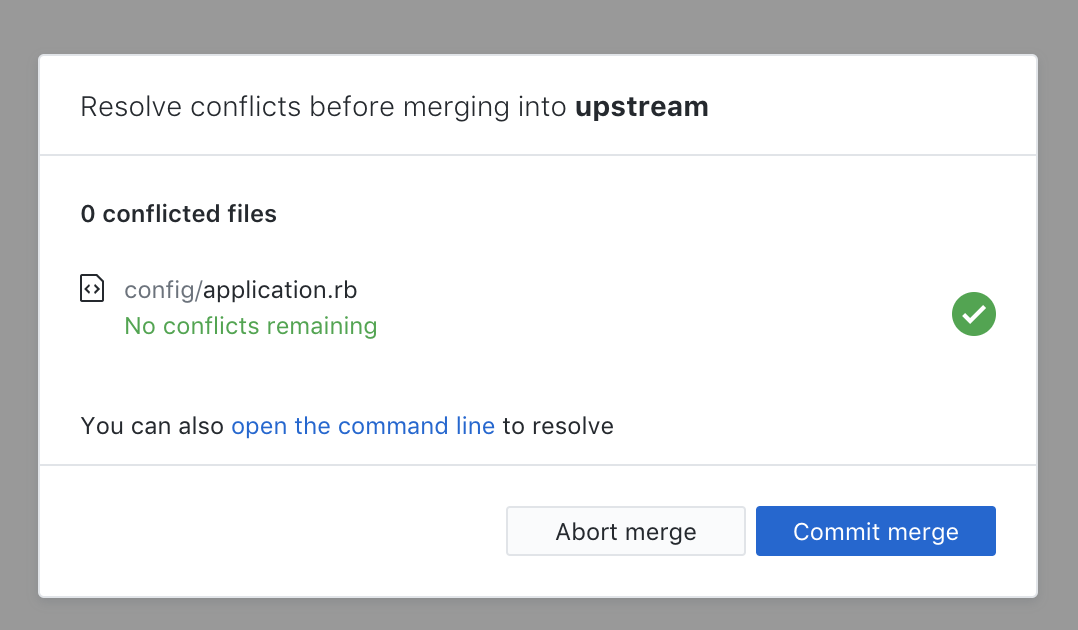
When you merge a branch with conflicts in previous version you could check all files with conflicts. Now appears a no closable popup with the list of all conflicted files and you have to open one by one on text editor instead of see them on Github Desktop.
Example:

Also when you resolve all the conflicts you can't review all changed files before merge 😅

Do you have any potential solutions in mind?
I think this popup should have a close button to hide it an can check all files (as before) without have to open one by one.
 decabeza
All 63 comments
The dialog could be dismissed into a banner saying “X conflicts remaining. Resolve →” that could be clicked to reopen the dialog.
 j-f1
on 16 Nov 2018
j-f1
on 16 Nov 2018
Thanks @decabeza! One of the things we still want to validate is whether there's some group of people who will prefer to just be able to see the conflicted files differentiated and be able to resolve them however you decide to instead of going through the more guided flow. Your description and the screenshots are really helpful there.
One note is that you can click "Open in Sublime Text" on one of the files and just navigate within Sublime to each of the others and come back to Desktop at the end so you're not having to bounce back and forth. The conflict resolution dialog will update as each of the conflicts is resolved so you don't have to come back to Desktop each time unless you want to.
On your second observation, can you unpack that a bit more for us? Are you saying that you want to be able to see a final diff of each of the files before completing the merge? We heard pretty convincingly from users in our usability tests that people felt like the extra step of viewing the final diff was burdensome and not particularly valuable, but we can obviously revisit that if it's something people are struggling with.
cc: @desktop/design
 billygriffin
on 16 Nov 2018
billygriffin
on 16 Nov 2018
@decabeza We're discussing your issue internally and I wanted to clarify one additional thing. Are the first and second screenshots in the same flow? In other words, after you resolved the conflicts from the first screenshot, did you then see the second screenshot with only one file displayed?
billygriffin
on 16 Nov 2018
Subcribed. New merge flow is uncomfortable
 webmayak
on 17 Nov 2018
webmayak
on 17 Nov 2018
New merge flow is annoying. I dont have any of the supported merge editors. So I do it through TortoiseMerge using git mergetool from command line. This adds a .ORIG file and I am forced to commit it since I cant review the changes
 manaskulkarni786
on 17 Nov 2018
manaskulkarni786
on 17 Nov 2018
Agree that new merge flow has issues. If anything goes wrong with the merge and can't commit there doesn't seem to be an option to close and manually fix yourself. Only option is to abort which rolls back all merges done so far. Agree with @j-f1 that there should at least be an option to just close the dialog and leave things as is.
 chrispday
on 19 Nov 2018
chrispday
on 19 Nov 2018
Hi @billygriffin,
I understand the benefits to see all conflicted files. The main problem I see is for example if you merge two branches there is two types of files: the conflicted ones and other files, I would like can review all files to check the merge is correct.
About your second question, yes the screenshots are in the same flow, I start with 93 conflicted files I was resolving them and the number was going down. When there was only file left first appear the "0 conflictes files" message, after go to Sublime Text and back the message refresh to "All conflicts resolved" but I still can't view the rest of the files before merging.
I attach some screenshot with some ideas about how to improve this flow (I think all are compatible with each other):
1. Make popup closable

2. List changed files separate of conflicted ones

3. Add a link to reopen the popup

decabeza
on 19 Nov 2018
@decabeza Thank you, really helpful and appreciate the thoughtful response.
Separate from the questions of how to view all the files and ensure everything is good before committing the merge (and your explanation makes complete sense), I'm curious about the flow in your initial screenshots. It appears that you had 93 conflicts, but after resolving each one they should all show up with checkmarks next to them to indicate that each file has been resolved. So it should be a scrollable list of resolved files, and I'm concerned that your second screenshot only had config/application.rb in it. I'd just like to verify that you went through the following steps:
- Click merge
- See a scrollable list of 93 conflicted files.
- Go through each file and resolve the conflicts in Sublime.
- Come back to Desktop.
- See the modal with only one file listed as resolved (config/application.rb) and the options to either abort or commit merge.
If that's right, it's a bug that would be pretty bad. So I just want to verify that separately from the larger questions that we're discussing internally. Thanks again!
billygriffin
on 19 Nov 2018
@billygriffin I think it's not a bug, it's my flow 😅 I mean...
I merge a branch with conflicts

I going resolving and all appear as resolved on a scrollable list.

I add the file on command line with (for example)
git add .hound.yml, so the file disappear from the list

I'm used to work between Github Desktop UI and command line, sorry for the confusion 🙏 😌
decabeza
on 19 Nov 2018
@decabeza Ah! Perfect, thank you for clarifying, that makes me feel better. 😄 We'll keep you updated on how we're thinking about the original problems, and thanks again.
billygriffin
on 19 Nov 2018
Hi everyone! Thanks so much for sharing your thoughts. Based on everyone's feedback here, we're considering this as an iteration on the current flow:
We'll add a close button to the modal:

We'll also add a dropdown option to the open buttons:

Closing the modal will take you to this state:

- You would reopen the modal from the banner at the top
- The file list will update with a green check as you remove conflict markers
- We will always enable the commit button, but we will show a warning dialog if you commit files with conflict markers
Let us know if you have any more feedback! If this feels like a good direction, we'll work on implementing it soon.
 ampinsk
on 19 Nov 2018
ampinsk
on 19 Nov 2018
Thanks @ampinsk, looks really nice and hopefully helps to give people an escape hatch if they want to see the diff and/or the additional files that were not conflicted. And it's nice that they can easily get back to it.
A couple considerations in implementation:
- [ ] We'll need to make sure the title stops before the close button, and that you can tab to it for accessibility.
- [ ] If we do go this direction, I'd also like to instrument metrics to find out what % of time people are closing the dialog, and also how frequently people are reopening it. If we implement something like this and a trivially small portion of people are closing the dialog, maybe we re-evaluate. And if a large portion of people are closing it, maybe we reconsider our original happy-path implementation.
billygriffin
on 19 Nov 2018
To try and add some more constructivity, it might also be helpful to add an "Open all in (editor of choice)" button. The dialogue is not very big and I had more than a dozen merge conflicts and scrolling and clicking each could have been a better experience.
The other reasons I would like to close this dialog without commiting (or aborting) is that I like to review my conflicted merges as a diff just before committing to double check I've done it right.
Merging conflicts is probably the hardest thing to do, so I think this effort is a good idea. But it's also where flexibility in workflow is required. Most of the time it can be followed but still provides an escape hatch for when things don't want to work cleanly. Especially when you are doing long and complicated merges where clicking the wrong button could lose a lot of effort.
chrispday
on 20 Nov 2018
How about replacing the commit button with a button that re-opens the resolution dialog?
j-f1
on 20 Nov 2018
To try and add some more constructivity, it might also be helpful to add an "Open all in (editor of choice)" button.
Thanks for the feedback @chrispday! That feels like a somewhat separate issue that we're definitely keeping an eye on the feedback. A couple things stand out. First, our hypothesis is that the vast majority of merge conflicts have only 1-3 files conflicted so we think for most cases this won't be an issue. Additionally, most editors should allow you to navigate to the files themselves and not have to come back to Desktop each time, and when you get back to Desktop at the end you're in better shape. But if there's a dozen or more, I totally get how that could be tough to figure out where they all are and it's helpful to provide an escape hatch.
billygriffin
on 20 Nov 2018
How about replacing the commit button with a button that re-opens the resolution dialog?
@j-f1 We don't want to slow people down if that's their preferred workflow to work outside of the guided flow, and they can still commit after resolving the conflicts in the normal Changes pane, right? I'd worry that replacing the commit button would add an extra step if they just wanted to commit the merge via that button. Thoughts?
billygriffin
on 20 Nov 2018
@billygriffin I was thinking that the button would only be replaced when attempting to commit would generate an error about resolving conflicts.
j-f1
on 20 Nov 2018
@j-f1 Oh, interesting, that makes sense. Because you can't actually commit until you've resolved them, thanks for the added context. @outofambit Do you happen to know what the state of the commit button will be now if someone closes the modal (as in @ampinsk's designs above) and still has unresolved conflicts?
billygriffin
on 20 Nov 2018
If the proposed solution is implemented, I do hope that you do not decide to re-evaluate even if it turns out that a trivially small portion of people actually end up closing the dialog. I would echo the sentiment by @chrispday , flexibility is required when dealing with merging conflicts, and options are a good thing.
 MarcusDivine
on 21 Nov 2018
MarcusDivine
on 21 Nov 2018
Do you happen to know what the state of the commit button will be now if someone closes the modal (as in @ampinsk's designs above) and still has unresolved conflicts?
@billygriffin there is currently no logic to stop a user from committing conflicted files in that part of the UI. so the button would be active and users could commit whatever files are checked in the changes pane.
 outofambit
on 26 Nov 2018
outofambit
on 26 Nov 2018
In absolute desperation, I even installed Atom... still doesn't get me past that modal. It opens Atom alright, but doesn't give me access to the GitHub UI to view the diff to find the conflicts, nor does it give me an option to look at other repos to get my work done or even to help me complete the merge!
 killroy42
on 26 Nov 2018
killroy42
on 26 Nov 2018
@killroy42 Thanks for the additional feedback. We found in interviews that most people use an external editor to typically resolve their conflicts, and that's why we made the primary path to open the conflicted file in your editor, resolve it there, and then complete the merge after all conflicts are resolved back in Desktop. There's also an option in the modal to open in command line in order to resolve it in a different fashion (for instance, if you use a merge tool to resolve conflicts).
What do you typically use in your normal workflow to resolve conflicts?
billygriffin
on 26 Nov 2018
@billygriffin At any point in time I have dozens of consoles open as well as several editor windows and multiple panes across three monitors. Your button does nothing for me. But the modal blocking access to GitHub takes away the tools I need. Why am I not allowed to look at my other repos? Why am I not allowed to look at the diff of the conflicted file? What's the reasoning behind this?
Even after installing Atom, just to satisfy your modal, All the button does is open Atom with the file. It does not give me back the diff display inside GitHub, or give me access to my other repos and information I might need.
Even if I taskkill GitHub to restart it an gain access to a different repo (perhaps to do urgent work there), it will immediately get disabled again after starting up by that modal, denying me access to my work.
killroy42
on 26 Nov 2018
@killroy42 Once the conflict is either resolved or aborted (however you choose to do that), you should no longer see the conflicts modal. Our hypothesis based on interviews is that when users are in a conflicted state, they will want to get into a clean state (either by aborting or resolving) prior to moving onto other work. So that's why the modal is front and center.
How do you typically resolve conflicts currently? Do you use an editor, the command line, or another tool?
billygriffin
on 26 Nov 2018
Well, I USED to use GitHub to look at the diff to see what the conflict was before I would choose how to resolve it, usually with the editor already open that I am working in, or using the console, one of the many already open as well.
Unfortunately, I now no longer can use GitHub as a tool to help me resolve the conflict. I have to use tedious string searches to find the conflict, and if I have to look something up in one of the other, related repos of this project, I have to completely revert the merge, before I am able to view that repo in GitHub, before re-initiating the merge once again on the command line.
What purpose does that modal serve? What single benefit does it give me to accomplish my tasks of writing code and developing applications?
killroy42
on 26 Nov 2018
Thanks @killroy42, appreciate the context of how it was useful for you and what's frustrating about this iteration. The concerns you expressed are reasonable and in line with what others in this thread have expressed - it's really helpful for us to hear about how people are using the product.
What purpose does that modal serve? What single benefit does it give me to accomplish my tasks of writing code and developing applications?
To answer your questions here, in usability testing and in hearing from users since the release, this flow is valuable in understanding what files your conflicts are in, providing a guided path to get to a place where you can resolve them (most commonly an editor), and then get a happy green checkmark when they're resolved so you can go through with finishing the merge. Based on a feedback in this thread and elsewhere, we're now aware that there's some population of our users who still want to be able to see the diff in Desktop during the conflict resolution process. That's a legitimate concern and we really appreciate you and others here sharing it, and we're iterating on the flow as a result.
billygriffin
on 27 Nov 2018
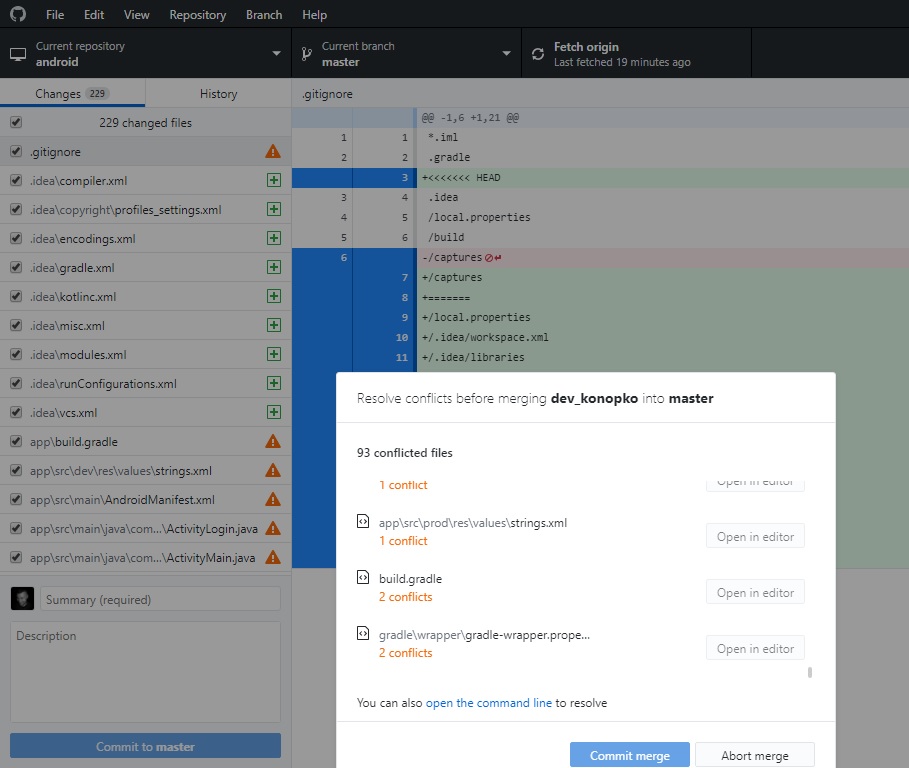
I can do nothing in this dialog, except of Abort merge
 konopkoman
on 28 Nov 2018
konopkoman
on 28 Nov 2018
Thanks @konopkoman! We think there are very few people who do not have external editors configured so this is a pretty rare case, and I can totally understand how it would be frustrating. Did you happen to notice the tooltip when hovering over the "Open in editor" button? And/or did you notice the "open the command line" link above the commit and abort buttons. Those are attempts at providing an alternate path if you don't have an editor configured or have a different way of typically resolving merge conflicts.
We're looking at shipping an iteration on this (hopefully in 1.6) more generally where we give a bit more of an escape hatch for those who don't want to use the guided flow, don't have an editor configured, etc. and hopefully that will help alleviate your pain. I'd love to hear your thoughts.
billygriffin
on 28 Nov 2018
FYI, updated my comment above with some slightly updated designs 😄
ampinsk
on 28 Nov 2018
I can no longer partially commit my work that didn't have merge conflicts. If there are conflicted binary files (temporary or otherwise) I'm forced to open up the file explorer and go searching for the filename (which sometimes doesn't display fully!) and delete it. Previously my workflow was to resolve conflicted text files (usually by unmarking the >>>>>>> lines and commiting the rest of the file) and uncheck conflicted binary files. I'd commit my work, and then discard changes for the binary files and leftover >>>>>>>> lines.
The popup just completely disables the whole program. It infuriates me and confuses the people I work with who are new to git.
 ottworks
on 1 Dec 2018
ottworks
on 1 Dec 2018
Thanks @ottworks, I really appreciate that feedback, and sorry it's causing problems for you. We're going to be iterating and here's the design for our initial proposed iteration. Do you think that would help resolve your issues? It seems like your normal flow is to resolve the conflicts prior to committing, right? Thanks again!
billygriffin
on 3 Dec 2018
@billygriffin I'm a bit worried about this line:
We wouldn't let you commit if we still detect conflict markers
Would I still be able to partially commit, omitting the lines with conflict markers?
ottworks
on 3 Dec 2018
@ottworks Thanks for bringing this up! We chatted about this, and we're actually going to allow you to commit, but we will show a warning dialog if you're committing files with conflict markers. I updated my comment above with the decision. 😄
ampinsk
on 3 Dec 2018
Please let me dismiss this and just see the diff! Also, right now I have a bunch of data files with hundreds of merge conflicts each (plus a bunch of other diff'd files that I do want to look at) and I just want to choose the old version of those data files - before I could right click and choose "discard all changes" on them but now I have to go reset them all manually which is annoying and like half the reason I use the GUI in the first place. But most importantly, I need the diff and it seems reasonable enough to just be able to dismiss the "helper". Very glad to see you guys are working on a compromise.
 emilymerwin
on 3 Dec 2018
emilymerwin
on 3 Dec 2018
@emilymerwin Sorry it's not working well for your workflow, and thank you so much for the feedback! We're looking to ship the next iteration here in 1.6 in a couple weeks.
billygriffin
on 4 Dec 2018
Just chiming in here as well, for me the biggest issue I found was that for example with a file like yarn.lock that's conflicting, I tend to just discard the changes and continue with the merge. However, now this is impossible because of the popup blocking access to that functionality, and I am forced to do this externally.
 adamreisnz
on 4 Dec 2018
adamreisnz
on 4 Dec 2018
Makes total sense @adamreisnz, thanks for that additional context. 😄 All of this feedback has been really helpful in us understanding people's various workflows when encountering merge conflicts, so it's really appreciated. ❤️
billygriffin
on 4 Dec 2018
I was going to start a new issue, but finally found this one, but I think the core issue does not appear to be addressed:
Description
The conflict resolution dialog is unclear what is next when 'no conflicts remaining'.
Version
- GitHub Desktop: 1.5.1-beta0 (special note, Node 10)
- Operating system: Win 10 1809
Steps to Reproduce
- merge which produces conflicts
- use editor to handle the conflicts, saving file when complete
- repeat editing until all conflicted files are 'No conflicts remaining'.
Expected Behavior
'Commit merge' button would become available.
Actual Behavior
'Commit merge' button remains unavailable.
Additional Information
My editor is VS Code, so in VS Code I can just 'stage changes' on the conflicted file, and then I can merge, but that workflow is not clear to me from the dialog, nor would it be available if I was using an editor without GIT integration.
This build is built on Node 10.
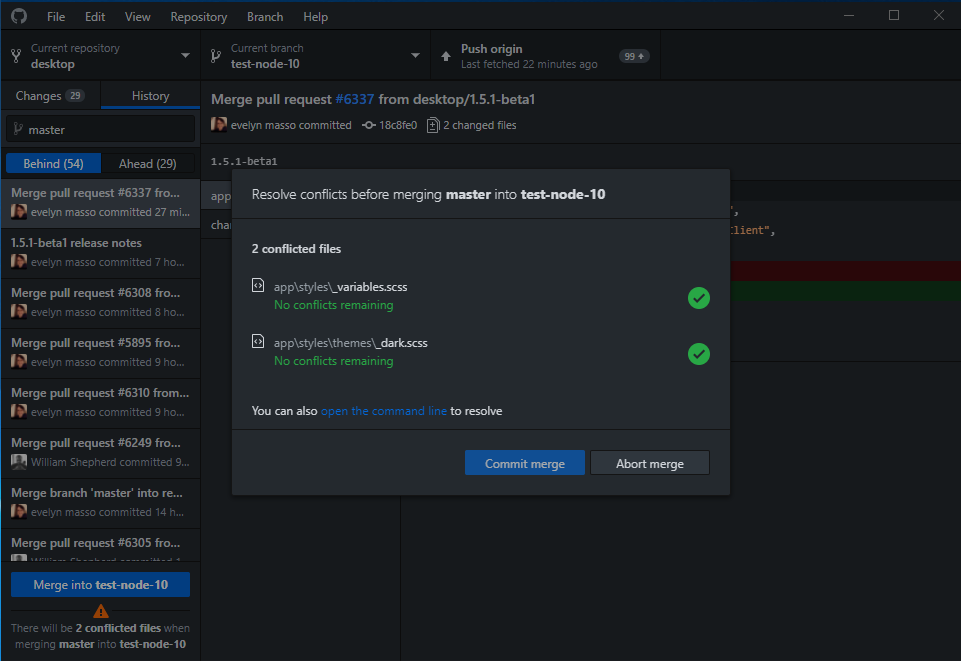
So the core issue would seem to be a lack of communication on the next step, or providing the tools for the next step, which is to stage the files so they are no longer marked conflicted so we can just press the 'Commit merge' button and move on.
However, Kudo's to Desktop, VS Code would not let me commit with conflicted files, even though I did not want to merge the conflicted files. Desktop handled it fine.
 msftrncs
on 4 Dec 2018
msftrncs
on 4 Dec 2018
@msftrncs Thanks for the feedback! That seems like unintended behavior.
As the conflicts get resolved, it should count down the number of files that are still conflicted, and at the end you should see something like this:
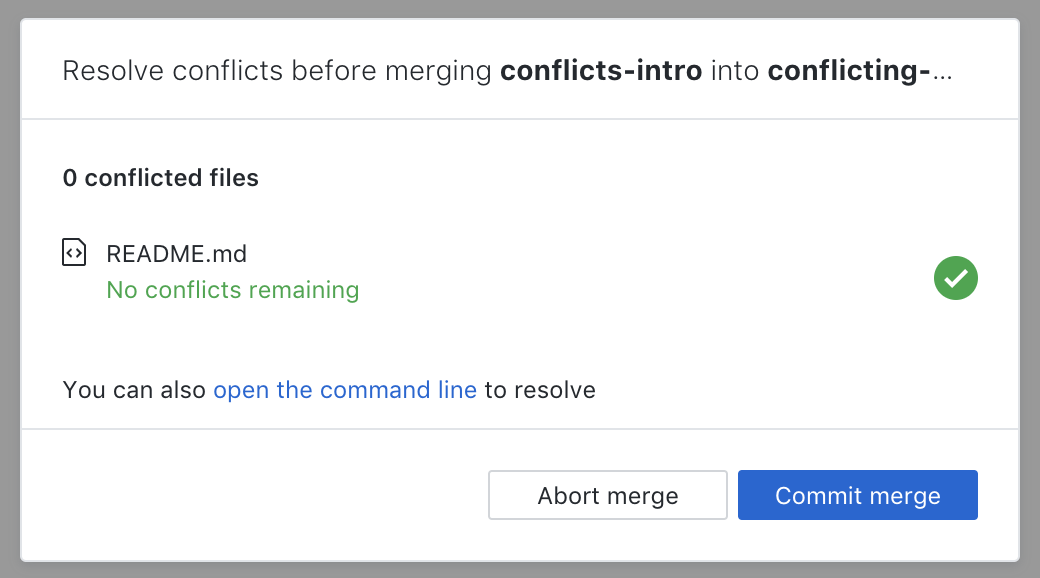
So in your screenshot, if it was just those two files, there's a mismatch between the green checkmarks indicating that they're resolved and the "2 conflicted files" header above the listed files. Was there anything else that might've been out of the ordinary? I'd love if you'd try to reproduce to see if it's consistent or just that time.
Any ideas @outofambit?
billygriffin
on 4 Dec 2018
@msftrncs Thanks for the report of this, was definitely not intended. ❤️ We're working through this and we'll be fixing for 1.5.1. I'm going to open a new issue to capture it.
billygriffin
on 4 Dec 2018
There's another issue related to the merge conflicts. I'll report it here, but you may want to split it off and deal with it separately.
I noticed the popup told me that after a merge, I would have 10 conflicted files. However, this was incorrect. I only had 4 conflicted files, but in total there were 10 merge conflicts. So the wording needs to be updated.
adamreisnz
on 5 Dec 2018
@adamreisnz, this may be the same as #6101. It may just be a coincidence that the count of files reported and the count of merge conflicts were the same.
msftrncs
on 5 Dec 2018
@msftrncs hmm yes, it may have been. I have to admit I didn't actually count how many conflicts there were, but it was close to 10 and I assumed that's what it was reporting on.
adamreisnz
on 5 Dec 2018
@adamreisnz and @msftrncs yes, that looks to a dupe of #6101 but thanks for bringing it to our attention nonetheless! Feel free to add any color to that issue if you see the issue again. ✨
 tierninho
on 5 Dec 2018
tierninho
on 5 Dec 2018
@killroy42 Once the conflict is either resolved or aborted (however you choose to do that), you should no longer see the conflicts modal. Our hypothesis based on interviews is that when users are in a conflicted state, they will want to get into a clean state (either by aborting or resolving) prior to moving onto other work. So that's why the modal is front and center.
How do you typically resolve conflicts currently? Do you use an editor, the command line, or another tool?
I use NetBeans to edit my project. I'm a Java developer and I don't want to learn a new editor (Atom) which I don't need and have no use for except when I'm forced to use it by GitHub Desktop. I created issue #6332 because I wanted to be able to use the editor of my preference, EditPlus, but I found from the answer in that thread that GitHub Desktop has way to high demands on the editors it supports.
GitHub Desktop supports a couple of editors, like Atom and Visual Studio, but I don't want to use any of them and I have no intention at all to add support for EditPlus. Windows has for a very long time had support for launching an application with a particular file, which is the only thing that is needed. Launch EditPlus with the selected filename as command line parameter.
GitHub Desktop is more and more becoming "Microsoft hell". In earlier versions of Windows, like Windows 2000, the administrator could configure the OS as he pleased. In later versions of Windows, Microsoft has decided that everything should be "easy", meaning that Microsoft thinks that every administrator is a stupid newbe user that doesn't know anything and needs a lot of help.
Well, many of us are not newbies. We can handle advanced features and we want to be able to do advanced things. I get angry then a program like GitHub Desktop requires me to install another editor just because it tries to force me to use the workflow that you think is better.
I want to do the merge, get the list of conflicts, resolve these conflicts in NetBeans or EditPlus, and I never want to see either Atom or Visual Studio.
You, the developers of GitHub Desktop, seems to treat us developers using GitHub desktop, as small children that needs to be protected from doing dangerus things. Please stop doing that!
 danielb987
on 6 Dec 2018
danielb987
on 6 Dec 2018
... but I found from the answer in that thread that GitHub Desktop has way to high demands on the editors it supports.
What I mean is that the only thing that is really needed is that the editor is able to open one file and that you have the path name to the exectuable file. For example, I can open the command prompt, go to C:\Program Files\EditPlus and then type editplus.exe readme.txt and press <enter>. The editor is then launched with the desired file.
danielb987
on 6 Dec 2018
@danielb987 Thanks for your thoughts, and sorry you're not feeling heard. While we definitely want to support a continuously improving out-of-the-box experience for newer developers, our goal is to continue to improve the experience for more experienced developers as well - that's why we're exploring support for rebasing and other workflows that some more advanced users prefer.
We recognize in this thread that our initial iteration didn't quite hit the mark for users who didn't need (or didn't want) a more guided editor-centric flow, and that's why we're actively iterating on it based on the feedback we've received here and elsewhere. We're also evaluating metrics over time to help determine what percentage of users are having success resolving conflicts compared to before, so that will help guide our path forward as well.
As editors are concerned, we hope GitHub Desktop will increasingly be able to provide support for more and more editors over time, and we're totally open to open source contributions to add additional supported editors, with documentation on how to do that here: https://github.com/desktop/desktop/blob/master/docs/technical/editor-integration.md
We're not always going to get the first iteration of new features perfect for every subset of users, but we are continually evaluating how we can be more representative in our user interviews and usability testing as we explore how we solve problems in GitHub Desktop. Thanks again for sharing, and I hope the next iteration of this in 1.6 will make the experience less painful for you.
billygriffin
on 6 Dec 2018
@billygriffin : Thanks.
danielb987
on 6 Dec 2018
to all, some ideas regarding the methods for resolution,
I understand the complexity of supporting editors. Compounded by the fact that newer editors support opening folders, its not as easy, amongst all the OS's to just say, 'Hey OS, here is a path, do what you do with it', because most of the magic happens in the shell, not in the OS, and also too many programs fight for the default operations of file extensions or types, and so it can never be clear what the results will be.
(Note, do not ever perform the default action on BAT or CMD files when you intend to just edit them!)
However, maybe the user can be helped, to help himself. In the merge conflict resolution, other solutions instead of just opening the editor should be possible. (some of this may have been mentioned before)
- add the following items to a drop-down button next to the 'open with {editor}' button.
- 'Open with default program' (like in the changed file list)
- 'Show in Explorer/Finder' with the file selected. (also like in the changed file list)
msftrncs
on 7 Dec 2018
I have found a HUGE bug in either GitHub Desktop or Atom.
I merged master into my working branch and got a conflict in a file. I opened the file in Atom (which I have installed against my will since I'm forced to).
I wasn't sure what was the correct change, but I clicked on one of the options in Atom to resolve the conflict. Then I realized that I had done the wrong thing and wanted to go back so I closed Atom and returned to GitHub Desktop. I opened Atom again from GitHub Desktop and realized that Atom kept the change!!!! What a stupid program to do that!!!
So I closed Atom, aborted the merge. I did the merge again, got the merge conflict in GitHub Desktop and opened the file in Atom. And Atom still has saved the change!!!!
Atom seems to be the most stupid software I have ever seen!!!! What in hell should I do to revert the change????
If you really, really wants the users to hate GitHub desktop, this is the way to do it.
I'm sorry, but I'm very angry at the moment. If I would have had the option to edit the file in my own editor this would never had happen!!!
danielb987
on 7 Dec 2018
@danielb987, this sounds like you experienced what is called 'HOT EXIT' where you can exit with a file in an unsaved state, and the next time you open the editor it will restore your changes to the file right where you left off. This is a common feature of VS Code, but I am not sure about Atom since I do not use it, but they are very similar. If Atom is like VS Code, there is a context item somewhere to 'REVERT' back to the copy on disk, possibly in the file menu. If this is HOT EXIT, the changes are not saved to the file, but to a temp file somewhere else, and so you can easily REVERT, or you can just use a different editor, which will not see the change.
msftrncs
on 7 Dec 2018
@danielb987 Thanks for the feedback. The merge conflict modal that directs you to your editor is in no way forcing you to use that path or to use Atom. You can open it on the command line from the modal, or open it in your preferred editor by just switching to that editor and resolving your conflicts there and then coming back to GitHub Desktop to commit the merge. We created the new flow to be helpful for those who have editors set up in Desktop and can easily be directed to the file in their editor, but if you're already in your editor and don't want to add it as a supported editor in Desktop, I'd recommend just switching to it when you encounter a conflict, resolving it there, and when you're finished then come back to Desktop to complete it (or obviously you're welcome to do it elsewhere too).
I also just tried to reproduce the issue you described and was unable to do so (aborting the merge successfully got everything back into the previous state in Atom or any other editor). If you're able to reproduce it reliably, you're welcome to file an issue for it in https://github.com/atom/atom.
billygriffin
on 7 Dec 2018
@danielb987 your comment above is a violation of the Desktop Code of Conduct as it is insulting or derogatory. You may consider this an official warning.
 lee-dohm
on 7 Dec 2018
lee-dohm
on 7 Dec 2018
add the following items to a drop-down button next to the 'open with {editor}' button.
'Open with default program' (like in the changed file list)
'Show in Explorer/Finder' with the file selected. (also like in the changed file list)
@msftrncs Thanks for these suggestions. We're discussing a few options to help clarify that this isn't intended to be your only way to resolve conflicts, but that we're just trying to make it more convenient by routing you to your editor if it's set up in Desktop. 😄 More to come here.
billygriffin
on 7 Dec 2018
@msftrncs thanks for the suggestion!

We'll update the button with a dropdown option to expose more open options. I added this to the designs above!
ampinsk
on 10 Dec 2018
@Swarzkopf314 your comment was deleted as a violation of the Desktop Code of Conduct as it was insulting or derogatory. You may consider this an official warning.
lee-dohm
on 18 Dec 2018
Why wasn't the close button in the initial release of this feature? It breaks my workflow as I have the same problem as mentioned here: https://github.com/desktop/desktop/issues/6311.
It seems a really bad and annoying practice to force users to change their workflow and I'm increasingly worried about the course you're taking with the app (it started with the decision to remove "magic stashing" entirely instead of making it an opt-in option, but let's forget that for now).
 Swarzkopf314
on 18 Dec 2018
Swarzkopf314
on 18 Dec 2018
Hi @Swarzkopf314, thanks for the updated response. Prior to the last release, we did usability testing with several people and everyone indicated that closing the modal or getting back to the diff added an extra level of complexity that didn't feel necessary. However, we understand after the feedback we've received here that there are some percentage of people who prefer to more manual workflow during conflict resolution for a variety of reasons. We know when we release things that each individual thing isn't going to be perfect, but that's why we listen to feedback, try to unpack the underlying problems, and iterate from there.
With respect to magic stashing, I totally understand the frustration having used the previous Mac app and liking that feature. As you saw, we're working on that in #6107 and it's on the roadmap for the next few big things we're working on. Because the current app was entirely new from the previous apps and only the Mac app had magic stashing (and it was relatively unreliable and sometimes got people into bad spots), we decided to prioritize other things. But we do think it's important and we are starting to work on it. Appreciate the feedback and hope this helps explain our process a bit more.
billygriffin
on 18 Dec 2018
Thanks for the answer.
I understand that I'm stuck to my point of view and things might look
entirerly different from the app's developer's point of view. But I don't
think I got that irritated because of one or two single changes that just
happened to affect me. We all know pretty well that you can't just make a
great feature without some problems and imperfections on the way. So it's
not about that
It's the spirit of those changes - they make the app more stiff and
prohibiting, and less trusting in the user's intelligence. It looks as
somebody is trying to protect the users from themselves, forcing one true
workflow on them. And I'm not saying it's a necessarily bad philosophy -
but it wasn't there in the first place. You're changing the tool people got
used to. The least you can do is to ensure "backwards compatible workflow"
by making some stuff optional, so that the user can choose if he wants to
migrate to the new paradigm. Since you are not doing that it just feels
that somebody out there just thinks he knows better and wants to bring
salvation upon the app's misguided and uneducated users by force.
It doesn't look hard at all to implement that close button and fall back to the previous way of resolving merge conflicts. Not doing that feels almost disrespectfull towards the users who might not like the new feature.
And I'm seriously considering to move to another git gui because I don't like that
kind of attitude towards the users. I hope it's not the case and it just
looks that way.
Hope my feedback is of any value for you. Cheers.
On Tue, Dec 18, 2018, 19:14 Billy Griffin <[email protected] wrote:
Hi @Swarzkopf314 https://github.com/Swarzkopf314, thanks for the
updated response. Prior to the last release, we did usability testing with
several people and everyone indicated that closing the modal or getting
back to the diff added an extra level of complexity that didn't feel
necessary. However, we understand after the feedback we've received here
that there are some percentage of people who prefer to more manual workflow
during conflict resolution for a variety of reasons. We know when we
release things that each individual thing isn't going to be perfect, but
that's why we listen to feedback, try to unpack the underlying problems,
and iterate from there.With respect to magic stashing, I totally understand the frustration
having used the previous Mac app and liking that feature. As you saw, we're
working on that in #6107 https://github.com/desktop/desktop/issues/6107
and it's on the roadmap for the next few big things we're working on.
Because the current app was entirely new from the previous apps and only
the Mac app had magic stashing (and it was relatively unreliable and
sometimes got people into bad spots), we decided to prioritize other
things. But we do think it's important and we are starting to work on it.
Appreciate the feedback and hope this helps explain our process a bit more.—
You are receiving this because you were mentioned.
Reply to this email directly, view it on GitHub
https://github.com/desktop/desktop/issues/6213#issuecomment-448316768,
or mute the thread
https://github.com/notifications/unsubscribe-auth/AJW3u43GJe3uTlO9n02nfSylfhURWbhDks5u6TBvgaJpZM4YmBpw
.
Swarzkopf314
on 18 Dec 2018
Since you are not doing that it just feels that somebody out there just thinks he knows better and wants to bring salvation upon the app's misguided and uneducated users by force.
That's a totally fair way to feel. I think in retrospect we calibrated too far on the side of being too opinionated here and didn't leave enough room for other workflows. Candidly, we hadn't heard feedback from people who were like, "this merge conflicts error and just leaving me on my own in Desktop is really working for me." Feedback we've heard has always been that it was confusing and unclear as to what the state was and what to do next. So we're always trying to improve our own way of doing things, but we definitely don't think we know best and we're learning as we go. And yep, that's exactly why your feedback is valuable. So thank you. ❤️
billygriffin
on 18 Dec 2018
This issue has covered a lot of things, which we spun off into #6379 #6380 #6381. We're aiming to ship these improvements out to everyone with 1.5.1 tomorrow, so I'm in favour of closing this out in favour of more specific feedback based on those changes.
@billygriffin let me know if there's anything else we should be tracking in separate issues based on this discussion.
 shiftkey
on 18 Dec 2018
shiftkey
on 18 Dec 2018
That sounds right @shiftkey, thanks! 1.5.1 is scheduled to ship (🤞 tomorrow), and feel free to follow up here with product feedback. There are still a few small iterative things we're working on in 1.6 but overall the bulk of this is already on beta and will be released to production in 1.5.1. Thank you to everyone for the thoughtful feedback!
billygriffin
on 18 Dec 2018
Thanks everyone for all the great feedback and @decabeza for opening this issue in the first place. 1.5.1 is out and includes most of the planned iteration here. Thanks again for helping us improve it!
billygriffin
on 19 Dec 2018
Related issues
 NickCraver
·
76Comments
NickCraver
·
76Comments
 kiuru
·
58Comments
kiuru
·
58Comments
 hmtxz
·
242Comments
hmtxz
·
242Comments
 Raul6469
·
57Comments
Raul6469
·
57Comments
 jborn
·
68Comments
jborn
·
68Comments
Most helpful comment
Hi everyone! Thanks so much for sharing your thoughts. Based on everyone's feedback here, we're considering this as an iteration on the current flow:
We'll add a close button to the modal:
We'll also add a dropdown option to the open buttons:
Closing the modal will take you to this state:
Let us know if you have any more feedback! If this feels like a good direction, we'll work on implementing it soon.