Desktop: Github Desktop version 1.0.12 Authentication Failed during fetch with remote
Description
After upgrading to the new Github desktop from the classic Github Desktop on Windows 10 I get an Authentication Failed when using an https repository URL.
Version
GitHub Desktop version: 1.0.12
OS version: Windows 10 Pro Version 1709 OS Build 16299.192 (running as a VM under Mac OS X Sierra 10.12.6 using VitualBox)
Steps to Reproduce
- Install latest GitHub Desktop
- Add local repository (From GitHub Classic clone)
- Try and fetch repository just added and receive the following error message:

- Copy github_rsa.pub to id_rsa.pub and github_rsa to id_rsa in %USERPROFILE%.ssh to no avail. Still can't clone, fetch, push or pull from the new Github Desktop. Still get same error message as above.
Expected behavior: I expect that I can clone a remote repository using the new GitHub Desktop application. I expect that I can fetch an already cloned repository.
Actual behavior: Both workflows give me an Authentication Failed error message
Reproduces how often: This has never worked for me. I can reproduce this behavior 100% of the time. I have two computers this is happening to me on. Both Windows 10 Pro VMs running under VirtualBox on Mac OS 10. Only difference is one is running High Sierra.
Logs - From fresh install on new computer today that has same issue.
2018-01-18T15:31:44.674Z - info: [main] Received possible protocol arguments: 2
2018-01-18T15:31:55.162Z - info: [ui] [AppStore] loading 0 repositories from store
2018-01-18T15:31:55.181Z - info: [ui] [Welcome] no sign in step found. ignoring...
2018-01-18T15:31:55.184Z - info: [ui] [Welcome] no sign in step found. ignoring...
2018-01-18T15:31:55.186Z - info: [ui] [Welcome] no sign in step found. ignoring...
2018-01-18T15:31:55.189Z - info: [ui] [Welcome] no sign in step found. ignoring...
2018-01-18T15:31:56.340Z - info: [ui] launching: 1.0.12 (Windows 10.0.16299)
2018-01-18T15:32:00.078Z - info: [ui] [Welcome] no sign in step found. ignoring...
2018-01-18T15:32:00.642Z - info: [ui] [Welcome] no sign in step found. ignoring...
2018-01-18T15:32:08.344Z - info: [ui] [Welcome] advancing to step: SignInToDotCom
2018-01-18T15:32:08.352Z - info: [ui] [Welcome] current sign in state not found. ignoring...
2018-01-18T15:32:16.450Z - info: [ui] Executing installGlobalLFSFilter: git lfs install --skip-repo (took 21.107s)
2018-01-18T15:32:41.882Z - info: [ui] [Welcome] kind Authentication is the same as Authentication. ignoring...
2018-01-18T15:32:51.656Z - info: [ui] [AppStore] adding account jborn (Jeffrey Born) to store
2018-01-18T15:32:51.665Z - info: [ui] [Welcome] advancing to step: ConfigureGit
2018-01-18T15:32:51.841Z - info: [ui] [Welcome] no sign in step found. ignoring...
2018-01-18T15:33:00.596Z - info: [ui] [Welcome] advancing to step: UsageOptOut
2018-01-18T15:33:01.928Z - info: [ui] Executing setGlobalConfigValue: git config --global --replace-all user.name jborn (took 1.282s)
2018-01-18T15:33:03.102Z - info: [ui] Executing setGlobalConfigValue: git config --global --replace-all user.email jeff.[email protected] (took 1.183s)
2018-01-18T15:33:05.939Z - info: [ui] Opt out reported.
2018-01-18T15:33:53.473Z - info: [ui] [AppStore] adding repository at E:Source CodeGitHubMidasDB to store
2018-01-18T15:33:56.305Z - info: [ui] Executing getStatus: git status --untracked-files=all --branch --porcelain=2 -z (took 2.790s)
2018-01-18T15:33:56.968Z - info: [ui] Executing getStatus: git status --untracked-files=all --branch --porcelain=2 -z (took 2.443s)
2018-01-18T15:33:57.468Z - info: [ui] Executing getCommits: git log cd3224f8430aff342311ade799b83060b1d3534b --date=raw --max-count=1 --pretty=%H%x1F%s%x1F%b%x1F%an <%ae> %ad%x1F%P -z --no-color -- (took 1.142s)
2018-01-18T15:33:58.137Z - info: [ui] Executing getBranches: git for-each-ref --format=%(refname)%00%(refname:short)%00%(upstream:short)%00%(objectname)%00%(author)%00%(parent)%00%(symref)%00%(subject)%00%(body)%00%1F refs/heads refs/remotes (took 4.621s)
2018-01-18T15:33:58.584Z - info: [ui] Executing getBranches: git for-each-ref --format=%(refname)%00%(refname:short)%00%(upstream:short)%00%(objectname)%00%(author)%00%(parent)%00%(symref)%00%(subject)%00%(body)%00%1F refs/heads refs/remotes (took 4.054s)
2018-01-18T15:33:59.155Z - info: [ui] Executing getRecentBranches: git log -g --no-abbrev-commit --pretty=oneline HEAD -n 2500 -- (took 5.626s)
2018-01-18T15:33:59.319Z - info: [ui] Executing getRecentBranches: git log -g --no-abbrev-commit --pretty=oneline HEAD -n 2500 -- (took 4.787s)
2018-01-18T15:34:00.179Z - info: [ui] Executing getWorkingDirectoryDiff: git diff HEAD --no-ext-diff --patch-with-raw -z --no-color -- Midas/MidasFactory/Schema Objects/Schemas/MIDAS/Programmability/Stored Procedures/Building_MergeThenDelete_From_AnchorAndDuplicateBuildingKeyList.proc.sql (took 2.616s)
2018-01-18T15:34:00.433Z - info: [ui] Executing getRemotes: git remote -v (took 1.050s)
2018-01-18T15:34:00.433Z - info: [ui] Executing getWorkingDirectoryDiff: git diff HEAD --no-ext-diff --patch-with-raw -z --no-color -- Midas/MidasFactory/Schema Objects/Schemas/MIDAS/Programmability/Stored Procedures/Building_MergeThenDelete_From_AnchorAndDuplicateBuildingKeyList.proc.sql (took 2.975s)
2018-01-18T15:34:00.481Z - info: [ui] Executing getRemotes: git remote -v (took 1.326s)
2018-01-18T15:34:00.732Z - info: [ui] Executing getCommits: git log origin/DuplicateBuildingHandling..DuplicateBuildingHandling --date=raw --max-count=100 --pretty=%H%x1F%s%x1F%b%x1F%an <%ae> %ad%x1F%P -z --no-color -- (took 1.388s)
2018-01-18T15:34:00.805Z - info: [ui] Executing getCommits: git log origin/DuplicateBuildingHandling..DuplicateBuildingHandling --date=raw --max-count=100 --pretty=%H%x1F%s%x1F%b%x1F%an <%ae> %ad%x1F%P -z --no-color -- (took 1.662s)
2018-01-18T15:34:01.205Z - info: [ui] Executing isUsingLFS: git lfs track (took 7.701s)
2018-01-18T15:34:03.354Z - info: [ui] Executing getBranches: git for-each-ref --format=%(refname)%00%(refname:short)%00%(upstream:short)%00%(objectname)%00%(author)%00%(parent)%00%(symref)%00%(subject)%00%(body)%00%1F refs/heads refs/remotes (took 2.144s)
2018-01-18T15:34:03.629Z - info: [ui] Executing getStatus: git status --untracked-files=all --branch --porcelain=2 -z (took 2.425s)
2018-01-18T15:34:04.568Z - info: [ui] Executing getRecentBranches: git log -g --no-abbrev-commit --pretty=oneline HEAD -n 2500 -- (took 3.344s)
2018-01-18T15:34:05.252Z - info: [ui] Executing getWorkingDirectoryDiff: git diff HEAD --no-ext-diff --patch-with-raw -z --no-color -- Midas/MidasFactory/Schema Objects/Schemas/MIDAS/Programmability/Stored Procedures/Building_MergeThenDelete_From_AnchorAndDuplicateBuildingKeyList.proc.sql (took 1.624s)
2018-01-18T15:34:06.994Z - info: [ui] Executing fetch: git -c credential.helper= fetch --progress --prune origin (took 6.222s)
2018-01-18T15:34:06.995Z - error: [ui] git -c credential.helper= fetch --progress --prune origin exited with an unexpected code: 128.
remote: Invalid username or password.
fatal: Authentication failed for 'https://github.com/peachtreegeographics/MidasDB.git/'
(The error was parsed as 3: Authentication failed. You may not have permission to access the repository or the repository may have been archived. Open options and verify that you're signed in with an account that has permission to access this repository.)
2018-01-18T15:34:08.592Z - info: [ui] Executing getStatus: git status --untracked-files=all --branch --porcelain=2 -z (took 1.597s)
2018-01-18T15:34:09.016Z - info: [ui] Executing getBranches: git for-each-ref --format=%(refname)%00%(refname:short)%00%(upstream:short)%00%(objectname)%00%(author)%00%(parent)%00%(symref)%00%(subject)%00%(body)%00%1F refs/heads refs/remotes (took 2.015s)
2018-01-18T15:34:09.370Z - info: [ui] Executing getRecentBranches: git log -g --no-abbrev-commit --pretty=oneline HEAD -n 2500 -- (took 2.354s)
2018-01-18T15:34:11.739Z - info: [ui] Executing getAheadBehind: git rev-list --left-right --count Dev...origin/Dev -- (took 1.658s)
2018-01-18T15:34:16.835Z - info: [ui] [AppStore.withAuthenticatingUser] account found for repository: MidasDB - jborn (has token)
2018-01-18T15:34:24.142Z - info: [ui] Executing fetch: git -c credential.helper= fetch --progress --prune origin (took 7.246s)
2018-01-18T15:34:24.143Z - error: [ui] git -c credential.helper= fetch --progress --prune origin exited with an unexpected code: 128.
remote: Invalid username or password.
fatal: Authentication failed for 'https://github.com/peachtreegeographics/MidasDB.git/'
(The error was parsed as 3: Authentication failed. You may not have permission to access the repository or the repository may have been archived. Open options and verify that you're signed in with an account that has permission to access this repository.)
2018-01-18T15:34:32.458Z - info: [ui] Executing getStatus: git status --untracked-files=all --branch --porcelain=2 -z (took 8.337s)
2018-01-18T15:34:33.177Z - info: [ui] Executing getBranches: git for-each-ref --format=%(refname)%00%(refname:short)%00%(upstream:short)%00%(objectname)%00%(author)%00%(parent)%00%(symref)%00%(subject)%00%(body)%00%1F refs/heads refs/remotes (took 8.846s)
2018-01-18T15:34:33.430Z - info: [ui] Executing getRecentBranches: git log -g --no-abbrev-commit --pretty=oneline HEAD -n 2500 -- (took 9.095s)
2018-01-18T15:34:36.306Z - info: [ui] Executing getAheadBehind: git rev-list --left-right --count Dev...origin/Dev -- (took 2.241s)
2018-01-18T15:34:44.593Z - info: [ui] [AppStore.getAccountForRemoteURL] account found for remote: https://github.com/peachtreegeographics/MelllisaDataWindowsService.git - jborn (has token)
2018-01-18T15:34:47.107Z - info: [ui] Executing clone: git -c credential.helper= clone --recursive --progress -- https://github.com/peachtreegeographics/MelllisaDataWindowsService.git C:UsersJeffrDocumentsGitHubMelllisaDataWindowsService (took 2.450s)
2018-01-18T15:34:47.107Z - error: [ui] git -c credential.helper= clone --recursive --progress -- https://github.com/peachtreegeographics/MelllisaDataWindowsService.git C:\Users\Jeffr\Documents\GitHub\MelllisaDataWindowsService exited with an unexpected code: 128.
Cloning into 'C:UsersJeffrDocumentsGitHubMelllisaDataWindowsService'...
remote: Invalid username or password.
fatal: Authentication failed for 'https://github.com/peachtreegeographics/MelllisaDataWindowsService.git/'
(The error was parsed as 3: Authentication failed. You may not have permission to access the repository or the repository may have been archived. Open options and verify that you're signed in with an account that has permission to access this repository.)
2018-01-18T15:34:53.003Z - info: [ui] storing generic credentials for 'github.com' and 'jborn'
2018-01-18T15:34:53.025Z - info: [ui] [AppStore.getAccountForRemoteURL] account found for remote: https://github.com/peachtreegeographics/MelllisaDataWindowsService.git - jborn (has token)
2018-01-18T15:34:56.482Z - info: [ui] Executing clone: git -c credential.helper= clone --recursive --progress -- https://github.com/peachtreegeographics/MelllisaDataWindowsService.git C:UsersJeffrDocumentsGitHubMelllisaDataWindowsService (took 3.415s)
2018-01-18T15:34:56.483Z - error: [ui] git -c credential.helper= clone --recursive --progress -- https://github.com/peachtreegeographics/MelllisaDataWindowsService.git C:\Users\Jeffr\Documents\GitHub\MelllisaDataWindowsService exited with an unexpected code: 128.
Cloning into 'C:UsersJeffrDocumentsGitHubMelllisaDataWindowsService'...
remote: Invalid username or password.
fatal: Authentication failed for 'https://github.com/peachtreegeographics/MelllisaDataWindowsService.git/'
(The error was parsed as 3: Authentication failed. You may not have permission to access the repository or the repository may have been archived. Open options and verify that you're signed in with an account that has permission to access this repository.)
remote: Invalid username or password.
fatal: Authentication failed for 'https://github.com/peachtreegeographics/MidasDB.git/'
(The error was parsed as 3: Authentication failed. You may not have permission to access the repository or the repository may have been archived. Open options and verify that you're signed in with an account that has permission to access this repository.)
Additional Information
I can use the git bash shell to do the tasks that are failing in the Github Desktop application.
I can see a complete repositories to clone from the https://github.com/peachtreegeographics. I don't believe I'd be able to do that without the right credentials. When not logged in with my credentials I can see four public repositories.
 jborn
jborn
All 68 comments
@jborn could you attach the full log? There are some additional details that help us validate the environment before the error occurs.
 shiftkey
on 18 Jan 2018
shiftkey
on 18 Jan 2018
I updated the original issue with the logs from my second machine that I just installed the new Github Desktop on today to see if the issue was reproducible across multiple machines. Let me know if you need anything else and I'll get try and get it for you.
jborn
on 18 Jan 2018
I'm having the same issue. Last night out of the blue Github Desktop 1.0.12 on macOS Sierra started giving errors when I tried to push a repo, though it still showed me as signed in. Once I restarted the app I was no longer signed in. I get "The user name or passphrase you entered is not correct" error when signing in both with email/password (which work on github.com) and using the browser. It actually looks more like a problem with github.com API, rather than GitHub Desktop itself.
 sergkop
on 19 Jan 2018
sergkop
on 19 Jan 2018
@sergkop the "The user name or passphrase you entered is not correct" error on macOS is probably related to keychain access - see this workaround which has worked for lots of people https://github.com/desktop/desktop/issues/3263#issuecomment-344590213
shiftkey
on 19 Jan 2018
It worked. Thanks, @shiftkey !
sergkop
on 19 Jan 2018
Any update on this issue?
jborn
on 15 Feb 2018
Also having a very similar issue with 1.1.0, #4181
 patrickdundas
on 6 Mar 2018
patrickdundas
on 6 Mar 2018
I have the same issue here... what is the fix? please help me... I work with this app
 patrickfcf
on 8 Mar 2018
patrickfcf
on 8 Mar 2018
@patrickfcf head over to #4181, somebody suggested using https instead of http under repository settings. Could you comment and let us know if that fixes it for you?
patrickdundas
on 14 Mar 2018
My repository settings have always been https, so this isn't a fix for me.
jborn
on 14 Mar 2018
Goto File > Options > Sign Out and Sign In again. It works for me.
 miftahafina
on 17 Apr 2018
miftahafina
on 17 Apr 2018
Even reinstalling github desktop doesn’t fix this, nor does signing out and back in
On Apr 16, 2018 at 9:24 PM,
Goto File > Options > Sign Out and Sign In again
—
You are receiving this because you commented.
Reply to this email directly, view it on GitHub (https://github.com/desktop/desktop/issues/3816#issuecomment-381799708), or mute the thread (https://github.com/notifications/unsubscribe-auth/AGhuh0aZ0eGFpGWPuekOl3JKF8tu5l3Zks5tpUROgaJpZM4RjHMK).
patrickdundas
on 18 Apr 2018
Even reinstalling github desktop doesn’t fix this, nor does signing out and back in
On Apr 16, 2018 at 9:24 PM,
Goto File > Options > Sign Out and Sign In again
—
You are receiving this because you commented.
Reply to this email directly, view it on GitHub (https://github.com/desktop/desktop/issues/3816#issuecomment-381799708), or mute the thread (https://github.com/notifications/unsubscribe-auth/AGhuh0aZ0eGFpGWPuekOl3JKF8tu5l3Zks5tpUROgaJpZM4RjHMK).
patrickdundas
on 18 Apr 2018
I can confirm that logging out and back in does not fix this issue. I restarted my machine between signing out and signing back in in one attempt.
I noticed that the command line git package was out of date on my machine, so I updated that to the latest version, but that also did not fix the issue.
jborn
on 20 Apr 2018
@patrickdundas I'd be happy to dig into what's causing these authentication issues if you would like to email [email protected] with your log file, or you can upload it directly in a reply in this issue.
 steveward
on 20 Apr 2018
steveward
on 20 Apr 2018
@steveward I uploaded my log file at the beginning of this error report. That seems (to me) to have the information you're looking for.
jborn
on 20 Apr 2018
I have the same problem with repositories set up with ssh remotes. Fetch from Git Bash works, but not from the Desktop program. If I remove the passphrase on the key, it works from the Desktop program. I would prefer to have a passphrase on the key though.
Windows 7, Github Desktop 1.1.1
 justinmcgrath
on 23 Apr 2018
justinmcgrath
on 23 Apr 2018
Got the same issue after update to new version in several machines. Try many solutions but all failed.
 focusdada
on 3 May 2018
focusdada
on 3 May 2018
Same problem here.
- Cannot fetch/push from a remote non-GitHub.com repo via https using the GUI button in the new GitHub Desktop v1.1.1.
- Fetch/push works via command line using Git bash.
- It also works with the old GitHub Desktop and its GUI button.
- So there is something wrong just with the new GitHub Desktop GUI version and https repos other than GitHub.com.
 mschroen
on 28 May 2018
mschroen
on 28 May 2018
@mschroen please open a new issue and fill out the template. It's not clear to me which OS you are using, and there are log files generated by the app that will help with troubleshooting.
shiftkey
on 29 May 2018
@shiftkey All symptoms are identical and also the system details are almost the same (Win7 here). So I am just confirming the stated issue. My post aimed to add more details for you to narrow down the problem.
mschroen
on 29 May 2018
I downloaded version 1.2.2 today (for OSX 10.11.6, El Capitan) and observed the exact same problem. It didn't allow me to sync with remote complaining about the authentication failed. Luckily I still had the old Github Desktop app around, which allowed me to sync with Github.
 lessaworld
on 31 May 2018
lessaworld
on 31 May 2018
Having the same issue with Windows 10. GitHub Desktop will not load my SSH files. Am using self-hosted git server.
 gpresland
on 4 Jun 2018
gpresland
on 4 Jun 2018
Not working for me either, exact same issue
 adamski11
on 8 Jun 2018
adamski11
on 8 Jun 2018
I had this same issue with version 1.2.3 I switched to using the command line, and git kept asking for my ssh passphrase, so I ran ssh-add to resolve that and it resolved the issue with GitHub Desktop. No idea if this will work for anyone else.
 tomlovett
on 13 Jun 2018
tomlovett
on 13 Jun 2018
Same issue here:
_Authentication failed. You may not have permission to access the repository or the repository may have been archived. Open preferences and verify that you're signed in with an account that has permission to access this repository._
What I tried on Mac osX latest version with latest version of Github Desktop:
- Read about Locking/Unlocking keychain login: did not help
- Removed everything related to GIT in keychain: did not help
I will keep looking for a solution.
kind regards
 24Degrees
on 13 Jun 2018
24Degrees
on 13 Jun 2018
Same exact issue here, hopefully there will be a fix soon!
 Sadulisten
on 17 Jun 2018
Sadulisten
on 17 Jun 2018
It would be helpful to the team if anyone who runs into this issue could attach a log file to their reply or open a new issue and fill out the template so that we can take a look and see what the specific underlying errors are. It seems like there are some users using SSH and some using HTTPS, which is going to make it difficult to track down the specific issue without more information.
steveward
on 26 Jun 2018
It worked for me when I logged out of my account and logged in back
 mounikamuddasani1
on 5 Jul 2018
mounikamuddasani1
on 5 Jul 2018
Thank you @mounikamuddasani1 . That worked for me too!
 ElisaRojas
on 6 Jul 2018
ElisaRojas
on 6 Jul 2018
I'm also facing the same issue but not at solved till now.
I tried logout and login in gitdesktop
i tried uninstall and install
tried with system shutdown and restart
nothing worked getting same error.
log files details
2018-07-10T11:50:57.529Z - info: [main] Received possible protocol arguments: 2
2018-07-10T11:50:58.244Z - info: [ui] [AppStore] loading 0 repositories from store
2018-07-10T11:50:58.244Z - info: [ui] [AppStore] found account: leelakrishnaSdei (leelakrishna)
2018-07-10T11:50:58.451Z - info: [ui] launching: 1.2.6 (Windows 10.0.17134)
2018-07-10T11:50:58.451Z - info: [ui] execPath: 'C:Usersleela.krishnaAppDataLocalGitHubDesktopapp-1.2.6GitHubDesktop.exe'
2018-07-10T11:50:59.812Z - info: [ui] Executing installGlobalLFSFilter: git lfs install --skip-repo (took 1.431s)
2018-07-10T11:51:01.375Z - info: [ui] Stats reported.
2018-07-10T11:52:23.070Z - info: [ui] [AppStore] adding repository at D:DiaNewGitCodeCommit to store
2018-07-10T11:52:42.396Z - info: [ui] [AppStore.getAccountForRemoteURL] account found for remote: https://github.com/ICC/Dia.git - leelakrishna (has token)
2018-07-10T11:52:42.795Z - error: [ui] git -c credential.helper= clone --recursive --progress -- https://github.com/ICC/Dia.git D:\Dia\DiaTest exited with an unexpected code: 128.
Cloning into 'D:DiaDiaTest'...
fatal: unable to access 'https://github.com/ICC/Dia.git/': schannel: next InitializeSecurityContext failed: SEC_E_INVALID_TOKEN (0x80090308) - The token supplied to the function is invalid
 leelakrishnaSdei
on 10 Jul 2018
leelakrishnaSdei
on 10 Jul 2018
Just sign out and sign in again. 👍
 KashyapCKotak
on 20 Jul 2018
KashyapCKotak
on 20 Jul 2018
I have logged out and logged back in multiple times. It still doesn't work.
jborn
on 20 Jul 2018
I just quit the GitHub desktop app, opened Keychain Access on MacOS and deleted the entries for the GitHub application and then opened the GitHub app and it fixed the issue.
 haxlerose
on 1 Aug 2018
haxlerose
on 1 Aug 2018
@haxlerose , that worked for me. Thanks !!
 satyagandham
on 9 Aug 2018
satyagandham
on 9 Aug 2018
Still not working. Can't push to my own repo.. Shame!
 selimanac
on 13 Sep 2018
selimanac
on 13 Sep 2018
@selimanac please open a new issue with details about your setup so we can troubleshoot.
shiftkey
on 13 Sep 2018
I'm confused by why this would be opened as a new issue. I've had this issue since January 18 when I first reported it and have tried all the solutions mentioned in this thread (with no success) and provided logs and setup information. I'm happy to provide more details. Just tell me what you need and where to get it.
jborn
on 13 Sep 2018
@shiftkey @jborn It looks like a ssh key issue. Generating a new key fix the problem for me: https://help.github.com/articles/generating-a-new-ssh-key-and-adding-it-to-the-ssh-agent/
selimanac
on 13 Sep 2018
@jborn I was asking @selimanac to open a new issue because I had very little detail to understand their setup, but I'm glad they were able to workaround it.
Just tell me what you need and where to get it.
Given this issue has been all over the place because of it's vague details, and involved issues and workarounds unrelated to your setup, let's start with some fresh log files.
The original error that Git was reporting looked like this:
2018-01-18T15:34:56.483Z - error: [ui] git -c credential.helper= clone --recursive --progress -- https://github.com/peachtreegeographics/MelllisaDataWindowsService.git C:\Users\Jeffr\Documents\GitHub\MelllisaDataWindowsService exited with an unexpected code: 128.
Cloning into 'C:\Users\Jeffr\Documents\GitHub\MelllisaDataWindowsService'...
remote: Invalid username or password.
fatal: Authentication failed for 'https://github.com/peachtreegeographics/MelllisaDataWindowsService.git/'
Let's walk through these steps:
- The error message does not look like the typical SSH failure, so Git probably isn't rewriting the URL to be SSH and using a different authentication method. Can you confirm you don't have any rules that look like this in your
~/.gitconfig?
[url "ssh://[email protected]/"]
        insteadOf = https://github.com/
- I gather you are signed into a GitHub account still within the app. Try signing out and in again to confirm we're using a valid token.
- Then, confirm you have a entry in the Credential Manager | Windows Credentials section of Control panel that looks like this. It should be modified today to confirm Desktop has added the latest token.
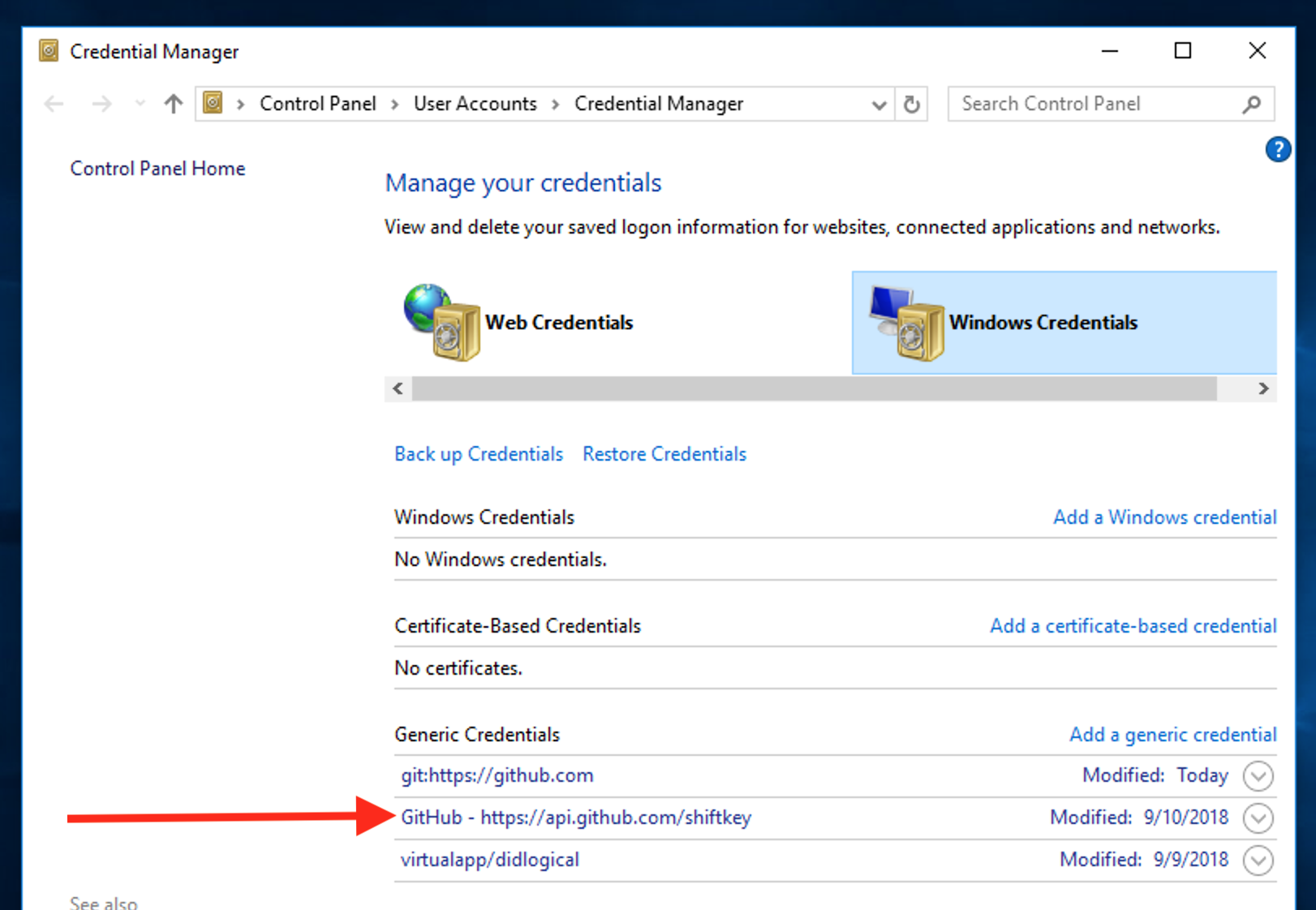
If all that looks fine, try a clone of a private repository and let me know what error it returns.
shiftkey
on 13 Sep 2018
I'm getting this issue too - here are my logs:
2018-09-16T21:27:32.427Z - info: [ui] [AppStore] loading 1 repositories from store
2018-09-16T21:27:32.428Z - info: [ui] [AppStore] found account: jbreckmckye (Jimmy Breck-McKye)
2018-09-16T21:27:32.810Z - warn: [ui] fetchMentionables: failed for jbreckmckye/dead-simple-text
TypeError: Failed to execute 'fetch' on 'Window': Invalid value
    at Object.t.request ([path redacted]\GitHubDesktop\app-1.4.0\webpack:\app\src\lib\http.ts:135:2)
    at _.request [path redacted]\GitHubDesktop\app-1.4.0\webpack:\app\src\lib\api.ts:503:12)
    at _.fetchMentionables ([path redacted]\GitHubDesktop\app-1.4.0\webpack:\app\src\lib\api.ts:546:35)
    at l.updateMentionables ([path redacted]\GitHubDesktop\app-1.4.0\webpack:\app\src\lib\stores\github-user-store.ts:125:32)
    at ye.refreshMentionables ([path redacted]\GitHubDesktop\app-1.4.0\webpack:\app\src\lib\stores\app-store.ts:1330:4)
    at ye._selectRepository ([path redacted]\Local\GitHubDesktop\app-1.4.0\webpack:\app\src\lib\stores\app-store.ts:1292:5)
    at ye.updateRepositorySelectionAfterRepositoriesChanged [path redacted]\GitHubDesktop\app-1.4.0\webpack:\app\src\lib\stores\app-store.ts:1634:7)
    at ye.loadInitialState ([path redacted]\GitHubDesktop\app-1.4.0\webpack:\app\src\lib\stores\app-store.ts:1484:5)
    at <anonymous>
2018-09-16T21:27:32.853Z - warn: [ui] fetchAccount: failed with endpoint https://api.github.com
TypeError: Failed to execute 'fetch' on 'Window': Invalid value
    at Object.t.request ([path redacted]\GitHubDesktop\app-1.4.0\webpack:\app\src\lib\http.ts:135:2)
    at _.request ([path redacted]\GitHubDesktop\app-1.4.0\webpack:\app\src\lib\api.ts:503:12)
    at _.fetchAccount ([path redacted]\GitHubDesktop\app-1.4.0\webpack:\app\src\lib\api.ts:287:35)
    at Object.t.fetchUser ([path redacted]\GitHubDesktop\app-1.4.0\webpack:\app\src\lib\api.ts:723:5)
    at o ([path redacted]\GitHubDesktop\app-1.4.0\webpack:\app\src\lib\stores\accounts-store.ts:220:10)
    at l.tryUpdateAccount ([path redacted]\GitHubDesktop\app-1.4.0\webpack:\app\src\lib\stores\accounts-store.ts:138:6)
    at accounts.Promise.all.accounts.map [path redacted]\GitHubDesktop\app-1.4.0\webpack:\app\src\lib\stores\accounts-store.ts:120:5)
    at Array.map (<anonymous>)
    at l.refresh [path redacted]\GitHubDesktop\app-1.4.0\webpack:\app\src\lib\stores\accounts-store.ts:117:21)
    at ye.loadInitialState [path redacted]\GitHubDesktop\app-1.4.0\webpack:\app\src\lib\stores\app-store.ts:1530:4)
2018-09-16T21:27:32.856Z - warn: [ui] fetchUser: failed with endpoint https://api.github.com
TypeError: Failed to execute 'fetch' on 'Window': Invalid value
    at Object.t.request [path redacted]\GitHubDesktop\app-1.4.0\webpack:\app\src\lib\http.ts:135:2)
    at _.request [path redacted]\GitHubDesktop\app-1.4.0\webpack:\app\src\lib\api.ts:503:12)
    at _.fetchAccount [path redacted]\GitHubDesktop\app-1.4.0\webpack:\app\src\lib\api.ts:287:35)
    at Object.t.fetchUser [path redacted]\GitHubDesktop\app-1.4.0\webpack:\app\src\lib\api.ts:723:5)
    at o [path redacted]\GitHubDesktop\app-1.4.0\webpack:\app\src\lib\stores\accounts-store.ts:220:10)
    at l.tryUpdateAccount [path redacted]\GitHubDesktop\app-1.4.0\webpack:\app\src\lib\stores\accounts-store.ts:138:6)
    at accounts.Promise.all.accounts.map [path redacted]\GitHubDesktop\app-1.4.0\webpack:\app\src\lib\stores\accounts-store.ts:120:5)
    at Array.map (<anonymous>)
    at l.refresh [path redacted]\GitHubDesktop\app-1.4.0\webpack:\app\src\lib\stores\accounts-store.ts:117:21)
    at ye.loadInitialState [path redacted]\GitHubDesktop\app-1.4.0\webpack:\app\src\lib\stores\app-store.ts:1530:4)
2018-09-16T21:27:32.857Z - warn: [ui] Error refreshing account 'jbreckmckye'
TypeError: Failed to execute 'fetch' on 'Window': Invalid value
    at Object.t.request [path redacted]\GitHubDesktop\app-1.4.0\webpack:\app\src\lib\http.ts:135:2)
    at _.request [path redacted]\GitHubDesktop\app-1.4.0\webpack:\app\src\lib\api.ts:503:12)
    at _.fetchAccount [path redacted]\GitHubDesktop\app-1.4.0\webpack:\app\src\lib\api.ts:287:35)
    at Object.t.fetchUser [path redacted]\GitHubDesktop\app-1.4.0\webpack:\app\src\lib\api.ts:723:5)
    at o [path redacted]\GitHubDesktop\app-1.4.0\webpack:\app\src\lib\stores\accounts-store.ts:220:10)
    at l.tryUpdateAccount [path redacted]\GitHubDesktop\app-1.4.0\webpack:\app\src\lib\stores\accounts-store.ts:138:6)
    at accounts.Promise.all.accounts.map [path redacted]\GitHubDesktop\app-1.4.0\webpack:\app\src\lib\stores\accounts-store.ts:120:5)
    at Array.map (<anonymous>)
    at l.refresh [path redacted]\GitHubDesktop\app-1.4.0\webpack:\app\src\lib\stores\accounts-store.ts:117:21)
    at ye.loadInitialState [path redacted]\GitHubDesktop\app-1.4.0\webpack:\app\src\lib\stores\app-store.ts:1530:4)
2018-09-16T21:27:33.005Z - warn: [ui] fetchIssues: failed for repository jbreckmckye/dead-simple-text
TypeError: Failed to execute 'fetch' on 'Window': Invalid value
    at Object.t.request [path redacted]\GitHubDesktop\app-1.4.0\webpack:\app\src\lib\http.ts:135:2)
    at _.request [path redacted]\GitHubDesktop\app-1.4.0\webpack:\app\src\lib\api.ts:503:12)
    at _.fetchAll [path redacted]\GitHubDesktop\app-1.4.0\webpack:\app\src\lib\api.ts:476:35)
    at _.fetchIssues [path redacted]\GitHubDesktop\app-1.4.0\webpack:\app\src\lib\api.ts:417:7)
    at t.IssuesStore.refreshIssues [path redacted]\GitHubDesktop\app-1.4.0\webpack:\app\src\lib\stores\issues-store.ts:68:30)
    at <anonymous>
2018-09-16T21:27:33.007Z - warn: [ui] Unable to fetch issues for jbreckmckye/dead-simple-text
TypeError: Failed to execute 'fetch' on 'Window': Invalid value
    at Object.t.request [path redacted]\GitHubDesktop\app-1.4.0\webpack:\app\src\lib\http.ts:135:2)
    at _.request [path redacted]\GitHubDesktop\app-1.4.0\webpack:\app\src\lib\api.ts:503:12)
    at _.fetchAll [path redacted]\GitHubDesktop\app-1.4.0\webpack:\app\src\lib\api.ts:476:35)
    at _.fetchIssues [path redacted]\GitHubDesktop\app-1.4.0\webpack:\app\src\lib\api.ts:417:7)
    at t.IssuesStore.refreshIssues [path redacted]\GitHubDesktop\app-1.4.0\webpack:\app\src\lib\stores\issues-store.ts:68:30)
    at <anonymous>
2018-09-16T21:27:33.008Z - warn: [ui] fetchPullRequests: failed for repository jbreckmckye/dead-simple-text
TypeError: Failed to execute 'fetch' on 'Window': Invalid value
    at Object.t.request [path redacted]\GitHubDesktop\app-1.4.0\webpack:\app\src\lib\http.ts:135:2)
    at _.request [path redacted]\GitHubDesktop\app-1.4.0\webpack:\app\src\lib\api.ts:503:12)
    at _.fetchAll [path redacted]\GitHubDesktop\app-1.4.0\webpack:\app\src\lib\api.ts:476:35)
    at _.fetchPullRequests [path redacted]\GitHubDesktop\app-1.4.0\webpack:\app\src\lib\api.ts:433:7)
    at c.fetchAndCachePullRequests [path redacted]\GitHubDesktop\app-1.4.0\webpack:\app\src\lib\stores\pull-request-store.ts:54:41)
    at loadPullRequests [path redacted]\GitHubDesktop\app-1.4.0\webpack:\app\src\lib\stores\app-store.ts:3748:7)
    at ye.loadPullRequests [path redacted]\GitHubDesktop\app-1.4.0\webpack:\app\src\lib\stores\app-store.ts:3743:4)
    at ye._refreshPullRequests [path redacted]\GitHubDesktop\app-1.4.0\webpack:\app\src\lib\stores\app-store.ts:3746:34)
    at n.loadPullRequests [path redacted]\GitHubDesktop\app-1.4.0\webpack:\app\src\lib\stores\app-store.ts:1269:9)
    at <anonymous>
2018-09-16T21:27:33.008Z - warn: [ui] Error refreshing pull requests for 'dead-simple-text'
TypeError: Failed to execute 'fetch' on 'Window': Invalid value
    at Object.t.request [path redacted]\GitHubDesktop\app-1.4.0\webpack:\app\src\lib\http.ts:135:2)
    at _.request [path redacted]\GitHubDesktop\app-1.4.0\webpack:\app\src\lib\api.ts:503:12)
    at _.fetchAll [path redacted]\GitHubDesktop\app-1.4.0\webpack:\app\src\lib\api.ts:476:35)
    at _.fetchPullRequests [path redacted]\GitHubDesktop\app-1.4.0\webpack:\app\src\lib\api.ts:433:7)
    at c.fetchAndCachePullRequests [path redacted]\GitHubDesktop\app-1.4.0\webpack:\app\src\lib\stores\pull-request-store.ts:54:41)
    at loadPullRequests [path redacted]\GitHubDesktop\app-1.4.0\webpack:\app\src\lib\stores\app-store.ts:3748:7)
    at ye.loadPullRequests [path redacted]\GitHubDesktop\app-1.4.0\webpack:\app\src\lib\stores\app-store.ts:3743:4)
    at ye._refreshPullRequests [path redacted]\GitHubDesktop\app-1.4.0\webpack:\app\src\lib\stores\app-store.ts:3746:34)
    at n.loadPullRequests [path redacted]\GitHubDesktop\app-1.4.0\webpack:\app\src\lib\stores\app-store.ts:1269:9)
    at <anonymous>
2018-09-16T21:27:33.191Z - info: [ui] launching: 1.4.0 (Windows 10.0.17134)
2018-09-16T21:27:33.191Z - info: [ui] execPath: 'C:\Users\Jimmy\AppData\Local\GitHubDesktop\app-1.4.0\GitHubDesktop.exe'
2018-09-16T21:27:34.122Z - warn: [ui] fetchRepository: an error occurred for 'jbreckmckye/dead-simple-text'
TypeError: Failed to execute 'fetch' on 'Window': Invalid value
    at Object.t.request [path redacted]\GitHubDesktop\app-1.4.0\webpack:\app\src\lib\http.ts:135:2)
    at _.request [path redacted]\GitHubDesktop\app-1.4.0\webpack:\app\src\lib\api.ts:503:12)
    at _.fetchRepository [path redacted]\GitHubDesktop\app-1.4.0\webpack:\app\src\lib\api.ts:260:35)
    at Object.t.inferLastPushForRepository [path redacted]\GitHubDesktop\app-1.4.0\webpack:\app\src\lib\infer-last-push-for-repository.ts:43:7)
    at <anonymous>
    at process._tickCallback (internal/process/next_tick.js:188:7)
2018-09-16T21:27:34.123Z - warn: [ui] fetchRepository: an error occurred for 'jbreckmckye/dead-simple-text'
TypeError: Failed to execute 'fetch' on 'Window': Invalid value
    at Object.t.request [path redacted]\GitHubDesktop\app-1.4.0\webpack:\app\src\lib\http.ts:135:2)
    at _.request [path redacted]\GitHubDesktop\app-1.4.0\webpack:\app\src\lib\api.ts:503:12)
    at _.fetchRepository [path redacted]\GitHubDesktop\app-1.4.0\webpack:\app\src\lib\api.ts:260:35)
    at Object.t.inferLastPushForRepository [path redacted]\GitHubDesktop\app-1.4.0\webpack:\app\src\lib\infer-last-push-for-repository.ts:51:28)
    at <anonymous>
    at process._tickCallback (internal/process/next_tick.js:188:7)
2018-09-16T21:27:34.127Z - info: [ui] [AppStore.withAuthenticatingUser] account found for repository: dead-simple-text - jbreckmckye (has token)
2018-09-16T21:27:34.216Z - warn: [ui] fetchRepository: an error occurred for 'jbreckmckye/dead-simple-text'
TypeError: Failed to execute 'fetch' on 'Window': Invalid value
    at Object.t.request [path redacted]\GitHubDesktop\app-1.4.0\webpack:\app\src\lib\http.ts:135:2)
    at _.request [path redacted]\GitHubDesktop\app-1.4.0\webpack:\app\src\lib\api.ts:503:12)
    at _.fetchRepository [path redacted]\GitHubDesktop\app-1.4.0\webpack:\app\src\lib\api.ts:260:35)
    at Object.t.inferLastPushForRepository [path redacted]\GitHubDesktop\app-1.4.0\webpack:\app\src\lib\infer-last-push-for-repository.ts:43:7)
    at <anonymous>
    at process._tickCallback (internal/process/next_tick.js:188:7)
2018-09-16T21:27:34.217Z - warn: [ui] fetchRepository: an error occurred for 'jbreckmckye/dead-simple-text'
TypeError: Failed to execute 'fetch' on 'Window': Invalid value
    at Object.t.request [path redacted]\GitHubDesktop\app-1.4.0\webpack:\app\src\lib\http.ts:135:2)
    at _.request [path redacted]\GitHubDesktop\app-1.4.0\webpack:\app\src\lib\api.ts:503:12)
    at _.fetchRepository [path redacted]\GitHubDesktop\app-1.4.0\webpack:\app\src\lib\api.ts:260:35)
    at Object.t.inferLastPushForRepository [path redacted]\GitHubDesktop\app-1.4.0\webpack:\app\src\lib\infer-last-push-for-repository.ts:51:28)
    at <anonymous>
    at process._tickCallback (internal/process/next_tick.js:188:7)
2018-09-16T21:27:34.229Z - info: [ui] [AppStore.withAuthenticatingUser] account found for repository: dead-simple-text - jbreckmckye (has token)
2018-09-16T21:27:34.625Z - info: [ui] [AppStore.withAuthenticatingUser] account found for repository: dead-simple-text - jbreckmckye (has token)
2018-09-16T21:27:35.263Z - info: [ui] Executing fetch: git -c credential.helper= fetch --progress --prune origin (took 1.129s)
2018-09-16T21:27:35.264Z - error: [ui] `git -c credential.helper= fetch --progress --prune origin` exited with an unexpected code: 128.
[email protected]: Permission denied (publickey).
fatal: Could not read from remote repository.

Please make sure you have the correct access rights
and the repository exists.

(The error was parsed as 2: Authentication failed. You may not have permission to access the repository or the repository may have been archived. Open options and verify that you're signed in with an account that has permission to access this repository.)
2018-09-16T21:27:35.335Z - info: [ui] Executing fetch: git -c credential.helper= fetch --progress --prune origin (took 1.102s)
2018-09-16T21:27:35.335Z - error: [ui] `git -c credential.helper= fetch --progress --prune origin` exited with an unexpected code: 128.
[email protected]: Permission denied (publickey).
fatal: Could not read from remote repository.

Please make sure you have the correct access rights
and the repository exists.

(The error was parsed as 2: Authentication failed. You may not have permission to access the repository or the repository may have been archived. Open options and verify that you're signed in with an account that has permission to access this repository.)
2018-09-16T21:27:35.748Z - info: [ui] Executing fetch: git -c credential.helper= fetch --progress --prune origin (took 1.114s)
2018-09-16T21:27:35.748Z - error: [ui] `git -c credential.helper= fetch --progress --prune origin` exited with an unexpected code: 128.
[email protected]: Permission denied (publickey).
fatal: Could not read from remote repository.

Please make sure you have the correct access rights
and the repository exists.

(The error was parsed as 2: Authentication failed. You may not have permission to access the repository or the repository may have been archived. Open options and verify that you're signed in with an account that has permission to access this repository.)
2018-09-16T21:27:36.020Z - warn: [ui] fetchPullRequests: failed for repository jbreckmckye/dead-simple-text
TypeError: Failed to execute 'fetch' on 'Window': Invalid value
    at Object.t.request [path redacted]\GitHubDesktop\app-1.4.0\webpack:\app\src\lib\http.ts:135:2)
    at _.request [path redacted]\GitHubDesktop\app-1.4.0\webpack:\app\src\lib\api.ts:503:12)
    at _.fetchAll [path redacted]\GitHubDesktop\app-1.4.0\webpack:\app\src\lib\api.ts:476:35)
    at _.fetchPullRequests [path redacted]\GitHubDesktop\app-1.4.0\webpack:\app\src\lib\api.ts:433:7)
    at c.fetchAndCachePullRequests [path redacted]\GitHubDesktop\app-1.4.0\webpack:\app\src\lib\stores\pull-request-store.ts:54:41)
    at loadPullRequests [path redacted]\GitHubDesktop\app-1.4.0\webpack:\app\src\lib\stores\app-store.ts:3748:7)
    at ye.loadPullRequests [path redacted]\GitHubDesktop\app-1.4.0\webpack:\app\src\lib\stores\app-store.ts:3743:4)
    at ye._refreshPullRequests [path redacted]\GitHubDesktop\app-1.4.0\webpack:\app\src\lib\stores\app-store.ts:3746:34)
    at withPushPull [path redacted]\GitHubDesktop\app-1.4.0\webpack:\app\src\lib\stores\app-store.ts:3028:11)
    at <anonymous>
2018-09-16T21:27:36.021Z - warn: [ui] Error refreshing pull requests for 'dead-simple-text'
TypeError: Failed to execute 'fetch' on 'Window': Invalid value
    at Object.t.request [path redacted]\GitHubDesktop\app-1.4.0\webpack:\app\src\lib\http.ts:135:2)
    at _.request [path redacted]\GitHubDesktop\app-1.4.0\webpack:\app\src\lib\api.ts:503:12)
    at _.fetchAll [path redacted]\GitHubDesktop\app-1.4.0\webpack:\app\src\lib\api.ts:476:35)
    at _.fetchPullRequests [path redacted]\GitHubDesktop\app-1.4.0\webpack:\app\src\lib\api.ts:433:7)
    at c.fetchAndCachePullRequests [path redacted]\GitHubDesktop\app-1.4.0\webpack:\app\src\lib\stores\pull-request-store.ts:54:41)
    at loadPullRequests [path redacted]\GitHubDesktop\app-1.4.0\webpack:\app\src\lib\stores\app-store.ts:3748:7)
    at ye.loadPullRequests [path redacted]\GitHubDesktop\app-1.4.0\webpack:\app\src\lib\stores\app-store.ts:3743:4)
    at ye._refreshPullRequests [path redacted]\GitHubDesktop\app-1.4.0\webpack:\app\src\lib\stores\app-store.ts:3746:34)
    at withPushPull [path redacted]\GitHubDesktop\app-1.4.0\webpack:\app\src\lib\stores\app-store.ts:3028:11)
    at <anonymous>
2018-09-16T21:27:36.044Z - warn: [ui] fetchIssues: failed for repository jbreckmckye/dead-simple-text
TypeError: Failed to execute 'fetch' on 'Window': Invalid value
    at Object.t.request [path redacted]\GitHubDesktop\app-1.4.0\webpack:\app\src\lib\http.ts:135:2)
    at _.request [path redacted]\GitHubDesktop\app-1.4.0\webpack:\app\src\lib\api.ts:503:12)
    at _.fetchAll [path redacted]\GitHubDesktop\app-1.4.0\webpack:\app\src\lib\api.ts:476:35)
    at _.fetchIssues [path redacted]\GitHubDesktop\app-1.4.0\webpack:\app\src\lib\api.ts:417:7)
    at t.IssuesStore.refreshIssues [path redacted]\GitHubDesktop\app-1.4.0\webpack:\app\src\lib\stores\issues-store.ts:68:30)
    at <anonymous>
2018-09-16T21:27:36.045Z - warn: [ui] Unable to fetch issues for jbreckmckye/dead-simple-text
TypeError: Failed to execute 'fetch' on 'Window': Invalid value
    at Object.t.request [path redacted]\GitHubDesktop\app-1.4.0\webpack:\app\src\lib\http.ts:135:2)
    at _.request [path redacted]\GitHubDesktop\app-1.4.0\webpack:\app\src\lib\api.ts:503:12)
    at _.fetchAll [path redacted]\GitHubDesktop\app-1.4.0\webpack:\app\src\lib\api.ts:476:35)
    at _.fetchIssues [path redacted]\GitHubDesktop\app-1.4.0\webpack:\app\src\lib\api.ts:417:7)
    at t.IssuesStore.refreshIssues [path redacted]\GitHubDesktop\app-1.4.0\webpack:\app\src\lib\stores\issues-store.ts:68:30)
    at <anonymous>
2018-09-16T21:27:36.127Z - warn: [ui] fetchRepository: an error occurred for 'jbreckmckye/dead-simple-text'
TypeError: Failed to execute 'fetch' on 'Window': Invalid value
    at Object.t.request [path redacted]\GitHubDesktop\app-1.4.0\webpack:\app\src\lib\http.ts:135:2)
    at _.request [path redacted]\GitHubDesktop\app-1.4.0\webpack:\app\src\lib\api.ts:503:12)
    at _.fetchRepository [path redacted]\GitHubDesktop\app-1.4.0\webpack:\app\src\lib\api.ts:260:35)
    at Object.t.inferLastPushForRepository [path redacted]\GitHubDesktop\app-1.4.0\webpack:\app\src\lib\infer-last-push-for-repository.ts:43:7)
    at <anonymous>
    at process._tickCallback (internal/process/next_tick.js:188:7)
2018-09-16T21:27:36.128Z - warn: [ui] fetchRepository: an error occurred for 'jbreckmckye/dead-simple-text'
TypeError: Failed to execute 'fetch' on 'Window': Invalid value
    at Object.t.request [path redacted]\GitHubDesktop\app-1.4.0\webpack:\app\src\lib\http.ts:135:2)
    at _.request [path redacted]\GitHubDesktop\app-1.4.0\webpack:\app\src\lib\api.ts:503:12)
    at _.fetchRepository [path redacted]\GitHubDesktop\app-1.4.0\webpack:\app\src\lib\api.ts:260:35)
    at Object.t.inferLastPushForRepository [path redacted]\GitHubDesktop\app-1.4.0\webpack:\app\src\lib\infer-last-push-for-repository.ts:51:28)
    at <anonymous>
    at process._tickCallback (internal/process/next_tick.js:188:7)
2018-09-16T21:27:36.131Z - info: [ui] [AppStore.withAuthenticatingUser] account found for repository: dead-simple-text - jbreckmckye (has token)
2018-09-16T21:27:37.220Z - info: [ui] Executing fetch: git -c credential.helper= fetch --progress --prune origin (took 1.088s)
2018-09-16T21:27:37.220Z - error: [ui] `git -c credential.helper= fetch --progress --prune origin` exited with an unexpected code: 128.
[email protected]: Permission denied (publickey).
fatal: Could not read from remote repository.

Please make sure you have the correct access rights
and the repository exists.

(The error was parsed as 2: Authentication failed. You may not have permission to access the repository or the repository may have been archived. Open options and verify that you're signed in with an account that has permission to access this repository.)
I've signed out & signed back in again, providing my 2FA token. I have an entry for Github desktop in the credentials manager (as mentioned above). Regenerating SSH keys didn't help either.
 jbreckmckye
on 16 Sep 2018
jbreckmckye
on 16 Sep 2018
In my case I had an ssh command, that I had added so that it forced git to work (using command line) using a specific key as I'd had a conflict earlier.
sshCommand = ssh -i ~/.ssh/git_id_rsa -F /dev/null
While the command line worked the latest version of Git Desktop stopped working. Once removed both now work.
Sorry I can't explain or defend the sshCommand as I don't really understand it's relationship at the time, I just copied it from a page found on google and it resolved the conflict at the time.
The odd thing for me is why did it work with the previous version of git desktop and stop working now?
One clue is that key has a password and Git Desktop never requests it so, I am assuming that it's using a different key or https to connect.
Here is my full config (now working)
[pack]
buildbitmaps = false
[core]
repositoryformatversion = 0
filemode = true
logallrefupdates = true
precomposeunicode = true
bare = false
ignorecase = false
[remote "origin"]
url = [email protected]:xxxxxx/xxxxxxxx.git
fetch = +refs/heads/:refs/remotes/origin/
[branch "master"]
remote = origin
merge = refs/heads/master
[branch "development"]
remote = origin
merge = refs/heads/development
[user]
email = [email protected]
sshCommand = ssh -i ~/.ssh/git_id_rsa -F /dev/null was in [core]
 stephenbaugh
on 21 Sep 2018
stephenbaugh
on 21 Sep 2018
Sorry for the delay, but this still isn't working for me. I've attached my latest information.
My .gitconfig looks like this:
[filter "lfs"]
required = true
clean = git-lfs clean -- %f
smudge = git-lfs smudge -- %f
process = git-lfs filter-process
[user]
name = Jeffrey Born
[user]
email = jeff.[email protected]
Signing out and signing in did nothing for me. Still have the same error. I will add that my password is complex and long. I see a lot of issues where long complex passwords cause issues. Hopefully this isn't it, but might help in finding a solution.

When trying to clone a private repo I get the following dialog in an endless loop:
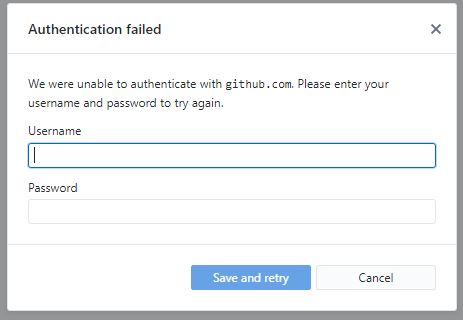
I'm also attaching my setup log and today's log file
2018-10-01.desktop.production.log
SquirrelSetup.log
jborn
on 1 Oct 2018
@jborn thanks for updating this issue with the latest log files, and I am sorry that we still have not yet been able to track down what is causing these authentication errors. I installed a fresh Windows 10 VM in VirtualBox on my macOS machine but was unable to reproduce this issue.
Would you mind running one more command from one of these VMs where you are experiencing this issue?
git config --list --show-origin
Please let me know the output of that command.
Also, have you tried performing a fresh reinstallation of GitHub Desktop to see if that helps with this issue (just to make sure nothing is corrupt that could be causing these errors)? To do this, you will need to close GitHub Desktop and delete the following two directories:
%LocalAppData%\GitHubDesktop
%AppData%\GitHub Desktop
Then try reinstalling again. Let me know if that helps at all.
steveward
on 4 Oct 2018
@steveward I've attached the output of the git command as you requested here:
A reinstall of the GitHub Desktop after first deleting both folders you listed above also did not help.
I still get the dreaded Authentication Error message.
jborn
on 11 Oct 2018
I was having this exact same issue today trying to get the Desktop Client (v1.4.2) on Windows 10 to talk to Bitbucket. When I originally set up my SSH key I added a passphrase but when I recreated the SSH key I didn't set a passphrase and this now seems to be working. Just me 2 cents
 markvdesign
on 12 Oct 2018
markvdesign
on 12 Oct 2018
Solved. I created two repositories DESIGNER and MACHUPS. I created a TEAM. I assigned a designer to the Team and assigned permissions to the repository.
Well, my my designer had the (Authentication Failed ) issue using Windows Github. It was very strange, as he managed to synchronize at first, but the error would appear later. He solved it by simply logging out of the File -> Options -> Account. He said the issue is, that it is my Repository, not his, thus the (Authentication Failed ) issue. As such, he did not need to be logged into this. I was very confused by this. I asked how does the software know who you are and to which Github account to synchronize then. He claimed upon installation of the software, it asked for login so it knows who he is anyhow. Weird.
As for me, I the Owner logged out of my Windows Github. Logged back in to File -> Options -> Account and the I got the (Authentication Failed ) error when doing a "Pull Origin". My fix was different. I chose a different Repository in the top left corner (I have two). "Pull Origin" worked. Then went back to the previous repository. Got some strange 401 error upon "Pull Origin". Tried once more and everything worked. But then later, it started all over again. At current time, I keep getting this error. I sign in. Sign out. Exit software. Etc. Nothing helps.
So very convoluted situation. Hope this was helpful.
 gz1968
on 22 Oct 2018
gz1968
on 22 Oct 2018
I am also facing same Issue, I reinstalled the latest version still getting same error, Attached the file for your reference
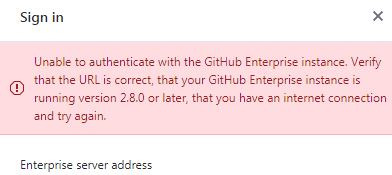
 sadiqn
on 28 Nov 2018
sadiqn
on 28 Nov 2018
@sadiqn Please open a fresh issue with your details so we can investigate.
Also, there are some "fixes" in this thread, like the following... Please try them. Thank you!
https://github.com/desktop/desktop/issues/3816#issuecomment-429200078
https://github.com/desktop/desktop/issues/3816#issuecomment-358997970
https://github.com/desktop/desktop/issues/3816#issuecomment-396958068
 tierninho
on 28 Nov 2018
tierninho
on 28 Nov 2018
@jborn Had the same issue happen to me after my paid services expired and my private repos became locked down. It would just say there was an authentication error until I checked my github and extended my subscription. Might not be your case, but I thought I would put it out here for people trying to resolve this.
 avatarxargo
on 30 Nov 2018
avatarxargo
on 30 Nov 2018
@sadiqn Please open a fresh issue with your details so we can investigate.
Also, there are some "fixes" in this thread, like the following... Please try them. Thank you!
#3816 (comment)
#3816 (comment)
#3816 (comment)
Why would you have sadiqn open a new issue, if he is having the same issue as me, doesn't it make sense to keep all information about this issue in one issue thread? I've tried all the "fixes" listed and nothing has worked for me. Very frustrating that I opened this issue a year ago and no fix and people are being asked to open new issues when they happen upon this ticket. Please fix!
jborn
on 15 Jan 2019
I agree with jborn. Many people have the problem and here are only super-specific fixes that do not solve the problem at its root. We all can push and pull in a standard way, with other software or terminal, using default credential settings. But GitHub Desktop seems to use some bugged credential or ssl lookup which breaks the whole thing. Just implement a simple push and pull command that uses the default options without fancy additions, and it will work as expected. One year later. Thanks.
mschroen
on 16 Jan 2019
I was having the same problem, and I wasted a lot of time trying to fix it, following various solutions to propose some issues here. So I decided to sign out from the account in Github desktop, and login again. And this worked for me.
Go to File > Options> Accounts > Sign out > and Sign in again.
In my case, cloning my repository, I used my github.com account on the Github desktop, and I get an same authentication failed when using an https repository URL (as first described). So doing this procedure my same problem has been solved.
 mirianfsilva
on 17 Jan 2019
mirianfsilva
on 17 Jan 2019
I think this thread is mainly about non-GitHub.com-repositories. In my case, I am not using GitHub.com accounts, so there is nothing to sign in or sign out.
mschroen
on 18 Jan 2019
The repository I'm trying to access is a private repository hosted by github. I'm using my github credentials to access this private repository.
jborn
on 18 Jan 2019
In my case helped deleteon of this in registry:
[HKEY_LOCAL_MACHINESOFTWAREMicrosoftCommand ProcessorAutorun]
 ZiiMakc
on 20 Jan 2019
ZiiMakc
on 20 Jan 2019
The repository I'm trying to access is a private repository hosted by github. I'm using my github credentials to access this private repository.
This happened to me as well, when I read that your repo is a private one as well I decided to make mine public and tried to access it through github desktop afterwards. It worked, hope this helps!
 gitsocks
on 24 Jan 2019
gitsocks
on 24 Jan 2019
Hi, I solved this issue by creating a personal Token and using it to login from GitHub Desktop.

 samiwali
on 25 Jan 2019
samiwali
on 25 Jan 2019
I found that my internet was not connecting properly - causing this error which the keychain hack above did not fix. Once I got onto a stable internet, I signed in with web browser, and it was all OK.
 samhforbes
on 30 Apr 2019
samhforbes
on 30 Apr 2019
@jborn are you still encountering authentication issues in GitHub Desktop from within your VM? One thing we've been seeing more cases of is the HKEY_LOCAL_MACHINE\SOFTWARE\Microsoft\Command Processor\Autoruns registry entry being modified, which causes authentication failures. If you haven't looked into that I'd recommend checking that registry entry in your VM to see if it has been modified.
steveward
on 16 Oct 2019
Try going to the _toolbar > Repository > Repository Settings_
I was using SSH but changed it to HTTPS and it worked
 Alejov0
on 20 Feb 2020
Alejov0
on 20 Feb 2020
I'm on Windows 10 x64 and I started getting this issue after I had added a .cmd file to be autorun upon opening the command line prompt. @ReTWi's solution worked for me.
I dug a bit deeper and found that in the file I had created, I had echo statements. Removing them from the file fixed the problem.
It seems thus that the authentication is being broken by the additional statements written to the command line upon running this autorun file.
 Doggie52
on 5 May 2020
Doggie52
on 5 May 2020
@Doggie52 I'm glad to hear you were able to get things working. For anyone else who stumbles upon this issue we've documented the workaround here. I'm going to close this issue out since we've determined the cause of these authentication issues.
steveward
on 5 May 2020
Thanks - the workaround does not mention my solution though. Using an autorun for Windows is extremely helpful when it comes to setting doskey aliases among other things, a bit like a .bash_profile. I think if the issue was the .bash_profile, you wouldn't tell *nix users to just not use that functionality.
Doggie52
on 5 May 2020
@Doggie52 I mentioned the link to share a previous known solution to this issue, not the specific workaround you shared. Sorry for the confusion.
steveward
on 6 May 2020
Signing out and back in didn't help me in macOS, nor did changing from SSH to https in the repo settings via Desktop.
 cheshire137
on 1 Jun 2020
cheshire137
on 1 Jun 2020
For the record on Windows logging out and in, and re-installing did not help. I originally installed from the windows app store, when I tried installing from the website: https://desktop.github.com/ the issue was resolved. I hope this helps someone!
 NickiShaw
on 4 Jul 2020
NickiShaw
on 4 Jul 2020
@NickiShaw thanks for sharing that. The Windows store version of GitHub Desktop was not uploaded by GitHub, and we are working to have it removed. Sorry for the trouble there.
steveward
on 6 Jul 2020
Related issues
 renegadedata
·
68Comments
renegadedata
·
68Comments
 penCsharpener
·
103Comments
penCsharpener
·
103Comments
 lameyer
·
77Comments
lameyer
·
77Comments
 aFloatingEcho
·
54Comments
aFloatingEcho
·
54Comments
 TCROC
·
55Comments
TCROC
·
55Comments
Most helpful comment
Goto
File>Options>Sign OutandSign Inagain. It works for me.