Desktop: GitHub Desktop unable to fetch ("url has no scheme")
Update: This has been fixed for Windows in the latest release of Desktop (production v2.4.3 and beta v2.4.4-beta0). We are still investigating a fix for macOS.
Describe the bug
I cannot seem to fetch origin ever since the update to Github Desktop recently, every time I attempt to do this, I get the following error message:
warning: url has no scheme: helperselector
fatal: credential url cannot be parsed: helperselector
Version & OS
Github Desktop Version 2.4.2
Windows 10 Home - Build 18363.889
Steps to reproduce the behavior
- Go to the main screen.
- Click on Fetch Origin
- See error
Expected behavior
I expected to fetch origin.
Actual behavior
Github spits out an error message. I'm very unsure on what the next steps to do since using other git UI applications seem to work properly, and previous versions of github desktop on a different computer works properly, so something must have changed in this version that causes it to suddenly stop working. I've already logged in and out of Github several times, reinstalled Github Desktop a few other times, but I still run into this issue.
Screenshot of Error Message

 aFloatingEcho
All 54 comments
Even I am facing same issue. I had a older version installer. after uninstalling new version and installing old version fixed the issue
Github Desktop Version 2.4.2
Windows 10 Home - 18363.720
 arabelagaje
on 22 Apr 2020
arabelagaje
on 22 Apr 2020
Exactly the same error. Please advise!
 giorgoc
on 22 Apr 2020
giorgoc
on 22 Apr 2020
Hi, we are getting the same error after updating to version 2.4.2
 demisp
on 22 Apr 2020
demisp
on 22 Apr 2020
Even I am facing same issue. I had a older version installer. after uninstalling new version and installing old version fixed the issue
Github Desktop Version 2.4.2
Windows 10 Home - 18363.720
which version do you have? can you please share?
giorgoc
on 22 Apr 2020
Even I am facing same issue. I had a older version installer. after uninstalling new version and installing old version fixed the issue
Github Desktop Version 2.4.2
Windows 10 Home - 18363.720which version do you have? can you please share?
2.1.0 (thats may be a year old) but it has already downloaded the update on next restart it will be 2.4.2 again I guess
(Any way to keep it in old version until its fixed)
arabelagaje
on 22 Apr 2020
Getting similar issue:
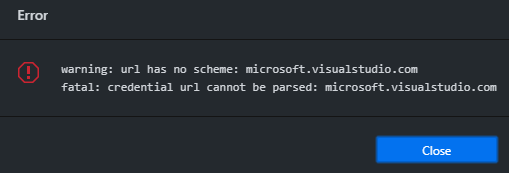
GitHub Desktop Version: 2.4.2
Windows 10 Pro - 18363.720
 narasimhamurthyss
on 22 Apr 2020
narasimhamurthyss
on 22 Apr 2020
Getting similar issue:
GitHub Desktop Version: 2.4.2
Windows 10 Pro - 18363.720
I have downloaded 2.4.1 from https://www.techspot.com/downloads/6741-github-desktop.html
You can install it over your existing installation it will not delete any settings. The only problem is that it automatically downloads the new version (2.4.2) but good news is that the update is not applied unless you restart the app.
so you can work this solution, at least temporarily.
giorgoc
on 22 Apr 2020
Thanks for filling this issue, this may be related to the upgrade to git that was performed on v2.4.2. I'm currently investigating
 rafeca
on 22 Apr 2020
rafeca
on 22 Apr 2020
I have the same issue but my commandline git is still working though. Happened right after 2.4.2 upgrade.
git version 2.18.0.windows.1
 koide
on 22 Apr 2020
koide
on 22 Apr 2020
I'm having the same issue as og.

GitHub Desktop Version: 2.4.2
Windows 10 Pro - 18363.720
Any clue about when will we get the fix?
 Guillicap
on 22 Apr 2020
Guillicap
on 22 Apr 2020
Found a solution that worked for me.
Open your .gitconfig (Under C:\Users\<username>) and if you have an entry
[credential "url_without_scheme"]
change it for
[credential "https://url_without_scheme"]
That fixed it for me. It can help the investigation and might fix it for you!
koide
on 22 Apr 2020
I'm not seeing the issue.
GitHub Desktop Version: 2.4.2
Windows 10 Pro - 18363.778
My credentials setting in .gitconfig (unchanged from default install) is as follows:
[credential]
    helper = wincred
 JimBobSquarePants
on 22 Apr 2020
JimBobSquarePants
on 22 Apr 2020
Hi again! This issue seems to be related to the vulnerability fix that has been introduced on the latest git releases (see the changelog here: https://github.com/git/git/blob/master/Documentation/RelNotes/2.17.5.txt). This fix requires authentication credentials URLs to contain full URLs with their protocol.
As @koide mentioned, changing the URLs in your .gitconfig may fix your issue (I'm unsure if that would solve the helperselector errors though).
Unfortunately, I haven't been able to reproduce the issue myself so I can't provide more advise at the moment. We're contacting with git core members to check if there's a better solution.
rafeca
on 22 Apr 2020
[credential]
    helper = manager
[credential "helperselector"]
    selected = manager
This is how my .gitconfig looks, what do i need to change here to fix the issue?
arabelagaje
on 22 Apr 2020
@Aravind-Belagaje thank you for posting this! Now it _all_ makes sense.
To fix this in your setup, simply run:
git config --unset --global credential.helperselector
on the command-line, or _remove_ the lines
[credential "helperselector"]
    selected = manager
 dscho
on 22 Apr 2020
dscho
on 22 Apr 2020
Well, it looks like replacing the lines as mentioned by @koide in https://github.com/desktop/desktop/issues/9597#issuecomment-617745963 as shown below:
[credential "helperselector"]
    selected = manager
to
[credential "https://url_without_scheme"]
    selected = manager
seems to have fixed my issue as well. (I just got up, I'm surprised this issue blew up.) Looks like doing that has fixed the issue.
aFloatingEcho
on 22 Apr 2020
Longer explanation, for those who are interested in details: in Git for Windows v2.23.0, we introduced a meta credential helper, i.e. a credential helper that would enumerate all credential helpers available on the search path, and list them and let the user choose.
Now, to remember what the user chose, we persist that choice under the key credential.helperselector.selected.
The fixes in Git v2.26.2 (and in the backports) for CVE-2020-11008 address problems where URL-specific credential settings (whether from .gitmodules or from .gitconfig, does not matter) used _incomplete_ URLs which would be mistaken e.g. by git-credential-osxkeychain for wildcards. That is, a URL of the form https:///path would trick susceptible credential helpers into giving up passwords for _some random host_. As a consequence, v2.26.2 (and those backports) really clamp down on incomplete URLs.
The problem now is that the meta credential helper uses a naming scheme in the Git config that Git mistakes for such a credential setting. It is obviously not that, but Git does not know that. So it wants to verify that the double-quoted parts in [credential "helperselector"] are a valid URL, and otherwise exit with error.
dscho
on 22 Apr 2020
@narasimhamurthyss @giorgoc your issue seems to be a different one. Can you look whether you have any entries either in your user-wide config, or in .gitmodules, that has microsoft.visualstudio.com in double-quotes, where that should maybe be a fully-qualified URL (i.e. _with_ protocol, i.e with the https:// prefix)?
dscho
on 22 Apr 2020
Well, it looks like replacing the lines as mentioned by @koide in #9597 (comment) as shown below:
[credential "helperselector"]
  selected = manager
to
[credential "https://url_without_scheme"]
  selected = manager
@aFloatingEcho please note that it would be better to just remove those lines. By changing the double-quoted part, it is ensured that the meta credential helper won't find that setting anymore, and it is really only useful for that meta helper.
dscho
on 22 Apr 2020
@Aravind-Belagaje thank you for posting this! Now it _all_ makes sense.
To fix this in your setup, simply run:
git config --unset --global credential.helperselectoron the command-line, or _remove_ the lines
[credential "helperselector"]
  selected = manager
Thanks,
it looks like removing
[credential "helperselector"]
    selected = manager
solved the issue for me
arabelagaje
on 22 Apr 2020
Huh. That's useful to know, I'll be sure to be lookout on changing that on my other git installations, @dscho . It doesn't look like I need to change:
[credential]
    helper = wincred
I think, right?
I"ll let rafeca decide if this can be closed or if this still needs work.
aFloatingEcho
on 22 Apr 2020
It doesn't look like I need to change:
[credential]
  helper = wincred
I think, right?
Right. The problem occurs when you have a quoted part in [credential "<something>"] because as of the latest security bug fixes, that <something> _must_ be a fully-qualified URL.
dscho
on 22 Apr 2020
The proplem occurs after last update with private repos only version 2.4.2

 marcozakaria
on 22 Apr 2020
marcozakaria
on 22 Apr 2020
@narasimhamurthyss @giorgoc your issue seems to be a different one. Can you look whether you have any entries either in your user-wide config, or in
.gitmodules, that hasmicrosoft.visualstudio.comin double-quotes, where that should maybe be a fully-qualified URL (i.e. _with_ protocol, i.e with thehttps://prefix)?
It's exactly the same problem as the others reported. So , the solution was to replace
[credential "helperselector"]
by
[credential "https://url_without_scheme"]
at the .gitconfig file under
C:\Users\<username>
directory.
giorgoc
on 22 Apr 2020
@giorgoc but didn't you report to have a [credential "microsoft.visualstudio.com"]? That would have interesting settings, I am sure, and will need a fix in Git's source code. (I'm on it.)
dscho
on 22 Apr 2020
I am having the same issue after upgrading to 2.26.2. In my c:users
[credential]
helper = manager
I tried removing that, but it didn't seem to change anything, I am still getting
warning: url has no scheme:
fatal: credential url cannot be parsed:
yet besides those messages, all seems to work fine (I'm using command line git).
In my .git-credentials there is a bunch of URLs but all start with 'https://'.
 dima-y
on 23 Apr 2020
dima-y
on 23 Apr 2020
@dima-y are you using github desktop? or is this cli git v2.26.2? can you share if you're on mac or windows, too please? thank you!
 outofambit
on 23 Apr 2020
outofambit
on 23 Apr 2020
@outofambit I'm on Windows 10, using git for Windows (updated this morning to 2.26.2), using command line.
> git --version
> git version 2.26.2.windows.1
dima-y
on 23 Apr 2020
hey all, we are still looking into this! thank you for being so patient. we are evaluating some different fixes and hope to be able to patch this early next week.
as we understand it right now, its an issue in git v2.23.3 for both mac and windows users, but seems to be more common for windows users due to some complicating factors in git4windows and other config settings that are more common in windows environments.
If you're experiencing this issue, please comment saying so and include your OS version! We want to be sure we're tracking how many people are affected by this.
outofambit
on 23 Apr 2020
@dima-y gotcha, thanks for sharing this! this discussion is specific to github desktop (which bundles git4windows v2.23.x). please file an issue in git-for-windows, especially since i don't seen one there for something like this on version 2.26.2.windows.1. thank you!
outofambit
on 23 Apr 2020
@outofambit Thanks, will do. BTW, FWIW, I 'fixed' this by removing the '[credential]' entry also from my local .git/config. Still looks like a bug to me.
dima-y
on 23 Apr 2020
I have the same problem.
Installed a new desktop on 04/22.
Trying to publish a repository and getting an error
"warning: url has no scheme: helperselector
fatal: credential url cannot be parsed: helperselector"
Win10 v.1809
 tanchora
on 23 Apr 2020
tanchora
on 23 Apr 2020
@giorgoc but didn't you report to have a
[credential "microsoft.visualstudio.com"]? That would have interesting settings, I am sure, and will need a fix in Git's source code. (I'm on it.)
No, i quoted a message for VS from another user, but mine is related to the helperselector too :-)
giorgoc
on 23 Apr 2020
The mentioned Fix solved it for me. Thanks
 m-blattner
on 23 Apr 2020
m-blattner
on 23 Apr 2020
@Aravind-Belagaje thank you for posting this! Now it _all_ makes sense.
To fix this in your setup, simply run:
git config --unset --global credential.helperselectoron the command-line, or _remove_ the lines
[credential "helperselector"]
  selected = manager
That worked for me!
Thank you :)
Guillicap
on 23 Apr 2020
Still looks like a bug to me.
@dima-y Yes. To make it clear: we are treating it exactly this way: this is a bug. There are already patches being discussed on the Git mailing list to fix this. We try to move as fast as we can to fix this (without risking breaking more stuff).
dscho
on 23 Apr 2020
Distributor ID: Ubuntu
Description: Ubuntu 18.04.4 LTS
Release: 18.04
Codename: bionic
Git: 2.17.1
only occurs for me on a git pull:
warning: url has no scheme:
fatal: credential url cannot be parsed:
Already up to date.
of note is that if there are changes to pull, my local git updates with those changes, even with the error. creating a new branch, pushing, and getting status do not seem to produce the error for me.
in my ~/.gitconfig file, i have this section at the end:
[credential]
        helper = store
and then my ~/.git-credentials file has a single entry of the form, https://<git-username>:<git-token>@github.com
 pax-awitt
on 23 Apr 2020
pax-awitt
on 23 Apr 2020
I am an artist and I am using two different programs for source control:
GitHub Desktop Because it uses vocabulary words that I understand because I am right brained and not a left-brained programmer. (I'm not wired for genius).
Source Tree: Because it has a visual tree.
I was able to get Source Tree working by pounding the crap out of the HelperSelector: Manager Button. If finally worked after pressing it 5 to 7 times. I can commit and also Fetch.
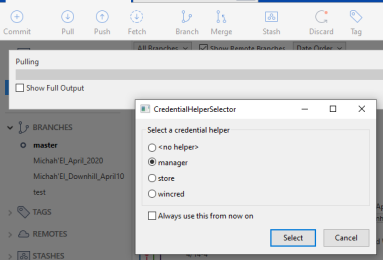
GitHub Desktop, however, does not have an interface for me to abuse:
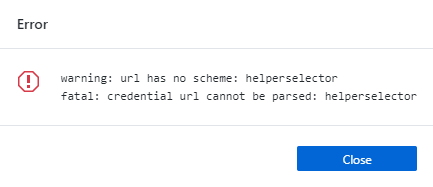
This only happens when I try and Push.
*edit. I am also on git version 2.26.2.windows.1 on Windows 10
 GeneralSoundwave
on 24 Apr 2020
GeneralSoundwave
on 24 Apr 2020
@GeneralSoundwave please run git config --global credential.helper manager followed by git config --global --unset credential.helperselector.selected. The first invocation should do the same as selecting the manager in the helper _and_ checking the Always use this from now on checkbox. The second invocation will let GitHub Desktop fetch again.
dscho
on 24 Apr 2020
It helped me:
in .gitconfig (C:/Users/YOURUSERNAME):
Change this lines:
[credential "helperselector"]
    selected = manager
to
[credential]
    helper = wincred
 bPavenko
on 26 Apr 2020
bPavenko
on 26 Apr 2020
I use AppVeyor as my CI solution. Part of that build process uses git-credential store to store access tokens the build needs to pull down an Azure hosted git repo for an APIM tenant.
An access token with this format:
https://username:password@{name}.scm.azure-api.net/
is manifesting the error being discussed in this issue, as of Git for Windows 2.26.2:
warning: url has no scheme: ?
fatal: credential url cannot be parsed: ?
 rabrahamOpti
on 27 Apr 2020
rabrahamOpti
on 27 Apr 2020
I am using osx:
My gitconfig includes:
[credential]
    helper = store
which works fine from the command line. I don't think it is invalid. The problem is that Github desktop is setting the helper to nothing( from the logs: git -c credential.helper= -c protocol.version=2 fetch --progress --prune origin) which requires manual input of the credentials which it doesn't seem to be set up to do...
 joelcahalan
on 28 Apr 2020
joelcahalan
on 28 Apr 2020
Huh. That's useful to know, I'll be sure to be lookout on changing that on my other git installations, @dscho . It doesn't look like I need to change:
[credential]
  helper = wincred
I think, right?
I"ll let rafeca decide if this can be closed or if this still needs work.
this just works! Thanks. But I had this piece configured with "wincred" while setting up source tree with wincred. Will my sourcetree setup break in such case?
 sud007
on 29 Apr 2020
sud007
on 29 Apr 2020
warning: url has no scheme: ?
fatal: credential url cannot be parsed: ?
@rabrahamOpti could you have a look whether the ~/.git-credentials file maybe contains a line that has a single question mark in it? Or anything else with a question mark in a funny spot?
dscho
on 29 Apr 2020
@dscho FWIW, in my case the problem was caused by TWO empty lines at the end of ~/.git-credentials, and the "fix" was to remove the extra empty line.
dima-y
on 29 Apr 2020
Manually removing all the credential parameters from .git/CONFIG file solved the problem for me.
After running "git pull" , I had to re-enter github credentials and save it again into credential store.
 ender9055
on 30 Apr 2020
ender9055
on 30 Apr 2020
@ender9055 what operating system are you on? An update this past Monday should have addressed this issue on Windows, but there is not yet any official Git v2.23.x fixing it on other platforms.
dscho
on 1 May 2020
Ubuntu
For linux users...
I ended up using ssh instead of https. Find how to create and store your ssh credentials, this depends on which git server are you using: https://help.github.com/en/github/authenticating-to-github/connecting-to-github-with-ssh. Once you've done that, run this command
git remote set-url origin git@your_repo_here.git
Once I did that, the problem was solved
 nikoremi97
on 4 May 2020
nikoremi97
on 4 May 2020
It does seem like git has become very sensitive to empty lines in ~/.git-credentials (using store helper) after a range of security patches landed in April (2.17.X, Ubuntu 18.04.X). Probably need to fixup the parsing so that empty/whitespace-only lines become are ignored.
 oyvindstegard
on 11 May 2020
oyvindstegard
on 11 May 2020
warning: url has no scheme: ?
fatal: credential url cannot be parsed: ?@rabrahamOpti could you have a look whether the
~/.git-credentialsfile maybe contains a line that has a single question mark in it? Or anything else with a question mark in a funny spot?
@dscho I RDPed into the appveyor VM and inspected ~/.git-credentials. I do not see any ? characters. This is what the file looks like (anonymized with {username} {password}, and {APIM Tenant}):
https://{username}:{password}@{APIM Tenant}.scm.azure-api.net/

https://{username}:{password}@{APIM Tenant}.scm.azure-api.net/

https://{username}:{password}@{APIM Tenant}.scm.azure-api.net/
The passwords are URL encoded, and contain %26, %2b, %3d and %2f
rabrahamOpti
on 11 May 2020
warning: url has no scheme: ?
fatal: credential url cannot be parsed: ?@rabrahamOpti could you have a look whether the
~/.git-credentialsfile maybe contains a line that has a single question mark in it? Or anything else with a question mark in a funny spot?@dscho I RDPed into the appveyor VM and inspected
~/.git-credentials. I do not see any?characters. This is what the file looks like (anonymized with {username} {password}, and {APIM Tenant}):https://{username}:{password}@{APIM Tenant}.scm.azure-api.net/ https://{username}:{password}@{APIM Tenant}.scm.azure-api.net/ https://{username}:{password}@{APIM Tenant}.scm.azure-api.net/The passwords are URL encoded, and contain %26, %2b, %3d and %2f
@dscho It appears that the newlines in that file are triggering this bug. Another AppVeyor user ran into this, and found that eliminating extra newlines allowed his builds to succeed. I updated my configuration to mimic his work-around and am also no longer experiencing this bug.
rabrahamOpti
on 11 May 2020
I use 2 repos for personal and work both with 2fa. This worked for me to stop errors in Atom editor.
Changed .gitconfig lines:
from
[credential "github.com"]
useHttpPath = true
to
[credential]
useHttpPath = true
 devmaster45
on 21 May 2020
devmaster45
on 21 May 2020
I use 2 repos for personal and work both with 2fa. This worked for me to stop errors in Atom editor.
Changed .gitconfig lines:
from
[credential "github.com"]
useHttpPath = true
to[credential]
useHttpPath = true
Yes, that will fix the issue, and due to a bug in Git
dscho
on 21 May 2020
 ZEARMENI
on 2 Dec 2020
ZEARMENI
on 2 Dec 2020
Related issues
 michellepurcell
·
50Comments
michellepurcell
·
50Comments
 Raul6469
·
57Comments
Raul6469
·
57Comments
 jborn
·
68Comments
jborn
·
68Comments
 renegadedata
·
68Comments
renegadedata
·
68Comments
 hmtxz
·
242Comments
hmtxz
·
242Comments
Most helpful comment
Found a solution that worked for me.
Open your .gitconfig (Under
C:\Users\<username>) and if you have an entry[credential "url_without_scheme"]change it for
[credential "https://url_without_scheme"]That fixed it for me. It can help the investigation and might fix it for you!