Desktop: Window hiding after using a second screen
Description
I use a second screen with my laptop, in which I display the GitHub desktop window. The problem is when I disconnect the second screen, the window seems to be again on that second screen, as we can guess with the Windows animations.
Here is the animation :

Version
GitHub Desktop version: 0.6.2, but the problem was also here in the previous version, 0.6.1
OS version: Windows 10.0.15063
Steps to Reproduce
- Connect a second screen to your laptop
- Move GitHub desktop window to that second screen
- Disconnect the second screen
Expected behaviour: The window should be displayed in your laptop screen
Actual behaviour: The window seems to be in that inexistant second screen
Reproduces how often: Always
Hope this might be useful, this is my first contribution !
 Raul6469
All 57 comments
Any thoughts on this ? I'll just add that the issue is independent of screens orientation (not only vertically as I initally wrote).
Edit: You have to connect your laptop to the exact same screen to get the window back. This is really annoying, because I can't connect to that screen at the moment, so I am unable to use GitHub Desktop for now. I tried reinstalling it, but it does not solve the problem.
Raul6469
on 30 Jul 2017
@Raul6469 I can't reproduce this at the moment because I'm travelling (and they look at you funny when you try and take an external monitor on a plane), but maybe @iAmWillShepherd is able to reproduce it on his Windows machine.
My gut feeling is that we should be able to get events when the screens are added/removed, and maybe we can move the app to a better location.
 shiftkey
on 31 Jul 2017
shiftkey
on 31 Jul 2017
Thanks for the answer @shiftkey ! I was just about to close this issue because I found a solution to my problem here with some keyboard tricks. It seems that it can occur for other Windows programs as well, so I don't really think that the problem is with desktop...
Raul6469
on 31 Jul 2017
@shiftkey, unfortunately, I can't reproduce because I'm working on my laptop. Haven't actually unpacked everything since moving -_-.
 iAmWillShepherd
on 2 Aug 2017
iAmWillShepherd
on 2 Aug 2017
I just had to deal with this same issue myself. I had GitHub installed on my mass storage HDD. I had to reinstall windows because it was simpler when I got an M.2 drive to use as my main boot drive. Launching from the install save on the HDD brought it up in such a way that it did not display on any screen. I tried the tried and true Shift+Right click to bring up system menu for icon to select move. To my surprise and horror this did bumpkiss...
Thankfully I found this ticket and @Raul6469 's solution to his same problem. This allowed me to bring it back.
 lownignitus
on 17 Aug 2017
lownignitus
on 17 Aug 2017
A similar report to this around restoring the app: #2853
On a Windows multimonitor setup with the primary monitor being a High-DPI monitor (3000x2000 pixels - DPI-Font-Size set to 200%) and the secondary monitor being an ordinary 27" monitor (DPI-Font-Size set to 100%), when re-starting GitHub Desktop it tries to recreate its screen position somewhere out of the overall screen estate spanned by the two monitors.
shiftkey
on 26 Sep 2017
I am experiencing the same issue, even when restarting and reinstalling the program it is still opening on the second screen. I have seen this also with other Electron applications. My solution was Ctrl-Shift-right-click on the application icon in the taskbar and then click maximize. This will force the screen to open on the main screen and then the problem is solved.
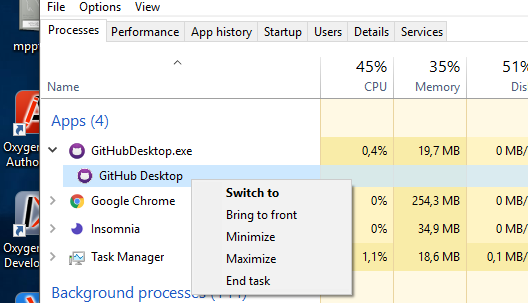
But for Github Desktop this seems disabled, maybe a solution is enabling this function so the there is a way to maximize the window?
edit: Just found out that you can maximize a program from the task manager, like this. Maybe that is a workaround for people experiencing the same.
 leonrenkema
on 30 Sep 2017
leonrenkema
on 30 Sep 2017
Hi
I am experiencing the same issue. I would like to add that using the keyboard shortcuts WIN+Left, WIN+Right, WIN+Up or Win+Down was not working when the program was on the disconnected monitor.
I also was able to get the program to the correct screen with the help of the task manager and then dragging the title bar when the window was maximized
 ostensene
on 18 Oct 2017
ostensene
on 18 Oct 2017
I've also been able to reproduce the issue on my Windows 10 environment. The only solution was to delete the file %APPDATA%\GitHub Desktop\window-state.json, per the discussion over here: https://github.com/desktop/desktop/issues/2893
 joshlangner
on 10 Nov 2017
joshlangner
on 10 Nov 2017
A bunch of extra details was provided in https://github.com/desktop/desktop/issues/3409
shiftkey
on 23 Nov 2017
I'm also experiencing this issue with multiple monitors (3). Work around I'm using is to run it Maximized.
 rcmaehl
on 24 Nov 2017
rcmaehl
on 24 Nov 2017
@leonrenkema thx my friend. You solved my problem
 ismailkilic
on 2 Dec 2017
ismailkilic
on 2 Dec 2017
Just an FYI: since Fall Creators Update, there are no options in Task Manager for window management, therefore workaround mentioned by @ostensene does not work.
You have to delete the %APPDATA%\GitHub Desktop\window-state.json, as @joshlangner mentioned.

 balcsida
on 5 Jan 2018
balcsida
on 5 Jan 2018
@balcsida Say it isn't so! D:
rcmaehl
on 5 Jan 2018
Can confirm that the window-state.json delete fix works.
What's possibly interesting is it was triggered for me by a client update. It was working fine, then I clicked the "restart now" to run an update, and then the window wouldn't come back.
And a peek at the JSON data does confirm it'd placed the X/Y at some absurd coordinates:
{
    "width": 3840,
    "height": 2080,
    "x": 30847,
    "y": 32767,
    "isMaximized": false,
    "isFullScreen": false,
    "displayBounds": {
        "x": 1920,
        "y": 0,
        "width": 2560,
        "height": 1440
    }
}
 jarcane
on 23 Jan 2018
jarcane
on 23 Jan 2018
I had the same issue, nothing works (the Win+Up/Down/Left/Right). Shift right clicking doesn't work either.
My coordinates were x: -1000, y: 0 (which is way off).
Deleting the .json file worked for me.
 lifewcody
on 23 Jan 2018
lifewcody
on 23 Jan 2018
Recently I experienced the same problem in Windows 10. Is there any way for the program to detect whether the second monitor is plugged in or not?
 yuhang-lin
on 25 Jan 2018
yuhang-lin
on 25 Jan 2018
I've been having this issue occasionally since the overhaul of GitHub Desktop. Using Windows 10. Deleting the windowstate file is the only thing that has worked. I've tried the normal Window management tricks like Alt + Tab , Win + Left, changing resolution; none of those did anything..
 JamesFaix
on 4 Feb 2018
JamesFaix
on 4 Feb 2018
Can we unmark this as "needs-reproduction"? It's clearly reproduceable.
joshlangner
on 20 Feb 2018
@joshlangner needs-reproduction is a label we use internally. Being reproducible for us means that _we_ are able to reproduce the issue (we are working to improve our label names 😅). I think everyone on our team is on a single monitor or laptop, which is why we've gone so long without reproducing.
iAmWillShepherd
on 23 Feb 2018
I experience the same issues as above - had to resort to deleting the .json file under APP_DATA to fix.
Latest Windows 10 build and update
 mswezey23
on 23 Feb 2018
mswezey23
on 23 Feb 2018
20 lut 2018 23:07 "joshlangner" notifications@github.com napisał(a):
Can we unmark this as "needs-reproduction"? It's clearly reproduceable.
—
You are receiving this because you are subscribed to this thread.
Reply to this email directly, view it on GitHub
https://github.com/desktop/desktop/issues/2107#issuecomment-367137324,
or mute the thread
https://github.com/notifications/unsubscribe-auth/AiJTCNZTlpgLHdeMXW7L0QmLoIkB1E2bks5tW0IxgaJpZM4OESGs
.
 ja1977ja
on 23 Feb 2018
ja1977ja
on 23 Feb 2018
Hello,
I experienced this problem today.
Workaround was editing %APPDATA%\GitHub Desktop\window-state.json while the app was closed. That file seems to be written to every time the app closes.
I'm running 3 monitors with a nvidia card. Monitors are left to right at the same level. Y value was set to a negative integer in the window-state.json file.
I'll note that my nvidia card never really played well with any drivers I try and throw at it. Sometimes, infrequently, settings get reset, display order is changed, main display is changed, etc. In ubuntu, I've got some options in nvidia-settings that aren't available in windows, namely the viewport paramater. While I don't see this option to adjust the viewport in windows, nvidia probably uses something like it internally. I think the absolute location of the viewport (its equiv in windows) may be initialized somewhat randomly on my setup due to the driver issues. ie the left screen is always adjacent, to the left of and equal height as the middle screen, but on each boot the left screen's origin could be rendered at (0,0), (0,-1080) or (0,+1080).
Its just a hunch from behavior I've observed, but I hope it helps.
 mmmaxwwwell
on 25 Feb 2018
mmmaxwwwell
on 25 Feb 2018
This is a known issue, please read steps to fix in our known-issues doc
iAmWillShepherd
on 27 Feb 2018
As I talked about in https://github.com/desktop/desktop/pull/3943#issuecomment-365212714 I'm not a fan of this workaround, and I'd like to handle this better in the app. Desktop is just blindly restoring the co-ordinates of the window without considering that the screen configuration might have changed to drop an existing screen.
We have access to the screen API in Electron to detect the configuration of the users, and we should be able to workaround this without manual intervention by the user:
- detect if the stored co-ordinates can be associated with a connected screen
- if so, it should restore as-is (the current behaviour)
- if not, restore the app to the center of the primary display
- ensure
electron-window-stateis refreshed with the new position
I have ideas on implementing this (it'll be on the critical path of launching, so I don't want this to be too complex) and I have access to an external monitor currently to test this without needing VMs.
shiftkey
on 27 Feb 2018
I agree with @shiftkey. A workaround, especially as one that requires a deletion of a file, should not be acceptable to close this issue out.
To put it bluntly, that's just lazy to not update the program to detect the user's setup and current configuration of monitors.
mswezey23
on 27 Feb 2018
Pulling this into 1.1.x to see if we can do better at restoring the window _somewhere_.
shiftkey
on 28 Feb 2018
Same Issue on Windows 10.0.16299 with Github Desktop 1.1.1. A suggestion, maybe try using "connected" displays as "DisplayLink" drivers are considered connected, but not "active." Possibly create If/else with "active displays". "Primary display" does not work either as these users (including me) sometimes mark main display as one that is now disconnected.
 magicmaster85
on 28 Mar 2018
magicmaster85
on 28 Mar 2018
One option rather than delete the %APPDATA%\GitHub Desktop\window-state.json file is to close the program and then edit edit it and change the x and y to 0. i.e.
from: {"width":960,"height":660,"x":4399,"y":150,...
to {"width":960,"height":660,"x":0,"y":0,...**
 awinner1
on 15 May 2018
awinner1
on 15 May 2018
Hey there everyone! I literally had this problem today, and found a super short fix: On the monitor, you are working on, bring any window into the half-pane view. Now, when a series of windows shows up, select GitHub Desktop, and then drag the git hub window into the front view. Attached a small gif to help visualize the process:

Hope this helps everyone out!
 tejasVR
on 19 May 2018
tejasVR
on 19 May 2018
@tejasVR Windows 10 only (for sure) AND only certain builds (if I remember correctly). Looks like anyone not on Windows 10 will need to upgrade 😉
rcmaehl
on 21 May 2018
Hi,
I don't seem to have the problem when opening GitHub Desktop from a desktop shortcut, which I set to open to maximized window.
Hope this helps.
 JonneKonink
on 24 May 2018
JonneKonink
on 24 May 2018
@JonneKonink a previous user stated that was a workaround (hence you don't see the issue we're having).
magicmaster85
on 24 May 2018
@magicmaster85 Sorry, I forgot to mention that I did have the same issue, so this is indeed a workaround. Opening from the Win start menu doesn't work, but from the desktop does.
JonneKonink
on 25 May 2018
You can retrieve lost windows by doing the following:
- Activate the app by clicking the Taskbar icon
- Hit Alt+Space which will show the Window menu
- Hit M, or click the Move menu item
- Tap one of your cursor keys which will lock the window to your mouse cursor
- You can them move you mouse cursor and the window will come along with it
- Drop it where you please, with a click of the mouse
I need this for a variety of apps recently where their windows like to vanish outside of the bounds of my displays - Slack desktop app, Chrome dev tools windows...
 qisope
on 6 Jun 2018
qisope
on 6 Jun 2018
Can confirm that @tejasVR's workaround does work on the current Win10 build; but it didn't work for me when I posted earlier, so it's possible something changed.
As an added tip, you can do the tiling trick faster by just hitting Win+left or right arrow.
jarcane
on 6 Jun 2018
In Windows 7 Pro the following worked for me:
- Click taskbar icon (i.e. window is open and selected off-screen)
- Alt+Space
- Maximise
 jdclarke5
on 17 Jun 2018
jdclarke5
on 17 Jun 2018
@hawley83 please don't spam this channel.
magicmaster85
on 17 Jun 2018
Has any progress been made on why you can't shift-right click?
This is a feature that all windows are supposed to implement properly, GitHub desktop is the only app I use that has this issue.
For something this simple I shouldn't have to go crawling over the internet to does something so common and widespread knowledge in IT.
I had this same issue and it drove me nuts for a little while.
 ZaxLofful
on 8 Aug 2018
ZaxLofful
on 8 Aug 2018
I reproduced this after making my second screen the primary screen and rebooting. On opening Github Desktop I get the transparent, unfocusable window problem. The window-state.json had a reasonable set of geometry and window coordinates, it had been on the same screen when last closed.
Deleting the json file fixed it for the next and subsequent opens.
From that it sounds like its any change to the order or type of screens attached and that deleting the file has the side effect of getting all display properties again.
 bpluly
on 9 Aug 2018
bpluly
on 9 Aug 2018
Any chance this issue could get fixed? Been open for more than a year, almost two years. Extremely annoying.
 jmurdick
on 14 Sep 2018
jmurdick
on 14 Sep 2018
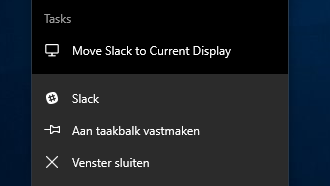
Slack (also electron?) has recently introduced a button "move to current display", maybe borrow that solution?
leonrenkema
on 15 Sep 2018
You can retrieve lost windows by doing the following:
- Activate the app by clicking the Taskbar icon
- Hit Alt+Space which will show the Window menu
- Hit M, or click the Move menu item
- Tap one of your cursor keys which will lock the window to your mouse cursor
- You can them move you mouse cursor and the window will come along with it
- Drop it where you please, with a click of the mouse
I need this for a variety of apps recently where their windows like to vanish outside of the bounds of my displays - Slack desktop app, Chrome dev tools windows...
Thanks, dude it really worked for me
 reza-faghihi
on 4 Oct 2018
reza-faghihi
on 4 Oct 2018
My guess is that this is an issue with https://github.com/mawie81/electron-window-state.
 rschuetzler
on 15 Oct 2018
rschuetzler
on 15 Oct 2018
use this fix: it's by far the fastest for windows 10.
https://github.com/desktop/desktop/issues/2107#issuecomment-390414700
 eliasvanderlinden
on 16 Oct 2018
eliasvanderlinden
on 16 Oct 2018
I've also been able to reproduce the issue on my Windows 10 environment. The only solution was to delete the file
%APPDATA%\GitHub Desktop\window-state.json, per the discussion over here: #2893
above was the only fix that worked for me! Thank you!
 EPDISI
on 5 Nov 2018
EPDISI
on 5 Nov 2018
It's an old issue but maybe it can be useful to somebody, if you check the logs it's some authentication fail (at least in my case)
to open it you can go to AppData/Roaming/github Desktop/
Rename the Cache folder to Old_Cache or just remove it this will bring you back the dekstop
This won't solve the authenticaton, to solve this change your ssh link to the https link
 gurkanakcakaya
on 26 Dec 2018
gurkanakcakaya
on 26 Dec 2018
I'm using GitHub Desktop with two displays for a long time now, but I run today for the first time into this issue. https://github.com/desktop/desktop/issues/2107#issuecomment-343320044 fixed it for me
 Croydon
on 22 Jan 2019
Croydon
on 22 Jan 2019
Here is the Fix
https://github.com/desktop/desktop/issues/3342#issue-274469274
 irfanrulz
on 6 Feb 2019
irfanrulz
on 6 Feb 2019
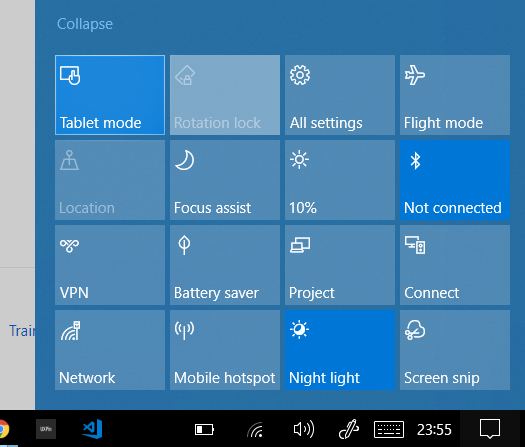
there is a workaround by switching to tablet mode
 alexdobsom
on 22 Mar 2019
alexdobsom
on 22 Mar 2019
Had this issue on my laptop(no secondary screen) with a detachable screen. Deleting %APPDATA%\Roaming\GitHubDesktop\window-state.json fixed it.
 vaibhavhrt
on 23 Apr 2019
vaibhavhrt
on 23 Apr 2019
Almost 2 years and still hasn't been properly fixed 😏
mswezey23
on 24 Apr 2019
I'm having this problem on OS X Catalina. Slack is open, can't find it anywhere! Can't restart it!
 goodlux
on 19 Nov 2019
goodlux
on 19 Nov 2019
@goodlux Please fill a new issue and provide more details.
 tierninho
on 19 Nov 2019
tierninho
on 19 Nov 2019
I'm having this problem on OS X Catalina. Slack is open, can't find it anywhere! Can't restart it!
The topic in this thread is for GitHub Desktop, not Slack. :)
mswezey23
on 19 Nov 2019
I had the same issue .. jumped up and down with no good results . . until i tried some thing on task manager,
- right click on the application/screen not showing,
- choose maximize.
 MaslinoJ
on 24 Jan 2020
MaslinoJ
on 24 Jan 2020
You can retrieve lost windows by doing the following:
- Activate the app by clicking the Taskbar icon
- Hit Alt+Space which will show the Window menu
- Hit M, or click the Move menu item
- Tap one of your cursor keys which will lock the window to your mouse cursor
- You can them move you mouse cursor and the window will come along with it
- Drop it where you please, with a click of the mouse
I need this for a variety of apps recently where their windows like to vanish outside of the bounds of my displays - Slack desktop app, Chrome dev tools windows...
Thanks, dude it really worked for me
Worked smoothly! Thx!
 Jonas-Carvalho
on 27 Jan 2020
Jonas-Carvalho
on 27 Jan 2020
Related issues
 SilverFoxA
·
66Comments
SilverFoxA
·
66Comments
 billygriffin
·
65Comments
billygriffin
·
65Comments
 NickCraver
·
76Comments
NickCraver
·
76Comments
 lameyer
·
77Comments
lameyer
·
77Comments
 Be1con
·
74Comments
Be1con
·
74Comments
Most helpful comment
Hey there everyone! I literally had this problem today, and found a super short fix: On the monitor, you are working on, bring any window into the half-pane view. Now, when a series of windows shows up, select GitHub Desktop, and then drag the git hub window into the front view. Attached a small gif to help visualize the process:
Hope this helps everyone out!