Desktop: After restarting my client following a desktop client update prompt, I can no longer Fetch Origin
Description

Version
- GitHub Desktop:
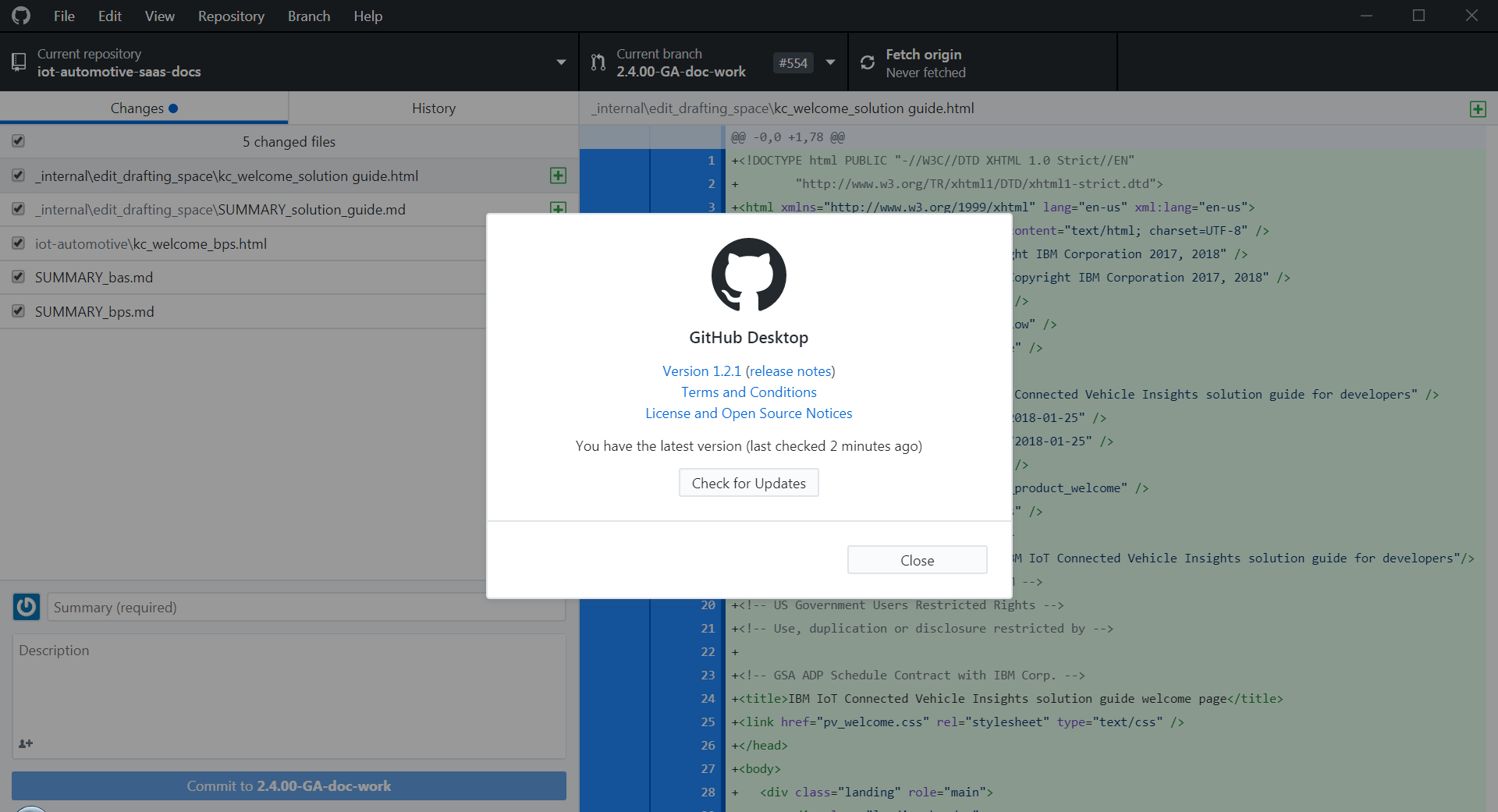
- Operating system:
Windows 7 professional.
Steps to Reproduce
- I restarted the GH desktop client after noticing a prompt that there was a new update.
- I made a change to content in a repo.
- Now when I click fetch Origin I get the error above. I have not touched my properties, my password or anything.
Expected Behavior
Fetch original to work as normal.
Actual Behavior
Additional Information
Logs
 michellepurcell
All 50 comments
@michellepurcell thanks for the report. We published an update a couple of hours ago to address a Git security issue, and I'd received a report about a potential SChannel issue, but I couldn't reproduce it myself.
Could you do me a huge favour and open a shell and run this command? This will help with troubleshooting and reporting this upstream:
$ git config --show-origin -l
 shiftkey
on 30 May 2018
shiftkey
on 30 May 2018
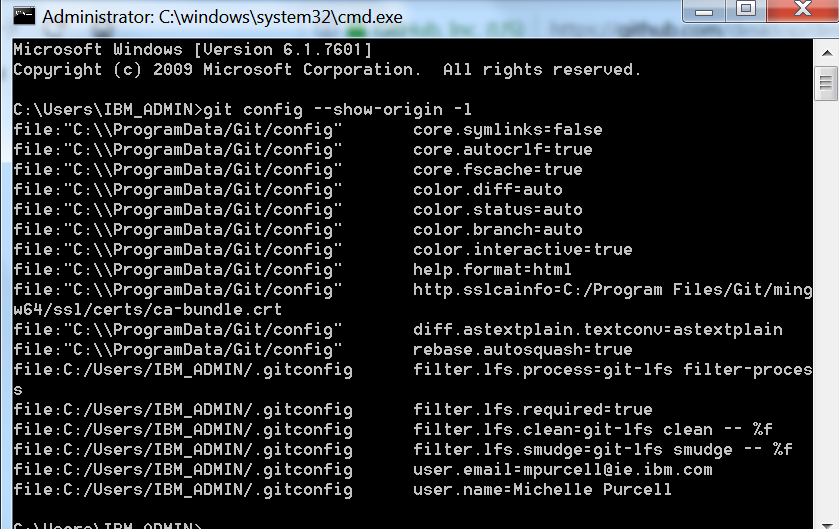
michellepurcell
on 30 May 2018
@dscho I'm going to put together a test release now to downgrade to 2.17.0 and confirm this is specific to the latest build - is there any diagnostics or tracing here you'd like to gather to help get to the root cause of this?
shiftkey
on 30 May 2018
@michellepurcell there might be a way to workaround this issue while we work with the upstream project.
Could you try running these command in a shell in your problem Git repository and attaching the output?
$ git --version
$ git -c http.sslBackend=schannel fetch
$ git -c http.sslBackend=openssl fetch
If the second command works, you _should_ be able to switch Desktop over to use OpenSSL by running this command:
$ git config --global http.sslBackend openssl
@fschutt please be patient while we investigate the issue.
You too could try switching over to OpenSSL to see if that addresses the issue:
$ git config --global http.sslBackend openssl
@shiftkey yep, that seems to fix it, thanks.
 fschutt
on 30 May 2018
fschutt
on 30 May 2018
@shiftkey - Thanks Brendan. I get errors doing that:

michellepurcell
on 30 May 2018
hey @michellepurcell, you'll need to CD into the directory of the repository you were having problems with first. As a shortcut you can click on the Repository menu in GitHub Desktop and then Open in Command Line and that should open a command line with the correct directory preselected.
 niik
on 30 May 2018
niik
on 30 May 2018
@Reahreic is also experiencing this (see #4821) and they're on Windows 10 so this problem is not constrained to a particular version of Windows.
niik
on 30 May 2018
Just a quick update here. We're still investigating the best way to address this but preliminary findings indicate that this is a side-effect of https://github.com/curl/curl/commit/899630021153b2a26a43008cccc6620b6c3f9bbf (https://github.com/curl/curl/pull/1325) wherein support is added to curl's schannel interface (Win32 SSL) that allows it to parse a "traditional" certificate bundle file.
This allows curl to operate the same way on Windows as it does on macOS and Linux while leveraging the native Windows APIs for SSL/TLS support.
Prior to this update the only way you could use a CA bundle file was to switch back to the openssl backend.
Unfortunately this means that as long as either the Git config variable http.sslCAInfo or the environment variable GIT_SSL_CAINFO is set (even if set to an empty string) curl will bypass the normal Windows certificate chain validation and solely use the information in the ca bundle file.
GitHub Desktop ships with a stock CA bundle file in order for the openssl backend to work properly but that also means that the schannel backend will always use the bundle file and never look at the Certificate Store.
While we search for an optimal solution that will work for both backends I believe I have workaround for any users currently stuck and unable to push/pull/fetch from their enterprise instances.
- Open a command line prompt (click on the Repository menu in GitHub Desktop and then Open in Command Line).
- Copy and paste the following commands (and hit Enter after pasting to run them)
"%LocalAppData%\GitHubDesktop\app-1.2.1\resources\app\git\cmd\git" config --unset --system http.sslCAInfo"%LocalAppData%\GitHubDesktop\app-1.2.1\resources\app\git\cmd\git" config --unset --global http.sslCAInfo"%LocalAppData%\GitHubDesktop\app-1.2.1\resources\app\git\cmd\git" config --global http.sslBackend schannel
This workaround will be reset the next time we ship an update but hopefully by then we will have solved it properly. Note that if you're using a beta version of GitHub Desktop you'll need to substitute the app-1.2.1 part in the paths with your version i.e. app-1.2.1-beta1.
niik
on 30 May 2018
@niik The workaround you posted is allowing me to sync and push again. (At lease for now) Thank you.
 Reahreic
on 30 May 2018
Reahreic
on 30 May 2018
Hi @michellepurcell @fschutt, we just released 1.2.2 to address your and others' issues without requiring a workaround. Do you mind confirming that 1.2.2 addresses your issue?
 nerdneha
on 31 May 2018
nerdneha
on 31 May 2018
@nerdneha
Just did a fresh install of 1.2.2 and seeing:
fatal: unable to access 'https://github.com/XXX/': schannel: failed to open CA file 'C:/Users/Andrew/AppData/Local/GitHubDesktop/app-1.2.2/resources/app/git/mingw64/bin/curl-ca-bundle.crt': No such file or directory
referenced curl-ca-bundle.crt does not exist at the path specified on disk,
[Edit] Manually adding the curl-ca-bundle.crt at this path does indeed fix the issue, but it was not installed/distributed with the 1.2.2 release.
 akrock
on 31 May 2018
akrock
on 31 May 2018
@akrock thanks for the report. Could you open a shell, run this command and attach the output?
$ git config -l --show-origin
I'd like to confirm whether or not you still have a http.sslCAInfo entry defined at the global or system level that is unnecessary when using SChannel.
shiftkey
on 31 May 2018
@shiftkey & @nerdneha
1.2.2 does not fix the problem. Same error occurs.
Thanks
michellepurcell
on 31 May 2018
@niik - Thanks for your update and workaround. I tried this also but get the same error.
michellepurcell
on 31 May 2018
Manually adding the curl-ca-bundle.crt at this path does indeed fix the issue, but it was not installed/distributed with the 1.2.2 release.
@akrock this configuration file wasn't included by Desktop - it probably lived at C:\ProgramData\Git\config and was related to an old Git installation.
shiftkey
on 31 May 2018
@michellepurcell could you share a fresh log file? I'd like to confirm the error you're now seeing.
shiftkey
on 31 May 2018
michellepurcell
on 31 May 2018
Configure it under the corresponding project
 qq15870939565
on 31 May 2018
qq15870939565
on 31 May 2018
qq15870939565 - Thanks but can you please clarify the name and path of the config file that I need to manually edit?
michellepurcell
on 31 May 2018
@michellepurcell the file I'm interested in, and I think @qq15870939565 is too, should be located at C:\ProgramData\Git\config. What's in there currently?
shiftkey
on 31 May 2018
@shiftkey & @qq15870939565 - Here you go... Thanks!
[core]
symlinks = false
autocrlf = true
fscache = true
[color]
diff = auto
status = auto
branch = auto
interactive = true
[pack]
[help]
format = html
[http]
sslCAInfo = C:/Program Files/Git/mingw64/ssl/certs/ca-bundle.crt
[diff "astextplain"]
textconv = astextplain
[rebase]
autosquash = true
michellepurcell
on 31 May 2018
@michellepurcell this is the problem entry:
[http]
sslCAInfo = C:/Program Files/Git/mingw64/ssl/certs/ca-bundle.crt
If you delete those two lines, Desktop should be back to a happy place. I'm also curious if there's another tool which is adding these lines back in - are there any other tools you have installed that have Git integration?
shiftkey
on 31 May 2018
@shiftkey - Thank you Brendan. I am now back in business and working again!
michellepurcell
on 31 May 2018
@shiftkey - Git command line, npm, Atom, markdown cli? Other than that, I don't recall installing any other tools relating to Git.
michellepurcell
on 31 May 2018
@michellepurcell those all seem fine. Please report back if you see that value return and affecting Desktop again.
shiftkey
on 31 May 2018
@shiftkey - I am having the same issue with version 1.2.2.
I was able to fix my issue by editing the gitconfig and removing these lines:
[http]
sslBackend = schannel
 jpkessle
on 31 May 2018
jpkessle
on 31 May 2018
@jpkessle are you able to open a shell and run this command too?
$ git config -l --show-origin
I think that value is what Desktop is providing, and on the next update it'll be added back again. It would be nice to confirm the root cause of your issue is the same as the others.
shiftkey
on 31 May 2018
@shiftkey - Here is my output:
C:\>git config -l --show-origin
file:"C:\\ProgramData/Git/config" core.symlinks=false
file:"C:\\ProgramData/Git/config" core.autocrlf=true
file:"C:\\ProgramData/Git/config" core.fscache=true
file:"C:\\ProgramData/Git/config" color.diff=auto
file:"C:\\ProgramData/Git/config" color.status=auto
file:"C:\\ProgramData/Git/config" color.branch=auto
file:"C:\\ProgramData/Git/config" color.interactive=true
file:"C:\\ProgramData/Git/config" help.format=html
file:"C:\\ProgramData/Git/config" http.sslcainfo=C:/Program Files/Git/ming
w64/ssl/certs/ca-bundle.crt
file:"C:\\ProgramData/Git/config" diff.astextplain.textconv=astextplain
file:"C:\\ProgramData/Git/config" rebase.autosquash=true
file:"C:\\Program Files\\Git\\mingw64/etc/gitconfig" credential.helper=manage
r
file:C:/Users/username/.gitconfig filter.lfs.clean=git-lfs clean -- %f
file:C:/Users/username/.gitconfig filter.lfs.smudge=git-lfs smudge -- %f
file:C:/Users/username/.gitconfig filter.lfs.process=git-lfs filter-proces
s
file:C:/Users/username/.gitconfig filter.lfs.required=true
file:C:/Users/username/.gitconfig user.name=Josh Kessler
file:C:/Users/username/.gitconfig [email protected]
@jpkessle thanks for the details - this is the problem entry that you need to remove from C:\ProgramData\Git\config:
file:"C:\\ProgramData/Git/config" http.sslcainfo=C:/Program Files/Git/mingw64/ssl/certs/ca-bundle.crt
You should restore that schannel config value that GitHub Desktop expects by ensuring this entry exists at "%LocalAppData%\GitHubDesktopapp-1.2.2\resourcesapp\git\mingw64\etc\gitconfig":
[http]
sslBackend = schannel
@shiftkey Hi Brendan, I'm facing this issue while upgrading to 1.2.2 version. When I want to clone one repository, I encountered with this message;
Cloning into 'D:\PersonelProjects\app-android-new'...
fatal: unable to access 'https://github.com/repoName/repoName-app-android-new.git/': schannel: failed to open CA file 'D:/Users/salih.yalcin/AppData/Local/GitHubDesktop/app-1.2.2/resources/app/git/mingw64/bin/curl-ca-bundle.crt': No such file or directory
Here is my git $ git config -l --show-origin result
file:"C:\\ProgramData/Git/config" core.symlinks=false
file:"C:\\ProgramData/Git/config" core.autocrlf=true
file:"C:\\ProgramData/Git/config" core.fscache=true
file:"C:\\ProgramData/Git/config" color.diff=auto
file:"C:\\ProgramData/Git/config" color.status=auto
file:"C:\\ProgramData/Git/config" color.branch=auto
file:"C:\\ProgramData/Git/config" color.interactive=true
file:"C:\\ProgramData/Git/config" help.format=html
file:"C:\\ProgramData/Git/config" http.sslcainfo=/bin/curl-ca-bundle.crt
file:"C:\\ProgramData/Git/config" sendemail.smtpserver=/bin/msmtp.exe
file:"C:\\ProgramData/Git/config" diff.astextplain.textconv=astextplain
file:"C:\\ProgramData/Git/config" rebase.autosquash=true
file:C:/Program Files/Git/mingw64/etc/gitconfig sslbackend=openssl
file:C:/Program Files/Git/mingw64/etc/gitconfig diff.astextplain.textconv=astext plain
file:C:/Program Files/Git/mingw64/etc/gitconfig filter.lfs.clean=git-lfs clean - - %f
file:C:/Program Files/Git/mingw64/etc/gitconfig filter.lfs.smudge=git-lfs smudge -- %f
file:C:/Program Files/Git/mingw64/etc/gitconfig filter.lfs.process=git-lfs filte r-process
:...skipping...
file:"C:\\ProgramData/Git/config" core.symlinks=false
file:"C:\\ProgramData/Git/config" core.autocrlf=true
file:"C:\\ProgramData/Git/config" core.fscache=true
file:"C:\\ProgramData/Git/config" color.diff=auto
file:"C:\\ProgramData/Git/config" color.status=auto
file:"C:\\ProgramData/Git/config" color.branch=auto
file:"C:\\ProgramData/Git/config" color.interactive=true
file:"C:\\ProgramData/Git/config" help.format=html
file:"C:\\ProgramData/Git/config" http.sslcainfo=/bin/curl-ca-bundle.crt
file:"C:\\ProgramData/Git/config" sendemail.smtpserver=/bin/msmtp.exe
file:"C:\\ProgramData/Git/config" diff.astextplain.textconv=astextplain
file:"C:\\ProgramData/Git/config" rebase.autosquash=true
file:C:/Program Files/Git/mingw64/etc/gitconfig sslbackend=openssl
file:C:/Program Files/Git/mingw64/etc/gitconfig diff.astextplain.textconv=astextplain
file:C:/Program Files/Git/mingw64/etc/gitconfig filter.lfs.clean=git-lfs clean -- %f
file:C:/Program Files/Git/mingw64/etc/gitconfig filter.lfs.smudge=git-lfs smudge -- %f
file:C:/Program Files/Git/mingw64/etc/gitconfig filter.lfs.process=git-lfs filter-process
file:C:/Program Files/Git/mingw64/etc/gitconfig filter.lfs.required=true
file:C:/Program Files/Git/mingw64/etc/gitconfig credential.helper=manager
file:D:/Users/salih.yalcin/.gitconfig core.autocrlf=true
file:D:/Users/salih.yalcin/.gitconfig core.excludesfile=C:\Users\salih.yalcin\Documents\gitignore_global.txt
file:D:/Users/salih.yalcin/.gitconfig filter.lfs.clean=git-lfs clean -- %f
file:D:/Users/salih.yalcin/.gitconfig filter.lfs.smudge=git-lfs smudge -- %f
file:D:/Users/salih.yalcin/.gitconfig filter.lfs.process=git-lfs filter-process
file:D:/Users/salih.yalcin/.gitconfig filter.lfs.required=true
~
~
~
~
~
~
~
~
~
(END)
 salihyalcin
on 1 Jun 2018
salihyalcin
on 1 Jun 2018
@salihyalcin thanks for the details - this is the problem entry that you need to remove from C:\ProgramData\Git\config:
file:"C:\\ProgramData/Git/config" http.sslcainfo=C:/Program Files/Git/mingw64/ssl/certs/ca-bundle.crt
Thanks @shiftkey, here is my config file that you mentioned it. I also removed http.sscainfo line but problem not solved.
[core]
symlinks = false
autocrlf = true
fscache = true
[color]
diff = auto
status = auto
branch = auto
interactive = true
[pack]
[help]
format = html
[http]
    sslCAinfo = /bin/curl-ca-bundle.crt
[sendemail]
smtpserver = /bin/msmtp.exe
[diff "astextplain"]
textconv = astextplain
[rebase]
autosquash = true
Okey I just remove lines below and everything works like a hero. 👍 Thanks
[http]
sslCAinfo = /bin/curl-ca-bundle.crt
salihyalcin
on 1 Jun 2018
This "fatal error" still happening ...
I just installed new version 64 bits, and fatal error shows up :-1:
 SidVal
on 10 Jun 2018
SidVal
on 10 Jun 2018
@SidVal have you had a chance to look at the output of this command on your machine?
$ git config -l --show-origin
It's hard to say more without knowing what error you're seeing is and what your current configuration is, but I think it's related to this configuration value being present:
file:"C:\ProgramData/Git/config" http.sslcainfo=/bin/curl-ca-bundle.crt
And removing these lines from C:\ProgramData\Git\config should do the trick:
[http]
sslCAinfo = /bin/curl-ca-bundle.crt
fatal: unable to access 'https://github.com/lincolnvirus/lincolnvirus.github.io.git/': schannel: failed to open CA file 'C:/Program Files/Git/mingw64/ssl/certs/ca-bundle.crt': No such process
данная проблема не решается. что происходит?
 chutkoy
on 10 Jun 2018
chutkoy
on 10 Jun 2018
Found a simple solution to this problem: disable the antivirus. On my computer all the work spoils "Kaspersky". I will delete it.
chutkoy
on 11 Jun 2018
Yes @shiftkey I removed the line that @salihyalcin said here, I just said that the error still showing up. I don't understand why this issue is closed 😐 (or there is some open issue about this problem?)
SidVal
on 11 Jun 2018
@SidVal if you don't believe this has been resolved please open a fresh issue and provide details about your setup, details about the errors you are seeing, and the diagnostic information I asked for above.
shiftkey
on 12 Jun 2018
I removed the line @shiftkey has pointed, and it worked
[http]
sslCAInfo = C:/Program Files/Git/mingw64/ssl/certs/ca-bundle.crt
 ygor-lima
on 12 Jun 2018
ygor-lima
on 12 Jun 2018
@shiftkey im experience this same issue but C:/ProgramData/Git/config doesnt have the [http] line everyone is saying they removed for it to work
 alvaromon
on 12 Jun 2018
alvaromon
on 12 Jun 2018
ok
 Ribhasingh
on 12 Jun 2018
Ribhasingh
on 12 Jun 2018
ok
Ribhasingh
on 12 Jun 2018
add account
Ribhasingh
on 12 Jun 2018
@alvaromon please open a fresh issue and provide details about your setup, details about the errors you are seeing, and the diagnostic information I asked for above - it might not be the exact same issue.
shiftkey
on 13 Jun 2018
Just posting to say I had the same issue after updating GitHub Desktop
github fatal: unable to access schannel: failed to open CA file No such file or directory
Deleting these lines in C:\ProgramData\Git\config as instructed seems to have solved it
[http]
    sslCAinfo = /bin/curl-ca-bundle.crt
 subsoap
on 14 Jun 2018
subsoap
on 14 Jun 2018
On my Windows 10 Surface book, I had to remove the following line from the config file...
sslCAInfo = C:/Program Files/Git/mingw64/ssl/certs/ca-bundle.crt
 dhimant1
on 28 Jun 2018
dhimant1
on 28 Jun 2018
I had the same error today when I download GHDesktop
there is not file or folder C:/Program Files/Git/mingw64/ssl/certs/ca-bundle.crt
So I did what @shiftkey said, I delete those two lines.
[http]
sslCAInfo = C:/Program Files/Git/mingw64/ssl/certs/ca-bundle.crt
 BelarminoVicenzo
on 29 Jun 2018
BelarminoVicenzo
on 29 Jun 2018
Related issues
 Raul6469
·
57Comments
Raul6469
·
57Comments
 TCROC
·
55Comments
TCROC
·
55Comments
 renegadedata
·
68Comments
shiftkey
·
60Comments
renegadedata
·
68Comments
shiftkey
·
60Comments
 cheshire137
·
52Comments
cheshire137
·
52Comments
Most helpful comment
Okey I just remove lines below and everything works like a hero. 👍 Thanks
[http]
   sslCAinfo = /bin/curl-ca-bundle.crt