Desktop: LFS Merge Conflict Merges Pointers
Description
When merging into a branch while using Git LFS, it attempts to merge the LFS pointers together. We then have to manually change the files by removing the pointer we don't want. I would have expected to be prompted with "Take Incoming File" or "Keep Current File" for our LFS files.
Version
- GitHub Desktop: 1.6.5
- Operating system: Microsoft Windows [Version 10.0.17763.379]
Steps to Reproduce
- Create a merge conflict between two LFS files in two different branches.
- Attempt to merge one branch into the other branch with the merge conflict, and you will see that the conflict was "automatically resolved" when all it did was merge the pointers together.
Expected Behavior
Be prompted with "Take Incoming File" or "Keep Current File" for LFS files.
Actual Behavior
The LFS pointers are merged together into one file and breaks the LFS pointer.
Additional Information
Logs
 TCROC
TCROC
All 55 comments
@TCROC thanks for the feedback! I think it'd be great to put together a sample project of this so we can verify the behaviour ourselves and confirm the fix.
 shiftkey
on 26 Mar 2019
shiftkey
on 26 Mar 2019
@shiftkey Hey thanks for getting back with me :) I created a test repo here. All you have to do is clone the repo in GitHub Desktop. Merge the branch 'master' into 'DevBranch2' and commit the merge. Then open 'LFSTrackedFile.asset' in a text editor (I tested it in Notepad, Notepad++, and VS Code). The results should look like this:
version https://git-lfs.github.com/spec/v1
<<<<<<< HEAD
oid sha256:6b11f7689252ef9a2ae45a0949db32457b0404ffd27fbe399685da21efe06c46
size 51
=======
oid sha256:88169783c65ba3ceeff49a02a88e37c08b10d82b05368fe16792ede6d68db380
size 62
>>>>>>> master
I realize all we have to do is pick the merge ourselves in a merge tool / text editor and is plenty easy for us developers to do, but this is not intuitive for our artists (we are a game dev team). We simply want to be able to do an "Accept Incoming Change" or "Accept Current Change" from GitHub Desktop like we currently have to do in VS Code.
Here are some example pics of what we see:
Before comitting merge:

What we expect to see before committing merge. Pic was taken with a normal merge conflict (not LFS).

The file after merging:

The during merge screen would be nice if there were "Accept Incoming Change" or "Keep My Change" buttons. This would be much more intuitive for our artists. However, we don't even get the option as seen in the expected image. Currently our artists have to open a command prompt and enter git mergetool and take the merges by hand.
Again thanks for looking into this for us :)
TCROC
on 27 Mar 2019
@TCROC thanks so much for putting together a repro for it. I'm going to try it out and see if I can propose a solution for this (we have detecting in place for binary files but nothing LFS-specific).
shiftkey
on 27 Mar 2019
Other priorities have jumped up which I need to tackle first before I can investigate this.
Unassigning myself in the meantime to show it's available for someone else to try and reproduce.
shiftkey
on 27 Mar 2019
Hi @TCROC and thanks for the excellent reproduction example! I reproduced this on my machine and am going to start looking into a fix. I'll post updates here!
 outofambit
on 27 Mar 2019
outofambit
on 27 Mar 2019
Hi @TCROC, just wanted to echo the others' thanks for the excellent issue and description of how it's falling down for y'all. We're currently working on several features that we're hoping to ship toward the end of this month and unfortunately aren't able to prioritize this until after that work is complete. However, we totally agree that it's confusing and it's a priority for us to fix when that work is complete. Just wanted to let you know and set expectations that it wouldn't be immediately worked on, as much as we'd love to do so.
 billygriffin
on 3 Apr 2019
billygriffin
on 3 Apr 2019
@billygriffin Thanks for the update! :) I look forward to seeing how this turns out when time is found to work on it :)
TCROC
on 4 Apr 2019
@billygriffin @shiftkey @outofambit Hey. Just wanted to check in and see what the status is on this issue.
TCROC
on 13 Jul 2019
Hey just checking in to see what the status is on this
TCROC
on 30 Jul 2019
Hi @TCROC, thanks for the gentle nudges, and sorry for the delay. We've got a couple folks out right now, so we haven't gotten to this yet. It'll be prioritized alongside the other priority 2 bugs, so I don't expect that it'll happen in the next couple weeks but as I mentioned before, we agree that it should be fixed. If you want to dig into what might be causing it to enable us to knock it out more quickly when we are able to get to it, you're welcome to do so, but certainly no obligation. Thanks again!
billygriffin
on 30 Jul 2019
@billygriffin Thanks for the response :) . I'll come back to check in the next couple of weeks then :)
TCROC
on 31 Jul 2019
I got the same issue on LFS conflict. I found GitHub Desktop has resolution on text file conflict and binary file(non-lfs) conflict, but has no resolution for LFS conflict, hope this issue can be resolved soon.
 TerryChan
on 31 Jul 2019
TerryChan
on 31 Jul 2019
I come up with a solution for this issue in this comment https://github.com/desktop/desktop/issues/8059#issuecomment-517353605
Could you give some comments on this solution?
TerryChan
on 1 Aug 2019
@TerryChan Yes that is what we are looking for in regards to our LFS merge conflicts via a GUI. A "Choose Mine" or "Choose Theirs" solution. A "Choose All Mine" or "Choose All Theirs" option would also be helpful to just act on all of the merge conflicts. Normally we do good about not having that many merge conflicts to worry about, but every once and a while when upgrading to a newer version of our game engine Unity, things don't go as smoothly and we need that "Choose All Mine" or "Choose all Their's" option. If anyone gets the chance to implement these features let me know and I'd love to try them out / provide feedback.
In regards to the actual git commands being invoked I'm not sure. Based on my understanding of git LFS, they look like they should work, but git commands are not my expertise. I will let someone else verify those.
I imagine the challenge probably falls more in line with determining if the file is in fact an LFS file and not just a txt file, but again I'll let the experts provide more light on the situation / what the challenges and potential solutions are in implementing this feature.
TCROC
on 1 Aug 2019
@TerryChan I believe that change will help with this issue, but I don't think its the complete solution. (we will probably need to also improve desktop's logic for detecting conflicts in LFS files, too)
outofambit
on 1 Aug 2019
@outofambit yes, you are right, we still need to implement LFS conflict detection
I found when LFS conflict, the conflict file content will be a conflicted pointer file which contains conflict markers, no matter it's a bianry LFS or text LFS file.
And, the output of git diff --numstat MERGE_HEAD command will be:

It will detect 2 conflict markers (the output is similar to the binary conflcit, but not exact the same, that's why the LFS conflict detection failed in current GitHub Desktop). And the git diff --check command will output none, which means it will not treat it as a text conflict - even for text LFS file.
So for the detection, maybe we can use regex /2\t2\t(?:\0.+\0)?([^\0]*)/gi for the first check, and then check the files after the first check are not in the output of git diff --check comand. Maybe you have better solution to detect LFS conflict.
TerryChan
on 2 Aug 2019
If I'm not mistaken, there's a more fundamental, analogous issue with git rebase. Suppose you're working on a stack of commits where commits A and B both touch the text LFS file foo. Editing A in an interactive rebase results in a conflict at B when you run git rebase --continue, even if git would normally be able to resolve the conflict. Further, there's no easy way to resolve the rebase conflict; you just get hashes:
~/repo (branch|REBASE-i 2/2)$ git diff HEAD -- foo
diff --git a/foo b/foo
index 40b929909..ee924354a 100644
--- a/foo
+++ b/foo
@@ -1,3 +1,3 @@
 version https://git-lfs.github.com/spec/v1
-oid sha256:b6b18c7e35b79624d65141dde71119f8f1f9742d28b474d4fef655f6c50900da
-size 3843822
+oid sha256:630e6288b57b7a3f3c1b98ee0c8add8604058627fe5d80ff279457b15eee6fac
+size 275
Trying to use git difftool gives a similar, uneditable result. When I encountered this issue, I had to resort to git reflog to figure out the git hash of the pre-rebase version of B, manually copy changes from A to B, and save the manually merged B version.
 theNth
on 16 Aug 2019
theNth
on 16 Aug 2019
Hey @theNth Thanks for the response! I'm slightly confused though. We aren't trying to perform a rebase. We are trying to resolve LFS merge conflicts when merging one branch into another branch. I don't consider myself an expert in git by any means (which is partially why I enjoy GUIs like GitHub Desktop). However, I don't see where rebasing comes into play here. If you could expand further that would be great! Thanks :) .
TCROC
on 16 Aug 2019
We are trying to resolve LFS merge conflicts when merging one branch into another branch.
Indeed. However, so far you have been trying to select the content of branch A or B. I'm talking about cases where you want to merge changes A + B; simply selecting one of the branches is not sufficient. I suppose this comes up much more frequently when maintaining a linear history or rewriting history. Somebody makes a change to foo and pushes it to master. In the meantime, you also change foo and need to rebase on top of master in order to preserve linear history. This results in two version of foo that you need to combine together in some context specific way.
Looking at this some more, the problem appears to reside with git LFS itself - not GitHub Desktop. Apologies for posting on the wrong project.
Also, sorry for the delay in getting back to you.
theNth
on 19 Aug 2019
@theNth No need to apologize! Any discussion is welcomed and encouraged! :) But ya I would agree that is more of a problem with Git LFS than GitHub Desktop itself. For this thread, simply selecting one or the other will suffice :)
TCROC
on 21 Aug 2019
@theNth I’d be interested in tracking the core bug underlying this problem as I’m dealing with a very similar one at my corporate git org. Did you file an issue somewhere to track that with their team by chance?
 pkane
on 24 Sep 2019
pkane
on 24 Sep 2019
@pkane I'm not exactly sure what you mean by that. I have filed this issue which is open and being tracked. Is there somewhere else I'm supposed to open issues as well?
TCROC
on 26 Sep 2019
Hello :) Just checking in to see if there are any updates on this issue.
TCROC
on 7 Nov 2019
Hey @billygriffin Just wondering if there are any updates on this issue :)
TCROC
on 10 Nov 2019
Would also like an update, we are starting to utilize GitHub to manage our Silk scripts via LFS and having the same issue. This is causing issues within our team.
 PseudoNinja
on 22 Nov 2019
PseudoNinja
on 22 Nov 2019
Just another gentle nudge to the thread :)
TCROC
on 1 Dec 2019
I have abandoned LFS and excluded large files from source control to prevent this issue from impeding our progress.
PseudoNinja
on 5 Dec 2019
@billygriffin @shiftkey @outofambit Just wondering if there are any new updates on this :)
TCROC
on 11 Jan 2020
 wycfutures
on 13 Jan 2020
wycfutures
on 13 Jan 2020
Yes we are aware of that. That is not the bug though. Read the original report at the top. Let me know if you have any questions on it. (No disrespect intended).
TCROC
on 13 Jan 2020
@billygriffin @shiftkey @outofambit Just wondering if there are any new updates on this :)
TCROC
on 13 Jan 2020
@billygriffin @shiftkey @outofambit Just wondering if there are any new updates on this :)
TCROC
on 16 Jan 2020
Hi @TCROC, thanks for the nudge (for future reference, one is totally sufficient and we'll provide any updates as we have them). I was OOO for a bit and back now. I've added this to our agenda to discuss prioritization for upcoming releases. I wouldn't expect any movement on it in the immediate future.
Admittedly since there's a reasonable workaround, we've struggled to prioritize this very highly compared to other bugs that are more significantly affecting more people. However, we still agree this is completely valid and we'll be discussing it alongside other issues. I apologize for giving an answer that implied that we'd get to it more quickly in my previous response, as juggling so many issues can be tricky and I likely painted a more optimistic picture than was warranted.
billygriffin
on 16 Jan 2020
@billygriffin All good. Completely understand. Thanks for the response. I hadn't' heard from any of you guys since July so I wanted to make sure it wasn't forgotten. I do look forward to hearing what comes from the discussions. 👍
TCROC
on 16 Jan 2020
Hey @billygriffin @wycfutures @PseudoNinja @shiftkey @outofambit @pkane @theNth @TerryChan I found a workaround to get the behaviour we are looking for! If you simply mark each LFS file as binary in .gitattributes, it behaves as expected. Here is the .gitattributes file my team is now using:
# Unity LFS
*.cubemap filter=lfs diff=lfs merge=lfs -text binary
*.unitypackage filter=lfs diff=lfs merge=lfs -text binary
*.mat filter=lfs diff=lfs merge=lfs -text binary
*.anim filter=lfs diff=lfs merge=lfs -text binary
*.unity filter=lfs diff=lfs merge=lfs -text binary
*.prefab filter=lfs diff=lfs merge=lfs -text binary
*.physicMaterial2D filter=lfs diff=lfs merge=lfs -text binary
*.physicMaterial filter=lfs diff=lfs merge=lfs -text binary
*.asset filter=lfs diff=lfs merge=lfs -text binary
*.meta filter=lfs diff=lfs merge=lfs -text binary
*.controller filter=lfs diff=lfs merge=lfs -text binary
*.sbsar filter=lfs diff=lfs merge=lfs -text binary
*.flare filter=lfs diff=lfs merge=lfs -text binary
*.playable filter=lfs diff=lfs merge=lfs -text binary

# 3D models
*.3dm filter=lfs diff=lfs merge=lfs -text binary
*.3ds filter=lfs diff=lfs merge=lfs -text binary
*.blend filter=lfs diff=lfs merge=lfs -text binary
*.c4d filter=lfs diff=lfs merge=lfs -text binary
*.collada filter=lfs diff=lfs merge=lfs -text binary
*.dae filter=lfs diff=lfs merge=lfs -text binary
*.dxf filter=lfs diff=lfs merge=lfs -text binary
*.fbx filter=lfs diff=lfs merge=lfs -text binary
*.jas filter=lfs diff=lfs merge=lfs -text binary
*.lws filter=lfs diff=lfs merge=lfs -text binary
*.lxo filter=lfs diff=lfs merge=lfs -text binary
*.ma filter=lfs diff=lfs merge=lfs -text binary
*.max filter=lfs diff=lfs merge=lfs -text binary
*.mb filter=lfs diff=lfs merge=lfs -text binary
*.obj filter=lfs diff=lfs merge=lfs -text binary
*.ply filter=lfs diff=lfs merge=lfs -text binary
*.skp filter=lfs diff=lfs merge=lfs -text binary
*.stl filter=lfs diff=lfs merge=lfs -text binary
*.ztl filter=lfs diff=lfs merge=lfs -text binary
*.spm filter=lfs diff=lfs merge=lfs -text binary

# Audio
*.aif filter=lfs diff=lfs merge=lfs -text binary
*.aiff filter=lfs diff=lfs merge=lfs -text binary
*.it filter=lfs diff=lfs merge=lfs -text binary
*.mod filter=lfs diff=lfs merge=lfs -text binary
*.mp3 filter=lfs diff=lfs merge=lfs -text binary
*.ogg filter=lfs diff=lfs merge=lfs -text binary
*.s3m filter=lfs diff=lfs merge=lfs -text binary
*.wav filter=lfs diff=lfs merge=lfs -text binary
*.xm filter=lfs diff=lfs merge=lfs -text binary

# Video
*.asf filter=lfs diff=lfs merge=lfs -text binary
*.avi filter=lfs diff=lfs merge=lfs -text binary
*.flv filter=lfs diff=lfs merge=lfs -text binary
*.mov filter=lfs diff=lfs merge=lfs -text binary
*.mp4 filter=lfs diff=lfs merge=lfs -text binary
*.mpeg filter=lfs diff=lfs merge=lfs -text binary
*.mpg filter=lfs diff=lfs merge=lfs -text binary
*.ogv filter=lfs diff=lfs merge=lfs -text binary
*.wmv filter=lfs diff=lfs merge=lfs -text binary

# Images
*.bmp filter=lfs diff=lfs merge=lfs -text binary
*.exr filter=lfs diff=lfs merge=lfs -text binary
*.gif filter=lfs diff=lfs merge=lfs -text binary
*.hdr filter=lfs diff=lfs merge=lfs -text binary
*.iff filter=lfs diff=lfs merge=lfs -text binary
*.jpeg filter=lfs diff=lfs merge=lfs -text binary
*.jpg filter=lfs diff=lfs merge=lfs -text binary
*.pict filter=lfs diff=lfs merge=lfs -text binary
*.png filter=lfs diff=lfs merge=lfs -text binary
*.psd filter=lfs diff=lfs merge=lfs -text binary
*.tga filter=lfs diff=lfs merge=lfs -text binary
*.tif filter=lfs diff=lfs merge=lfs -text binary
*.tiff filter=lfs diff=lfs merge=lfs -text binary

# Compressed Archive
*.7z filter=lfs diff=lfs merge=lfs -text binary
*.bz2 filter=lfs diff=lfs merge=lfs -text binary
*.gz filter=lfs diff=lfs merge=lfs -text binary
*.rar filter=lfs diff=lfs merge=lfs -text binary
*.tar filter=lfs diff=lfs merge=lfs -text binary
*.zip filter=lfs diff=lfs merge=lfs -text binary

# Compiled Dynamic Library
*.dll filter=lfs diff=lfs merge=lfs -text binary
*.pdb filter=lfs diff=lfs merge=lfs -text binary
*.so filter=lfs diff=lfs merge=lfs -text binary

# Fonts
*.otf filter=lfs diff=lfs merge=lfs -text binary
*.ttf filter=lfs diff=lfs merge=lfs -text binary

# Executable/Installer
*.apk filter=lfs diff=lfs merge=lfs -text binary
*.exe filter=lfs diff=lfs merge=lfs -text binary

# Documents
*.pdf filter=lfs diff=lfs merge=lfs -text binary

# Etc
*.bytes filter=lfs diff=lfs merge=lfs -text binary
*.url filter=lfs diff=lfs merge=lfs -text binary
*.pso filter=lfs diff=lfs merge=lfs -text binary
*.ptx filter=lfs diff=lfs merge=lfs -text binary
*.vso filter=lfs diff=lfs merge=lfs -text binary
*.gso filter=lfs diff=lfs merge=lfs -text binary
*.bin filter=lfs diff=lfs merge=lfs -text binary
*.dat filter=lfs diff=lfs merge=lfs -text binary
*.axobj filter=lfs diff=lfs merge=lfs -text binary
Sorry if I'm doing something wrong tagging all of you in here, but I know some of you were abandoning LFS completely because of this. I wanted to make sure you saw this as some of you made it seem critical to your project. I hope it helps. It's not really a solution as it is still a problem how GitHub Desktop handles LFS merge conflicts, but it does cause the expected behaviour to occur. I'm not sure if there will be any unexpected side effects from this. I will post more if I see anything negative happening. As of now, it seems like a nice workaround.
TCROC
on 25 Jan 2020
Awesome! I will test it after the break.
wycfutures
on 25 Jan 2020
Hey @billygriffin @wycfutures @PseudoNinja @shiftkey @outofambit @pkane @theNth @TerryChan I found a workaround to get the behaviour we are looking for! If you simply mark each LFS file as binary in .gitattributes, it behaves as expected. Here is the .gitattributes file my team is now using:
# Unity LFS
*.cubemap filter=lfs diff=lfs merge=lfs -text binary
*.unitypackage filter=lfs diff=lfs merge=lfs -text binary
*.mat filter=lfs diff=lfs merge=lfs -text binary
*.anim filter=lfs diff=lfs merge=lfs -text binary
*.unity filter=lfs diff=lfs merge=lfs -text binary
*.prefab filter=lfs diff=lfs merge=lfs -text binary
*.physicMaterial2D filter=lfs diff=lfs merge=lfs -text binary
*.physicMaterial filter=lfs diff=lfs merge=lfs -text binary
*.asset filter=lfs diff=lfs merge=lfs -text binary
*.meta filter=lfs diff=lfs merge=lfs -text binary
*.controller filter=lfs diff=lfs merge=lfs -text binary
*.sbsar filter=lfs diff=lfs merge=lfs -text binary
*.flare filter=lfs diff=lfs merge=lfs -text binary
*.playable filter=lfs diff=lfs merge=lfs -text binary

# 3D models
*.3dm filter=lfs diff=lfs merge=lfs -text binary
*.3ds filter=lfs diff=lfs merge=lfs -text binary
*.blend filter=lfs diff=lfs merge=lfs -text binary
*.c4d filter=lfs diff=lfs merge=lfs -text binary
*.collada filter=lfs diff=lfs merge=lfs -text binary
*.dae filter=lfs diff=lfs merge=lfs -text binary
*.dxf filter=lfs diff=lfs merge=lfs -text binary
*.fbx filter=lfs diff=lfs merge=lfs -text binary
*.jas filter=lfs diff=lfs merge=lfs -text binary
*.lws filter=lfs diff=lfs merge=lfs -text binary
*.lxo filter=lfs diff=lfs merge=lfs -text binary
*.ma filter=lfs diff=lfs merge=lfs -text binary
*.max filter=lfs diff=lfs merge=lfs -text binary
*.mb filter=lfs diff=lfs merge=lfs -text binary
*.obj filter=lfs diff=lfs merge=lfs -text binary
*.ply filter=lfs diff=lfs merge=lfs -text binary
*.skp filter=lfs diff=lfs merge=lfs -text binary
*.stl filter=lfs diff=lfs merge=lfs -text binary
*.ztl filter=lfs diff=lfs merge=lfs -text binary
*.spm filter=lfs diff=lfs merge=lfs -text binary

# Audio
*.aif filter=lfs diff=lfs merge=lfs -text binary
*.aiff filter=lfs diff=lfs merge=lfs -text binary
*.it filter=lfs diff=lfs merge=lfs -text binary
*.mod filter=lfs diff=lfs merge=lfs -text binary
*.mp3 filter=lfs diff=lfs merge=lfs -text binary
*.ogg filter=lfs diff=lfs merge=lfs -text binary
*.s3m filter=lfs diff=lfs merge=lfs -text binary
*.wav filter=lfs diff=lfs merge=lfs -text binary
*.xm filter=lfs diff=lfs merge=lfs -text binary

# Video
*.asf filter=lfs diff=lfs merge=lfs -text binary
*.avi filter=lfs diff=lfs merge=lfs -text binary
*.flv filter=lfs diff=lfs merge=lfs -text binary
*.mov filter=lfs diff=lfs merge=lfs -text binary
*.mp4 filter=lfs diff=lfs merge=lfs -text binary
*.mpeg filter=lfs diff=lfs merge=lfs -text binary
*.mpg filter=lfs diff=lfs merge=lfs -text binary
*.ogv filter=lfs diff=lfs merge=lfs -text binary
*.wmv filter=lfs diff=lfs merge=lfs -text binary

# Images
*.bmp filter=lfs diff=lfs merge=lfs -text binary
*.exr filter=lfs diff=lfs merge=lfs -text binary
*.gif filter=lfs diff=lfs merge=lfs -text binary
*.hdr filter=lfs diff=lfs merge=lfs -text binary
*.iff filter=lfs diff=lfs merge=lfs -text binary
*.jpeg filter=lfs diff=lfs merge=lfs -text binary
*.jpg filter=lfs diff=lfs merge=lfs -text binary
*.pict filter=lfs diff=lfs merge=lfs -text binary
*.png filter=lfs diff=lfs merge=lfs -text binary
*.psd filter=lfs diff=lfs merge=lfs -text binary
*.tga filter=lfs diff=lfs merge=lfs -text binary
*.tif filter=lfs diff=lfs merge=lfs -text binary
*.tiff filter=lfs diff=lfs merge=lfs -text binary

# Compressed Archive
*.7z filter=lfs diff=lfs merge=lfs -text binary
*.bz2 filter=lfs diff=lfs merge=lfs -text binary
*.gz filter=lfs diff=lfs merge=lfs -text binary
*.rar filter=lfs diff=lfs merge=lfs -text binary
*.tar filter=lfs diff=lfs merge=lfs -text binary
*.zip filter=lfs diff=lfs merge=lfs -text binary

# Compiled Dynamic Library
*.dll filter=lfs diff=lfs merge=lfs -text binary
*.pdb filter=lfs diff=lfs merge=lfs -text binary
*.so filter=lfs diff=lfs merge=lfs -text binary

# Fonts
*.otf filter=lfs diff=lfs merge=lfs -text binary
*.ttf filter=lfs diff=lfs merge=lfs -text binary

# Executable/Installer
*.apk filter=lfs diff=lfs merge=lfs -text binary
*.exe filter=lfs diff=lfs merge=lfs -text binary

# Documents
*.pdf filter=lfs diff=lfs merge=lfs -text binary

# Etc
*.bytes filter=lfs diff=lfs merge=lfs -text binary
*.url filter=lfs diff=lfs merge=lfs -text binary
*.pso filter=lfs diff=lfs merge=lfs -text binary
*.ptx filter=lfs diff=lfs merge=lfs -text binary
*.vso filter=lfs diff=lfs merge=lfs -text binary
*.gso filter=lfs diff=lfs merge=lfs -text binary
*.bin filter=lfs diff=lfs merge=lfs -text binary
*.dat filter=lfs diff=lfs merge=lfs -text binary
*.axobj filter=lfs diff=lfs merge=lfs -text binary
Sorry if I'm doing something wrong tagging all of you in here, but I know some of you were abandoning LFS completely because of this. I wanted to make sure you saw this as some of you made it seem critical to your project. I hope it helps. It's not really a solution as it is still a problem how GitHub Desktop handles LFS merge conflicts, but it does cause the expected behaviour to occur. I'm not sure if there will be any unexpected side effects from this. I will post more if I see anything negative happening. As of now, it seems like a nice workaround.
The binary flag doesn't seem to do anything in github desktop
 azmartone
on 10 Apr 2020
azmartone
on 10 Apr 2020
What version of GitHub Desktop are u using? It still seems to be working for us.
TCROC
on 10 Apr 2020
Forgive me, I was rebasing my feature branch onto master and master does not have the updates to the gitattributes file. So github desktop did not use those new settings during the rebase.
azmartone
on 10 Apr 2020
I just want to thank @TCROC for this workaround. Without it, using Github Desktop for any kinds of conflicts with binary files would just be painful. This saved me a whole heap of time!
 paradroid001
on 24 Apr 2020
paradroid001
on 24 Apr 2020
Am I wrong in saying that the binary macro is the same as setting -diff -text? https://git-scm.com/docs/gitattributes#_using_macro_attributes
Doesn't that break something with LFS? Can you confirm your entire history for binary files isn't stored locally now? Instead of only the latest version, keeping versions remote.
Which parts of LFS is required for it to work as intended? Is filter=lfs for example enough? Sorry, but I don't fully understand the gitattributes yet.
Trying @TCROC example only allows me to choose my own changes and results in an error 128 if I try to choose the changes from remote. Something about git credentials.
 mortenblaa
on 25 Apr 2020
mortenblaa
on 25 Apr 2020
@mortenblaa
Am I wrong in saying that the binary macro is the same as setting -diff -text? https://git-scm.com/docs/gitattributes#_using_macro_attributes

Reading the docs, it says it "unsets" the -diff -text attributes. I also misread that as "sets" at first. So to answer your question, the binary macro is NOT the same as -diff -text according to those docs.
Doesn't that break something with LFS? Can you confirm your entire history for binary files isn't stored locally now? Instead of only the latest version, keeping versions remote.
I just checked my remote history and the changes appear to be there. I can confirm that I do not have a problem pulling down to different machines using the binary flag. This makes me believe that it is all working correctly.
Which parts of LFS is required for it to work as intended? Is filter=lfs for example enough? Sorry, but I don't fully understand the gitattributes yet.
I am also not an expert in gitattributes or LFS. Just doing some quick Googling, I found some docs that might be worth a read:
- https://git-scm.com/docs/gitattributes.
- https://github.com/git-lfs/git-lfs/tree/master/docs?utm_source=gitlfs_site&utm_medium=docs_link&utm_campaign=gitlfs
- https://git-scm.com/book/en/v2/Customizing-Git-Git-Attributes (this one talks about the
binaryflag).
Trying @TCROC example only allows me to choose my own changes and results in an error 128 if I try to choose the changes from remote. Something about git credentials.
Our team has not yet noticed any issues using the binary flag. Everything appears to store on the remote. In regards to your credential errors, it sounds like it is trying to access the remote changes but can't because you don't have the credentials for the remote. If that is the case, yes you would only be able to access things locally. I do not think it has any relation to LFS or the binary flag.
TCROC
on 25 Apr 2020
But doesn't -text mean unset and text mean set? At least that's how I have been interpreting it. Also according to the documentation https://git-scm.com/docs/gitattributes#_description
Set
The path has the attribute with special value "true"; this is specified by listing only the name of the attribute in the attribute list.
Unset
The path has the attribute with special value "false"; this is specified by listing the name of the attribute prefixed with a dash-in the attribute list.
Set to a value
The path has the attribute with specified string value; this is specified by listing the name of the attribute followed by an equal sign=and its value in the attribute list.
Unspecified
No pattern matches the path, and nothing says if the path has or does not have the attribute, the attribute for the path is said to be Unspecified.
Regarding the credentials, I just signed in using my GitHub account and the repository was created by me. Besides that one error I can push/pull just fine. The error only appears when I add the binary macro and like I said, only when trying to choose the remote file. Maybe I'll give it a shot with a new repo.
Thanks for following up @TCROC :)
mortenblaa
on 25 Apr 2020
@mortenblaa
But doesn't -text mean unset and text mean set? At least that's how I have been interpreting it. Also according to the documentation https://git-scm.com/docs/gitattributes#_description
I did not know that. If that is the case, I imagine the -text is probably redundant. Try it in your gitattributes and let us know if you see any different behavior.
TCROC
on 26 Apr 2020
@TCROC I tried creating a new project on GitHub. Then I added the .gitignore and .gitattributes to the repo, comitted and pushed those. After, I cloned the repo to another computer.
Then I added an 8k png to clearly see if there was any size changes. Pushed that from computer A and pulled on computer B.
On both computers I then modified the png, and comitted and pushed from B. On A, I comitted but waited for B to finish, and followed with a pull on A.
Finally the merge conflict appeared with an option between using the modified file from master or origin/master. Here I selected "origin/master", and I ended up with the following error:
Commit failed - exit code 128 received, with output: 'fatal: could not read Username for 'https://github.com': Device not configured
Downloading image-1.png (49 MB)
fatal: could not read Username for 'https://github.com': Device not configured
Error downloading object: image-1.png (2be91b8): Smudge error: Error downloading image-1.png (2be91b88411c3cf08666fd3c17695748f2d96014c9a1972c8dca4db67966cde6): batch response: Git credentials for https://github.com/mortenblaa/git-unity-testing.git not found.

Errors logged to /logs/20200426T100539.434326.log
Use `git lfs logs last` to view the log.
error: external filter 'git-lfs filter-process' failed
fatal: image-1.png: smudge filter lfs failed'
However, if I manually resolve the conflict with
git checkout --theirs image-1.png
It succeeds. No issues with signing in. Maybe this is caused by another bug in Desktop.
I would also like to point out, that my .git folder gradually increased in size.
After the first commit, it was 47 MB.
And after the last merge resolution the .git folder was 140 MB. Basically 3 versions of the image.
The original image is 49 MB.
mortenblaa
on 26 Apr 2020
I had a look at my gitconfig and noted there were additions from various sources. Including sourcetree. So I removed it and re-signed in and tried again. However, same result. If anyone is interested my gitconfig looks like this now (I have removed the username and email):
credential.helper=osxkeychain
filter.lfs.clean=git-lfs clean -- %f
filter.lfs.smudge=git-lfs smudge -- %f
filter.lfs.process=git-lfs filter-process
filter.lfs.required=true
user.name=XXXX
user.email=XXXX
core.repositoryformatversion=0
core.filemode=true
core.bare=false
core.logallrefupdates=true
core.ignorecase=true
core.precomposeunicode=true
submodule.active=.
remote.origin.url=https://github.com/mortenblaa/git-unity-testing.git
remote.origin.fetch=+refs/heads/*:refs/remotes/origin/*
branch.master.remote=origin
branch.master.merge=refs/heads/master
lfs.https://github.com/mortenblaa/git-unity-testing.git/info/lfs.access=basic
Actually, just watched the .git folder while committing files without the binary macro, and my local .git folder also increased in size with "normal" LFS commits. Seems like git lfs prune clears those out :)
mortenblaa
on 26 Apr 2020
Actually, just watched the
.gitfolder while committing files without thebinarymacro, and my local.gitfolder also increased in size with "normal" LFS commits. Seems likegit lfs pruneclears those out :)
@mortenblaa Have you noticed your pushes to ever be strangely large? I had an instance where my pushes seem to be way larger than the files I am altering. I deleted my git repo, pulled it back down, and it seems to have fixed itself. If it happens again I'll see if git lfs prune fixes it. I'm wondering if it has anything to do with the way the .gitattributes file is configured.
TCROC
on 2 May 2020
@TCROC No, I haven't experienced that. I only noticed my Unity scene files compressed really well when set to binary, from about 22 MB to 1.6 MB. Maybe try pushing using the command line and see if you notice anything odd. It might give you more insight, where Desktop hides some information.
Right now I'm working with a gitattributes looking something like this (though with many more types):
# Source code
*.cs merge diff=csharp -text

# Unity (no automatic merge)
*.meta merge=binary diff -text
*.unity merge=binary diff -text

# LFS
*.unitypackage filter=lfs diff=lfs merge=lfs -text
*.png filter=lfs diff=lfs merge=lfs -text
Note that I've unset text for C#, but that's only because I don't want Git to change line endings.
I generally don't add Unity file types to LFS, since they are text files and diff well, so they don't have to rely on binary patches. At least the local repo growed faster, with Unity types in LFS, but may only be locally because of how LFS keeps versions. I'm unsure if the remote repo actually made better patches with Unity types in LFS and didn't increase that much in size.
mortenblaa
on 3 May 2020
Hi @TCROC, sorry for the delay in getting back to you. https://github.com/desktop/desktop/pull/9702 is merged and now available on beta (and will be on production next week), which provides the option to choose either version for all file types now and not just explicitly binary files. Do you think that can also close this issue? It's not super clear to me whether there's something specific to LFS that requires further detection logic beyond providing the choice for all file types.
billygriffin
on 8 May 2020
@billygriffin I think being able to do this for _all_ file types should solve this issue. I will test out the beta version quick and if it works as expected, I will close this issue.
TCROC
on 9 May 2020
@billygriffin Where can I download the beta?
TCROC
on 9 May 2020
@TCROC Sorry about that! I totally should've included a link in my original response. Here it is: https://github.com/desktop/desktop#beta-channel
billygriffin
on 9 May 2020
@billygriffin After testing, I am sad to say that it does not resolve the issue 😞 . GitHub Desktop still merges the pointers of the LFS file:
GitHub Desktop incorrectly merging LFS pointer together and marking conflicts as fixed

Visual Studio Code correctly detecting merge conflicts with LFS file

Visual Studio correctly detecting merge conflicts with LFS file
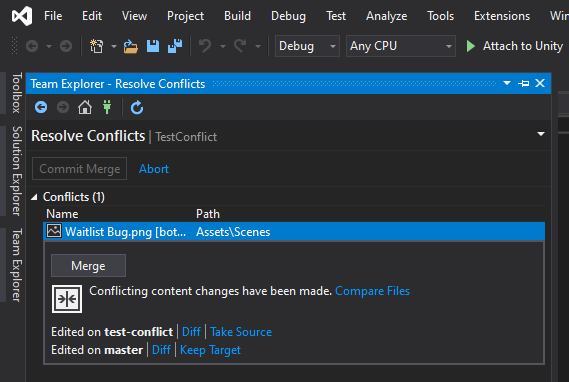
The conflicted file is a png image and marked with this in the .gitattributes file:
``` .gitattributes
*.png filter=lfs diff=lfs merge=lfs -text
TL; DR;

Visual Studio Code = works
Visual Studio = works
GitHub Desktop = broken

The reason I mention the other tools is because there has been much discussion about whether it is an LFS issue or a GitHub Desktop issue.  Because other tools work and GitHub desktop does not, I am lead to believe that it is a GitHub Desktop issue.

However, I did make one interesting discovery in this test.  I found that when modifying a file created with the Unity Game Engine that is marked to handle merge conflicts like this:
*.asset merge=unityyamlmerge eol=lf
```
It worked. Therefore, it could be a combination of an issue with LFS and GitHub Desktop. The only way to know if it is an LFS issue would be to recreate this with the command line. Because I have only done it with GitHub Desktop GUI, tried other GUIs, and these are the results I see, I still conclude that it is an issue with GitHub Desktop and will be keeping this issue open.
UPDATE
_This can also be seen in the below comment. Edited in here for ease of reading._

I just tested it with the command line. I can confirm that it works as expected in the command line. This clarifies that it is not an issue with Git LFS. It is in fact an issue with GitHub Desktop.
TCROC
on 9 May 2020
@billygriffin
I just tested it with the command line. I can confirm that it works as expected in the command line. This clarifies that it is not an issue with Git LFS. It is in fact an issue with GitHub Desktop.
TCROC
on 9 May 2020
Related issues
 renegadedata
·
68Comments
renegadedata
·
68Comments
 decabeza
·
63Comments
decabeza
·
63Comments
 penCsharpener
·
103Comments
shiftkey
·
60Comments
penCsharpener
·
103Comments
shiftkey
·
60Comments
 joshaber
·
51Comments
joshaber
·
51Comments
Most helpful comment
@billygriffin Thanks for the update! :) I look forward to seeing how this turns out when time is found to work on it :)