Desktop: Unable to read askpass response from ask-pass-trampoline.bat
Description
Attempting to push commits to my GitHub using the Desktop client results in this message:
The system cannot find the path specified.
error: unable to read askpass response from 'C:\Users\Alca\AppData\Local\GitHubDesktop\app-0.8.0\resources\app\static\ask-pass-trampoline.bat'
fatal: could not read Username for 'https://github.com': terminal prompts disabled
No changes occur.
Similar issue as #1916.
Version
GitHub Desktop version: 0.8.0
OS version: Windows 7 (6.1.7601 SP1)
Steps to Reproduce
- Make a commit.
- Push the commit.
- Error message pops up.

Expected behavior: The commit should be pushed.
Actual behavior: The aforementioned error message pops up.
Reproduces how often: 100% of the time.
Logs
2017-09-06T06:15:40.333Z - error: [ui] `git -c credential.helper= push origin master:master --progress` exited with an unexpected code: 128.
The system cannot find the path specified.
error: unable to read askpass response from 'C:\Users\Alca\AppData\Local\GitHubDesktop\app-0.8.0\resources\app\static\ask-pass-trampoline.bat'
fatal: could not read Username for 'https://github.com': terminal prompts disabled
Additional Information
The file at that location most definitely does exist. It has persisted through multiple versions of Desktop.
I've tried commenting out core.askpass=git-gui--askpass from my git config.
Issue created by request of Stacey Burns @staceb
 AlcaDesign
All 69 comments
Hey @AlcaDesign,
I don't know what could cause that error but I figure we should start by eliminating some things and take it from there.
Could you please open a command prompt and run set PATH and copy the output here?
Do you have any anti-virus software running on your machine, and if so, could you temporarily disable it and try again?
Have you ever been able to use any older versions of GitHub Desktop to push?
 niik
on 6 Sep 2017
niik
on 6 Sep 2017
Path
Path=C:\Program Files (x86)\Common Files\Intel\Shared Libraries\redist\intel64\compiler;C:\Program Files (x86)\Common Files\Microsoft Shared\Windows Live;C:\ProgramData\Oracle\Java\javapath;C:\Windows\system32;C:\Windows;C:\Windows\System32\Wbem;C:\Windows\System32\WindowsPowerShell\v1.0\;c:\Program Files (x86)\Microsoft SQL Server\100\Tools\Binn\;c:\Program Files\Microsoft SQL Server\100\Tools\Binn\;c:\Program Files\Microsoft SQL Server\100\DTS\Binn\;C:\Program Files\cURL\bin;C:\Program Files\Microsoft SQL Server\110\Tools\Binn\;C:\Program Files\Microsoft SQL Server\120\Tools\Binn\;C:\Program Files (x86)\NVIDIA Corporation\PhysX\Common;C:\Users\Alca\AppData\Roaming\npm;C:\Program Files\nim\bin;C:\cygwin64\bin;C:\Program Files\nodejs\;C:\Users\Alca\AppData\Local\atom\bin;C:\Program Files\Git\cmd;C:\Program Files (x86)\Common Files\Intel\Shared Libraries\redist\intel64\compiler;C:\Program Files (x86)\Common Files\Microsoft Shared\Windows Live;C:\ProgramData\Oracle\Java\javapath;C:\Windows\system32;C:\Windows;C:\Windows\System32\Wbem;C:\Windows\System32\WindowsPowerShell\v1.0\;c:\Program Files (x86)\Microsoft SQL Server\100\Tools\Binn\;c:\Program Files\Microsoft SQL Server\100\Tools\Binn\;c:\Program Files\Microsoft SQL Server\100\DTS\Binn\;C:\Program Files\cURL\bin;C:\Program Files\Microsoft SQL Server\110\Tools\Binn\;C:\Program Files\Microsoft SQL Server\120\Tools\Binn\;C:\Program Files (x86)\NVIDIA Corporation\PhysX\Common;C:\Program Files\Git\cmd;C:\Program Files\nodejs\;C:\Program Files\Common Files\Microsoft Shared\Windows Live;C:\Python27\;C:\Program Files\7-Zip
PATHEXT=.COM;.EXE;.BAT;.CMD;.VBS;.VBE;.JS;.JSE;.WSF;.WSH;.MSC;.PY
Formatted:
C:\Program Files (x86)\Common Files\Intel\Shared Libraries\redist\intel64\compiler
C:\Program Files (x86)\Common Files\Microsoft Shared\Windows Live
C:\ProgramData\Oracle\Java\javapath
C:\Windows\system32
C:\Windows
C:\Windows\System32\Wbem
C:\Windows\System32\WindowsPowerShell\v1.0\
c:\Program Files (x86)\Microsoft SQL Server\100\Tools\Binn\
c:\Program Files\Microsoft SQL Server\100\Tools\Binn\
c:\Program Files\Microsoft SQL Server\100\DTS\Binn\
C:\Program Files\cURL\bin
C:\Program Files\Microsoft SQL Server\110\Tools\Binn\
C:\Program Files\Microsoft SQL Server\120\Tools\Binn\
C:\Program Files (x86)\NVIDIA Corporation\PhysX\Common
C:\Users\Alca\AppData\Roaming\npm
C:\Program Files\nim\bin
C:\cygwin64\bin
C:\Program Files\nodejs\
C:\Users\Alca\AppData\Local\atom\bin
C:\Program Files\Git\cmd
C:\Program Files (x86)\Common Files\Intel\Shared Libraries\redist\intel64\compiler
C:\Program Files (x86)\Common Files\Microsoft Shared\Windows Live
C:\ProgramData\Oracle\Java\javapath
C:\Windows\system32
C:\Windows
C:\Windows\System32\Wbem
C:\Windows\System32\WindowsPowerShell\v1.0\
c:\Program Files (x86)\Microsoft SQL Server\100\Tools\Binn\
c:\Program Files\Microsoft SQL Server\100\Tools\Binn\
c:\Program Files\Microsoft SQL Server\100\DTS\Binn\
C:\Program Files\cURL\bin
C:\Program Files\Microsoft SQL Server\110\Tools\Binn\
C:\Program Files\Microsoft SQL Server\120\Tools\Binn\
C:\Program Files (x86)\NVIDIA Corporation\PhysX\Common
C:\Program Files\Git\cmd
C:\Program Files\nodejs\
C:\Program Files\Common Files\Microsoft Shared\Windows Live
C:\Python27\
C:\Program Files\7-Zip
I went through and removed paths that didn't exist any longer from the path.
Anti-virus?
Nope
Old Version of GitHub Desktop?
Yes, before I switched to the "beta" pushing worked.
AlcaDesign
on 6 Sep 2017
This also started happening to me last week. I just used the command prompt to get around it, but now it's getting annoying, I've been using GitHub Desktop for months without problems, I don't know if 0.8.0 started it, since updates happen so transparently. But 0.8.0 what I was running when I noticed the problem, and I've also manually downloaded and reinstalled with 0.8.2 and still have the issue.
GitHub Desktop version: 0.8.0/0.8.2
OS version: Windows 7 (6.1.7601)
Log:
2017-09-12T19:27:06.117Z - info: [ui] Executing fetch: git -c credential.helper= fetch --progress --prune origin (took 5.941s)
2017-09-12T19:27:08.800Z - error: [ui] `git -c credential.helper= push origin master:master --progress` exited with an unexpected code: 128.
The system cannot find the path specified.
error: unable to read askpass response from 'C:\Users\jayt\AppData\Local\GitHubDesktop\app-0.8.2\resources\app\static\ask-pass-trampoline.bat'
fatal: could not read Username for 'https://github.com': terminal prompts disabled


2017-09-12T19:29:00.786Z - error: [ui] `git -c credential.helper= push origin master:master --progress` exited with an unexpected code: 128.
The system cannot find the path specified.
error: unable to read askpass response from 'C:\Users\jayt\AppData\Local\GitHubDesktop\app-0.8.2\resources\app\static\ask-pass-trampoline.bat'
fatal: could not read Username for 'https://github.com': terminal prompts disabled
 jbtule
on 12 Sep 2017
jbtule
on 12 Sep 2017
I have some fresh theories on this, mostly due to this clue from the malformed characters from a more recent report:
'C:\Users\TiagoMagalhaes' is not recognized as an internal or external command,
operable program or batch file.
error: unable to read askpass response from 'C:\Users\TiagoMagalhães(11506\AppData\Local\GitHubDesktop\app-1.0.2\resources\app\static\ask-pass-trampoline.bat'
The error message The system cannot find the path specified. is self-explanatory, but without more context I'd say we're passing some unicode characters into %DESKTOP_PATH% and cmd can't resolve it due to code pages.
This feels a lot like #2624 but in a different location.
 shiftkey
on 1 Oct 2017
shiftkey
on 1 Oct 2017
hello i have tried to clone into C:\Dev but it didn't work either , so sure to what degree its some Unicode issue , i have also tried disabling avast but to no avail , to be added that you can still be right .
this is happening on my laptop where i use a college version of W10 so my name and school number is my account name. However on my desktop my name has no Unicode characters and i did not encounter this issue.
 TiagoJoseMagalhaes
on 1 Oct 2017
TiagoJoseMagalhaes
on 1 Oct 2017
For myself. I've solved it, it was not github desktop. Another program had added something stupid to the registry HKEY_CURRENT_USER\Software\MicrosoftCommand Processor\autorun
jbtule
on 5 Oct 2017
@jbtule that's weird - thanks for reporting back!
@TiagoJoseMagalhaes @AlcaDesign can you check that registry entry too and see if something unexpected is registered there?
shiftkey
on 5 Oct 2017
@shiftkey There's no "autorun" entry at that location.
AlcaDesign
on 5 Oct 2017
Dropping myself off this while I don't have access to Windows hardware, in case someone else wants to take a swing at this.
shiftkey
on 5 Oct 2017
@AlcaDesign @shiftkey i don´t have any autorun entry at that location either.
TiagoJoseMagalhaes
on 5 Oct 2017
Alright, back and looking into this. I setup a test account named shöftkäß to see if I could induce any unicode-related issues when an operation needs to GIT_ASKPASS. Here's the environment variables for the user:
PS C:\Users\shöftkäß> gci env:

Name                           Value
----                           -----
ALLUSERSPROFILE                C:\ProgramData
APPDATA                        C:\Users\shöftkäß\AppData\Roaming
CommonProgramFiles             C:\Program Files\Common Files
CommonProgramFiles(x86)        C:\Program Files (x86)\Common Files
CommonProgramW6432             C:\Program Files\Common Files
COMPUTERNAME                   BRENDANFORSEE7D
ComSpec                        C:\Windows\system32\cmd.exe
HOMEDRIVE                      C:
HOMEPATH                       \Users\shöftkäß
LOCALAPPDATA                   C:\Users\shöftkäß\AppData\Local
LOGONSERVER                    \\BRENDANFORSEE7D
NUMBER_OF_PROCESSORS           2
OneDrive                       C:\Users\shöftkäß\OneDrive
OS                             Windows_NT
Path                           C:\Program Files (x86)\Parallels\Parallels Tools\Applications;C:\Windows\system32;C:\...
PATHEXT                        .COM;.EXE;.BAT;.CMD;.VBS;.VBE;.JS;.JSE;.WSF;.WSH;.MSC;.CPL
PROCESSOR_ARCHITECTURE         AMD64
PROCESSOR_IDENTIFIER           Intel64 Family 6 Model 70 Stepping 1, GenuineIntel
PROCESSOR_LEVEL                6
PROCESSOR_REVISION             4601
ProgramData                    C:\ProgramData
ProgramFiles                   C:\Program Files
ProgramFiles(x86)              C:\Program Files (x86)
ProgramW6432                   C:\Program Files
PSModulePath                   C:\Users\shöftkäß\Documents\WindowsPowerShell\Modules;C:\Program Files\WindowsPowerSh...
PUBLIC                         C:\Users\Public
SESSIONNAME                    Console
SystemDrive                    C:
SystemRoot                     C:\Windows
TEMP                           C:\Users\SHFTK~1\AppData\Local\Temp
TMP                            C:\Users\SHFTK~1\AppData\Local\Temp
USERDOMAIN                     BRENDANFORSEE7D
USERDOMAIN_ROAMINGPROFILE      BRENDANFORSEE7D
USERNAME                       shöftkäß
USERPROFILE                    C:\Users\shöftkäß
windir                         C:\Windows
I was able to clone and fetch a private repository down without issues, so there goes that theory.
@TiagoJoseMagalhaes I overlooked this comment from earlier:
this is happening on my laptop where i use a college version of W10 so my name and school number is my account name.
Could you open a PowerShell prompt, run this command and attach the output. I'd like to understand a bit more about your account setup on the machine that has the your name and school number for the account name:
> Get-ChildItem Env:
@AlcaDesign looking at the error message from your log, I'd like to check that the trampoline file is actually setup for success.
The system cannot find the path specified.
error: unable to read askpass response from 'C:\Users\Alca\AppData\Local\GitHubDesktop\app-0.8.0\resources\app\static\ask-pass-trampoline.bat'
The files we depend on are these:
%LOCALAPPDATA%\GitHubDesktop\app-${version}\resources\app\static\ask-pass-trampoline.bat
%LOCALAPPDATA%\GitHubDesktop\app-${version}\resources\app\ask-pass.js
Adjust for whichever version of Desktop you are currently running.
If any of those aren't where you expect them to be, please let me know - it will help to recreate this on my end.
shiftkey
on 10 Oct 2017
@shiftkey Those files definitely exist.
AlcaDesign
on 10 Oct 2017
@AlcaDesign could you attach a fresh log file? Maybe there's something different about the situation that will help me understand what's different your setup.
shiftkey
on 10 Oct 2017
@shiftkey
2017-10-10T06:17:16.627Z - info: [ui] launching: 1.0.3 (Windows 6.1.7601)
2017-10-10T06:17:16.976Z - info: [ui] Stats reported.
2017-10-10T06:17:37.813Z - info: [ui] Executing fetch: git -c credential.helper= fetch --progress --prune origin (took 8.515s)
2017-10-10T06:18:16.276Z - info: [ui] Executing getStatus: git status --untracked-files=all --branch --porcelain=2 -z (took 2.289s)
2017-10-10T06:18:18.127Z - info: [ui] Executing getCommits: git log HEAD --date=raw --max-count=100 --pretty=%H%x1F%s%x1F%b%x1F%an <%ae> %ad%x1F%P -z --no-color (took 3.193s)
2017-10-10T06:18:25.806Z - info: [ui] Executing getRecentBranches: git log -g --no-abbrev-commit --pretty=oneline HEAD -n 2500 -- (took 11.795s)
2017-10-10T06:18:26.394Z - error: [ui] `git -c credential.helper= fetch --progress --prune origin` exited with an unexpected code: 128.
The system cannot find the path specified.
error: unable to read askpass response from 'C:\Users\Alca\AppData\Local\GitHubDesktop\app-1.0.3\resources\app\static\ask-pass-trampoline.bat'
fatal: could not read Username for 'https://github.com': terminal prompts disabled

2017-10-10T06:23:39.873Z - error: [ui] `git -c credential.helper= fetch --progress --prune origin` exited with an unexpected code: 128.
The system cannot find the path specified.
error: unable to read askpass response from 'C:\Users\Alca\AppData\Local\GitHubDesktop\app-1.0.3\resources\app\static\ask-pass-trampoline.bat'
fatal: could not read Username for 'https://github.com': terminal prompts disabled

2017-10-10T06:25:13.541Z - error: [ui] `git -c credential.helper= push origin master:master --progress` exited with an unexpected code: 128.
The system cannot find the path specified.
error: unable to read askpass response from 'C:\Users\Alca\AppData\Local\GitHubDesktop\app-1.0.3\resources\app\static\ask-pass-trampoline.bat'
fatal: could not read Username for 'https://github.com': terminal prompts disabled

2017-10-10T06:28:53.679Z - error: [ui] `git -c credential.helper= fetch --progress --prune origin` exited with an unexpected code: 128.
The system cannot find the path specified.
error: unable to read askpass response from 'C:\Users\Alca\AppData\Local\GitHubDesktop\app-1.0.3\resources\app\static\ask-pass-trampoline.bat'
fatal: could not read Username for 'https://github.com': terminal prompts disabled

2017-10-10T06:34:07.417Z - error: [ui] `git -c credential.helper= fetch --progress --prune origin` exited with an unexpected code: 128.
The system cannot find the path specified.
error: unable to read askpass response from 'C:\Users\Alca\AppData\Local\GitHubDesktop\app-1.0.3\resources\app\static\ask-pass-trampoline.bat'
fatal: could not read Username for 'https://github.com': terminal prompts disabled

2017-10-10T06:39:21.161Z - error: [ui] `git -c credential.helper= fetch --progress --prune origin` exited with an unexpected code: 128.
The system cannot find the path specified.
error: unable to read askpass response from 'C:\Users\Alca\AppData\Local\GitHubDesktop\app-1.0.3\resources\app\static\ask-pass-trampoline.bat'
fatal: could not read Username for 'https://github.com': terminal prompts disabled

2017-10-10T06:44:34.934Z - error: [ui] `git -c credential.helper= fetch --progress --prune origin` exited with an unexpected code: 128.
The system cannot find the path specified.
error: unable to read askpass response from 'C:\Users\Alca\AppData\Local\GitHubDesktop\app-1.0.3\resources\app\static\ask-pass-trampoline.bat'
fatal: could not read Username for 'https://github.com': terminal prompts disabled

2017-10-10T06:49:48.778Z - error: [ui] `git -c credential.helper= fetch --progress --prune origin` exited with an unexpected code: 128.
The system cannot find the path specified.
error: unable to read askpass response from 'C:\Users\Alca\AppData\Local\GitHubDesktop\app-1.0.3\resources\app\static\ask-pass-trampoline.bat'
fatal: could not read Username for 'https://github.com': terminal prompts disabled

2017-10-10T06:55:03.069Z - info: [ui] Executing fetch: git -c credential.helper= fetch --progress --prune origin (took 1.053s)
2017-10-10T06:55:03.072Z - error: [ui] `git -c credential.helper= fetch --progress --prune origin` exited with an unexpected code: 128.
The system cannot find the path specified.
error: unable to read askpass response from 'C:\Users\Alca\AppData\Local\GitHubDesktop\app-1.0.3\resources\app\static\ask-pass-trampoline.bat'
fatal: could not read Username for 'https://github.com': terminal prompts disabled

2017-10-10T07:00:16.861Z - error: [ui] `git -c credential.helper= fetch --progress --prune origin` exited with an unexpected code: 128.
The system cannot find the path specified.
error: unable to read askpass response from 'C:\Users\Alca\AppData\Local\GitHubDesktop\app-1.0.3\resources\app\static\ask-pass-trampoline.bat'
fatal: could not read Username for 'https://github.com': terminal prompts disabled

2017-10-10T07:05:30.703Z - error: [ui] `git -c credential.helper= fetch --progress --prune origin` exited with an unexpected code: 128.
The system cannot find the path specified.
error: unable to read askpass response from 'C:\Users\Alca\AppData\Local\GitHubDesktop\app-1.0.3\resources\app\static\ask-pass-trampoline.bat'
fatal: could not read Username for 'https://github.com': terminal prompts disabled

2017-10-10T07:10:44.563Z - error: [ui] `git -c credential.helper= fetch --progress --prune origin` exited with an unexpected code: 128.
The system cannot find the path specified.
error: unable to read askpass response from 'C:\Users\Alca\AppData\Local\GitHubDesktop\app-1.0.3\resources\app\static\ask-pass-trampoline.bat'
fatal: could not read Username for 'https://github.com': terminal prompts disabled

2017-10-10T07:15:58.382Z - error: [ui] `git -c credential.helper= fetch --progress --prune origin` exited with an unexpected code: 128.
The system cannot find the path specified.
error: unable to read askpass response from 'C:\Users\Alca\AppData\Local\GitHubDesktop\app-1.0.3\resources\app\static\ask-pass-trampoline.bat'
fatal: could not read Username for 'https://github.com': terminal prompts disabled

2017-10-10T07:21:12.204Z - error: [ui] `git -c credential.helper= fetch --progress --prune origin` exited with an unexpected code: 128.
The system cannot find the path specified.
error: unable to read askpass response from 'C:\Users\Alca\AppData\Local\GitHubDesktop\app-1.0.3\resources\app\static\ask-pass-trampoline.bat'
fatal: could not read Username for 'https://github.com': terminal prompts disabled

2017-10-10T07:26:25.940Z - error: [ui] `git -c credential.helper= fetch --progress --prune origin` exited with an unexpected code: 128.
The system cannot find the path specified.
error: unable to read askpass response from 'C:\Users\Alca\AppData\Local\GitHubDesktop\app-1.0.3\resources\app\static\ask-pass-trampoline.bat'
fatal: could not read Username for 'https://github.com': terminal prompts disabled
@AlcaDesign the whole log file would be helpful - I'm not even sure what version you're running currently
shiftkey
on 10 Oct 2017
@shiftkey
`
Name Value
---- -----
ALLUSERSPROFILE C:\ProgramData
APPDATA C:\Users\TiagoMagalhães(11506\AppData\Roaming
CommonProgramFiles C:\Program Files\Common Files
CommonProgramFiles(x86) C:\Program Files (x86)\Common Files
CommonProgramW6432 C:\Program Files\Common Files
COMPUTERNAME DESKTOP-24D5LTU
ComSpec C:\Windows\system32cmd.exe
FPS_BROWSER_APP_PROFILE_STRING Internet Explorer
FPS_BROWSER_USER_PROFILE_ST... Default
GTK_BASEPATH C:\Program Files (x86)\GtkSharp\2.12\
HOMEDRIVE C:
HOMEPATH \Users\TiagoMagalhães(11506
LOCALAPPDATA C:\Users\TiagoMagalhães(11506\AppDataLocal
LOGONSERVER \DESKTOP-24D5LTU
NUMBER_OF_PROCESSORS 4
OneDrive C:\Users\TiagoMagalhães(11506\OneDrive
OS Windows_NT
Path C:\Python27\;C:\Python27\Scripts;C:\ProgramData\Oracle\Java\javapath;C:\Windows\system32;C:\Windows;C:\Windows\System32\Wbem;C:\Windows\System32\WindowsPower...
PATHEXT .COM;.EXE;.BAT;.CMD;.VBS;.VBE;.JS;.JSE;.WSF;.WSH;.MSC;.CPL
PROCESSOR_ARCHITECTURE AMD64
PROCESSOR_IDENTIFIER Intel64 Family 6 Model 78 Stepping 3, GenuineIntel
PROCESSOR_LEVEL 6
PROCESSOR_REVISION 4e03
ProgramData C:\ProgramData
ProgramFiles C:\Program Files
ProgramFiles(x86) C:\Program Files (x86)
ProgramW6432 C:\Program Files
PSModulePath C:\Users\TiagoMagalhães(11506\Documents\WindowsPowerShell\Modules;C:\Program Files\WindowsPowerShell\Modules;C:\Windows\system32\WindowsPowerShell\v1.0\Modules
PUBLIC C:\Users\Public
SESSIONNAME Console
SystemDrive C:
SystemRoot C:\Windows
TEMP C:\Users\TIAGOM~1\AppDataLocal\Temp
TMP C:\Users\TIAGOM~1\AppDataLocal\Temp
USERDOMAIN AzureAD
USERDOMAIN_ROAMINGPROFILE AzureAD
USERNAME TiagoMagalhães(11506
USERPROFILE C:\Users\TiagoMagalhães(11506
VBOX_MSI_INSTALL_PATH C:\Program Files\Oracle\VirtualBox\
windir C:\Windows
`
The log about my system you asked for.
TiagoJoseMagalhaes
on 10 Oct 2017
@AlcaDesign the best theory I've got so far about your setup is that the trampoline script isn't returning any output, for some reason. I added #3007 to log whether there is a token is actually set for the user when we perform Git operations - if you are able to reproduce this with the latest version 1.0.6, could you attach a fresh log? This should provide some more insight.
shiftkey
on 3 Nov 2017
@TiagoJoseMagalhaes I can reproduce the issue you are seeing using an account with a ( in it.

Let's see if I can put together a fix for it now.
shiftkey
on 3 Nov 2017
@shiftkey
2017-11-03T04:56:17.767Z - info: [ui] [AppStore] loading 9 repositories from store
2017-11-03T04:56:17.770Z - info: [ui] [AppStore] found account: AlcaDesign (Jacob Foster)
2017-11-03T04:56:18.640Z - warn: [ui] Error refreshing account 'AlcaDesign'
Error: Cannot update an account which doesn't have a token: [object Object]
    at Object.n [as fatalError] (C:\Users\Alca\AppData\Local\GitHubDesktop\app-1.0.6\webpack:\external "path":1:1)
    at o (C:\Users\Alca\AppData\Local\GitHubDesktop\app-1.0.6\webpack:\app\src\lib\stores\accounts-store.ts:201:7)
    at t.AccountsStore.refresh (C:\Users\Alca\AppData\Local\GitHubDesktop\app-1.0.6\webpack:\app\src\lib\stores\accounts-store.ts:119:24)
    at ee.loadInitialState (C:\Users\Alca\AppData\Local\GitHubDesktop\app-1.0.6\webpack:\app\src\lib\stores\app-store.ts:955:4)
    at <anonymous>
2017-11-03T04:56:18.832Z - info: [ui] launching: 1.0.6 (Windows 6.1.7601)
2017-11-03T04:56:24.871Z - info: [ui] Executing getStatus: git status --untracked-files=all --branch --porcelain=2 -z (took 2.112s)
2017-11-03T04:56:34.526Z - info: [ui] Executing getRecentBranches: git log -g --no-abbrev-commit --pretty=oneline HEAD -n 2500 -- (took 11.746s)
2017-11-03T04:59:59.783Z - error: [ui] `git -c credential.helper= push origin master:master --progress` exited with an unexpected code: 128.
The system cannot find the path specified.
error: unable to read askpass response from 'C:\Users\Alca\AppData\Local\GitHubDesktop\app-1.0.6\resources\app\static\ask-pass-trampoline.bat'
fatal: could not read Username for 'https://github.com': terminal prompts disabled
2017-11-03T04:56:18.640Z - warn: [ui] Error refreshing account 'AlcaDesign'
Error: Cannot update an account which doesn't have a token: [object Object]
Aha, this looks interesting. Are you able to do the sign-in-and-out dance under the File | *Options menu, and see if that fixes it for you?
I'm still not sure if the The system cannot find the path specified message is something I should worry about right now, but let's see if that gets you something different when you push changes...
shiftkey
on 3 Nov 2017
@shiftkey Here are the logs that follow. Sign in, try to push, sign out, sign in, try again.
2017-11-03T05:07:56.636Z - info: [ui] [AppStore] adding account AlcaDesign (Jacob Foster) to store
2017-11-03T05:08:05.635Z - info: [ui] [AppStore.withAuthenticatingUser] account found for repository: Alcabot - AlcaDesign (has token)
2017-11-03T05:08:06.474Z - error: [ui] `git -c credential.helper= push origin master:master --progress` exited with an unexpected code: 128.
The system cannot find the path specified.
error: unable to read askpass response from 'C:\Users\Alca\AppData\Local\GitHubDesktop\app-1.0.6\resources\app\static\ask-pass-trampoline.bat'
fatal: could not read Username for 'https://github.com': terminal prompts disabled

2017-11-03T05:08:55.371Z - info: [ui] [AppStore] removing account AlcaDesign (Jacob Foster) from store
2017-11-03T05:09:10.769Z - info: [ui] [AppStore] adding account AlcaDesign (Jacob Foster) to store
2017-11-03T05:09:13.830Z - info: [ui] [AppStore.withAuthenticatingUser] account found for repository: Alcabot - AlcaDesign (has token)
2017-11-03T05:09:14.404Z - error: [ui] `git -c credential.helper= push origin master:master --progress` exited with an unexpected code: 128.
The system cannot find the path specified.
error: unable to read askpass response from 'C:\Users\Alca\AppData\Local\GitHubDesktop\app-1.0.6\resources\app\static\ask-pass-trampoline.bat'
fatal: could not read Username for 'https://github.com': terminal prompts disabled
@AlcaDesign ok, so it's not that. Thanks for following up.
shiftkey
on 3 Nov 2017
Some notes on @TiagoJoseMagalhaes's case which is very puzzling:
When cloning with GIT_ASKPASS setup for a private repository, git-remote-https.exe will spawn cmd with our batch file and environment variables configured:
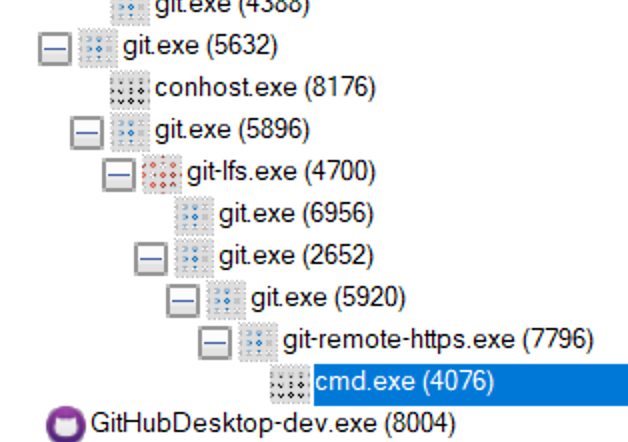
The command it spawns looks like this, and it fails like this:
C:\Users\TiagoMagalhães(11506>C:\Windows\system32\cmd.exe /c C:\Users\TiagoMagalhães(11506\Documents\GitHub\desktop\dist\GitHubDesktop-dev-win32-x64\resources\app\static\ask-pass-trampoline.bat "Username for 'https://github.com': "
'C:\Users\TiagoMagalhães' is not recognized as an internal or external command,
operable program or batch file.
And this fails because the user account contains the ( character. Quoting doesn't seem to change this behaviour either.
Isolating this from Desktop, we can get it to fail in this way:
C:\Users\TiagoMagalhães(11506>cmd /c C:\Users\TiagoMagalhães(11506\test.bat
'C:\Users\TiagoMagalhães' is not recognized as an internal or external command,
operable program or batch file.

C:\Users\TiagoMagalhães(11506>cmd /c "C:\Users\TiagoMagalhães(11506\test.bat"
'C:\Users\TiagoMagalhães' is not recognized as an internal or external command,
operable program or batch file.

C:\Users\TiagoMagalhães(11506>
test.bat is a simple batch file to just emit something:
@echo off
setlocal

ECHO "HELLO WORLD!"

endlocal
There's probably some way to set GIT_ASKPASS and our other batchfiles we spawn to work like this:
C:\Users\TiagoMagalhães(11506>SET BATCHFILE="C:\Users\TiagoMagalhães(11506\test.bat"

C:\Users\TiagoMagalhães(11506>cmd /c "%BATCHFILE%"
"HELLO WORLD!"
But we really need that second argument ("Username for 'https://github.com': ") to flow through, which we might break by going down this path.
C:\Users\TiagoMagalhães(11506>SET BATCHFILE="C:\Users\TiagoMagalhães(11506\test.bat"

C:\Users\TiagoMagalhães(11506>type %BATCHFILE%
@echo off
setlocal

ECHO "HELLO %1!"

endlocal
C:\Users\TiagoMagalhães(11506>.\test.bat world!
"HELLO world!!"

C:\Users\TiagoMagalhães(11506>cmd /c %BATCHFILE% "world!"
'C:\Users\TiagoMagalhães' is not recognized as an internal or external command,
operable program or batch file.

C:\Users\TiagoMagalhães(11506>cmd /c "%BATCHFILE%" "world!"
'"C:\Users\TiagoMagalhães(11506\test.bat"" "world!' is not recognized as an internal or external command,
operable program or batch file.

C:\Users\TiagoMagalhães(11506>cmd /c "%BATCHFILE%" world!
"HELLO world!!"

C:\Users\TiagoMagalhães(11506>cmd /c "%BATCHFILE%" wor ld!
"HELLO wor!"
Just a hunch: can you escape the parenthesis by a single backtick?
 dscho
on 3 Nov 2017
dscho
on 3 Nov 2017
@dscho
C:\Users\TiagoMagalhães(11506>cmd /c C:\Users\TiagoMagalhães`(11506\test.bat
'C:\Users\TiagoMagalhães`' is not recognized as an internal or external command,
operable program or batch file.
@shiftkey you know what is really funny? I encountered the solution to your conundrum while working on the updater this past Monday, with a slightly related problem: I did not have to pass a path with a parenthesis, but a path with a space.
The thing is: quoting is real hard, especially with XP behaving differently than Vista and beyond. See https://stackoverflow.com/questions/8189553/how-to-handle-closing-parenthesis-in-path-names-in-a-for-loop#8202245 for a more complete discussion.
The short gist of it is: if you want to quote anything in cmd /c, you simply add an extra pair of quotes around the command and its command-line parameters, like so:
C:\> cmd /c ""C:\Users\TiagoMagalhães`(11506\test.bat""
Longer explanation: if you want consistent unquoting by cmd, you will want to force more than two quotes on the command-line: one pair around everything (which is stripped by cmd because it sees more than two quotes), and then at least one pair around the command.
dscho
on 3 Nov 2017
@dscho

Thanks for the extra insight. I'll test that out and see if it flows through correctly when we set GIT_ASKPASS.
shiftkey
on 3 Nov 2017
Tweaking my local setup, the environment variable now seems to be encoded right:
GIT_ASKPASS=""C:\Users\TiagoMagalhães`(11506\Documents\GitHub\desktop\dist\GitHubDesktop-dev-win32-x64\resources\app\static\ask-pass-trampoline.bat""
The error message differs, but I don't see it spawn a cmd /c [blah] now in procmon as it did before 🤷♂️ .
error: [ui] `git -c credential.helper= lfs clone --recursive --skip-repo --progress -- https://github.com/shiftkey/blank-repo-tidy-up-refs.git C:\Users\TiagoMagalhães(11506\Documents\GitHub\blank-repo-tidy-up-refs` exited with an unexpected code: 2.
Cloning into 'C:\Users\TiagoMagalhães(11506\Documents\GitHub\blank-repo-tidy-up-refs'...
error: cannot spawn ""C:\Users\TiagoMagalhães`(11506\Documents\GitHub\desktop\dist\GitHubDesktop-dev-win32-x64\resources\app\static\ask-pass-trampoline.bat"": No such file or directory
fatal: could not read Username for 'https://github.com': terminal prompts disabled
Error(s) during clone:
git clone failed: exit status 128
I'll get some more tracing into a dev version of Git here as I'm pretty sure error: cannot spawn is this message from Git itself.
shiftkey
on 3 Nov 2017
FWIW I confused the escape characters. The backtick is Powershell's escape character, the caret is CMD's. From the error message, it looks, however, as if you called the .bat (with extra quotes) directly, rather than with cmd /c. Is that the case? If so, I would expect it to work much better with cmd /c...
dscho
on 3 Nov 2017
From the error message, it looks, however, as if you called the .bat (with extra quotes) directly, rather than with
cmd /c. Is that the case?
@dscho we're setting the GIT_ASKPASS environment variable path to the batch file path (with no quoting currently, which is likely still part of the issue) and git-remote-https is invoking it when it requires authentication.

PID:    7372
Command line:   C:\Windows\system32\cmd.exe /c C:\Users\TiagoMagalhães(11506\AppData\Local\GitHubDesktop\app-1.0.6\resources\app\static\ask-pass-trampoline.bat "Username for 'https://github.com': "
Looking at the latest version of prepare_shell_cmd, I can see it's trying to do some quoting of it's own with whatever arguments it receives:
EDIT: I'm confusing -c and /c here. This isn't the problem.
So I guess my next question before I go deeper is: is there a different thing we should set for GIT_ASKPASS on Windows so that we avoid this quoting issue that comes when we use the full path?
The script itself is trivial (and leverages other environment variables already):
@echo off
setlocal

set ELECTRON_RUN_AS_NODE=1
set ELECTRON_NO_ATTACH_CONSOLE=1

"%DESKTOP_PATH%" "%DESKTOP_ASKPASS_SCRIPT%" %*

endlocal
There's also something really strange here with the caret (^) that I'm trying to get to the bottom of. Check this trace output:
C:\git-sdk-64\usr\src\git>set GIT_ASKPASS=""C:\Users\TiagoMagalhães^(11506\AppData\Local\GitHubDesktop\app-1.0.6\resources\app\static\ask-pass-trampoline.bat""
I'll then try and force the clone of a private repository to use this environment variable:
C:\git-sdk-64\usr\src\git>SET GIT_TRACE=1

C:\git-sdk-64\usr\src\git>SET GIT_TERMINAL_PROMPT=0

C:\git-sdk-64\usr\src\git>git -c credential.manager= clone https://github.com/shiftkey/blank-repo-tidy-up-refs.git C:\some-repo\
10:18:15.743130 git.c:344               trace: built-in: git 'clone' 'https://github.com/shiftkey/blank-repo-tidy-up-refs.git' 'C:\some-repo\'
Cloning into 'C:\some-repo'...
warning: templates not found C:\git-sdk-64\usr\src/share/git-core/templates
10:18:15.758772 run-command.c:570       start_command being launched
10:18:15.758772 run-command.c:628       trace: run_command: 'remote-https' 'origin' 'https://github.com/shiftkey/blank-repo-tidy-up-refs.git'
10:18:15.774378 git.c:576               trace: exec: 'git-remote-https' 'origin' 'https://github.com/shiftkey/blank-repo-tidy-up-refs.git'
10:18:15.774378 run-command.c:626       trace: run_command: 'git-remote-https' 'origin' 'https://github.com/shiftkey/blank-repo-tidy-up-refs.git'
10:18:16.666157 run-command.c:626       trace: run_command: '""C:\Users\TiagoMagalhães(11506\AppData\Local\GitHubDesktop\app-1.0.6\resources\app\static\ask-pass-trampoline.bat""' 'Username for '\''https://github.com'\'': '
error: cannot spawn ""C:\Users\TiagoMagalhães(11506\AppData\Local\GitHubDesktop\app-1.0.6\resources\app\static\ask-pass-trampoline.bat"": No such file or directory
fatal: could not read Username for 'https://github.com': terminal prompts disabled
Note what is being passed to run_command:
10:18:16.666157 run-command.c:626 trace: run_command: '""C:\Users\TiagoMagalhães(11506\AppData\Local\GitHubDesktop\app-1.0.6\resources\app\static\ask-pass-trampoline.bat""' 'Username for '\''https://github.com'\'': '
The caret is no longer present, which might explain why it still errors despite our best attempts to encode it correctly.
EDIT: to clarify this is reproducible just by poking at the environment variables:
C:\>set GIT_ASKPASS=""C:\Users\TiagoMagalhães^(11506\AppData\Local\GitHubDesktop\app-1.0.6\resources\app\static\ask-pass-trampoline.bat""

C:\>echo %GIT_ASKPASS%
""C:\Users\TiagoMagalhães(11506\AppData\Local\GitHubDesktop\app-1.0.6\resources\app\static\ask-pass-trampoline.bat""
Thank you for your issue!
We haven’t gotten a response to our questions above. With only the information that is currently in the issue, we don’t have enough information to take action. We’re going to close this but don’t hesitate to reach out if you have or find the answers we need. If you answer our questions above, a maintainer will reopen this issue.
![no-response[bot] picture](https://avatars2.githubusercontent.com/u/26350515?v=4&s=40) no-response[bot]
on 14 Nov 2017
no-response[bot]
on 14 Nov 2017
Whoops, looks like our bot got a little too aggressive. Re-opening.
 joshaber
on 14 Nov 2017
joshaber
on 14 Nov 2017
I'm going to drop this from the 1.0.x milestone for now after digging into this a lot without success, but I want to write up a bit more about where this is at for future reference.
There's two different root causes here for the same error:
the first, as reported by @AlcaDesign, I'm not clear on - I thought this might have been related to the token being missing, but that didn't seem to fix it. I've not been able to reproduce this and unless some third party tool is restricting the execution of the batch file then I'm not sure what's up.
the second, as reported by @TiagoJoseMagalhaes, is related to having parentheses in the account name. I've been able to reproduce this, but I found myself deep inside MSYS and the
CreateProcessdocumentation on Windows trying to figure out the right incantation of arguments to pass safely from theGIT_ASKPASSenvironment variable to then be spawned bycmdso it then resolves the correct PATH to spawn our script. This is the only report I've had of this, and while the workaround - changing the account name on the machine - is not possible for everyone, this is the best advice I have right now.
shiftkey
on 6 Dec 2017
I've added needs-reproduction here to indicate the first scenario still doesn't have a clear way to reproduce it - that's not your fault @AlcaDesign, I'm just stumped on what else it might be.
shiftkey
on 6 Dec 2017
@shiftkey I'm getting on fine with a combination of Desktop and Atom for my git stuff. I've been meaning to start with a new Windows install on a fresh disk at some point. The problem for me will probably disappear at that point.
AlcaDesign
on 6 Dec 2017
I've identified a related issue with how Windows launches batch files which affects our GIT_ASKPASS script specifically in Git LFS: https://github.com/desktop/desktop/issues/3752#issuecomment-362160566 I was able to use test accounts from reproducing this issue to identify and confirm the related issue, so I believe these are intertwined.
I believe that moving us away from launching a batch file to instead launching an executable will fix the second issue listed here, and maybe the first: https://github.com/desktop/desktop/issues/2623#issuecomment-349517484.
Resolving #3752 requires testing against accounts similar to the ones which had problems here, and so rather than tracking both issues I'm going to close this out in favour of the other issue. Please follow along with that issue for updates.
shiftkey
on 1 Feb 2018
I can open a new issue if need be, but I started getting this exact error but with a "could not read Password" variant. And neither my username or password have spaces or extended unicode characters. Is this the same issue?
Version 1.0.13
Windows 7 64-bit
Steps: Highlight existing repo and click "Fetch"
This succeeded as recently as two days ago
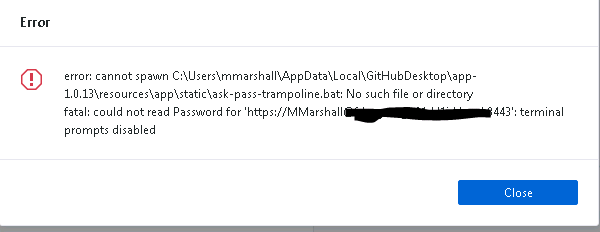
Logging and screenshot:
018-02-01T21:22:44.716Z - info: [ui] Executing getBranches: git for-each-ref --format=%(refname)%00%(refname:short)%00%(upstream:short)%00%(objectname)%00%(author)%00%(committer)%00%(parent)%00%(symref)%00%(subject)%00%(body)%00%(trailers:unfold,only)%00%1F refs/heads refs/remotes (took 1.070s)
2018-02-01T21:22:48.458Z - info: [ui] Executing fetch: git -c credential.helper= fetch --progress --prune origin (took 1.901s)
2018-02-01T21:22:48.459Z - error: [ui] `git -c credential.helper= fetch --progress --prune origin` exited with an unexpected code: 128.
error: cannot spawn C:\Users\mmarshall\AppData\Local\GitHubDesktop\app-1.0.13\resources\app\static\ask-pass-trampoline.bat: No such file or directory
fatal: could not read Password for 'https://[email protected]:8443': terminal prompts disabled
 mike-marshall
on 1 Feb 2018
mike-marshall
on 1 Feb 2018
@mike-marshall it's weird that it would suddenly stop working, but I'm not going to spend much time investigating this area until I've thrown away these batch files.
As a sanity check, can you confirm the file actually exists under the path C:\Users\mmarshall\AppData\Local\GitHubDesktop\app-1.0.13\resources\app\static\, and that something like antivirus hasn't being overzealous and removed the file?
shiftkey
on 2 Feb 2018
The file is there.. Just thought it was weird to see the "can't read Password" variant. I'd agree focusing on the eventual solution is best. I reinstall and try some other things in the meantime.
mike-marshall
on 2 Feb 2018
I am new to GitHub. I just created a private sandbox repository and was not able to clone it with GitHub Desktop 1.0.13:
error: unable to read askpass response from 'C:\Users..........\ask-pass-trampoline.bat'
fatal: could not read Username for 'https://github.com': terminal prompts disabled
Just for testing I create a public repository, and tried the same steps. That worked just fine. How do I make it work for a private repository?
 asellink
on 10 Feb 2018
asellink
on 10 Feb 2018
FYI, when I use Git Bash it works because it pops up a credentials window:
$ cd location/where/clone/should/go
$ git clone https://github.com/
asellink
on 10 Feb 2018
Just wanted to comment that a previous installation of Miniconda had created an AutoRun key at HKEY_CURRENT_USER\Software\MicrosoftCommand Processor\
(Another user has stated Computer\HKEY_LOCAL_MACHINE\SOFTWARE\MicrosoftCommand Processor was where it was located for them. It may be different depending on how Miniconda was installed.
Deleting the key fixed this problem for me.
 Reldey
on 26 May 2019
Reldey
on 26 May 2019
Just wanted to comment that a previous installation of Miniconda had created a AutoRun key at HKEY_CURRENT_USER\Software\MicrosoftCommand Processor\
Deleting the key fixed this problem for me.
Resolved this issue for me. Thanks Reldey!
 bshaw-setfords
on 2 Jul 2019
bshaw-setfords
on 2 Jul 2019
Just wanted to comment that a previous installation of Miniconda had created a AutoRun key at HKEY_CURRENT_USER\Software\MicrosoftCommand Processor\
Deleting the key fixed this problem for me.
Thank you so much ! I resolved my problem true
 LeTuan252
on 14 Jul 2019
LeTuan252
on 14 Jul 2019
Just wanted to comment that a previous installation of Miniconda had created a AutoRun key at HKEY_CURRENT_USER\Software\MicrosoftCommand Processor\
Deleting the key fixed this problem for me.Thank you so much ! I resolved my problem true
Glad my solution is working for people. This may be above my pay grade, but I am wondering why Miniconda is fiddling with the registry at all? I would assume the only value the program should modify would be the PATH. Might be something to throw at them.
Reldey
on 16 Jul 2019
For myself. I've solved it, it was not github desktop. Another program had added something stupid to the registry HKEY_CURRENT_USER\Software\MicrosoftCommand Processor\autorun
It solved my issue. I used to add macros and did't know that it can impact on the work with Git Hub Desktop. Thank you!
 kreinhub
on 23 Aug 2019
kreinhub
on 23 Aug 2019
Just wanted to comment that a previous installation of Miniconda had created a AutoRun key at HKEY_CURRENT_USER\Software\MicrosoftCommand Processor\
Deleting the key fixed this problem for me.
It solved my issue. ~///(^v^)\\~
 chaoxue-sysu
on 15 Nov 2019
chaoxue-sysu
on 15 Nov 2019
Just wanted to comment that a previous installation of Miniconda had created a AutoRun key at HKEY_CURRENT_USER\Software\MicrosoftCommand Processor\
Deleting the key fixed this problem for me.It solved my issue. ~~~///(^v^)
Should there be a key of Auto run or not
 Sameedahmad
on 3 Dec 2019
Sameedahmad
on 3 Dec 2019
Just wanted to comment that a previous installation of Miniconda had created a AutoRun key at HKEY_CURRENT_USER\Software\MicrosoftCommand Processor
Deleting the key fixed this problem for me.It solved my issue. ~~~///(^v^)
Should there be a key of Auto run or not
Sorry, I am not sure, but it works.
chaoxue-sysu
on 4 Dec 2019
Anyone unable to find "Command Processor" tab under HKEY_CURRENT_USER\Software\Microsoft\?
 meenmo
on 10 Dec 2019
meenmo
on 10 Dec 2019
Just wanted to comment that a previous installation of Miniconda had created a AutoRun key at HKEY_CURRENT_USER\Software\MicrosoftCommand Processor\
Deleting the key fixed this problem for me.
Thanks much - I'm amazed that you were able to discover that 👍
 alexqfredrickson
on 31 Dec 2019
alexqfredrickson
on 31 Dec 2019
Just wanted to comment that a previous installation of Miniconda had created a AutoRun key at HKEY_CURRENT_USER\Software\MicrosoftCommand Processor\
Deleting the key fixed this problem for me.
Cheers, worked for me as well - Thanks
 TheNullBoolean
on 25 Feb 2020
TheNullBoolean
on 25 Feb 2020
Just wanted to comment that a previous installation of Miniconda had created a AutoRun key at HKEY_CURRENT_USER\Software\MicrosoftCommand Processor\
Deleting the key fixed this problem for me.
I was having the same issue and this solved it. Thanks 👍
 bn-s
on 7 Apr 2020
bn-s
on 7 Apr 2020
Just wanted to comment that a previous installation of Miniconda had created a AutoRun key at HKEY_CURRENT_USER\Software\MicrosoftCommand Processor\
Deleting the key fixed this problem for me.
Had the same problem! they should fix this on conda's side...
 elalexel
on 22 Apr 2020
elalexel
on 22 Apr 2020
Anyone unable to find "Command Processor" tab under HKEY_CURRENT_USER\Software\Microsoft?
I was also unable to find that key. But i found that in __Computer\HKEY_LOCAL_MACHINE\SOFTWARE\MicrosoftCommand Processor__ . It was there maybe because I installed it conda for all users and not just for me. And after deleting that autorun key my issue was solved.
 shivanshu-semwal
on 5 Jul 2020
shivanshu-semwal
on 5 Jul 2020
I had to reinstall GitHub Desktop to fix this problem; the registry key Autorun was absent in both presented locations.
 SuperHarmony910
on 9 Aug 2020
SuperHarmony910
on 9 Aug 2020
Forgot to mention, this has disassociated with the SSH protocol not working; it is now singularly focused on askpass.bat, as I am lazy to create a new issue.
SuperHarmony910
on 27 Aug 2020
Just wanted to comment that a previous installation of Miniconda had created an AutoRun key at HKEY_CURRENT_USER\Software\MicrosoftCommand Processor
(Another user has stated Computer\HKEY_LOCAL_MACHINE\SOFTWARE\MicrosoftCommand Processor was where it was located for them. It may be different depending on how Miniconda was installed.
Deleting the key fixed this problem for me.
Please, I have the same issue which I have been trying to resolve.
I opened Computer\HKEY_LOCAL_MACHINE\SOFTWARE\MicrosoftCommand Processor
but can't find AutoRun Key.
What I have there are:
(Default)
CompletionChar
DefaultColor
EnableExtensions
PathCompletionChar
(I don't know which of them is AutoRun key)

 Onoshe
on 1 Oct 2020
Onoshe
on 1 Oct 2020
@Onoshe same problem here. mine also no any autorun
 DLionApps
on 1 Oct 2020
DLionApps
on 1 Oct 2020
I updated the Github desktop to latest version. then error was gone. now i'm able to push the code
DLionApps
on 1 Oct 2020
@Onoshe I've been suffering the same problem, have you tried looking through the help document! Hopefully, the help document can be of assistance. If not, try joining our open issue at #10363!
SuperHarmony910
on 2 Oct 2020
@DLionApps I'm already using the latest version. I tried everything but the problem still persist. Am just 😫
@SuperHarmony910 Alright. I will try and join.
Thanks all of you.
Onoshe
on 2 Oct 2020
@Onoshe I am also on the latest version (2.5.6). You should try everything that @steveward told me in the comments of #10363
In the meantime, I would recommend you install Git Bash, the official one that GitHub is compatible with, from https://git-scm.com and download the latest version based upon your computer processor. If you have a 32-bit system, the download won't work unless you click "32-bit Git for Windows Setup". After you've installed it, go to your repository folder, right-click anywhere within File Explorer, and click on "Git Bash Here". Now that you have a working copy of Git, you should toy around with the commands git commit -a & git push! They are great first commands to learn, and basically, its committing and pushing the long way using Git!
SuperHarmony910
on 3 Oct 2020
In the registry editor(pc\HKEY_CURRENT_USER\Software\MicrosoftCommand Processor), just remove all the custom string value.
In the case of me, "doskey" command for Linux macro was causing problems.
 DawonChoi
on 7 Oct 2020
DawonChoi
on 7 Oct 2020
I currently cannot view that registry entry for some reason, it does not exist on my file system, Command Processor. Although it may be a 'view permissions' thing. Who knows?
SuperHarmony910
on 7 Oct 2020
For myself. I've solved it, it was not github desktop. Another program had added something stupid to the registry HKEY_CURRENT_USER\Software\MicrosoftCommand Processor\autorun
Thanks, I just removed the Autorun entry that was created by Conda and it is working correctly now
 shahnitav
on 1 Nov 2020
shahnitav
on 1 Nov 2020
For myself. I've solved it, it was not github desktop. Another program had added something stupid to the registry HKEY_CURRENT_USER\Software\MicrosoftCommand Processor\autorun
Thanks, I just removed the Autorun entry that was created by Conda and it is working correctly now
Geez, I had this issue couple a days now and this actually helped. Also Conda Autorun entry in the registry removed and works like heaven now. Thanks
 denisdrga
on 8 Dec 2020
denisdrga
on 8 Dec 2020
Related issues
 justinjdickow
·
56Comments
justinjdickow
·
56Comments
 NickCraver
·
76Comments
NickCraver
·
76Comments
 Be1con
·
74Comments
shiftkey
·
60Comments
Be1con
·
74Comments
shiftkey
·
60Comments
 Raul6469
·
57Comments
Raul6469
·
57Comments
Most helpful comment
Just wanted to comment that a previous installation of Miniconda had created an AutoRun key at HKEY_CURRENT_USER\Software\MicrosoftCommand Processor\
(Another user has stated Computer\HKEY_LOCAL_MACHINE\SOFTWARE\MicrosoftCommand Processor was where it was located for them. It may be different depending on how Miniconda was installed.
Deleting the key fixed this problem for me.