Botframework-composer: Can't invoque remote skill
Describe the bug
I have a project with multiple skills, everything works when I invoke the skills locally, but when I deploy the skills and I try to invoke the remote skill I get the following error:
Error invoking the skill id: "<APP ID from the Bot Channel registration resource>" at "https://contactskilldev.azurewebsites.net/api/messages" (status is 401).
I followed the steps in https://docs.microsoft.com/en-us/composer/how-to-export-a-skill and https://docs.microsoft.com/en-us/composer/how-to-connect-to-a-skill and also set allowedCallers to "*" on the skill configuration settings.
This is how one of the skill manifests looks like:
{
  "$schema": "https://schemas.botframework.com/schemas/skills/skill-manifest-2.0.0.json",
  "$id": "ContactDetailsSkill-7561f7ff-d796-4774-a5ee-a2fe432cbbf4",
  "endpoints": [
    {
      "protocol": "BotFrameworkV3",
      "name": "ContactManifest1",
      "description": "Contact Skill",
      "msAppId": "<APP ID from the Bot Channel registration resource>",
      "endpointUrl": "https://contactskilldev.azurewebsites.net/api/messages"
    }
  ],
  "name": "ContactDetailsSkillRemote",
  "version": "1.0",
  "publisherName": "CSCBot",
  "activities": {
    "ContactDetailsSkill": {
      "type": "event",
      "name": "ContactDetailsSkill"
    },
    "GetContactDetailsDialog": {
      "type": "event",
      "name": "GetContactDetailsDialog"
    },
    "conversationUpdate": {
      "type": "conversationUpdate"
    }
  }
}
Version
1.3.0
Browser
- [X] Electron distribution
- [ ] Chrome
- [ ] Safari
- [ ] Firefox
- [ ] Edge
OS
- [X] macOS
- [ ] Windows
- [ ] Ubuntu
Expected behavior
I expect to be able to invoke remote skills
Additional context
 pedro-ramirez-suarez
All 15 comments
@pedro-ramirez-suarez The allowedCallers validation is done both on the skill side and the Root Bot (consumer bot) side. Could you try adding the MsAppId of the remote skill in the allowedCallers list of the consumer bot too?
One more place an error can happen while consuming a remote skill is "Skill Host Endpoint" setting of the Root Bot needs to updated with a tunnel url that the skill can communicate back to the bot.
 srinaath
on 8 Jan 2021
srinaath
on 8 Jan 2021
Hi @srinaath thanks for the guidance, that helped; to make it work I had to remove the * entry everywhere and have only the MSAppIds of the skills that I want to allow, having the * in the array throws a 500 error when the skill is invoked.
Unfortunately now I am getting a new error. The skill is now being invoked and executed, but when the skills ends and the conversation should return to the root/consumer bot I am getting the following error:
An attempt was made to access a socket in a way forbidden by its access permissions.
Do you have any idea of what could be happening?
pedro-ramirez-suarez
on 9 Jan 2021
@pedro-ramirez-suarez I haven't seen that issue before. The same skill when you run locally works fine but when you run it from azure you get this error correct?
First thing to check probably is skillHostEndpoint setting is correctly set to the {ngrokUrl}/api/skills. The ngrok url of course is pointing to port in which the root bot is running.
Can you check http://127.0.0.1:4040/inspect/http to see the requests (if your ngrok tunnel is running on port 4040). Do you see the skill call back {ngrokUrl}/api/skills url?
srinaath
on 11 Jan 2021
Hi @srinaath ,
All the bots are part of the same project, when I run and the skills and the bot locally everything works, when I publish the skills and I try to connect to any the remote skills if throws the same error, no matter if the main bot runs locally or on Azure.
The Skills endpoint of the main bot is setup correctly as mentioned on https://docs.microsoft.com/en-us/composer/how-to-connect-to-a-skill#set-configurations-in-a-consumer-bot, I can see requests on ngrok.
If I have everything running on azure, do I need to add any special permissions or open any specific ports?
pedro-ramirez-suarez
on 11 Jan 2021
Nope. There are no special permissions to set up since all the calls to skills work and the skill logic works. It just fails when the skill logic ends and control shifts back to the root bot right? Was skills call made inside the Greeting trigger or inside a loop by any chance?
srinaath
on 11 Jan 2021
@luhan2017 Have you encountered a bug like the above when calling skills?
srinaath
on 11 Jan 2021
Hi @srinaath, let me clarify a little bit more,
All the bots are part of the same project, when I run the skills and the bot locally everything works fine; when I publish the skills and I try to connect to any of the remote skills from my local bot I get a 500 error; If I run everything on azure I get An attempt was made to access a socket in a way forbidden by its access permissions. after the skill has been invoked and finishes it's execution.
About running the bot locally, the Skills' endpoint of the main bot is setup correctly as mentioned on https://docs.microsoft.com/en-us/composer/how-to-connect-to-a-skill#set-configurations-in-a-consumer-bot
I can see requests on ngrok but I get the following:
/api/skill/v3/conversations/1be3fa73-2b18-4ac5-ad7f-f1652b087e0c-c302 404 Not Found
And on the emulator I get a 500 error.
pedro-ramirez-suarez
on 11 Jan 2021
Nope. There are no special permissions to set up since all the calls to skills work and the skill logic works. It just fails when the skill logic ends and control shifts back to the root bot right? Was skills call made inside the Greeting trigger or inside a loop by any chance?
Yes, it fails when shift backs to the main bot; The main bot invokes the skill after presenting a menu (HeroCard) to the user, depending on the selection a particular skill is invoked, the skills ask for some user input and execute an api call, then it returns a response to the main bot and the main bot performs additional actions depending on the skills' response, this does not occur inside a loop.
Inside the skill we have a few dialogs, the entry point dialog starts on both the greeting and inside an unknown intent that we have at the same level of the greeting; we did this because we found that when the skill is invoked from an external bot, the unknown intent is the one that starts our entry point dialog, but if we interact with the skill directly from the emulator, the greeting is the one that starts the entry point.
pedro-ramirez-suarez
on 11 Jan 2021
Got it.
Thanks @pedro-ramirez-suarez.. Lets handle the first failure case of local RootBot(Consumer Bot) when trying to connect to the remote skills failing with the 500 status error. (response to when I run the skills and the bot locally everything works fine; when I publish the skills and I try to connect to any of the remote skills from my local bot I get a 500 error)
Could you expand on the 500 error that you are getting (the error message).?
- Are you able to connect just to one remote skill from Bot Framework Emulator using the MsAppId and MsPass of the skill without Composer in the picture?
- Does the allowedCallers setting of the remote skill you just deployed have the MsAppId of the Root Bot that is calling it? You can check this in your azure portal under the bot's appsettings.json or can do a reploy of the skill using Composer.
- You had already mentioned that allowedCaller setting of the root bot has the MsAppId of the remote skill that its calling which is also a mandatory step.
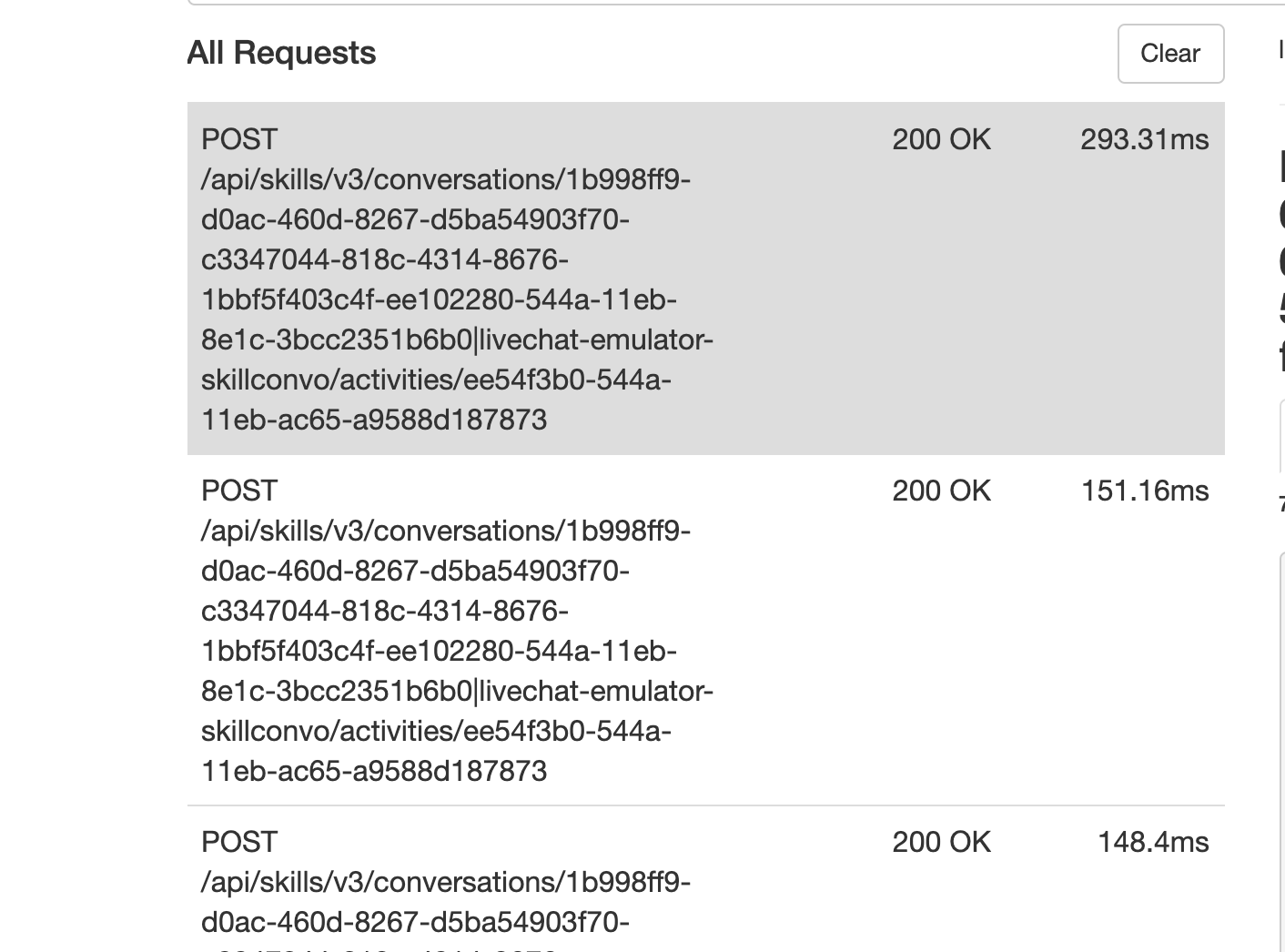
The 404 in your ngrok view (/api/skill/v3/conversations/1be3fa73-2b18-4ac5-ad7f-f1652b087e0c-c302 404 Not Found) could be a problem. I just tried calling a remote skill and this is a snapshot that i receive.
srinaath
on 11 Jan 2021
Got it.
Thanks @pedro-ramirez-suarez.. Lets handle the first failure case of local RootBot(Consumer Bot) when trying to connect to the remote skills failing with the 500 status error. (response to
when I run the skills and the bot locally everything works fine; when I publish the skills and I try to connect to any of the remote skills from my local bot I get a 500 error)Could you expand on the 500 error that you are getting (the error message).?
- Are you able to connect just to one remote skill from Bot Framework Emulator using the MsAppId and MsPass of the skill without Composer in the picture?
- Does the allowedCallers setting of the remote skill you just deployed have the MsAppId of the Root Bot that is calling it? You can check this in your azure portal under the bot's appsettings.json or can do a reploy of the skill using Composer.
- You had already mentioned that allowedCaller setting of the root bot has the MsAppId of the remote skill that its calling which is also a mandatory step.
The 404 in your ngrok view (/api/skill/v3/conversations/1be3fa73-2b18-4ac5-ad7f-f1652b087e0c-c302 404 Not Found) could be a problem. I just tried calling a remote skill and this is a snapshot that i receive.
_Are you able to connect just to one remote skill from Bot Framework Emulator using the MsAppId and MsPass of the skill without Composer in the picture?_
Yes, I can connect to the skill; doing this at the end of the execution I get an Object reference not set to an instance of an object. error, actually, all my skills end with that error when I access them directly via the emulator.
_Does the allowedCallers setting of the remote skill you just deployed have the MsAppId of the Root Bot that is calling it? You can check this in your azure portal under the bot's appsettings.json or can do a reploy of the skill using Composer._
Yes, I have the app id of the caller, previously I didn't have that id and I was getting a 401 error.
_You had already mentioned that allowedCaller setting of the root bot has the MsAppId of the remote skill that its calling which is also a mandatory step._
Yes, I already have that.
About the 500 error, this is what I get on the emulator:
Error invoking the skill id: “c302550f-6825-4711-ad4c-30c1eeb724e6” at “https://devlicenseplateskillbot-dev.azurewebsites.net/api/messages” (status is 500).
This is the detail of the message from the emulator:
{
  "channelId": "emulator",
  "conversation": {
    "id": "897989e0-5451-11eb-82c5-a309b909e217|livechat"
  },
  "from": {
    "id": "89793bc0-5451-11eb-a602-05e38b44e658",
    "name": "Bot",
    "role": "bot"
  },
  "id": "9078c490-5451-11eb-82c5-a309b909e217",
  "inputHint": "acceptingInput",
  "localTimestamp": "2021-01-11T13:11:25-08:00",
  "locale": "en-US",
  "recipient": {
    "id": "6bf9e9c5-9312-467a-86b8-4b02a7c70922",
    "role": "user"
  },
  "replyToId": "8bb214c0-5451-11eb-82c5-a309b909e217",
  "serviceUrl": "https://f63050d15a5b.ngrok.io",
  "text": "Error invoking the skill id: \"c302550f-6825-4711-ad4c-30c1eeb724e6\" at \"https://devlicenseplateskillbot-dev.azurewebsites.net/api/messages\" (status is 500). \r\n ",
  "timestamp": "2021-01-11T21:11:25.785Z",
  "type": "message"
}
@pedro-ramirez-suarez Thank you. Im afraid i have exhausted my remote debugging ways on this issue. Is there any way you can give me the zipped up bot solution so that I can further debug on my end. My microsoft email id is [email protected].
srinaath
on 11 Jan 2021
Hi @srinaath ,
I'll be sending you my project by email, my email is ([email protected]).
Thanks.
pedro-ramirez-suarez
on 12 Jan 2021
@pedro-ramirez-suarez @srinaath could you please check the the azure webapp appid and the appid in manifest are matched?
 luhan2017
on 12 Jan 2021
luhan2017
on 12 Jan 2021
@pedro-ramirez-suarez could you confirm the msAppID in your manifest file (also the msAppId included in allowedCallers list of the root bot) is the same msAppId that was created in the Bot Registration resources created as a part of bot deployment correct?
srinaath
on 12 Jan 2021
Closing this ticket. The issue was an invalid MsAppId for the consumer bot and the need to configure MsAppId's for all the skills when one of them is remote.
srinaath
on 14 Jan 2021
Related issues
 stephanbisser
·
21Comments
stephanbisser
·
21Comments
 rudrasingh21
·
34Comments
rudrasingh21
·
34Comments
 KoradaRajesh
·
25Comments
KoradaRajesh
·
25Comments
 sujeongHeo
·
24Comments
sujeongHeo
·
24Comments
 selmi5
·
17Comments
selmi5
·
17Comments