Botframework-composer: Error in invoking Skill ID .. ""http://localhost:3980/manifests/EmptyBot-0-2-0-0-manifest.json AND "Value cannot be null. (Parameter 'uriString')"
HI Team I am getting error while working with Skill in bot framework Composer .
I tried many combination to make this work, but all the time I am getting different error.
Recent ERROR:--
Error invoking the skill id: “003eedb4-1991-403c-b848-9536ce1b5bb8” at “http://localhost:3980/manifests/EmptyBot-0-2-0-0-manifest.json” (status is 404).
I followed this doc to work with Skill bot :-
https://docs.microsoft.com/en-us/composer/how-to-connect-to-a-skill
But thinks are not working for me .
Can you help please?
Other details :-- Using version V1.02 of composer
on V1.0.1 , i am facing the same issue
 rudrasingh21
All 34 comments
Bot setting at consumer bot--
{
"feature": {
"UseShowTypingMiddleware": false,
"UseInspectionMiddleware": false,
"RemoveRecipientMention": false
},
"MicrosoftAppPassword": "",
"MicrosoftAppId": "",
"cosmosDb": {
"authKey": "",
"collectionId": "botstate-collection",
"cosmosDBEndpoint": "",
"databaseId": "botstate-db"
},
"applicationInsights": {
"InstrumentationKey": ""
},
"blobStorage": {
"connectionString": "",
"container": "transcripts"
},
"luis": {
"name": "",
"authoringKey": "",
"authoringEndpoint": "",
"endpointKey": "",
"endpoint": "",
"authoringRegion": "westus",
"defaultLanguage": "en-us",
"environment": "composer"
},
"publishTargets": [],
"qna": {
"knowledgebaseid": "",
"endpointkey": "",
"hostname": ""
},
"telemetry": {
"logPersonalInformation": false,
"logActivities": true
},
"runtime": {
"customRuntime": false,
"path": "",
"command": ""
},
"downsampling": {
"maxImbalanceRatio": 10,
"maxUtteranceAllowed": 15000
},
"skill": [
{
"manifestUrl": "http://localhost:3980/manifests/EmptyBot-0-2-0-0-manifest.json",
"name": "SkillBOT"
}
],
"botId": "",
"skillHostEndpoint": "http://localhost:3980/manifests/EmptyBot-0-2-0-0-manifest.json"
}
NOTE:- I tried giving :- "endpointUrl": "http://localhost:3980/api/messages", as well but not worked
rudrasingh21
on 19 Jul 2020
at Consumer bot side:-
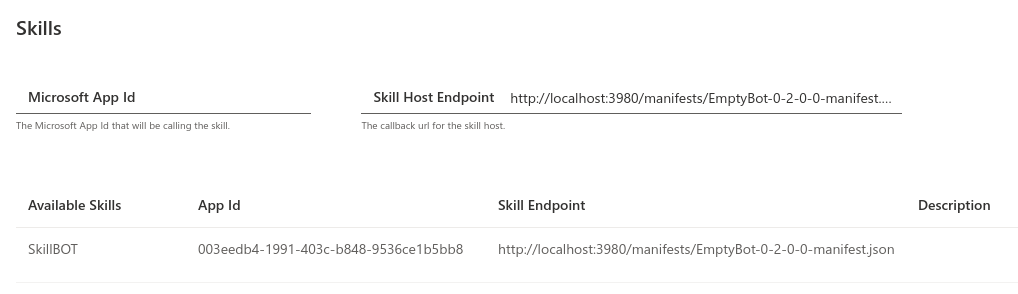
rudrasingh21
on 19 Jul 2020
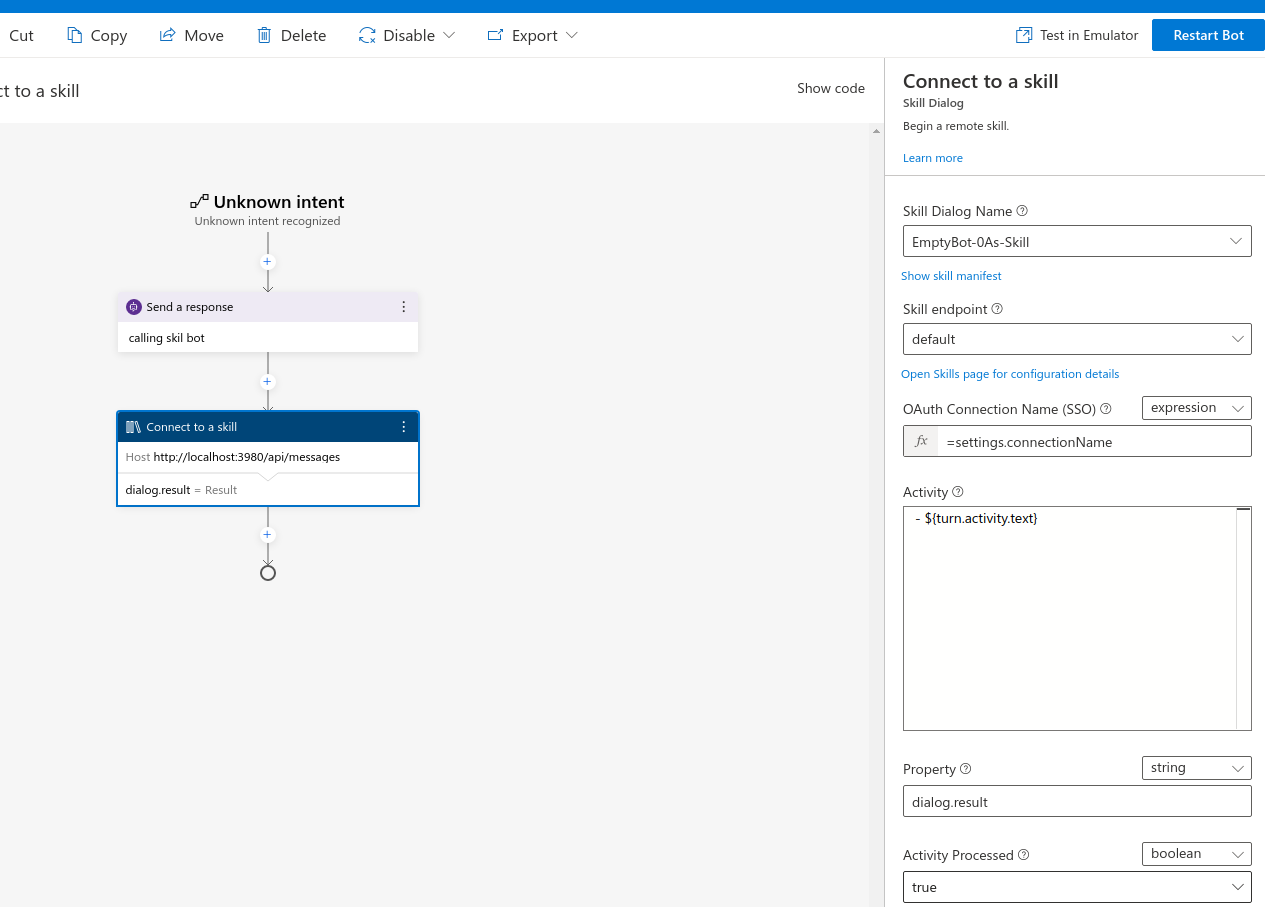
at Consumer Bot side:-

rudrasingh21
on 19 Jul 2020
At Skill BOT Side:-
{
"$schema": "https://schemas.botframework.com/schemas/skills/skill-manifest-2.0.0.json",
"$id": "EmptyBot-0",
"name": "EmptyBot-0As-Skill",
"version": "EmptyBot-0As-Skill",
"publisherName": "EmptyBot-0As-Skill",
"endpoints": [
{
"name": "default",
"protocol": "BotFrameworkV4",
"description": "Production endpoint for SkillBot.",
"endpointUrl": "http://localhost:3980/api/messages",
"msAppId": "003eedb4-1991-403c-b848-9536ce1b5bb8"
}
],
"activities": {
"message": {
"type": "message",
"description": "A message activity containing the utterance that the skill will echo back to the user"
}
}
}
rudrasingh21
on 19 Jul 2020
Could you please help me on this? I am expecting some quick help , as I know there is some config , I am missing .
rudrasingh21
on 19 Jul 2020
Other way , I am getting below error:-
Error invoking the skill id: "003eedb4-1991-403c-b848-9536ce1b5bb8" at "http://localhost:3980/api/messages" (status is 500).
rudrasingh21
on 19 Jul 2020
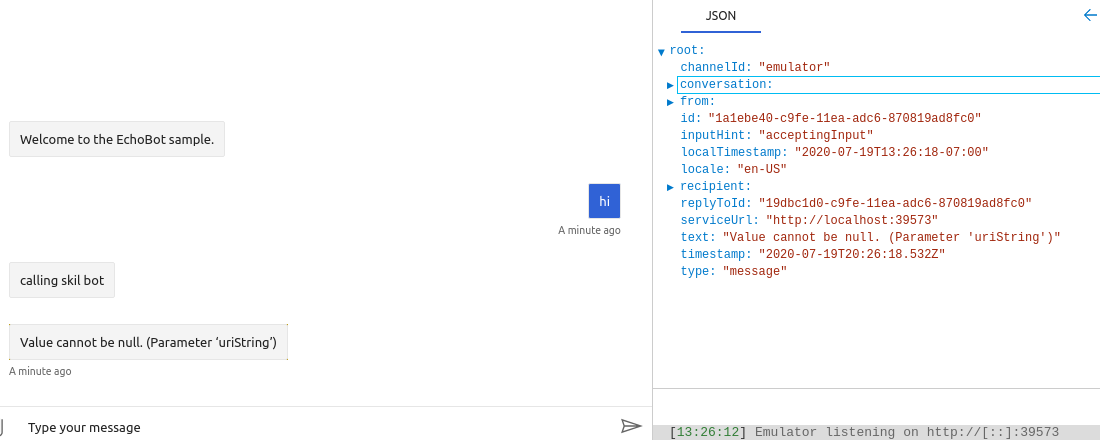 rudrasingh21
on 19 Jul 2020
rudrasingh21
on 19 Jul 2020
Request you to help , please.
rudrasingh21
on 19 Jul 2020
It looks like your 'Skill Host Endpoint' on the Skills page is set incorrectly. It should be something like http://localhost:<port-number>/api/skills. You also need to generate app ids and passwords for both the parent and skill bots in the Azure portal.
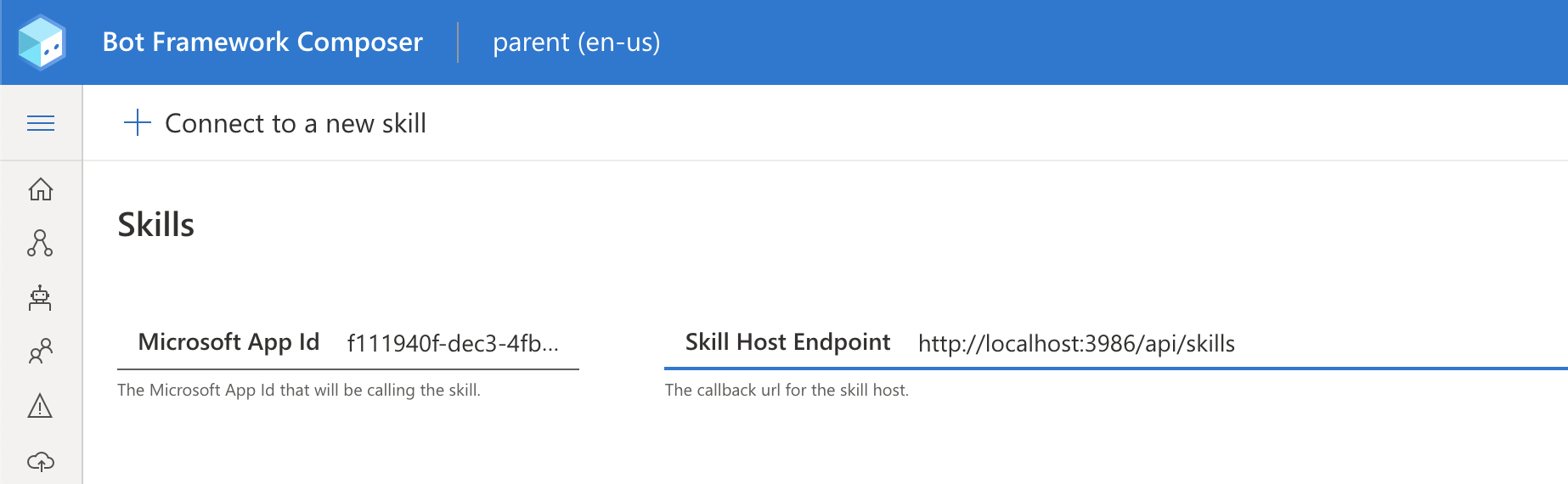
 tdurnford
on 20 Jul 2020
tdurnford
on 20 Jul 2020
Hi @tdurnford ,
I tried using http://localhost:
And getting same error, I shared above.
And these both BOT Skill and Consumer is running locally.
I HAVE NOT GENERATED APP ID AND PASSWORD FOR BOTH BOT BECAUSE I AM RUNNING IS LOCALLY.
I READ ONE MS document that it is not required .
When I used app id and password for consumer bot , it throws error 400 .
I think it is not required for running both bot locally.
Still, DO YOU THINK , I NEED TO DO THAT IN THIS CASE ?
AND IF YES , can you share a doc for the same which I can follow.
rudrasingh21
on 20 Jul 2020
@rudrasingh21 , you need appid and apppassword for both bots, caller and caller even run it locally, because we are using the appid and password for the authentication part.
 luhan2017
on 20 Jul 2020
luhan2017
on 20 Jul 2020
Ok , Sure @luhan2017 : a quick question:-
on --> You also need to generate app ids and passwords for both the parent and skill bots in the Azure portal.
Do i need to register for 2 different bot channel registration ?
Or same appid and apppassword for both bots?
rudrasingh21
on 20 Jul 2020
And yes @luhan2017 on issue #3430 , that was not working on my windows machine , So I installed it on VM , Ubuntu machine.
Thanks for your support there.
rudrasingh21
on 20 Jul 2020
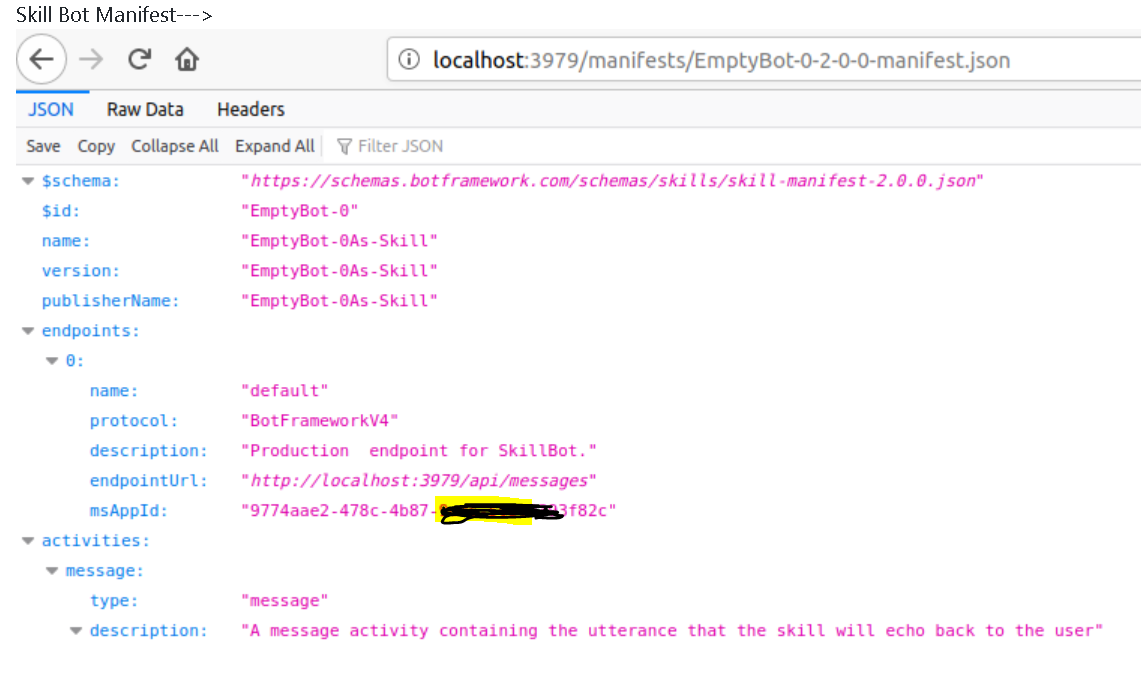
I have created 2 bot channel registration on Azure . One for Skill bot and other for Consumer Bot.
In the Skill bot:-
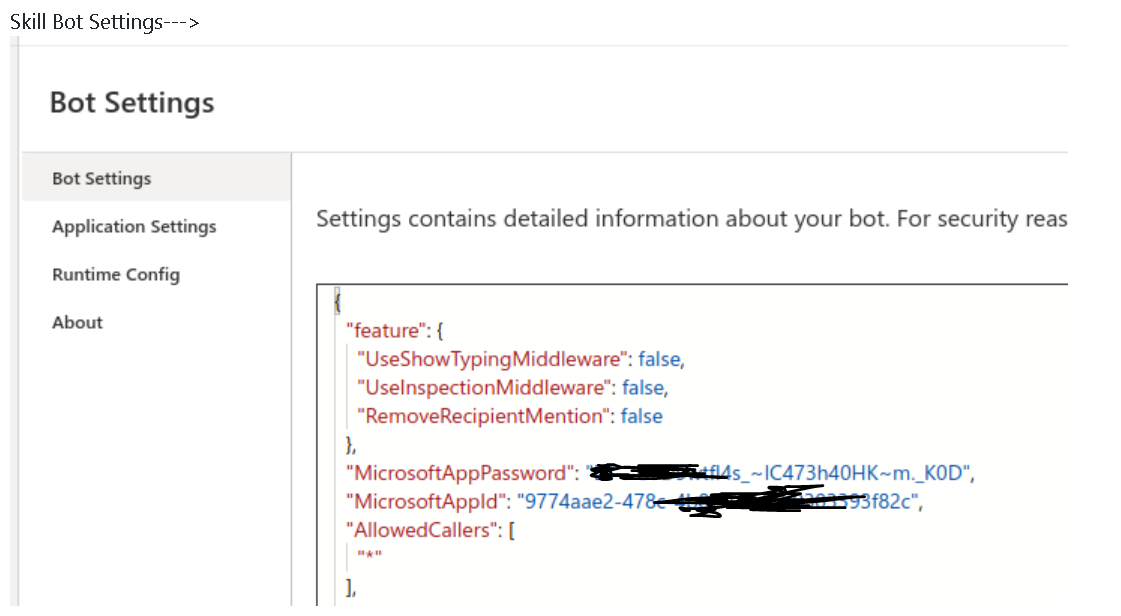
In Bot Setting , I provided AppID and Pass which I generated on Azure portal (Bot channel registration)
As well , I provided AppID in manifest as well.
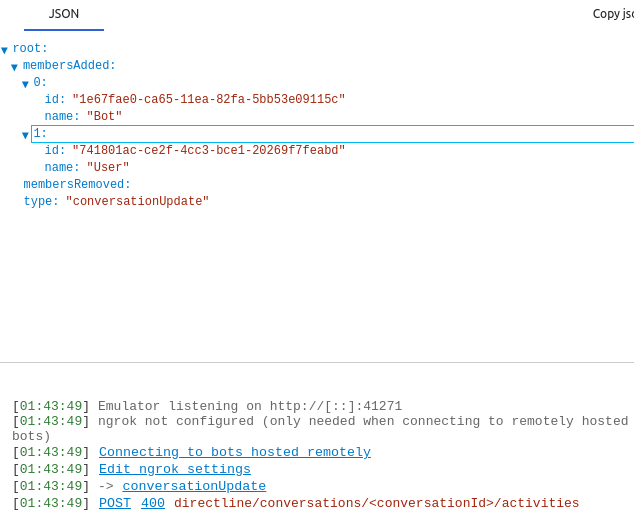
Now this Skill bot throws error when I am testing it in emulator
Skill Bot Manifest--->
Skill Bot Settings--->
Now , while testing even Skill bot in emulator , it is throwing Error:-
rudrasingh21
on 20 Jul 2020
Kindly Help
rudrasingh21
on 20 Jul 2020
Hi Team , Can we connect and resolve this issue .
rudrasingh21
on 20 Jul 2020
@rudrasingh21 Unfortunately, yes. Even though you are running your skill locally, you still need to generate different app ids and passwords for the parent and skill bots.
In regard to the 400 error in the Emulator you are experiencing, can you try double checking all of your app id and passwords and restarting the conversation in the emulator a few times after you restart the bot? Sometimes it takes a few moments for the bot to start up and the emulator to connect to it correctly.
tdurnford
on 20 Jul 2020
@tdurnford :- I generated different app ids and password for Skill and Consumer bot.
Now when I am using AppID and Password in both bots respectively , even without adding up skills , bot is not responding , It is throwing 400 error all the time .
I tried it multiple time , but no luck.
rudrasingh21
on 20 Jul 2020
@rudrasingh21 , could you double check if your bot port is updated after restarting? 400 usually means there is not a bot serving on that endpoint.
luhan2017
on 21 Jul 2020
@luhan2017 : I have checked and tried multiple times.
Both bot ( using from template empty and echo bot ) individually works fine. As soon as , I use Microsoft app id and password . it starts throwing error 400.
When I am not using Microsoft app id and password and use skill bot in consumer bot , it throws error :-- " error invoking the skill id: “003eedb4-1991-403c-b848-9536ce1b5bb8” at “http://localhost:3980......................."
rudrasingh21
on 21 Jul 2020
@rudrasingh21 , I have tried this locally, it works fine in my side, is there anything special in your environment? I have tried several scenarios which might cause issue, incorrect App password will get 401(unauthorized), querying another endpoint will get 400. I wonder what is the timezone in your side? could we have a quick call on this?
luhan2017
on 21 Jul 2020
Yes , Please . A quick call can help to resolve this . How can we connect ?
rudrasingh21
on 21 Jul 2020
@luhan2017:
I am now able to connect Consumer and skill bot By using AppID and Pass for both the BOTS.
Thanks .
But the issue is , now I am getting Error:-
Value cannot be null. (Parameter 'uriString') [ FIxed ]
then other error:-
Object reference [ Fixed ]
Now I am getting Error:-
"
Error invoking the skill id: "9774aae2-478c-4b87-9ce5-50303393f82c" at "http://localhost:3979/api/messages" (status is 500).
"
rudrasingh21
on 21 Jul 2020
I would request you or anyone from your team to connect and check for this issue.
rudrasingh21
on 21 Jul 2020
@rudrasingh21 , sorry for the late response, I am in Beijing, what time do you prefer for a call? Can we use Teams? you can setup a meeting with me ([email protected]) or let me know your email address, I can try to setup a meeting.
luhan2017
on 21 Jul 2020
My email address is [email protected] , I don't have account on teams , I can use it if it allows guest.
Let me know your comfortable time , I will join.
10 AM IST would be fine for me.
rudrasingh21
on 21 Jul 2020
@rudrasingh21 , I've send you a meeting invitation, please let me know if it does not work for you.
luhan2017
on 22 Jul 2020
Thanks @luhan2017 , I have received meeting Invitation . Let's connect.
rudrasingh21
on 22 Jul 2020
Thanks @luhan2017 for quick connect .It is working perfectly now after giving skillHostEndpoint .
A big thanks to you.
rudrasingh21
on 22 Jul 2020
Hi - I am working on similar above requirement and configured both skill bot and consumer bot , but getting below error when trying to call skill bot from consumer bot locally in emulator.
Error is : Object reference not set to an instance of an object.
Please suggest if any configuration steps , I am missing.
Note, I am using different appid/passwd for both skill bot and consumer bot.
Thanks
Aavi
 Aavi2105
on 24 Jul 2020
Aavi2105
on 24 Jul 2020
Hi - I found that i did not add "- ${turn.activity.text}" in "connect to a skill" step , after adding this "object Reference ....." error is gone, but getting below error , which is similar to what error came above. Please suggest what step I am missing in configuration setting.
Error invoking the skill id: “3616df17-8c17-40b2-8247-968814832a3d” at “http://localhost:3979/api/messages” (status is 500).
Thanks
Aavi
Aavi2105
on 24 Jul 2020
@Aavi2105 could you double check the skillHostEndpoint in your parent bot ? It should be set to http://parentboturl/api/skills. Please let me know if it still not works.
luhan2017
on 24 Jul 2020
Thanks @luhan2017 for quick response. Yes, I am using the same format as you have mentioned, but still getting the same error. PFB screen shot.
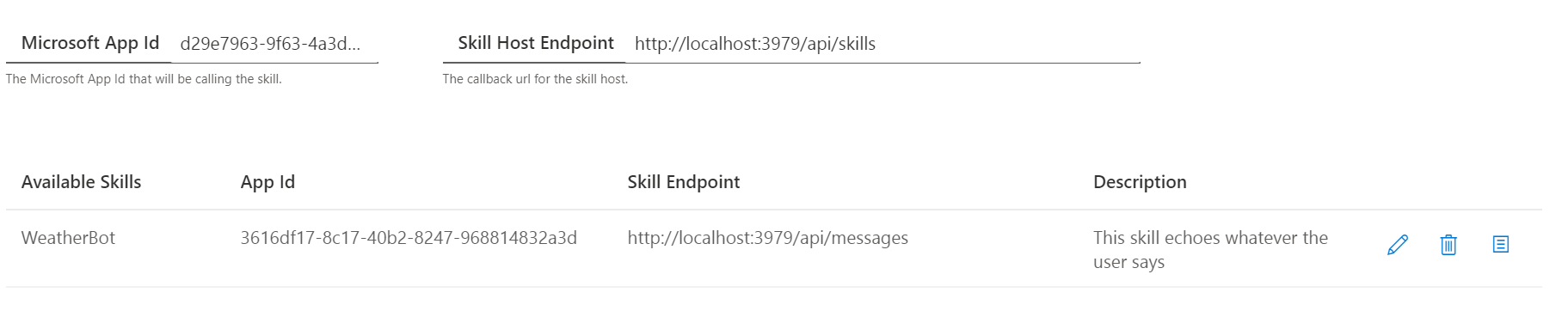
Aavi2105
on 24 Jul 2020
@luhan2017 :- Just realized that skillhostendpoint should be consumer bot url, which I have given the skill bot endpoint url , which was incorrect. Just updated this to consumer bot url and it is triggering now. Thanks for your help.
Aavi2105
on 24 Jul 2020
Related issues
 Laxmi30
·
16Comments
Laxmi30
·
16Comments
 kalebk
·
16Comments
kalebk
·
16Comments
 gbelenky
·
22Comments
gbelenky
·
22Comments
 arafattehsin
·
15Comments
arafattehsin
·
15Comments
 Samirun
·
13Comments
Samirun
·
13Comments