Botframework-composer: Published Bot to Azure but not sure where to get the manifest URL https link to publish to PVA
Describe the bug
I followed the directions, here: https://docs.microsoft.com/en-us/composer/how-to-publish-bot#create-azure-resources to publish a bot composer bot to Azure Web App, with success. However, how do I get the manifest URL?
Version
1.3
Browser
- [ ] Chrome
OS
- [ ] Windows
To Reproduce
Steps to reproduce the behavior:
Publish a bot to Azure Web App, as in the directions in the article (created azure resources, published bot) Bot is published to Azure with success - verified by testing in web chat in azure. However, I'd like to try for the first time to import this skill bot to PVA, from within PVA. To do this, you need to go to PVA > choose a bot > manage > Skills > add a skill and enter the skill manifest URL (requires a https:// link). When I look at the azure web app I published in app registrations, the home page URL is blank. I can see the uploaded manifest though. If I look at it in resource groups, I do see a messaging endpoint.
Expected behavior
Not sure where to get the manifest URL so I can import the skill into PVA. I saw this article: https://www.arafattehsin.com/empower-your-existing-power-virtual-agents-with-bot-framework-skills-%f0%9f%a4%96/ where it is noted that there is a bug and to change the Home Page URL manually by going to the app registration, but I'm not sure what the URL there should be or how to construct it.
Screenshots
Additional context
Through this article (https://docs.microsoft.com/en-us/power-virtual-agents/advanced-use-skills), says you can create and deploy the skill using pro-code tools, but the link sends you to the homepage of bot framework solutions documentation and I didn't find anything there about deploying a skill (new to bot framework).
 DS2019
All 11 comments
@DS2019 The manifest URL : "https://_skillbot-dev_.azurewebsites.net/manifests/_skillbot-manifests.json_"

 hibrenda
on 16 Dec 2020
hibrenda
on 16 Dec 2020
@zxyanliu we also have same issue how to get manifest url f a remote skill? or atleast how to construct it?
 Samirun
on 17 Dec 2020
Samirun
on 17 Dec 2020
Yes, agree with Samirun on the manifest - to get a bot published to Azure Web App and try to publish to PVA via the manifest URL, I've needed to go to several documents online (new to Azure and Bot Composer) - and I've not seen yet how to construct the manifest step by step from what you get with the Azure Web App publish.
DS2019
on 17 Dec 2020
FYI. I am working on the content you guys requested on the docs patch releases.
 zxyanliu
on 17 Dec 2020
zxyanliu
on 17 Dec 2020
That is wonderful news, thank you!
DS2019
on 17 Dec 2020
Apologies for the delay because of the holiday season and we writers have many details to check with our developers before publishing the docs. Will keep you informed on this. Thanks for your patience! : -)
zxyanliu
on 17 Dec 2020
Hi, I tested today and while waiting for the docs to be published, I'd like to answer your question so that you do not get blocked.
Thanks to @luhan2017 who helped troubleshoot for me. : -)
Question: how to get the manifest URL after you publish your skill to Azure?
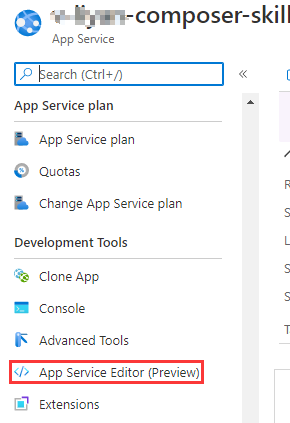
Select the App Service resource you just published.

Select App Service Editor (Preview) from the menu (under the Development Tools section)
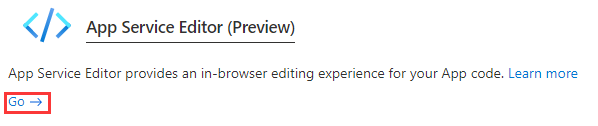
Select Go->
Access your skill manifest in the following directory:
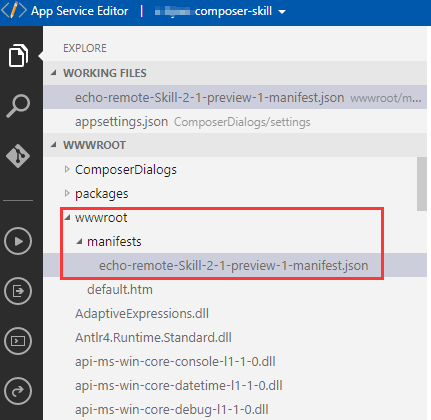
Now you will see in the browser, the following URL:
https://composer-skill.scm.azurewebsites.net/dev/wwwroot/wwwroot/manifests/echo-remote-Skill-2-1-preview-1-
manifest.json
This is not your remote skill URL. Your remote skill manifest URL should be:
https://composer-skill.azurewebsites.net/manifests/echo-remote-Skill-2-1-preview-1-manifest.json
Other important details:
- Before publishing your skill, it is strongly recommended that you set your skill's
allowedCallersproperty to associate it with the caller. SetallowedCallersto be "*" to allow all caller.
- You must update the
endpoint URLandmsAppIdof your remote skill manifest after publishing it to Azure.

I will try to get the content added ASAP. Thanks again for your feedback.
zxyanliu
on 18 Dec 2020
@DS2019 FYI. I created a FAQ thread for this particular issue you brought up. The docs have just been published to docs.microsoft.com
Please let me know if you are still blocked for anything...
https://docs.microsoft.com/en-us/composer/faq/composer-faq
zxyanliu
on 18 Dec 2020
@DS2019 are you still blocked?
zxyanliu
on 30 Dec 2020
@DS2019 I am wondering if you are still blocked and if I should close this issue as the doc has been updated. :-)
Please let us know if you still have any questions.
zxyanliu
on 5 Jan 2021
Per @Samirun's request in the email: "sorry for the late response. we can close this issue".
I am closing this issue because it has been addressed.
zxyanliu
on 6 Jan 2021
Related issues
 sujeongHeo
·
15Comments
sujeongHeo
·
15Comments
 yochay
·
15Comments
yochay
·
15Comments
 Laxmi30
·
16Comments
Laxmi30
·
16Comments
 Kagigz
·
26Comments
sujeongHeo
·
24Comments
Kagigz
·
26Comments
sujeongHeo
·
24Comments