Botframework-composer: Trying to escape placeholders in bot composer fails.....
We currently pull in JSON from an api and build a product carousel with it using the following code in bot composer.
ProductsCarousel()
[Activity
Attachments = ${json(adaptivecardjson1())} | ${json(adaptivecardjson2())} | ${json(adaptivecardjson3())} | ${json(adaptivecardjson4())} | ${json(adaptivecardjson5())}
AttachmentLayout = carousel
]
With the json(adaptivecardjson1() etc specified in the same way as the example project (be it with dynamic content for title, image)
This works fine as long as 5 products or more come back on the api otherwise the carousel fails. As such I have been trying to concatenate a sequence from looping the array building each of the 5 parts on each iteration. Every time the part renders e.g. ${json(adaptivecardjson1())} bot composer is trying to evaluate the property. I can get the parts working using .dialog.foreach.index fine and now stuck trying to escape the placeholders. I have tried the following to get the statement to output as a string:
(backlash) as the character won't render on github....
(backlash)${json(adaptivecardjson1())}
'(backlash)${json(adaptivecardjson1())}'
(backlash)'${json(adaptivecardjson1())}'
and a million others but cannot stop it attempting the evaluation. To add a little more complexity I am trying to nest this inside an IF statement as follows:
=if(dialog.foreach.index == 0,'${json(adaptivecardjson${dialog.foreach.index}())} ', '| ${json(adaptivecardjson${dialog.indexadd}())}')
If I take the curly brackets out at any point ey voila everything works........is this a bug or my syntax?
Composer Version 1.1.1 and emulator
Windows 10
Steps to reproduce the behavior:
- As described above....
Expected behavior
The if statement to product the following as a literal text string:
${json(adaptivecardjson1())} | ${json(adaptivecardjson2())} | ${json(adaptivecardjson3())} | ${json(adaptivecardjson4())} | ${json(adaptivecardjson5())}
 philip-mc
All 14 comments
Hi @philip-mc - Rather than trying to achieve this with a complex LG template with embedded expressions, I would suggest capturing the search results into an array property and using the foreach and join methods to build the carousel.
 benbrown
on 3 Nov 2020
benbrown
on 3 Nov 2020
Hey,
Thanks for responding.........
So the LG template is no more complex that the example project bar a couple of dynamic bits of content (note the carousel creates absolutely fine all I am trying to do is build the string for the attachments as I do not always have 5 results in the search coming back from our website) for example:
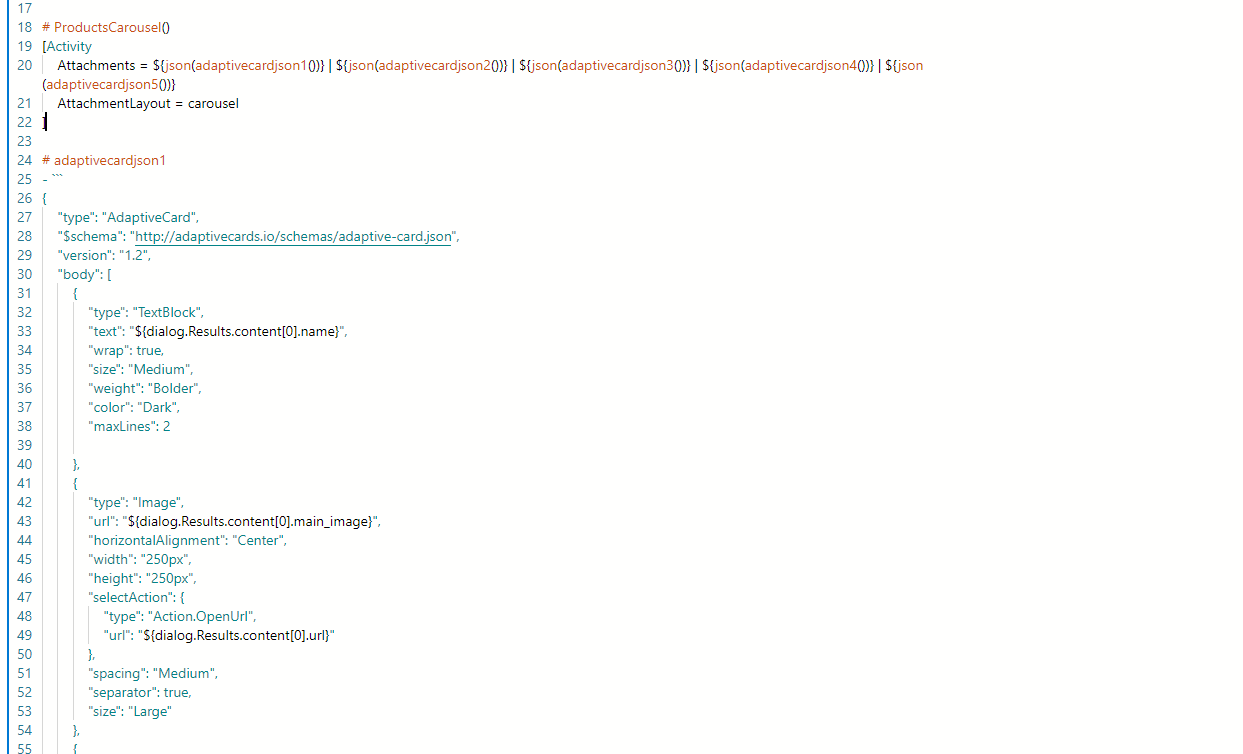
So I tried your idea of editing an array with the following settings:
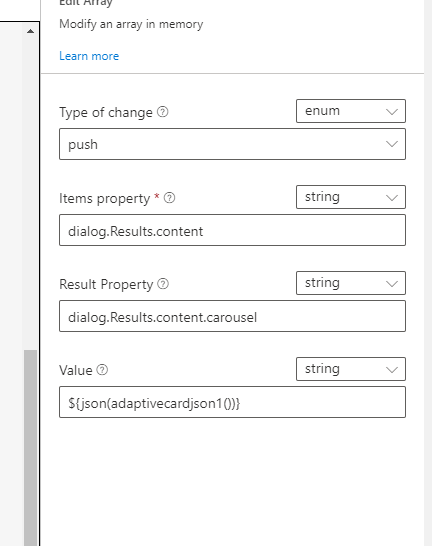
And I still get the following issue as I think composer is trying to evaluate the property rather than leave it as a string:
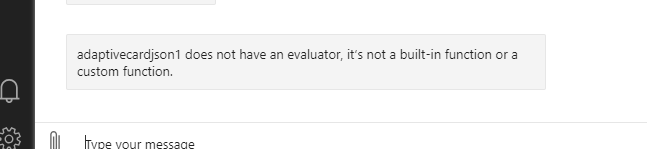
I am trying to apply this JS logic:

Hopefully that explains things a little better.
philip-mc
on 6 Nov 2020
Hello,
Please can I bump this one - happy to jump on a Teams call if needed to discuss.
Thanks
philip-mc
on 16 Nov 2020
hi @philip-mc Sorry for the delay. I'm looking into this and i'll update you soon.
 dmvtech
on 17 Nov 2020
dmvtech
on 17 Nov 2020
Ok cool appreciate the update. Let me know if anything needs clarification.
philip-mc
on 17 Nov 2020
Hello,
Im about to need to use this for a project going live - if tis not do able please let me know and I will attempt a workaround.
philip-mc
on 25 Nov 2020
Any update please?
philip-mc
on 30 Nov 2020
@philip-mc if i understand correct, you want to build a dynamic carousel based on an array in the memory, right? I'm working on an example of that, and will give you a concrete example of how to do that today.
I want to explain some underlyings first, actually, even if you can concat the string correctly, you won't be able to render the correct carousael. Because, in line 20 below, what the attachments property takes is an array, it's not a plain string.

The easiest way to do a dynamic list is simply do a foreach at the attachments property, something like this
# Products
[Activity
  Attachments = ${foreach(dialog.results.content, x, json(adaptiveCardJson(x))}
  AttachmentStyle = carousel
]
# adaptiveCardJson(item)
....
 boydc2014
on 1 Dec 2020
boydc2014
on 1 Dec 2020
you can use such a LG file to achive your requirements:
# ProductsCarousel()
[Activity
    Attachments = ${GetAdaptiveCards()}
    AttachmentLayout = carousel
]

# GetAdaptiveCards()
- ${foreach(dialog.Results.content, u, json(GetAdaptiveCard(u)))}

# GetAdaptiveCard(content)
- ```
{
  "type":"AdaptiveCard",
  "$schema":"http://adaptivecards.io/schemas/adaptive-card.json",
  "version":"1.2",
  "body": [
    {
        "type":"TextBlock",
        "text":"${content.name}",
        "wrap": true,
        "size": "Medium",
        "weight":"Bolder",
        "color":"Dark",
        "maxLines":2
    },
    {
        "type":"Image",
        "url":"content.main_image",
        "horizontalAligment":"Center",
        "width":"250px",
        "height":"250px",
        "selectAction":{
            "type":"Action.OpenUrl",
            "url":"${content.url}"
        },
        "spacing":"Medium",
        "separator":true,
        "size":"Large"
    }
  ]
}```
 Danieladu
on 1 Dec 2020
Danieladu
on 1 Dec 2020
Thank you @Danieladu and @boydc2014.
I was able to implement this myself successfully. I was trying to do the foreach with actions, but this approach is a lot more clean.
@philip-mc Please let us know if this works for you or if you have any further questions.
dmvtech
on 1 Dec 2020
I'm closing this as resolved. @philip-mc Please let us know if you have any further questions or need clarification.
dmvtech
on 4 Dec 2020
Morning,
Sorry mad delay getting back. So yes this solution works and is rather elegant many thanks :D
Can someone please just explain what is actually going on in this step for my understanding - - ${foreach(dialog.Results.content, u, json(GetAdaptiveCard(u)))}
Secondly if we wanted to limit this 5 or 10 items how we we do this?
philip-mc
on 13 Jan 2021
This uses the foreach expression to iterate over each item in dialog.Results.content. Each item is then stored in the property u, and then passed into the iterator function json(GetAdaptiveCards(u)). The result of this is an array containing the JSON of a card for each item.
This part, json(GetAdaptiveCards(u)) shows the process of generating the json with an LG rule GetAdaptiveCards and then ensuring it is in the JSON data format using json()
Hope this helps!
benbrown
on 13 Jan 2021
Thanks for following up @philip-mc letting us know that it worked for you.
Not that I knew the answer either 😅, but here is the documentation for it :
https://docs.microsoft.com/en-us/azure/bot-service/adaptive-expressions/adaptive-expressions-prebuilt-functions?view=azure-bot-service-4.0#foreach
dmvtech
on 13 Jan 2021
Related issues
 saikumaru
·
18Comments
saikumaru
·
18Comments
 hraz-msft
·
21Comments
hraz-msft
·
21Comments
 sujeongHeo
·
15Comments
sujeongHeo
·
15Comments
 KoradaRajesh
·
25Comments
KoradaRajesh
·
25Comments
 DS2019
·
21Comments
DS2019
·
21Comments
Most helpful comment
This uses the
foreachexpression to iterate over each item indialog.Results.content. Each item is then stored in the propertyu, and then passed into the iterator functionjson(GetAdaptiveCards(u)). The result of this is an array containing the JSON of a card for each item.This part,
json(GetAdaptiveCards(u))shows the process of generating the json with an LG ruleGetAdaptiveCardsand then ensuring it is in the JSON data format usingjson()Hope this helps!