Botframework-composer: Add a Publish Profile > Publish Bot to PVA > No Bots Found
Describe the bug
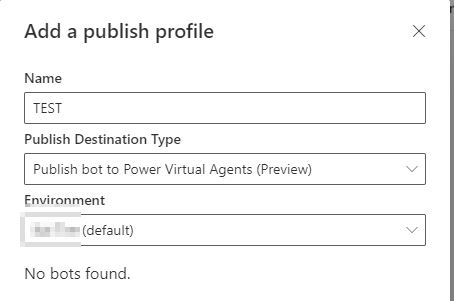
In our default environment (and only environment) in our test tenant, I am trying out the Add a Publish Profile in Bot Composer and attempting to Publish my bot to PVA. We have 4 published bots and yet the message I get is "no bots found." Does anyone know why the Publish can't find the bots (it did find the default environment)?
Version
Latest: 1.21
Browser
- [ ] Chrome
OS
- [ ] Windows
To Reproduce
Steps to reproduce the behavior:
In Bot Composer, go to publish and choose "Add new profile"
Give profile a name, choose destination type as "Publish Bot to PVA" > Login with my test tenant account > message back after it finds the default environment is "no bots found." There are 4 published PVA bots here.
Expected behavior
I expected it would publish to PVA and find the bots.
Screenshots
Additional context
 DS2019
All 21 comments
Hi @DS2019 ,
When you go to manage your bots in PVA, what URL are you accessing them at?
Does the URL look something like this? https://powerva.microsoft.com/environments/<environment>/bots/<botId>
There are different management URLs and the publishing UI only targets one of them, so I'm wondering if your bots are on one of the other URLs.
 tonyanziano
on 10 Dec 2020
tonyanziano
on 10 Dec 2020
Hi there,
Thanks!
For one of our bots called Automation Tests, this is the URL when I click “Home” for that bot:
[cid:[email protected]]
Here is another bot, Create Bots with PVA:
[cid:[email protected]]
They both have the format for the URL as you have shown.
Appreciate the help!
DS2019
on 10 Dec 2020

DS2019
on 10 Dec 2020
Hmmm, ok that looks to be the right environment. Let me do some digging around in the code and see if there is a good way to debug this.
tonyanziano
on 10 Dec 2020
Thanks! Anything I can do or info\config you'd like me to provide, just let me know.
DS2019
on 10 Dec 2020
Ok, bear with me here, but I would like you to try something.
Find where Composer is installed on your machine. You can do this by right-clicking the Composer shortcut and looking at the Properties, or by selecting "Open file location" until you end up in the directory.
Open a CMD prompt or terminal of your choice and navigate to the install directory from step 1.
run the following command in the terminal:
set DEBUG=composer*Start Composer via the terminal:
"Bot Framework Composer.exe"You should see a bunch of output in the terminal that looks like this:
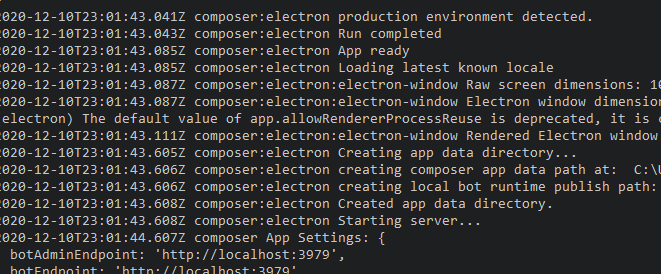
Now try to create a new PVA publishing profile, and login. After you login, you should see a log entry in the terminal from which you launched Composer that looks like this:
composer:electron:one-auth Acquired access token. eyJ0eXAiOiJKV1QiLCJyaCI6IjAuQWdBQXY0ajVjdkdHcjBH ... aZWZKdm9vMmVNSV9rIiwidGlkIjoiNzJmO
Copy that access token. I'm going to have you use it to manually hit the bots endpoint for your environment where your bots should be listed.
Open Postman or some other utility that allows you to make HTTP requests. (I can help you with this step if you are unfamiliar with this.)
Make a GET request to the following URL:
https://powerva.microsoft.com/api/botmanagement/v1/environments/<environment ID>/bots
with the following headers:
X-CCI-TenantId: <Your tenant ID>
X-CCI-Routing-TenantId: <Your tenant ID>
You can find your tenant ID in the Azure portal.
You are going to need to use the access token you copied from the terminal as a Bearer authorization header as well.
- Let me know what the response is that you get back from the request.
Please let me know if you need me to help out with gathering any of this information, or if any of it is confusing. I can help out.
tonyanziano
on 11 Dec 2020
Fabulous instructions, thank you! Here's the request response (with GUIDs obfuscated with XXXX):
[
{
"id": "df1eXXXX",
"aadTenantId": "6168XXXX",
"name": "Teams Channel Test",
"region": {
"id": "Default-6168XXXX",
"displayName": null,
"primarySecurityGroupId": null,
"default": false,
"url": null,
"expiration": null,
"expiringInDays": null,
"locationId": null,
"locationDisplayName": null,
"environmentSku": null,
"isLiteSku": null,
"isTeamsLinked": false
},
"regionId": "Default-6168XXXX",
"cdsBotId": "df1eXXXX",
"users": [],
"provisioningStatus": 501,
"isManaged": null,
"isCustomizable": null,
"language": "en-US",
"languageCode": 1033,
"almMigrationState": "Migrated",
"requiresFlowRegistration": false,
"lastPublishedVersion": "2020-09-30T22:55:52.1739811Z",
"cdsBotConfiguration": null
},
{
"id": "e237XXXX",
"aadTenantId": "6168XXXX",
"name": "Demo Website Chatbot",
"region": {
"id": "Default-6168XXXX",
"displayName": null,
"primarySecurityGroupId": null,
"default": false,
"url": null,
"expiration": null,
"expiringInDays": null,
"locationId": null,
"locationDisplayName": null,
"environmentSku": null,
"isLiteSku": null,
"isTeamsLinked": false
},
"regionId": "Default-6168XXXX",
"cdsBotId": "e237XXXX",
"users": [],
"provisioningStatus": 501,
"isManaged": null,
"isCustomizable": null,
"language": "en-US",
"languageCode": 1033,
"almMigrationState": "Migrated",
"requiresFlowRegistration": false,
"lastPublishedVersion": "2020-09-30T23:06:37.1964462Z",
"cdsBotConfiguration": null
},
{
"id": "6f47XXXX",
"aadTenantId": "6168XXXX",
"name": "Automation Tests",
"region": {
"id": "Default-6168XXXX",
"displayName": null,
"primarySecurityGroupId": null,
"default": false,
"url": null,
"expiration": null,
"expiringInDays": null,
"locationId": null,
"locationDisplayName": null,
"environmentSku": null,
"isLiteSku": null,
"isTeamsLinked": false
},
"regionId": "Default-6168XXXX",
"cdsBotId": "ee44XXXX",
"users": [],
"provisioningStatus": 501,
"isManaged": null,
"isCustomizable": null,
"language": "en-US",
"languageCode": 1033,
"almMigrationState": "Migrated",
"requiresFlowRegistration": false,
"lastPublishedVersion": "2020-12-09T23:59:36.2395339Z",
"cdsBotConfiguration": null
},
{
"id": "f34bXXXX",
"aadTenantId": "6168XXXX",
"name": "Create Bots with PVA",
"region": {
"id": "Default-6168XXX",
"displayName": null,
"primarySecurityGroupId": null,
"default": false,
"url": null,
"expiration": null,
"expiringInDays": null,
"locationId": null,
"locationDisplayName": null,
"environmentSku": null,
"isLiteSku": null,
"isTeamsLinked": false
},
"regionId": "Default-6168XXXX",
"cdsBotId": "f34b8XXXX",
"users": [],
"provisioningStatus": 501,
"isManaged": null,
"isCustomizable": null,
"language": "en-US",
"languageCode": 1033,
"almMigrationState": "Migrated",
"requiresFlowRegistration": false,
"lastPublishedVersion": "2020-12-10T00:01:19.5149516Z",
"cdsBotConfiguration": null
}
]
DS2019
on 11 Dec 2020
Ok so it looks like there are bots in that tenant & environment combo. I see 4 of them, as is expected, right? Do those look like the 4 bots you mentioned previously?
If so, I wonder why the UI isn't seeing those. It should be making that exact request under the hood.
tonyanziano
on 11 Dec 2020
Hi,
Yes, those are the 4 bots, not sure why the PVA Publish is not seeing those. I did see this post: https://www.spyglassmtg.com/blog/required-tools-pva
where the author mentions in a note at the bottom where the new version of Bot composer (Nov 2020) - he can't make publish to PVA work in his setup, although he didn't elaborate as to the issue.
Thanks for your help,
DS2019
on 11 Dec 2020
Ok let's try to see what's going on in the network traffic then. Can you please install Fiddler if you don't have it already? Or some sort of network sniffing tool.
Then start the tool, and try to create the PVA publishing profile.
You should see some entries in your tool that look like this:
/api/extensions/proxy/https%3A%2F%2Fpowerva.microsoft.com%2Fapi%2Fbotmanagement%2Fv1%2Fenvironments

Can you save the network traffic before and up to a little bit after those calls, and export it to a file? Then please email the file to me at [email protected] and I can take a look.
Let me know if you need help with any of the above steps.
tonyanziano
on 11 Dec 2020
Hi,
Please let me know if any of the files I sent you (225kb and 743kb) made it through to you and much thanks!
DS2019
on 14 Dec 2020
Hey Donia,
I received the ~200kb file, but I did not receive the 700kb file.
Maybe try zipping up the larger one and send the .zip over? Or if you have one drive or sharepoint you can maybe upload it there and send me the link to download it?
From: DS2019 notifications@github.com
Sent: Monday, December 14, 2020 9:47 AM
To: microsoft/BotFramework-Composer BotFramework-Composer@noreply.github.com
Cc: Tony Anziano Tony.Anziano@microsoft.com; Assign assign@noreply.github.com
Subject: Re: [microsoft/BotFramework-Composer] Add a Publish Profile > Publish Bot to PVA > No Bots Found (#5270)
Hi,
Please let me know if any of the files I sent you (225kb and 743kb) made it through to you and much thanks!
—
You are receiving this because you were assigned.
Reply to this email directly, view it on GitHubhttps://nam06.safelinks.protection.outlook.com/?url=https%3A%2F%2Fgithub.com%2Fmicrosoft%2FBotFramework-Composer%2Fissues%2F5270%23issuecomment-744602753&data=04%7C01%7CTony.Anziano%40microsoft.com%7Cd2d599c3f007462542c608d8a0585a08%7C72f988bf86f141af91ab2d7cd011db47%7C1%7C0%7C637435648633683213%7CUnknown%7CTWFpbGZsb3d8eyJWIjoiMC4wLjAwMDAiLCJQIjoiV2luMzIiLCJBTiI6Ik1haWwiLCJXVCI6Mn0%3D%7C1000&sdata=cuozHtzz%2BnvkEip5j2xTSXki1qvDoO6kChmy7Ka7c8E%3D&reserved=0, or unsubscribehttps://nam06.safelinks.protection.outlook.com/?url=https%3A%2F%2Fgithub.com%2Fnotifications%2Funsubscribe-auth%2FAA2KY3EBP47AVM7T7DFZAQ3SUZFTXANCNFSM4UUI5XHQ&data=04%7C01%7CTony.Anziano%40microsoft.com%7Cd2d599c3f007462542c608d8a0585a08%7C72f988bf86f141af91ab2d7cd011db47%7C1%7C0%7C637435648633683213%7CUnknown%7CTWFpbGZsb3d8eyJWIjoiMC4wLjAwMDAiLCJQIjoiV2luMzIiLCJBTiI6Ik1haWwiLCJXVCI6Mn0%3D%7C1000&sdata=Rmad%2BYwEM8vYSpbUO9j9aRvaEWWpX5XU2HQ3cWMq04w%3D&reserved=0.
tonyanziano
on 14 Dec 2020
You bet, I've done a OneDrive folder share with you and much thanks.
DS2019
on 14 Dec 2020
@DS2019 Ok after inspecting the network logs you gave me, I believe I have found the issue:
It looks like the first call to PVA to fetch all your available environments succeeds and returns an array of your available environments as expect (I only see one environment in the logs).
However, the 2nd call to PVA which is supposed to list all the bots for a specified environment, fails and returns a 500 with the message
"The Virtual Agent environment you're looking for no longer exists."
After inspecting this call, it looks like the PVA publishing extension is incorrectly constructing the 2nd request URL as you can see here:
/api/extensions/proxy/https%3A%2F%2Fpowerva.microsoft.com%2Fapi%2Fbotmanagement%2Fv1%2Fenvironments%2F%255Bobject%2520Object%255D%2Fbots
If we take everything after /proxy/ and decode it, we get the following:
https://powerva.microsoft.com/api/botmanagement/v1/environments/%5Bobject%20Object%5D/bots
After /environments/ we have the fragment %5Bobject%20Object%5D which decodes to [object Object].
This is incorrect. This should instead be the desired environment ID, and it looks like the extension is instead stringifying the entire environment object itself, instead of just taking the ID property of the environment object.
If we look at the source code, we can see that this line appears to be the culprit. It is saving the entire environment object in the state instead of just saving the ID property.
I will work on a fix in the coming days, and you should expect to see a fix for this in a nightly release by the end of the week.
My hunch is that if you had at least 2 environments to choose from in the dropdown, you could select one, and then re-select the original environment and you would see the right results.
tonyanziano
on 15 Dec 2020
Wow, great sleuthing! Thanks so much for delving into this. I'll watch for the fix. Thank you so much again.
DS2019
on 15 Dec 2020
May I ask if it is better to publish to PVA through Bot Composer or Publish to Azure and then import the skill into PVA? Is there a difference in the architecture\reusability? Thanks!
DS2019
on 15 Dec 2020
Unfortunately, that question is a little out of my wheelhouse.
I would recommend asking your question on Stack Overflow with the tag botframework, or maybe open a separate issue.
tonyanziano
on 15 Dec 2020
Thanks, will do!
DS2019
on 15 Dec 2020
@DS2019 the issue should be resolved by #5348. Please feel free to try tonight's nightly build to verify the fix. It should be out after midnight PST.
tonyanziano
on 17 Dec 2020
HI @tonyanziano - I've had a look at the nightly builds, but the last one is from 3 days ago. I did install dc4bb80 - but the issue where I can't publish to PVA now at all since the update persists. Which build should I install so I can test? Much thanks!
DS2019
on 18 Dec 2020
Hey @DS2019 ,
Sorry about that, it looks like we were publishing some release candidate versions of Composer that were not supposed to be published, and these were burying the most recent nightly builds.
Here's the most recent nightly: https://github.com/microsoft/BotFramework-Composer-Nightlies/releases/tag/v1.3.0-nightly.196531.57e5aaf
tonyanziano
on 18 Dec 2020
Related issues
 stephanbisser
·
21Comments
stephanbisser
·
21Comments
 KoradaRajesh
·
25Comments
KoradaRajesh
·
25Comments
 yochay
·
15Comments
yochay
·
15Comments
 sujeongHeo
·
15Comments
sujeongHeo
·
15Comments
 arafattehsin
·
15Comments
arafattehsin
·
15Comments