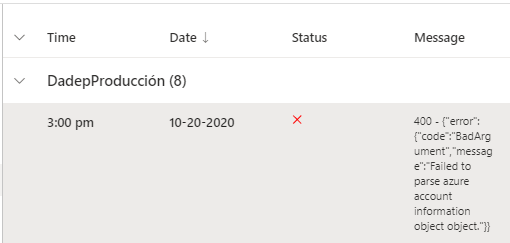
Botframework-composer: Trying to update already published bot. Keep getting 400 - {"error":{"code":"BadArgument","message":"Failed to parse azure account information object object."}}
I had already published a working bot to Azure. However I had to update it and I am now trying to publish it again to the same resource group in which it already exists. As expected, my access token had expired, so I generated a new one, pasted it on the bot's profile (after clicking on "Edit") and tried to publish the bot again.
I tried following this documentation: https://docs.microsoft.com/en-us/composer/how-to-publish-bot
I also tried using the JSON structure that appears on the "README" of the bot files, and tried just modifying the values of the previous JSON that I used when I first uploaded this file. But I keep getting the same error 400.
I made sure to use a valid access token on each attempt.
Any help would be greatly appreciated.
Version
I'm using the Composer v1.1.1
Browser
- [X] Chrome
OS
- [X] Windows
To Reproduce
Steps to reproduce the behavior:
- Published a working bot
- Edited the bot
- Tried to publish it again on its existing resource group with a new access token
- Error shows up everytime I try to publish the bot
Expected behavior
I expected the bot to be published normally, as it had worked before, with the new updates.
Screenshots
 juanpmendoza
All 7 comments
This is the JSON that I followed from the Readmefile

And this is the one that I used following the structure in the "Edit" of the profile:

juanpmendoza
on 20 Oct 2020
It should be fixed in main per @lei9444 , @luhan2017 will help verify this
 boydc2014
on 21 Oct 2020
boydc2014
on 21 Oct 2020
@juanpmendoza , I suspect the az cli subscription does not match with your subscription in publish profile, could you please double check? could you try to run this command "az account show", it will show your current subscription info and check whether the services you used in the publish profile belongs to this subscription.
 luhan2017
on 21 Oct 2020
luhan2017
on 21 Oct 2020
@luhan2017 I checked and you're right! I should set the right one using "az account set" right? Which Json schema should I use to edit the bot? Thanks!
juanpmendoza
on 21 Oct 2020
@luhan2017 I used az login and then the JSON from the Readme file and it worked! Thanks for the help!
juanpmendoza
on 21 Oct 2020
Awesome, thanks for reporting back that @luhan2017's solution worked. I'm closing this issue as it sounds like it has been resolved, if there are any questions related to this please reply here and @mention a team member or open a new issue.
 stevengum
on 21 Oct 2020
stevengum
on 21 Oct 2020
@luhan2017 I tried with Json in the Readme file. But still, I'm facing the same error.
 Afranzio
on 30 Dec 2020
Afranzio
on 30 Dec 2020
Related issues
 yochay
·
15Comments
yochay
·
15Comments
 selmi5
·
17Comments
selmi5
·
17Comments
 sujeongHeo
·
24Comments
sujeongHeo
·
24Comments
 cxbuilders
·
15Comments
cxbuilders
·
15Comments
 kalebk
·
16Comments
kalebk
·
16Comments