Botframework-composer: Custom Runtime Error
Describe the bug
I followed the steps outlined in:
https://docs.microsoft.com/en-us/composer/how-to-add-custom-action
There are many warnings after this step:
Parsing component .schema files
Warning C:\Users\kdubi.nuget\packages\Microsoft.Bot.Builder.AI.Luis\4.10.2\content\Schemas\Microsoft.LuisRecognizer.schema: Component schema https://schemas.botframework.com/schemas/component/v1.0/component.schema does not match https://raw.githubusercontent.com/microsoft/botframework-sdk/master/schemas/component/component.schema
When I re-open Composer, I get this error:
"Definition not found for Microsoft.Ask/properties/activity/oneOf/1/properties/membersAdded/items"
Version
v 1.1.1
Browser
- [x] Electron distribution
- [ ] Chrome
- [ ] Safari
- [ ] Firefox
- [ ] Edge
OS
- [ ] macOS
- [x] Windows
- [ ] Ubuntu
Screenshots

 kdubious
All 11 comments
The custom action does work, though.
kdubious
on 19 Oct 2020
@dmvtech can you investigate and report back? Thanks!
 stevengum
on 19 Oct 2020
stevengum
on 19 Oct 2020
@kdubious , could you check the your bf cli version, is it pointing to the latest?
 luhan2017
on 21 Oct 2020
luhan2017
on 21 Oct 2020
I am getting the same issue, and 2 of my customers writing bots in Composer found this as well. The custom action does work once you click through the error.
 rmthurman
on 22 Oct 2020
rmthurman
on 22 Oct 2020
I can confirm this experience. I tried with both versions:
@microsoft/botframework-cli/4.10.1 win32-x64 node-v12.18.3 and
@microsoft/botframework-cli/4.10.0-dev.20200730.3786d10 win32-x64 node-v12.18.3
Just a lot of warnings, it does work. I think this is a BF cli issue as it's definitely coming from bf dialog:merge and not the .ps1 script.
 dmvtech
on 22 Oct 2020
dmvtech
on 22 Oct 2020
Sorry maybe not a BF cli issue, but it is the one reporting it. There definitely is a schema mis-match, due to the ID:
https://schemas.botframework.com/schemas/component/v1.0/component.schema:
"$id": "https://schemas.botframework.com/schemas/component/v1.0/component.schema"
https://raw.githubusercontent.com/microsoft/botframework-sdk/master/schemas/component/component.schema
"$id": "https://raw.githubusercontent.com/microsoft/botframework-sdk/master/schemas/component/component.schema"
dmvtech
on 22 Oct 2020
@Kaiqb the issue is in the documentation at: custom action. The $schema should be https://schemas.botframework.com/schemas/component/v1.0/component.schema.
@kdubious you can fix this by changing the $schema in your custom action .schema file.
 chrimc62
on 22 Oct 2020
chrimc62
on 22 Oct 2020
FYI. The doc actually references from the schema in the sample here.
I did a fresh test using Composer v1.1.1.
- I had the following error when running the scripts to update the schema file:

I fixed the error by Googling and running the following script:
Get-ExecutionPolicy -List | Format-Table -AutoSize; Set-ExecutionPolicy -ExecutionPolicy RemoteSigned -Scope ProcessThen run
./update-schema.ps1 -runtime azurewebappin powershell again.Re-open the bot from Composer and it worked as expected:
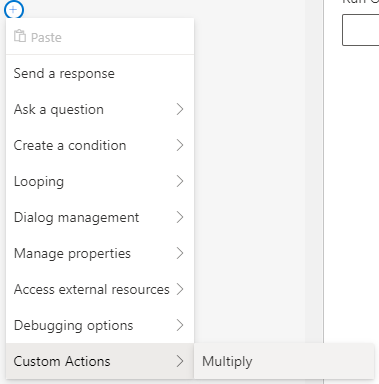
Tested in Emulator:

 zxyanliu
on 23 Oct 2020
zxyanliu
on 23 Oct 2020
@zxyanliu
Then run ./update-schema.ps1 -runtime azurewebapp in powershell again.
But when running this (after remedying your execution policy), did you no longer get any Warnings output in the shell/cmdline? They should have looked like:
Warning C:\Users\kdubi.nuget\packages\Microsoft.Bot.Builder.AI.Luis\4.10.2\content\Schemas\Microsoft.LuisRecognizer.schema: Component schema https://schemas.botframework.com/schemas/component/v1.0/component.schema does not match https://raw.githubusercontent.com/microsoft/botframework-sdk/master/schemas/component/component.schema
The issue is not that it _fails_, it's that it is outputting a bunch of warnings (even though in the end it runs).
dmvtech
on 23 Oct 2020
@dmvtech
Yes, I did get a lot of warnings about mismatched schema:

The warnings went away after I updated the $schema in the sample to be https://schemas.botframework.com/schemas/component/v1.0/component.schema
See:

zxyanliu
on 23 Oct 2020
We should update the following in the sample schema:
The $schema should be https://schemas.botframework.com/schemas/component/v1.0/component.schema
zxyanliu
on 23 Oct 2020
Related issues
 KoradaRajesh
·
25Comments
KoradaRajesh
·
25Comments
 DS2019
·
21Comments
DS2019
·
21Comments
 cxbuilders
·
15Comments
cxbuilders
·
15Comments
 pedro-ramirez-suarez
·
15Comments
cxbuilders
·
16Comments
pedro-ramirez-suarez
·
15Comments
cxbuilders
·
16Comments