Botframework-composer: Array data binding in adaptive card not working
Hi,
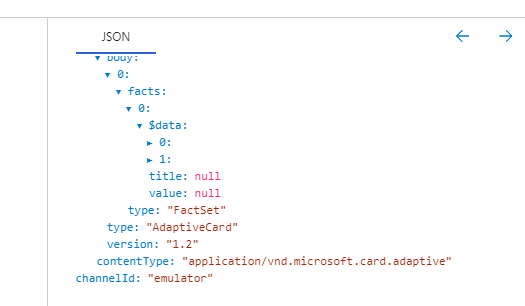
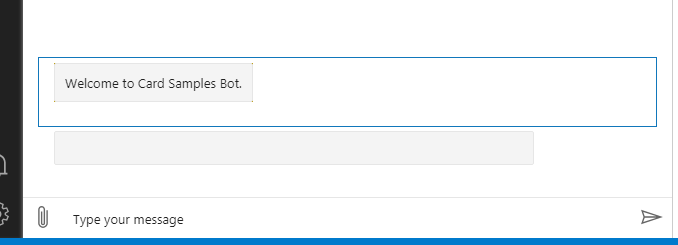
I am trying an adaptive card with array of data mapped which i tried online which is working, but the same json returns null when i use from composer.
Any solution? Please help.

Composer
 UmaPrelude
All 7 comments
Hey @UmaPrelude , the $data (data binding) feature which is a preview feature of adpativeCard called templating, we don't have native support that yet in Composer, in composer we used botframework LG to do data binding and send cards including adpativeCards.
Please refer to the card samples in our samples bots to check the LG files, you can either create a sample bot or here is a direct link to the file https://github.com/microsoft/BotFramework-Composer/blob/830d27b21fa7897e1862a2736a79f2d9e71735ac/Composer/plugins/samples/assets/projects/RespondingWithCardsSample/language-generation/en-us/common.en-us.lg#L99 which then linked to another json file to hold adaptive card json.
Basically we are doing data binding for cards using LG and AdaptiveExpression before we send to Channel, and thus not leveraging the builtin adaptiveCard data binding technique.
 boydc2014
on 17 Jun 2020
boydc2014
on 17 Jun 2020
@UmaPrelude Composer leverage LG capability for adaptive card rendering but not leverage the adaptive card rendering strategy. @Danieladu may take a look and provide the comments.
 hibrenda
on 17 Jun 2020
hibrenda
on 17 Jun 2020
hi @UmaPrelude. If you just want to bind the data in advance (with LG system, but not AdaptiveCards template system), below is the workaround:
````
AdaptiveCard
[Activity
Attachments = ${json(adaptivecardjson(json(employeeData())))}
]
employeeData
-```
{
"name": "Matt",
"peers":
[
{
"name": "Andrew",
"title":"pm"
},
{
"name": "Lei",
"title":"lead"
}
]
}
# adaptivecardjson(employee)
- ```
{
"$schema":"http://adaptivecards.io/schemas/adaptive-card.json",
"type":"AdaptiveCard",
"version":"1.2",
"body": [
{
"type": "TextBlock",
"text": "Hi ${employee.name}! Here's a bit about your org..."
},
{
"type": "TextBlock",
"text": "Your peer is: ${employee.peers[0].name} and the title is ${employee.peers[0].title}"
}
]
}
````
Hope that helps. Thanks!
 Danieladu
on 17 Jun 2020
Danieladu
on 17 Jun 2020
AdaptiveCard
[Activity
Attachments = ${adaptivecardjson(json(employeeData()))}
]
Hi @Danieladu,
Thanks for your sugggestion.
But the thing is i am trying to dynamically generate controls based on the number of array records.
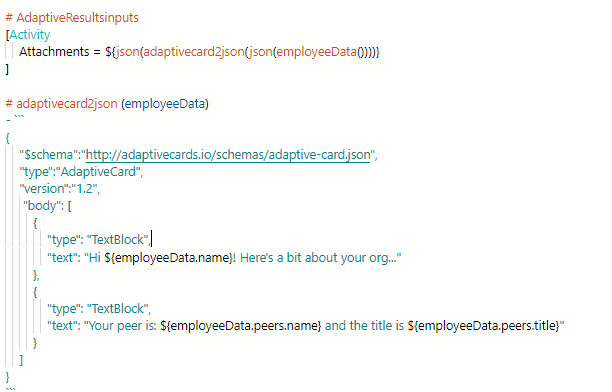
So using the above suggestion, helps to assign the 0th index values. But what i am expecting is simply assigning the array property and generate the controls and assign its value. Which is not supporting right now. Please correct me if i am wrong.
Or can i use loop or so to achieve the same, if so please help me with the syntax.
UmaPrelude
on 17 Jun 2020
Hey @UmaPrelude , the $data (data binding) feature which is a preview feature of adpativeCard called _templating_, we don't have native support that yet in Composer, in composer we used botframework LG to do data binding and send cards including adpativeCards.
Please refer to the card samples in our samples bots to check the LG files, you can either create a sample bot or here is a direct link to the file
which then linked to another json file to hold adaptive card json.
Basically we are doing data binding for cards using LG and AdaptiveExpression before we send to Channel, and thus not leveraging the builtin adaptiveCard data binding technique.
Hi @boydc2014,
Thanks for your response. I am some how trying to dynamically populate the controls in one go for number of records and send it as a single response, so that it will send one email response on email channel. now for each record we are using one card response and it is sending separate email for each card.
Regards,
UmPrel
UmaPrelude
on 17 Jun 2020
I get what you want....
So, The expression library provides many operations on Array/List. I'm glad to provide some solutions here:
Solution1, Embed all text in one line:
````
AdaptiveCard
[Activity
Attachments = ${json(adaptivecardjson(json(employeeData())))}
]
employeeData
-```
{
"name": "Matt",
"peers":
[
{
"name": "Andrew",
"title":"pm"
},
{
"name": "Lei",
"title":"lead"
}
]
}
# adaptivecardjson(employee)
- ```
{
    "$schema":"http://adaptivecards.io/schemas/adaptive-card.json",
    "type":"AdaptiveCard",
    "version":"1.2",
     "body": [
        {
            "type": "TextBlock",
            "text": "Hi ${employee.name}! Here's a bit about your org..."
        },
        {
            "type": "TextBlock",
            "text": "${generateList(employee)}"
        }
    ]
}
generateList(employee)
- ${join(foreach(employee.peers, u, readout(u.name, u.title)), '\r\n')}
readout(name, title)
- Your peer is: ${name} and the title is ${title}
````
Solution 2: Use Array operation to generate the list in json
````
AdaptiveCard
[Activity
Attachments = ${json(adaptivecardjson(json(employeeData())))}
]
employeeData
-```
{
"name": "Matt",
"peers":
[
{
"name": "Andrew",
"title":"pm"
},
{
"name": "Lei",
"title":"lead"
}
]
}
# adaptivecardjson(employee)
- ```
{
    "$schema":"http://adaptivecards.io/schemas/adaptive-card.json",
    "type":"AdaptiveCard",
    "version":"1.2",
     "body": [
        ${generateList()}
    ]
}
generateList(employee)
- ${join(foreach(employee.peers, u, item(u.name, u.title)), ',')}
item(name, title)
- { "title": "${name}", "value": "${title}" }
````
Thanks. Look forward to your reply.
Danieladu
on 17 Jun 2020
Hi @Danieladu,
Thanks a lot for your support.
Solution 2 is suitable for our scenario.
Regards,
UmPrel
UmaPrelude
on 17 Jun 2020
Related issues
 gbelenky
·
22Comments
gbelenky
·
22Comments
 KoradaRajesh
·
25Comments
KoradaRajesh
·
25Comments
 saikumaru
·
18Comments
saikumaru
·
18Comments
 yochay
·
15Comments
yochay
·
15Comments
 pedro-ramirez-suarez
·
15Comments
pedro-ramirez-suarez
·
15Comments
Most helpful comment
I get what you want....
So, The expression library provides many operations on Array/List. I'm glad to provide some solutions here:
Solution1, Embed all text in one line:
````
AdaptiveCard
[Activity
Attachments = ${json(adaptivecardjson(json(employeeData())))}
]
employeeData
-```
{
"name": "Matt",
"peers":
[
{
"name": "Andrew",
"title":"pm"
},
{
"name": "Lei",
"title":"lead"
}
]
}
generateList(employee)
readout(name, title)
````
Solution 2: Use Array operation to generate the list in json
````
AdaptiveCard
[Activity
Attachments = ${json(adaptivecardjson(json(employeeData())))}
]
employeeData
-```
{
"name": "Matt",
"peers":
[
{
"name": "Andrew",
"title":"pm"
},
{
"name": "Lei",
"title":"lead"
}
]
}
generateList(employee)
item(name, title)
````
Thanks. Look forward to your reply.