Azuredatastudio: Unable to stop a job after running it from SQL Agent.
- Azure Data Studio Version:
Version 1.4.5
Commit 887f4e8985023602e599cf86bdb44df48bb28569
Date 2019-02-12T06:20:08.633Z
VS Code 1.26.1
Shell 2.0.9
Renderer 61.0.3163.100
Node 8.9.3
V8: 6.1.534.41
Architecture x64
Steps to Reproduce:
- Connect to server
- Bring up manage editor
- Click on SQL Agent dashboard
- Select a job
- Click Run
- The stop button is never usable
I expect once I click on Run to be able immediately stop the job. Even clicking on refresh for a long running job does not allow you to stop it once you started it via ADS.
 wsmelton
All 4 comments
@abist Can you take a look at this tomorrow? Greatly appreciated :)
 yualan
on 28 Feb 2019
yualan
on 28 Feb 2019
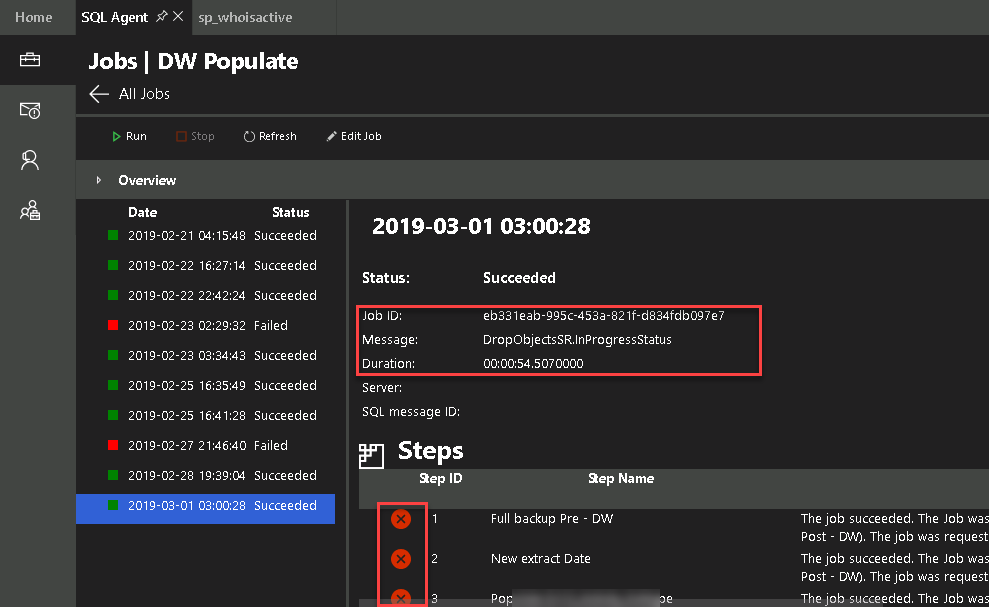
Trying this on a job that has multiple steps and one that I know runs for over 4 hours. I started the job at 3:00:08 AM UTC. I know the job is still running, but the view given by SQL Agent is that it succeeded, but the view of all the steps is completely false in the details....none of the steps shown failed on this run (some have not even run yet)....
Unsure if this is all connected to why that stop button is not available, but the screenshot below the job time slot I have selected is still running on the server:
wsmelton
on 1 Mar 2019
@wsmelton Thanks for reporting this bug! Just to make sure, the job was still running and yet it showed it succeeded with failing steps?
 abist
on 1 Mar 2019
abist
on 1 Mar 2019
Correct
wsmelton
on 1 Mar 2019
Related issues
 blackTay
·
3Comments
blackTay
·
3Comments
 carloscfcortez
·
3Comments
carloscfcortez
·
3Comments
 sandermvanvliet
·
3Comments
sandermvanvliet
·
3Comments
 RobLW
·
3Comments
RobLW
·
3Comments
 kburtram
·
3Comments
kburtram
·
3Comments