Azuredatastudio: Database dropdown only shows current database
Issue Type: Bug
- Open a new query window
- Connect to a SQL Server with multiple databases leaving the
databaseproperty empty in the connection tab
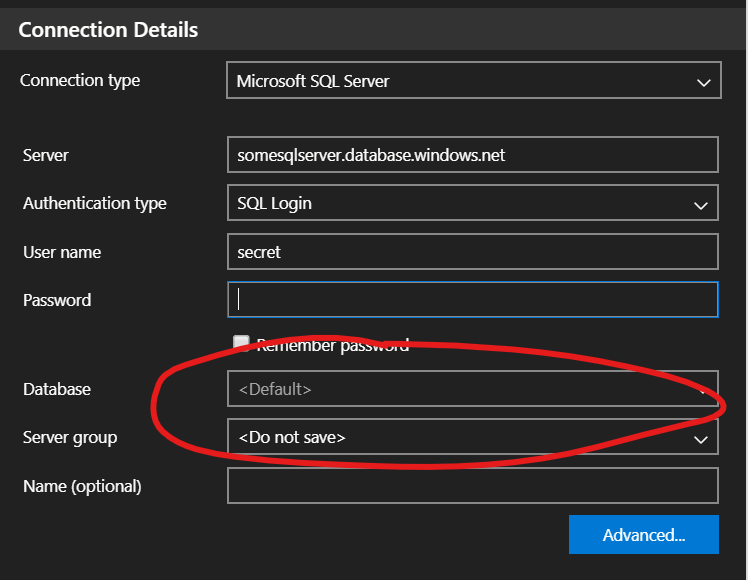
- Query window opens on
master - Open database dropdown and select a different database
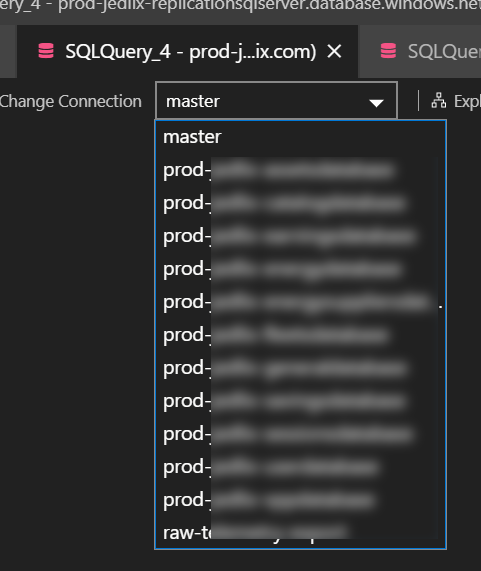
- Database is now changed for the query window
- Open database dropdown
at this point only master and the selected database are visible. All other databases on the server are no longer displayed.
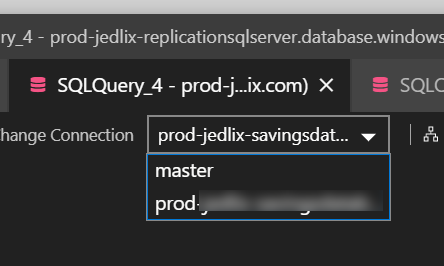
As on Azure SQL you can't simply USE [database] this is a bit suboptimal to change connections all the time...
Azure Data Studio version: azuredatastudio-insiders 1.19.0-insider (6e3d960d1db2a9544db18b20e0e0db5e22ccbc07, 2020-06-08T05:37:04.177Z)
OS version: Windows_NT x64 10.0.18363
System Info
|Item|Value|
|---|---|
|CPUs|Intel(R) Core(TM) i9-8950HK CPU @ 2.90GHz (12 x 2904)|
|GPU Status|2d_canvas: enabled
flash_3d: enabled
flash_stage3d: enabled
flash_stage3d_baseline: enabled
gpu_compositing: enabled
multiple_raster_threads: enabled_on
oop_rasterization: disabled_off
protected_video_decode: enabled
rasterization: enabled
skia_renderer: disabled_off_ok
video_decode: enabled
viz_display_compositor: enabled_on
viz_hit_test_surface_layer: disabled_off_ok
webgl: enabled
webgl2: enabled|
|Load (avg)|undefined|
|Memory (System)|31.74GB (10.45GB free)|
|Process Argv||
|Screen Reader|no|
|VM|0%|
Extensions: none
 sandermvanvliet
All 3 comments
Thanks for submitting this issue. Please also check if it is already covered by an existing one, like:
![adsbot[bot] picture](https://avatars.githubusercontent.com/in/25741?v=4&s=40) adsbot[bot]
on 9 Jun 2020
adsbot[bot]
on 9 Jun 2020
@aasimkhan30 Confirmed that this is a regression due to https://github.com/microsoft/sqltoolsservice/pull/957
We should consider trying to connect to master first - and if that fails then fall back to the current DB. Or at least having that be an option on listDatabases so that only callers that care about getting all the possible DBs can control it since we might not want the perf hit in other cases.
 Charles-Gagnon
on 9 Jun 2020
Charles-Gagnon
on 9 Jun 2020
Fixed in release/1.19 branch
 kburtram
on 10 Jun 2020
kburtram
on 10 Jun 2020
Related issues
 jacobzed
·
3Comments
kburtram
·
3Comments
jacobzed
·
3Comments
kburtram
·
3Comments
 jsmith8858
·
3Comments
jsmith8858
·
3Comments
 erickangMSFT
·
3Comments
erickangMSFT
·
3Comments
 carloscfcortez
·
3Comments
carloscfcortez
·
3Comments