Apexcharts.js: Stacked bar chart border radius
Bug report
Codepen
click on given link to view the issue this codepen
issue on reactjs this codepen
Explanation
- I want to make only top border rounded instead of each stack entity
- here is every stack stack entity shows rounded border
- No error message
 marghoobahmad0344
All 5 comments
For vertical columns
.apexcharts-bar-series.apexcharts-plot-series  .apexcharts-series path {
    clip-path: inset(0% 0% -11% 0% round 8px);
}
For horizontal bars
.apexcharts-bar-series.apexcharts-plot-series  .apexcharts-series path {
    clip-path: inset(0% 0% 0% -5% round 8px);
}
Disable the animations
chart: {
    height: 380,
     animations: {
          enabled: false
     },
}
EDIT
Since v3.26.0, there is a new property for border-radius
plotOptions: {
  bar: {
    borderRadius: 5
  }
}
 IsaacSomething
on 16 Jan 2021
IsaacSomething
on 16 Jan 2021
🎉2
👍2
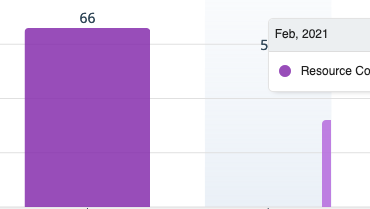
@IsaacSomething your suggestion mostly works until I hover over the bar and it looks like this:
 praneetloke
on 2 Mar 2021
praneetloke
on 2 Mar 2021
@praneetloke I think you might have to remove the hover state and active state. It should still show the tooltip
```
states: {
hover: {
filter: {
type: 'none',
}
},
active: {
filter: {
type: 'none',
}
},
}
IsaacSomething
on 3 Mar 2021
Ah gotcha. Unfortunately, that won't work for me. I'd like to keep the hover state for accessibility reasons.
praneetloke
on 3 Mar 2021
Since v3.26.0, there is a new property for border-radius
plotOptions: {
  bar: {
    borderRadius: 5
  }
}
 junedchhipa
on 15 Mar 2021
junedchhipa
on 15 Mar 2021
👍1
Was this page helpful?
0 / 5 - 0 ratings
Related issues
 Bilge
·
15Comments
Bilge
·
15Comments
 dougnewnham
·
18Comments
dougnewnham
·
18Comments
 astone2014
·
15Comments
astone2014
·
15Comments
 thellimist
·
15Comments
thellimist
·
15Comments
 stalnikar
·
13Comments
stalnikar
·
13Comments
Most helpful comment
For vertical columns
For horizontal bars
Disable the animations
EDIT
Since v3.26.0, there is a new property for border-radius