Apexcharts.js: 3.19.2 -> 3.19.3 Some Charts (Scatter/Bubble) not redrawing on parent resize.
Is your feature request related to a problem? Please describe.
I'm having issues resizing scatter plot, bubble chart after upgrade from 3.19.2 -> 3.19.3.
Just by downgrading to [email protected] my scatter and bubble charts resize more as expected.
Describe the solution you'd like
Help me understand why I'm seeing this behavior with the version change.
Describe alternatives you've considered
- Manually redraw charts by listening to parent resize events.
- Sticking with 3.19.2 but that'd suck.
Additional context
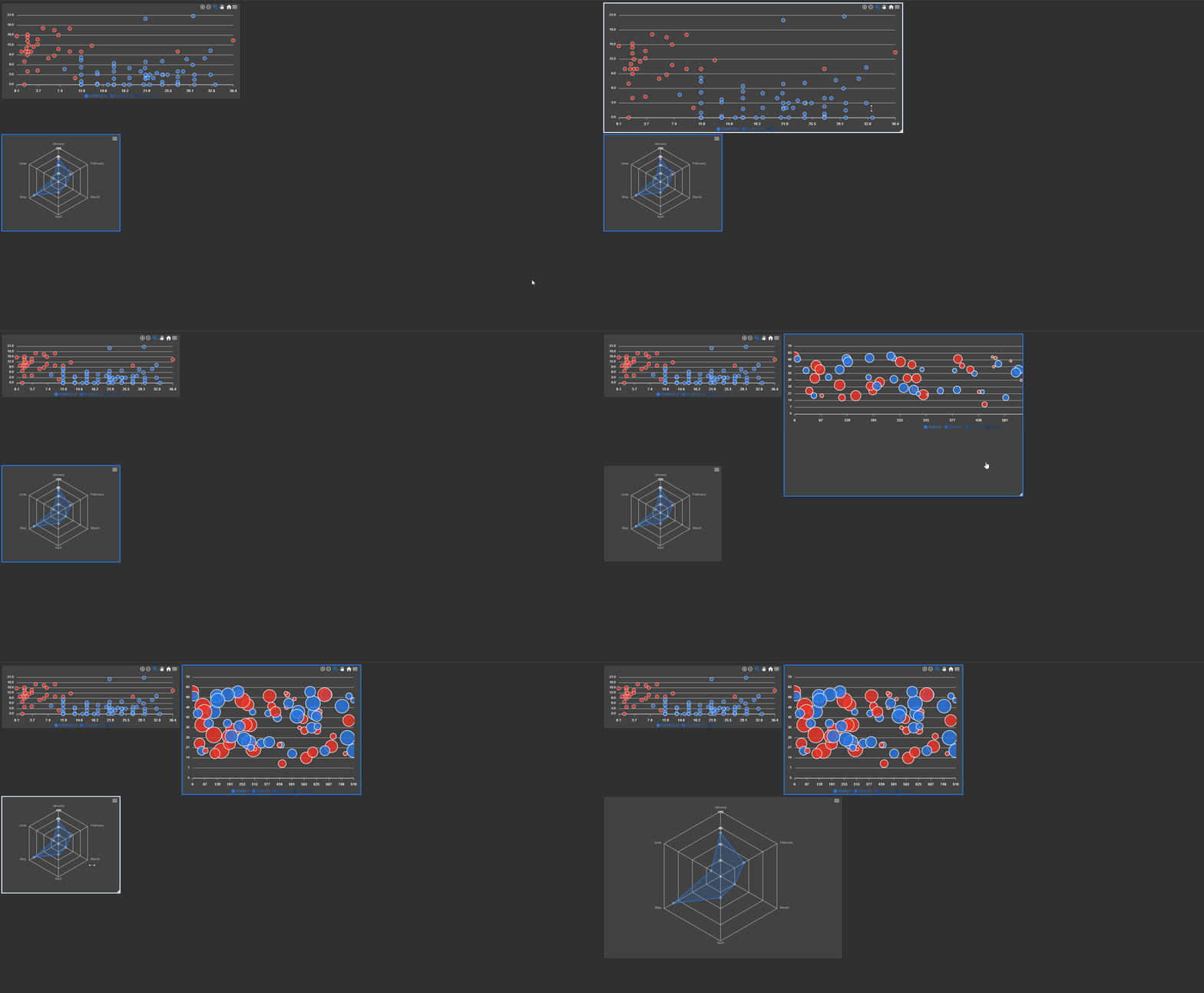
Here is a gif of the behavior:

The wrapper for the chart
.grid-widget-container{
    display: flex;
    flex-direction: column;
    height: 100%;
    width: 100%;
    box-sizing: border-box;
    overflow: hidden;
}

.grid-widget {
    flex: 1;
    box-sizing: border-box;
    padding: 0;
    height: 100%;
    min-height: 0;
    width: 100%;
    overflow: auto;
}

chart-wrapper {
    width: 100%;
    height: 100%;
    display: block;
    overflow: hidden;
}
    <div class="grid-widget-container">
      <div class="grid-widget">
        <div class="chart-wrapper">
          <!-- chart display block -->
        </div>
      </div>
    </div>
 astone2014
All 15 comments
Here is 3.19.2 working as expected.
astone2014
on 18 Sep 2020
Thanks for a detailed explanation, I can see the issue.
It will be addressed soon.
 junedchhipa
on 19 Sep 2020
junedchhipa
on 19 Sep 2020
Sorry, but can you reproduce this in a Codepen?
I am having trouble reproducing this.
junedchhipa
on 20 Sep 2020
Sorry, but can you reproduce this in a Codepen?
I am having trouble reproducing this.
Here it is in codepen https://codesandbox.io/s/apx-line-basic-forked-9p5ks?file=/src/app/app.component.css
I made a line chart and scatter chart. Notice, when resizing the black boxes, line chart is good but not scatter.
astone2014
on 20 Sep 2020
Thank you for providing a codesandbox.
This will be addressed soon.
junedchhipa
on 27 Sep 2020
I think I'm also facing a similar issue. I have a resizable div and the apexchart resides inside this div. When I resize the div, the apexchart does not resize to fit the div. But when I resize the browser window, apexchart resizes based on window size. Is this issue related with this bug?
Also, is there any API with which we can explicitly trigger resizing to fit the parents size? It would be nice to have.
Thanks for the great work on this beautiful library @junedchhipa
 j-a-h-i-r
on 30 Oct 2020
j-a-h-i-r
on 30 Oct 2020
@astone2014 How are you generating the resizable containers? Is this part of ApexCharts or are you using something else?
j-a-h-i-r
on 30 Oct 2020
@astone2014 How are you generating the resizable containers? Is this part of ApexCharts or are you using something else?
Honestly I am using Gridster2 for my project but you can see same behavior in my Codepen using resize: both; css property.
astone2014
on 30 Oct 2020
I actually checked the link you provided but it contained only css, and I'm very bad at CSS. That's why I asked to be sure. Thanks for the link to Gridstar2. This seems promising
j-a-h-i-r
on 30 Oct 2020
Hi, are you guys experiencing the same problem still?
With the latest version, I am having resizing issues with bar charts, the pie charts work fine.
 simplecommerce
on 23 Dec 2020
simplecommerce
on 23 Dec 2020
Yes codepen still shows issues with 3.23.1.
astone2014
on 19 Jan 2021
@astone2014 I forgot I wrote here, here is how I fixed my issue in react
https://github.com/apexcharts/react-apexcharts/issues/187#issuecomment-755299765
simplecommerce
on 19 Jan 2021
Sorry for the delay.
The issue has been fixed and a new version will be released soon.
junedchhipa
on 24 Jan 2021
I confirmed this is fixed in
"apexcharts": "^3.25.0"
thank you!
astone2014
on 5 Mar 2021
Thanks @junedchhipa for the awesome work!
j-a-h-i-r
on 5 Mar 2021
Related issues
 EroTiXx
·
3Comments
EroTiXx
·
3Comments
 rcoundon
·
3Comments
rcoundon
·
3Comments
 drummad
·
3Comments
drummad
·
3Comments
 maasha
·
3Comments
maasha
·
3Comments
 drew-dulgar
·
3Comments
drew-dulgar
·
3Comments
Most helpful comment
Sorry for the delay.
The issue has been fixed and a new version will be released soon.