Apexcharts.js: Most recent library will not render in IE11
Sorry if I am asking an old question but is IE11 still supported. The most recent download does not appear to render at all.
 dougnewnham
All 18 comments
IE11 needs some polyfill libraries to be loaded first before rendering ApexCharts as specified in the README
Please load these polyfills before loading ApexCharts and report back if it works after loading these.
- promise-polyfill
- classlist.js
- findIndex - You will need this only if you require timeline/rangebar charts
 junedchhipa
on 11 Jan 2020
junedchhipa
on 11 Jan 2020
I have added these to both my original working use of ApexCharts and also tried adding them to the samples but it still does not render correctly. Adding the Polyfills does seem to make a change and I can see the chart "body" but no grids, data or labels etc.
dougnewnham
on 11 Jan 2020
Thanks for the update. I don't have windows at the moment.
But, I will soon test and update this thread.
junedchhipa
on 11 Jan 2020
Thanks for the quick response. I am relatively new to JavaScript so I'm not sure if I've incorporated those polyfills correctly. I've placed them above the ApexCharts.js but i've not added anything else beyond that.
dougnewnham
on 11 Jan 2020
I also have the same issue so my site can't run
let me know how to solve this problem plz.
thank you
 parkyeonkyu
on 14 Jan 2020
parkyeonkyu
on 14 Jan 2020
I included all polyfills u said, but it still doesn't work, because ApexCharts use insertAdjacentHTML method, IE 11 has this method implemented only for base HTMLElement. And i have no idea how to solve this
 Harkonnen13
on 14 Jan 2020
Harkonnen13
on 14 Jan 2020
Fixed the issues and released new version 3.15.1. Please upgrade the library to the latest version
Add these IE11 polyfills in the header
<script>
  window.Promise || document.write('<script src="https://cdn.jsdelivr.net/npm/promise-polyfill@8/dist/polyfill.min.js"><\/script>');
  window.Promise || document.write('<script src="https://cdn.jsdelivr.net/npm/[email protected]/classList.min.js"><\/script>');
  window.Promise || document.write('<script src="https://cdn.jsdelivr.net/npm/findindex_polyfill_mdn"><\/script>');
It should work now.
junedchhipa
on 15 Jan 2020
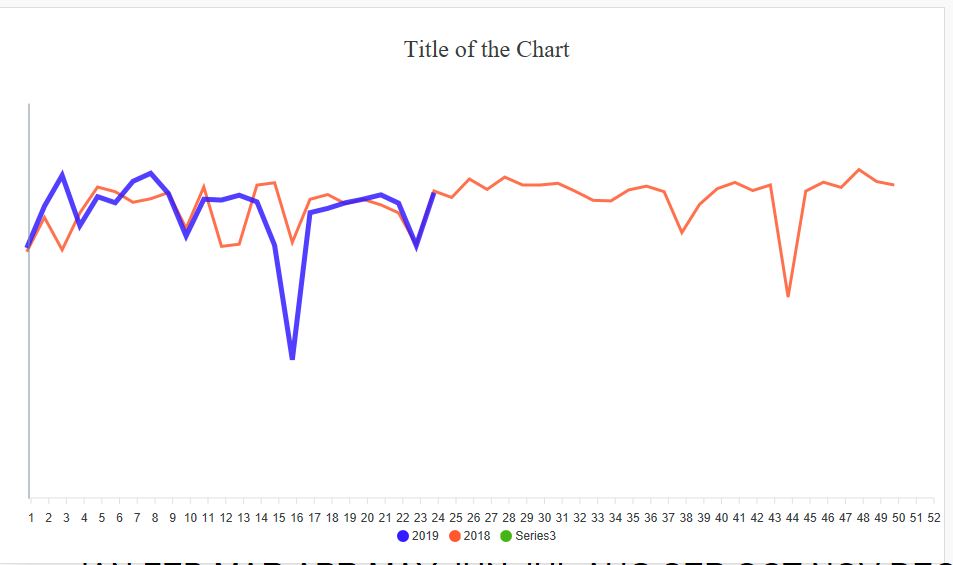
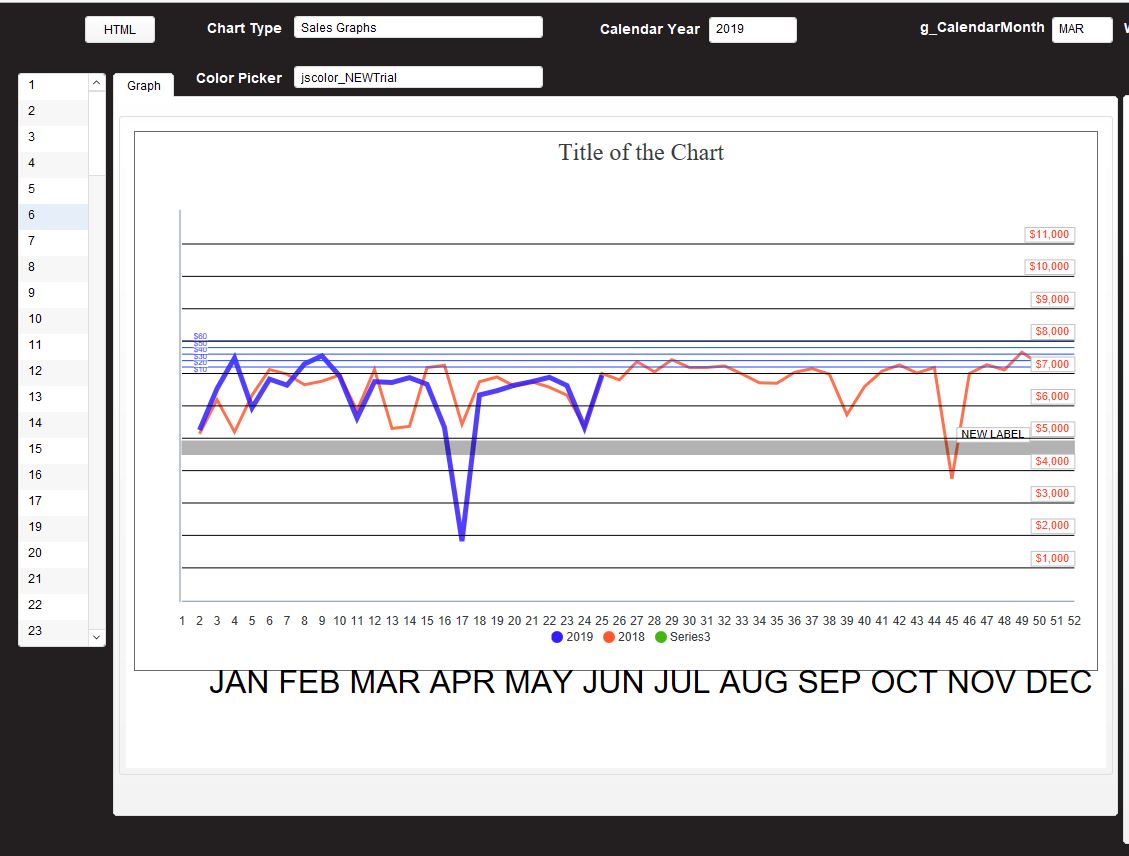
Great work! It is rendering again now as you can see but annotations and labels have disappeared. With these two screenshots the only difference is the CSS and the library
dougnewnham
on 15 Jan 2020
Note that what appear to be gridlines are actually annotation lines.
dougnewnham
on 15 Jan 2020
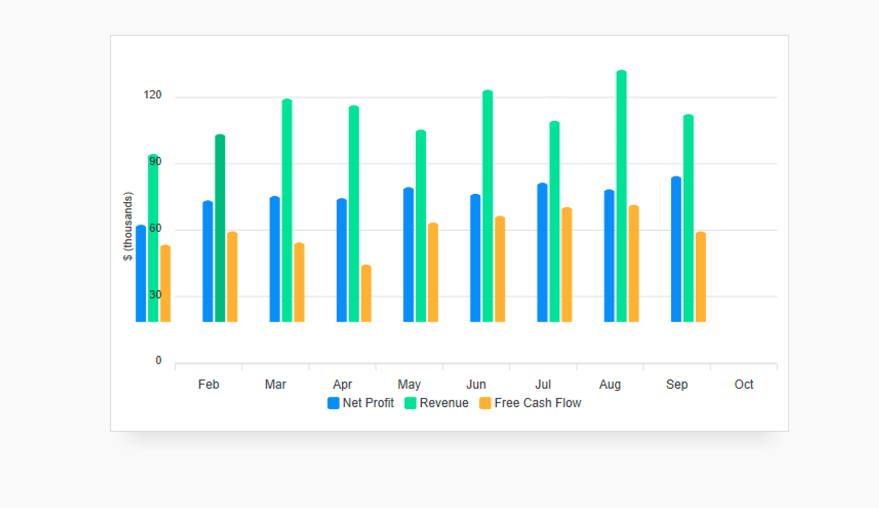
So close! There's some type of off by 1 glitch happening for me with IE11. Screenshot attached of stock bar chart demo code.
 perren
on 16 Jan 2020
perren
on 16 Jan 2020
Thanks for the feedback.
I don't have windows machine at the moment.
Can anyone suggest a place where I can test IE11 remotely?
junedchhipa
on 16 Jan 2020
You can do 1hr a month for free here:
On Jan 16, 2020, at 5:58 AM, Juned Chhipa notifications@github.com wrote:
Thanks for the feedback.
I don't have windows machine at the moment.
Can anyone suggest a place where I can test IE11 remotely?—
You are receiving this because you are subscribed to this thread.
Reply to this email directly, view it on GitHub, or unsubscribe.
perren
on 16 Jan 2020
@perren That looks promising. Thanks!
junedchhipa
on 16 Jan 2020
Fixed the issues and released new version 3.15.1. Please upgrade the library to the latest version
Add these IE11 polyfills in the header
<script>
  window.Promise || document.write('<script src="https://cdn.jsdelivr.net/npm/promise-polyfill@8/dist/polyfill.min.js"><\/script>');
  window.Promise || document.write('<script src="https://cdn.jsdelivr.net/npm/[email protected]/classList.min.js"><\/script>');
  window.Promise || document.write('<script src="https://cdn.jsdelivr.net/npm/findindex_polyfill_mdn"><\/script>');
It should work now.
Hello! After included https://cdn.jsdelivr.net/npm/blob-polyfill I have error (apexcharts.amd.js 3.15.1) in Chrome:

Can you help me?
 IlyaChubko
on 16 Jan 2020
IlyaChubko
on 16 Jan 2020
@IlyaChubko You may remove blob.js polyfill as it doesn't work as expected. I will find another alternative.
junedchhipa
on 16 Jan 2020
Released v3.15.2
Removed IE11 incompatible code.
Let me know if the latest version works.
junedchhipa
on 16 Jan 2020
Thank you! 3.15.2 fix a lot of bugs IE11. It works for me
IlyaChubko
on 16 Jan 2020
Awesome!
Closing this thread.
junedchhipa
on 16 Jan 2020
Related issues
 Vvelghe
·
15Comments
Vvelghe
·
15Comments
 RyanMooreOPS
·
16Comments
RyanMooreOPS
·
16Comments
 LucaCorcella
·
14Comments
LucaCorcella
·
14Comments
 thellimist
·
15Comments
thellimist
·
15Comments
 jimfilippou
·
23Comments
jimfilippou
·
23Comments
Most helpful comment
IE11 needs some polyfill libraries to be loaded first before rendering ApexCharts as specified in the README
Please load these polyfills before loading ApexCharts and report back if it works after loading these.