Apexcharts.js: endingShape / Stroke bar chart
Round end on bar chart
Hi my code for bar chart is.
let option = {
chart: {
type: 'bar',
width: 200,
height: 150,
sparkline: {
enabled: true
}
},
plotOptions: {
bar: {
columnWidth: '40%',
endingShape: 'rounded',
dataLabels: {
position: 'top',
}
}
},
series: series,
labels: labels,
dataLabels: {
enabled: true,
offsetY: -15,
style: {
fontSize: '8px',
fontWeight: 'bold',
fontFamily: 'sans-serif',
colors: ['#000']
},
dropShadow: {
enabled: false,
top: 1,
left: 0,
blur: 1,
opacity: 0.45
}
},
stroke: {
show: true,
width: 1,
colors: ['transparent']
},
xaxis: {
crosshairs: {
width: 1
},
},
tooltip: {
fixed: {
enabled: false
},
x: {
show: false
},
y: {
title: {
formatter: function (seriesName) {
return ''
}
}
},
marker: {
show: false
}
}
}
Explanation
- I would like a bar with rounded border on end
- But with the current version, it doesn't work, if I try with this version https://cdnjs.cloudflare.com/ajax/libs/apexcharts/1.4.6/apexcharts.min.js" it works fine!
 LucaCorcella
All 14 comments
The endingShape property has been deprecated, and soon a new property borderRadius will be implemented.
 junedchhipa
on 21 Mar 2019
junedchhipa
on 21 Mar 2019
@junedchhipa thx,
so with version 3.6.3 I can't get bar rounded?.
Now I'm trying the 3.0.0 version and it works!
LucaCorcella
on 21 Mar 2019
It was removed recently in 3.6.0.
You may use 3.0.0 until borderRadius is released
junedchhipa
on 21 Mar 2019
Closing as related to #414
junedchhipa
on 23 Mar 2019
any update on borderRadius?
 rileylnapier
on 8 Nov 2019
rileylnapier
on 8 Nov 2019
+1
 astronati
on 23 Nov 2019
astronati
on 23 Nov 2019
Btw, I went to recharts. I can define my own shape. Wanted to share in case anyone else was looking for alternatives.
rileylnapier
on 23 Nov 2019
@rileylnapier how?
astronati
on 28 Nov 2019
Any updates on the release of 'borderRadius'?
 Thimows
on 13 Mar 2020
Thimows
on 13 Mar 2020
@junedchhipa Just wondering, was the idea of a border-radius property scrapped? I have been looking for a way to make the corners only slightly rounded.
 lmrisdal
on 27 Mar 2020
lmrisdal
on 27 Mar 2020
This rounded shape is a little bit "abnormal" - it´s possible to be really rounded instead a "sausage" bars ?
 csfeijo
on 1 Apr 2020
csfeijo
on 1 Apr 2020
Thanks @junedchhipa :
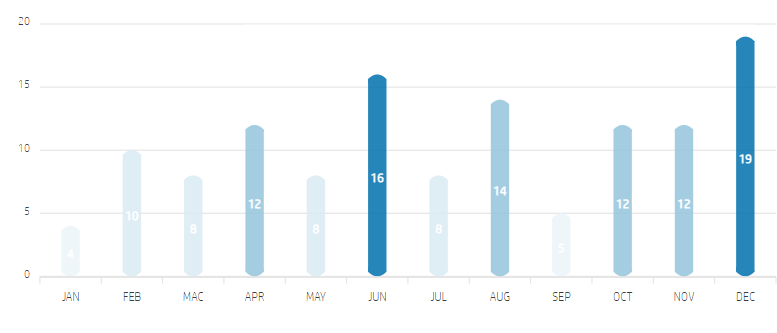
I´m using 30% for barHeight - less than that the legend inside the bars will be unreadable.
csfeijo
on 1 Apr 2020
Ok, no problem !!!
Thanks for your support, the ApexCharts is amazing, this is a minimal detail guys!
Cheers,
csfeijo
on 1 Apr 2020
Is this working also with pie charts?
 adibreaban
on 12 Nov 2020
adibreaban
on 12 Nov 2020
Related issues
 pribilinskiy
·
3Comments
pribilinskiy
·
3Comments
 frlinw
·
3Comments
frlinw
·
3Comments
 ismaildervisoglu
·
3Comments
ismaildervisoglu
·
3Comments
 rudeayelo
·
3Comments
rudeayelo
·
3Comments
 thellimist
·
3Comments
thellimist
·
3Comments
Most helpful comment
any update on borderRadius?