Amiberry: "Update WHDLoad Database/XML" results in Amiberry Crash since Version 3.1.3.1
System: Raspberry Pi 4 with RetroPie 4.6 and Amiberry Version 3.1.3.1
"Update WHDLoad Database/XML" results in Amiberry Crash since Version 3.1.3.1
Cheers
Retro1968
 Retro1968
All 28 comments
Can you try the following test please:
- Exit EmulationStation
- Login to the console
- Launch Amiberry manually (e.g. sudo /opt/retropie/emulators/amiberry/amiberry)
- Test the button again
 midwan
on 1 May 2020
midwan
on 1 May 2020
Also, this is really covered in #540 :)
midwan
on 1 May 2020
"sudo /opt/retropie/emulators/amiberry/amiberry" results in error message "Internal error: file scrc/osdep/gui/main_windows.cpp line 1031".
Internet is OK, since i can surf in IBrowse on AmigaOS 3.1.4.1
Retro1968
on 1 May 2020
@Retro1968
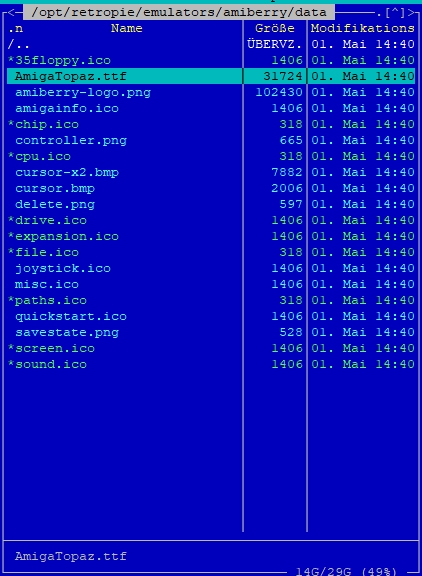
That's indicating that it failed to load the GUI font. It's trying to open the file data/AmigaTopaz.ttf - does that exist from the location the binary is in?
midwan
on 1 May 2020
Retro1968
on 1 May 2020
I can confirm I have the same issue when updating WHDLoad db.
 stuffu
on 1 May 2020
stuffu
on 1 May 2020
I deinstalled the Version 3.1.3.1 and installed the pre-compiled Amiberry Version 3.1.3.
The error is now also present here. Maybe the problem is with RetroPie 4.6?
Retro1968
on 2 May 2020
There have always been issues with the RetroPie install not giving permissions properly where the file gets saved - has anyone tested if restoring full user rights to pi user where it is saved might solve this?
 HoraceAndTheSpider
on 2 May 2020
HoraceAndTheSpider
on 2 May 2020
This commands didnt solved the problem:
sudo chown -R pi:pi /home/pi
sudo chown -R pi:pi /opt/retropie/configs
Retro1968
on 2 May 2020
It certainly works on the standard Raspbian Buster systems I've tested it with, so this sounds like it's RetroPie-specific at this point. More investigation is needed to find out why...
midwan
on 3 May 2020
Maybe you should report that to the RetroPie team?
Retro1968
on 3 May 2020
I just tested your new version 3.1.4 beta. Unfortunately, the error remains.
Retro1968
on 3 May 2020
@Retro1968 there was no change related to this area in the beta, so of course the behavior would be the same :)
If there's any progress made in this, I'll mention it here of course. ;)
midwan
on 3 May 2020
I will look into this on RetroPie.
 joolswills
on 3 May 2020
joolswills
on 3 May 2020
I can reproduce the crash. Not debugged yet.
PING www.google.com (172.217.169.36) 1(29) bytes of data.
9 bytes from lhr48s08-in-f4.1e100.net (172.217.169.36): icmp_seq=1 ttl=55

--- www.google.com ping statistics ---
1 packets transmitted, 1 received, 0% packet loss, time 0ms

2020-05-03 21:16:25 URL:https://raw.githubusercontent.com/HoraceAndTheSpider/Amiberry-XML-Builder/master/whdload_db.xml [4583717/4583717] -> "/tmp/whdload_db.xml" [1]
/tmp/whdload_db.xml:26772: parser error : PCDATA invalid Char value 2
            $z÷ÄAú¨Nª
                     ^
INFO: --- New exception ---
INFO: JIT not in use.
INFO: Segmentation Fault
INFO: info.si_signo = 11
INFO: info.si_errno = 0
INFO: info.si_code = -6
INFO: info.si_addr = 00003c3f
INFO: r0  = 0x00000000
INFO: r1  = 0xbefcbcb4
INFO: r2  = 0x00000000
INFO: r3  = 0x00000008
INFO: r4  = 0xb6f5c968
INFO: r5  = 0x0000000b
INFO: r6  = 0xbefcbcb4
INFO: r7  = 0x000000af
INFO: r8  = 0x64616f6c
INFO: r9  = 0x2e62645f
INFO: r10 = 0x706d742f
INFO: FP  = 0x6468772f
INFO: IP  = 0x00000000
INFO: SP  = 0xbefcbcb0
INFO: LR  = 0x00000000
INFO: PC  = 0xb6d5d8ec
INFO: CPSR = 0x00000010
INFO: Fault Address = 0x00000000
INFO: Trap no = 0x0000000e
INFO: Err Code = 0x00000207
INFO: Old Mask = 0x00000000
INFO: LR - 0x00000000: symbol not found
INFO: Stack trace:
INFO: 0x0014447c <(null) + 0x0014447c> (./amiberry)
INFO: 0xb672a130 <__default_rt_sa_restorer + 0x00000000> (/lib/arm-linux-gnueabihf/libc.so.6)
INFO: IP out of range
INFO: Stack trace (non-dedicated):
INFO: ./amiberry() [0x144594]
INFO: /lib/arm-linux-gnueabihf/libc.so.6(__default_rt_sa_restorer+0) [0xb672a130]
INFO: End of stack trace.
INFO: --- end exception ---
Sorry. Missed some of the log. Updated previous reply.
joolswills
on 3 May 2020
There is a line of garbage at the referenced line in the downloaded file. But I'm not sure that's the cause of the crash.
joolswills
on 3 May 2020
I tested with a fixed XML and it was fine. Also if the file doesn't exist or so it will crash too.
Not sure why this isn't reproducible for you @midwan - did you test it before the XML got broken maybe.
Some error handling in this code is needed anyway. But it's not a retropie issue.
joolswills
on 3 May 2020
@joolswills
Thanks for the assistance! Yes, this area definitely needs some error handling.
midwan
on 4 May 2020
@HoraceAndTheSpider
There seems to be a problem with the current whdload_db.xml file in your repo. Specifically, I found this:
error on line 26813 at column 10: PCDATA invalid Char value 2
It's in the game Benefactor_v1.2_CD32, in the <custom> fields (3rd line).
It looks like this causes the parsing of the XML to fail, even if the download is successful.
I'm making several improvements in this area in Amiberry, so it will not crash anymore, but I think you need to update the file also. ;)
midwan
on 4 May 2020
Hello @midwan it's something I have fixed in my xml. I'm working with @HoraceAndTheSpider to merge it into the official repo but to have confirmation would be great. Thanks.
 nemo93
on 4 May 2020
nemo93
on 4 May 2020
@nemo93 yes, that doesn't have the problem. ;)
midwan
on 4 May 2020
@HoraceAndTheSpider
There seems to be a problem with the currentwhdload_db.xmlfile in your repo. Specifically, I found this:
error on line 26813 at column 10: PCDATA invalid Char value 2It's in the game
Benefactor_v1.2_CD32, in the<custom>fields (3rd line).
It looks like this causes the parsing of the XML to fail, even if the download is successful.
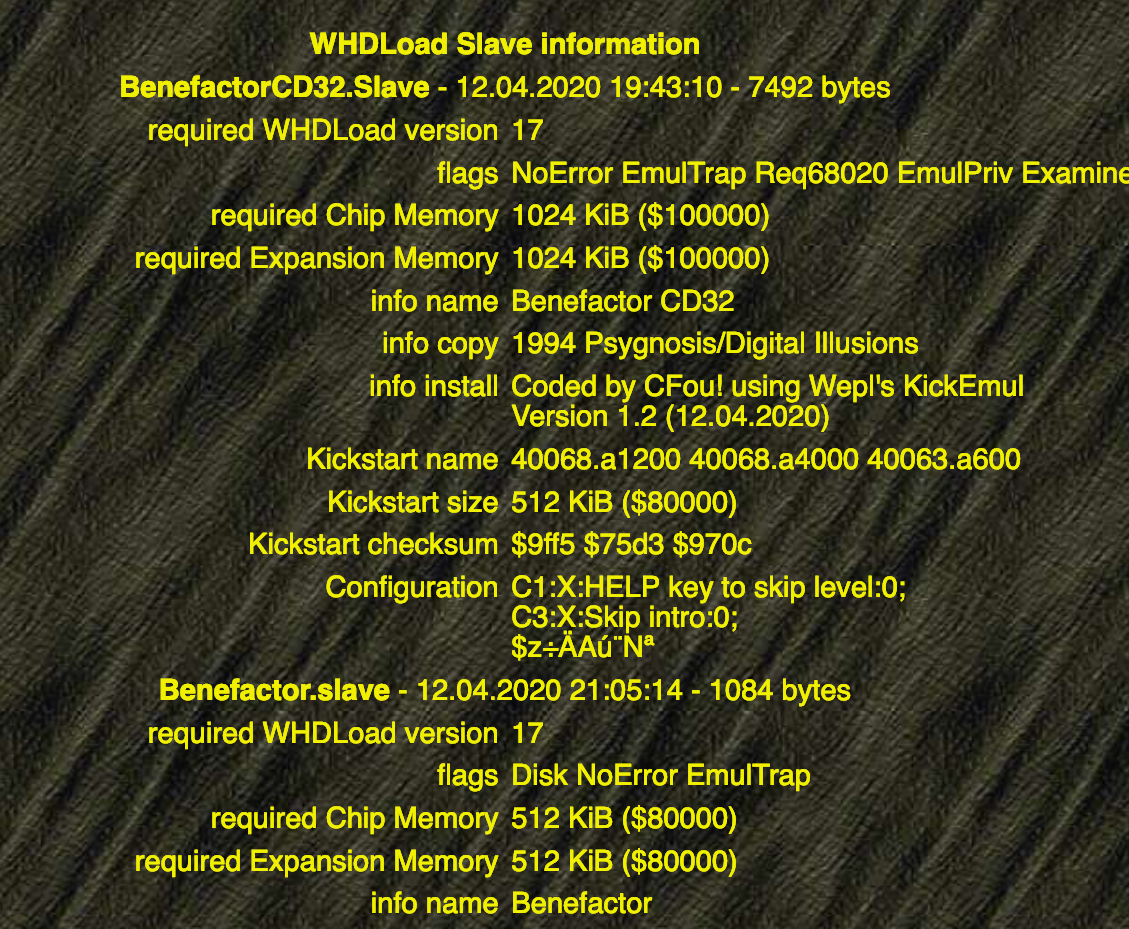
The garbled characters are actually correct for what is in the file!!
http://whdload.de/games/Benefactor.html
We will add a work-around on the XML builder, but techncially this is one for the WHDLoad devs to fix!
HoraceAndTheSpider
on 6 May 2020
Interesting. Maybe you should inform the developers about your findings?
Retro1968
on 6 May 2020
yeah in that case you can work around it by encoding it correctly in the xml or stripping out of range characters that would need encoding - but best fixed upstream.
joolswills
on 6 May 2020
Interesting. Maybe you should inform the developers about your findings?
I have reported it on the WHDLoad Mantis BugTracker for the specific game.
http://mantis.whdload.de/view.php?id=4610
(apologies for my shameful typos in the report)
It's interesting that it's a recent slave update (around 3 weeks) which might explain why it has only recently occurred.
edit: Hardcoded fix added in the XML builder. https://github.com/HoraceAndTheSpider/Amiberry-XML-Builder/commit/c316944eaa6fe6039890a28876cd347d9f9ad35b
I've test this on my laptop and it generated the new entry as:
    <game filename="Benefactor_v1.2_CD32"  sha1="36a63cf707596ce4b5158f5c97001c73db75d722">
        <name>Benefactor [CD32]</name>
        <subpath>BenefactorCD32</subpath>
        <variant_uuid>359c1d55-4bb8-536c-b9af-81d373001023</variant_uuid>
        <slave_count>1</slave_count>
        <slave_default>BenefactorCD32.Slave</slave_default>
        <slave_libraries>False</slave_libraries>
        <slave number="1">
            <filename>BenefactorCD32.Slave</filename>
            <datapath>data</datapath>
            <custom>
            C1:X:HELP key to skip level:0
            C3:X:Skip intro:0

            </custom>
        </slave>
        <hardware>
        PRIMARY_CONTROL=JOYSTICK
        PORT0=CD32
        PORT1=CD32
        JIT=FALSE
        CHIPSET=AGA
        SCREEN_HEIGHT=256
        SCREEN_CENTERH=SMART
        SCREEN_CENTERV=SMART

        </hardware>
    </game>
I just got the message: "Updated XML downloaded". :-)
Retro1968
on 7 May 2020
This has also been fixed on the Benefactor slave update: http://www.whdload.de/games/Benefactor.html
HoraceAndTheSpider
on 10 May 2020
Related issues
 andreavitali
·
6Comments
andreavitali
·
6Comments
 henrikstengaard
·
7Comments
henrikstengaard
·
7Comments
 Fourdee
·
4Comments
Fourdee
·
4Comments
 tenleftfingers
·
8Comments
tenleftfingers
·
8Comments
 Shawson
·
7Comments
Shawson
·
7Comments
Most helpful comment
yeah in that case you can work around it by encoding it correctly in the xml or stripping out of range characters that would need encoding - but best fixed upstream.