Altair: Empty chart saving with transformer
Problem: with data transformer enable,saved html shows empty graph. In #1370, html will embed data by default, but now the html will not reference the JSON correctly nor embed data in HTML.
version:
altair==3.1.0
vega=2.4.0
related issue: #1370
import altair as alt
import pandas as pd
alt.renderers.enable('notebook')
alt.data_transformers.enable('json')
source = pd.DataFrame({
'a': ['A', 'B', 'C', 'D', 'E', 'F', 'G', 'H', 'I'],
'b': [28, 55, 43, 91, 81, 53, 19, 87, 52]
})
chart = alt.Chart(source).mark_bar().encode(
x='a',
y='b'
)
chart.save("demo.html")
 noklam
All 8 comments
Supplement, the only way that I can export an embed HTML is comment the data_transformer for Max rows >5000.
This is weird since when I am working in notebook, I need to enable it to make sure my graph is OK. But then I have to disable it before I save graph(basically I comment that line and restart my notebook)
noklam
on 8 Jul 2019
Updated:
I found it is related to the browser.
Left(Firefox), right(Chrome). The reference JSON only render correctly in Firefox but not Chrome...
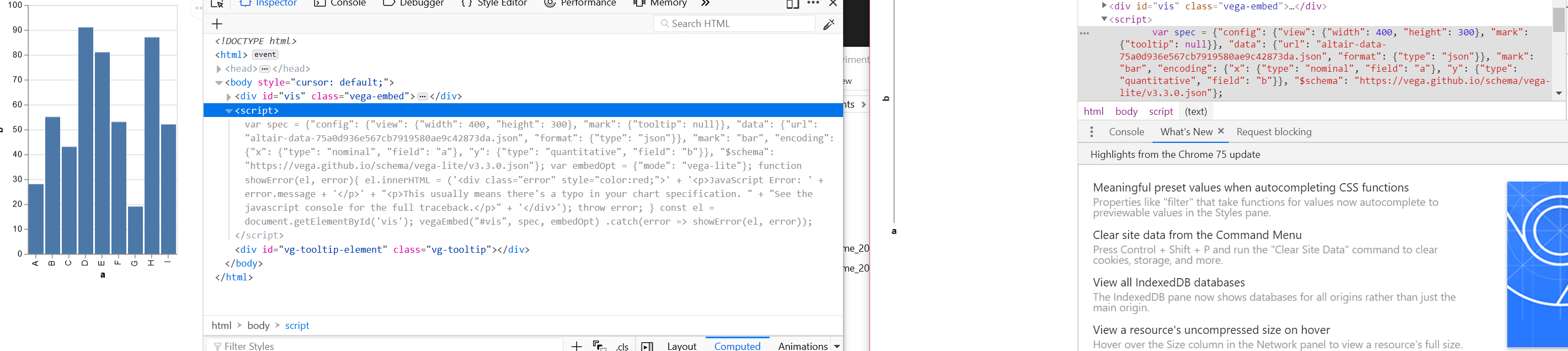
Additional Information in Chrome debugger:
vega@5:1 Fetch API cannot load file:///my-path/altair-data-75a0d936e567cb7919580ae9c42873da.json. URL scheme must be "http" or "https" for CORS request.
(anonymous) @ vega@5:1
Vt @ vega@5:1
async function (async)
Vt @ vega@5:1
Ur.request @ vega@5:1
Ur.preload @ vega@5:1
add @ vega@5:1
transform @ vega@5:1
SD @ vega@5:1
(anonymous) @ vega@5:1
OD @ vega@5:1
(anonymous) @ vega@5:1
VD @ vega@5:1
(anonymous) @ vega-embed@4:1
(anonymous) @ vega-embed@4:1
D @ vega-embed@4:1
je @ vega-embed@4:1
Ne @ vega-embed@4:1
(anonymous) @ demo.html:34
vega@5:1 WARN Loading failed altair-data-75a0d936e567cb7919580ae9c42873da.json TypeError: Failed to fetch
at Object.http (vega@5:1)
at Object.Vt [as load] (vega@5:1)
at async VD.Ur.request (vega@5:1)
at async VD.Ur.preload (vega@5:1)
noklam
on 8 Jul 2019
Thanks for the investigation. I suspect it's some sort of security "feature" in chrome that is blocking access from the headless browser to the saved file.
For what it's worth, there is no need to restart your session and rerun with the transformer enabling commented out. If you want to temporarily change the data transformer, you can use the context manager:
with alt.data_transformers.enable('default'):
    chart.save('chart.png')
 jakevdp
on 8 Jul 2019
jakevdp
on 8 Jul 2019
More information on disabling max rows here: https://altair-viz.github.io/user_guide/faq.html#maxrowserror-how-can-i-plot-large-datasets
jakevdp
on 8 Jul 2019
Thanks Jake, I think you are right. I did a bit more of research and seems that by default Chrome blocks Javascript to access the local filesystem directly for security. So far I can only use chrome if I start a local HTTP server to open that HTML file.
noklam
on 9 Jul 2019
I was thinking about whether we should enable the default data transformer automatically when saving a chart, but unfortunately that would break applications where the data transformer is used to, for example, transform geographic data on input. So I think the best approach is to make certain you enable the default data transformer on save if that is appropriate for you.
jakevdp
on 9 Jul 2019
I think that makes sense, thx for your help!
noklam
on 11 Jul 2019
I will also note that this is also the behaviour introduced in Firefox v68 in response to CVE-2019-11730
 malramsay64
on 22 Jul 2019
malramsay64
on 22 Jul 2019
Related issues
 zanarmstrong
·
4Comments
zanarmstrong
·
4Comments
 floringogianu
·
3Comments
floringogianu
·
3Comments
 fischcheng
·
4Comments
fischcheng
·
4Comments
 morberg
·
3Comments
morberg
·
3Comments
 firasm
·
3Comments
firasm
·
3Comments
Most helpful comment
Thanks for the investigation. I suspect it's some sort of security "feature" in chrome that is blocking access from the headless browser to the saved file.
For what it's worth, there is no need to restart your session and rerun with the transformer enabling commented out. If you want to temporarily change the data transformer, you can use the context manager: