Hi,
Trying to sort a bar chart on another field, not getting the expected results.
My data in DataFrame:
  location  name                 score sort_order   target
0   A   Elwood Dempsey      10  1   20
1   B   Migdalia Mcferron   23  2   25
2   B   Takisha Rodiguez    32  2   25
3   C   Aurea Heinecke          34  3   30
4   A   Sofia Donofrio           5  1   20
5   B   Cecile Eubanks          56  2   25
6   D   Haley Curfman           23  4   40
7   A   Keenan Israel           44  1   20
8   B   Bethanie Nicosia     9  2   25
9   C   Dominga Sterns           4  3   30
My Altair code to display a bar chart:
alt.Chart(data).mark_bar().encode(
        alt.Y('name:N', sort= {"op": "distinct", "field": "sort_order:O"}),
        alt.X('score:Q'),
        color={"field": 'location:N', "sort": {"op": "distinct", "field": "sort_order:O"}}
        )
Result:

The legend is sorted correctly on sort_order, however Y isn't sorted at all. Y is displayed in the order from the datasource. If I remove the Y sort attribute, Y is sorted alphabetically (as expected).
Question: is this a bug of I'm missing something?
 sderuiter
All 9 comments
It will work with the following:
alt.Y('name:N', sort=alt.SortField(field="sort_order", op="sum", order='ascending')),
 afonit
on 24 Mar 2018
afonit
on 24 Mar 2018
Thank you for pointing me to SortField, that works. Now, I want to make this a LayerChart and add mark_tick() to this. I've re-written the call to facilitate the LayerChart.
Original bar chart
base = alt.Chart(data).encode(
        alt.Y('name:N', sort=alt.SortField(field="sort_order", op="sum", order='ascending')))

bar = base.mark_bar().encode(
        alt.X('score:Q'),
        alt.Color('location:N', sort=alt.SortField(field="sort_order", op="distinct", order='ascending'))
        )
bar
This outputs:
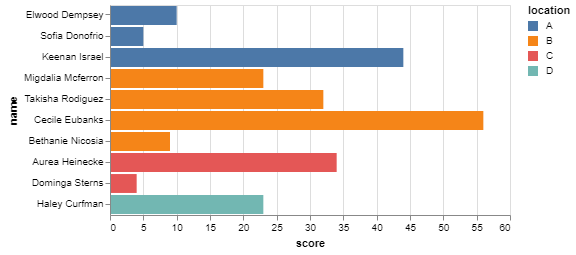
Which is perfect!
Now adding the tick.
base = alt.Chart(data).encode(
        alt.Y('name:N', sort=alt.SortField(field="sort_order", op="sum", order='ascending')))

bar = base.mark_bar().encode(
        alt.X('score:Q'),
        alt.Color('location:N', sort=alt.SortField(field="sort_order", op="distinct", order='ascending'))
        )

tick = base.mark_tick().encode(
        alt.X('target:Q')
)
bar+tick
This outputs:
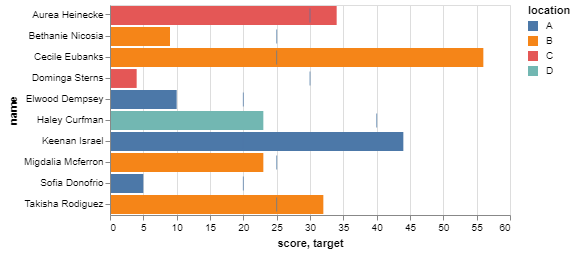
The legend is still sorted correctly, but the bar graph is now sorted alphabetically again!
What am I mising here?
sderuiter
on 24 Mar 2018
That looks like a similar issue I ran into and filed bugs here - it ended up being a duplicate of an existing bug reported against vega-lite.
My first issue raised against altair:
https://github.com/altair-viz/altair/issues/549
Then I filed against vega-lite as that is the source:
https://github.com/vega/vega-lite/issues/3566
and that was closed as this looked like a duplicate of this issue that they are currently tracking to resolve:
https://github.com/vega/vega-lite/issues/2177
afonit
on 24 Mar 2018
Thank you, will follow these closely.
sderuiter
on 26 Mar 2018
Do we know why we cannot sort? And when would this issue be fixed? :)
 Proteusiq
on 21 Sep 2018
Proteusiq
on 21 Sep 2018
I am running into the same issue. It would be great to get this resolved.
 gballardin
on 22 Sep 2018
gballardin
on 22 Sep 2018
Sorting layered charts does not work because of a bug in Vega-Lite. I believe it will be fixed in the Vega-Lite 3.0 release, which will be supported by Altair version 3.0.
 jakevdp
on 22 Sep 2018
jakevdp
on 22 Sep 2018
See the Vega-Lite issues linked above for more information.
jakevdp
on 22 Sep 2018
Awesome. Looking forward to v3.0
Proteusiq
on 25 Sep 2018
Related issues
 maxgerma
·
3Comments
maxgerma
·
3Comments
 DentonGentry
·
3Comments
DentonGentry
·
3Comments
 Juan-132
·
3Comments
Juan-132
·
3Comments
 nielsmde
·
4Comments
nielsmde
·
4Comments
 jtbaker
·
3Comments
jtbaker
·
3Comments
Most helpful comment
Sorting layered charts does not work because of a bug in Vega-Lite. I believe it will be fixed in the Vega-Lite 3.0 release, which will be supported by Altair version 3.0.