Xiaomi-pro-hackintosh: Problem with CPU CPUFriendDataProvider and Geekbench score
If I use XiaoMi NoteBook Pro EFI v1.2.3 with v1.2.2 CPUFriendDataProvider.kext and CPUFriend.kext (released on 13 May) instead of 1.2.3 (or 1.2.4) versions, geekbench is fine with 16.500 score in geekbench.
Otherwise, if I use full clover folder (release 1.2.3 or 1.2.4), I just get 11.400 score in geekbench.
I think the updated release and CLOVER folder of @stevezhengshiqi has wrong CPUFriend kext, because I cant get good score. Anybody can check this?
 alexmenn
All 58 comments
Hi, I think it's a trade off between performance and power saving. If you prefer performance, you can try this CPUFriendDataProvider.kext. I set EPP at max performance level in the kext below(Second one). In the v1.2.2 and v1.2.6 EFI folder, the system doesn't enable HWP(SpeedShift) in Kabylake-R, resulting inefficient power management.

UPDATE: Because in 10.13.6(17G2112) and 10.14, Apple add MBP(15,2)'s PM frequency vectors in X86Plugin, we can make use of it. (Both MBP 2018 and Xiaomi NoteBook Pro use Intel 8th CPU)
IMPORTANT: Your OS version has to be 10.13.6(17G2112) or above. Some devices may crash in 10.13.4, I am not sure.
If you want longer battery life, which could result in slower performance, please replace
EFI/CLOVER/kexts/Other/CPUFriendDataProvider.kextwith the archive below
CPUFriendDataProvider.kext.zipIf you want balance battery life and performance, please replace
EFI/CLOVER/kexts/Other/CPUFriendDataProvider.kextwith the archive below
CPUFriendDataProvider.kext.zipIf you want more performance, which could result in shorter battery life, please replace
EFI/CLOVER/kexts/Other/CPUFriendDataProvider.kextwith the archive below
CPUFriendDataProvider.kext.zip
The way I make these kexts is inspired by PMheart and shuhung.
 stevezhengshiqi
on 8 Aug 2018
stevezhengshiqi
on 8 Aug 2018
Thanks for your test again. I tested for several frequencyvectors and found that the incorrect minimum frequency value can result in low mark in Geekbench. I used to set the minimum frequency to 400mhz, which is too low. I will update CPUDataProvider by using default apple min frequency value (1300mhz) in the near future.
UPDATE: It's may related to min frequency, but EPP is the main reason causing the low performance. The kext above uses EPP value 00(max performance). The one in EFI folder use C0, which is max power-saving, and default is 90. I will reverse this value to default 90 in new release. Reference is here. The v1.2.2 EFI folder disables HWP, so EPP setting doesn't work at all. Therefore, v1.2.2 works in an inefficient XCPM mode, which is power hungry.
stevezhengshiqi
on 8 Aug 2018
Ok perfect! Thank you. I will wait for new release :)
alexmenn
on 9 Aug 2018
Hi there again! I've tried your new release, and my geekbench is 16.200 with EPP and min freq 0.8ghz . Pretty good. With the kext you provided here, (max performance), I ger 17.100 score; but min freq es 1.3ghz (drain more battery I think). Is this ok?
alexmenn
on 11 Aug 2018
Yeah, the purpose of the driver provided here is to enable higher performance. If you want a min freq 0.8ghz version of the kext above, here it is.
CPUFriendDataProvider.kext.zip
stevezhengshiqi
on 11 Aug 2018
The CPUFriendProvider.kext you give me now is different than the new release one? Or is the same?
alexmenn
on 11 Aug 2018
You said "I ger 17.100 score; but min freq es 1.3ghz (drain more battery I think)". So I modify the min freq value of the kext in the 2nd floor to meet your requirement.
stevezhengshiqi
on 11 Aug 2018
Oh! Great! Now I get it. What differences are now with this new kext (updated to has min freq 0.8h) and the latest release one? Just the performance? I mean, battery life should be the same with both kexts?
alexmenn
on 11 Aug 2018
Certainly we can't get both good performance and long battery life. The kext, which utilizes more aggressive frequency vector, in this issue are for people who want better performance, and kexts in my latest release provide balance battery life and performance.
stevezhengshiqi
on 11 Aug 2018
Ok, then I will keep in balance mode. I prefer to lose 1000 in geekbench and win battery life!! Thank you
alexmenn
on 12 Aug 2018
1.6000是 i5 8250u跑的还是i7 8550u跑的? i5的话可以缩一下预算了
 chenjiangui
on 30 Aug 2018
chenjiangui
on 30 Aug 2018
@chenjiangui i7跑的,多核分数i5会差一些,单核差不多。
stevezhengshiqi
on 30 Aug 2018
好的, 谢谢.
预算缩不了了, 内存是板载的
chenjiangui
on 30 Aug 2018
Hello guys,
I have a little problem, I have Mi i7 16gb and I can choose in clover MBP 15,2 but I must choose MBP 14,1 because in 15,2 my Macos don't boot.
I have actually latest EFI folder from stevezhengshiqi and macOS 10.13.6
sorry for my English ;)
thanks for help :)
 sebmoris
on 21 Sep 2018
sebmoris
on 21 Sep 2018
@sebmoris There's no advantage to choose MBP 15,2. If you want better power management, please use CPUFriendDataProvider above.
By the way, MBP15,2 only supports 10.13.6 17G2112 and above. 17G65 doesn't support.
stevezhengshiqi
on 21 Sep 2018
@sebmoris There's no advantage to choose MBP 15,2. If you want better power management, please use
CPUFriendDataProviderabove.By the way, MBP15,2 only supports 10.13.6 17G2112 and above. 17G65 doesn't support.
Thanks for help @stevezhengshiqi :)
sebmoris
on 21 Sep 2018
@stevezhengshiqi I was able to install higher build of 10.13.6 and now I can choose in clover MBP 15,2 but trackpad don't work and is not detected
cpu and battery with your CPUFriendDataProvider.kext on 800Mhz and disable bluetooth works fine :)
only trackpad don't work and sometimes usb mouse don't work after reboot sys.
sebmoris
on 22 Sep 2018
@sebmoris Congratulations. I still not recommend to choose MBP 15,2, the reason I have explained: there's no advantage to choose that.
For the trackpad issue, you can try to run sudo kextcache -i / and restart, as said in README.md - Installation.
stevezhengshiqi
on 22 Sep 2018
everything works fine but in my opinion on 10.13.6 MBP 15,2 some times in micro seconds I have some delays, for example in changing beetween users profiles, on startup login when I click on logo user to write pass and after write pass have to wait to load all desktop. So I update do Mojave and check performance, if in Mojave I see same problem, then I would be back to MBP 14,1 on 17G65 :)
sebmoris
on 22 Sep 2018
@stevezhengshiqi, ok I will back to MBP 14,1 on 17G65 because on Mojave Beta Public on 15,2 or 14,1 in Geekbench results was same 16600-16720 points, so it confirms what you wrote about choose MBP 15,2, so I wait to official Mojave, but still not have solution to Turbo Boost Switcher because I can't off TB with this tool... any ideas ? :)
sebmoris
on 23 Sep 2018
hi guys :)
can you send the CPUFriendDataProvider.kext file on which you obtained the result 17100 on Geekbench? because actually on macOS Mojave on MPB15,2 my best results 16700 is only on Cpufrienddataprovider 800Mhz, on the other files the results are worse... ;/ should I return to MBP14,1 and repeat tests ??
my max freq in bench is only 2,8GHz... on intel website in i7 8550u is 1,8Ghz base and 4,0Ghz max...
https://ark.intel.com/products/122589/Intel-Core-i7-8550U-Processor-8M-Cache-up-to-4_00-GHz
sebmoris
on 25 Sep 2018
I repeat test on MBP 14,1 and results same
How did you make 17100pts ;) ?
sebmoris
on 25 Sep 2018
The power management should be right but I wanna know if it's possible mod it. Because when the pc reach 92 degrees at 45 watts the pc throttling and go back at 15w with lower frequency.
At 59/60 degrees there is so much space to increase the performance of the pc and have high frequencies.
I ran some test with all 3 CPUFriendDataProvider.kext.
With the one for Battery, the CPU never reach 45w and stay all the time at 15w. So lower performance:
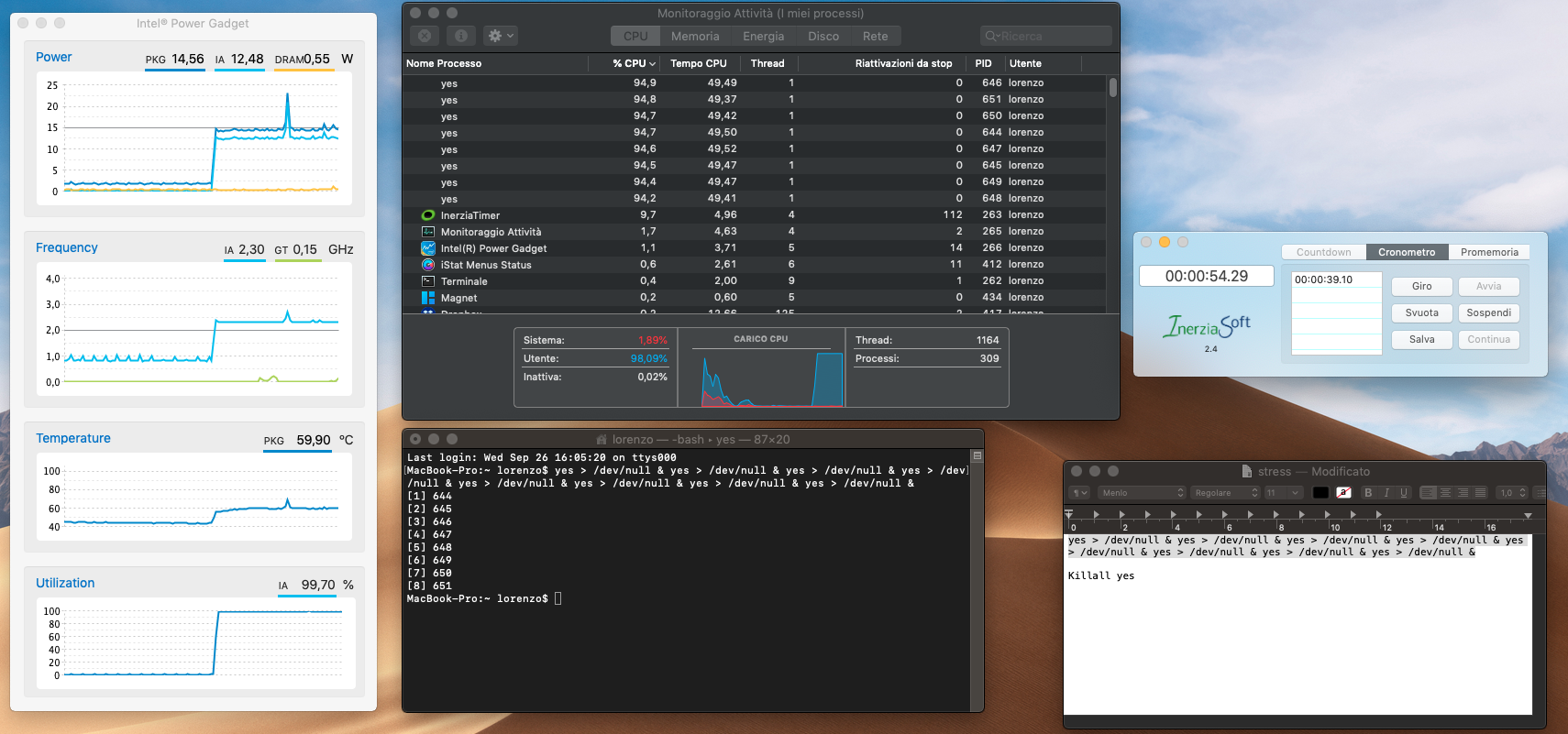
With the one for Performance, the CPU stays at 45w for 11sec and go back at 15 for all the time. It never goes high.
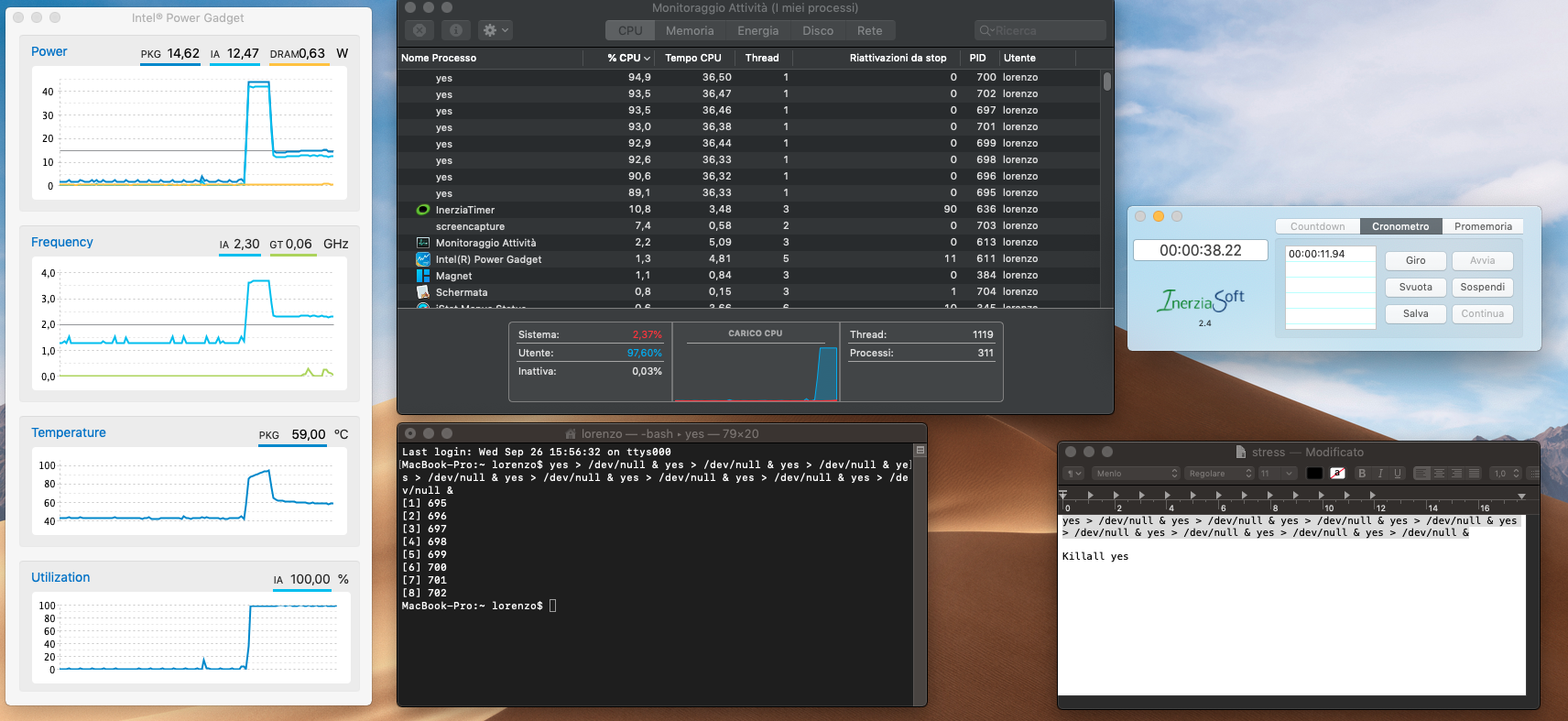
with the one for Balanced, the CPU need 14/15sec before it reaches 90 degrees and goes back at 15w:
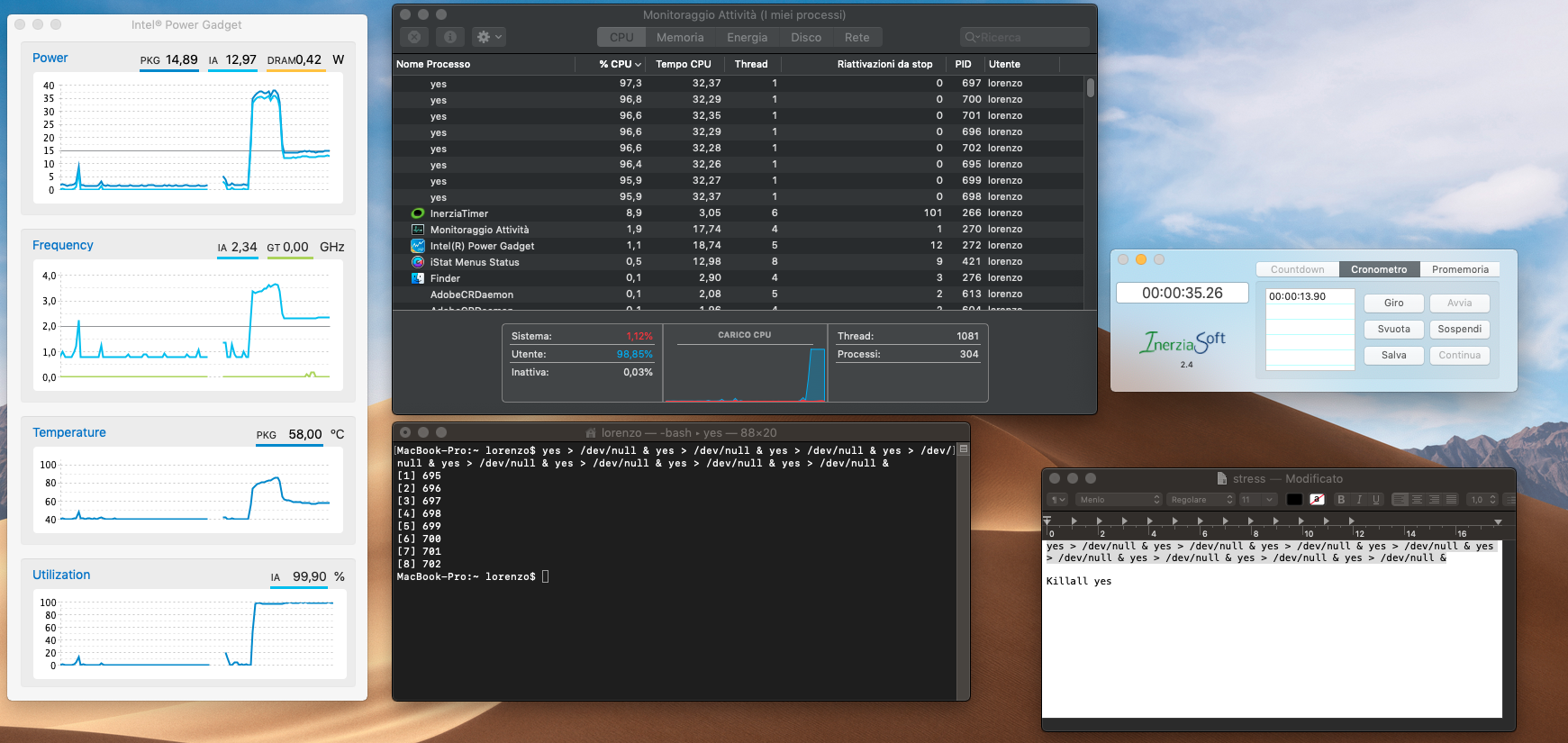
Because it stays more time at 45w the CPUFriendDataProvider.kext for Balanced allow me to have a higher score in Cinebench than the one for Performance. This thing doesn't make any sense.
This CPU is made for stay at 15w but, because degrees are low, I wanna know if it's possible to let the CPU consume more watt and have high frequencies with more performance.
I think the problem here is because the pc cut down too much the watt for the CPU when it reaches 92 degrees. When it goes back at 15w and 60 degrees it should be able to increase again the wattage and frequencies.
 lorenzoangotzi
on 29 Sep 2018
lorenzoangotzi
on 29 Sep 2018
@lorenzoangotzi thanks so much for your test ;) I have same problem, we can not use the full power and frequency of the processor. next issue what I saw, its a better results on benchmarks with CPUFriendDataProvider.kext for better battery life than other files ;/ on mbp 14,1 and 15,2
sebmoris
on 30 Sep 2018
Any updates about my test? If you need I can make other tests.
I really hope that we can solve this problem
lorenzoangotzi
on 18 Oct 2018
我也发现这个问题了, 黑苹果下睿频时间不超过15S, 顶多就跑个GB4, 编译项目的时候频率一直是2.4GHZ, TDP 15W, 性能非常差, 有什么办法可以在OSX解锁低压U的TDP(PL1)吗? Linux下有人开源了Python写的一个脚本解锁低压U的TDP: https://github.com/erpalma/lenovo-throttling-fix
chenjiangui
on 26 Oct 2018
Hi @stevezhengshiqi @sebmoris @lorenzoangotzi . Ive upadted to mojave and everything work ok. But, I've made some geekbench test with 3 CPUFriendDataProvider.kext you uploaded. With all of them, I get 11.700-11.900 score. With HS, I was getting 16000 or more. How can we fix it? The score now is lower.
I've tried too with smbios 15.2, and 14.1. Nothing worked, les than 12k score all time!!
alexmenn
on 28 Oct 2018
Hi @lorenzoangotzi @daliansky @stevezhengshiqi I "fix" this problem using older version of CPUFriendDataProvider.kext it. Months ago I could fix similar problem with HWP and score using kext in version 1.2.2 of @daliansky folder.
Try this kext, you will get more score when using geekbench and low freq is 0,74 or so, so is like balance mode.
I know this kext does not use HWP, maybe @daliansky can fix the new kext with HWP and good score results :)
now @daliansky can try what is wrong with 1.2.8 kext, because it doesnt reach max score.
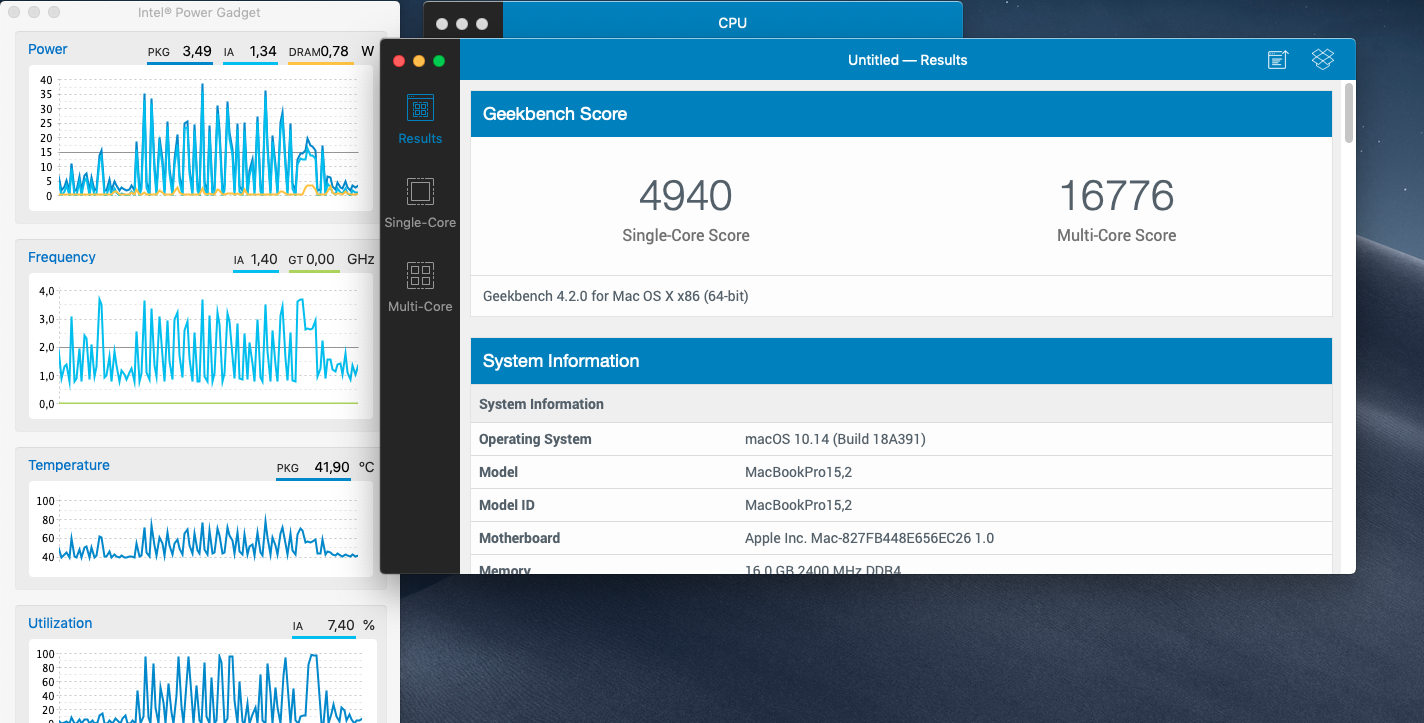
CPUFriendDataProvider.kext.zip
alexmenn
on 29 Oct 2018
@alexmenn There's nothing wrong in v1.2.8's CPUFriendDataProvider. You should check your settings. A complete replace of v1.2.8 release is necessary if you keep getting low score.
I remember v1.2.8 and v1.2.2 are using the same CPUFriendDataProvider, so I use Beyond Compare to confirm my memory.
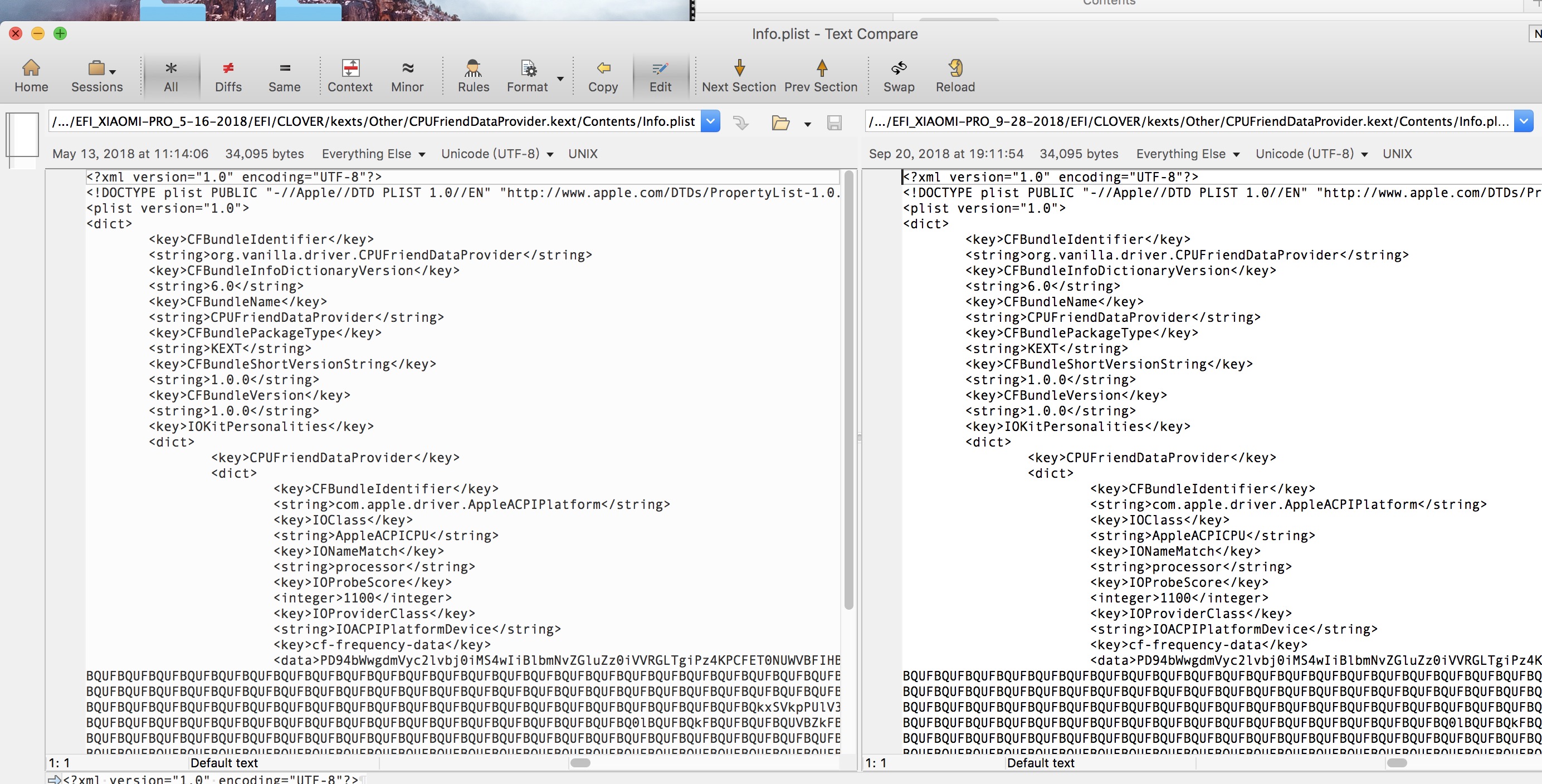
By the way, why are you keeping @daliansky who is not responsible for the release after 1.0.0? He is busy so that I help him maintain this repository since April.
stevezhengshiqi
on 29 Oct 2018
Hi @stevezhengshiqi You we're right. I copied full EFI folder but I don't know why, it didn't work. I downloaded it again, copy/paste, and now it works with good score. @lorenzoangotzi had the same problem, maybe he fixed it downloading again the EFI folder.
I thought you and daliansky were the same person. Sorry, I was wrong :)
Thank you for support! :)
alexmenn
on 30 Oct 2018
Hi @lorenzoangotzi @daliansky @stevezhengshiqi I "fix" this problem using older version of CPUFriendDataProvider.kext it. Months ago I could fix similar problem with HWP and score using kext in version 1.2.2 of @daliansky folder.
Try this kext, you will get more score when using geekbench and low freq is 0,74 or so, so is like balance mode.
I know this kext does not use HWP, maybe @daliansky can fix the new kext with HWP and good score results :)
now @daliansky can try what is wrong with 1.2.8 kext, because it doesnt reach max score.
CPUFriendDataProvider.kext.zip
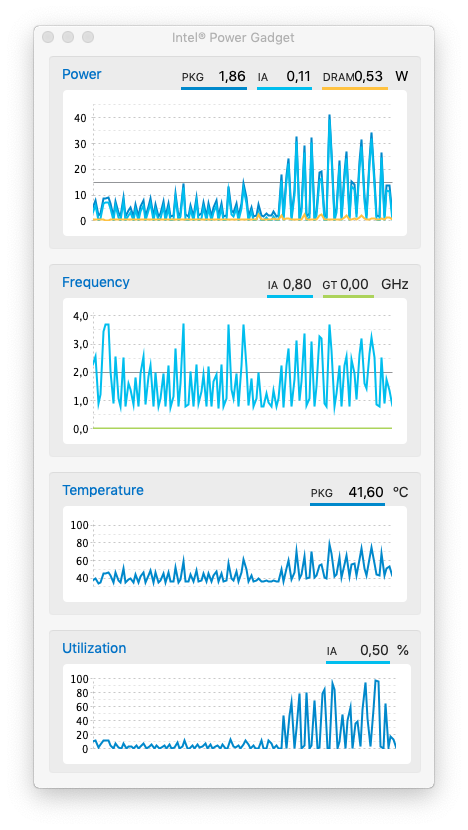
The problem happens when you are in a real work with CPU at 100% and 92 degrees.
The turbo boost doesn't work anymore and goes down to 15w, 60 degrees and 2.3 GHz.
In the synthetic benchmark, you never reach 92 degrees so the CPU is always able to go at 45w and higher frequencies.
lorenzoangotzi
on 30 Oct 2018
Oh! Okay, I get it. Did you enable Speedshift with windows + scripts and tried it? Maybe it goest down to 15w because of "heat security", Im not sure. Have you tried too without cpufriend and without cpufrienddataprovider?
alexmenn
on 30 Oct 2018
@alexmenn Yes, on Windows I'm able to stay at 45w watt, higher frequencies and degrees with so much more performance.
I have tried everything on MacOS. Nothing works.
lorenzoangotzi
on 31 Oct 2018
Ok I see, it's a pitty. @stevezhengshiqi do you know how to fix it? or you have the same problem?
alexmenn
on 1 Nov 2018
@alexmenn Could you briefly summarize the question? As far as I know, Xiaomi-Pro's tdp is restricted to 15W and only 28s for 45W.
stevezhengshiqi
on 1 Nov 2018
I mean, that if @lorenzoangotzi can use tdp at 45w for minutes on windows, why we cant do the same on mac. Is mojave problem? or we will find the same tdp problem in HS? Maybe in windows he can use tdp more time because he uses intel software to unrestrict the tdp!
alexmenn
on 1 Nov 2018
@stevezhengshiqi On windows I can able to stay up to 45w for much longer than 28s.
On MacOs the CPU doesn't stay at 45w for 28s, but it stays at maximum wattage until it reaches 92 degrees than it drops frequencies, wattage and degrees at 60c without never going up.
It's a bit a miss, because at 60c there is so much room for having higher performance.
lorenzoangotzi
on 3 Nov 2018
CPUFriendDataProvider provided here for hwp is working only with smbios 14,1 ?
Cause I think 15,2 is closer to this laptop.
 Mateo1234454545
on 6 Nov 2018
Mateo1234454545
on 6 Nov 2018
@Mateo1234454545 Hi, please read carefully the insturctions at the front. The CPUFriendDataProvider here are all exacted from MBP15,2.
stevezhengshiqi
on 6 Nov 2018
Yes , i reat that.
But when using mbp15,2 (without cpufriend and dataprovider) lower cpu freq is 1.2 , not 0.8 as with 14,1 and cpufriend.
So ,to be clear. If we use mbp15,2 do we have hwp ?
Mateo1234454545
on 6 Nov 2018
@Mateo1234454545 CPUFriend wil overwrite PM management of SMBIOS, so there's no point to change SMBIOS.
I used the native PM template from MBP15,2 and modified the minimum frequency(from 1300 to 800) to generate the CPUFriendDataProvider provided above. Without CPUFriend*, the minimum frequency will be 1300mhz in MBP14,1 and also in MBP15,2 because it is designed by Apple.
Yes, we have hwp when using SMBIOS MBP15,2 or CPUFriendDataProvider above.
If you want to check the HWP status, you can use AppleIntelInfo and view the log.
AppleIntelInfo.kext.zip
stevezhengshiqi
on 6 Nov 2018
Terminal Saved Output.txt
How does it seem ?
Do I have proper cpu management ? Using smbios 15,2.
Mateo1234454545
on 6 Nov 2018
@Mateo1234454545 You can see IA32_PM_ENABLE...................(0x770) : 0x1 (HWP Supported and Enabled) and IA32_HWP_STATUS..................(0x777) : 0x0 in your log, which means HWP is opened successfully.
stevezhengshiqi
on 6 Nov 2018
Great.
So , why do you prefer smbios 14,1 over 15,2 ? Is there any problem with 15,2 ?
Mateo1234454545
on 7 Nov 2018
@Mateo1234454545 Mainly there are three reasons.
Firstly, which I mentioned many times, CPUFriend* will overwrite the origin PM of SMBIOS, so choose 14,1 or 15,2 won't affect PM.
Secondly, accroding to info.plist in USBPorts, the USB configuration is model specific. Change in SMBIOS may cause unexpected USB error.
Thirdly, the EFI is purposely to support all system version from 10.13 to 10.14, and 10.13 can't boot with model MBP15,2.
stevezhengshiqi
on 7 Nov 2018
Just trying to help to find the best configuration.
In my opinion (but I'm far for expert) smbios 15,2 seems better on battery management. Also , lowest cpu freq is 1.2 instead of 1.3. Last , 15,2 works fine with latest HS 10.3.6 patch.
But , as I said I'm not an expert.
Mateo1234454545
on 7 Nov 2018
@Mateo1234454545 Thank you for your help. If you use CPUFriendDataProvider at the top of this site, then your device is using native MBP15,2’s battery management.
Also, a lot of people still stay at 10.13.3/10.13.4. They may suffer from boot error by using SMBIOS MBP15,2.
stevezhengshiqi
on 7 Nov 2018
@stevezhengshiqi I have tried all the three CPUFriendDataProvider for the configuration with 14,1 and 15,2. Nothing change in the wattage use and there is the same drop of frequencies when reaches 92c degrees.
As you can see in my post of 29 Sept, the CPU doesn't stay at 45w for 28sec, but for 12sec with the kext for performance and 14sec for Balanced. This because it cut down everything every time at 92c.
lorenzoangotzi
on 7 Nov 2018
@lorenzoangotzi I am only able to let macOS run MBP15,2's PM and modify minimum frequency, EPP, and maximum frequency. More specific modifications, like the temperature wall, are beyond my ability. We are using the native PM of MBP15,2 provided by Apple, so it may not fit for our CPU very well.
By the way, I can generate a CPUFriendDataProvider with the minimum frequency 3.2GHz if you want high frequency. Not sure whether it will cause system error or not.
CPUFriendDataProvider.kext.zip
stevezhengshiqi
on 7 Nov 2018
Can you please make another one with min freq 1.2 and max freq 2.6 ? I think that would be nice for high temps and temp throttling.
Mateo1234454545
on 7 Nov 2018
@Mateo1234454545 Here it is.
CPUFriendDataProvider.kext.zip
stevezhengshiqi
on 7 Nov 2018
Thanks , but not working. Max speed still 3.4
Is ot possible to have max speed at 3.4 when on power and 2.8 when on battery ?
Mateo1234454545
on 7 Nov 2018
@Mateo1234454545 It may be possible, but I don't know how.
stevezhengshiqi
on 7 Nov 2018
@Mateo1234454545 Here it is.
CPUFriendDataProvider.kext.zip
Is it possible to give it another try ? I'm using smbios 15,2 if this matters.
Mateo1234454545
on 8 Nov 2018
@stevezhengshiqi 我的cpu是i5 8265u,上面的三个CPUFriendDataProvider能用吗
 wsadaaa
on 1 Jan 2019
wsadaaa
on 1 Jan 2019
@wsadaaa 可以的。
stevezhengshiqi
on 1 Jan 2019
@stevezhengshiqi 请问我的电脑是Thinkpad E480 CPU是i5-8250U,请问可以用这个CPUFriendDataProvider吗? 只需要把CPUFriend.kext和CPUFriendDataProvider.kext放到指定位置就可以了吗?还需要其他操作吗?
 aliyoge
on 1 Feb 2019
aliyoge
on 1 Feb 2019
@aliyoge 首先要确保plugintype=1,X86PlugIn驱动未被修改。
推荐根据https://github.com/acidanthera/CPUFriend/blob/master/Instructions.md 来自己生成CPUFriendDataProvider
stevezhengshiqi
on 21 Jul 2019
Related issues
 johnnync13
·
4Comments
johnnync13
·
4Comments
 orhan-drsn
·
7Comments
orhan-drsn
·
7Comments
 Remmed96
·
8Comments
Remmed96
·
8Comments
 wuchuguang
·
5Comments
wuchuguang
·
5Comments
 ghondar
·
8Comments
ghondar
·
8Comments
Most helpful comment
Hi, I think it's a trade off between performance and power saving. If you prefer performance, you can try this

CPUFriendDataProvider.kext. I set EPP at max performance level in the kext below(Second one). In the v1.2.2 and v1.2.6 EFI folder, the system doesn't enable HWP(SpeedShift) in Kabylake-R, resulting inefficient power management.UPDATE: Because in 10.13.6(17G2112) and 10.14, Apple add MBP(15,2)'s PM frequency vectors in X86Plugin, we can make use of it. (Both MBP 2018 and Xiaomi NoteBook Pro use Intel 8th CPU)
IMPORTANT: Your OS version has to be 10.13.6(17G2112) or above. Some devices may crash in 10.13.4, I am not sure.
If you want longer battery life, which could result in slower performance, please replace
EFI/CLOVER/kexts/Other/CPUFriendDataProvider.kextwith the archive belowCPUFriendDataProvider.kext.zip
If you want balance battery life and performance, please replace
EFI/CLOVER/kexts/Other/CPUFriendDataProvider.kextwith the archive belowCPUFriendDataProvider.kext.zip
If you want more performance, which could result in shorter battery life, please replace
EFI/CLOVER/kexts/Other/CPUFriendDataProvider.kextwith the archive belowCPUFriendDataProvider.kext.zip
The way I make these kexts is inspired by PMheart and shuhung.