Xiaomi-pro-hackintosh: install.sh option 8 doesn't work
I'm trying to change my tdp but this option doesn't work, is there another way to do it ??
 Remmed96
All 8 comments
You probably need to build voltageshift (https://github.com/sicreative/VoltageShift) on your own and manually set configurations like https://github.com/daliansky/XiaoMi-Pro-Hackintosh/issues/180 and https://github.com/daliansky/XiaoMi-Pro-Hackintosh/issues/174. I am not in charge of the tdp script in option 8 that is currently out of maintenance.
 stevezhengshiqi
on 8 Oct 2020
stevezhengshiqi
on 8 Oct 2020
Yes I did exactly that, I just wanted to suggest to pay attention to the typed commands, it seems that in the readme of the repository there are suggestions of wrong commands, or better maybe they refer to previous versions because at least as far as I could notice they set the power and time window in a different way from what was stated.
Remmed96
on 9 Oct 2020
I suggest to take note of the values before the change and to check that they are modified as desired by the script.
Remmed96
on 9 Oct 2020
Agree with you. So what's your suggestion? I can add a warning when the user chooses option 8 or I just delete that option.
stevezhengshiqi
on 9 Oct 2020
I set the parameters as suggested by the script for the version with gpu mx150, i.e. downvolt of gpu, cpu and cache of -90mv, short term power 25W with windows of 28 s, long term power of 44 with window 0.002 s and a refresh of the settings every 60 minutes (it can be set to a lower value to refresh more frequently but with 60 I'm pretty good at least for now), the command I used and suggest to run once built to instantiate the daemon is the following.
(Obviously these are parameters that I suggest and of which I'm not sure either, they are the ones I'm currently using, I'm not responsible for any kind of errors or problems that can be created using them).
sudo ./voltageshift buildlaunchd -90 -90 -90 0 0 0 25 28 44 0.002 60
The command must be started in the folder where the executable voltageshift is present, mine for example is ./VoltageShift-master/build/release
Remmed96
on 9 Oct 2020
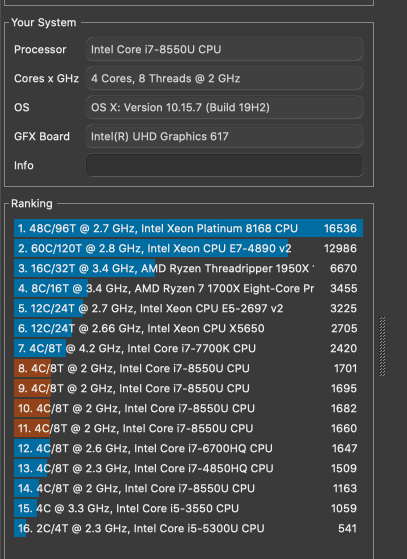
These are the results achieved in this configuration with a max of 70-75° Celsius on the cpu
Remmed96
on 9 Oct 2020
Agree with you. So what's your suggestion? I can add a warning when the user chooses option 8 or I just delete that option.
I would suggest to create a guide in the Advanced section ok the WiKi (I mean where there is also the "Drive Native Intel Wireless Card" guide) where you explain how to use this tool and insert a link to this guide in the "Improvements" section in the README of the repository.
In this way anyone who wants to use this tool can find the right info directly from the repository without having to waste time searching for this info in the issues.
I am not an expert and I do not have the knowledge to create a detailed guide, I just did some tests to understand how to really set those values.
Remmed96
on 9 Oct 2020
Undervolt wiki page created by MarFre22.
stevezhengshiqi
on 20 Nov 2020
Related issues
 bnznamco
·
8Comments
bnznamco
·
8Comments
 Mateo1234454545
·
5Comments
Mateo1234454545
·
5Comments
 ghondar
·
8Comments
ghondar
·
8Comments
 fanvinga
·
4Comments
fanvinga
·
4Comments
 johnnync13
·
4Comments
johnnync13
·
4Comments
Most helpful comment
I set the parameters as suggested by the script for the version with gpu mx150, i.e. downvolt of gpu, cpu and cache of -90mv, short term power 25W with windows of 28 s, long term power of 44 with window 0.002 s and a refresh of the settings every 60 minutes (it can be set to a lower value to refresh more frequently but with 60 I'm pretty good at least for now), the command I used and suggest to run once built to instantiate the daemon is the following.
(Obviously these are parameters that I suggest and of which I'm not sure either, they are the ones I'm currently using, I'm not responsible for any kind of errors or problems that can be created using them).
sudo ./voltageshift buildlaunchd -90 -90 -90 0 0 0 25 28 44 0.002 60
The command must be started in the folder where the executable voltageshift is present, mine for example is ./VoltageShift-master/build/release