Wordpress-seo: Frontpage og:image not picked correctly when using Latest Posts as Homepage
- [x] I've read and understood the contribution guidelines.
- [x] I've searched for any related issues and avoided creating a duplicate issue.
Please give us a description of what happened.
When using the homepage to display the latest posts (set in Settings → Reading). the og:image of the homepage is incorrect. It uses the og:image of the latest post, instead of the one set for the frontpage in SEO → Social → Facebook
Please describe what you expected to happen and why.
I expected the homepage to use the image set for in SEO → Social → Facebook → Frontpage settings
How can we reproduce this behavior?
- Set an image in SEO → Social → Facebook → Frontpage settings
- Set a different image for your latest post
- Set the homepage to show the latest posts in Settings → Reading
- Check the source of the homepage, it will show the og:image of the latest post
Screenshots
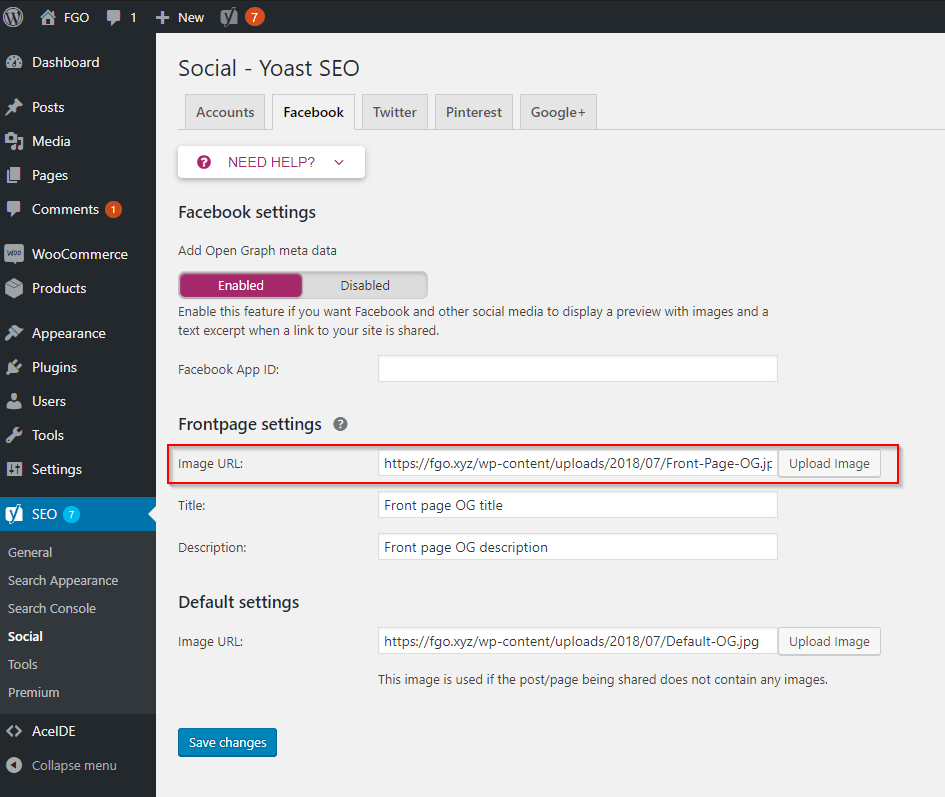

Additional context
It does not seem to happen to everybody, so there must be something else triggering this issue.
Technical info
- WordPress version: 4.9.7
- Yoast SEO version: 7.8 (free) and 7.8.1 (premium)
- Relevant plugins in case of a bug:
- Tested with theme: Twenty Seventeen
 mariusghitulescu
All 20 comments
Please inform the customer of conversation # 408607 when this conversation has been closed.
mariusghitulescu
on 23 Jul 2018
Something has changed since I opened this topic (or maybe I noticed it now given its seemingly random nature):
While the _og:image_ of the homepage still shows the last post's featured image, now those of SOME single posts, strange enough, show the homepage's default icon – but not all the single posts, just some, as from random checks from the source pages.
Changes made from the original topic:
- Update to Yoast SEO 7.9
- Cleared all caches (with W3 Total Cache).
Is there any chance that the cache plugin is involved?
 tittisan
on 28 Jul 2018
tittisan
on 28 Jul 2018
Please inform the customer of conversation # 410292 when this conversation has been closed.
 Pcosta88
on 28 Jul 2018
Pcosta88
on 28 Jul 2018
Hi,
I am facing exactly the same issue on my site. Homepage is ‘Archive’, so homepage image set via SEO > Social > Facebook (using the same as Default as well), and Facebook debugging tool retrieves a different og:image (one of the thumbnails of the articles in Archive) and the chosen image fro homepage only shows under _image:twitter._
I thought it might be a caching issue, but tried deactivating Yoast SEO and using Facebook Thumb Fixer (to determine a homepage image) and works like a charm...
 dexpositoromero
on 6 Aug 2018
dexpositoromero
on 6 Aug 2018
I have the same issue. We are checheking if installed SSL and/or other plugins have part of the problem.
 Engelbertg
on 7 Aug 2018
Engelbertg
on 7 Aug 2018
Please inform the customer of conversation # 412915 when this conversation has been closed.
 devnihil
on 7 Aug 2018
devnihil
on 7 Aug 2018
Please inform the customer of conversation # 412572 when this conversation has been closed.
 iamazik
on 9 Aug 2018
iamazik
on 9 Aug 2018
Please inform the customer of conversation # 413916 when this conversation has been closed.
iamazik
on 9 Aug 2018
Please inform the customer of conversation # 413357 when this conversation has been closed.
 monbauza
on 10 Aug 2018
monbauza
on 10 Aug 2018
We face this problem on all of our sites that use front-page.php to generate the homepage, showing the first X blog posts. It uses the image of the first post in the default loop.
Interestingly the twitter card does use the uploaded file and not the first post image.
example site: https://benbere.org or https://www.yaga-burundi.com
Yoast SEO version 7.9.1
WordPress 4.9.8
Varnish / NginX / Galera Cluster on top of Ubuntu 16.04 LTS server (separate boxes)
 andykillen
on 13 Aug 2018
andykillen
on 13 Aug 2018
I'm having the same problem as well. Wordpress is set to display latest posts on homepage (via Settings > Reading)
Yoast outputs og:image from latest post, not the image that is setup in the Yoast > Social > Facebook > Frontpage settings
Same as @andykillen (above) Twitter Card uses the image that is setup in the Frontpage Settings
website: http://followphyllis.com/
Wordpress Version 4.9.8
Yoast Version 7.9.1
 djzero23
on 13 Aug 2018
djzero23
on 13 Aug 2018
I am experiencing the same issue. Here's the support ticket I added to the forums before I was redirected here.
==
When I post my website URL into Facebook it shows the wrong og Image.
I have the Yoast plugin installed.
I have the Yoast SEO section filled in correctly – including the Front Page Settings and Default Settings area.
This should be the image that shows as the og image: http://www.themsgym.com/wp-content/uploads/2018/04/sq.jpg
Instead it seems to be pulling the image from my last post (which is not even shown on my home page).
I have run the Health Check plugin with no issues.
I have deactivated all other plugins and even the theme. I still get the same error.
I’ve run the Facebook Debugger tool many times and clicked the Scrape button many times.
When I look at my source code I can see the og image is wrong… but I can think of no other place to enter the correct og image URL other than Yoast Social areas I mentioned above.
My home page is made of widgets but the Settings – Reading section is set to show latest posts vs show a static page, if that makes a difference.
Twitter does pull the proper image.
 lynncoffey
on 15 Aug 2018
lynncoffey
on 15 Aug 2018
I'm having the same problem on my site. Wordpress is set to display latest posts. The OG image for my homepage is the OG image of my latest post, not the image I've manually set in the Yoast plugin.
Website: https://readingbookslikeaboss.com/
Wordpress version: 4.9.8
Yoast plugin version: 8.0
 thislitlife
on 16 Aug 2018
thislitlife
on 16 Aug 2018
WordPress.org Support Forum Threads encountering this issue:
https://wordpress.org/support/topic/wrong-ogimage-on-homepage/
https://wordpress.org/support/topic/wrong-ogimage-shown/
 michaelbriantina
on 16 Aug 2018
michaelbriantina
on 16 Aug 2018
Please inform the customer of conversation # 415971 when this conversation has been closed.
 rmarcano
on 16 Aug 2018
rmarcano
on 16 Aug 2018
Please inform the customer of conversation # 417097 when this conversation has been closed.
michaelbriantina
on 20 Aug 2018
In SEO → Social → Facebook → i dont see Frontpage settings but only Default Settings
 delfinoweb
on 20 Nov 2018
delfinoweb
on 20 Nov 2018
@delfinoweb you should only see the Frontpage settings option if you are using Latest Posts as homepage. If you are using a static page as homepage, then you can set the Open Graph settings like this.
mariusghitulescu
on 20 Nov 2018
@mariusghitulescu nothing... I solved like this:
//$this->set_front_page_image();
in class-opengraph-image.php
`
/*
* Sets the images based on the page type.
*
* @return void
*/
protected function set_images() {
/*
* Filter: wpseo_add_opengraph_images - Allow developers to add images to the OpenGraph tags.
*
* @api WPSEO_OpenGraph_Image The current object.
*/
do_action( 'wpseo_add_opengraph_images', $this );
    switch ( true ) {
        case is_front_page():
            //$this->set_front_page_image();
            break;
        case is_home():
            $this->set_posts_page_image();
            break;
        case is_attachment():
            $this->set_attachment_page_image();
            break;
        case is_singular():
            $this->set_singular_image();
            break;
        case is_category():
        case is_tag():
        case is_tax():
            $this->set_taxonomy_image();
    }`
@delfinoweb. This fixed it for me. Thanks.
How is this still a bug for so many months?
 fishnyc22
on 19 Dec 2018
fishnyc22
on 19 Dec 2018
Related issues
 moorscode
·
6Comments
moorscode
·
6Comments
 szepeviktor
·
6Comments
szepeviktor
·
6Comments
 qmdev
·
6Comments
qmdev
·
6Comments
 JoshuaPotter
·
4Comments
JoshuaPotter
·
4Comments
 Chouby
·
4Comments
Chouby
·
4Comments
Most helpful comment
@delfinoweb. This fixed it for me. Thanks.
How is this still a bug for so many months?