Wordpress-seo: Sitemaps broken after plugin update, using wpml subdirectories.
- [x] I've read and understood the contribution guidelines.
- [x] I've searched for any related issues and avoided creating a duplicate issue.
Please give us a description of what happened.
We noticed in Google search console that our indexation of our biggest multinational client was dropping and new pages were not getting indexed anymore. Further inspection showed that yoast xml sitemaps were missing data.
Please describe what you expected to happen and why.
When going to the sitemap_index.xml you see a list of all other sitemaps --> OK
When you click one of those sub-sitemaps (like post-sitemap1.xml) there is only the data of the main language instead of all languages.
Longer issue description & how to replicate
ourwebsite.com/post-sitemap.xml now only gives the posts of the main language (same for pages and other post-types) + a link to the homepage of each language.
When you add the language slug to the url (for example ourwebsite.com/nl-NL/post-sitemap.xml) it shows all posts from that language (+ link to homepage of each language).
But those language specific sitemaps are not linked on the sitemap_index.xml so there is no way for Google to find those language specific sitemaps. It's also not the intended behaviour.
In a local development version of the website we still had yoast 8.0 installed.
Sitemaps were still correct there. (So posts of all languages were shown at ourwebsite.com/post-sitemap.xml like expected)
After updating yoast to the latest version on that local development environment the sitemaps were also broken. On a website of another client of ours with an allmost identical website setup we still have yoast version 10.1.1 installed. Sitemaps are still ok there.
Therefore we assume the issue was introduced between yoast 10.1.1 and 11.7
We think this issue is urgent because websites are not getting the correct indexation now and rankings might even drop.
We tried updating/disabling related plugins like wpml or disabling and re-enabling yoast xml sitemaps to regenerate new sitemaps but none of those gave any different outcome. It seems to come down on updating yoast plugin.
Note: our main language (en) has no posts, only pages and other post-types. When adding a demo post that does not get reflected in the /en/post-sitemap.xml as we would expect. When adding this snippet as a test the new post does show up in /en/post-sitemap.xml, but still not the posts from the other languages. We removed the snipped again after testing.
Used versions
- WordPress version: 5.2.2
- Yoast SEO version: 10.1.1 ~ 11.7
- Relevant plugins in case of a bug: WPML
- Tested with theme: Custom theme based on underscores.me
 qmdev
qmdev
All 6 comments
Hi @qmdev and thanks for your report.
Unfortunately, I am unable to replicate the problem you describe. I installed WPML and set the URL format to subdirectories. So my main language (EN) is running on the root domain and my second language (NL) is running in the /nl/ subdir. I creates pages in both English and Dutch languages and they both show in my main sitemap:
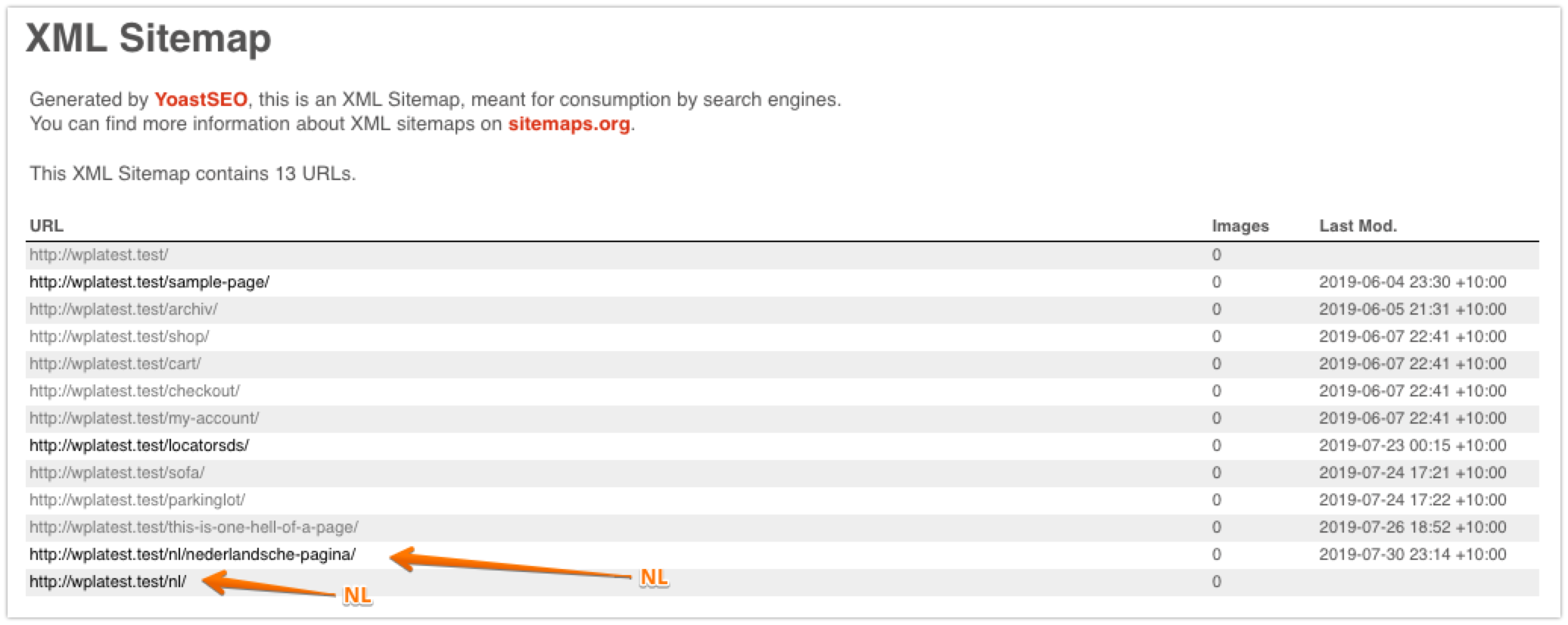
Running:
Yoast Free 11.7
WPML 4.1.3
If:
- you run a newer version of WPML, see if downgrading to the version above version solves the problem. Based on the description of your issue this sounds more like a WPML bug than a Yoast bug.
- My reproduction steps were incorrect, please provide feedback on what I should do differently to reproduce the issue.
- The issue persists on WPML 4.1.3 and my reproduction steps are correct I would assume there is something else that is conflicting. Have you done a plugin conflict check?
 Djennez
on 30 Jul 2019
Djennez
on 30 Jul 2019
Thanks @Djennez
I did a lot more tests after your comment and I'm fairly sure now that the problem is with Yoast.
Also your reproduction steps are not 100% the same, more on that at the bottom of this comment.
Let me break it down. ;)
When I posted above issue my development environment was outdated but the sitemaps worked at this point. (Live site is fully up to date)
It had the following relevant plugins:
- WPML Multilangual CMS: 4.0.5 (even lower than what you suggested)
- String Translation: 2.8.5
- Translation Management: 2.6.5
- Sticky Links: 1.4.4
- Yoast: 8.0
- Other plugins unrelated i.m.o.
To start I updated all plugins to the latest versions:
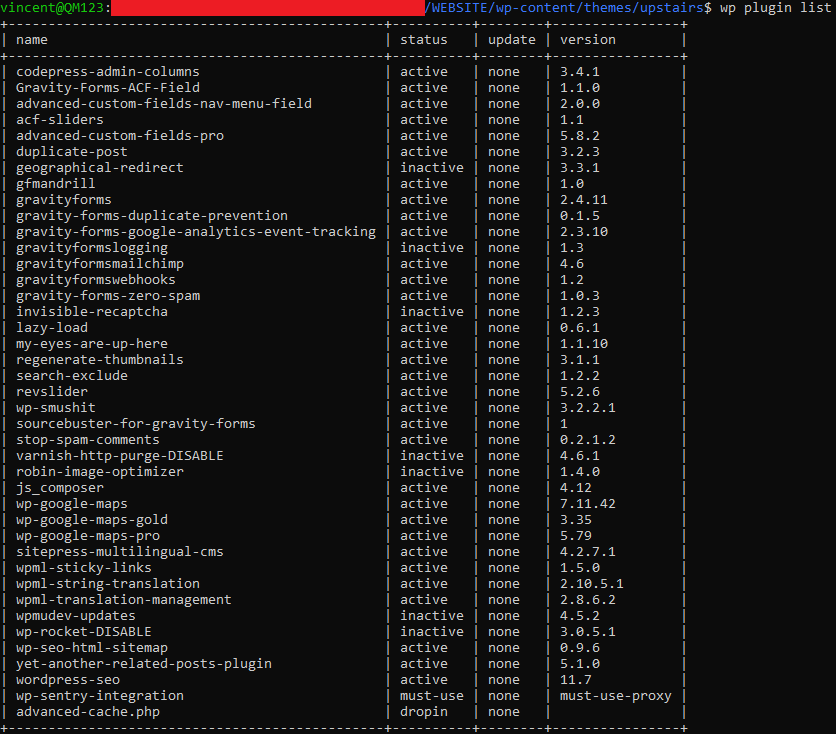
(I know those are a lot, but that's unrelated i.m.o as you can see below...)
The post sitemap result for a completely up to date website:
- WPML 4.2.7.1
- Yoast 11.7
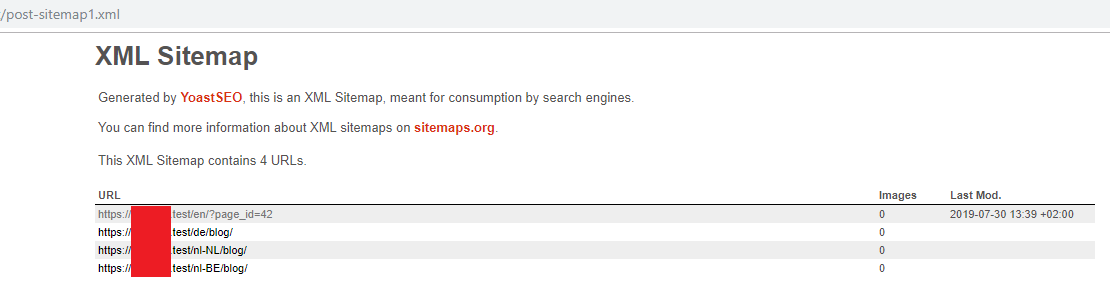
--> Not working
Then I downgraded wpml to version 4.1.3 like you suggested
- WPML 4.1.3
- Yoast 11.7
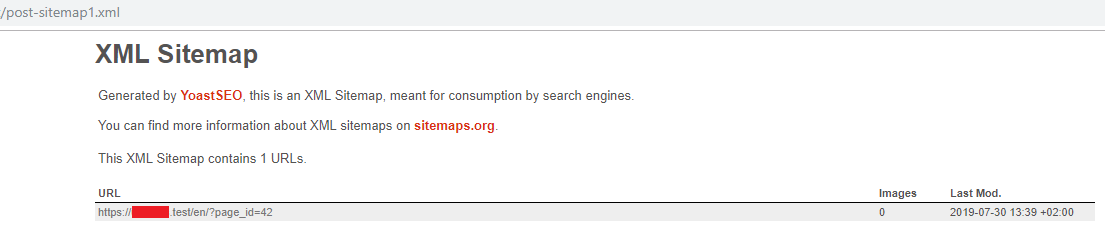
--> Weird homepage url's dissapeared but still incorrect sitemap
Then I upgraded wpml again but downgraded Yoast to v8.0 as I was sure it worked on that version
- WPML 4.2.7.1
- Yoast 8.0
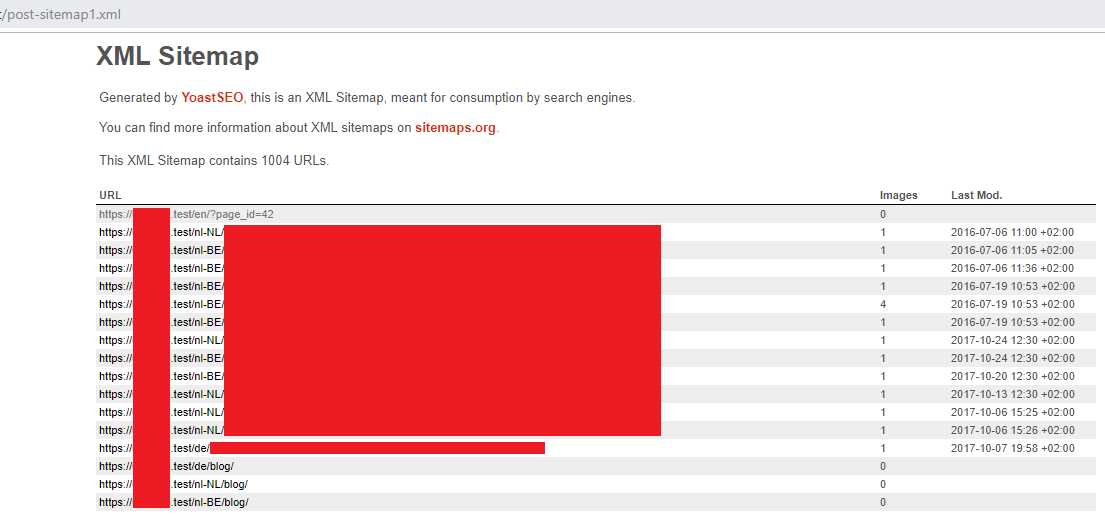
--> Works as expected.
--> Posts of /nl-NL, /nl-BE, and /de are visible, nothing from /en because that has no blogsposts.
Then I started upgrading Yoast version by version until it stopped working.
(WPML, Wordpress Core and all other plugins still updated to latest version)
I allways disabled the xml sitemaps + checked I got a "not found" page + enabled xml sitemaps + checked the working sitemap after each version upgrade.
- Yoast 8.0 --> Works
- Yoast 10.3.1 --> Works
- Yoast 11.0 --> Works
- Yoast 11.1.0 --> Works
- Yoast 11.2.1 --> Works
- Yoast 11.3 --> Works
- Yoast 11.4 --> Works
(So the working screenshot above above from Yoast 8.0 applies to all above versions)
But then when I get to version 11.5 it breaks:

Because of that I conclude that the bug is due to Yoast, starting from Version 11.5 and up.
This also gives me the conclusion that no other plugins are involved.
About the reproduction steps:
- We are using custom languages with locales:
- /nl-NL
- /nl-BE
- /en (default)
- /de
- As you can see "subfolder for default language" is also enabled and not in root like on your test. We have a root.php file setup in WPML that does a simple redirect based on browser language.
I hope this is enough for you to reproduce the issue and have a better understanding in what version thing started to go wrong.
Thanks
----
EDIT:
I'm assuming something from this commit in file _inc/sitemaps/class-post-type-sitemap-provider.php_ because that's the only sitemap related file that got editted between 11.4 and 11.5 as far as I can see in the commit history.
qmdev
on 30 Jul 2019
Incredible, thanks for the extensive research! I'll dive into this tomorrow and see what I can find.
Djennez
on 30 Jul 2019
It's related to this PR. I'd guess that your website has default language in a sub-directory and WPML was fixed this issue in Yoast SEO Multilingual 1.0.1:
Features
- Don’t run strip-category compatibility code when it’s disabled
- Check if archive has a link before add its translation to the sitemap
- Required changes for upcoming Yoast release
@qmdev Did you try to install Yoast SEO Multilingual?
 stodorovic
on 30 Jul 2019
stodorovic
on 30 Jul 2019
It's related to this PR. I'd guess that your website has default language in a sub-directory and WPML has fixed this issue in Yoast SEO Multilingual 1.0.1:
@qmdev Did you try to install Yoast SEO Multilingual?
As I stated before that is correct. We have de default language in a subdirectory indeed.
I tried to install Yoast SEO Multilingual and that correctly fixes the issue.
Thanks @stodorovic & @Djennez !
I allways assumed that Yoast was WPML compatible in it's core version and that the "Yoast SEO Multilingual" just added some extra "bulky" functionality that was not really needed. But now I see that it clearly states to be a "compatibility layer" plugin so I should install it on multiple of our client's site after I update Yoast to a release higher than V11.5. I just hope it does not add any other new unwanted behaviour that I'm unaware of now...
Thanks for your support.
qmdev
on 31 Jul 2019
Good thing that @stodorovic had that information, would have been inventing the wheel again to debug that :)
I'll close this issue as it seems resolved, please do feel free to leave any comments / feedback.
Djennez
on 31 Jul 2019
Related issues
 andizer
·
3Comments
andizer
·
3Comments
 schurig
·
5Comments
schurig
·
5Comments
 stayallive
·
4Comments
stayallive
·
4Comments
 mentik
·
6Comments
mentik
·
6Comments
 moorscode
·
6Comments
moorscode
·
6Comments