Wordpress-ios: Offline Support: Publishing a Post with Media in Aztec.
Description:
You can't publish / save a post that has local images while offline.
When trying to save / publish a post with media from the camera roll an alert dialog displays:
Uploads failed / Some media uploads failed. This action will remove all failed media uploads from the post. Save anyway?
Not now and Yes are the options.
This was reproduced in Aztec, but not in Gutenberg.
Matching Android Issue:
None.
 diegoreymendez
All 7 comments
When I run the production app I see the described behavior with the alert showing up.
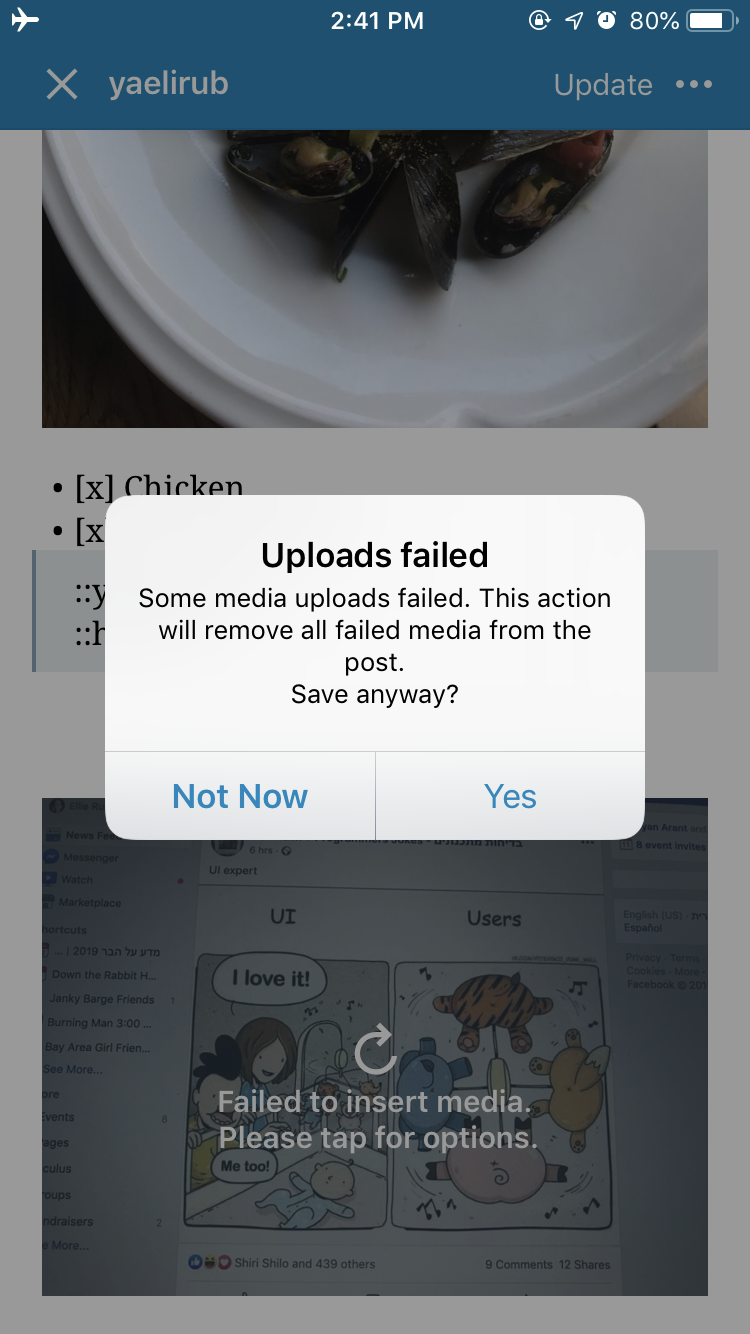
But when I run on develop I notice some weird behavior while offline. The post completely disappears when I update. Anybody else seeing this? @diegoreymendez , @shiki ??
Steps:
- Be offline
- Go to published post in Aztec
- Add image to post
- Choose update
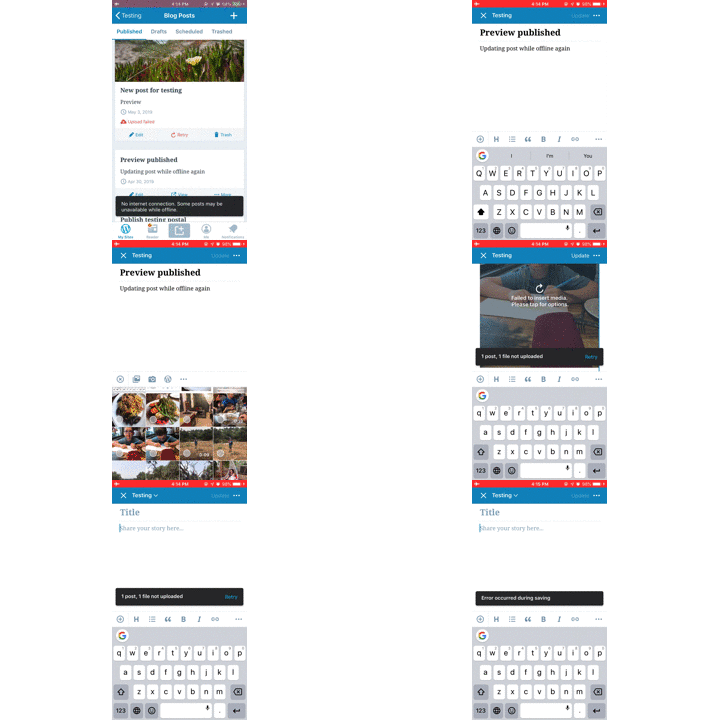
 yaelirub
on 11 Jun 2019
yaelirub
on 11 Jun 2019
no longer seeing this issue (no blocking pop up alert) in develop.
Can you confirm? @diegoreymendez , @shiki ?
yaelirub
on 13 Jun 2019
@yaelirub - I couldn't reproduce this either, but I looked into the code and this alert is still in there.
From what I could read, it seems to me like this may probably be hidden when the upload is async. I'm not sure the exact conditions cos I just briefly looked at it, but for reference @yaelirub, this is where the alert is being shown:
My suggestion on how to move forward:
- Analyze the current logic to make the dialog come up and try to reproduce it.
- If it isn't possible for it to come up, clean the code up and remove the alert
- If it's still possible to make it come up, update the description in this issue with more precise steps and analyze how we can make the UX better for that case.
My 2 cents... hope that helps.
diegoreymendez
on 13 Jun 2019
I cannot reproduce it too. I agree with what Diego suggested.
 shiki
on 13 Jun 2019
shiki
on 13 Jun 2019
I've been able to reproduce it once by "faking" a response from a server about a malformed image — so I don't think we can get rid of the whole logic just yet.
I have a work in progress patch based on #11933 to clean up the code around this a bit and make sure we'd only show that for cases where there's an actual actionable problem for users, not just a bad network connection. I'll PR it tomorrow!
 jklausa
on 17 Jul 2019
jklausa
on 17 Jul 2019
fwiw, I tested with WPiOS 13.1.1 (App Store version) on iPhone 6S iOS 13.1 Beta 1 and found that I couldn't see the dialog saying it would remove the media as described in the issue:
Uploads failed
Some media uploads failed. This action will remove all failed media from the post. Save anyway?
Then the image uploaded normally for me after going back online. (2m22s)
I used the following testing steps:
- Be offline
- Go to published post in Aztec
- Add image to post
- Choose update
 designsimply
on 4 Sep 2019
designsimply
on 4 Sep 2019
I also triple-quadruple confirmed this is no longer an issue — some of the patches we've been working on as part of Offline Posting fixed this already. Closing the issue.
jklausa
on 6 Sep 2019
Related issues
 hypest
·
3Comments
hypest
·
3Comments
 ScoutHarris
·
3Comments
designsimply
·
3Comments
designsimply
·
3Comments
designsimply
·
3Comments
ScoutHarris
·
3Comments
designsimply
·
3Comments
designsimply
·
3Comments
designsimply
·
3Comments
Most helpful comment
I also triple-quadruple confirmed this is no longer an issue — some of the patches we've been working on as part of Offline Posting fixed this already. Closing the issue.