Wordpress-ios: Crash on startup after updating iOS
Reported on 2284689-zen
After updating WordPress for iOS, the app can no longer be started.
If you delete it and install it again, it will be forcibly terminated after
login, and it will no longer be able to start.
Similar cases in the forums:
- https://ios.forums.wordpress.org/topic/wordpress-app-crashing
- https://ios.forums.wordpress.org/topic/app-crashing-after-update
This was reproduced in iPhone X with version 13.0, and iPhone 7. We could not reproduce it on 5s (iOS 12.4) or 6s . Here's a video of what @chaitanyamsv is experiencing on his phone:
https://cld.wthms.co/8FL1PD
Tested with iPhone 7 on iOS 12.2 right after upgrading to WPiOS 13.0.
(EDIT) Crash details: https://github.com/wordpress-mobile/WordPress-iOS/issues/12338#issuecomment-535896537
 iamgabrielma
All 90 comments
Seems to be the same crash as https://github.com/wordpress-mobile/WordPress-iOS/issues/12331
 thehenrybyrd
on 19 Aug 2019
thehenrybyrd
on 19 Aug 2019
So, https://github.com/wordpress-mobile/WordPress-iOS/issues/12331 turned out to affect only apps running on Japanese.
This issue in particular seems to be related to this other ticket: https://github.com/wordpress-mobile/WordPress-iOS/issues/12028
 etoledom
on 19 Aug 2019
etoledom
on 19 Aug 2019
Another report mentioned at 6166545-hc
 aleone89
on 19 Aug 2019
aleone89
on 19 Aug 2019
I tried testing with WPiOS 13.0 (app store version) on iPhone 6S iOS 12.4 and the app did not crash on startup in my test, so I'm looking for any details about how to trigger the crash that I might be missing when testing from my end.
 designsimply
on 19 Aug 2019
designsimply
on 19 Aug 2019
Noting the details from https://ios.forums.wordpress.org/topic/app-crashing-after-update
Recently I Updated My WordPress App to Latest Version in iPhone 7 and After that Whenever i Open App it Just Crash Instantly. Like - I Clicked on WP App>> It Shows Dashboard for 0.5 Seconds>> Blackout for 0.5 Second and Closed without any Notification. I Tried to Restart my Device but no Luck.
designsimply
on 19 Aug 2019
Noting some details from 6166545-hc
New iphone upgrade - WP App initiation just produces frozen blue screen with W in the middle. Computer is fine but I need to have both working.
Followed by:
On the phone I have 2 WP logos. One takes me straight into stats and via that to all the rest. It is light blue and works (so I have that). No idea if the upgrade has been applied. This is the portal I generally use.
The other is the basic WP portal, now dark blue (I assume from the upgrade)
I clicked on it today. I got the frozen screen I described. I couldn't get past that so I went to the App itself where I saw the upgrade details (unaware before that)
Sounds like they have two installs? Interesting. Maybe one is a TestFlight beta install. 🤔
Confirmed they are using iPhone 7.
cc @aleone89 in the future can you include a teeny bit more detail when reporting issues mentioning internal references such as 6166545-hc on issues like this one? It's super helpful even if you just copy a short quote from the problem report or any quick/relevant details you have like device/app version or type of site! Thanks tons!
designsimply
on 19 Aug 2019
Here's a video of what @chaitanyamsv is experiencing on his phone:
https://cld.wthms.co/8FL1PD
Oof. Looks like there's not much chance to get app logs in these cases, but @chaitanyamsv if by some chance the app starts working long enough for you to get to the Profile > Help & Support > Activity Logs screen, please add a copy of the logs and send them our way via support in the app or in #cellular-happiness on Slack! 😊
[Update/internal reference to the related Slack discussion: T024FN1V2/CC7L49W13/thread/CC7L49W13-1566238060.070900-slack-platform9]
designsimply
on 19 Aug 2019
For reports of these cases, we'd like to confirm:
- Did this happen for you only after upgrading to version 13.0 of the WordPress app?
- What is your iOS version?
- What is your device language set to in Settings > General > Language & Region?
If anyone experiencing this is able to get to the logs in Profile > Help & Support > Activity Logs, please send us a copy in the Contact Us screen in the app or by sending to [email protected]. Thank you!
designsimply
on 19 Aug 2019
I can see from sentry that this happens on -[CommentService mergeHierarchicalComments:forPage:forPost:] but I haven't been able to figure out any possible cause. My guess is that it could be related to a specific comment being synced, and not device-specific, so it would be interesting if we could try to reproduce this with any of the affected accounts.
 koke
on 20 Aug 2019
koke
on 20 Aug 2019
Noting the details from https://ios.forums.wordpress.org/topic/wordpress-app-crashing
I am running iOS 12.4 on an iPhone 5s.
I can’t remember which part of the app I was using but was working perfectly prior to the most recent update. The app stays on the start up screen for around 15 seconds before closing.
Just to let you know that deleting the app then reinstalling it fixed the issue, hopefully this might work for anyone else having this issue.
I couldn't access the activity logs before I deleted the app as I couldn't access any part of the app unfortunately.
designsimply
on 20 Aug 2019
Working with another report in #2296429-zen
A blue screen appears as though it’s going to open, then goes. Double clicking the home button shows it’s there, but trying to open it from there has just the same effect.
This person has an iPod Touch running iOS 12.3.1 and WPiOS 13.0, and this crash began after updating to 13.0.
In addition, they're running the TestFlight public beta on an iPad, currently WPiOS 13.1, and the crash is occurring there as well.
I'm asking them to clarify the device language.
thehenrybyrd
on 26 Aug 2019
adding to @thehenrybyrd 's issue above -- this user is English/United Kingdom
 melindahelt
on 27 Aug 2019
melindahelt
on 27 Aug 2019
2296429-zen from above came back to let us know that their devices updated to iOS 12.4.1, and their WPiOS apps on both devices are still crashing.
thehenrybyrd
on 1 Sep 2019
Unfortunately we are still investigating this issue. We haven't been able to replicate it, but we are putting more logging and mitigation fixes in place. For now the only thing we can tell users is to uninstall and reinstall the app. If anyone is seeing the issue after following those steps please ping me.
 elibud
on 2 Sep 2019
elibud
on 2 Sep 2019
That's been my experience too. WordPress app stopped crashing once I uninstalled the existing version (13.1) and installed the updated version (13.1.1) on my iPhone 7 running on iOS 12.2.
Simply updating the app did not help; I had to uninstall the current version and install the latest version.
 chaitanyamsv
on 2 Sep 2019
chaitanyamsv
on 2 Sep 2019
I'm seeing a crash on startup happen for account design5279 with WP Internal 13.1.0.20190819 on both my iPhone and iPad right after updating to iOS 13.1 beta 4 (from 13.1 beta 3). I also have the app store version installed on the same device and that one is working normally—the app store version is a fresh install though, I deleted and reinstalled before noticing the crash-on-startup issue in WP Internal.
Video: 9s
Tested with WP Internal 13.2.0.20190827 (HockeyApp) on iPhone 6S iOS 13.1.
@jklausa @jkmassel I followed the previous conversation you had with @chaitanyamsv in Slack about pulling files from a local backup and sent them to you in the same thread. Here are the steps I followed to get the backup:
- Follow https://support.apple.com/en-us/HT203977#itunes to make a backup.
- Download and install iExplorer.
- Give iExplorer full disk access (follow the instructions that pop up).
- In iExplorer on Mac, go to today's backup > Backup Explorer > App > org.wordpress.internal.
- Export the folder, zip it, save it somewhere online with a share link.
Note: my backup org.wordpress.internal folder is only 1.7 MB.
(internal reference: slack /archives/CC7L49W13/p1568831252025100?thread_ts=1566238060.070900&cid=CC7L49W13)
designsimply
on 18 Sep 2019
Noting a couple more test results:
Crash on startup after iOS 13.1 update with WP Internal 13.2.0.20190827 with WiFi on and "Very Bad Network" on in Link Conditioner: 6s
Crash on startup after iOS 13.1 update with WP Internal 13.2.0.20190827 with WiFi off and "Very Bad Network" on in Link Conditioner: 16s
Crash stops happening if I upgrade the app in place: 37s
designsimply
on 18 Sep 2019
@designsimply I don't see any crashes that match this version in sentry. Can you look for them in your device and share, just to make sure it's the same crash?
koke
on 24 Sep 2019
@koke certainly! I zipped up everything from the ~/Library/Logs/CrashReporter/MobileDevice folder for my device and sent it to ya in Slack.
Aside: I also looked for anything related to WP Internal at Settings > Privacy > Analytics > Analytics Data on the device directly but didn't see any file names that looked related.
(internal reference: p4a5px-2ry-p2)
designsimply
on 24 Sep 2019
From a 1-star review - "Something has changed" by Viperscho – Sep 12, 2019 Version 13.1.1
Used this app infrequently for blog updates and it always worked fine. As of two weeks ago, it stopped working. When opened, the app briefly displays, then crashes to desktop on my iPad. No amount of updating, reinstallation, or patience while waiting for a fix has worked. Will have to begin using a different product to access my Wordpress site.
designsimply
on 26 Sep 2019
From a 1-star review - "Log in failure, app crashes" by jw22455 – Sep 21, 2019 Version 13.2.1
Can’t access my blog ever since your last update. It’s making me log in now then gives me an error messages and crashes. Updated to iOS 13 today and same problem!
designsimply
on 26 Sep 2019
From a 4-star review - "Crashes" by Expressionsfoto.com – Aug 31, 2019 Version 13.1.1
App starts then crashes. Tried updating, restart and nothing works. Maybe I should remove and reinstall
designsimply
on 26 Sep 2019
From a 1-star review - "Crashes immediately" by BriceOne – Aug 23, 2019 Version 13.0.1
I had left a two-star for the last Wordpress version. But at least that worked. I updated in the hopes things would improve. Now the app just won’t open at all. How can I run a business on this?
designsimply
on 26 Sep 2019
From a 1-star review - "WP crashes after update" by Max the Duolinguist – Aug 22, 2019 Version 13.0.1
The latest update just would not work on my SE at all, thus, alas, leaving me with the web app only.
designsimply
on 26 Sep 2019
From a 1-star review - "Collapse" by Darkus04 – Aug 21, 2019 Version 13.0.1
Since installing this update my Wordpress app doesn’t open; it just starts up and immediately collapses before I can see my data.
designsimply
on 26 Sep 2019
From a 1-star review - "Crashes" by worst scooter ever – Aug 16, 2019 Version 13.0
App used to be great but now keeps crashing. Fix please
designsimply
on 26 Sep 2019
From a 1-star review - "Keeps crashing" by Boxcanyon – Jul 31, 2019 Version 12.9
New update keeps crashing, I can’t even sign on! Please fix
designsimply
on 26 Sep 2019
Finally found the crash in Xcode (it won't get to sentry since it crashes before it gets a chance to send the data):
Exception Type:  EXC_CRASH (SIGABRT)
Exception Codes: 0x0000000000000000, 0x0000000000000000
Exception Note:  EXC_CORPSE_NOTIFY
Triggered by Thread:  0

Thread 0 name:
Thread 0 Crashed:
0   libsystem_kernel.dylib          0x000000023a6fa0dc __pthread_kill + 8
1   libsystem_pthread.dylib         0x000000023a773094 pthread_kill$VARIANT$mp + 380 (pthread.c:1492)
2   libsystem_c.dylib               0x000000023a652ea8 abort + 140 (abort.c:94)
3   WordPress                       0x00000001003416b8 -[ContextManager persistentStoreCoordinator] + 1208 (ContextManager.m:267)
4   WordPress                       0x00000001003404e4 __31-[ContextManager writerContext]_block_invoke + 76 (ContextManager.m:74)
5   libdispatch.dylib               0x000000023a59c7d4 _dispatch_client_callout + 16 (object.m:511)
6   libdispatch.dylib               0x000000023a53feb8 _dispatch_once_callout + 28 (once.c:52)
7   WordPress                       0x0000000100340494 -[ContextManager writerContext] + 128 (once.h:84)
8   WordPress                       0x0000000100340614 __29-[ContextManager mainContext]_block_invoke + 76 (ContextManager.m:86)
9   libdispatch.dylib               0x000000023a59c7d4 _dispatch_client_callout + 16 (object.m:511)
10  libdispatch.dylib               0x000000023a53feb8 _dispatch_once_callout + 28 (once.c:52)
11  WordPress                       0x00000001003405c4 -[ContextManager mainContext] + 128 (once.h:84)
12  WordPress                       0x0000000100341714 -[ContextManager startListeningToMainContextNotifications] + 92 (ContextManager.m:280)
13  WordPress                       0x0000000100340304 -[ContextManager init] + 68 (ContextManager.m:34)
14  WordPress                       0x0000000100340390 __32+[ContextManager sharedInstance]_block_invoke + 40 (ContextManager.m:44)
15  libdispatch.dylib               0x000000023a59c7d4 _dispatch_client_callout + 16 (object.m:511)
16  libdispatch.dylib               0x000000023a53feb8 _dispatch_once_callout + 28 (once.c:52)
17  WordPress                       0x0000000100340360 +[ContextManager sharedInstance] + 72 (once.h:84)
18  WordPress                       0x00000001009b60ac MediaCoordinator.init() + 228 (MediaCoordinator.swift:20)
19  WordPress                       0x00000001009b6464 @objc MediaCoordinator.init() + 20 (<compiler-generated>:0)
20  WordPress                       0x00000001009b5f68 globalinit_33_75C2DFAF7FEDF19BA73080809175E149_func1386 + 60 (MediaCoordinator.swift:0)
21  libdispatch.dylib               0x000000023a59c7d4 _dispatch_client_callout + 16 (object.m:511)
22  libdispatch.dylib               0x000000023a53feb8 _dispatch_once_callout + 28 (once.c:52)
23  libswiftCore.dylib              0x0000000268472e40 swift_once + 40 (once.h:111)
24  WordPress                       0x0000000100a17978 closure #1 in variable initialization expression of WordPressAppDelegate.uploadsManager + 176 (MediaCoordinator.swift:12)
25  WordPress                       0x0000000100a1d3a0 WordPressAppDelegate.init() + 184 (WordPressAppDelegate.swift:37)
26  WordPress                       0x0000000100a1d404 @objc WordPressAppDelegate.init() + 20 (<compiler-generated>:0)
27  UIKitCore                       0x000000026708c348 _UIApplicationMainPreparations + 1720 (UIApplication.m:4318)
28  UIKitCore                       0x000000026708bc04 UIApplicationMain + 160 (UIApplication.m:4347)
29  WordPress                       0x000000010044a2e0 main + 240 (main.swift:7)
30  libdyld.dylib                   0x000000023a5ad8e0 start + 4
I still don't know why this happens but at this point:
- The app tried to open the core data database and it was incompatible, triggering a migration
- The migration has failed for some reason
- As a last resort, the app tries to back up the existing database, remove the file, and try again
- The NSPersistentStoreCoordinator is still failing to add a persistent store at that URL, even if it should be creating a new clean one.
koke
on 27 Sep 2019
From a 1-star review "App Crashing" by Shae F. – Sep 28, 2019 Version 13.2.3
Every time I try to open the app, it crashes. I’ve even tried to spam click the new post button and nothing... it just closes out. There is no use to keep an app on my phone if I’m unable to use it.
designsimply
on 30 Sep 2019
From a 1-star review - "Great before update: by Aandreew – Aug 17, 2019 Version 13.0
After the update to 13, app crashes every time at startup.
designsimply
on 30 Sep 2019
From the WordPress for iOS forums:
App crashing on iPhone 6 iOS 12.4.3
The app doesn’t proceed further the “Wordpress Logo” and shuts down automatically.
https://ios.forums.wordpress.org/topic/app-crashing-on-iphone-6-ios-1242
designsimply
on 10 Oct 2019
I see only 3 crashes for this on Xcode for 13.3. Sadly, the approach in #12569 didn't yield the expected results, and the crash logs provided by Apple don't contain any details about the exception
Exception Type:  EXC_CRASH (SIGABRT)
Exception Codes: 0x0000000000000000, 0x0000000000000000
Exception Note:  EXC_CORPSE_NOTIFY
Triggered by Thread:  0

Last Exception Backtrace:
0   CoreFoundation                  0x1ac65698c __exceptionPreprocess + 228 (NSException.m:172)
1   libobjc.A.dylib                 0x1ab82f9f8 objc_exception_throw + 56 (objc-exception.mm:557)
2   WordPress                       0x104793158 -[ContextManager persistentStoreCoordinator] + 1184 (ContextManager.m:266)
3   WordPress                       0x104791fcc __31-[ContextManager writerContext]_block_invoke + 68 (ContextManager.m:74)
4   libdispatch.dylib               0x1ac0957d4 _dispatch_client_callout + 16 (object.m:511)
5   libdispatch.dylib               0x1ac038eb8 _dispatch_once_callout + 28 (once.c:52)
6   WordPress                       0x104791f84 -[ContextManager writerContext] + 120 (once.h:84)
7   WordPress                       0x1047920ec __29-[ContextManager mainContext]_block_invoke + 68 (ContextManager.m:86)
8   libdispatch.dylib               0x1ac0957d4 _dispatch_client_callout + 16 (object.m:511)
9   libdispatch.dylib               0x1ac038eb8 _dispatch_once_callout + 28 (once.c:52)
10  WordPress                       0x1047920a4 -[ContextManager mainContext] + 120 (once.h:84)
11  WordPress                       0x1047931b4 -[ContextManager startListeningToMainContextNotifications] + 92 (ContextManager.m:281)
12  WordPress                       0x104791e04 -[ContextManager init] + 68 (ContextManager.m:34)
13  WordPress                       0x104791e88 __32+[ContextManager sharedInstance]_block_invoke + 32 (ContextManager.m:44)
14  libdispatch.dylib               0x1ac0957d4 _dispatch_client_callout + 16 (object.m:511)
15  libdispatch.dylib               0x1ac038eb8 _dispatch_once_callout + 28 (once.c:52)
16  WordPress                       0x104791e60 +[ContextManager sharedInstance] + 72 (once.h:84)
17  WordPress                       0x104d3847c PostCoordinator.init(mainService:backgroundService:) + 632 (PostCoordinator.swift:28)
18  WordPress                       0x104d381b4 globalinit_33_5D116A905D40F0186CABE86C80FC2843_func1206 + 68 (PostCoordinator.swift:0)
19  libdispatch.dylib               0x1ac0957d4 _dispatch_client_callout + 16 (object.m:511)
20  libdispatch.dylib               0x1ac038eb8 _dispatch_once_callout + 28 (once.c:52)
21  libswiftCore.dylib              0x1da34ee40 swift_once + 40 (once.h:111)
22  WordPress                       0x104e4dc98 closure #1 in variable initialization expression of WordPressAppDelegate.uploadsManager + 176 (PostCoordinator.swift:7)
23  WordPress                       0x104e52124 WordPressAppDelegate.init() + 184 (WordPressAppDelegate.swift:36)
24  WordPress                       0x104e52188 @objc WordPressAppDelegate.init() + 20 (<compiler-generated>:0)
25  UIKitCore                       0x1d8f68348 _UIApplicationMainPreparations + 1720 (UIApplication.m:4318)
26  UIKitCore                       0x1d8f67c04 UIApplicationMain + 160 (UIApplication.m:4347)
27  WordPress                       0x104899a80 main + 240 (main.swift:7)
28  libdyld.dylib                   0x1ac0a68e0 start + 4
From a 1-star review "Won’t open?!" by Ekishq – Oct 11, 2019 Version 13.3
Went to open the app after not using it for a while so I could do a business post and it won’t open or does but crashes immediately. What a bummer, the app was so great for doing quick posts to my site :(.
designsimply
on 12 Oct 2019
From a 5-star review "Recent version not working well" by Jens_Happy – Oct 17, 2019 Version 13.3
Over a month ago: The upgraded version started listing my sites in triplicate and crashing. Could not keep it open. Got even worse recently. Could not find any relevant support topics. Now threatens me with error messages as if my site is infected. I deleted the app and am reinstalling it now. […] If reinstalling the app doesn’t work, I will just go back to looking up my sites in a browser window.
designsimply
on 17 Oct 2019
This came up in beta testing for 13.6:
I’m unable to start the app after the most recent update. The W screen displays for a long time and finally the app crashes.
- App version: 13.6 (13.6.0.1)
- Device: iPhone 6S
- iOS version: 13.2
(internal reference: p5T066-14K-p2#comment-3794)
designsimply
on 18 Nov 2019
This came up in beta testing for 13.6:
Tried to open app. Just crashed
- App version: 13.6 (13.6.0.1)
- Device: iPad mini 4
- iOS version: 13.2
(internal reference: p5T066-14K-p2#comment-3795)
designsimply
on 18 Nov 2019
This came up in beta testing for 13.6:
Keeps crashing
- App version: 13.6 (13.6.0.1)
- Device: iPhone X
- iOS version: 13.2.2
(internal reference: p5T066-14K-p2#comment-3796)
designsimply
on 18 Nov 2019
This came up in beta testing for 13.6:
Just opened app [noted in a crash report]
- App version: 13.6 (13.6.0.1)
- Device: iPad mini 4
- iOS version: 13.2
(internal reference: p5T066-14K-p2#comment-3797)
designsimply
on 18 Nov 2019
Worked with @leandroalonso on this for a while now but we failed to find the cause. We saw the same exceptions described in https://github.com/wordpress-mobile/WordPress-iOS/issues/12338#issuecomment-541032550 but there are not enough details. As for the database shared in https://github.com/wordpress-mobile/WordPress-iOS/issues/12338#issuecomment-532808481, we posted our findings in https://github.com/wordpress-mobile/WordPress-iOS/issues/12028#issuecomment-557591559.
We also tried to simulate a locked database file but that yielded a different stack trace.
 shiki
on 22 Nov 2019
shiki
on 22 Nov 2019
Reported on 2512716-zen
updated your iOS app, keeps crashing on startup, can’t even open it.
Version 13.6 on iOS 13.1.3, iPhone 6s
 thabotswana
on 23 Nov 2019
thabotswana
on 23 Nov 2019
This came up in beta testing for 13.7:
Opened a push notification right after updating to 13.7. It crashed on launch, but the second launch seemed fine
- App version: 13.7 (13.7.0.0)
- Device: iPhone XS
- iOS version: 13.2
designsimply
on 4 Dec 2019
I don’t get any error message when using the app but after taking a long time to load it just closes down. I get notifications and I can see a pic if I look at all of my open apps but pressing on it means it just refuses to load. It’s baffling as it happened suddenly on my phone first and later my iPad.
- App version: 13.7
- iPhone 5s and an iPad Air both running iOS 12.4.3.
- The capacity of my iPhone is 64gb with 46.27gb free.
- The capacity of my iPad is 16gb with 1.15gb free.
(internal reference: 2528699-zen)
designsimply
on 11 Dec 2019
This came up in beta testing for 13.7:
Opened a push notification right after updating to 13.7. It crashed on launch, but the second launch seemed fine
- App version: 13.7 (13.7.0.0)
- Device: iPhone XS
- iOS version: 13.2
I don’t get any error message when using the app but after taking a long time to load it just closes down. I get notifications and I can see a pic if I look at all of my open apps but pressing on it means it just refuses to load. It’s baffling as it happened suddenly on my phone first and later my iPad.
- App version: 13.7
- iPhone 5s and an iPad Air both running iOS 12.4.3.
- The capacity of my iPhone is 64gb with 46.27gb free.
- The capacity of my iPad is 16gb with 1.15gb free.
(internal reference: 2528699-zen)
These ones in particular were most likely caused by this other issue: https://github.com/wordpress-mobile/WordPress-iOS/pull/13155
 diegoreymendez
on 3 Jan 2020
diegoreymendez
on 3 Jan 2020
I hit this issue on an iPad Pro 11" last night – the app was up-to-date, so the issue was certainly not related to core data migration.
I hit the "open a notification and the app crashes" issue, after which the app was stuck in a crash loop. That makes me think that the app might've been trying to restore the view it was attempting to display when it crashed over and over. The PR merged by @diegoreymendez may resolve this issue in addition to the crash-on-open-notification issue, but let's wait and see – running develop on the device from Xcode broke the crash loop and it launched properly, so the issue _may_ be resolved!
Just adding my info here in case we need to do further debugging.
 jkmassel
on 10 Jan 2020
jkmassel
on 10 Jan 2020
Another piece of information from the results of the track we implemented in https://github.com/wordpress-mobile/WordPress-iOS/pull/12995:
We've been receiving some track information but they're all related to people in our team (probably running the release process, tests or something like that). You can see the data here. Filtering to remove occurrences from our team results in zero occurrences of this issue.
If we didn't receive any new report about that issue I'd assume that's fixed, as @jkmassel pointed.
Also, we can remove this tracking from the app for the next version. What do you think @jkmassel?
 leandroalonso
on 10 Jan 2020
leandroalonso
on 10 Jan 2020
@leandroalonso – I agree that it's probably ok to remove this, but I wouldn't mind doing so once this issue is closed – it's possible we have > 1 bug, and if there was no migration as part of the newest release, it's possible that bug remains (but I'm...kinda(?) confident it's ok!)
I think...remove it for now, and if we see other issues, we can just pop it back into another release since we trust the code :)
jkmassel
on 10 Jan 2020
@leandroalonso – update:
I took a look through the details again, and these are _probably_ live issues, not related to A8C debugging.
This error:
Can't initialize Core Data stack: -[ContextManager persistentStoreCoordinator] (/Users/jeremymassel/Projects/WordPress-iOS/WordPress/Classes/Utility/ContextManager.m:284) Der Vorgang konnte nicht abgeschlossen werden. (NSSQLiteErrorDomain-Fehler 13.) | userInfo: ["NSFilePath": /var/mobile/Containers/Data/Application/CE8EB4CC-0A59-4DCF-AC6D-CC023E9E990A/Documents/WordPress.sqlite, "NSSQLiteErrorDomain": 13]
is odd, because I don't use my device in German, and we don't send Sentry errors for debug builds.
I suspect this is a real user, and the filename is just what it is because I built the hotfix on my local machine.
I now think we should consider these real crashes and react to them appropriately :(
jkmassel
on 10 Jan 2020
@jkmassel Hmmm... that's bad.
I was talking with @shiki and most errors refer to NSSQLiteErrorDomain: 778 (errors 13 are related to disk full).
From SQLite documentation:
(778) SQLITE_IOERR_WRITE
The SQLITE_IOERR_WRITE error code is an extended error code for SQLITE_IOERR indicating an I/O error in the VFS layer while trying to write into a file on disk. This error might result from a hardware malfunction or because a filesystem came unmounted while the file was open. This error should not occur if the filesystem is full as there is a separate error code (SQLITE_FULL) for that purpose.
The database exists, it can be read, but it can't be written. I still have no idea why this is happening. 😢
leandroalonso
on 20 Jan 2020
That's interesting – IMHO we should handle the error 13 – Disk Full issue with a graceful message to the user? One weird way to potentially mitigate this would be to catch that error specifically, clear out WP's own local caches (for images etc), and retry the save? At least that way user data would be safely stored away?
The error 778 is really strange! It doesn't appear to be because of write lock contention (I was thinking maybe we were calling save from the wrong thread?), but I think that'd be error 15 (maybe?), but I'm not super confident about that.
I kind of wonder if it's a transient thing. In the same way we'd special-case a full-disk, WDYT about special-casing a 778 error and just retrying in order to see if it tends to be a temporary hiccup or a persistently broken DB? If the DB is just broken, we could present UI offering the user the option to rebuild their database – we should have all their credentials in the keychain, so just removing the DB and rebuilding from scratch should work well?
These are sort of off-the-cuff ideas that would take some time to implement, but WDYT?
jkmassel
on 20 Jan 2020
@jkmassel Sorry for taking too long to reply.
On the error 13 – Disk Full: I wonder if the OS itself doesn't handle that when the app crashes (with the "Storage Almost Full" warning). My main concern is that we'll need to be aware and handle other cases (in WordPressAppDelegate for example) to prevent other parts of the app to access the database (which will cause a crash) — so it's not as simple as just showing a View. Thoughts?
On the 778: what's your idea? To retry right recreating the persistentStoreCoordinator right away?
@designsimply I wonder how many tickets we've been receiving of users complaining of the app crashing on the startup. Do you know?
If the number is low, probably it's just something temporary as @jkmassel mentioned and maybe the retry can be a good solution.
leandroalonso
on 17 Feb 2020
From a 4-star review "last update always crashes" by Roqeenet – Nov 29, 2019 Version 13.6
last update 13.6 crashes everytime i open the app ..
iphone 7 .. IOS 13.1.2
designsimply
on 20 Feb 2020
From a 3-star review "Crashing After Today’s Update" by Dee Encourager – Dec 2, 2019 Version 13.7
Help crashes immediately after opening!!!
designsimply
on 20 Feb 2020
From a 1-star review "Newest update causes app to crash" by Mattrhere – Dec 20, 2019 Version 13.8.1
The newest update causes the app to crash. Worked fine prior to this update. App will open but won’t allow you to do anything and won’t show any traffic info. Have to delete the app and reinstall to get it to work again. Have to do this once a day or so since updating...
designsimply
on 20 Feb 2020
From a 1-star review "Crashes when opened" by ddavis37722 – Dec 23, 2019 Version 13.8.1
As soon as I open iPad app it crashes. Have not been able to use it for weeks. I have updated to latest version. Useless.
designsimply
on 20 Feb 2020
From a 1-star review "Boo" by BUTTERSNUTT – Dec 28, 2019 Version 13.8.1
Won’t open at all. Crashes at start up.
@designsimply I wonder how many tickets we've been receiving of users complaining of the app crashing on the startup. Do you know?
There haven't been any new reports of crash on startup in app reviews for 2020 to date, which is way cool!
designsimply
on 20 Feb 2020
On the 778: what's your idea? To retry right recreating the persistentStoreCoordinator right away?
Yeah that would be my thought. Even throw in a jittery delay to retry it – IMHO the goal is to say "is this a transient thing the device can recover from, or is it a permanent failure?". Also – for this specific error, it might be valuable to try to find out what point this is happening. As a for-instance, do we know for sure this isn't a background crash happening while the user's device is locked? If the app launches in the background, is the storage locked? I don't know what data protection level we use for the DB, but I'd be curious about that. Also curious about if the app crashes and SQLite is trying to apply the WAL to recover and we come in trying to set up our Core Data stack at that time whether we'd have issues. Just a few more off-the-cuff thoughts – this is definitely a tricky one. Last thought – part of me wonders if this could all be resolved by adopting NSPersistentContainer and getting out of the "initialize the stack" business?
In terms of priority, I _think_ the main crash-on-launch issue we were hitting was the notification one, which was fixed in https://github.com/wordpress-mobile/WordPress-iOS/pull/13158, which is why we're seeing fewer user complaints now.
jkmassel
on 20 Feb 2020
That background crash happening is a good idea. I wonder if that's really what's causing this. 🤔
Also curious about if the app crashes and SQLite is trying to apply the WAL to recover and we come in trying to set up our Core Data stack at that time whether we'd have issues.
The last time I looked at this, the WAL recovery happens when the persistent store is created during:
So I think that routine is under our control. Everything should be happening in the main thread too last I checked.
part of me wonders if this could all be resolved by adopting NSPersistentContainer and getting out of the "initialize the stack" business?
This would be great. I believe the Core Data initialization stack is overdue for a refresh. Especially since we have that Core Data migration failing silently issue lurking around: #13014.
shiki
on 20 Feb 2020
This would be great. I believe the Core Data initialization stack is overdue for a refresh. Especially since we have that Core Data migration failing silently issue lurking around: #13014.
@shiki Hack week project?? 😃
jkmassel
on 27 Feb 2020
1-star review by Knmdkkkvjitdcjusx – Jan 14, 2020
The App has been down for a long time, and every time you open it, you can't turn on every function. But the Internet is normal, and other apps can be used normally. Only Wordpress doesn't work, the page keeps turning but never opens. I hope to fix it soon, thank you! ~
App yǐjīng dāng jī hǎojiǔle, měi cì dǎkāi zhīhòu, yàodiǎn měi yīgè gōngnéng dōu yīzhí zhuànquān kāi bùliǎo. Dàn wǎng lù shì zhèngcháng de, qítā App dōu kěyǐ zhèngcháng shǐyòng. Zhǐyǒu Wordpress bùxíng, yèmiàn yīzhí zhuànquān dàn yǒngyuǎn dōu kāi bùliǎo. Fēicháng xīwàng néng zǎorì xiūfù, xièxiè nín!~
WPiOS 13.9. Taiwan. Translated with http://translate.google.com/.
Note: there are still a steady report of these coming in via app reviews in the App Store. I will take some time to record them…
designsimply
on 5 May 2020
1-star review by t_zittlow – Jan 24, 2020
I updated the app after it couldn’t load anything on the app, now it won’t open at all.
WPiOS 13.9. United States.
designsimply
on 5 May 2020
1-star review by Slinyakovak – Jan 24, 2020
Constantly crashes, nothing loads
Постоянно вылетает, ничего не загружается
WPiOS 13.9. Russia. Translated with http://translate.google.com/.
designsimply
on 5 May 2020
1-star review Feb 1, 2020
China apple phone, every time I settings, web, and I sure it’s open, then I turn to WORDPRESS, no WEB ,no WIFI, it’s close by himself! I just want to update my blog!!!!!!!! Is it bug!
WPiOS 14.0. China mainland.
designsimply
on 5 May 2020
1-star review by Rustix010101 – Feb 10, 2020
The site crashed after trying to connect to it from the application
Упал сайт после попытки подключится к нему из приложения
WPiOS 14.1. Russia. Translated with http://translate.google.com/.
designsimply
on 5 May 2020
1-star review by Osielmaldonado – Feb 17, 2020
The last update does not open and closes when the app loads together with the images that do not load well
La última actualización no abre y se cierra al cargar la app junto con las imágenes que no cargan bien
WPiOS 14.1, Mexico, Translated with http://translate.google.com/.
designsimply
on 5 May 2020
そもそも開けない
2020年2月のアップデートから、iPhone SEでは開くことすらできなくなってしまいました (iPad proでは開けてるのですがまさかSEには対応終了?)
Can't open in the first place
Since the update in February 2020, I can't even open it on the iPhone SE (I can open it on the iPad pro, but is SE no longer supported?)
WPiOS 14.2.1. Japan. Translated with http://translate.google.com/.
designsimply
on 5 May 2020
1-star review by thenugwa – Mar 30, 2020
New Update Keeps Crashing
I updated my app two days ago and ever since, I haven’t been able to make a post because the app keeps crashing. Please downgrade the app or fix this issue.
WPiOS 14.4.1. Nigeria.
designsimply
on 5 May 2020
1-star review by sandeld – Apr 3, 2020
Can’t open. Crashes immediately.
WPiOS 14.4.1. United States.
designsimply
on 5 May 2020
1-star review by Junko Shimura – Apr 6, 2020
as soon as i open it, it crashes 😐😐
WPiOS 14.5. Pakistan.
designsimply
on 5 May 2020
1-star review by Tomo9171 – Apr 9, 2020
Crashes doing almost anything after updating to iOS 13.4.1.
WPiOS 14.5. Canada.
designsimply
on 5 May 2020
1-star review by Kelleyth – Apr 9, 2020
Crashes as of April 9
WPiOS 14.5. Canada.
designsimply
on 6 May 2020
1-star review by いいねーーーーー」 – Apr 14, 2020
最近アプリを起動してもすぐ落ちてしまい使い物になりません
Even if I launch the app recently, it will fall down immediately and it will not be useful
WPiOS 14.5. Japan. Translated with http://translate.google.com/.
designsimply
on 6 May 2020
1-star review by by SantanaXD_404 Devs – Edited Apr 15, 2020
Crash app on iPhone 11 running iOS 13.4.5 ! P
WPiOS 14.5. Argentina.
designsimply
on 6 May 2020
1-star review by Marion-44 – Apr 19, 2020
Ca plante constamment c est super relou
Toujours des bug dans le televersement ...
It’s constantly crashing
Always bug in the upload ...
WPiOS 14.5. France. Translated with http://translate.google.com/.
designsimply
on 6 May 2020
1-star review by Tone Kroll – Apr 20, 2020
Problems opening the new version
I downloaded the app, but i can’t open it on my mobile. I have been using the app for many years. (I am using IPhone.) Must be a bug.
WPiOS 14.6. Norway.
designsimply
on 6 May 2020
1-star review by @mili@ – Apr 22, 2020
今日アプデしたらメディアをアップしようとするとアプリが落ちる。もう今はアプリを立ち上げた段階で落ちる。
If you try to upload media before today, the app will crash. Now it crashes when the app is launched.
WPiOS 14.6. Japan. Translated with http://translate.google.com/.
designsimply
on 6 May 2020
2-star review by ひろしげりんぐ – Apr 27, 2020
アプリにはいれない
開いたら途端に閉まってしまう…なぜなのでしょうか
I can't enter the app
When I open it, it closes immediately ... why?
WPiOS 14.6. Japan. Translated with http://translate.google.com/.
designsimply
on 6 May 2020
2-star review by ラウル07020 – Apr 29, 2020
アプリ起動後にメディアの画面からスタートし、すぐに落ちるようになった。これまで使えていたのに、アップデート後は全く使えない。
After starting the application, it started from the media screen and started falling immediately. It used to work, but after the update it doesn't work at all.
WPiOS 14.6. Japan. Translated with http://translate.google.com/.
designsimply
on 6 May 2020
1-star review by Damedamedanedame – May 1, 2020
アップデート後、立ち上げたらすぐに落ちるようになりました。
After the update, it started to fall as soon as it was launched.
WPiOS 14.6. Japan. Translated with http://translate.google.com/.
designsimply
on 6 May 2020
3-star review by hrbooth20 – May 1, 2020
Worked brilliantly till an update today and now closes within five seconds of opening. Absolutely lost without this app. Please fix this ASAP.
WPiOS 14.6. United Kingdom.
designsimply
on 6 May 2020
1-star review by なあらあ、あらた – May 2, 2020
アプリを開いても強制終了してまったく使えなくなった。
When I opened the app, it was forced to quit and I couldn't use it at all.
WPiOS 14.6. Japan. Translated with http://translate.google.com/.
designsimply
on 6 May 2020
5-star review by Dhendidndoe – May 3, 2020
Tui vừa update Wordpress bản mới nhất xong, giờ vào nó chỉ hiện giao diện chữ W màu xanh, vài giây sau thì out ra. Vẫn nhận được thông báo bình thường nhưng không vào được 😭😭
I've just updated the latest version of Wordpress, now it shows only the blue W interface, a few seconds later it out. Still receiving the normal message but not able to enter 😭😭
WPiOS 14.6. Vietnam. Translated with http://translate.google.com/.
designsimply
on 6 May 2020
2-star review by dinrian – May 3, 2020
why does this app usually crash/closed/force down.. come on I need your help
WPiOS 14.6. Indonesia.
designsimply
on 6 May 2020
2-star review by excelsiorpiyush – May 3, 2020
tried multiple reinstallings, but app crashes & never opens. please help.
WPiOS 14.6. India.
designsimply
on 6 May 2020
Ok – bad news, the NSPersistentContainer-based stack is crashing on launch in 15.1.0:
https://sentry.io/share/issue/15270b83d17145f7a800b0410f6a4db6/
jkmassel
on 16 Jun 2020
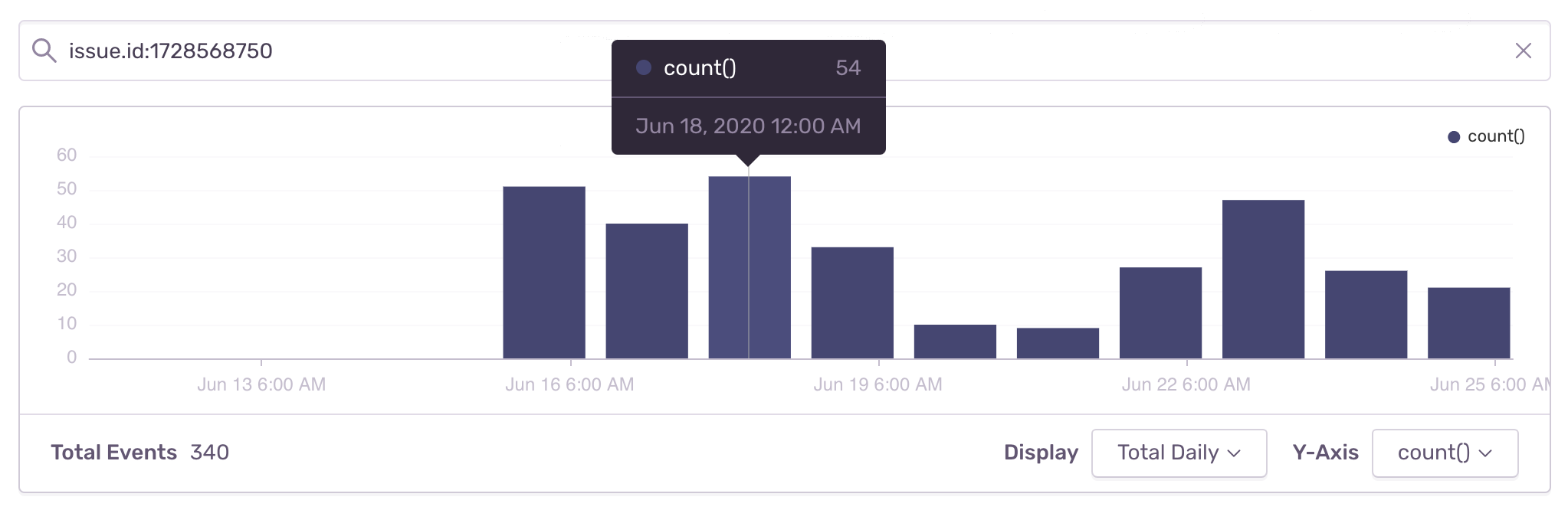
I noticed the crash link @jkmassel posted already has high numbers even for the alpha release 15.1.0.20200615, but I am not sure what happened here and whether we still need to look into it separately or how it relates to the overall crash on startup cases noted on this issue.
https://sentry.io/share/issue/15270b83d17145f7a800b0410f6a4db6/
designsimply
on 26 Jun 2020
To provide an update, after seeing the crash (https://sentry.io/share/issue/15270b83d17145f7a800b0410f6a4db6/)
this PR https://github.com/wordpress-mobile/WordPress-iOS/pull/14335 has reverted the swift migration of the core data stack, which we hope solves the crash.
More details at p1592342943409700-slack-wpmobile
Thanks @jkmassel @designsimply !!
 Gio2018
on 27 Jun 2020
Gio2018
on 27 Jun 2020
Looping back to check in on this issue. I see that the latest comments refer to issue.id:1728568750 in Sentry and that one does look resolve but was just one instance of this type of crash (which was resolved quickly by @Gio2018 🎉 thank you!).
https://sentry.io/share/issue/15270b83d17145f7a800b0410f6a4db6/
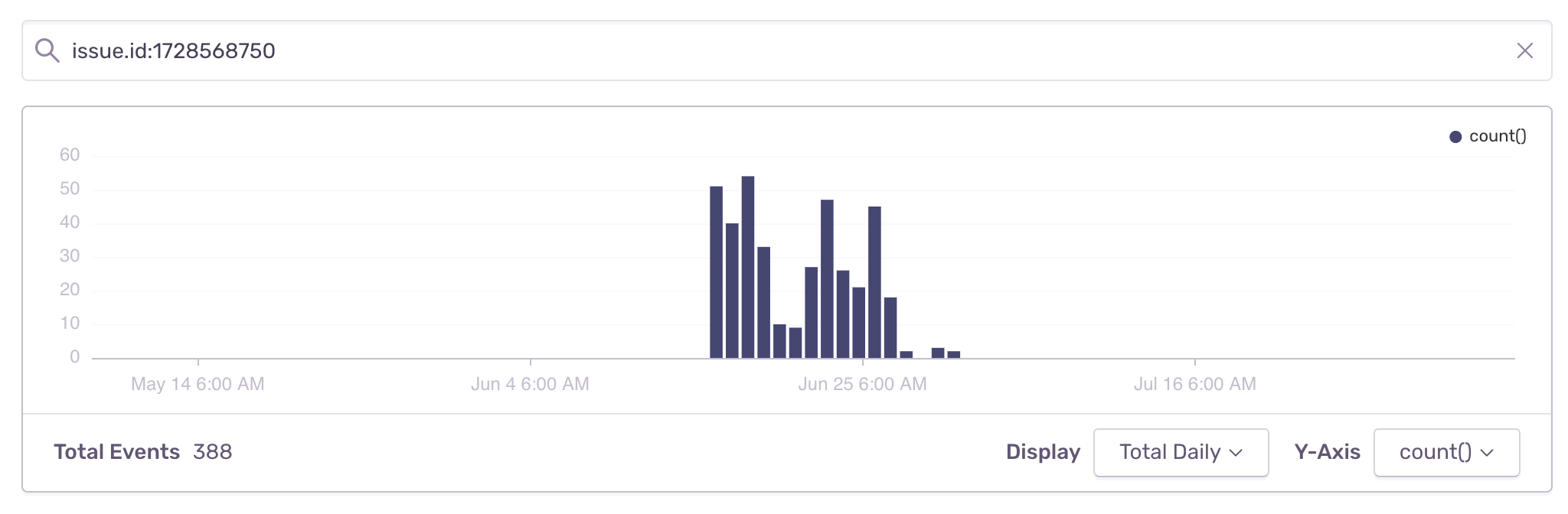
That said, I also haven't seen any new crash on startup reports from users in a while and I will check in with our support team about this as well.
(internal reference: p7cLQ7-131-p2)
designsimply
on 7 Aug 2020
I did a quick analysis of our app store reviews and they were showing a high number of reports of crashing in versions 14.9 and 15.0, but it appears those reports slow or even stop starting with 15.1.
designsimply
on 7 Aug 2020
No new reports of crash on startup are showing up in app reviews. We may be able to close this one as fixed.
designsimply
on 2 Sep 2020
I haven't seen any new cases of this in recent app reviews. I decided to close this issue with an ask to please definitely reported it again in a new issue if it comes up again! Thank you so much.
designsimply
on 30 Sep 2020
Related issues
designsimply
·
3Comments
 mindgraffiti
·
3Comments
mindgraffiti
·
3Comments
 iamthomasbishop
·
3Comments
iamthomasbishop
·
3Comments
 wptester9845
·
3Comments
wptester9845
·
3Comments
 kurzee
·
3Comments
kurzee
·
3Comments
Most helpful comment
I haven't seen any new cases of this in recent app reviews. I decided to close this issue with an ask to please definitely reported it again in a new issue if it comes up again! Thank you so much.