Wordpress-ios: NUX: Add email confirmation prompt for WordPress.com users
Expected behavior
When a WordPress.com user signs up on the web, they are prompted to confirm their email address at the end of the signup flow:

If the user doesn't confirm their email address at that step, they are blocked from publishing new posts and see a notice/reminder in the Calypso editor:


Currently, those same users are blocked from publishing in the WordPress app as well, but the publish button isn't deactivated — their posts just inexplicably become drafts instead of publishing. (They often have to reach out to support for an explanation of what's happening and for help confirming their email address.)
Instead, we should offer a similar notice/reminder within the app to help these users.
Steps to reproduce the behavior
- While logged out of WordPress.com, open https://wordpress.com/start
- Sign up for a new account but don't confirm your email address
- In the app, log in to your new account
- Create a new post and try to publish it
Result: You get the "Published" popup but the post becomes a draft.
Tested on iPhone 6, iOS 10.0.1, WPiOS 6.4.1
 rachelmcr
All 21 comments
I think this must have changed recently. I just signed up from the app, and received a welcome email, but it didn't ask me to confirm my address. I was able to successfully publish a post as well.
 koke
on 9 Feb 2017
koke
on 9 Feb 2017
This isn't an issue if the user signs up from the app. It specifically happens when a user signs up on the web (that flags their email as unverified) and then tries to use the app.
I think this is a critical issue for us right now because we are specifically trying to attract more web users to the apps.
rachelmcr
on 9 Feb 2017
Also, sign in using a magic link should automatically verify the email address.
koke
on 10 Feb 2017
I've started on the backend changes, but I'd love some design input from @mattmiklic, as I'm a bit lost as to what's the right UI for this:

I don't think we want to add a notice in that screen. Perhaps we could alert when the user tries to publish but I'd rather let them know before: publishing a first post can be stressful enough.
On the other hand, I'm not sure what the reasons are to skip email confirmation on mobile signup, but maybe they could also extend here? i.e. when you sign in from the app, the account gets automatically verified.
koke
on 10 Feb 2017
I'll take a look at this on Monday.
 mattmiklic
on 10 Feb 2017
mattmiklic
on 10 Feb 2017
I'm not sure what the reasons are to skip email confirmation on mobile signup, but maybe they could also extend here?
I think it's skipped just because it was never implemented on mobile signup the way it was on the web. In the past, users who signed up on mobile didn't have to immediately confirm their email address, but they did get a confirmation email and had to confirm it within a week after signup. (Ref: p195om-2jt-p2)
At some point that stopped being a requirement, maybe because the email confirmation process changed on the web? I'm not sure why it's no longer required. Email confirmation is valuable for account recovery if a user forgets their password (because it ensures their account has the correct email address and they can receive emails from WordPress.com there), so I'd be more inclined to require it than auto-verify app users.
rachelmcr
on 10 Feb 2017
If the user doesn't confirm their email address at that step, they are blocked from publishing new posts and see a notice/reminder in the Calypso editor
I like the way Calypso handles this, by putting the notice that they need to verify directly adjacent to the Publish action they're looking for. I think showing them this kind of message (and making it dismissable, if they just want to write a draft) has some merit.

- We don't have much room here, so instead of showing a disabled Publish button, how about we just show Save?
- Tapping the notice would open a native version of this UI where they can re-send the email.
Any drawbacks to this approach? I think we could maybe use a native snackbar on Android, but iOS might need something new? Do we have notices like this within the iOS app at all already?
If we think this will work I can provide some visual detail.
mattmiklic
on 13 Feb 2017
Do we have notices like this within the iOS app at all already?
It felt familiar and it took me a while to find it, but we have NoticeAnimator which I think is currently used only for pending email changes:

koke
on 14 Feb 2017
I think we could re-use that. I was thinking the notice should be dismissable with a ✖️button, but if it just scrolled out of the way if the user started editing a field, that'd be fine too. It might be better than making it dismissable, since it's a notice the user needs to see and act on to be able to use the site normally.
mattmiklic
on 14 Feb 2017
I've been thinking about this one, and it adds a lot of complexity as we'd need to add this to several places. Considering our three editors and the differences between posts and pages, we'd have to tweak 5 different View Controllers. All for something that, while a terrible experience, is unlikely to happen. Besides, on the iPhone SE, it looks a bit packed:

So I started to think if there was a different approach.
Since this only happens if you sign up from the web, what if the app didn't let you complete login until the email account was verified (not sure if SMS could be an option as well). That seems much easier to implement, and we could make it less about confirming an email and more like a magic link flow, which would automatically make the account verified.
@rachelmcr @mattmiklic Thoughts on that?
koke
on 7 Mar 2017
we could make it less about confirming an email and more like a magic link flow, which would automatically make the account verified.
That sounds amazing. I'd be concerned about blocking users from logging in, but if it could be a smooth email confirmation + login flow that could be really nice.
rachelmcr
on 7 Mar 2017
Since this only happens if you sign up from the web, what if the app didn't let you complete login until the email account was verified (not sure if SMS could be an option as well).
I like the idea of preventing the user from entering states where they can't do core actions like publishing, so this feels like a better approach. I'm making a note to keep this flow in mind as we work on login.
mattmiklic
on 14 Mar 2017
Frequently have confused users who try to publish and end up with posts in drafts due to needing to verify their account's email address (but they don't realize it).
Most recently, internal ref: #209378-h
 sarahblackstock
on 3 Aug 2017
sarahblackstock
on 3 Aug 2017
Another one. She did not receive any indication within the app about verifying, so tried to publish, but kept getting stuck in drafts.
internal ref: #211887-h
sarahblackstock
on 8 Aug 2017
+1
internal ref: #212750-h
sarahblackstock
on 10 Aug 2017
Since this only happens if you sign up from the web, what if the app didn't let you complete login until the email account was verified (not sure if SMS could be an option as well).
I'm a bit worried about blocking the login entirely. Would maybe be sensible to find a middle ground there in terms of granularity?
Something like:

I went for a modal instead of a full page so we can have a single component that can be triggered and blocks the full page in multiple instances.
If for example the user can access a page, but can't do a specific action, it just adds a button:
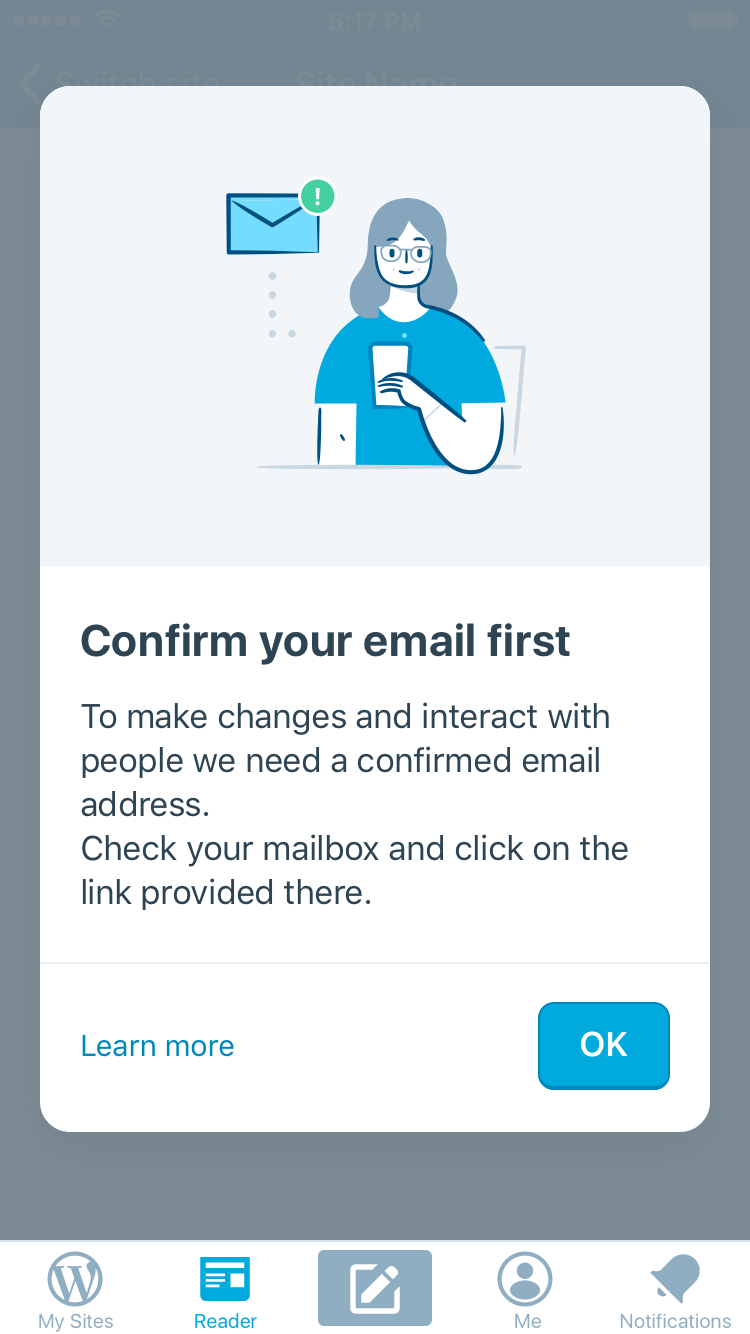
The rationale of this approach is:
- Just one single UI for the same action
- Uses our standard dialog design
- Can block either a full section (without "OK") or just a single action on the page ("Ok" button)
- Provides a link to learn more help
- Has more space for instructions
Reading through this thread, here's what I'd block:
- The whole My Sites section to start with — we can fine-tune later
- Reader is accessible, but blocks Likes (has "Ok" visible)
- Me is accessible
- Notifications are accessible
Would this work and simplify things enough?
we could make it less about confirming an email and more like a magic link flow, which would automatically make the account verified.
As an aside, I think a Magic Link _should_ validate the email too if it's not validated — regardless of how we proceed in this issue.
 folletto
on 14 Aug 2017
folletto
on 14 Aug 2017
This is still an ongoing issue, and often I notice if we don't catch it in support quickly, the person with this issue tends to get pretty frustrated and give up, thinking the app is broken. Would be great to a see a solution here!
most recent case, internal ref: #224252-h
sarahblackstock
on 20 Sep 2017
Dutch user unable to publish for a few days due to not realizing they still needed to verify their email address in a web browser.
internal ref: #226589-h
sarahblackstock
on 25 Sep 2017
Another confused user unable to publish their first post.
internal ref: #226180-h
sarahblackstock
on 26 Sep 2017
+1
internal ref: #226901-h
sarahblackstock
on 29 Sep 2017
Excited new blogger can't publish or tell why.
I chose your website to start it because I love this site. My only problem is that it won't let me publish my blogs. It is saved in my drafts but when I press "publish" it doesn't publish.
internal ref: #227250-h
sarahblackstock
on 29 Sep 2017
Related issues
 ScoutHarris
·
3Comments
ScoutHarris
·
3Comments
 designsimply
·
3Comments
designsimply
·
3Comments
 wptester9845
·
3Comments
designsimply
·
3Comments
wptester9845
·
3Comments
designsimply
·
3Comments
 hypest
·
3Comments
hypest
·
3Comments