Wordpress-ios: Stats: Stats use the wrong timezone (adding together the device and site timezone offset from UTC)
Expected behavior
Per https://github.com/wordpress-mobile/WordPress-iOS/issues/12018 I expect the stats in the app to use the site's timezone.
Actual behavior
The stats are using the UTC offset from the site's timezone AND the device timezone. For example:
- A site set to UTC-4 with a device in UTC-4 is showing UTC-8 in stats.
- A site set to UTC-10 with a device in UTC+1 is showing UTC-9 in stats.
A user reported seeing this when their stats showed the wrong day. The site is set to UTC-4, and the device is in UTC-4, but the stats didn't update to the next day until 4:00 AM (which matches a UTC-8 timezone).
Steps to reproduce the behavior
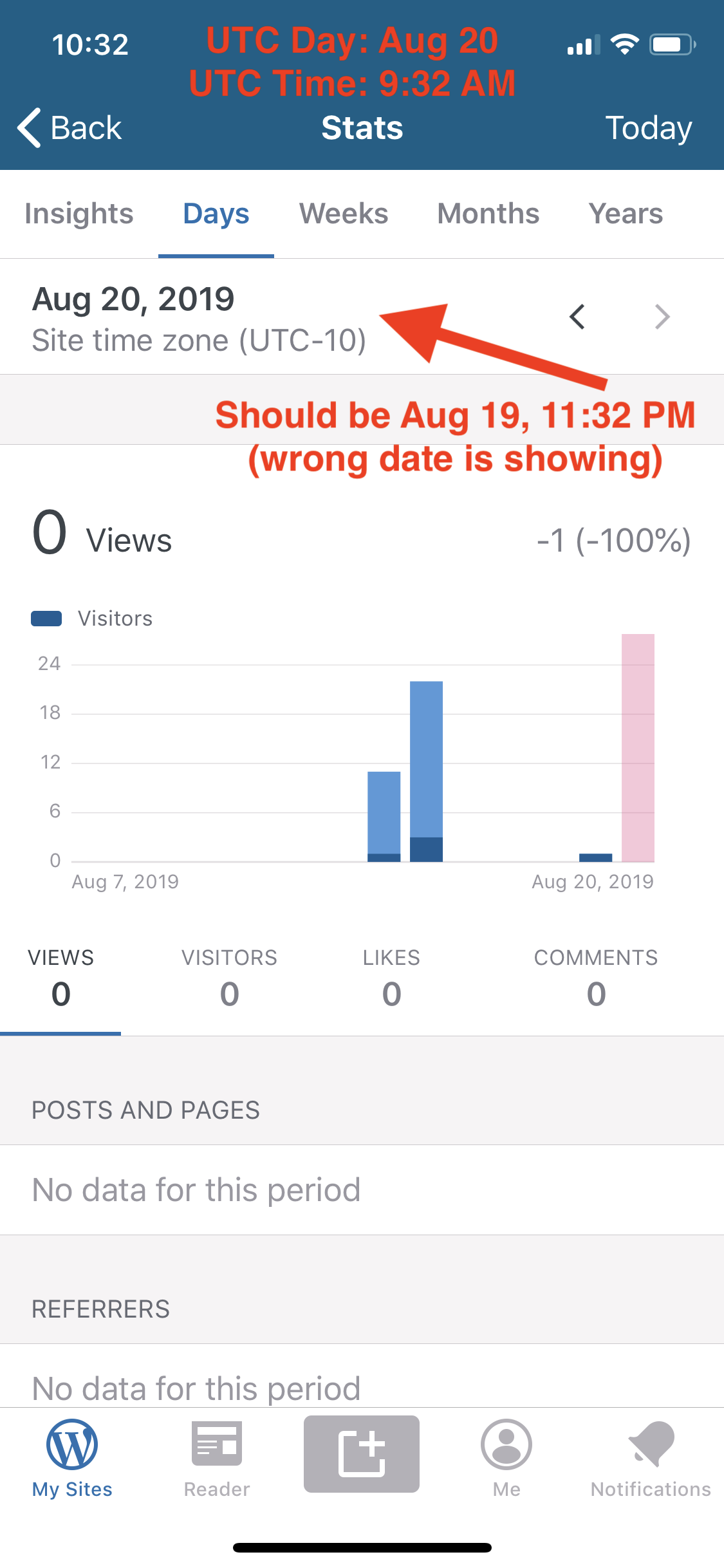
- Set your site timezone to a timezone other than UTC. Choose a timezone that, if you add your device timezone to it, the date will be different. (For example, I selected UTC-10 because the current time there was 11:15PM. But when I add my timezone UTC+1 the time/date change to the next day at 12:15AM.)
- Check your stats in the app. Note that it shows the wrong date for your site timezone setting.
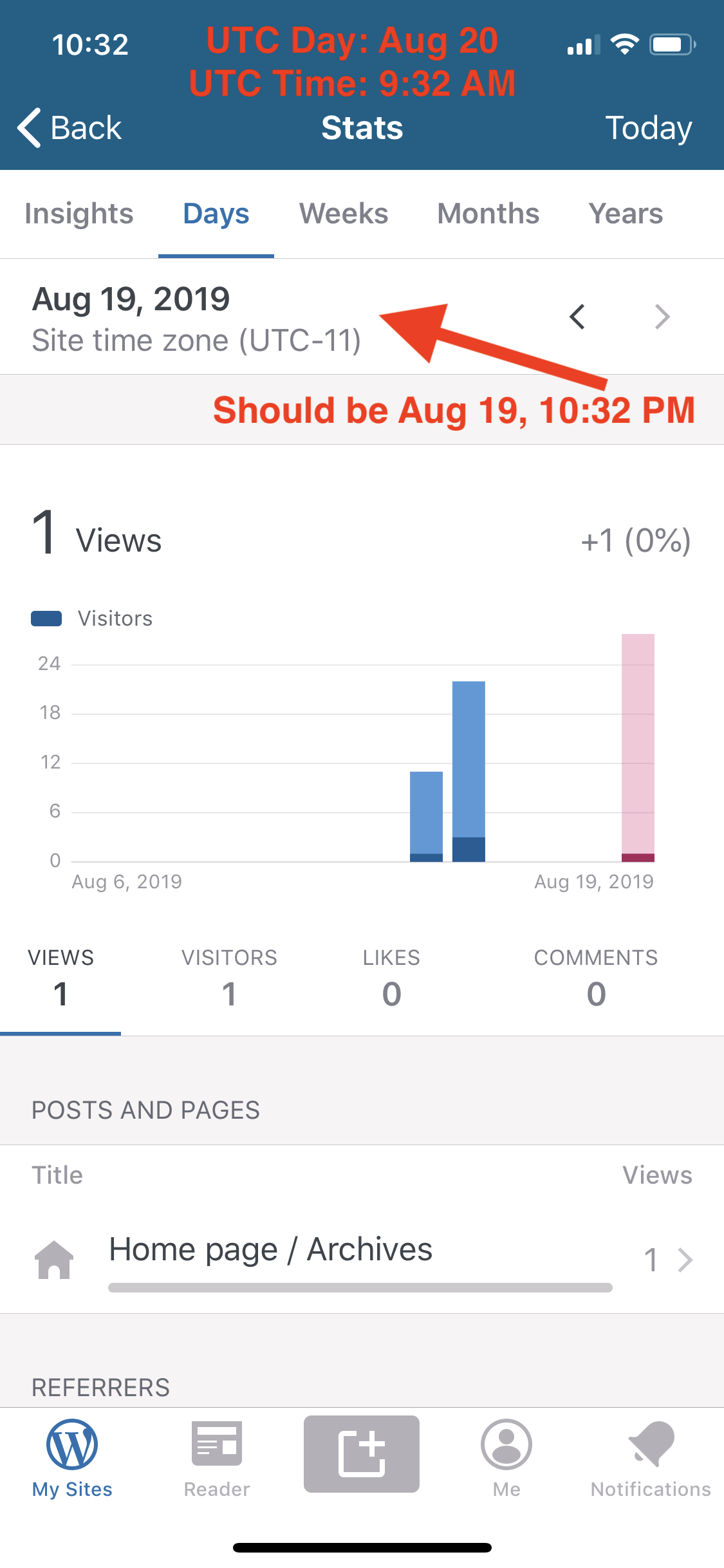
- Change the site timezone setting to adjust for your device timezone. (I set it back one hour to UTC-11, because I am in UTC+1.)
- Check your stats in the app again. Note that it now shows the right date for your site timezone setting.
Screenshots
Site timezone UTC-10, Device timezone UTC+1 (wrong date showing):
Site timezone UTC-11, Device timezone UTC+1 (right date showing):
Tested on [iPhone XS], iOS [12.4], WPiOS [13.1.0.20190814]
User report (internal ref): 2282987-zen
 rachelmcr
All 18 comments
cc @ScoutHarris
rachelmcr
on 20 Aug 2019
We have another user report (internal ref: 2292216-zen) of what looks like the same problem. In this case, the user is in Australia with the site set to Sydney time (UTC+10) and in the afternoon the stats start showing the following day.
rachelmcr
on 22 Aug 2019
Thanks for this report @rachelmcr. We'll try and look at this as soon as we can – probably next week.
 frosty
on 22 Aug 2019
frosty
on 22 Aug 2019
User report on iPad as well as iPhone app after upgrade to version 13 (internal ref #14474802-hc)
Another user report where they see UTC (day before) while their site is set to New York (#2290233-zen)
 nagpai
on 23 Aug 2019
nagpai
on 23 Aug 2019
Another report in #2298544-zen. Site and phone are both set to UTC+2, and the stats show the next day (0 visitors, 0 views) late in the evening.
 thehenrybyrd
on 25 Aug 2019
thehenrybyrd
on 25 Aug 2019
@thehenrybyrd this should be fixed in 13.1 with https://github.com/wordpress-mobile/WordPress-iOS/pull/12363.
 ScoutHarris
on 25 Aug 2019
ScoutHarris
on 25 Aug 2019
@ScoutHarris user still reports issue after updating to 13.1 in 2298544-zen
Hi, after yesterday's update (v. 13.1) I've been waiting until 10 PM to see if the problem with statistics/date still persists. Unfortunately, no matter if the websites are set at UTC+2 or choosing the city, like Zagreb, app switches stats at 10 PM
 rfaile313
on 28 Aug 2019
rfaile313
on 28 Aug 2019
Ping @danielebogo
ScoutHarris
on 28 Aug 2019
also reported in 2302754-zen
 melindahelt
on 28 Aug 2019
melindahelt
on 28 Aug 2019
Thanks everyone! I'm trying to fix it as soon as possible!
 danielebogo
on 28 Aug 2019
danielebogo
on 28 Aug 2019
Another report in 2303966-zen
rfaile313
on 29 Aug 2019
Report in 2307756-zen
rfaile313
on 29 Aug 2019
also reported in 2314174-zen
melindahelt
on 3 Sep 2019
This should be fixed as of version 13.1.1. @melindahelt if you get word that updating to 13.1.1 doesn't resolve it for that report, please let us know!
rachelmcr
on 4 Sep 2019
@rachelmcr I have a report in 2327764-zen that updating to 13.1.1 did not solve the issue.
But I’ve updated the app to version 13.1.1 and timezone is still not in synch. Then I uninstalled and reinstalled the app just now but same result.
Local time and site’s time both at +8 UTC but I’m seeing next day stats already.
Any suggestions?
melindahelt
on 6 Sep 2019
Thanks @melindahelt! I tested with my device set to Manila time and my site set to Manila time (both UTC+8) and couldn't reproduce the issue, even though it's the right time of day for the issue to be reproduced in that time zone.
Here's what I tested:
- iPhone XS (iOS 13.1 beta) with WPiOS 13.2 (the latest version now in the app store)
- iPhone XS simulator (iOS 13 beta) with
developbranch - iPhone SE simulator (iOS 12.4) — same device/OS as the user — with
developbranch
In each case, the stats showed the correct day (not the next day's stats).
Could you gather as much detail as possible from this user about their site and device setup? That includes:
- The exact timezone selected in the site's settings
- The exact date/time setting selected on the device
- The latest app logs
It's possible there's another factor that can cause the issue to still appear, but without more details about the site/device setup it's hard to say what might cause it.
rachelmcr
on 9 Sep 2019
@melindahelt Actually, you can hold off on that additional investigation — there were some issues with the 13.1.1 and 13.2 releases, so the complete fix for this issue will be in the next release. Please ask the user to stay tuned and we should have this sorted out in the next update in the app store.
rachelmcr
on 9 Sep 2019
adding 2334102-zen that is running 13.2 and reporting the same issue. Going to have them hold off for the next update!
melindahelt
on 9 Sep 2019
Related issues
 wptester9845
·
3Comments
wptester9845
·
3Comments
 jleandroperez
·
3Comments
jleandroperez
·
3Comments
 marekhrabe
·
3Comments
wptester9845
·
3Comments
marekhrabe
·
3Comments
wptester9845
·
3Comments
 designsimply
·
3Comments
designsimply
·
3Comments
Most helpful comment
@thehenrybyrd this should be fixed in 13.1 with https://github.com/wordpress-mobile/WordPress-iOS/pull/12363.