Wordpress-ios: Jetpack Themes: Can't activate a WordPress.com theme
Expected behavior
In the Themes section on a Jetpack site, I expect to be able to activate a new theme.
Actual behavior
On any Jetpack site (including Atomic sites), I can only activate themes that are already uploaded to my site, listed in the "Uploaded Themes" section. If I scroll down to the "WordPress.com Themes" section and try to activate one of those themes, I get an error:
Activation Error
The specific theme was not found.
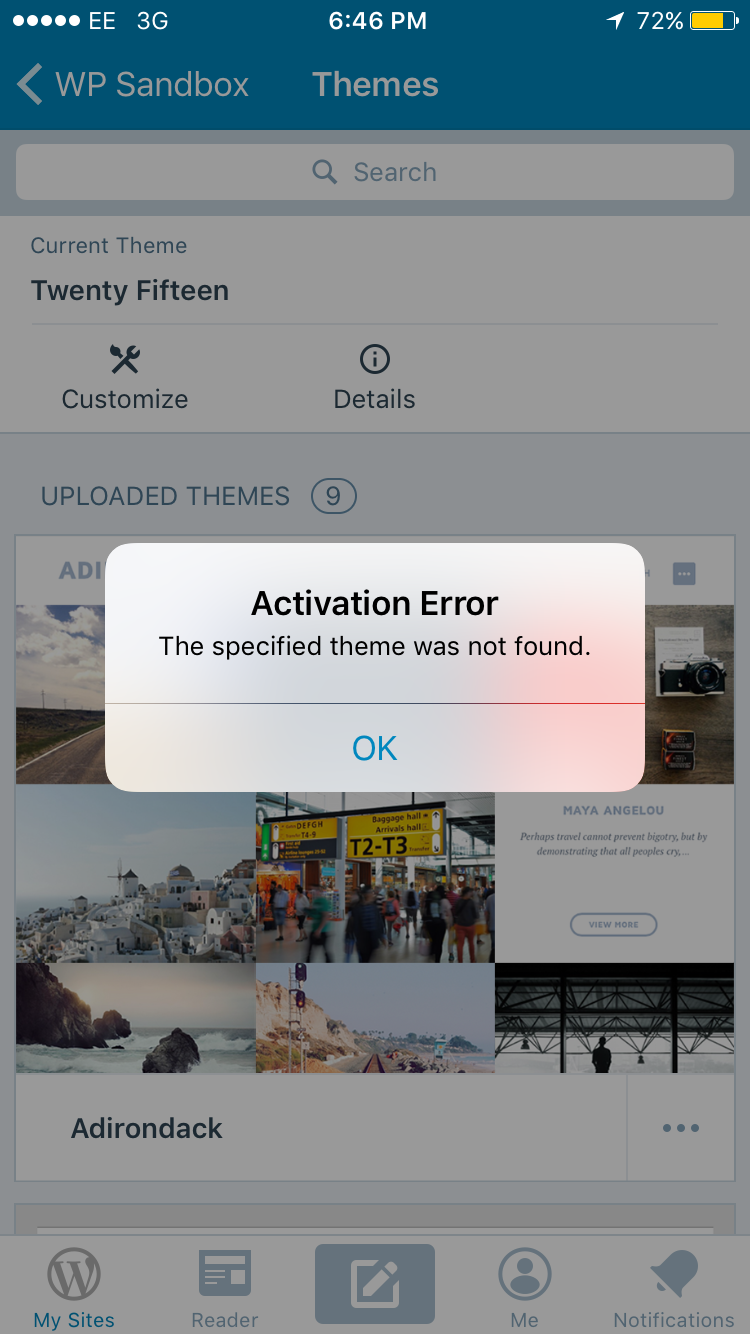
Steps to reproduce the behavior
- In My Sites, select a Jetpack site.
- Open the Themes section.
- Scroll down to the "WordPress.com Themes" section.
- Tap the ... menu for a WordPress.com theme and select "Activate."
Result: You get an activation error and the theme is not activated.
Tested on iPhone 6, iOS 10.3.3, WPiOS 8.4.0.20170828
 rachelmcr
All 21 comments
@rachelmcr This is extremely strange since we tested this scenario thoughtfully. Activating a theme requires to first upload it to your site, and I can see you were on a 3G connection. Can you check this again on Wi-Fi? Thanks
 elibud
on 30 Aug 2017
elibud
on 30 Aug 2017
My screenshot was from testing on 3G, but I tested again on WiFi and reproduced the issue before reporting it. I checked my app logs to see if they contain more clues but I don't see anything there besides the error was displayed on-screen:
2017/08/30 13:34:57:816 Error activating theme Optional("independent-publisher-2"): Optional("The specified theme was not found.")
I then tested with the same WordPress.com theme and the same Jetpack site at https://wordpress.com/themes in a web browser and confirmed that I could successfully activate the theme from there, so this seems to be app specific.
Is there anything else I could check for you?
rachelmcr
on 30 Aug 2017
Can you check several different themes and let me know if none of them work? I just tested on my sandbox and it worked correctly.
elibud
on 30 Aug 2017
@rachelmcr I think your site is possessed by the devil ;)
I just invited you to my sandbox and I've uninstalled all themes var the current one there. When you have a few minutes please try to activate a couple of themes on that one. Thanks a lot.
elibud
on 6 Sep 2017
Unfortunately I run into the same error trying to activate various themes on your sandbox (as well as other tests sites I have). I also tested from a second device (iPad Mini) with the same results.
rachelmcr
on 6 Sep 2017
Thanks @rachelmcr I'll keep digging.
elibud
on 6 Sep 2017
Tested on my iPad Air 2 with two different accounts and sites (on different hosts as well) and had the same result as @rachelmcr, The specified theme was not found
WP iOS v8.4.0.20170905
 hoverduck
on 7 Sep 2017
hoverduck
on 7 Sep 2017
Got it!
The feature only works if you have SSO enabled. If this isn't checked, you get the error:
Spoke too soon....it worked _one time_, but then I started getting the error again after toggling that setting back and forth, and now I can't get the theme to go through anymore.
hoverduck
on 7 Sep 2017
Thanks @hoverduck, this is becoming really mysterious.
@frosty since you were the reviewer of the PR, can you check that you can activate a WordPress.com theme that you have not previously installed on your site? I want to see if we can find a pattern between who is this working for and who it isn't.
elibud
on 7 Sep 2017
A different side of the same problem, if I choose "Try & Customize" for a wpcom theme I'm then prompted to login via the web. Once I log in I get the error The theme directory "apostrophe-2-wpcom" does not exist (for the given theme name)
hoverduck
on 7 Sep 2017
That's a different issue @hoverduck https://github.com/wordpress-mobile/WordPress-iOS/issues/7794 I'll fix it.
elibud
on 7 Sep 2017
Updating here too, it's the same issue, the theme fails to install so we can't try it on the Jetpack site.
elibud
on 7 Sep 2017
@elibud fwiw, I just tested activating a number of different themes (that weren't already installed) on my Jetpack site, and they all worked just fine.
 frosty
on 8 Sep 2017
frosty
on 8 Sep 2017
Thanks @frosty I thought I was going crazy.
elibud
on 8 Sep 2017
@rachelmcr @hoverduck I've just invited you to a test site, when you have some time please let me know if you can activate themes there. There are no themes currently installed. Thanks
elibud
on 8 Sep 2017
I accepted the invitation and tried activating several themes on that site (Karuna, Cubic, Sela) and got the same error each time. Each time I went to My Sites > Themes in the app, tapped the ellipsis icon on a theme, and selected "Activate" from the menu.
I then tried the following steps:
- I selected "Try & Customize" instead of "Activate" and was sent to a login screen for the test site.
- I selected a different (WordPress.com) site and selected "Try & Customize" for a theme to make sure I was authenticated there. (I was.)
- I went back to Themes on the test site and tried "Try & Customize" again, but was again presented with the site's login screen.
- I selected "Details" for a theme and confirmed that I got a logged-in view of the theme details page.
- I selected "Activate" in the top right corner of the theme details screen and got the same error.
- I opened the theme details again and selected the "Activate this design" button (in the webview) and it worked.
This is consistent with my previous experience, where I can activate themes from the web (it worked in the webview in the app) but I can't activate themes using the app's native features.
Note that I never logged in when I was presented with the login form for the test site. ~I wonder if it would work if I authenticated there.~ I tried authenticating on a different site with the same results already reported above.
rachelmcr
on 8 Sep 2017
Ok here we go again, I've created a branch with specific logging for this issue and I've made a tiny change that I doubt will have any effect, here's the branch: https://github.com/wordpress-mobile/WordPress-iOS/pull/7804
What I need from you angels @rachelmcr and @hoverduck is that you install the build from that branch and try to activate themes once again. When it fails please send me the application logs through Helpshift and ping me. Of course, no hurries.
Thanks a million for all your help on this, unfortunately I can't do anything else than to bug you two since I can't replicate on my side and neither can @frosty
elibud
on 8 Sep 2017
The error we are getting from the backend is a 403, we will have to investigate more along with the Jetpack team.
elibud
on 18 Sep 2017
@rachelmcr @hoverduck: a fix has been deployed for this one, can you please try again and let us know how it goes?
Thanks a million
elibud
on 22 Sep 2017
Woohoo! I tried again and confirmed that both "Activate" and "Try & Customize" work as expected now. Thanks for digging in to this one. :)
rachelmcr
on 22 Sep 2017
oh my goodness!!!!!!!!! thanks a lot, I'm going to re-enable it in prod builds :)
@oskosk did all the heavy lifting on this one, thanks again Oscar!
elibud
on 22 Sep 2017
Related issues
 mindgraffiti
·
3Comments
mindgraffiti
·
3Comments
 designsimply
·
3Comments
designsimply
·
3Comments
 rclations
·
3Comments
designsimply
·
3Comments
rclations
·
3Comments
designsimply
·
3Comments
 marekhrabe
·
3Comments
marekhrabe
·
3Comments